How to Solve Error: $GOPATH/go.mod exists but should not
Solution:
After the module support is turned on, it cannot coexist with GOPATH, so just remove the project from GOPATH
How to Solve Error: $GOPATH/go.mod exists but should not
Solution:
After the module support is turned on, it cannot coexist with GOPATH, so just remove the project from GOPATH
Problem description: According to the installation steps of the official laravel-admin document, execute: php artisan admin:install An error was reported during installation.
In fact, the problem of creating special characters in the database is too long. Laravel 5.4 changed the default database character set. Now utf8mb4 includes support for storing emojis. If you are running MySQL v5.7.7 or higher, you don’t need to do anything.
When you try to run the migrations command on some MariaDB or some older versions of MySQL, you may encounter the following error:
D:\wwwroot\www.test.com>php artisan admin:install
Migration table created successfully.

In Connection.php line 664:

  SQLSTATE[42000]: Syntax error or access violation: 1071 Specified key was too long; max key length is 1000 bytes (S
  QL: alter table `users` add unique `users_email_unique`(`email`))


In Connection.php line 458:

  SQLSTATE[42000]: Syntax error or access violation: 1071 Specified key was too long; max key length is 1000 bytes
The solution is to add default values in app\Providers\AppServiceProvider.php, and you need to delete the database migrations and users tables. Re-execute: php artisan admin:install
<?php

namespace App\Providers;

use Illuminate\Support\ServiceProvider;
use Illuminate\Support\Facades\Schema; //add fixed sql

class AppServiceProvider extends ServiceProvider
{
    /* *
     * Bootstrap any application services.
     *
     * @return void
     */
    public function boot()
    {
        Schema::defaultStringLength(191); //add fixed sql
    }

    /* *
     * Register any application services.
     *
     * @return void
     */
    public function register()
    {
        //
     }
}
1. Problem: I just installed centos7 at the minimum and want to check the local IP address. Then run ifconfig, and an error popped up as a result.
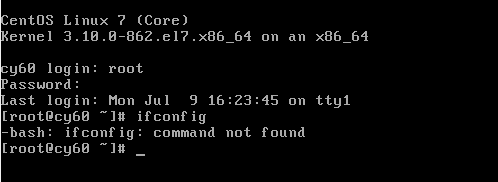
2. Troubleshooting: First of all, we understand whether it is caused by not turning on the network card? We can check through the following 3 methods;
1) Ping Baidu to find out whether the network card is enabled
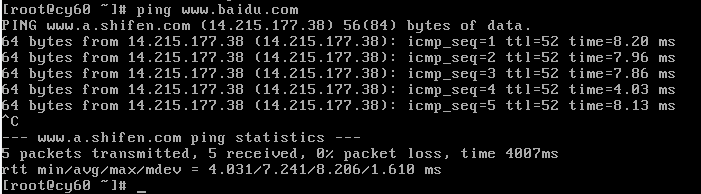
2) Confirm whether the network card is enabled by entering ip addr to check whether the IP address can be obtained
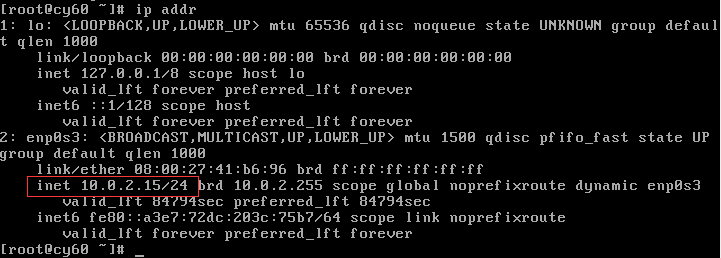
3) Through cat /etc/sysconfig/network-scripts/ifcfg-enp0s3 (ifcfg-enp0s3 is the name of the network card, different machines are different.) Whether NBOOT is turned on (meaning whether the network card is turned on).
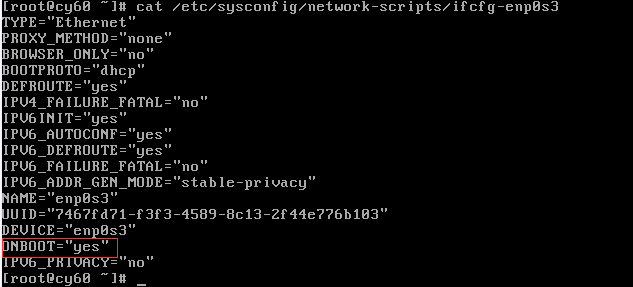
3. Conclusion of troubleshooting
1) If it can be pinged, it means that the network card is enabled and can obtain an IP address to access the Internet. (If not, you can use vi /etc/sysconfig/network-scripts/ifcfg-enp0s3 to change ONBOOT to yes. Change BOOTPROTO to dhcp, or to obtain the IP address manually, see Centos7 network configuration for details) Note: After modification Need to restart the network card (command: service network restart)
2) The obtained IP address can be checked through ip addr, which proves that the network card is enabled. If you can’t get it, please modify the network configuration file. Note: You need to restart the network card after modification (command: service network restart)
3) Check whether the network card is enabled through cat /etc/sysconfig/network-scripts/ifcfg-enp0s3, if not, use vi /etc/sysconfig/network-scripts/ifcfg-enp0s3 to modify the network configuration file.
Summary: At this time, it can be determined that ifconfig related tools are not installed.
4. Use yum provides ifconfig to check which package to improve ifconfig, and install it.
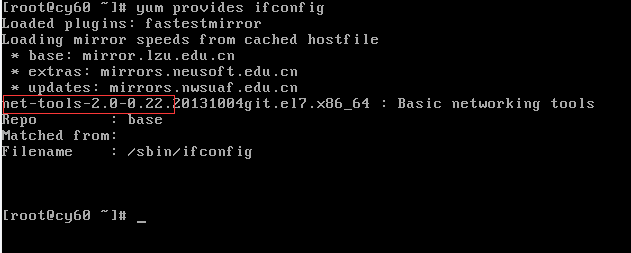
Then execute yum install net-tools

Then enter: ifconfig command to test
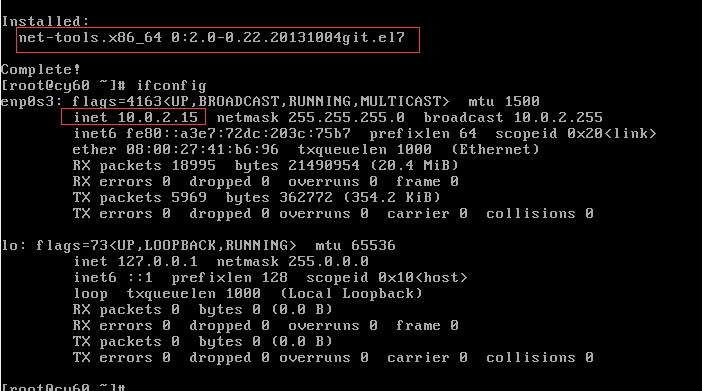
The version of the net-tools package can be displayed here, and the information related to the IP address can be viewed.
Use the command
lsof -i:port number
Then see the process number, just kill the process directly
kill -9 Process number

Use Laradock to build a PHP development environment based on Docker in Windows system to
execute commandsdocker-compose up nginx mysql redis
Errors occur during execution
newspaper laradock ERROR: Service ‘workspace’ failed to build:
reporteddocker ERROR: Service 'php-fpm' failed to build:
Solution: .envthe WORKSPACE_TIMEZONE=UTCchange WORKSPACE_TIMEZONE=PRC.
In C:\Windows\System32\drivers\etcthe Add
199.232.28.133 raw.githubusercontent.com
Then you need to try a few more times, and the network may have problems.
Laradock is a complete PHP local development environment provided by Docker
Error when connecting to MySQL in the framework
SQLSTATE[HY000] [2002] Connection refused
The main reason is that there is not enough understanding of the isolation mechanism of Docker containers. Each container is isolated. If there are interdependent services, it is necessary to perform display associations, such as using options
--link.
In the same way,docker-composewhen using , the association between containers is similar to the following method:
# docker-compose.xml basic
version: '2'
services:

	...

    php:
        build: ./php

        ...

        links:
            - "mysql"

    mysql:
        build: ./mysql
        ports:
            - "3306:3306"
        environment:
            MYSQL_PASSWORD: root
Note that the key point is here: the code to test the connection to MySQL is actually running in the container corresponding to PHP, and the MySQL service is in its own container. When our host fills in 127.0.0.1, it actually corresponds to the PHP container. Inside, so it is impossible to find the corresponding service, which causes the above connection refused error.
So, how do you connect?
In fact, after the containers are associated, they can be connected by the container name.
In the above docker-compose.xmldocument, the container corresponds to the service name MySQL mysql, PHP container name is associated with it mysql, so the 127.0.0.1change mysqland then connect to.
# thinkphp project modify database.php file
'hostname'        => 'mysql',

# Laravel project modify .env file
DB_HOST=mysql# mysql -uroot -p
> use mysql;
> select host, user, authentication_string, plugin from user;
> GRANT ALL ON *.* TO 'root'@'%';
> flush privileges;
> ALTER USER 'root'@'%' IDENTIFIED WITH mysql_native_password BY '123456';
> FLUSH PRIVILEGES;
> exit;
# service mysql restartWorkerman[start.php] start in DEBUG mode
stream_socket_server() has been disabled for security reasons in file /home/wwwroot/laykefu/vendor/workerman/workerman/Worker.php on line 2214
PHP Fatal error: Uncaught Exception in /home/wwwroot/laykefu/vendor/workerman/workerman/Worker.php:2216
Stack trace:
#0 /home/wwwroot/laykefu/vendor/workerman/workerman/Worker.php(646): Workerman\Worker->listen()
#1 /home/wwwroot/laykefu/vendor/workerman/workerman/Worker.php(504): Workerman\Worker::initWorkers()
#2 /home/wwwroot/laykefu/vendor/workerman/Config/start.php(37): Workerman\Worker::runAll()
#3 {main}
thrown in /home/wwwroot/laykefu/vendor/workerman/workerman/Worker.php on line 2216
Fatal error: Uncaught Exception in /home/wwwroot/laykefu/vendor/workerman/workerman/Worker.php:2216
Stack trace:
#0 /home/wwwroot/laykefu/vendor/workerman/workerman/Worker.php(646): Workerman\Worker->listen()
#1 /home/wwwroot/laykefu/vendor/workerman/workerman/Worker.php(504): Workerman\Worker::initWorkers()
#2 /home/wwwroot/laykefu/vendor/workerman/Config/start.php(37): Workerman\Worker::runAll()
#3 {main}
thrown in /home/wwwroot/laykefu/vendor/workerman/workerman/Worker.php on line 2216
The reason is: PHP the stream_socket_erver()function is disabled
Find the php.inifile and find disable_functionswhether stream_socket_server()this function is disabled in this item
find / -name php.ini # Find the location of php.ini
vim /usr/local/php/etc/php.ini # open edit php.ini
Press esc key, enter :/stream_socket_server, press nstart search
Check the function is not in disable_functionsthis one there, this one is meant Prohibited Method
If there is this function, delete it, press the esc key, enter to wqsave and exit
Restart php-fpm
service php-fpm restartThis is because the current database version is higher and some parameters need to be changed
Solution:
In the sql file
utf8mb4_0900_ai_ciReplace utf8_general_ci
utf8mb4withutf8
Run the SQL file again
The default value incompatibility problem caused by mysql5.7 version, the same problem may also occur in mysql8.0.
The problematic values are:
NO_ZERO_IN_DATE
In strict mode, the date and month are not allowed to be zero.
NO_ZERO_DATE
Set this value, mysql database does not allow the insertion of a zero date, and inserting a zero date will throw an error instead of a warning.
ONLY_FULL_GROUP_BY
For the GROUP BY aggregation operation, if the column in the SELECT does not appear in the GROUP BY, then this SQL is illegal because the column is not in the GROUP BY clause.
Execute select @@sql_mode, copy the value of the query and delete NO_ZERO_DATE, and then execute set sql_mode = ‘modify number’.
This method only works in the current session
Execute select @@global.sql_mode, copy the value of the query and delete NO_ZERO_DATE, and then execute set global sql_mode = ‘modify number’.
This method takes effect in the current service, and it becomes invalid after restarting the MySQL service
In the mysql installation directory, open the my.ini or my.cnf file. Under wamp, SQL_MODE is not set in MySQL 5.7.
1. Found in my.ini file [mysqld]
2. If there is no SQL_MODE, add it, and modify it if it has
sql_mode="STRICT_TRANS_TABLES,NO_ENGINE_SUBSTITUTION"
or
sql_mode=ONLY_FULL_GROUP_BY,STRICT_TRANS_TABLES,ERROR_FOR_DIVISION_BY_ZERO,NO_AUTO_CREATE_USER,NO_ENGINE_SUBSTITUTION
Finally restart MySQL
service mysqld restartUse docker to build the lnmp environment, and use a sub-container construction scheme. The
framework uses thinkphp and wants to connect to the data MySQL. It always shows “SQLSTATE[HY000] [2002] Connection refused”. The
database configuration host is filled with localhost, and then changed to 127.0 .0.1, I can’t connect.
I thought it was a database user permission problem. I created a new user and refreshed the permissions. The result was still not working for
a long time. It turned out to be a problem of sub-containers. If you connect to 127.0.0.1 or localhost in the container, you must not be able to connect to the database MySQL. You
should fill in the database configuration host with the name of the MySQL container. My local MySQL container name is MySQL, so you can connect to it.
nginx startup error
nginx: [error] open() "/usr/local/nginx/nginx.pid" failed (2: No such file or directory)
Solution: Find the folder directory of your nginx.conf, and then run this
nginx -c /usr/local/etc/nginx/nginx.conf
Run again
nginx -s reload
That’s it