After entering the last line, you should make sure that it is in the first column, and the new line can’t have empty characters such as spaces, so as not to give this warning
keil needs the last two lines to be empty and cannot have characters such as spaces.
Author Archives: Robins
TensorFlow error: AttributeError: module ‘tensorflow_core._api.v2.train’ has no attribute ‘Optimizer‘
Tensorflow error:
AttributeError: module ‘tensorflow_core._api.v2.train’ has no attribute 'Optimizer‘
The solution:
tf.train.Optimizer
Change to:
tf.compat.v1.train.Optimizer
success
[Two Methods] Ora-00904: invalid group by error identifier
I believe many students encounter the problem of invalid prompt identifier when using group by. Don’t worry, let’s summarize the common solutions to this problem:
Example: take the information of the youngest employee in each department
my SQL statement is as follows:
select name,min(age),(select deptname from dept d where d.deptid=uif.deptid)deptname from userinfo uif group by name,deptname
When you click execute, the system prompts:
ORA-00904:"deptname":Identifier is invalid
Error reason: the field after group by cannot be an alias (if you want to use an alias, you need to nest it at one level)
Solution 1:
--goup by The department name (alias: deptname ) is directly used in the deptid field of the employee information table
select name,min(age),(select deptname from dept d where d.deptid=uif.deptid)deptname from userinfo uif group by uif.name,uif.deptid
Solution 2:
--Grouping after one level of nesting
select us.name,min(us.age),us.deptname from (select name,age,(select deptname from dept d where d.deptid=uif.deptid)deptname from userinfo uif)us
group by us.name,us.deptname
How about this time?If you have any questions, please leave a message to study together~
[Solved] Login with Ubuntu graphical interface, error sorry, that didn’t work.please try again
Sorry, that didn’t work.please try again
Today, I just finished installing Ubuntu 20.04. After setting the root password, I found that the root login would report such an error:
sorry, that didn’t work.please try again
In fact, there is no problem with the command line login, which indicates that it is not the password, but the desktop environment.
vi /etc/pam.d/gdm-autologin
#Note "auth requied pam_succeed_if.so user != root quiet success"

vi /etc/pam.d/gdm-password
#Note "auth requied pam_succeed_if.so user != root quiet success"
[Solved] Caused by: java.lang.ClassNotFoundException: org.apache.flink.api.common.typeinfo.TypeInformation
Exception in thread “main” java.lang.NoClassDefFoundError: org/apache/flink/api/common/typeinfo/TypeInformation
at io.github.interestinglab.waterdrop.flink.test.RedisSinkTest.main(RedisSinkTest.scala)
Caused by: java.lang.ClassNotFoundException: org.apache.flink.api.common.typeinfo.TypeInformation
Check Provided if there are no errors in the code

SyntaxError: Non-UTF-8 code starting with ‘\xe4‘ in file [How to Solve Chinese encoding problem]
Python 3 uses UTF-8 format by default
Generally, you don’t need to add a word at the beginning– coding:utf-8 —
However, in some Chinese, there will still be unrecognizable cases, and the error of “non-utf-8 code starting with” \ \ xe7 “will be thrown. At this time, you need to add this sentence in the first line.
#-*- coding:utf-8 -*-
MySQL: How to Turn on Functions
I want to customize the function today, but the mysql console reports an error
This function has none of DETERMINISTIC, NO SQL, or READS SQL DATA in its declaration and binary logging is enabled (you might want to use the less safe log_bin_trust_function_creators variable)
It means I don’t have the function function enabled
show variables like '%func%';
Here I have turned on the function function as on
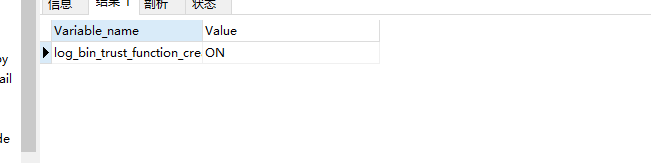
setting parameters to turn on the function function
set global log_bin_trust_function_creators=1;
Ubuntu ODBC MySQL 8 OPTION NOT Work [How to Solve]
Error due to FreeSWITCH using ODBC requirements
If you are using mysql, make sure you are using MYODBC 3.51.18 or higher and enable FLAG_MULTI_STATEMENTS
If you are using mysql, make sure you are using MYODBC 3.51.18 or higher and enable FLAG_MULTI_STATEMENTS
# vim /etc/odbc.ini
[freeswitch]
Driver = MySQL
SERVER = localhost
PORT = 3306
DATABASE = myDatabase
OPTION = 67108864
Note: option = 67108864 Start SQL batch, freeswitch ODBC mode must be on
ODBC does not configure SQL preprocessing, resulting in an error when executing multiple SQL statements at the same time
ubuntu20.04
Download and install ODBC driver from MySQL website
Note that the version option of 8x is invalid after setting,
Solution demotion
mysql-connector-odbc-5.3.14-linux-ubuntu19.10-x86-64bit.tar.gz
Verification supports preprocessing methods, which are not described here for ODBC configuration
isql -v freeswitch
delete from sip_ registrations where sub_ host is null and hostname=’VM-0-13-ubuntu’ and network_ ip like ‘%’ and network_ port like ‘%’ and sip_ u
[Solved] panic: proto: duplicate enum registered: raftpb.EntryType
Error information:
A future release will panic on registration conflicts. See:
https://developers.google.com/protocol-buffers/docs/reference/go/faq#namespace-conflict

panic: proto: duplicate enum registered: raftpb.EntryType

goroutine 1 [running]:
github.com/golang/protobuf/proto.RegisterEnum(0x2461722, 0x10, 0xc0002b29f0, 0xc0002b2a20)
	/user/local/gopath/pkg/mod/github.com/golang/[email protected]/proto/registry.go:104 +0x11f
github.com/coreos/etcd/raft/raftpb.init.0()
	/user/local/gopath/pkg/mod/github.com/coreos/[email protected]+incompatible/raft/raftpb/raft.pb.go:508 +0x52
make: *** [show] error 2
Solution: add to go.mod
replace go.etcd.io/etcd => github.com/coreos/etcd v3.3.10+incompatible[Solved] KEIL MDK Warning: “no browse info for symbol in this context”
If there is no Chinese path, enter Option for target-> ouput-> Cancel the check of browse information, click rebuild all target files to recompile all the files, re check the check of browse information, re check the check of browse information, and recompile all the files, the perfect solution, you can go to define happily!!!
Mysql Flashback Warning: C:\Program Files\MySQL\MySQL Server 8.0\bin\mysql.exe
mysql: [ Warning] C:\Program Files\MySQL\MySQL Server 8.0\bin\mysql.exe: ignoring option ‘–
Before opening MySQL, it was normal. After entering the password today, it has been flashing back. The warning is as follows:
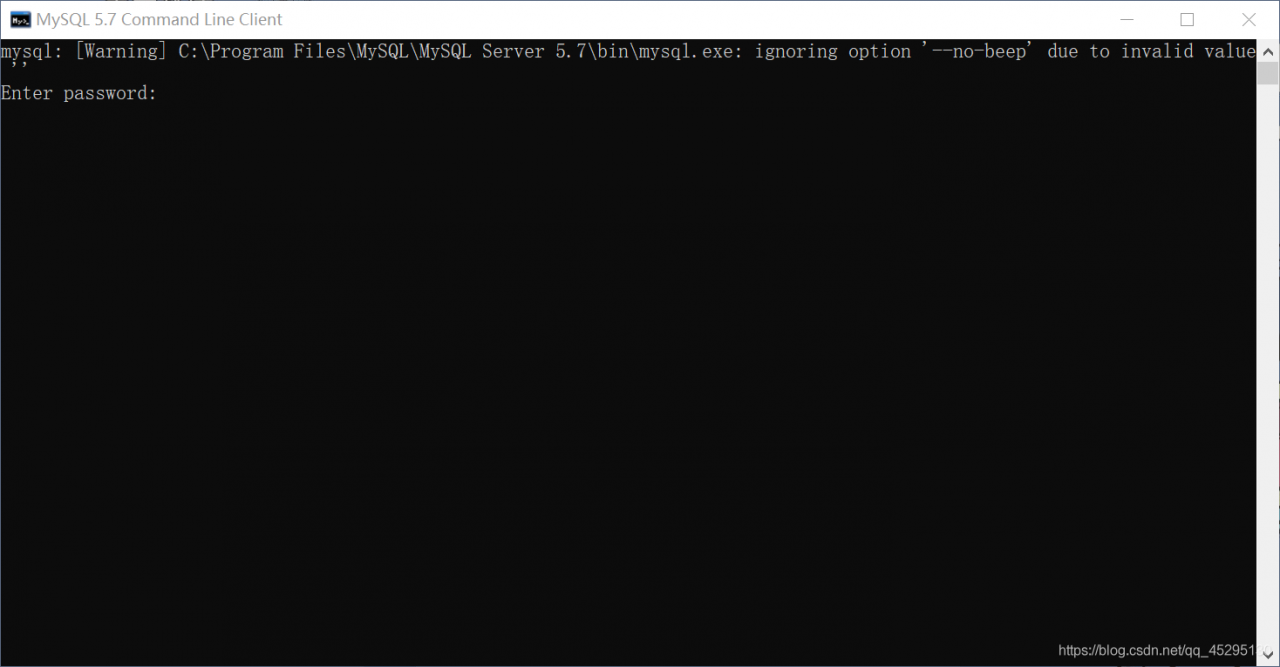
mysql: [ Warning] C:\Program Files\MySQL\MySQL Server 8.0\bin\mysql.exe: ignoring option ‘– no-beep’ due to invalid value ‘’.**
terms of settlement:
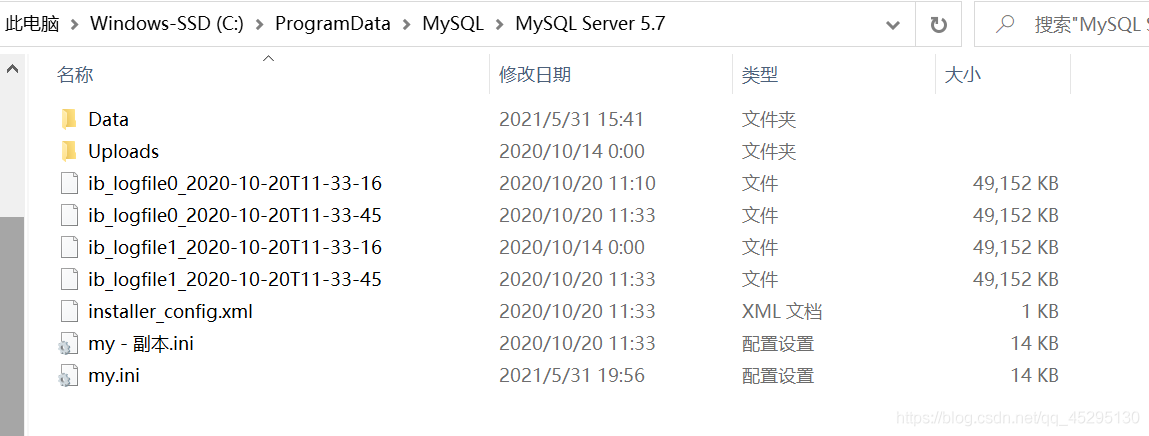
Open the above path (my computer is like this, the default path, if your path is not the same, it is recommended to find the installation path), find my.ini file, it is recommended to save a copy before changing to prevent modification errors. Open it in Notepad and find the following statement:
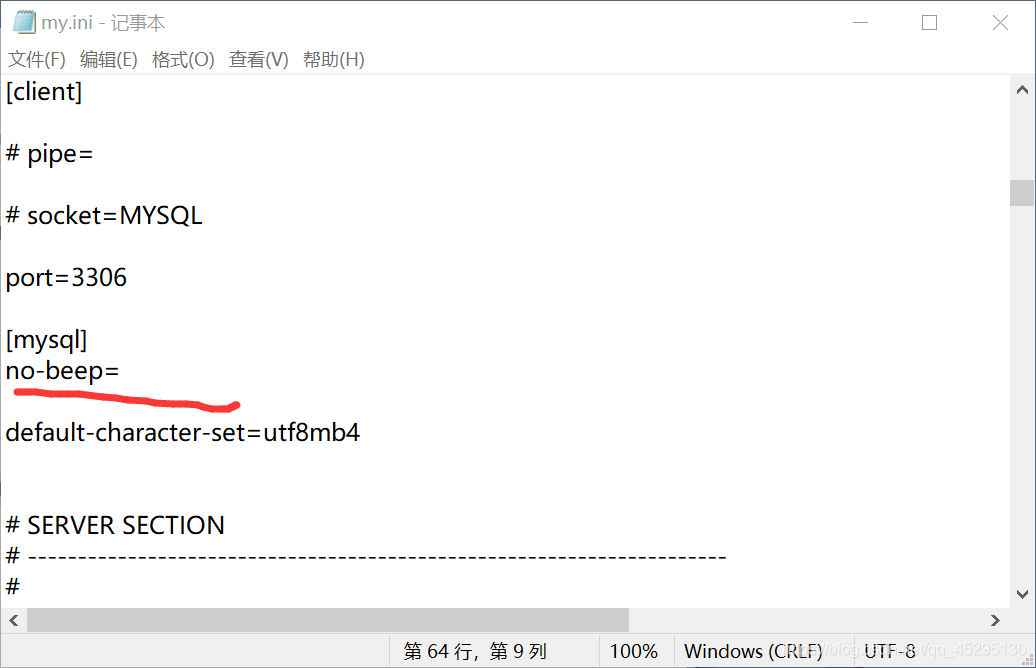
Delete the “=” in the red underlined statement and click save.
Reopen the MySQL execution box. Generally speaking, 80% of the problem is solved successfully. However, if you still flash back, right-click to find the folder where MySQL is located and enter the. EXE file from the folder chart. I hope these will help you.
libxx.so: undefined reference, vector.reserve(n) [How to Solve]
background: Trying to avoid reallocation using the STL: std::vector.reserve(n).
declared static std::vector<int> sample_num in class AngleCal, and want to do it in AngleCal::AngleCal() sample_num.reserve(300) (assumming 300 is the size or, alternatively an upper bound on the size)
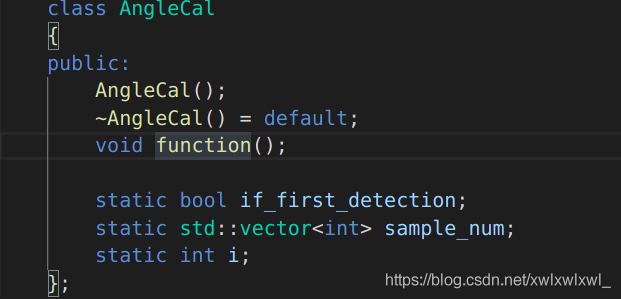
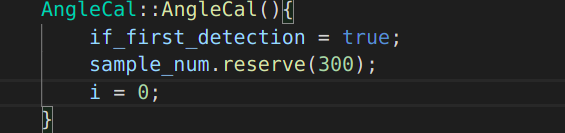
However, when compiling this AngleCal.cpp into libanglecal.so, the compiler gives the following error.
[build] /usr/bin/ld: ../lib/libanglecal.so: undefined reference to `hitcrt::AngleCal::if_first_detection’
[build] /usr/bin/ld: ../lib/libanglecal.so: undefined reference to `hitcrt::AngleCal::sample_num’
[build] /usr/bin/ld: ../lib/libanglecal.so: undefined reference to `hitcrt::AngleCal::i’
declared static std::vector<int> sample_num in class AngleCal, and want to do it in AngleCal::AngleCal() sample_num.reserve(300) (assumming 300 is the size or, alternatively an upper bound on the size)
However, when compiling this AngleCal.cpp into libanglecal.so, the compiler gives the following error.
[build] /usr/bin/ld: ../lib/libanglecal.so: undefined reference to `hitcrt::AngleCal::if_first_detection’
[build] /usr/bin/ld: ../lib/libanglecal.so: undefined reference to `hitcrt::AngleCal::sample_num’
[build] /usr/bin/ld: ../lib/libanglecal.so: undefined reference to `hitcrt::AngleCal::i’
Solution: A static member is shared by all objects of the class. All static data is initialized to zero when the first object is created, if no other initialization is present. We can’t put it in the class definition but it can be initialized outside the class as done in the following example by redeclaring the static variable, using the scope resolution operator :: to identify which class it belongs to.
#include <iostream>

using namespace std;

class Box {
   public:
      static int objectCount;

      // Constructor definition
      Box(double l = 2.0, double b = 2.0, double h = 2.0) {
         cout <<"Constructor called." << endl;
         length = l;
         breadth = b;
         height = h;

         // Increase every time object is created
         objectCount++;
      }
      double Volume() {
         return length * breadth * height;
      }

   private:
      double length;     // Length of a box
      double breadth;    // Breadth of a box
      double height;     // Height of a box
};

// Initialize static member of class Box
int Box::objectCount = 0;

int main(void) {
   Box Box1(3.3, 1.2, 1.5);    // Declare box1
   Box Box2(8.5, 6.0, 2.0);    // Declare box2

   // Print total number of objects.
   cout << "Total objects: " << Box::objectCount << endl;

   return 0;
}
The running results are as follows
Constructor called.
Constructor called.
Total objects: 2
Static decorated class members must be initialized outside the class before they can be manipulated.
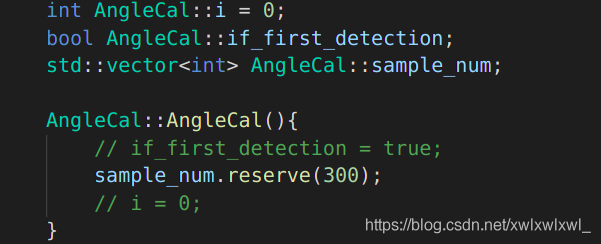
above.