Author Archives: Robins

[Solved] Intellij IDEA Error: Command line is too long

solve:

    1. find the workspace.xml configuration file in the. Idea folder of the project
    1. it may be hidden. You can set editor – > through idea; Remove. Idea from the ignore… Box at the bottom of file types. Locate the component name = “propertiescomponent” tag. Add a line at the bottom of the tag: property name = “dynamic. Classpath” value = “true”. Final effect
<component name="PropertiesComponent">
...other properties... 
 <property name="dynamic.classpath" value="true" />
</component>
MYSQL Index Key Length 1071 – Specified key was too long; max key length is 3072 bytes

MySQL index key length

In the development, two varchar 1000 fields are associated. As a MySQL index white, I directly add a normal index to the table. This will report an error, saying that the length of my index is too long. Search on the Internet is to change the MySQL configuration file. By chance, I saw an article sent by a big man, and I knew that the index length of MySQL was such a usage.

Error reported by MySQL: 1071 – specified key was too long; max key length is 3072 bytes

SELECT
 ROUND(SUM(LENGTH(`school_unit_title`)<10)*100/COUNT(`school_unit_title`),2) AS pct_length_10,
 ROUND(SUM(LENGTH(`school_unit_title`)<20)*100/COUNT(`school_unit_title`),2) AS pct_length_20,
 ROUND(SUM(LENGTH(`school_unit_title`)<50)*100/COUNT(`school_unit_title`),2) AS pct_length_50,
 ROUND(SUM(LENGTH(`school_unit_title`)<80)*100/COUNT(`school_unit_title`),2) AS pct_length_80,
 ROUND(SUM(LENGTH(`school_unit_title`)<100)*100/COUNT(`school_unit_title`),2) AS pct_length_100
FROM `z_school_unit`;

Solution to gzip: stdin: invalid compressed data — format violated error in decompressing. Tgz file under Linux

When executing the tar – zxvf xxxx.tgz command,
prompt the following information:
gzip: stdin: invalid compressed data – format violated
tar: child returned status 1
tar: error is not recoverable: exiting now
method 1

    1. reason: the compressed package is not compressed in gzip format, so there is no need to add Z instruction. Solution: use tar – xvf xxxxx.tgz command (i.e. remove Z parameter)

Method 2

      1. rename the downloaded file to tar suffix, MV xx.tgz xx.tar, and then execute the decompression command: tar – zxvf XX. Tar </ OL>

Method 3
add after WGet

 --no-check-certificate --no-cookies --header "Cookie: oraclelicense=accept-securebackup-cookie" 

For example:

wget --no-check-certificate --no-cookies --header "Cookie: oraclelicense=accept-securebackup-cookie" "http://download.oracle.com/otn-pub/java/jdk/8u181-b13/96a7b8442fe848ef90c96a2fad6ed6d1/jdk-8u181-linux-x64.tar.gz"

or

wget --no-check-certificate --no-cookies --header "Cookie: oraclelicense=accept-securebackup-cookie" -c -O 数据集名字 "对应的网页下载链接"

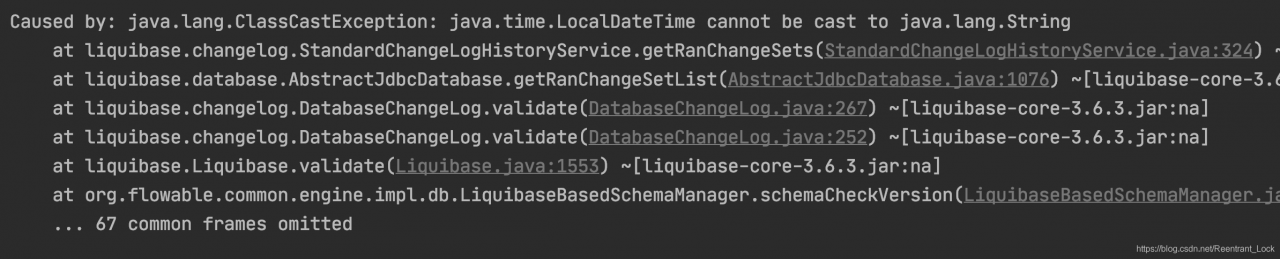
[Solved] Flowable Start Error: ClassCastException: java.time.LocalDateTime cannot be cast to java.lang.String

Springboot2 + MySQL integrated flowable6.6.0, failed to start

In liquibase.changelog.standardchangeloghistoryservice, there is such a code:

Object tmpDateExecuted = rs.get("DATEEXECUTED");
    Date dateExecuted = null;
    if (tmpDateExecuted instanceof Date) {
        dateExecuted = (Date)tmpDateExecuted;
    } else {
        SimpleDateFormat df = new SimpleDateFormat("yyyy-MM-dd HH:mm:ss");
        try {
            dateExecuted = df.parse((String)tmpDateExecuted);
        } catch (ParseException var24) {
    }
}

The dateexecuted field in the database is of timestamp type. When the version of the database driver package used is relatively new (8.0.23 is used here), the returned type is localdatetime. If it is strongly converted to string, an error will be reported

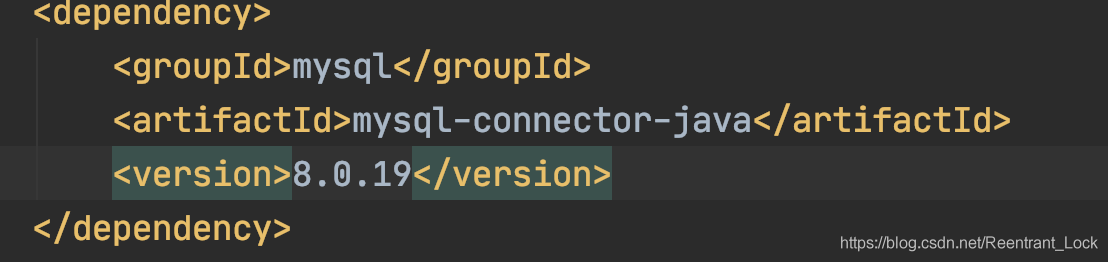
Modify the driver package version to 8.0.19, and the service starts normally

[Solved] Failed to start bean ‘eurekaAutoServiceRegistration‘; nested exception is java.lang.NullPointerExce

When using spring-cloud-starter-netflix-eureka-client, the following exception was encountered when starting the project. Failed to start bean ‘eurekaAutoServiceRegistration’; nested exception is java.lang.NullPointerExce

org.springframework.context.ApplicationContextException: Failed to start bean 'eurekaAutoServiceRegistration'; nested exception is java.lang.NullPointerException
	at org.springframework.context.support.DefaultLifecycleProcessor.doStart(DefaultLifecycleProcessor.java:176) ~[spring-context-4.3.17.RELEASE.jar:4.3.17.RELEASE]
	at org.springframework.context.support.DefaultLifecycleProcessor.access$200(DefaultLifecycleProcessor.java:50) ~[spring-context-4.3.17.RELEASE.jar:4.3.17.RELEASE]
	at org.springframework.context.support.DefaultLifecycleProcessor$LifecycleGroup.start(DefaultLifecycleProcessor.java:346) ~[spring-context-4.3.17.RELEASE.jar:4.3.17.RELEASE]
	at org.springframework.context.support.DefaultLifecycleProcessor.startBeans(DefaultLifecycleProcessor.java:149) ~[spring-context-4.3.17.RELEASE.jar:4.3.17.RELEASE]
	at org.springframework.context.support.DefaultLifecycleProcessor.onRefresh(DefaultLifecycleProcessor.java:112) ~[spring-context-4.3.17.RELEASE.jar:4.3.17.RELEASE]
	at org.springframework.context.support.AbstractApplicationContext.finishRefresh(AbstractApplicationContext.java:880) ~[spring-context-4.3.17.RELEASE.jar:4.3.17.RELEASE]
	at org.springframework.boot.context.embedded.EmbeddedWebApplicationContext.finishRefresh(EmbeddedWebApplicationContext.java:144) ~[spring-boot-1.5.13.RELEASE.jar:1.5.13.RELEASE]
	at org.springframework.context.support.AbstractApplicationContext.refresh(AbstractApplicationContext.java:546) ~[spring-context-4.3.17.RELEASE.jar:4.3.17.RELEASE]
	at org.springframework.boot.context.embedded.EmbeddedWebApplicationContext.refresh(EmbeddedWebApplicationContext.java:122) ~[spring-boot-1.5.13.RELEASE.jar:1.5.13.RELEASE]
	at org.springframework.boot.SpringApplication.refresh(SpringApplication.java:693) [spring-boot-1.5.13.RELEASE.jar:1.5.13.RELEASE]
	at org.springframework.boot.SpringApplication.refreshContext(SpringApplication.java:360) [spring-boot-1.5.13.RELEASE.jar:1.5.13.RELEASE]
	at org.springframework.boot.SpringApplication.run(SpringApplication.java:303) [spring-boot-1.5.13.RELEASE.jar:1.5.13.RELEASE]
	at org.springframework.boot.SpringApplication.run(SpringApplication.java:1118) [spring-boot-1.5.13.RELEASE.jar:1.5.13.RELEASE]
	at org.springframework.boot.SpringApplication.run(SpringApplication.java:1107) [spring-boot-1.5.13.RELEASE.jar:1.5.13.RELEASE]
	at com.shanba.SbnsyhManageApplication.main(SbnsyhManageApplication.java:12) [classes/:na]
Caused by: java.lang.NullPointerException: null
	at org.springframework.cloud.netflix.eureka.serviceregistry.EurekaServiceRegistry.maybeInitializeClient(EurekaServiceRegistry.java:56) ~[spring-cloud-netflix-eureka-client-1.3.0.RELEASE.jar:1.3.0.RELEASE]
	at org.springframework.cloud.netflix.eureka.serviceregistry.EurekaServiceRegistry.register(EurekaServiceRegistry.java:37) ~[spring-cloud-netflix-eureka-client-1.3.0.RELEASE.jar:1.3.0.RELEASE]
	at org.springframework.cloud.netflix.eureka.serviceregistry.EurekaAutoServiceRegistration.start(EurekaAutoServiceRegistration.java:73) ~[spring-cloud-netflix-eureka-client-1.3.0.RELEASE.jar:1.3.0.RELEASE]
	at org.springframework.context.support.DefaultLifecycleProcessor.doStart(DefaultLifecycleProcessor.java:173) ~[spring-context-4.3.17.RELEASE.jar:4.3.17.RELEASE]
	... 14 common frames omitted

Reason: spring cloud’s jar package is introduced in POM in sequence

Wrong reference

<!--thymeleaf Template engine configuration-->
<dependency>
	<groupId>org.springframework.boot</groupId>
	<artifactId>spring-boot-starter-thymeleaf</artifactId>
</dependency>
<!--Web依赖-->
<dependency>
	<groupId>org.springframework.boot</groupId>
	<artifactId>spring-boot-starter-web</artifactId>
</dependency>
<dependency>
	<groupId>org.springframework.cloud</groupId>
	<artifactId>spring-cloud-starter-netflix-eureka-client</artifactId>
</dependency>

Normal reference

<dependency>
	<groupId>org.springframework.cloud</groupId>
	<artifactId>spring-cloud-starter-netflix-eureka-client</artifactId>
</dependency>
<!--thymeleaf Template engine configuration-->
<dependency>
	<groupId>org.springframework.boot</groupId>
	<artifactId>spring-boot-starter-thymeleaf</artifactId>
</dependency>
<!--Web-->
<dependency>
	<groupId>org.springframework.boot</groupId>
	<artifactId>spring-boot-starter-web</artifactId>
</dependency>

DM database data migration DTS error solution

Project scenario:

When using DTS data migration tool to migrate from Mysql to DM, ten tables reported errors. There are two kinds of errors

Problem Description:

error number: – 2670
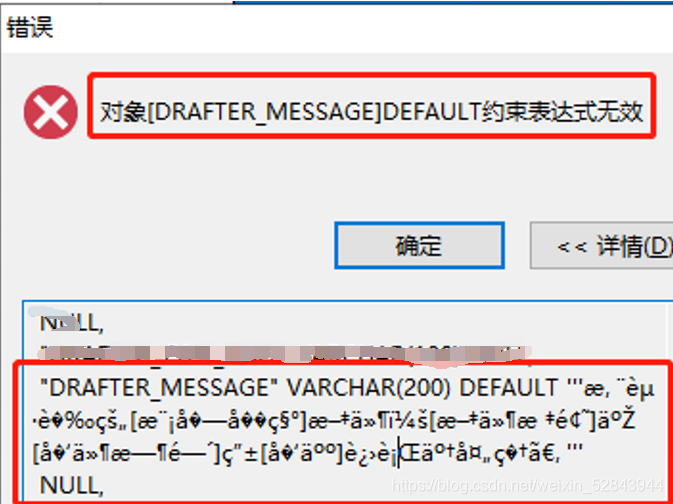
error message: Object [draft]_ The constraint expression of message] default is invalid
click the details query to find that the table definition is in disorder. You need to manually create this table in Dameng database </ font>

Error number: – 6169
error message: column [is]_ MOBILE_ Text] the length exceeds the definition
first, take out the table definition and create the table manually in DM database. If it is found that there is no problem, it should be the problem of data. Check that the character sets on both sides are consistent, and they are UTF-8. In the table definition, this column is varchar (20)
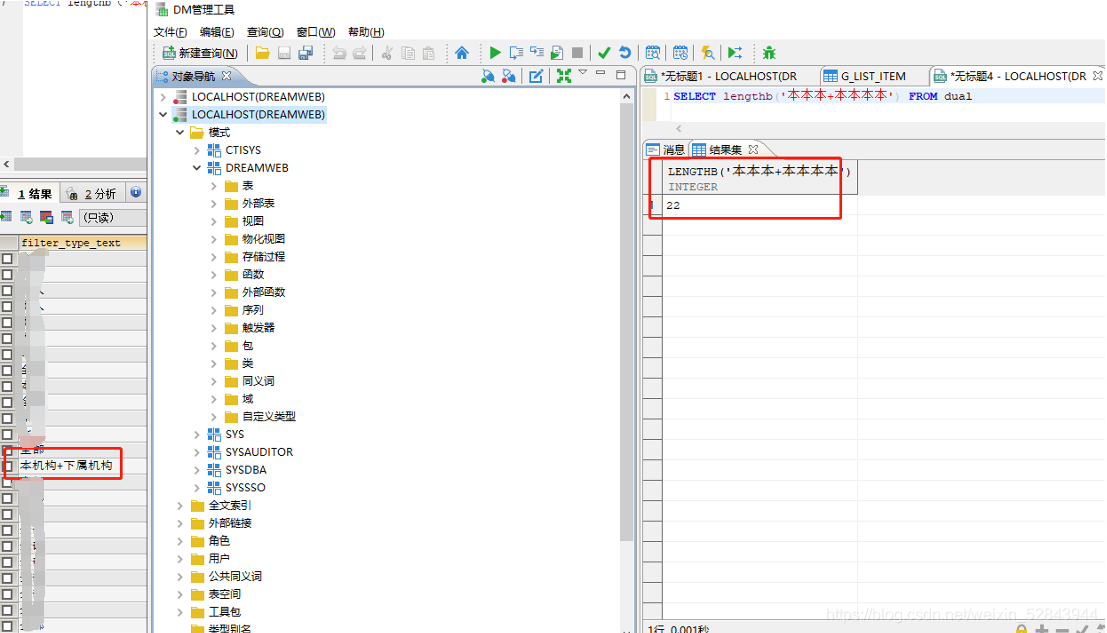
check that there is an obviously long field in this column of data in the source MSYQL. In DM calculation, it is found that this data occupies 22 bytes, so you need to change the field length

Gateway Error: Cannot resolve org.springframework.cloud:spring-cloud-starter-gateway:unknown

Reason: there is no version with the same version as springboot, so you need to add your own version model
eg:

<?xml version="1.0" encoding="UTF-8"?>
<project xmlns="http://maven.apache.org/POM/4.0.0" xmlns:xsi="http://www.w3.org/2001/XMLSchema-instance"
         xsi:schemaLocation="http://maven.apache.org/POM/4.0.0 https://maven.apache.org/xsd/maven-4.0.0.xsd">
    <modelVersion>4.0.0</modelVersion>
    <parent>
        <groupId>org.springframework.boot</groupId>
        <artifactId>spring-boot-starter-parent</artifactId>
        <version>2.3.3.RELEASE</version>
        <relativePath/> <!-- lookup parent from repository -->
    </parent>
    <groupId>com.example</groupId>
    <artifactId>dtestgateway</artifactId>
    <version>0.0.1-SNAPSHOT</version>
    <name>dtestgateway</name>
    <description>Demo project for Spring Boot</description>
    <properties>
        <java.version>1.8</java.version>
    </properties>
    <dependencies>
<!--        <dependency>-->
<!--            <groupId>org.springframework.boot</groupId>-->
<!--            <artifactId>spring-boot-starter-web</artifactId>-->
<!--        </dependency>-->

        <dependency>
            <groupId>org.springframework.boot</groupId>
            <artifactId>spring-boot-starter-webflux</artifactId>
        </dependency>

        <dependency>
            <groupId>org.springframework.cloud</groupId>
            <artifactId>spring-cloud-starter-gateway</artifactId>
            <version>3.0.1</version>
        </dependency>


        <dependency>
            <groupId>org.springframework.boot</groupId>
            <artifactId>spring-boot-starter-test</artifactId>
            <scope>test</scope>
        </dependency>


    </dependencies>

    <build>
        <plugins>
            <plugin>
                <groupId>org.springframework.boot</groupId>
                <artifactId>spring-boot-maven-plugin</artifactId>
            </plugin>
        </plugins>
    </build>

</project>

[Solved] JDK Install Error /lib/ld-linux.so.2: bad ELF interpreter: No such file or directory

CentOS 7.6 JDK installation, download the following JDK package

wget https://mirrors.huaweicloud.com/java/jdk/8u201-b09/jdk-8u201-linux-i586.tar.gz

After installation. After configuring environment variables, execute Java – version to report an error

-bash: /root/jdk1.8.0_201/bin/java: /lib/ld-linux.so.2: bad ELF interpreter: No such file or directory


Solution
Just run sudo yum install glibc.i686
Then look at java -version OK!

[Solved] from django.core.cache import cache Error

Import from django.core.cache import cache
Error:

django.core.exceptions.ImproperlyConfigured: Requested setting CACHES, but settings are not configured. You must either define the environment variable DJANGO_SETTINGS_MODULE or call settings.configure() before accessing settings.

Solution:

from django.conf import settings
settings.configure(DEBUG=True)

Done!


Error in compiling Android AOSP by Ubantu [How to Solve]

Error:

You asked for an OpenJDK 7 build but your version is

java version “1.7.0_75” Java(TM) SE Runtime Environment (build 1.7.0_75-b13) Java HotSpot(TM) 64-Bit Server VM (build 24.75-b04, mixed mode).

Reason:

AOSP (Android Open Source Project)
) Compilation requires openjdk, not oracle’s JDK version

This environment version.

Versions that can be compiled.