Author Archives: Robins

Oops error location method in ARM kernel

The error log information is as follows:

 1 Unable to handle kernel NULL pointer dereference at virtual address 00000014
 2 pgd = c0004000
 3 [00000014] *pgd=00000000
 4 Internal error: Oops: 5 [#1] PREEMPT SMP ARM
 5 Modules linked in:
 6 CPU: 0 PID: 1 Comm: swapper/0 Not tainted 3.10.45 #125
 7 task: dc078000 ti: dc05a000 task.ti: dc05a000
 8 PC is at at24c02_probe+0x78/0xa0
 9 LR is at wake_up_klogd+0x84/0xac
10 pc : [<c03e27c0>]    lr : [<c002d9b0>]    psr: 40000113
11 sp : dc05bdb8  ip : dc05bcc0  fp : dc05bdd4
12 r10: c0a20a80  r9 : 0000009e  r8 : c03e2748
13 r7 : 00000000  r6 : c08ccee4  r5 : c08ccf00  r4 : c075dbbc
14 r3 : 00000000  r2 : 00000001  r1 : 20000193  r0 : 00000020
15 Flags: nZcv  IRQs on  FIQs on  Mode SVC_32  ISA ARM  Segment kernel
16 Control: 10c5387d  Table: 1000404a  DAC: 00000015
17 Process swapper/0 (pid: 1, stack limit = 0xdc05a238)

1) According to the log information, the value of PC is   PC is at at24c02_ probe+0x78/0xa0;

  at24c02_ Probe: the function indicating the error;

0x78: indicates the offset position of the Error statement in the error function;

0xa0: AT24C02_ The size of probe function

2)   Use arm none Linux gnueabi GCC nm command to find the function AT24C02_ The linear address of probe in the kernel (you can also find it in the system. Map file)

  arm-none-linux-gnueabi-gcc-nm vmlinux | grep at24c02_ probe

(vmlinux is an uncompressed image file, which is in the compilation folder of the kernel.)

The results are as follows

1 c03e2748 t at24c02_probe

Description AT24C02_ The initial linear address of probe function in kernel is 0xc03e2748;

3) According to the deviation value of 0x78, using the arm none Linux gnueabi objdump command, the disassembly of address c03e2748-c03e27ff is displayed (estimated approximate range)

  arm-none-linux-gnueabi-objdump -S vmlinux –start-address=0xc03e2748 –stop-address=0xc03e27ff >/tmp/file

Deviation value + starting address of function = 0x78 + 0xc03e2748 = 0xc03e27c0 (it can also be obtained from PC value of log)

The errors found in the file file are as follows:

1  c03e27b8:       e59f0020        ldr     r0, [pc, #32]   ; c03e27e0 <at24c02_probe+0x98>
2  56 c03e27bc:       eb0c86de        bl      c070433c <printk>
3  57     printk("The i2c device id data is %d\n", id->driver_data);
4  58 c03e27c0:       e5971014        ldr     r1, [r7, #20]
5  59 c03e27c4:       e59f0018        ldr     r0, [pc, #24]   ; c03e27e4 <at24c02_probe+0x9c>
6  60 c03e27c8:       eb0c86db        bl      c070433c <printk>

We can see that the wrong statement is: printk (“the I2C device ID data is% D/N”, ID – & gt; driver_ data);

Another method:  
You can directly obtain the following information through the addr2line command:

Execute the following command under the compiled source code folder to show which line of code of that function has problems,  
    arm-none-linux-gnueabi-addr2line -e vmlinux   c03e27c0

/opt/Sourcery_CodeBench_for_ARM_Embedded/bin/arm-none-linux-gnueabi-addr2line -e vmlinux c03e27c0

Note: please make sure that cross_ Compile is compiled with the same prefix as you, such as arm none Linux gnueabi – above. You must compile with this prefix, otherwise the calculated line number may deviate greatly.
1067 – Invalid default value for ‘sex‘1366 – Incorrect string value: ‘\xE6\x8A\x80\xE6\x9C\xAF…‘ f

1067 – invalid default value for ‘sex’
the above error occurred when using SQL statement to create a table in Navicat,
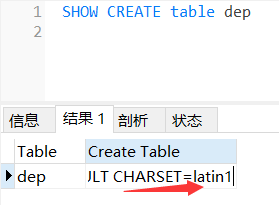
cause: the character set code of the default table is Latin1, so it’s OK to insert numbers, Insert Chinese characters will report an error
solution: alter database database name/table name character set utf8
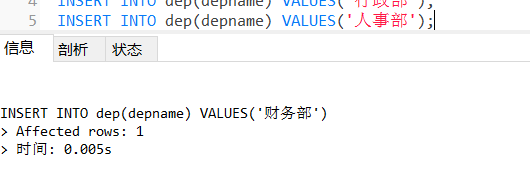
1366 – incorrect string value: ‘Xe6/x8a/X80/Xe6/x9c/XAF…’ for column ‘depname’ at row 1
reason: the above consistency
problem is that the character set code of the database has been changed before, why the same problem will appear
check the database and I want to The character set code of the inserted table is UTF-8, but the table is not

alter table dep  character set utf8

Still report the same error
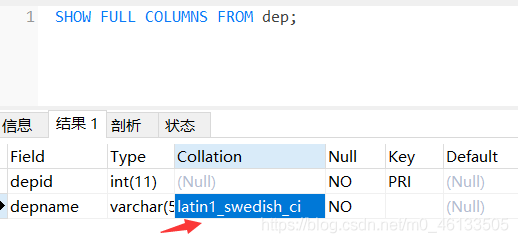
check the field code

the character code of the field is Latin_ 1
helpless 😔
change the fields

ALTER TABLE dep CHANGE depname depname 
VARCHAR(100) CHARACTER SET utf8 COLLATE utf8_general_ci;

Finally, it has become
but it’s very troublesome to change it all the time. It’s better to change the configuration file of MySQL once and for all

HTML echo error, NPM run build error, HTML path error

Direct NPM run build will report an error as follows:

ERROR in static/js/0.94510c9d26edb4b687ab.js from UglifyJs

Unexpected token: punc (() [./~/time-formater/lib/timeformater.js:21,0][static/js/0.94510c9d26edb4b687ab.js:41797,10]

The main problem is that when uglifyjs compresses the code, it can’t compress the code of ES6, so it should be converted to Es5 with bable first

The time formater library is ES6 and has not been converted.

Solution:

npm install –save–dev [email protected]

Under webpack. Base. Conf, the

Include: [resolve (‘src ‘), resolve (‘test’)] is modified to

include: [resolve(‘src’), resolve(‘test’),resolve(‘node_ modules/time-formater’)]

The wrong path of js.css referenced by index.html is found in config/index.js

Set to assetspublicpath: ‘. /’,

pandas parse_ Data exception, automatically skip

When processing raw data, the following error occurs:

id,name,date
0,a,2020/01/01
0,b,2020/01/01
0,c,2020/01/01
0,d,2020/01/01
0,e,2020/01/01
0,f,9999/01/01

It was treated with panda :

data = pandas.read_csv(file, sep=";", encoding="ISO-8859-1", parse_dates=["date"],  date_parser=lambda x: pandas.to_datetime(x, format="%d.%m.%Y"))

But the running time is wrong, which means out of bonds timestamp .

Our current approach is to skip the exception line,

The following line needs to be added

date_parser=lambda x: pd.to_datetime(x, errors="coerce")

There are three kinds of assignments for the errors parameter. The default value is’ raise ‘. An error will be reported if the parsing does not conform to the specification.

You can assign the errors parameter to “coerce” and set the time format of the error to NAT during parsing. If you don’t want to deal with the wrong time format, you can assign errors to ‘ignore’, so that the original format is the same.

errors{‘ignore’, ‘raise’, ‘coerce’}, default ‘raise’

If ‘raise’, then invalid parsing will raise an exception.If ‘coerce’, then invalid parsing will be set as NaT.If ‘ignore’, then invalid parsing will return the input.

About starting the service, you always get stuck in com. Alibaba. Druid. Pool. Druiddatasource | {datasource-1} initiated

Today, when debugging the program, it was good. Later, when restarting the service, it was stuck behind the log of com.alibaba.druid.pool.druiddatasource | {datasource-1} initiated, as shown in the figure

After a variety of debugging, restart or card here

Finally, I found that I made a breakpoint in a method of mapper interface, which is a real fucker

After canceling the breakpoint, it starts successfully  

PHP try will also throw an exception if it is executed successfully

PHP try will also throw an exception if it is executed successfully

try{
    Do something.
    Db::commit();
    return "success":
}cathe(\Exception $exception){
    Db::rollback();
    return "error":
}

Many of the returned results you get directly here, no matter whether your operation is successful or not, are returned as exceptions and go into error
Print exception error:

var_dump($e->getMessage());

The result is

"" 

There is no information
at this time, it should be noted that the return in the exception try will be thrown as an exception. There are two solutions.

First:
will

catch (\Exception $exception)

Change to (eg: use tp6, please rewrite the specific path within the framework)

catch (\think\Exception\DbException $exception)

Second:
save the information that needs to return in the variable, and finally output:

$_retData = [];
try{
    Do something.
    Db::commit();
    $_retData['data'] = [];
    $_retData['messages'] = "success";
}cathe(\Exception $exception){
    Db::rollback();
    return "error":
}
return $_retData;

RabbitMQ Error: {:plugins_not_found:[xxxx]}

Enter the instruction rabbitmq plugins enable rabbitmq management

appear   RabbitMQ Error: {:plugins_ not_ Found, [: rabbitmq management]} error prompt

It’s because the instruction is misspelled. It’s correct as follows:

rabbitmq-plugins enable rabbitmq_ Management (“-” changed to “)

You can also view the help through the rabbitmq plugins list command

Does the version of idea2020.1 import mybayis jar package or report an error? Error: (4,28) Java: package org.apache.ibatis.io does not exist

The other solution is to replace the local warehouse with the Maven warehouse of idea

But I don’t want to change it. I’m afraid there will be any trouble in the future. So I see another solution: using MVN idea:idea Command

In fact, this method can solve the problem that the same kind of package cannot be imported

The solution is as follows:

1. I use terminal of idea directly. Of course, I can also use CMD, but I have to go to the location of the project (directory with POM file) first,

2. Use MVN idea:idea Command:

 
  Finally, build success.

Then there is no error in guiding the package.