Author Archives: Robins

[Solved] Python Import mmcv Warning: ImportError: libGL.so.1: cannot open shared object file: No such file or directory

ImportError: libGL.so.1: cannot open shared object file: No such file or directory
centos 7.5 Simply install the relevant dependencies.

 yum install mesa-libGL.x86_64
 
 Installed
  mesa-libGL.x86_64 0:18.3.4-12.el7_9

Installed as a dependency:
  libX11.x86_64 0:1.6.7-3.el7_9       libX11-common.noarch 0:1.6.7-3.el7_9         libXau.x86_64 0:1.0.8-2.1.el7
  libXdamage.x86_64 0:1.1.4-4.1.el7   libXext.x86_64 0:1.3.3-3.el7                 libXfixes.x86_64 0:5.0.3-1.el7
  libXxf86vm.x86_64 0:1.1.4-1.el7     libglvnd.x86_64 1:1.0.1-0.8.git5baa1e5.el7   libglvnd-glx.x86_64 1:1.0.1-0.8.git5baa1e5.el7
  libxcb.x86_64 0:1.13-1.el7          libxshmfence.x86_64 0:1.2-1.el7              mesa-libglapi.x86_64 0:18.3.4-12.el7_9

Done!

Ubuntu 20.04 installation:

(mmdet2) root@ubuntuserver:~# apt install libgl1-mesa-glx
Reading package lists... Done
Building dependency tree
Reading state information... Done
The following additional packages will be installed:
  libdrm-amdgpu1 libdrm-intel1 libdrm-nouveau2 libdrm-radeon1 libgl1 libgl1-mesa-dri libglapi-mesa libglvnd0 libglx-mesa0 libglx0
  libllvm12 libpciaccess0 libsensors-config libsensors5 libvulkan1 libwayland-client0 libx11-xcb1 libxcb-dri2-0 libxcb-dri3-0
  libxcb-glx0 libxcb-present0 libxcb-randr0 libxcb-shm0 libxcb-sync1 libxcb-xfixes0 libxfixes3 libxshmfence1 libxxf86vm1
  mesa-vulkan-drivers
Suggested packages:
  lm-sensors
The following NEW packages will be installed:
  libdrm-amdgpu1 libdrm-intel1 libdrm-nouveau2 libdrm-radeon1 libgl1 libgl1-mesa-dri libgl1-mesa-glx libglapi-mesa libglvnd0
  libglx-mesa0 libglx0 libllvm12 libpciaccess0 libsensors-config libsensors5 libvulkan1 libwayland-client0 libx11-xcb1
  libxcb-dri2-0 libxcb-dri3-0 libxcb-glx0 libxcb-present0 libxcb-randr0 libxcb-shm0 libxcb-sync1 libxcb-xfixes0 libxfixes3
  libxshmfence1 libxxf86vm1 mesa-vulkan-drivers
0 upgraded, 30 newly installed, 0 to remove and 127 not upgraded.
Need to get 34.3 MB/34.8 MB of archives.
After this operation, 458 MB of additional disk space will be used.
Do you want to continue?[Y/n] y
...
Setting up libgl1-mesa-glx:amd64 (21.0.3-0ubuntu0.1~20.04.1) ...
Processing triggers for libc-bin (2.31-0ubuntu9.2) ...

Try importing again:

(mmdet) [root@node1 ~]# python
Python 3.8.10 (default, Jun  4 2021, 15:09:15)
[GCC 7.5.0] :: Anaconda, Inc. on linux
Type "help", "copyright", "credits" or "license" for more information.
>>> import mmcv
>>> exit
[Solved] Faceswap Error: CRITICAL An unexpected crash has occurred.You MUST provide this file if seeking assistan

When using faceswap to extract a face, it stops abnormally and prompts an error: critical an unexpected crash has occurred. Crash report written to ‘xxx. Log’. You must provide this file if seeking assistance. Please verify you are running the latest version of faceswap before reporting. The crash report is written to “XXX. Log”. If you need help, you must provide this file. Before reporting, please verify that you are running the latest version of faceswap

Problem analysis: it may be because there is something wrong with the setting of input dir or output dir directory. Note that it cannot contain Chinese; It may also be because the version is not the latest version.

Solution: first confirm whether there is a problem with the selected file directory, which cannot be in Chinese. If it is caused by this problem, it can be solved after changing. If it is still not solved, you need to update the version. The operation is as follows:

Solution: Download and install the latest dependency, but be sure to pay attention to all the installation, there is a red letter on the failure
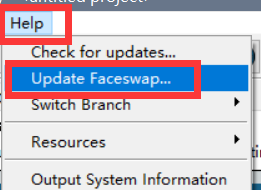
steps: help → update faceswap

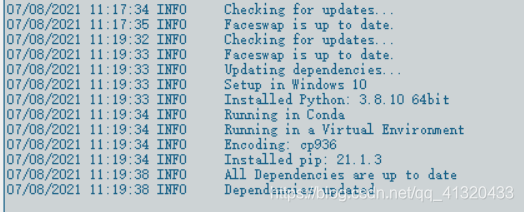
make sure that the updated items do not fail:

ktor org.jetbrains:kotlin-css-jvm Dependency Failure [Solved]

1, upgrade the version number of css-jvm
//    implementation "org.jetbrains:kotlin-css-jvm:1.0.0-pre.31-kotlin-1.2.41"
    implementation "org.jetbrains:kotlin-css-jvm:1.0.0-pre.122-kotlin-1.4.10"

2. Gradle uses a higher version. When I started to compile it, I used 5.6.4-all. There were many problems that I couldn’t download it. Later, I changed it to 6.7.1-all

3. You can also start without relying on this library

[Solved] Java.lang.BootstrapMethodError: call site initialization exception

Causes of the problem:

When we upgrade the version of the company’s Flink, we type the task into a jar package and send it to the Flink cluster to run. Due to the upgrade of the version of the Flink, it has a certain impact on the components.

Question:

When collecting data, ES reported the following error
java.lang.bootstrap method error: call site initialization exception
java.lang.invoke.lambdaconversionexception: invalid receiver type interface org.apache.http.header; not a subtype of implementation type interface org.apache.http.NameValuePair

bug-fix:

In the POM file, HttpCore and httpclient are introduced separately, and then conflicting dependencies are excluded in the introduction of ES. However, this method does not solve my problem. Finally, it is solved by reducing the version of ES dependency, which is reduced from es7.11.1 to es7.2.0.

[Solved] Java.util.linkedhashmap cannot be cast to entity class

Solve the problem of java.util.linkedhashmap cannot be cast to entity class

Background description

When learning about grain mall, openfeign is used for remote call, because an interface returns R < List<· Object>> Type of data, using list <Object> When receiving data, the java.util.linkedhashmap cannot be cast to XXX data conversion exception error occurs. It can be seen that the remote call will convert the data to be converted to LinkedHashMap, but it will not work to convert it to the desired data type.

Solution one

Use typereference in fastjson tool provided by Alibaba to transform.

We add SetData () and GetData () methods to R. when getting data, we use typereference class to indicate the data type. Then convert the map to the JSON string, and then convert the JSON string to the data type we want.

public class R extends HashMap<String, Object> {
	private static final long serialVersionUID = 1L;

	public R setData(Object data){
		put("data",data);
		return this;
	}

	//Reversal with fastjson
	public <T> T getData(TypeReference<T> typeReference){
		Object data = get("data");//Default is map type
		if(Objects.isNull(data)){
			return null;
		}
		String s = JSON.toJSONString(data);
		T t = JSON.parseObject("",typeReference);
		return t;
	}

Caller

        R r = wareFeignService.getSkusHasStock(skuIdList);//Remote calls
        TypeReference<List<SkuHasStockVo>> typeReference = new TypeReference<List<SkuHasStockVo>>() {
        };// Declare the internal class, specifying the type
        List<SkuHasStockVo> data = r.getData(typeReference);//get data for remote calls

reflection

This problem also occurred when using resttemplate remote call before. This problem was solved before, and the solution steps were not recorded. This time, the solution steps will be recorded to prevent the next step.

Supplementary solution 2

Recently, when reviewing the previous project code, I found a similar problem when using resttemplate remote call mentioned in my thinking. The solution at the time was this.

	import com.alibaba.fastjson.JSON;
	import com.alibaba.fastjson.JSONObject;
	
	//remote call, return the specified collection, but this collection can not be used directly, because he is a LinkedHashMap.
	List<InnerControl> remoteList = restTemplate.getForObject("url", List.class);
	remoteList = transToList(remoteList);// After the conversion, you will be able to use this collection normally.
	
	// Define a method to convert the LinkedHashMap type to the data type we want
	private List<InnerControl> transToList(List<InnerControl> list){
		String jsonStr = JSON.toJSONString(list);//still use the json conversion tool provided by alibaba.
		return JSONObject.parseArray(jsonStr, InnerControl.class);
	}

[Solved] Error reported using telnet command in Centos7: telnet: error while loading shared libraries: libtinfo.so.6

1.Preconditions for solution

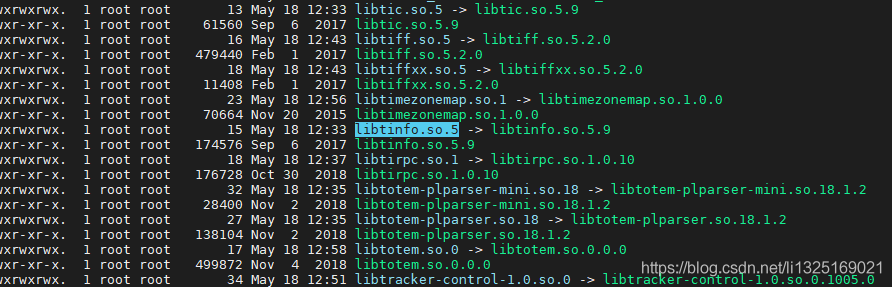
LZ found the package libtinfo. So. 5 in the directory/usr/lib64. Although there is no libtinfo. So. 6, there is libtinfo. So. 5, which can be downward compatible. Building a link can solve this problem.

2.Solutions

1. Replace the nonexistent libtinfo. So. 6 library with libtinfo. So. 5 and execute the following command

[root@localhost /]# cd /usr/lib64/
[root@localhost lib64]# ln -s libtinfo.so.5 libtinfo.so.6

2. Execute the telnet command again.

[Solved] Cmake: symbol lookup error: cmake: undefined symbol: archive_write_add_filter_zstd

centOS8(x86_ Cmake-3.18.2-11.el8, which is installed by default in Yum or DNF, cannot be used after installation   cmake: symbol lookup error: cmake: undefined symbol: archive_ write_ add_ filter_ Zstd error.

There are two solutions to this error:

The first one is

Install libarchive

dnf install   libarchive   Or Yum install   libarchive

Second: install a lower or higher version of cmake

1. Uninstall cmake program
Yum remove cmake   or   RPM – e cmake
2. Re install cmake,
website: https://cmake.org/download/
3. Create a soft connection
ln – S  /xx-path/cmake    / usr/bin/cmake

[Solved] Error starting proxy server: oserror (10013), “an attempt was made to access the socket in a way that the access permission is not allowed.”, None, 10013, None)

1. Problem description

Error in starting mitmproxy script

PS D:\D1\code\AutoTest\python_interface_autotest\PythonInterfaceAutoTest> cd .\chapter7\mitmproxy\
PS D:\D1\code\AutoTest\python_interface_autotest\PythonInterfaceAutoTest\chapter7\mitmproxy> mitmweb -s .\get_data.py
Error starting proxy server: OSError(10013, 'Made an attempt to access the socket in a way that access rights are not allowed.', None, 10013, None)
PS D:\D1\code\AutoTest\python_interface_autotest\PythonInterfaceAutoTest\chapter7\mitmproxy> mitmweb -s .\get_data.py
Error starting proxy server: OSError(10013, 'Made an attempt to access the socket in a way that access rights are not allowed.', None, 10013, None)

2. Problem solving

1. Specify the port number to resolve the port conflict

PS D:\D1\code\AutoTest\python_interface_autotest\PythonInterfaceAutoTest\chapter7\mitmproxy> mitmweb -s .\get_data.py -p 8083
Web server listening at http://127.0.0.1:8081/
Loading script .\get_data.py
Proxy server listening at http://*:8083

2. Query the process corresponding to the default startup port number 8080 and close it

Ubuntu18.04 Compile A40i SDK Error: misc/create_inode.c:395:18: error: conflicting types for ‘copy_file_range‘

Main desktop version:
Linux version 5.4.0-77-generic ( buildd@lgw01 -amd64-021) (gcc version 7.5.0 (Ubuntu 7.5.0-3ubuntu1~18.04)) #86~18.04.1-Ubuntu SMP Fri Jun 18 01:23:22 UTC 2021

1

Unescaped left brace in regex is illegal here in regex; marked by <-- HERE in m/\${ <-- HERE ([^ \t=:+{}]+)}/ at /media/nrjd/cqr40_linuxqt_bv3s/buildroot-2017.02.3/output/host/usr/bin/automake line 3936.

Modifybuildroot-2017.02.3/output/host/usr/bin/automakeFile Line 3936

$text =~ s/\${([^ \t=:+{}]+)}/substitute_ac_subst_variables_worker ($1)/ge;

is $text =~ s/\$([^ \t=:+{}]+)/substitute_ac_subst_variables_worker ($1)/ge;
2

misc/create_inode.c:395:18: error: conflicting types for ‘copy_file_range‘

Comment out the header file referenced by buildroot-2017.02.3/output/build/host-e2fsprogs-1.43.3/misc/create_inode.c

//#include <unistd.h>

3

digitlst.cpp:67:13: fatal error: xlocale.h: Not having that file or directory
 #   include <xlocale.h>

Comment out buildroot-2017.02.3/output/build/host-icu-58.2/source/i18n/digitlst.cpp
Referenced headers

//#   include <xlocale.h>

other

Unescaped left brace in regex is illegal here in regex; marked by <-- HERE in m/\${ <-- HERE ?PACKAGE}?/ at /media/nrjd/cqr40_linuxqt_bv3s/buildroot-2017.02.3/output/host/usr/bin/intltool-update line 1115.

Wrap the first { in curly brackets ] , such as

$varhash{"PACKAGE"} = $name if (not $name =~ /\${?PACKAGE}?/);

Amend to read

$varhash{"PACKAGE"} = $name if (not $name =~ /\$[{]?PACKAGE}?/);