Author Archives: Robins

[RFID] OctaneSDKJava Eclipse Error: Error occurred during initialization of boot layer

Question details

Errors are reported as follows:

Error occurred during initialization of boot layer
java.lang.module.FindException: Unable to derive module descriptor for C:\Users\tongx\eclipse-workspace\OctaneSDKJava\lib\OctaneSDKJava-1.22.0.30-jar-with-dependencies.jar
Caused by: java.lang.module.InvalidModuleDescriptorException: JDOMAbout$Info.class found in top-level directory (unnamed package not allowed in module)

Attempt method 1 (failed)

In jdk9 and above, modules are introduced. Therefore, if a separate running class is created in the default package, it cannot be compiled. There is no such problem in jdk8; If you still want to run separate classes in the default package, delete module-info.java in the SRC folder.

But my java is version 1.8, and my attempt failed

Try method 2 (feasible)

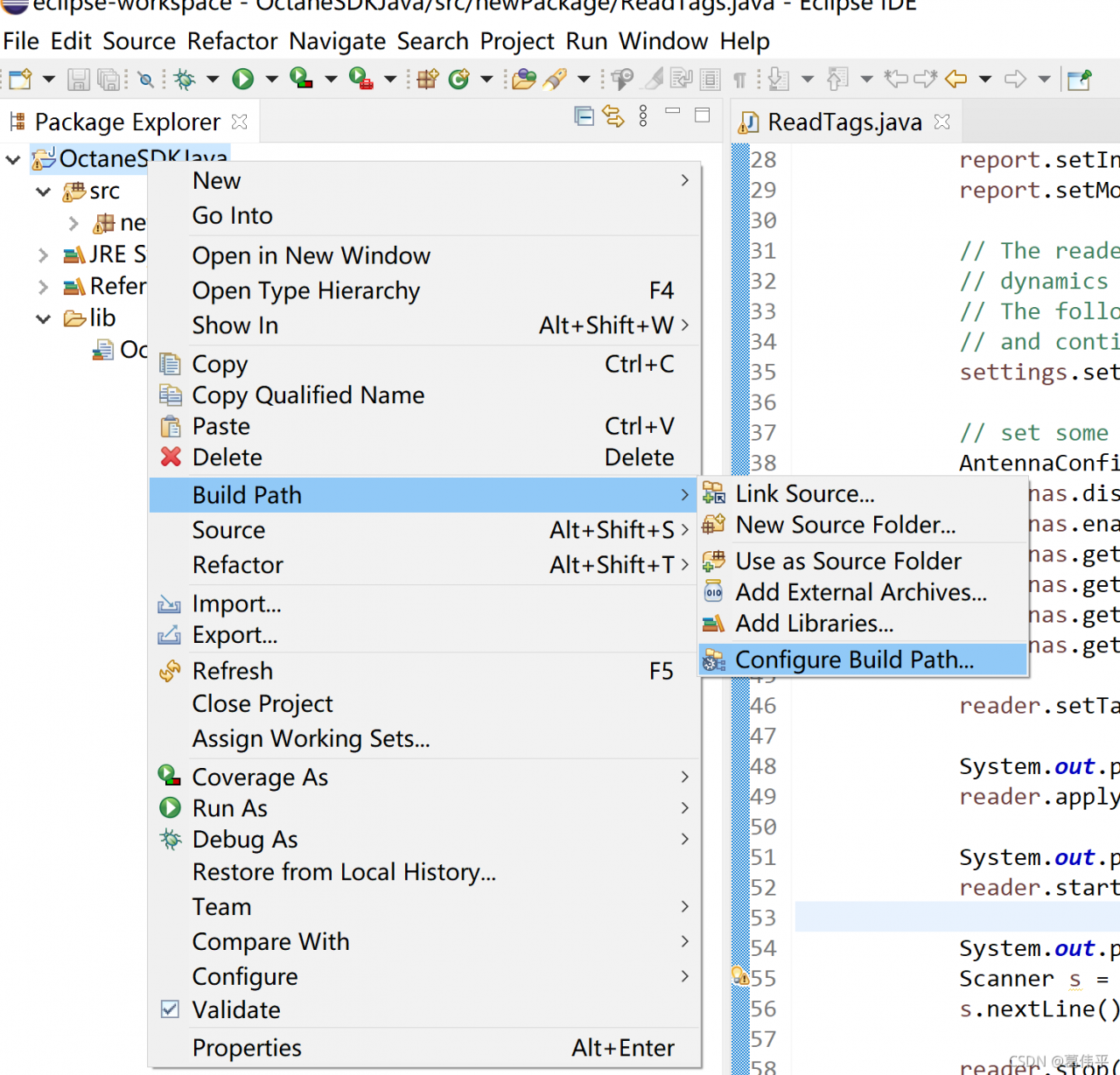
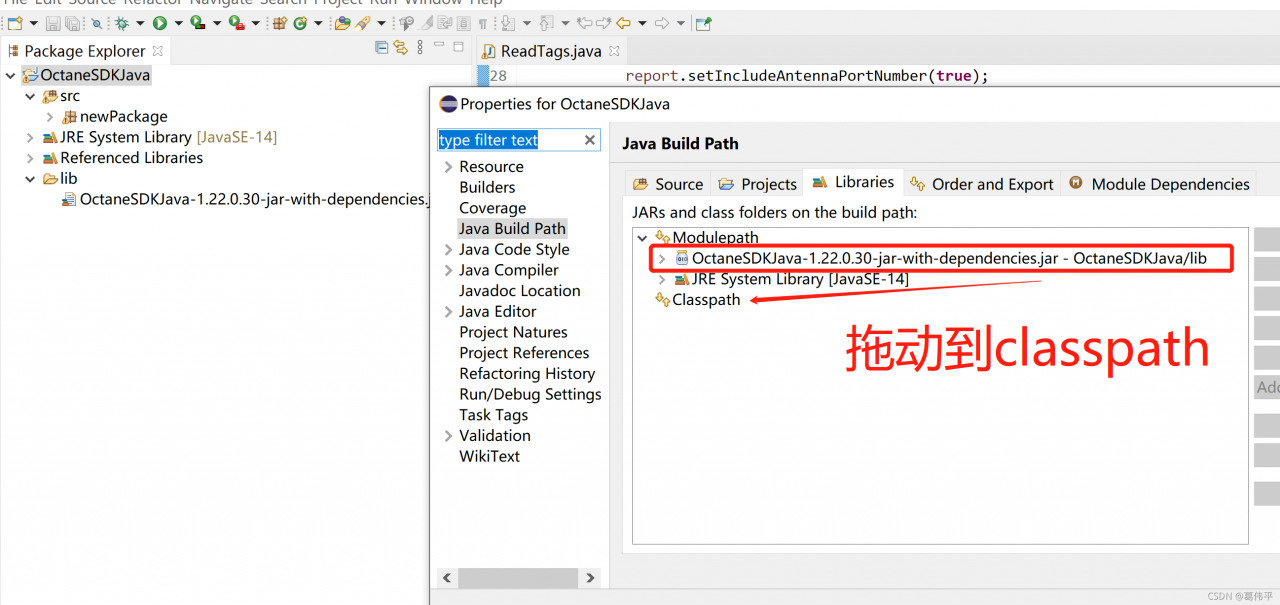
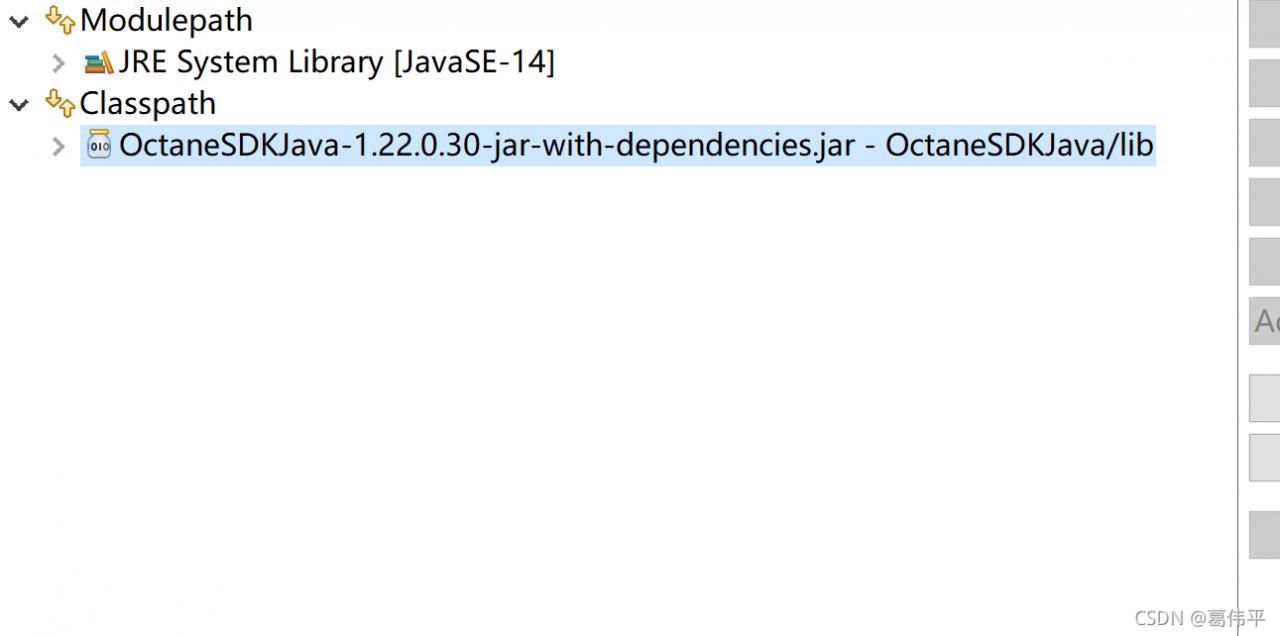
Here, we have adopted the methods of other big men:


end

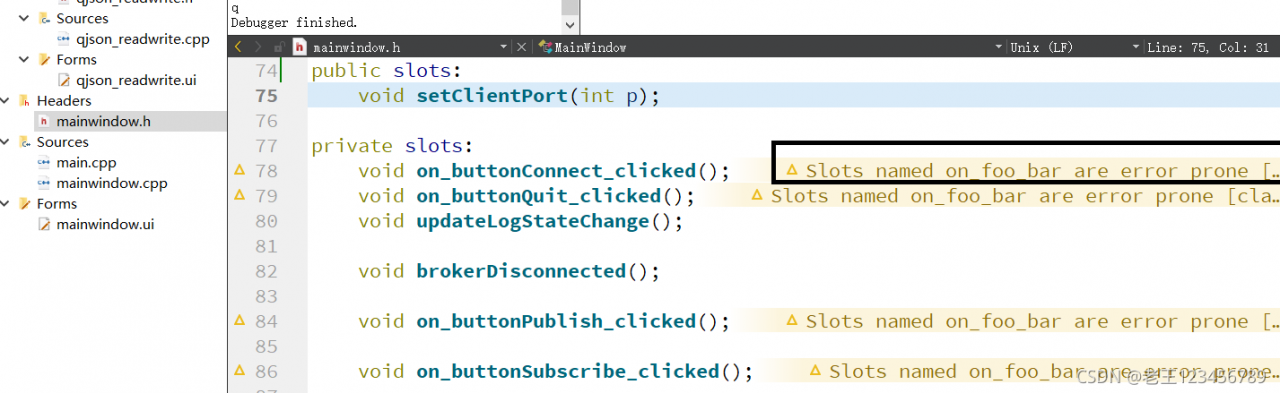
[Solved] QT Warning: Slots named on_foo_bar are error prone

Problem phenomenon:

Cause:
this warning appears because when processing the signal slot relationship, we use “go-to slot” in the UI designer to make the program generate automatically
the weakness of this automatic generation is that one day, you may change the name of the control in the UI designer, but the compilation will not report an error. The program still runs normally, and the compilation does not prompt errors
in this way, the control is equivalent to not being connected to the slot function and becomes invalid.

Recommended solution:
recommendation 1: do not automatically generate signal slot connection through “go to slot” of UI designer. The relationship can be established manually. For example:
connect (toolbutton, & QPushButton:: clicked,
this, & yourclassname:: nameofyourslot)
recommendation 1: ignore this warning and just ignore it. Because this is just a kind reminder.

Pytorch Loading model error: RuntimeError: Error(s) in loading state_dict for Model: Missing key(s) in state_dict

When the model is saved, it is saved with key pairs. At the same time, when loading, find the key value corresponding to the model according to the key value of the current network, and then load it. Generally, an error is reported because the key values of the model and the network do not match.

1. The most common problem is that there are too many key values or less module

In this case, the key value saved by the model after dataparallel or DDP training has module  , The key value of the corresponding network has no module

1) You can:

model = nn.DataParallel(model)

Add the key value of the model to module

2) You can also modify the key value by traversing the key pair value of the model.

For example, delete redundant modules when loading models   The code is as follows

state_dict = torch.load(load_path)
for key, param in state_dict.items():
    if key.startswith('module.'):        
        state_dict[key[7:]] = param          
        state_dict.pop(key)
net.load_state_dict(state_dict)
        

2. Explain load in detail_state_False parameter of dict (state_dict, false)

Many tutorials say that if the names do not match, you can directly add the false parameter, but you need to pay attention to a big pit here.

If the key value of the model does not match the key value of the network, the model will not load the pre training parameters, although no error will be reported.

The false parameter is used to the non-strict matching loading model can be analyzed in the following cases.

1) The model contains some parameters of the network

For example, the model is resnet101, and your current network is resnet50. Assuming that the parameter name of resnet50 is included in the parameters of resnet101, using false directly will load parameters with the same key value for your network resnet50. This avoids circular matching of each key pair value of resnet101 to see if it is required by resnet50.

2) The model does not contain the parameters of the network at all

As shown in case 1, the model has 100 parameters, all of which contain ‘module.’, and the network also has 100 parameters, all of which do not have ‘module.’. In this case, if the parameter is set to false, it will be found that no key-value can match, so the network will not load any parameters.

3) Introduce another false usage scenario

For example, in the distillation network pisr, the teacher network includes encoder and decoder, and the student network is composed of decoder. Therefore, when training the student network, if you want to load the pre-training model saved by the teacher network, setting false will automatically identify that the key values of the decoder are the same, and then load it.

To sum up, after setting the false parameter, the parameters are still loaded according to the key value. How many key values match, how many model parameters are loaded.

3. As long as the parameter size is the same, it can be loaded

For example, I have a 10 layer network model and a 3-layer network. I want to load the parameters of layer 9 into layer 1 of the current network. If the parameters have the same size, you can traverse the key pair values. Load the parameter into the desired key value.

state_dict = torch.load(load_path)
new_state_dict = []
for key, param in state_dict.items():
    if 'conv9' in key:        
        new_state_dict[key.replace('conv9', 'conv1')] = param   
net.load_state_dict(new_state_dict)

[Solved] Error: In the Function of ‘fmt::v8::detail::error_handler::on_error(char const*)’

1. Reasons

The FMT.H and related dynamic link files were not found

2. Solutions

Download FMT package, compile, install and call

git clone https://hub.fastgit.org/fmtlib/fmt.git
cd fmt
mkdir build
cmake ..
make
sudo make install

Called in the project cmakelists.txt

find_package(FMT REQUIRED)
target_link_libraries(Name of the executable file fmt::fmt)

How to Solve Keil Error: error: #29: expected an expression

About the solution of error: #29: expected an expression

Recently, a keil project was created, and an error occurred during compilation: #29: expected an expression

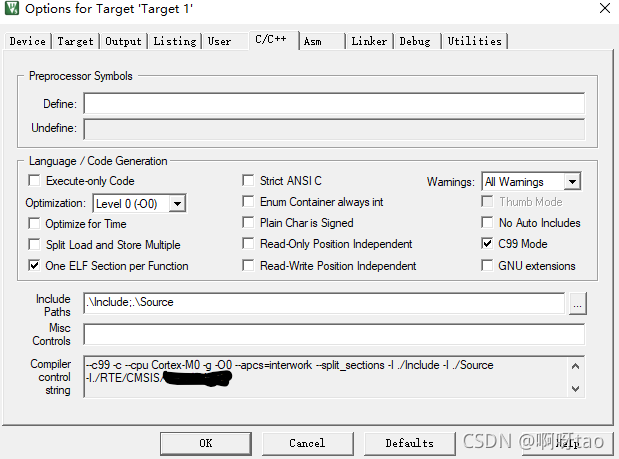
This problem is because keil MDK uses C90 by default. You need to modify the configuration to support C99 to solve this problem.

The specific solutions are as follows:

Magic Wand --> C/C++ --> Check 'C99 Mode' on the right to confirm  

Finally, recompile:

- 0 Error(s), 0 Warning(s).

CORS error has been blocked by CORS policy [How to Solve]

Problem description

The global request is intercepted through the axis of Vue. After adding the identify and token fields to the request header, the back-end zuul gateway is accessed. An error occurs in the browser, resulting in that the background cannot receive the custom header field of HTTP package and cannot authenticate the gateway well
the error is as follows:
access to XMLHttpRequest at‘ http://127.0.0.1:27000/api/v1/index -Infos’ from origin ‘http://’ has been blocked by CORS policy: request header field identification is not allowed by access control allow headers in preflight response.
network and console errors are as follows:

Error analysis

The background is cross-domain. An error occurs when a field is added to the header. In CORS, the options method will be used to initiate a pre-check request (generally, it will be automatically initiated when browsing detects that the request is cross-domain) to detect whether the actual request can be accepted by the server. The access control request method header field in the pre-check request message informs the server of the HTTP method used for the actual request
the access control request headers header field tells the server the custom header field carried by the actual request. The server determines whether to accept the next actual request based on the information obtained from the pre-check request. The access control allow methods header field returned by the server informs the client of all allowed request methods
to sum up, when the browser sends a request header with customization, the browser will first send an options pre-check request to the server to detect whether the server of the request allows customization of cross-domain fields. If yes, continue to execute the request. If not, an error message will be returned to prompt an error.

Solution:

Add the corresponding allow field in the cross domain request header and add your own custom field in the access control allow headers field. The request can be accessed. The interception code in zuul:

@Override
    public Object run() throws ZuulException {
        RequestContext ctx = RequestContext.getCurrentContext();
        HttpServletRequest request = ctx.getRequest();
        HttpServletResponse response = ctx.getResponse();

        response.setHeader("Access-Control-Allow-Origin",request.getHeader("Origin"));
        response.setHeader("Access-Control-Allow-Credentials","true");
        response.setHeader("Access-Control-Allow-Methods","GET, HEAD, POST, PUT, DELETE, OPTIONS, PATCH");
        response.setHeader("Access-Control-Allow-Headers","authorization, content-type,token,identify");
        response.setHeader("Access-Control-Expose-Headers","X-forwared-port, X-forwarded-host");
        response.setHeader("Vary","Origin,Access-Control-Request-Method,Access-Control-Request-Headers");

        if ("OPTIONS".equalsIgnoreCase(request.getMethod())){
            ctx.setSendZuulResponse(false); 
            ctx.setResponseStatusCode(HttpStatus.OK.value());
            ctx.set("isSuccess", true);
            return null;
        }
        ctx.setSendZuulResponse(true); 
        ctx.setResponseStatusCode(HttpStatus.OK.value());
        ctx.set("isSuccess", true);
        return null;
    }

Mac project startup error: logback configuration error detected

java.lang.illegalstateexception: logback configuration error detected:
when the company started the service, an error was reported, but there were no other problems at the same time. After checking for a long time, I checked the information on the Internet,
it was found that it was because I used a Mac computer. The path file configuration of the Mac computer was different from that of the window, and the MAC system, Log output location configured by logback. My computer does not have this path.

<property name="LOG_HOME" value="/Users/zero_/files/UNINETS-JAVA/Logs/log" />

Therefore, it is good to modify the location of the log path in the logback file configuration to its own path

Mapper.xml Error: Error setting non null for parameter #3 with JdbcType null.

Record the problems encountered in learning SSM framework 3
Exception Reporting
Message Request processing failed; nested exception is org.mybatis.spring.MyBatisSystemException: nested exception is org.apache.ibatis.type.TypeException: Could not set parameters for mapping: ParameterMapping{property=‘id’, mode=IN, javaType=class java.lang.Integer, jdbcType=null, numericScale=null, resultMapId=‘null’, jdbcTypeName=‘null’, expression=‘null’}. Cause: org.apache.ibatis.type.TypeException: Error setting non null for parameter #3 with JdbcType null . Try setting a different JdbcType for this parameter or a different configuration property. Cause: java.sql.SQLException: Parameter index out of range (3 > number of parameters, which is 2).
Description The server encountered an unexpected condition that prevented it from completing the request.
The problem occurs mainly in the mapper.xml file and can be due to several reasons.
1. two #’s are written together and will be identified incorrectly (my error)

<update id="updateById" parameterType="main.java.com.dy.domain.News">
        update news
        <set>
            <include refid="News_update"/>
        </set>
        where id=##{id}
    </update>

2. JavaEE comments appear inside/**/

<update id="updateById" parameterType="main.java.com.dy.domain.News">
        update news
        <set> /*  */
            <include refid="News_update"/>
        </set>
        where id=#{id}
    </update>

3. #{id} covered with quotation marks

<update id="updateById" parameterType="main.java.com.dy.domain.News">
        update news
        <set>
            <include refid="News_update"/>
        </set>
        where id='#{id}'
    </update>

All the above detailed errors may lead to errors in the execution of SQL statements, so we should be as careful as possible in the future development process.

Mysqlclient Error: ERROR: No matching distribution found for mysqlclient/OSError: mysql_config not found

Error: no matching distribution found for mysqlclient solution

Red hat/CentOS system

sudo yum install python3-devel mysql-devel

Debian/Ubuntu system

 sudo apt-get install python3-dev default-libmysqlclient-dev build-essential

Install mysqlclient

pip isntall mysqlclient

OSError: mysql_config not found Solution

  ERROR: Command errored out with exit status 1:
   command: /usr/local/python3/bin/python3.9 -c 'import io, os, sys, setuptools, tokenize; sys.argv[0] = '"'"'/tmp/pip-install-ubc4i40h/mysqlclient_b88fc9c0c9484503a326b0399e91838e/setup.py'"'"'; __file__='"'"'/tmp/pip-install-ubc4i40h/mysqlclient_b88fc9c0c9484503a326b0399e91838e/setup.py'"'"';f = getattr(tokenize, '"'"'open'"'"', open)(__file__) if os.path.exists(__file__) else io.StringIO('"'"'from setuptools import setup; setup()'"'"');code = f.read().replace('"'"'\r\n'"'"', '"'"'\n'"'"');f.close();exec(compile(code, __file__, '"'"'exec'"'"'))' egg_info --egg-base /tmp/pip-pip-egg-info-me3mh3fr
       cwd: /tmp/pip-install-ubc4i40h/mysqlclient_b88fc9c0c9484503a326b0399e91838e/
  Complete output (10 lines):
  /bin/sh: mysql_config: command not found
  Traceback (most recent call last):
    File "<string>", line 1, in <module>
    File "/tmp/pip-install-ubc4i40h/mysqlclient_b88fc9c0c9484503a326b0399e91838e/setup.py", line 17, in <module>
      metadata, options = get_config()
    File "/tmp/pip-install-ubc4i40h/mysqlclient_b88fc9c0c9484503a326b0399e91838e/setup_posix.py", line 47, in get_config
      libs = mysql_config("libs_r")
    File "/tmp/pip-install-ubc4i40h/mysqlclient_b88fc9c0c9484503a326b0399e91838e/setup_posix.py", line 29, in mysql_config
      raise EnvironmentError("%s not found" % (mysql_config.path,))
  OSError: mysql_config not found

Ubuntu system

sudo apt-get install libmysqlclient-dev

centOS7

yum install mysql-devel gcc gcc-devel python-deve

[Solved] PostgreSQL Error: ERROR: CURRENT TRANSACTION IS ABORTED, COMMANDS IGNORED UNTIL END OF TRANSA

Error occurred:

Current transaction is aborted, commands ignored until end of transaction block

analysis:

The transaction contains errors. When the DML is executed again, the transaction cannot proceed normally.

When automatic transaction submission is turned off in PG database, we often encounter such problems
error:   Current transaction is aborted, commands ignored until end of transaction block
the reason why this problem is caused is that
in the Postgres database, if an error occurs in a database operation in the same transaction, the database after the transaction will make an error
let’s take a very simple example
test = # select * from test1
ERROR:   relation “test1” does not exist
LINE 1: select * from test1;
^
time: 0.376 MS
at this time, because there is no operation error, all subsequent operations in this session will report
error:   Current transaction is aborted, commands ignored until end of transaction block
to solve this problem, we can only use rollback or commit
PG is not user-friendly
Solution:

1. Try connection.setautocommit (true); Cannot execute

2. Commit directly, execute the insert statement after submitting, and insert successfully.

Refer to the stackoverflow solution:

postgresql – PSQLException: current transaction is aborted, commands ignored until end of transaction block – Stack Overflow

Uncaught SyntaxError: Unexpected token o in JSON at position 1 [How to Solve]

JSON.parse(str); Error prompted during method execution;

The solution is very simple. Just pay attention to the format of STR parameter, which must be in the standard JSON string format

var str = '[{"code": "name", "name": "name"},{"code": "name1", "name": "name1"}]';

If the str value is passed through the background, be sure to confirm whether the format is correct