Author Archives: Robins

[Solved] flink Write Files Error: lang.NoClassDefFoundError: org/apache/flink/api/common/typeinfo/TypeInformation

1. An error is reported when using Flink to store parquet files

21/07/15 14:24:47 INFO checkpoint.CheckpointCoordinator: Triggering checkpoint 2 (type=CHECKPOINT) @ 1626330287296 for job 06a80360b770722f8dd3e41252a5a8d7.
21/07/15 14:24:47 INFO filesystem.Buckets: Subtask 2 checkpointing for checkpoint with id=2 (max part counter=0).
21/07/15 14:24:47 INFO filesystem.Buckets: Subtask 1 checkpointing for checkpoint with id=2 (max part counter=0).
21/07/15 14:24:47 INFO jobmaster.JobMaster: Trying to recover from a global failure.
org.apache.flink.util.FlinkRuntimeException: Exceeded checkpoint tolerable failure threshold.
	at org.apache.flink.runtime.checkpoint.CheckpointFailureManager.handleJobLevelCheckpointException(CheckpointFailureManager.java:66)
	at org.apache.flink.runtime.checkpoint.CheckpointCoordinator.abortPendingCheckpoint(CheckpointCoordinator.java:1739)
	at org.apache.flink.runtime.checkpoint.CheckpointCoordinator.abortPendingCheckpoint(CheckpointCoordinator.java:1716)
	at org.apache.flink.runtime.checkpoint.CheckpointCoordinator.access$600(CheckpointCoordinator.java:93)
	at org.apache.flink.runtime.checkpoint.CheckpointCoordinator$CheckpointCanceller.run(CheckpointCoordinator.java:1849)
	at java.util.concurrent.Executors$RunnableAdapter.call(Unknown Source)
	at java.util.concurrent.FutureTask.run(Unknown Source)
	at java.util.concurrent.ScheduledThreadPoolExecutor$ScheduledFutureTask.access$201(Unknown Source)
	at java.util.concurrent.ScheduledThreadPoolExecutor$ScheduledFutureTask.run(Unknown Source)
	at java.util.concurrent.ThreadPoolExecutor.runWorker(Unknown Source)
	at java.util.concurrent.ThreadPoolExecutor$Worker.run(Unknown Source)
	at java.lang.Thread.run(Unknown Source)

1). add checkpoint time
2). Look at the POM file version conflict of the flash parquet package. The parquet Avro version is 1.10.0 [the flash.version is 1.11.3]

<dependency>
    <groupId>org.apache.flink</groupId>
    <artifactId>flink-parquet_${scala.version}</artifactId>
    <version>${flink.version}</version>
</dependency>
<dependency>
    <groupId>org.apache.parquet</groupId>
    <artifactId>parquet-avro</artifactId>
    <version>1.10.0</version>
</dependency>

2. Flink applications rely on third-party packages

Solution: access Maven plug-in and pack fat

        <plugin>
            <artifactId>maven-assembly-plugin</artifactId>
            <version>3.1.0</version>
            <configuration>
                <descriptorRefs>
                    <descriptorRef>jar-with-dependencies</descriptorRef>
                </descriptorRefs>
            </configuration>
            <executions>
                <execution>
                    <id>make-assembly</id>
                    <phase>package</phase>
                    <goals>
                        <goal>single</goal>
                    </goals>
                </execution>
            </executions>
        </plugin>

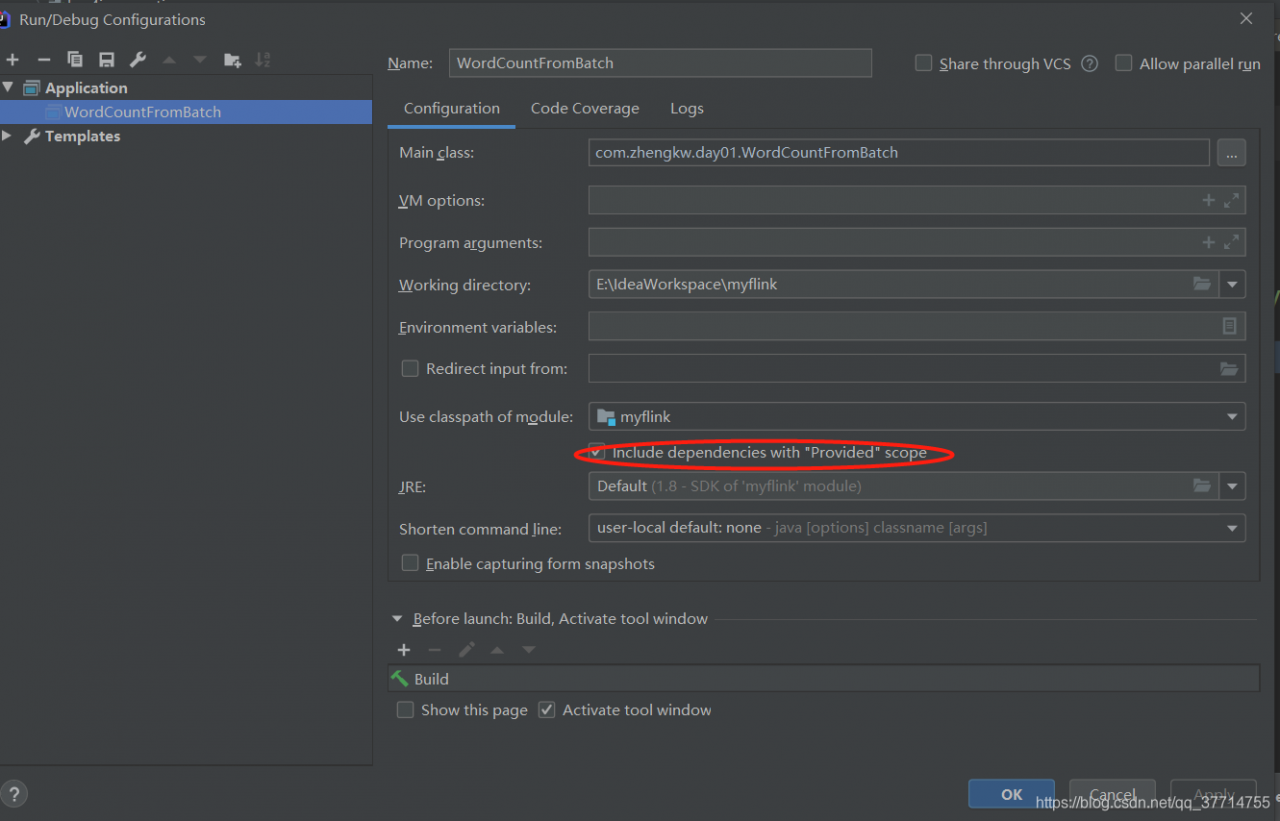
Add provided to unnecessary jar packages

The above provided will cause the following errors

Exception in thread "main" java.lang.NoClassDefFoundError: org/apache/flink/api/common/typeinfo/TypeInformation
	at com.zhangwen.bigdata.qy.logs.writer.LogToOssParquetWriterLogRecord.main(LogToOssParquetWriterLogRecord.scala)
Caused by: java.lang.ClassNotFoundException: org.apache.flink.api.common.typeinfo.TypeInformation
	at java.net.URLClassLoader.findClass(Unknown Source)
	at java.lang.ClassLoader.loadClass(Unknown Source)
	at sun.misc.Launcher$AppClassLoader.loadClass(Unknown Source)
	at java.lang.ClassLoader.loadClass(Unknown Source)
	... 1 more

Solution:
在这里插入图片描述

3. The Flink program runs normally locally, and the submitted cluster message: java.lang.nosuchmethoderror: org.apache.parquet.hadoop.parquetwriter $builder. (lorg/Apache/parquet/Io/outputFile;) v

Cause of the problem: the version of parquet Mr related jar package referenced in Flink is inconsistent with that in CDH, resulting in nosucjmethoderror
solution: recompile parquet Avro, parquet common, parquet column, parquet Hadoop, parquet format and Flink parquet through Maven shade plugin, and put them into ${flink_home}\Lib\Directory:

Add the following configuration files to pom.xml of parquet Avro, parquet common, parquet column and parquet Hadoop

<pre><code class="xml">
 <plugin>
        <groupId>org.apache.maven.plugins</groupId>
        <artifactId>maven-shade-plugin</artifactId>
        <version>3.2.4</version>
        <executions>
          <execution>
            <phase>package</phase>
            <goals>
              <goal>shade</goal>
            </goals>
            <configuration>
              <shadedArtifactAttached>true</shadedArtifactAttached>
              <!--This indicates that the generated shade package What is its suffix name, through this suffix name, in the reference of the time, there will be no reference to the shade package situation. -->
              <shadedClassifierName>shade</shadedClassifierName>
              <relocations>
                <relocation>
                  <! -- Source package name -->
                  <pattern>org.apache.parquet</pattern>
                  <! -- destination package name -->
                  <shadedPattern>shaded.org.apache.parquet</shadedPattern>
                </relocation>
              </relocations>

            </configuration>
          </execution>
        </executions>
      </plugin>

</code></pre>

Modify parquet format as follows

<pre><code class="xml">
  <plugin>
        <groupId>org.apache.maven.plugins</groupId>
        <artifactId>maven-shade-plugin</artifactId>
        <version>2.2</version>
        <executions>
          <execution>
            <phase>package</phase>
            <goals>
              <goal>shade</goal>
            </goals>
            <configuration>
              <artifactSet>
                <includes>
                  <include>org.apache.thrift:libthrift</include>
                </includes>
              </artifactSet>
              <filters>
                <filter>
                  <!-- Sigh. The Thrift jar contains its source -->
                  <artifact>org.apache.thrift:libthrift</artifact>
                  <excludes>
                    <exclude>**/*.java</exclude>
                    <exclude>META-INF/LICENSE.txt</exclude>
                    <exclude>META-INF/NOTICE.txt</exclude>
                  </excludes>
                </filter>
              </filters>
              <relocations>
                <relocation>
                  <pattern>org.apache.thrift</pattern>
                  <shadedPattern>${shade.prefix}.org.apache.thrift</shadedPattern>
                </relocation>
				 <relocation>
                  <pattern>org.apache.parquet</pattern>
                  <shadedPattern>shaded.org.apache.parquet</shadedPattern>
                </relocation>
              </relocations>
            </configuration>
          </execution>
        </executions>
      </plugin>
</code></pre>

The Flink parquet pom.xml is modified as follows

<pre><code class="xml">
	                           <plugin>
			                <groupId>org.apache.maven.plugins</groupId>
			                <artifactId>maven-shade-plugin</artifactId>
			                <version>3.2.4</version>
			                <executions>
			                    <execution>
			                        <phase>package</phase>
			                        <goals>
			                            <goal>shade</goal>
			                        </goals>
			                        <configuration>
			                            <shadedArtifactAttached>true</shadedArtifactAttached>
			                            <!--This indicates that the generated shade package What is its suffix name, through this suffix name, in the reference of the time, there will be no reference to the shade package situation. -->
			                            <shadedClassifierName>shade</shadedClassifierName>
                                                    <! 
                                                    <artifactSet>
                                                      <includes>
                                                        <include>org.apache.flink:flink-formats</include>
                                                      </includes>
                                                    </artifactSet>
			                            <relocations>
			                                <relocation>
			                                    <! -- Source package name -->
			                                    <pattern>org.apache.flink.formats.parquet</pattern>
			                                    <! -- destination package name -->
			                                    <shadedPattern>shaded.org.apache.flink.formats.parquet</shadedPattern>
			                                </relocation>
											<relocation>
												<!-- package name -->
												<pattern>org.apache.parquet</pattern>
												<!-- destination package name -->
												<shadedPattern>shaded.org.apache.parquet</shadedPattern>
											</relocation>
			                            </relocations>

			                        </configuration>
			                    </execution>
			                </executions>
			            </plugin>

</code></pre>

You need to install the jar package locally before the idea can reference it

mvn install:install-file -DgroupId=shade.org.apache.parquet -DartifactId=parquet-common -Dversion=1.10.2-SNAPSHOT -Dpackaging=jar -Dfile=E:\software\install\maven\repo\org\apache\parquet\parquet-common\1.10.2-SNAPSHOT\parquet-common-1.10.2-SNAPSHOT-shade.jar


mvn install:install-file -DgroupId=shade.org.apache.parquet -DartifactId=parquet-avro -Dversion=1.10.2-SNAPSHOT -Dpackaging=jar -Dfile=E:\software\install\maven\repo\org\apache\parquet\parquet-avro\1.10.2-SNAPSHOT\parquet-avro-1.10.2-SNAPSHOT-shade.jar


mvn install:install-file -DgroupId=shade.org.apache.parquet -DartifactId=parquet-column -Dversion=1.10.2-SNAPSHOT -Dpackaging=jar -Dfile=E:\software\install\maven\repo\org\apache\parquet\parquet-column\1.10.2-SNAPSHOT\parquet-column-1.10.2-SNAPSHOT-shade.jar


mvn install:install-file -DgroupId=shade.org.apache.parquet -DartifactId=parquet-hadoop -Dversion=1.10.2-SNAPSHOT -Dpackaging=jar -Dfile=E:\software\install\maven\repo\org\apache\parquet\parquet-hadoop\1.10.2-SNAPSHOT\parquet-hadoop-1.10.2-SNAPSHOT-shade.jar


mvn install:install-file -DgroupId=shade.org.apache.flink -DartifactId=flink-formats -Dversion=1.11.3-shade -Dpackaging=jar -Dfile=D:\work\github\flink\flink-1.11.3-src\flink-1.11.3\flink-formats\flink-parquet\target\flink-parquet_2.11-1.11.3-shade.jar


mvn install:install-file -DgroupId=shade.org.apache.parquet -DartifactId=parquet-format -Dversion=1.10.2-SNAPSHOT -Dpackaging=jar -Dfile=E:\lib\parquet-format-2.4.0.jar

Change the flash application pom.xml to

<pre>
     <dependency>
            <groupId>shade.org.apache.flink</groupId>
            <artifactId>flink-formats</artifactId>
            <version>1.11.3-shade</version>
            <scope>provided</scope>
        </dependency>
        <dependency>
            <groupId>shade.org.apache.parquet</groupId>
            <artifactId>parquet-avro</artifactId>
            <version>1.10.2-SNAPSHOT</version>
            <scope>provided</scope>
        </dependency>

        <dependency>
            <groupId>shade.org.apache.parquet</groupId>
            <artifactId>parquet-common</artifactId>
            <version>1.10.2-SNAPSHOT</version>
            <scope>provided</scope>
        </dependency>


        <!-- https://mvnrepository.com/artifact/org.apache.parquet/parquet-hadoop -->
        <dependency>
            <groupId>shade.org.apache.parquet</groupId>
            <artifactId>parquet-hadoop</artifactId>
            <version>1.10.2-SNAPSHOT</version>
            <scope>provided</scope>
        </dependency>
</pre>

The imported package name of the flick application is changed to:


import shaded.org.apache.flink.formats.parquet.{ParquetBuilder, ParquetWriterFactory}
import shaded.org.apache.parquet.avro.AvroParquetWriter
import shaded.org.apache.parquet.hadoop.ParquetWriter
import shaded.org.apache.parquet.hadoop.metadata.CompressionCodecName
import shaded.org.apache.parquet.io.OutputFile

Finally, you need to put the jar package into ${flink_home}\lib

Vue init webpack Error: unable to verify the first certificate

When initializing the webpack project with Vue cli, use the following commands:

$ vue init webpack [project-name]

After setting up the agent of NPM and modifying the domestic image warehouse, an error is still reported. The error information is as follows:

$ vue-cli · Failed to download repo vuejs-templates/webpack: unable to verify the first certificate

According to the information, the reason for this problem is that we use the proxy server, so Vue cli cannot verify the proxy server certificate when downloading the webpack template, so this error is reported
to solve this error, one way is to turn off the verification of SSL certificates. However, this method is not valid for everyone, and the following method is only used when your proxy server is trusted:

$ npm config set npm_config_strict_ssl=false

If this method doesn’t work, another way is to use the offline method to initialize the Vue project.

Clone the webpack template project to the local C:\users [username]. Vue Templates folder. If there is no such folder, create one. The folder starting with. Cannot be created in windows. You can use CMD or PowerShell to switch to the C:\users [username]\directory and enter the following command to create the folder:

$ mkdir .vue-templates

The download address of the webpack template is: vuejs templates. Select the required template to clone. I select the complete webpack template here. You can clone the project to the folder we created in the previous step through the following command (provided that git Bash is installed):

$ git clone https://github.com/vuejs-templates/webpack ~/.vue-templates/webpack
    1. If Git is not installed, you can also directly download the project in the form of zip on the GitHub and extract it into. Vue templates. Generally speaking, if the clone speed of Git is too slow, you can also directly download and extract the zip in step 3 in addition to setting the agent… Rerun the command of Vue to initialize the project. Note that the offline mode is
$ vue init webpack [project-name] --offline
$ cd [prject-name]
$ npm run dev

[Solved] python Error: GuessedAtParserWarning: No parser was explicitly specified

f:\py\verification.py:148: GuessedAtParserWarning: No parser was explicitly specified, so I'm using the best available HTML parser for this system ("lxml"). This usually isn't a problem, but if you run this code on another system, or in a different virtual environment, it may use a different parser and behave differently.

The code that caused this warning is on line 148 of the file f:\py\verification.py. To get rid of this
warning, pass the additional argument 'features="lxml"' to the BeautifulSoup constructor.

It can operate normally, but an error message is prompted on the output console

soup = BeautifulSoup(response, ‘html’)

add: Features = "lxml" is fine

soup = BeautifulSoup(response, features="lxml")

[Solved] Caused by: com.mysql.cj.exceptions.InvalidConnectionAttributeException

Caused by: com.mysql.cj.exceptions.InvalidConnectionAttributeException Error Messages:

Caused by: com.mysql.cj.exceptions.InvalidConnectionAttributeException: The server time zone value 'Öйú±ê׼ʱ¼ä' is unrecognized or represents more than one time zone. You must configure either the server or JDBC driver (via the serverTimezone configuration property) to use a more specifc time zone value if you want to utilize time zone support.
	at sun.reflect.GeneratedConstructorAccessor28.newInstance(Unknown Source) ~[na:na]
	at sun.reflect.DelegatingConstructorAccessorImpl.newInstance(DelegatingConstructorAccessorImpl.java:45) ~[na:1.8.0_144]
	at java.lang.reflect.Constructor.newInstance(Constructor.java:423) ~[na:1.8.0_144]
	at com.mysql.cj.exceptions.ExceptionFactory.createException(ExceptionFactory.java:61) ~[mysql-connector-java-8.0.13.jar:8.0.13]
	at com.mysql.cj.exceptions.ExceptionFactory.createException(ExceptionFactory.java:85) ~[mysql-connector-java-8.0.13.jar:8.0.13]
	at com.mysql.cj.util.TimeUtil.getCanonicalTimezone(TimeUtil.java:132) ~[mysql-connector-java-8.0.13.jar:8.0.13]
	at com.mysql.cj.protocol.a.NativeProtocol.configureTimezone(NativeProtocol.java:2234) ~[mysql-connector-java-8.0.13.jar:8.0.13]
	at com.mysql.cj.protocol.a.NativeProtocol.initServerSession(NativeProtocol.java:2258) ~[mysql-connector-java-8.0.13.jar:8.0.13]
	at com.mysql.cj.jdbc.ConnectionImpl.initializePropsFromServer(ConnectionImpl.java:1319) ~[mysql-connector-java-8.0.13.jar:8.0.13]
	at com.mysql.cj.jdbc.ConnectionImpl.connectOneTryOnly(ConnectionImpl.java:966) ~[mysql-connector-java-8.0.13.jar:8.0.13]
	at com.mysql.cj.jdbc.ConnectionImpl.createNewIO(ConnectionImpl.java:825) ~[mysql-connector-java-8.0.13.jar:8.0.13]
	... 9 common frames omitted

In fact, this error message is to use version 5.1.33 of MySQL JDBC Driver with UTC time zone. Servertimezone must be explicitly specified in the connection string.

Properties configuration file before modification:

server.port=8080

#jdbc
spring.datasource.driver-class-name=com.mysql.cj.jdbc.Driver
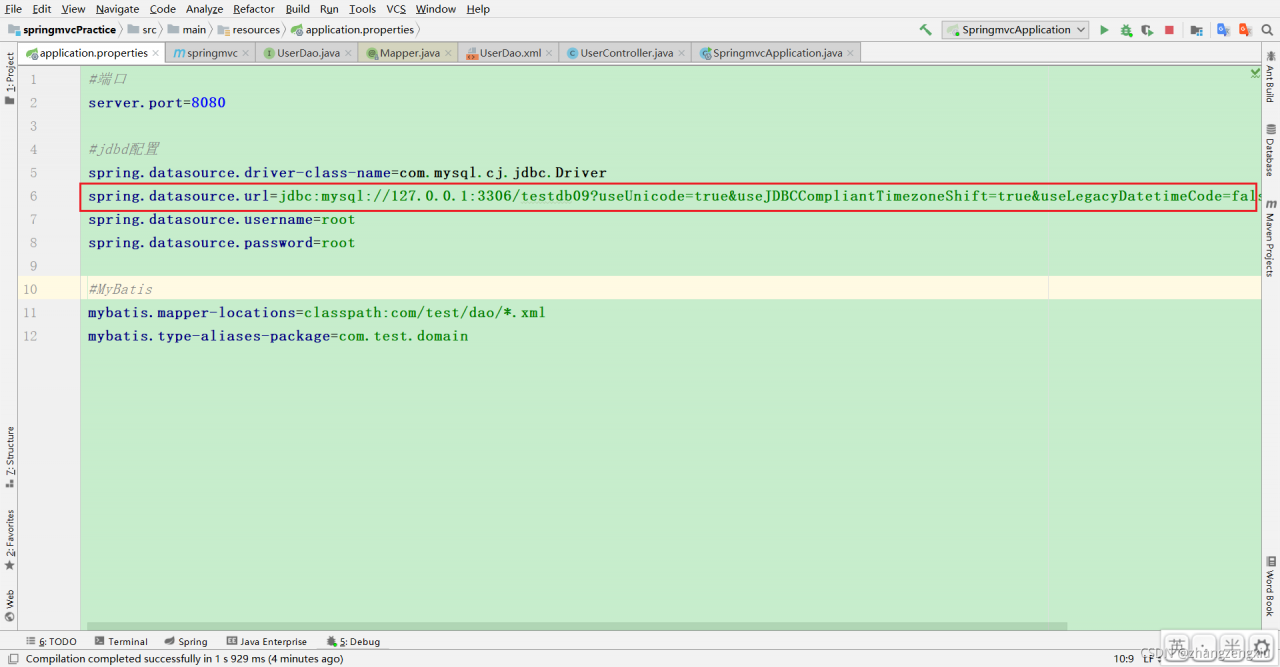
spring.datasource.url=jdbc:mysql://127.0.0.1:3306/testdb09
spring.datasource.username=root
spring.datasource.password=root

#MyBatis
mybatis.mapper-locations=classpath:com/test/dao/*.xml
mybatis.type-aliases-package=com.test.domain

After modification

server.port=8080

#jdbc
spring.datasource.driver-class-name=com.mysql.cj.jdbc.Driver
spring.datasource.url=jdbc:mysql://127.0.0.1:3306/testdb09?useUnicode=true&useJDBCCompliantTimezoneShift=true&useLegacyDatetimeCode=false&serverTimezone=UTC
spring.datasource.username=root
spring.datasource.password=root

#MyBatis
mybatis.mapper-locations=classpath:com/test/dao/*.xml
mybatis.type-aliases-package=com.test.domain

Modify:

[Solved] MySQL Startup Error: The server quit without updating PID file

Specific reports are as follows:
Starting MySQL
. Error! The server quit without updating PID file (/opt/homebrew/was/mysql/QdeMacBook-Pro.local.pid).

Resolution programme:

linux:
sudo chmod -R 777 /usr/local/var/mysql/

Start:
systemctl restart mysqld

Mac: homebrew installed.

chmod -R 777 /opt/homebrew/was/mysql

Start:
sudo mysql.server restart

Error! MySQL server PID file could not be found!
Starting MySQL
SUCCESS!

[Solved] Android Studio Error: Use of undeclared identifier ‘cv‘

Problem description

This error occurs when I use the opencv3.4.16 official so file in Android studio

Sort by Pvalue from smallest to largest

Change the build.gradle file

Change arguments “- dandroid_stl = C + + _shared”
to arguments “- dandroid_stl = gnustl_shared”

Possible causes:

Opencv3.4.16 officially uses the gun compiler, so it is specified as gnustl_shared

[Solved] R Language Error: duplicate ‘row.names’ are not allowed

This is because the R language default behavior is a unique identifier

Duplicate lines need to be removed

This is very common in differential expression, because different IDs may correspond to the same gene_ symbol

genes_sig <- res_sig %>% 
  arrange(adj.P.Val) %>% #Sort by Pvalue from smallest to largest
  as tibble() %>%
  column_to_rownames(var = "gene_symbol")

report errors

Error in `.rowNamesDF<-`(x, value = value) : 
  duplicate 'row.names' are not allowed
In addition: Warning message:
non-unique values when setting 'row.names': ‘’, ‘ AMY2A ’, ‘ ANKRD20A3 ’, ‘ ANXA8 ’, ‘ AQP12B ’, ‘ AREG ’, ‘ ARHGDIG ’, ‘ CLIC1 ’, ‘ CTRB2 ’, ‘ DPCR1 ’, ‘ FAM72B ’, ‘ FCGR3A ’, ‘ FER1L4 ’, ‘ HBA2 ’, ‘ HIST1H4I ’, ‘ HIST2H2AA4 ’, ‘ KRT17P2 ’, ‘ KRT6A ’, ‘ LOC101059935 ’, ‘ MRC1 ’, ‘ MT-TD ’, ‘ MT-TV ’, ‘ NPR3 ’, ‘ NRP2 ’, ‘ PGA3 ’, ‘ PRSS2 ’, ‘ REEP3 ’, ‘ RNU6-776P ’, ‘ SFTA2 ’, ‘ SLC44A4 ’, ‘ SNORD116-3 ’, ‘ SNORD116-5 ’, ‘ SORBS2 ’, ‘ TNXB ’, ‘ TRIM31 ’, ‘ UGT2B15 ’ 

Try to use the duplicated() function

res_df = res_df[!duplicated(res_df),] %>% as.tibble() %>%
column_to_rownames(var = "gene_symbol") 

Still not?Duplicated removing duplicate values still shows that duplicate values exist

Error in `.rowNamesDF<-`(x, value = value) : 
  duplicate 'row.names' are not allowed
In addition: Warning message:
non-unique values when setting 'row.names': ‘ AMY2A ’, ‘ ANKRD20A3 ’, ‘ ANXA8 ’, ‘ AQP12B ’, ‘ AREG ’, ‘ ARHGDIG ’, ‘ CLIC1 ’, ‘ CTRB2 ’, ‘ DPCR1 ’, ‘ FAM72B ’, ‘ FCGR3A ’, ‘ FER1L4 ’, ‘ HIST1H4I ’, ‘ HIST2H2AA4 ’, ‘ KRT17P2 ’, ‘ KRT6A ’, ‘ LOC101059935 ’, ‘ MT-TD ’, ‘ MT-TV ’, ‘ NPR3 ’, ‘ NRP2 ’, ‘ PGA3 ’, ‘ PRSS2 ’, ‘ REEP3 ’, ‘ RNU6-776P ’, ‘ SFTA2 ’, ‘ SORBS2 ’, ‘ TRIM31 ’, ‘ UGT2B15 ’ 

Another way is to use the uniqe function of the dyplr package

res_df = res_df %>% distinct(gene_symbol,.keep_all = T) %>% as.tibble() %>%
  column_to_rownames(var = "gene_symbol") 

Successfully solved

[Solved] MySql Error: unblock with ‘mysqladmin flush-hosts

Information troubleshooting

# Check the maximum number of connection errors
show global variables like 'max_connect_errors';

# Check the connection IP
select * from performance_schema.host_cache

 # Flush the database IP cache 
flush hosts


 # View connections
SELECT substring_index(host, ':',1) AS host_name, state, count(*) FROM information_schema.processlist GROUP BY state, host_name;

Solution: enter the database and use the admin permission account

1. Set the value of the variable max_connection_errors to a larger value

set global max_connect_errors=1500;


2. Execute the command to use flush hosts


3、Change the value of the system variable so that MySQL server does not record host cache information (not recommended) e.g. set global host_cache_size=0;

[Solved] RecursionError: maximum recursion depth exceeded in comparison

It is found that the default recursion depth of Python is very limited (the default is 1000), so when the recursion depth exceeds 999, such an exception will be thrown.

Solution:

You can modify the value of recursion depth to make it larger

import sys

Sys.setrecursionlimit (100000) # for example, it is set to 100000 here

be careful:

This solution is not the root cause, but also needs to be optimized in the code.

[Solved] Mac Maven Command Error: zsh: command not found

The MVN command cannot be found under Zsh
If Maven is configured, you must execute source ~ /.Bash every time the terminal executes the MVN command_ Profile to take effect. This is because when Zsh is installed on the Mac,. The configuration of the Bash_profile file cannot take effect. The solution is:

vi ~/.zshrc

Add the following command at the end of the file:

source ~/.bash_profile
then
esc  :wq

Update document:

source ~/.zshrc

In this way, when Zsh starts, it will read. Bash_ The contents of the profile file and make it effective
configure Maven environment variables under Zsh
there are three places on the MAC where you can set environment variables:

/Etc/Profile: system global variable, which loads the configuration of the file upon system startup (not recommended)
/etc/bashrc: all types of bash shells will read the configuration of the file
~ /.Bash_Profile: configure user level environment variables and create them in the system user folder. When a user logs in, the file will be executed only once

export PATH=/usr/local/bin:/usr/bin:/bin:/usr/sbin:/sbin
export PATH=${PATH}:/usr/local/mysql/bin

export JAVA_HOME=/Library/Java/JavaVirtualMachines/jdk1.8.0_131.jdk/Contents/Home/
export PATH=$PATH:$JAVA_HOME/bin
export CLASSPATH=.:$JAVA_HOME/lib/dt.jar:$JAVA_HOME/lib/tools.jar

export PATH=$PATH:/usr/local/maven/apache-maven-3.5.0/bin

export CATALINA_HOME=/usr/local/tomcat/apache-tomcat-7.0.77
export PATH=$PATH:/CATALINA_HOME/bin

alias ll='ls -alF'
alias la='ls -A' 
alias l='ls -CF'

Then experiment

mvn -v 
Apache Maven 3.8.4 (9b656c72d54e5bacbed989b64718c159fe39b537)
Maven home: /Users/yaoyonghao/Documents/software/apache-maven-3.8.4
Java version: 1.8.0_212, vendor: Oracle Corporation, runtime: /Library/Internet Plug-Ins/JavaAppletPlugin.plugin/Contents/Home
Default locale: zh_CN, platform encoding: UTF-8
OS name: "mac os x", version: "10.16", arch: "x86_64", family: "mac"

[Solved] Hive execute insert overwrite error: could not be cleared up

Problem description

    1. User Zhangsan executes insert overwrite:
INSERT OVERWRITE table temp.push_temp PARTITION(d_layer='app_video_uid_d_1')
SELECT ...

Could not be cleaned up:

Failed with exception Directory hdfs://Ucluster/user/hive/warehouse/temp.db/push_temp/d_layer=app_video_uid_d_1 could not be cleaned up.
FAILED: Execution Error, return code 1 from org.apache.hadoop.hive.ql.exec.MoveTask. Directory hdfs://Ucluster/user/hive/warehouse/temp.db/push_temp/d_layer=app_video_uid_d_1 could not be cleaned up.
      1. check the HDFS directory permissions and find that the directory is writable by everyone, and the directory owner is Lisi:
drwxrwxrwt   - lisi supergroup          0 2021-11-29 15:04 /user/hive/warehouse/temp.db/push_temp/d_layer=app_video_uid_d_1
        1. the user Lisi executes step 1. The SQL in step 1 can execute  successfully

Cause of problem

Three words – viscous bit
look carefully at the directory permissions above. The last bit is “t”, which means that the sticky bit is enabled for the directory, that is, only the owner of the directory can delete files under the directory

# Non-owner delete sticky bit files
$ hadoop fs -rm /user/hive/warehouse/temp.db/push_temp/d_layer=app_video_uid_d_1/000000_0
21/11/29 16:32:59 INFO fs.TrashPolicyDefault: Namenode trash configuration: Deletion interval = 7320 minutes, Emptier interval = 0 minutes.
rm: Failed to move to trash: hdfs://Ucluster/user/hive/warehouse/temp.db/push_temp/d_layer=app_video_uid_d_1/000000_0: Permission denied by sticky bit setting: user=admin, inode=000000_0

Because insert overwrite needs to delete the original file in the directory, but it cannot be deleted due to sticky bits, resulting in HQL execution failure

Solution

Cancel the sticky bit of the directory

# Cancellation of sticking position
hadoop fs -chmod -R o-t /user/hive/warehouse/temp.db/push_temp/d_layer=app_video_uid_d_1

# Open sticking position
hadoop fs -chmod -R o+t /user/hive/warehouse/temp.db/push_temp/d_layer=app_video_uid_d_1