Author Archives: Robins

DB2 detects a syntax error in the DRDA data stream: 0x3 ERRORCODE= -4499, SQLSTATE=58009

DB2 reports an error and detects a syntax error in the DRDA data stream Reason: 0x3 ERRORCODE= -4499, SQLSTATE=58009

[16:48:43] RMI TCP Connection(3)-127.0.0.1 ERROR  [] [] [com.alibaba.druid.pool.DruidDataSource] - 
dataSource init errorcom.ibm.db2.jcc.am.DisconnectNonTransientException: 
 [jcc][4][2034]11148][4.26.14] conversation was released due to a distribution protocol error.
thus causing the execution to fail. Cause: 0x3. ERRORCODE= -4499, SQLSTATE=58009
	at com.ibm.db2.jcc.am.b6.a(b6.java:340)
	at com.ibm.db2.jcc.am.b6.a(b6.java:463)
	at com.ibm.db2.jcc.t4.y.j(y.java:1016)
	at com.ibm.db2.jcc.t4.y.c(y.java:472)
	at com.ibm.db2.jcc.t4.y.v(y.java:1219)
	at com.ibm.db2.jcc.t4.z.a(z.java:53)
	at com.ibm.db2.jcc.t4.b.c(b.java:1410)
	at com.ibm.db2.jcc.t4.b.b(b.java:1282)
	at com.ibm.db2.jcc.t4.b.b(b.java:833)
	at com.ibm.db2.jcc.t4.b.a(b.java:804)
	at com.ibm.db2.jcc.t4.b.a(b.java:441)
	at com.ibm.db2.jcc.t4.b.a(b.java:414)
	at com.ibm.db2.jcc.t4.b.<init>(b.java:352)
	at com.ibm.db2.jcc.DB2SimpleDataSource.getConnection(DB2SimpleDataSource.java:233)
	at com.ibm.db2.jcc.DB2SimpleDataSource.getConnection(DB2SimpleDataSource.java:200)
	at com.ibm.db2.jcc.DB2Driver.connect(DB2Driver.java:471)
	at com.ibm.db2.jcc.DB2Driver.connect(DB2Driver.java:113)

Solution:

url ip can not use 127.0.0.1 and localhost; jdbc.url=jdbc:db2://localhost:50000/test ip can be changed to the real ip jdbc.url=jdbc:db2://192.168.xxx.xxx:50000/test
blackduck Error: Request failed authorization [HTTP Error]: XXX, response was 403 Forbidden.

Question:

15:03:23 2022-02-14 15:03:23 CST ERROR [main] --- Failed to upload code location: xxx/bom
15:03:23 2022-02-14 15:03:23 CST ERROR [main] --- Reason: Request failed authorization [HTTP Error]: There was a problem trying to POST https://xxx.com/api/scan/data/, response was 403 Forbidden.
15:03:23 2022-02-14 15:03:23 CST ERROR [main] --- An error occurred uploading a bdio file.
15:03:23 2022-02-14 15:03:23 CST ERROR [main] --- There was a problem: An error occurred uploading a bdio file.
15:03:23 2022-02-14 15:03:23 CST ERROR [main] --- Detect run failed: There was a problem:  An error occurred uploading a bdio file.
15:03:23 2022-02-14 15:03:23 CST ERROR [main] --- There was a problem:  An error occurred uploading a bdio file.

ROOT CAUSE:
The project-owner is not a role in Blackduck, but an external reference to a project.

SOLUTION:

SOLUTION:

Found that this is due to the user/project roles assigned to the user.
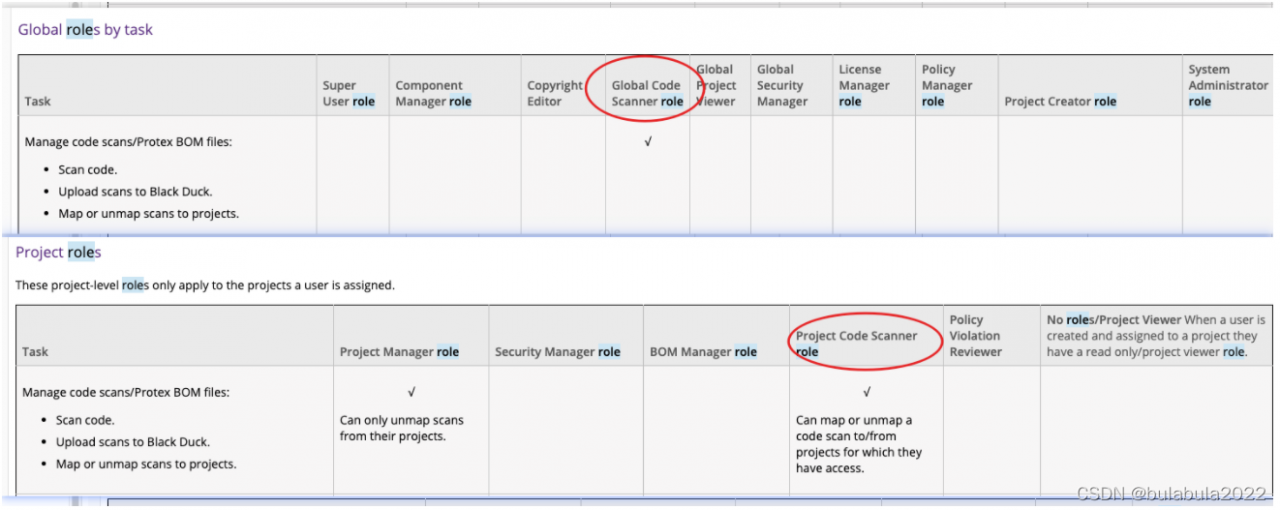
User had Project Code Scanner assigned under the specific project but this role does not allow you to create new projects (only project versions).
User must have Global Code Scanner assigned in order to create new projects within Black Duck while scanning.
OR

User can have Project Creator role assigned but needs to be assigned to the specific project in order to run scans against the new project.
OR
Ensure if user is already part of a group that has the correct above persmissions they are not running the following property as will also give 403 , because group already exists: ‘ detect.project.user.groups=blackduck.xxxx ‘ – Removing property will allow scan to run.

OR

To upload the scans using Detect, Global Code Scanner role (global scope) or Project Code Scanner role (project scope) needed to be set to the user, from who the token was generated and used in Detect CLI.

Please refer to the attached screenshot and role matrix doc part in Blackduck user guide (/doc/Welcome.htm#users_and_groups/rolematrix.htm)


NOTE:
Please ensure the user is the BOM manager of the project this will also prevent failure.
Product
Black Duck/Black Duck Hub

[Solved] QT Error: error: undefined reference to `GameModel::~GameModel()’

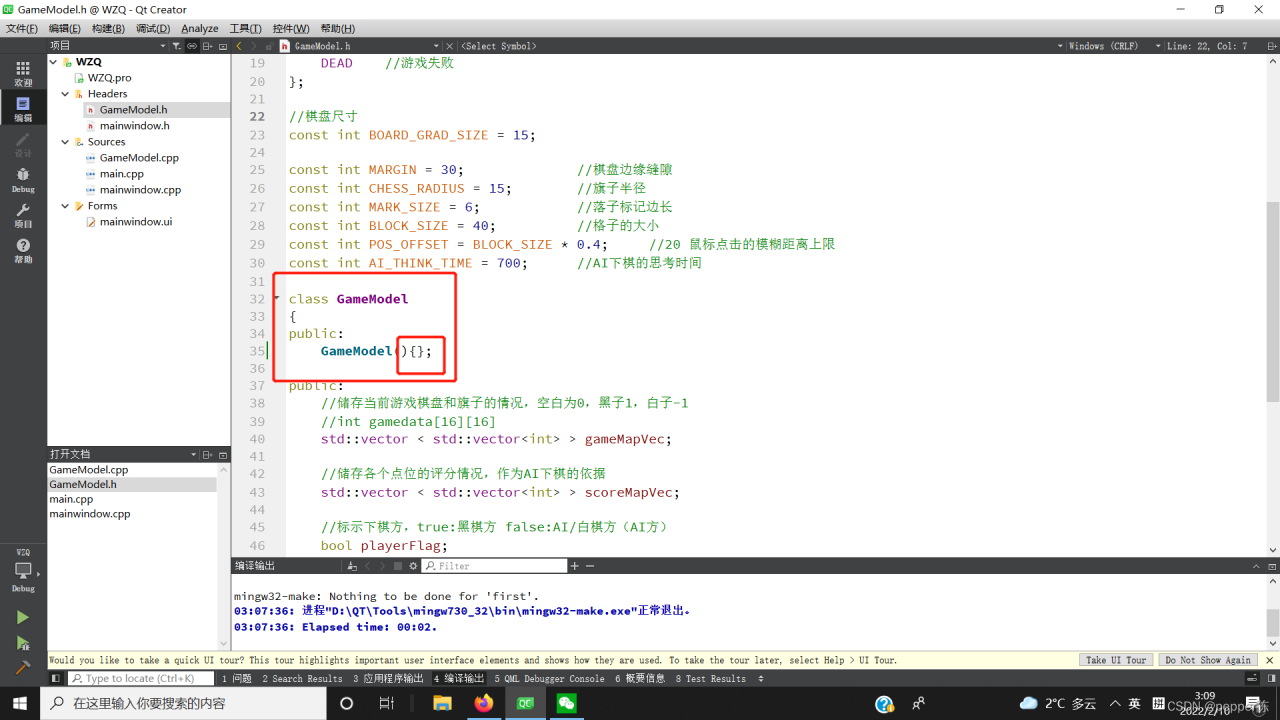
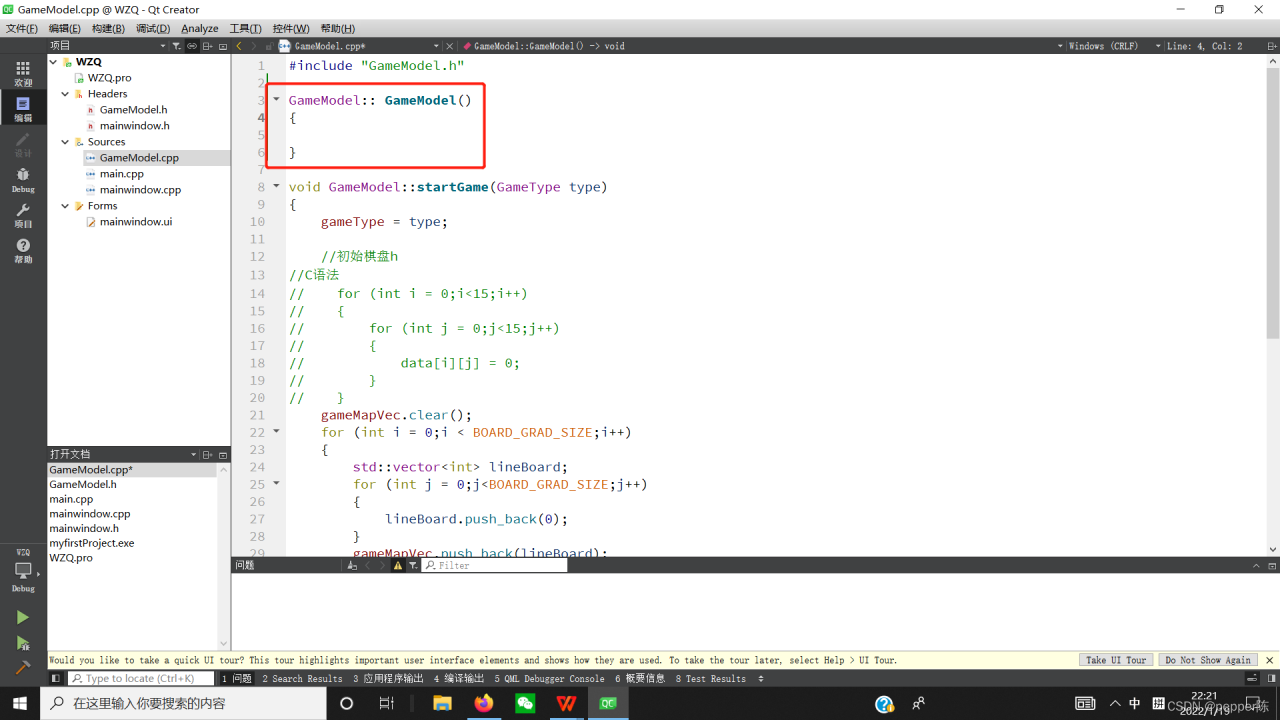
When compiling Qt program, error: undefined reference to `GameModel::~GameModel()’ is reported.
This is because Qt does not automatically generate the class destructor, so we need to write it ourselves, even if it is an empty function. After we write GameModel::~GameModel() by hand, the problem disappears when we compile it again.

There are two ways to write destructors:
Method 1:
in .cpp file:

Method 2:
in .h file.
in Destructor of

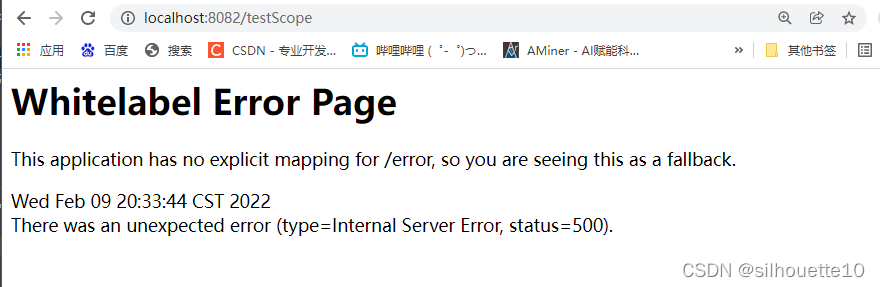
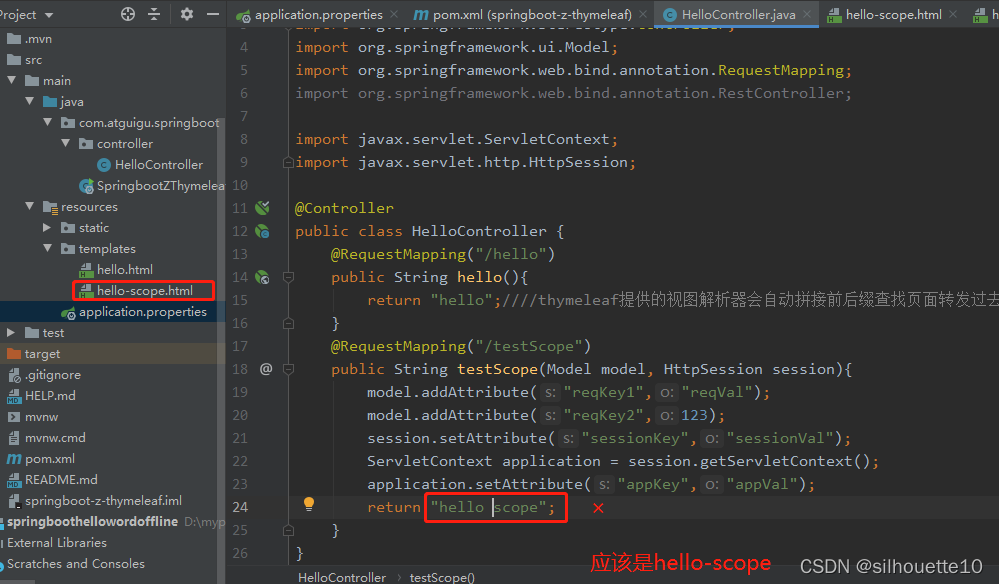
org.thymeleaf.exceptions.TemplateInputException: Error resolving template [hello scope], template mi

org.thymeleaf.exceptions.TemplateInputException: Error resolving template [hello scope], template might not exist or might not be accessible by any of the configured Template Resolvers
at org.thymeleaf.engine.TemplateManager.resolveTemplate(TemplateManager.java:869) ~[thymeleaf-3.0.11.RELEASE.jar:3.0.11.RELEASE]
at org.thymeleaf.engine.TemplateManager.parseAndProcess(TemplateManager.java:607) ~[thymeleaf-3.0.11.RELEASE.jar:3.0.11.RELEASE]
at org.thymeleaf.TemplateEngine.process(TemplateEngine.java:1098) [thymeleaf-3.0.11.RELEASE.jar:3.0.11.RELEASE]
at org.thymeleaf.TemplateEngine.process(TemplateEngine.java:1072) [thymeleaf-3.0.11.RELEASE.jar:3.0.11.RELEASE]
at org.thymeleaf.spring5.view.ThymeleafView.renderFragment(ThymeleafView.java:362) [thymeleaf-spring5-3.0.11.RELEASE.jar:3.0.11.RELEASE]
at org.thymeleaf.spring5.view.ThymeleafView.render(ThymeleafView.java:189) [thymeleaf-spring5-3.0.11.RELEASE.jar:3.0.11.RELEASE]
at org.springframework.web.servlet.DispatcherServlet.render(DispatcherServlet.java:1373) [spring-webmvc-5.2.12.RELEASE.jar:5.2.12.RELEASE]
at org.springframework.web.servlet.DispatcherServlet.processDispatchResult(DispatcherServlet.java:1118) [spring-webmvc-5.2.12.RELEASE.jar:5.2.12.RELEASE]
at org.springframework.web.servlet.DispatcherServlet.doDispatch(DispatcherServlet.java:1057) [spring-webmvc-5.2.12.RELEASE.jar:5.2.12.RELEASE]
at org.springframework.web.servlet.DispatcherServlet.doService(DispatcherServlet.java:943) [spring-webmvc-5.2.12.RELEASE.jar:5.2.12.RELEASE]
at org.springframework.web.servlet.FrameworkServlet.processRequest(FrameworkServlet.java:1006) [spring-webmvc-5.2.12.RELEASE.jar:5.2.12.RELEASE]
at org.springframework.web.servlet.FrameworkServlet.doGet(FrameworkServlet.java:898) [spring-webmvc-5.2.12.RELEASE.jar:5.2.12.RELEASE]
at javax.servlet.http.HttpServlet.service(HttpServlet.java:626) [tomcat-embed-core-9.0.41.jar:4.0.FR]
at org.springframework.web.servlet.FrameworkServlet.service(FrameworkServlet.java:883) [spring-webmvc-5.2.12.RELEASE.jar:5.2.12.RELEASE]
at javax.servlet.http.HttpServlet.service(HttpServlet.java:733) [tomcat-embed-core-9.0.41.jar:4.0.FR]
at


Solution: The method I wrote in the controller layer was wrongly written

[Solved] ERROR #8003 More than one page is numbered 1.

Error Messages:

ERROR #8003 More than one page is numbered 1.


Solution:

You can modify the title block by double-clicking it in the lower right corner of the schematic.
The title block of the schematic can be modified by double-clicking on the title block in the right corner of the schematic, and modifying its properties, mainly the page count and page number.

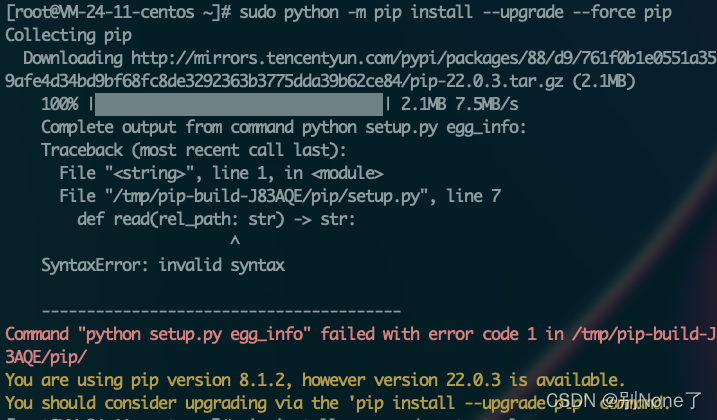
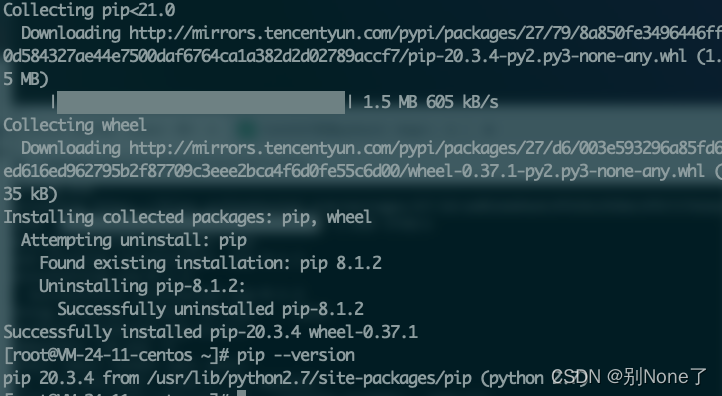
[Solved] command “python setup.py egg_info“ failed with error code 1


preface

when setting up the python 3 environment on your own server, the PIP version is too low, the upgrade pip is still invalid and falls into a dead circle. After reading many blogs on the Internet, there is no solution


1. Solution

# Download get-pip.py
wget https://bootstrap.pypa.io/2.7/get-pip.py
python get-pip.py

[Solved] Linux Error: ENOSPC: System limit for number of file watchers

Problem:
System: Ubuntu 18
problem scenario: when using react scaffold to write a case, the command NPM start is unsuccessful, and an error: enospc: system limit for number of file watchers occurs.

Solution:
error: enospc: system limit for number of file watchers error is that the system of the file monitor has a limit and reaches the default upper limit, so the limit needs to be increased
you can use the instruction $cat/proc/sys/FS/inotify/max_user_watch to see

root@:~$ cat /proc/sys/fs/inotify/max_user_watch
es
524288

New instructions can be set for temporary limit increase:

$ sudo sysctl fs.inotify.max_user_watches=524288
$ sudo sysctl -p

Permanent increase limit

$ echo fs.inotify.max_user_watches = 524288 | sudo tee -a /etc/sysctl.conf 
$ sudo sysctl -p

Docker Start Container Error: Error response from daemon: task already exists: unknown

Prompt: docker restart XXX error response from daemon: cannot restart container XXX: container “XXX”: already exists

Even if you run systemctl restart docker, it doesn’t work. Maybe some containers use systemctl stop docker, which will start the container of the bridge network, but will not kill the docker??? Using docker start XXX, the error “already exists” is always reported.

Cause: the container did not exit safely

Solution 1:

#xxx is the container of hash_id
rm -r /var/run/docker/runtime-runc/moby/xxx

Solution 2:
never mind. Restart can solve 50% of the problems:

reboot

Kafka executes the script to create topic error: error org apache. kafka. common. errors. InvalidReplicationFactorException: Replicati

Question:

To test the integration of sparkstreaming and Kafka in the code, you need to create two topics in Kafka in advance, but the following errors are reported during the execution of the creation script

 kafka-topics.sh --zookeeper linux1:2181,linux2:2181,linux3:2181 --create --topic wufabao_topic01 --replication-factor 2 --partitions 3

WARNING: Due to limitations in metric names, topics with a period ('.') or underscore ('_') could collide. To avoid issues it is best to use either, but not both.
Error while executing topic command : Replication factor: 2 larger than available brokers: 0.
[2022-02-09 17:27:18,432] ERROR org.apache.kafka.common.errors.InvalidReplicationFactorException: Replication factor: 2 larger than available brokers: 0.
 (kafka.admin.TopicCommand$)

reason:

The path of metadata stored in zookeeper configured by Kafka is incorrect. The metadata path I configured in Kafka is:
zookeeper connect=linux1:2181,linux2:2181,linux3:2181/myKafka

Solution:

Modify the path of Kafka metadata in the script as follows:
kafka-topics.sh --zookeeper linux1:2181,linux2:2181,linux3:2181/myKafka --create --topic wufabao_topic01 --replication-factor 2 --partitions 3
created successfully