Author Archives: Robins

[Solved] Error Rule can only have one resource source (provided resource and test + include + exclude)

Error: Rule can only have one resource source
(provided resource and test + include + exclude)

Error: Rule can only have one resource source (provided resource and test + include + exclude)

Error: Rule can only have one resource source (provided resource and test + include + exclude) in
 "exclude": [
    null
  ],
  "use": [
    {
      "loader": "/Users/juanpablo/front-treatments/node_modules/cache-loader/dist/cjs.js",
      "options": {
        "cacheDirectory": "/Users/juanpablo/front-treatments/node_modules/.cache/babel-loader",
        "cacheIdentifier": "81fef5a6"
      },
      "ident": "clonedRuleSet-38[0].rules[0].use[0]"
    },
    {
      "loader": "/Users/juanpablo/front-treatments/node_modules/babel-loader/lib/index.js",
      "options": "undefined",
      "ident": "undefined"
    }
  ]
} ````
A complete log of this run can be found in:
0 info it worked if it ends with ok
1 verbose cli [
1 verbose cli   '/Users/juanpablo/.nvm/versions/node/v12.19.0/bin/node',
1 verbose cli   '/Users/juanpablo/.nvm/versions/node/v12.19.0/bin/npm',
1 verbose cli   'run',
1 verbose cli   'serve'
1 verbose cli ]
2 info using [email protected]
3 info using [email protected]
4 verbose run-script [ 'preserve', 'serve', 'postserve' ]
5 info lifecycle [email protected]~preserve: [email protected]
6 info lifecycle [email protected]~serve: [email protected]
7 verbose lifecycle [email protected]~serve: unsafe-perm in lifecycle true
8 verbose lifecycle [email protected]~serve: PATH: /Users/juanpablo/.nvm/versions/node/v12.19.0/lib/node_modules/npm/node_modules/npm-lifecycle/node-gyp-bin:/Users/juanpablo/front-treatments/node_modules/.bin:/Users/juanpablo/.nvm/versions/node/v12.19.0/bin:/usr/local/bin:/usr/bin:/bin:/usr/sbin:/sbin:/Users/juanpablo/.rvm/bin
9 verbose lifecycle [email protected]~serve: CWD: /Users/juanpablo/front-treatments
10 silly lifecycle [email protected]~serve: Args: [ '-c', 'vue-cli-service serve' ]
11 silly lifecycle [email protected]~serve: Returned: code: 1  signal: null
12 info lifecycle [email protected]~serve: Failed to exec serve script
13 verbose stack Error: [email protected] serve: `vue-cli-service serve`
13 verbose stack Exit status 1
13 verbose stack     at EventEmitter.<anonymous> (/Users/juanpablo/.nvm/versions/node/v12.19.0/lib/node_modules/npm/node_modules/npm-lifecycle/index.js:332:16)
13 verbose stack     at EventEmitter.emit (events.js:314:20)
13 verbose stack     at ChildProcess.<anonymous> (/Users/juanpablo/.nvm/versions/node/v12.19.0/lib/node_modules/npm/node_modules/npm-lifecycle/lib/spawn.js:55:14)
13 verbose stack     at ChildProcess.emit (events.js:314:20)
13 verbose stack     at maybeClose (internal/child_process.js:1021:16)
13 verbose stack     at Process.ChildProcess._handle.onexit (internal/child_process.js:286:5)
14 verbose pkgid [email protected]
15 verbose cwd /Users/juanpablo/front-treatments
16 verbose Darwin 19.6.0
17 verbose argv "/Users/juanpablo/.nvm/versions/node/v12.19.0/bin/node" "/Users/juanpablo/.nvm/versions/node/v12.19.0/bin/npm" "run" "serve"
18 verbose node v12.19.0
19 verbose npm  v6.14.8
20 error code ELIFECYCLE
21 error errno 1
22 error [email protected] serve: `vue-cli-service serve`
22 error Exit status 1
23 error Failed at the [email protected] serve script.
23 error This is probably not a problem with npm. There is likely additional logging output above.
24 verbose exit [ 1, true ]

Cause analysis:

Webpack version conflict issue in package.json.


Solution:

Delete the webpack and reinstall the previous version
npm uninstall webpack
npm install webpack@^4.0.0 –save-dev
[Solved] pip Fatal error in launcher: Unable to create process using

Problem scenario

When we moved the python folder, the system’s global variables are still the original python path, at this time in cmd, type python, the system will follow the previous path to find python.exe, pip.exe. so you need to modify the global variables. But many friends then modify the global variables, although python is available, but pip still can not be used, will report the error pip Fatal error in launcher: Unable to create process using {original pip path} {now pip path}.

Problem analysis

This is because pip is actually python code, pip inside the python interpreter path or the original path is not updated, modify the system global variables and will not affect the python path in the pip.exe file.

Problem-solving:

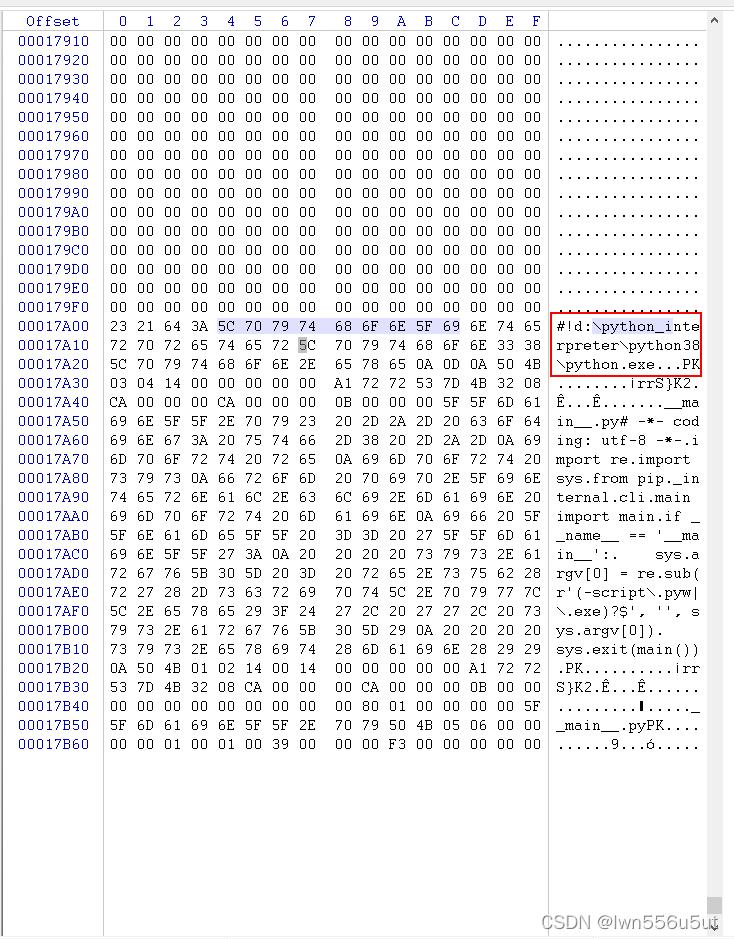
The brute force solution is to directly modify the python path inside pip.exe. Note that pip.exe is a binary file and cannot be modified directly.

1. Download and open binary software (WinHex, hedit)

2. Modify and save the file

Modify and save directly on the right

[Solved] Except CvBridgeError,e:SyntaxError:invalid syntax

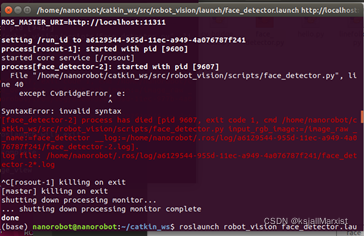
Error reporting for problem:

File “file location”, line 40

Except CvBridgeError,e:

SyntaxError:invalid syntax


Solution:

This is the result of a python version mismatch.

    1. 1. Find the code file according to the file location after File, and find the problematic line of code according to line
    1. 2. Change the code line to except CvBridgeError as e:
    1. 3. Save and exit

[Solved] ROS Error: Could NOT find move_base_msgs

Ubuntu18.04 + ROS melodic, catkin compile mbot error:

-- +++ processing catkin package: 'mbot_navigation'
-- ==> add_subdirectory(mbot_navigation)
-- Could NOT find move_base_msgs (missing: move_base_msgs_DIR)
-- Could not find the required component 'move_base_msgs'. The following CMake error indicates that you either need to install the package with the same name or change your environment so that it can be found.
CMake Error at /opt/ros/melodic/share/catkin/cmake/catkinConfig.cmake:83 (find_package):
  Could not find a package configuration file provided by "move_base_msgs"
  with any of the following names:
    move_base_msgsConfig.cmake
    move_base_msgs-config.cmake


Solution:

sudo apt-get install ros-melodic-move-base-msgs

[Solved] Homebrew Error: xcrun: error: invalid active developer path

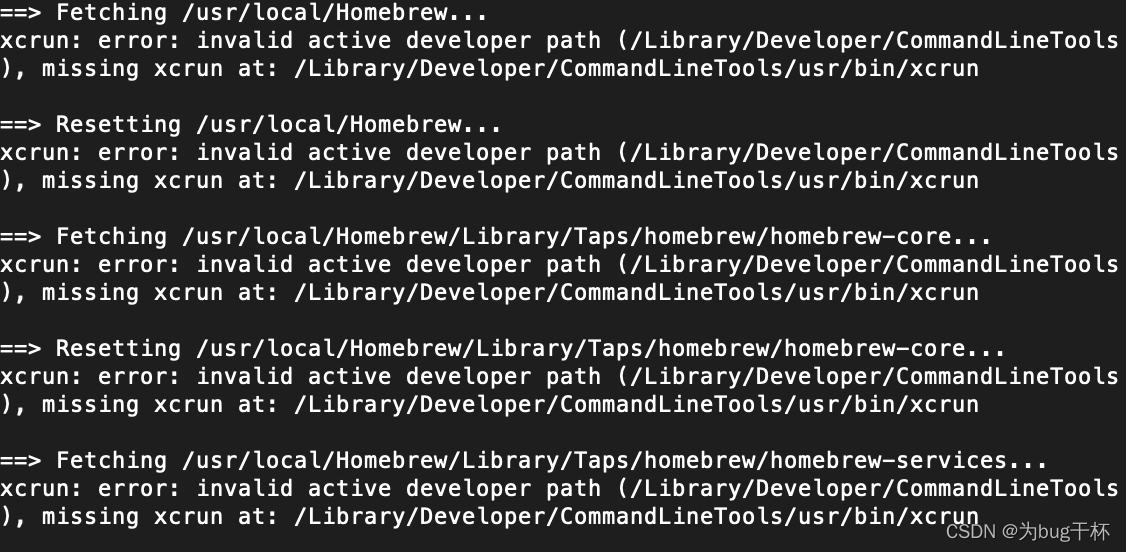
Recently, I found an error when installing things with homebrew. It turned out that homebrew was not adapted after my Mac updated maxos big sur11. In addition, the Xcode tool was deleted before, resulting in the following error:

Input directly at the terminal and xcrun will be installed

xcode-select --install

It can be used directly after installation

Error: error from slirp4netns while setting up port redirection: map[desc:bad request: add_hostfwd:

Causes: accidentally use kill -9 to delete the Podman container running java program process, start the container again with an error

Description of the problem: The problem is because the port is occupied, can not start

Solution: This is because the port is occupied, you can only find out which process is occupying the port through netstat (I am showing the PID/slirp4netns ), and then kill the process number of the occupied port PID with kill -9

jupyter notebook Sets Default Browser Error: SyntaxError: (unicode error) ‘utf-8‘ codec can‘t decode byte 0xd4

Jupiter notebook sets the default browser to open with an error
syntax error: (Unicode error) ‘UTF-8’ codec can’t decode byte 0xd4 in position 0: invalid continuation byte

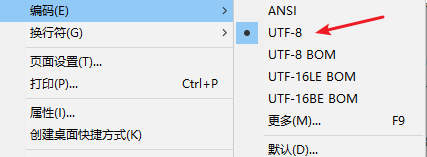
The default code of the Notepad provided by the win system is ANSI. Just reopen the PY script in the notebook,
save it as a py script coded as UTF-8, and it’s OK to run the PY script.

Modify the name of the file: jupyter_notebook_config.py

Code reference

import webbrowser 
webbrowser.register( "Cent Browser", None, webbrowser.GenericBrowser(r"C:\Users\中文用户名\AppData\Local\CentBrowser\Application\chrome.exe"))
c.NotebookApp.browser = "Cent Browser"

Set default browser, CMD input

jupyter notebook --generate-config

Find the PY file of the default configuration file
open it with notepad and find this statement: # c.NotebookApp.browser =
at the bottom of this statement, enter the following statement: the following figure is the configuration of chrome, * * pay attention to double \\**

# c.NotebookApp.password = '' Here
import webbrowser
webbrowser.register('chrome', None, webbrowser.GenericBrowser(u'C:\\Program Files\\Google\\Chrome\\Application\\chrome.exe'))
c.NotebookApp.browser = 'chrome'

MFC:: error C2065: “IDD_DIALOG1”: undeclared identifier Sending and handling custom messages in MFC threads

Just add the resource header file.

#include "Resource.h"

Send message in MFC thread

1. Write the meaning first and accept it

#define WM_SET_FOCUS WM_USER+100


BEGIN_MESSAGE_MAP(CWriteSnDlg, CDialogEx)
    //
	ON_MESSAGE(WM_SET_FOCUS, OnSetFocus)
END_MESSAGE_MAP()


	afx_msg LRESULT OnSetFocus(WPARAM wP, LPARAM lp);


LRESULT CWriteSnDlg::OnSetFocus(WPARAM wP, LPARAM lp)
{
	UNREFERENCED_PARAMETER(wP);
	UNREFERENCED_PARAMETER(lp);
	GetDlgItem(IDC_EDIT1)->SetFocus();
	return 0;
}

2. Send message

UINT  WriteSNProc(LPVOID  lParam){
    CWriteSnDlg *pWnd = (CWriteSnDlg *)lParam; 
    PostMessage(*pWnd,WM_SET_FOCUS, NULL,NULL);
    //SendMessage(*pWnd,WM_SET_FOCUS, NULL,NULL);
}


 PostMessage(this,WM_SET_FOCUS, NULL,NULL);