Author Archives: Robins

failed to find Build Tools revision 23.0.2  Install Build Tools 23.0.2 and sync project

Error:Cause: failed to find Build Tools revision 23.0.2
Install Build Tools 23.0.2 and sync project

error description: AndroidStudio opens the project to display this error;

error cause: buil-tools version 23.0.2

is configured in build.gradle of an open project module

 buildToolsVersion "23.0.2"

but build-tools 23.0.2

is not in the SDK

solution:

first: download build-tools version 23.0.2 through SDK manager;

second: configure the downloaded build tools version information in SDK manager;

reference: AndroidStuido view installed SDK API and Tools version

Exchange 2016 OWA login exception

today, I received an alert message from the script. There is an Exchange server OWA that cannot log in!

did a manual test and found a real problem with the following error message:

check the logs for this server and find the following information

1. The request to access OWA has received 500 internal server error at the HTTP level (error refers to the OWA backend problem)


(2) POST /owa/auth.owa & ClientId=D743AEEDADF24394B3932A43FD81A704& CorrelationID=< empty>; & cafeReqId=4d419796-dfb2-4242-bfc3-33558bd9c81c; & encoding=; 443 test0001 127.0.0.1 Mozilla/5.0 + + Windows NT + 6.3; +WOW64; Trident +/7.0; + the rv: 11.0) + + Gecko like https://localhost/owa/auth/logon.aspx?replaceCurrent=1& ureason=5& reason=0 302 0 0 0

2018-10-19 02:377.0.0.1 GET /owa & ClientId=D743AEEDADF24394B3932A43FD81A704& CorrelationID=< empty>; & ClientRequestId=636755132782181904& cafeReqId=62c96cbe-fa86-42dd-afde-30ba14ededb5; & encoding=; 443 test0001 127.0.0.1 Mozilla/5.0 + + Windows NT + 6.3; +WOW64; Trident +/7.0; + the rv: 11.0) + + Gecko like https://localhost/owa/auth/logon.aspx?replaceCurrent=1& ureason=5& reason=0 500 0 0 31

2, then get the OWA terminal display error

NegotiateSecurityContext failed with for host ‘bjmail6.sohu-inc.com’ with status ‘LogonDenied’

3. Check the Event log

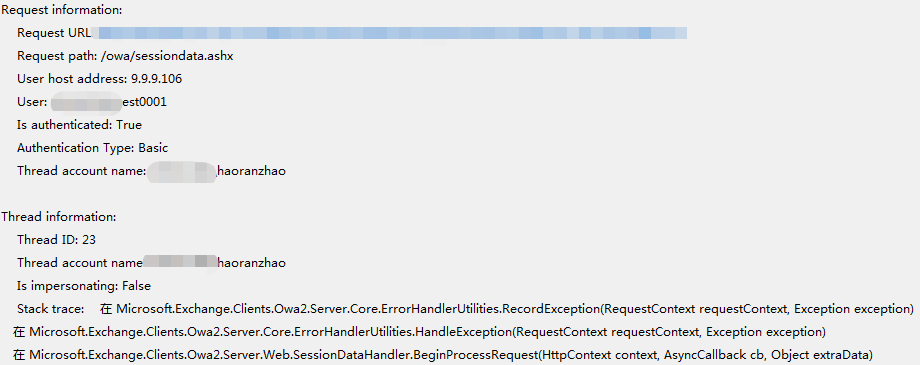
Event ID 1309 is from the Web Event of ASP.NET 4.0.30319.0, the specific information is as follows (the author selects the problem section for demonstration)

through the analysis of the log, I found that Thread account name was actually my domain account, which is obviously wrong, the correct one should be the SYSTEM account

by the above three concludes that the problem should be Exchange, OWA problem back-end IIS virtual directory

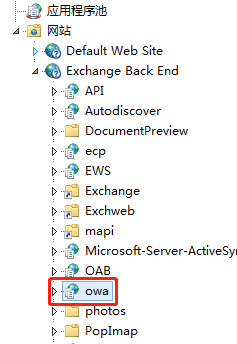
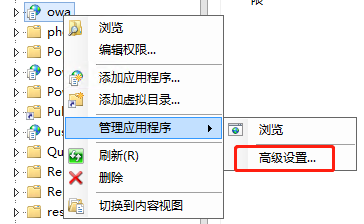
check my IIS configuration

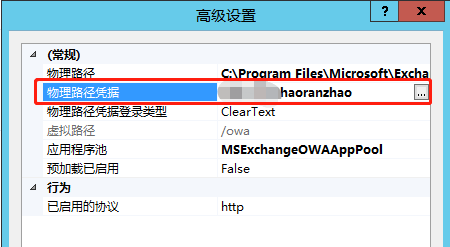
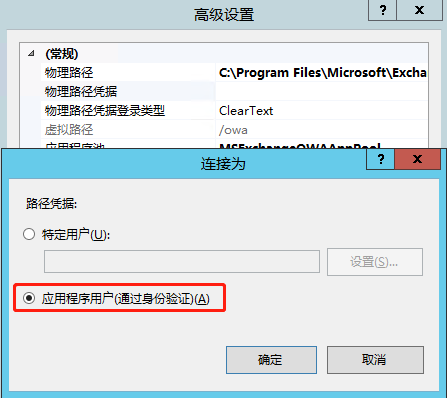
found the problem, OWA’s physical path credentialis actually my account, the correct configuration here is

reconfigure and restart IIS or OWA application pool. After the restart, test again and find that the user can access normally. After observation for a period of time, the above problem log does not appear again, and then the problem is considered to be solved successfully.

reproduced in: https://www.cnblogs.com/zhr1217/p/9835445.html

VirtualBox installation enhancement error “modprobe vboxguest failed”

1. Install kernel-devel, and update the kernel and kernel-devel to the same version
# yum install -y kernel-devel gcc //安装kernel-devel和gcc编译工具链
# yum -y upgrade kernel kernel-devel //更新kernel和kernel-devel到最新版本
# reboot //重启,重启时,选择最新版本的内核启动

2. Start with the new version of the kernel and delete the old version

//启动之后
# uname -r //查看当前启动的内核版本

# rpm -qa | grep kernel-[0-9] //查看全部的内核

# yum remove 旧版本内核 //删除旧版本内核

Android resource compilation failed (How to Fix)

there are many reasons for this problem on the Internet, I will not say more, the following is my more stupid solution, you can try;

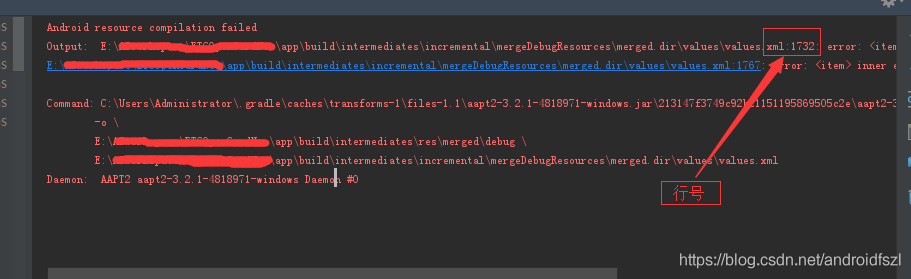
when you see this problem, you might have a line of files that you can click on, and click on the error.

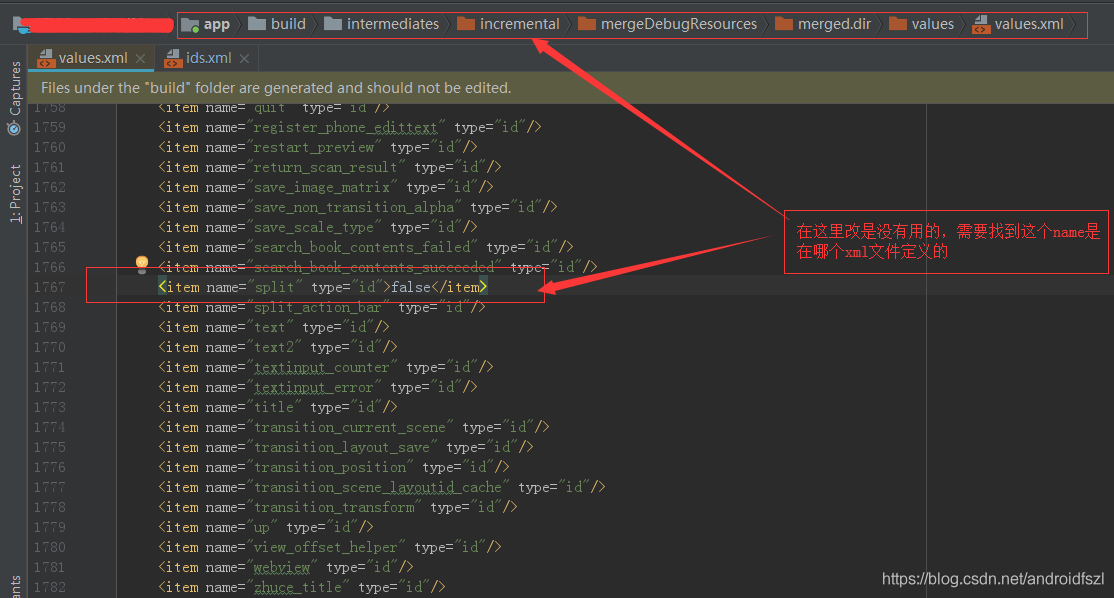
if there is no place to click, you can also find the specific place according to the directory and “line number”;

>

>

>

>

>

>

>

>

>

>

>

>

>

>

>

>

>

>

>

>

>

>

error:

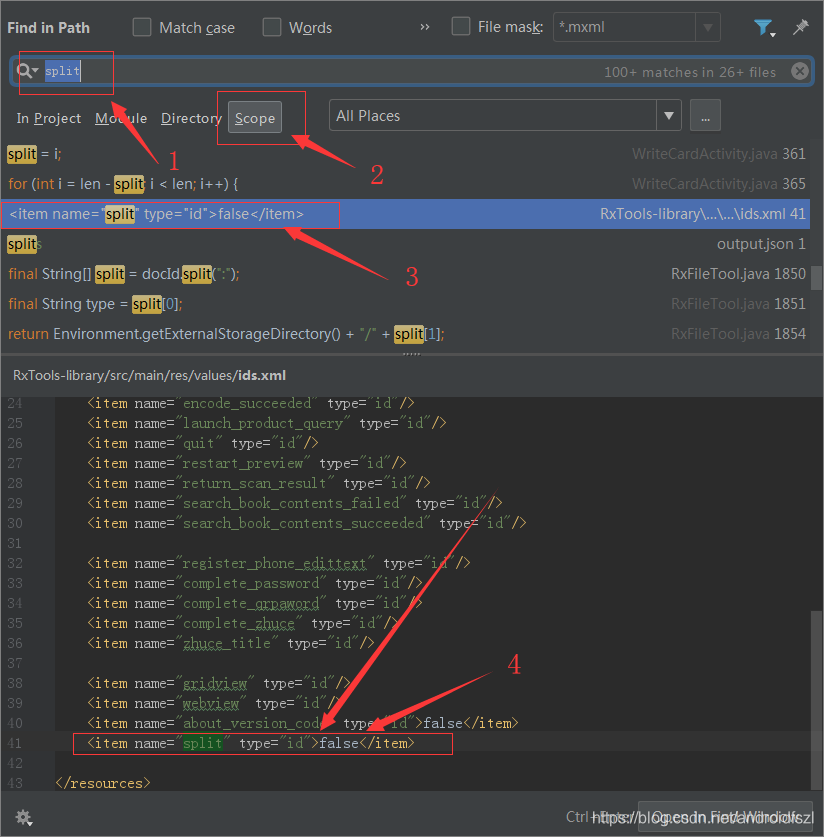
, if you don’t know how to change it, you can go to baidu;

is basically the point where the problem is solved (if that’s the only place you’re wrong).

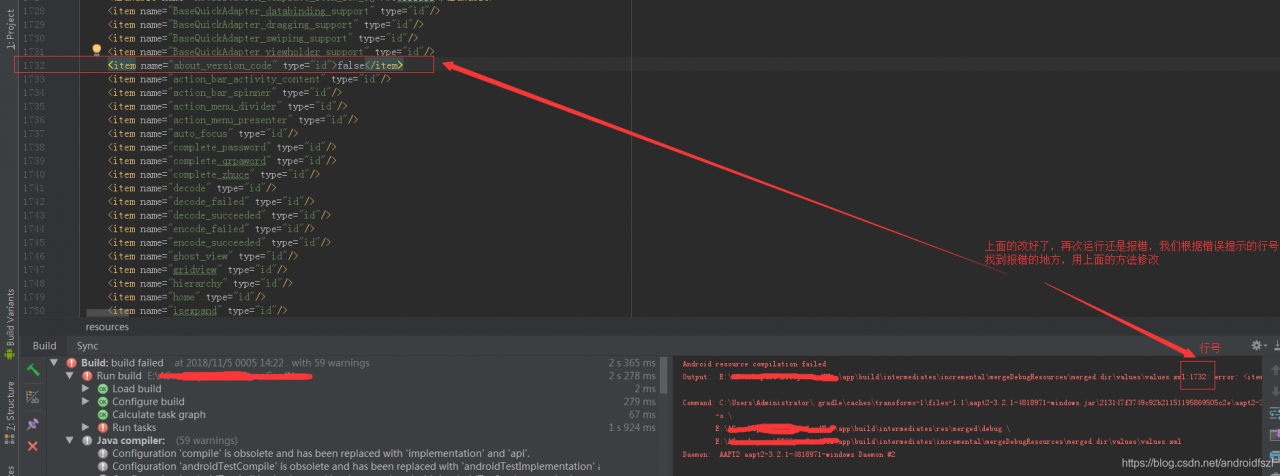
and I’m not done here, but you see, I have two wrong lines here.

let’s fix the wrong one and run it:

take a look, it was reported wrong, this time there is no reverse can click, and then jump to the reported wrong position;

but it doesn’t matter, there’s a table of contents and a corresponding line number, we can still find the error location. Then, using the above method, search for areas where the format is wrong, and change it to the correct one:

is modified, and it will run normally.

Opencv problem: opencv error: assertion failed (! Empty()) in detectmultiscale

Problem description:

in the process of using OpenCV on ROS to realize face detection, the following problems are encountered:

:

OpenCV Error: Assertion failed (! Empty ()) in detectMultiScale, the file/TMP/binarydeb/ros – kinetic – opencv3-3.3.1/modules/objdetect/SRC/cascadedetect CPP, Line 1698
the terminate called after throwing an instance of ‘CV: : Exception’
I () :/TMP/binarydeb/ros – kinetic – opencv3-3.3.1/modules/objdetect/SRC/cascadedetect CPP: 1698: error: (215). empty() in function detectMultiScale

Aborted (core dumped)

OpenCV cascade detector, Cascadedetect error, XML path reading error, found in the original code face_cascade did not read. XML file. As follows:

cv::CascadeClassifier face_cascade;

solution:

Find the location of the XML file related to face recognition and add the XML file to face_cascade. As follows:

cv::CascadeClassifier face_cascade = cv::CascadeClassifier("/home/opencv/opencv-3.4.4/data/haarcascades/haarcascade_frontalface_default.xml");

after modification, code debugging passed, problem solved.

The XML file here is also optional, with haarcascade_eye.xml for eye recognition, and so on.

Aptana studio 3 installation

1. Download aptana studio 3.6.1 installation package

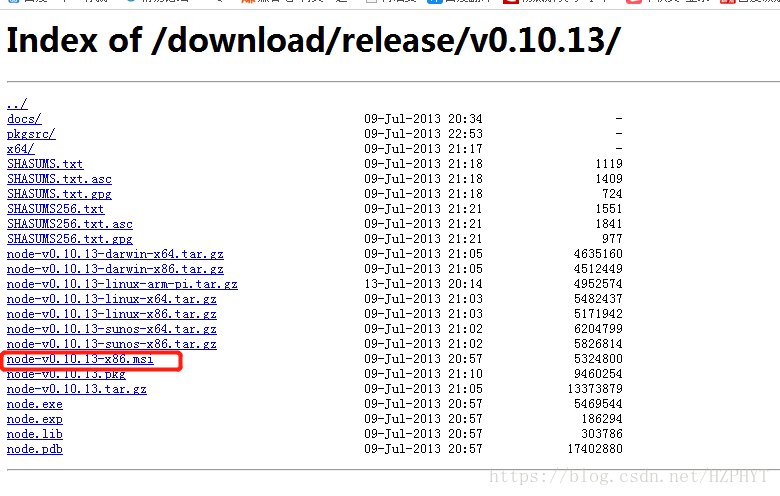
2. Installation Failed to correctly acquire intaller_nodejs_windows.msi file: CRC error?The main thing is that the current version of Aptana requires a Node version between 0.8.X and 0.11.x. I recommend a 0.10.x version of Node. https://nodejs.org/download/release/v0.10.13/

install this.

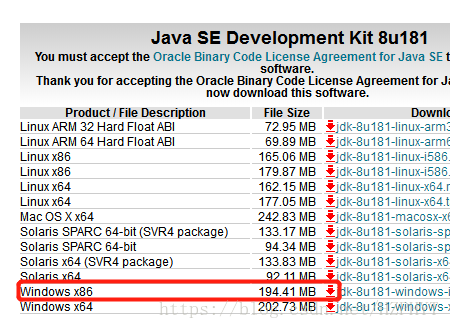
3. After successful installation, what is the reason if Failed to load the JNI Shared library?Mainly on your computer to install the JDK 64 – bit, aptana need is 32-bit JDK, to replace the JDK to reconfigure the path, too much trouble, so, we can install a 32-bit JDK, http://www.oracle.com/technetwork/java/javase/downloads/jdk8-downloads-2133151.html

install this.

4. Find the aptanastudio3.ini configuration file under the installation path of aptana, and add -vm C:/Program Files (x86)/Java/jre1.8.0_171/bin/javaw.exe in front of -vmargs. This path is javaw

in the bin under the installation path of the 32-bit JDK

aptanastudio3.ini configuration file contents are as follows:

-startup
plugins/org.eclipse.equinox.launcher_1.3.0.v20130327-1440.jar
--launcher.library
plugins/org.eclipse.equinox.launcher.win32.win32.x86_1.1.200.v20140116-2212
--launcher.XXMaxPermSize
256m
--launcher.defaultAction
openFile
-name
Aptana Studio 3
-vm
C:/Program Files (x86)/Java/jre1.8.0_171/bin/javaw.exe
-vmargs
-Xms128m
-Xmx512m
-Xverify:none
-Declipse.p2.unsignedPolicy=allow
-Declipse.log.size.max=10000
-Declipse.log.backup.max=5
-Djava.awt.headless=true

5. And then how do aptana studio3 sinize it?

(1). Enter aptana studio3, click install new software option

in help

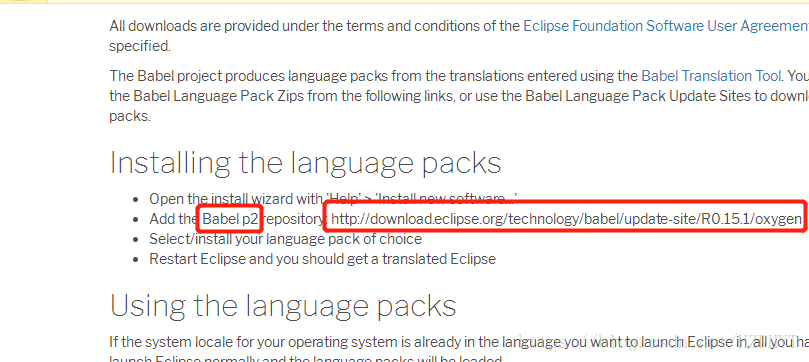
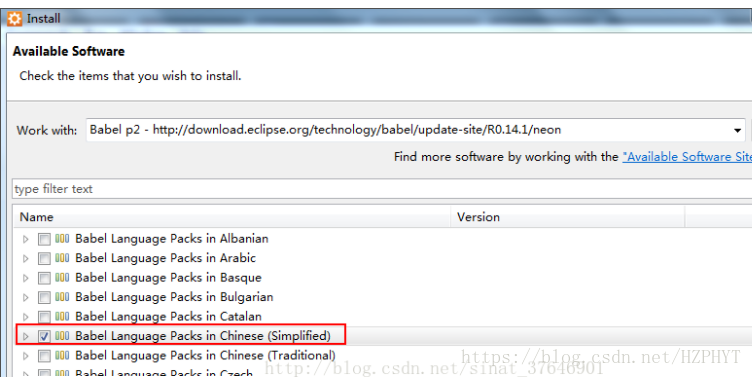
(2). Open http://www.eclipse.org/babel/downloads.php, found that two parameter

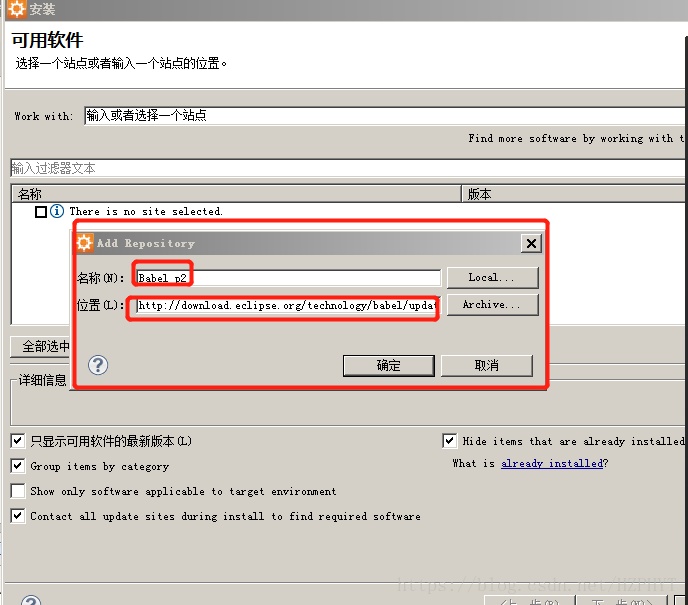
(3). Fill the two parameters into the box that pops up by clicking the add button, as shown in figure

(4). Then wait a moment and select Chinese(Simplified)

(5). Then all the way to next, restart the software to see the Chinese version of Aptana.

IntegrityError at ** NOT NULL constraint failed: learning_logs_topic.owner_id

in chapter 19 of python from introduction to practice, models add the user attribute of topic in learning_logs, that is, the topic created by the logged user, then the owner attribute of this topic is the logged user, code: Owner = model.foreignkey (User,on_delete= model.cascade), owner is the ForeignKey of User (pthon version 3.7.4, django version 2.2.6) and is coming up after makations:
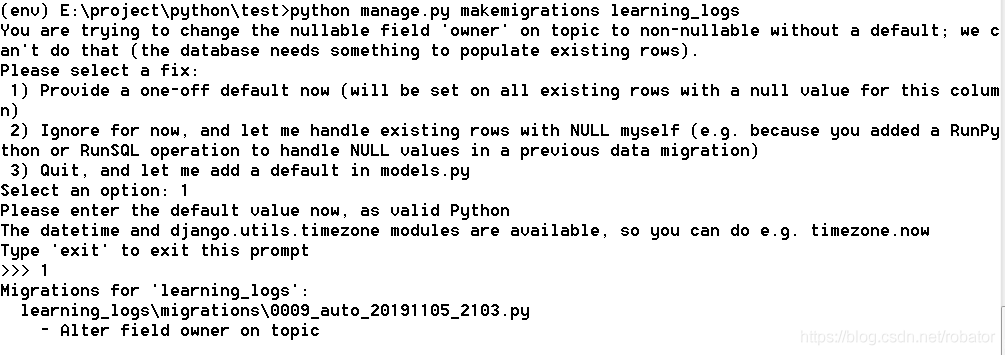
, then select the option of ‘1)’, then select the user ID of 1, namely ll_admin, then the attribution user ID of the original topic is 1, namely ll_admin. The following error occurs when executing new_topic:

IntegrityError at /new_topic/ NOT NULL constraint failed: learning_logs_top.owner_id, error site as follows:
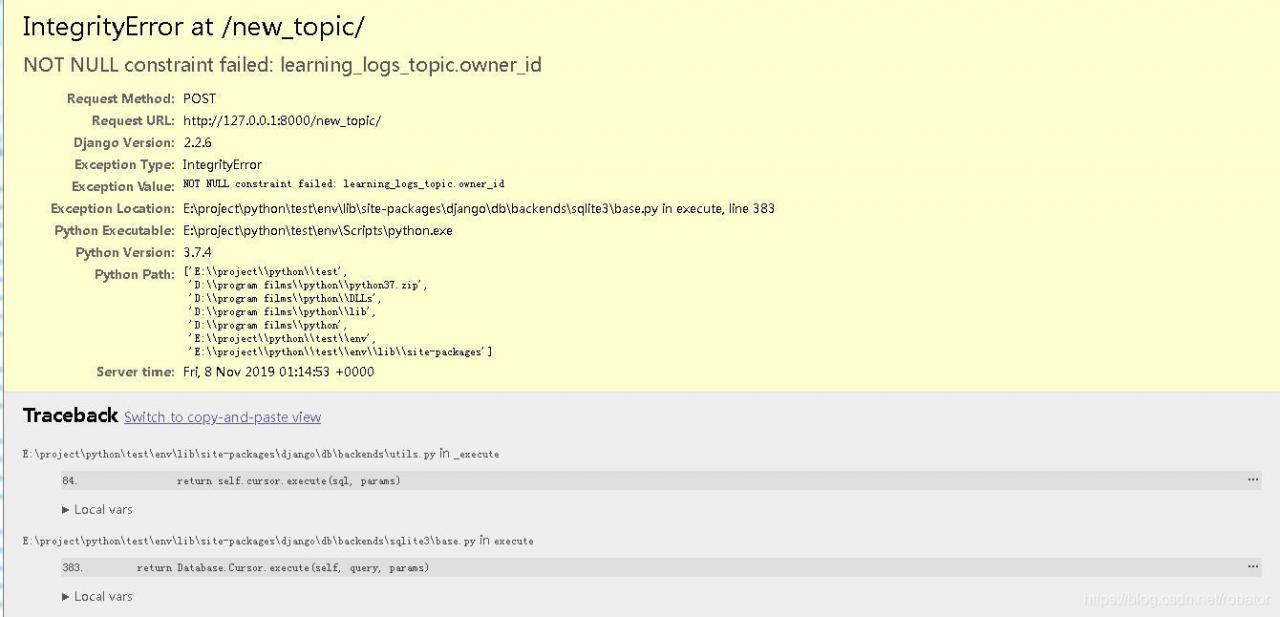
, of which topic model source code is as follows:

class Topic(models.model) :
text= model.charfield (max_length=200)
date_added= model.datetimefield (auto_now_add=True)
owner= model.foreignkey (User,on_delete= model.cascade)
def the __str__ (self) :
return self. The text

topicform source as follows:

class TopicForm (forms. ModelForm) :
class Meta:
model = Topic
fields = [‘ text ‘]
labels = {‘ text: “‘}

: new_topic under the learning_logs folder views. Py source code is as follows:

def new_topic(request) :
if request. Method! : = ‘POST’
form = TopicForm ()

the else:
form = TopicForm (request. POST).
if the form is_valid () :
form. The save ()
the return HttpResponseRedirect(‘learning_logs:topics’)

context={‘form’:form}
return render(request,’learning_logs/ new_top.html ‘,context)

this error shows null value limitation error: owner, owner is the attribute just added in models. Although the owner attribute is added in the existing topic, the newly added topic does not have an owner attribute, so an error is reported.

is solved as follows:

(1) add null=True to the models.py attribute, allowing this attribute to be empty

becomes owner= model.foreignkey after modification (User,on_delete= model.cascade, null=True). After modification, the error does not occur, but the owner of the newly added topic is null, and

is not intended by design

(2) adds the default value inside models.py.

modified owner= model.foreignkey (User,on_delete= model.cascade, default=1), and the modified error will not occur, but the owner of newly added topic is always the User with ID 1, and it is not the desired

(3) modify TopicForm and add owner field

modified TopicForm into the following:

class TopicForm (forms. ModelForm) :
class Meta:
model = Topic
fields = [‘ text, ‘the owner’]
labels = {‘ text ‘:’, ‘owner’ : ‘}
After

is modified, the user will select the owner of the new topic, as shown below:

although the current logged in user can choose the owner of this topic, the user can also choose other non-logged in users, which increases the risk of error

(4) in the views. Py new_topic view, get the current user with request.user and assign a value to form

is to add a line after if form.is_valid() :

form.instance.owner=request.user,

def new_topic(request) :
if request. Method! : = ‘POST’
form = TopicForm ()

the else:
form = TopicForm (request. POST).
if the form is_valid () :
form. The instance. The owner = request. User
Form. The save ()
return HttpResponseRedirect (reverse (‘ learning_logs: switchable viewer ‘))

the context = {‘ form: form}
the return render(request,’learning_logs/new_topic.html’,context)

USES the instance parameter of the Form to get the owner attribute and assigns the current user obtained by requset.user to the owner of the instance. After the modification, the program realizes the predetermined function

(5) also takes advantage of the instance parameter, but at the time of the generated Form, the modified new_topic view is as follows:

def new_topic(request) :
if request. Method! : = ‘POST’
form = TopicForm ()

the else:
form = TopicForm (request. POST)
topic = topic ()
topic. The owner = request. User
form = TopicForm (request. POST, the instance = topic).
if the form is_valid () :
form. The save ()
return HttpResponseRedirect (reverse (‘ learning_logs: switchable viewer ‘))

The context = {‘ form: form}
return render (request, ‘learning_logs/new_topic. HTML, context)

becomes a topic, then assign the value to the owner, and then assign the topic to the instance parameter, which costs a lot of space and time, but also achieves the predetermined function.

Error: package or namespace load failed for ‘rJava’:


library(“rJava”) Error: package or namespace load failed for ‘rJava’ : loadNamespace() calculate ‘rJava’. OnLoad failed, call: inDL(x, as. Logical (local), as. Logical (now)… Error: unable to load Shared object ‘C:/Users/DELL/Documents/R/win – 3.4/library/rJava/libs/x64/rJava DLL’ : LoadLibrary failure: can’t find the specified module.

Could you tell me how to deal with this problem in R language?

How to solve the “specified service has been marked for deletion” error

How to solve “The specified service has been marked for deletion” error

I try to remove a Windows Service with sc delete < service name> , and encounter the following error: I try to use sc delete < service name> Windows service, and encountered the following error:

[SC] DeleteService FAILED 1072: [SC] DeleteService FAILED 1072:

The specified service has been marked for deletion. specified service marked for deletion.

What I ‘ve already done: I have done:

  • Stopped the service, informational: obviously, service has been Stopped. The sc queryex "< service name>" gives the following result: sc queryex "< service name>" gives the following results:

     SERVICE_NAME: Stub service TYPE : 10 WIN32_OWN_PROCESS STATE : 1 STOPPED WIN32_EXIT_CODE : 1067 (0x42b) SERVICE_EXIT_CODE : 0 (0x0) CHECKPOINT : 0x0 WAIT_HINT : 0x0 PID : 0 FLAGS : 
  • >Ensured that Microsoft Management Console was closed (taskkill /F /IM mmc.exe), Ensured that the Microsoft Management Console closed (taskkill /F /IM mmc.exe),

    Ensured that the Event Viewer was closed, Ensured that the Event Viewer was closed,

  • 1

    2 3 Removed the key HKEY_LOCAL_MACHINE\\ \\ \\CurrentControlSet\\ \Services\\< service name> From the registry. deleted from the registry key HKEY_LOCAL_MACHINE \\ \ CurrentControlSet \\ Services \ < Service name & GT; .

    Due to this removal, services.msc still shows the service (with a name, but no status or startup type), but the description is “< MSC services.msc still shows the service (with name, but no status or startup type), but described as “< Unable to read description. Error Code: 2 >” . error code: 2>” . When we need to view the properties, “the system cannot find the file specified.” is shown five times. attempts to examine the property. .

The problem persists. problems still exist.

What is the next step? what do you do next?


# 1 floor

reference: https://stackoom.com/question/1OH70/ how to solve the specified service has been marked for deletion – error


# 2 floor

There may be several causes which lead to the service being stuck in “marked for deletion”.

  1. SysInternals’ Process Explorer is opened.SysInternals’ Process Explorer. Closing it should lead to automatic removal of the service. Closing it will cause the service to be automatically deleted.

  2. Task Manager is the opened. Task Manager has been opened.

  3. Microsoft Management Console (MMC) is opened.Microsoft Management Console (MMC) has opened. To ensure all instances are closed, run taskkill /F /IM mmc.exe.exe .exe To ensure that all instances are closed, run taskkill /F /IM mmc.exe.

    Services console is opened. This is the same as the previous point, since the Services console is hosted by mmc. This is the same as last, because the Services console is hosted by MMC.

  4. Event Viewer is the opened. Event Viewer has been opened. Again, this is the same as the third point. .

  5. The key HKEY_LOCAL_MACHINE\\ \Services\\{service name} exists. key HKEY_LOCAL_MACHINE\\ \CurrentControlSet\\ \\{service name} exists.

    Someone else is logged into the server and has one of the previously mentioned applications.

    An instance of Visual Studio used to debug the service is open. Visual Studio instance used to debug the service is open.


# 3 floor

This can also be caused by leaving the Services console open. may also be caused by opening the service console. Windows won’t actually delete the service until it is closed. Windows does not actually delete the service until it is closed.


# 4 floor

In my case, it was caused by unhandled exception while creating eventLog source. is caused by an exception that was not handled when the eventLog source was created. Use try catch to pin point the cause. Use try catch to identify the cause.


# 5 floor

finds another thing to check – look it up in the task manager – if other users are connected to this box, even if they are “disconnected,” you must actually log them out to eventually delete the service.


# 6 floor
Deleting registry keys as suggested above got my service stuck in the stopping state. Deleting registry keys as suggested above will stop my service. The following procedure worked for me: is useful for me:

open task manager > select services tab > select the service > right click and select “go to process” > Right click on the process and select End process open task manager > Select the service TAB & GT; Select service & GT; Right-click and select Go to Process & GT; Right-click the process, and select end process

Service should be gone after that after that Service should be gone

ADB:INSTALL_ FAILED_ UPDATE_ Incompatible [solved]

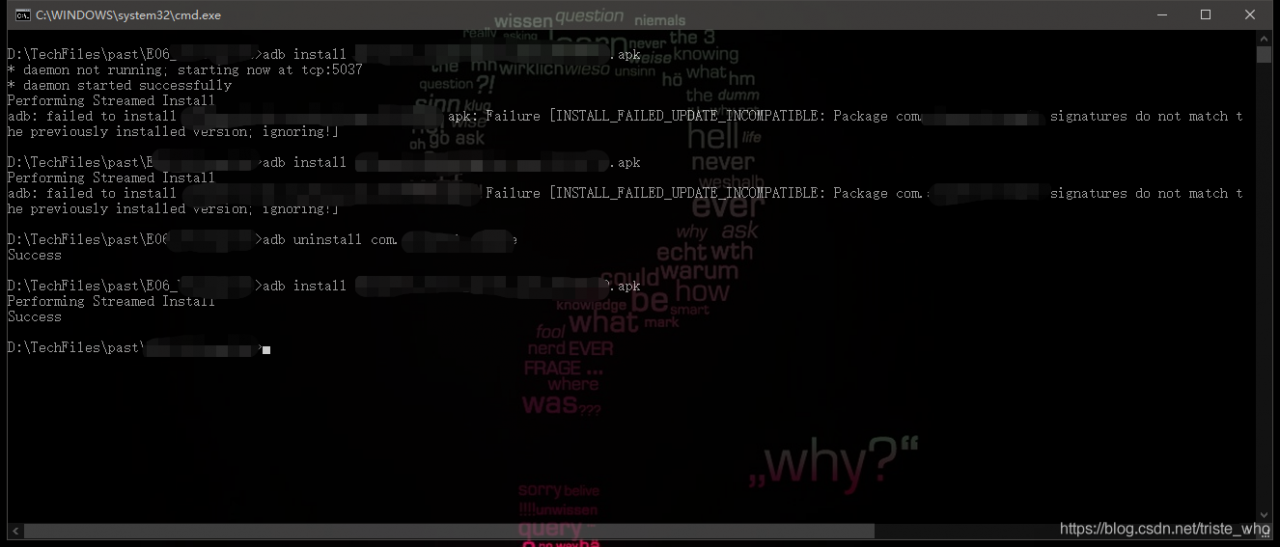
installation encounters this

adb: failed to install xxxxxxx.apk: 
Failure [INSTALL_FAILED_UPDATE_INCOMPATIBLE: 
Package com.xxx.xxxx signatures do not match the previously installed version; ignoring!]

uninstall the app with the same package name and then install

adb uninstall com.xxx.xxxx


but looking at this discussion on Stack Overflow, it doesn’t seem to say what the problem is because of
link: https://stackoverflow.com/questions/31489567/manually-installing-an-updated-apk-fails-with-signatures-do-not-match-the-previ
ultimately find another q&a
https://stackoverflow.com/questions/49757862/install-failed-update-incompatible-package-signatures-do-not-match-the-previous?Rq = 1
said domestic a blog: https://blog.bihe0832.com/android-v2-issue.html
reason involves the jarsigner, don’t know why the company network temporarily can’t open it, see you later add study reasons.