Author Archives: Robins

The resource has been blocked.

Question.
No valid summary could be found in the resource ‘http://localhost:4200/assets/css/bootstrap.min的’integrity’ attribute. css’ with computed SHA-256 integrity ‘ nvT75FkXevX06WR8vlhFFP02xzhq9qFxLQOuS0LkWyQ=’This resource is blocked.

Causes.


      <!-- Bootstrap CSS -->
  <!-- <link rel="stylesheet" href="https://stackpath.bootstrapcdn.com/bootstrap/4.1.1/css/bootstrap.min.css" integrity="sha384-WskhaSGFgHYWDcbwN70/dfYBj47jz9qbsMId/iRN3ewGhXQFZCSftd1LZCfmhktB" crossorigin="anonymous"> -->
    <!-- Bootstrap CSS -->
  <link rel="stylesheet" href="assets/css/bootstrap.min.css" integrity="sha384-WskhaSGFgHYWDcbwN70/dfYBj47jz9qbsMId/iRN3ewGhXQFZCSftd1LZCfmhktB" crossorigin="anonymous">

Remove:
integrity=”sha384-WskhaSGFgHYWDcbwN70/dfYBj47jz9qbsMId/iRN3ewGhXQFZCSftd1LZCfmhktB” crossorigin=”anonymous”
"anonymous"
A cross-domain request (that is, containing the Origin: HTTP header). But no authentication information is sent (that is, no cookies, X.509 certificates, and HTTP basic authentication information). If the server does not give the source site credentials (do not set access-control-allow-origin : HTTP header), the image will be contaminated and restricted.
The integrity </ code>
Contains inline metadata, which is the hash value of a resource file that you get with your browser, encoded in base64 so that users can verify that a retrieved resource has not been tampered with during transmission. Check Subresource Integrity for details.
Documents:
https://developer.mozilla.org/zh-CN/docs/Web/HTML/Element/link
Failed building wheel for psycopg2

My mistake:
Command "/ Users/qinlan/myproject/lenv1/bin/python3.6 - u - c" import setuptools, tokenize; __file__='/private/var/folders/l1/y1ch9__s6xx00p046b096_6m0000gn/T/pip-install-_p50tkoi/psycopg2/setup.py'; f=getattr(tokenize, 'open', open)(__file__); code=f.read().replace('\r\n', '\n'); f.close(); exec(compile(code, __file__, 'exec'))" install --record /private/var/folders/l1/y1ch9__s6xx00p046b096_6m0000gn/T/pip-record-jml81n0v/install-record.txt --single-version-externally-managed --compile --install-headers /Users/qinlan/myproject/lenv1/bin/../include/site/python3.6 psycopg2 "failed with the error code 1 in/private/var/folders/l1/y1ch9__s6xx00p046b096_6m0000gn/T/PIP - install - _p50tkoi/psycopg2/
Fix:
I fixed this problem by installing the command line tool
xcode-select --install
then install openssl through Homebrew and manually link the openssl installed by my homemade software to PIP:
env LDFLAGS = "-i/usr/local/opt/openssl/include - L/usr/local/opt/openssl/lib" PIP install psycopg2
in the macOS Sierra 10.12.1
It is recommended that PIP Install PsycopG2-Binary instead

git push error failed to push some refs to solution

Problem specification
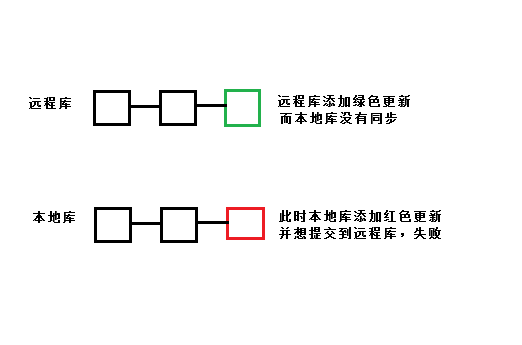
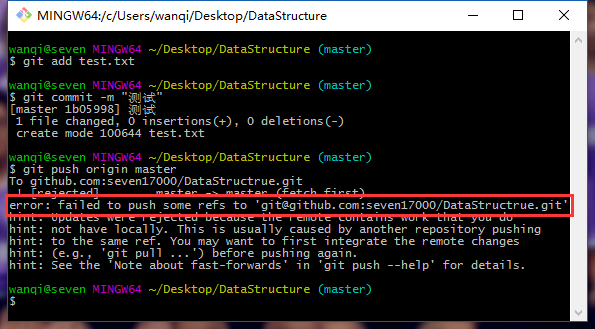
When we found a problem in the Github repository, you changed it online on Github; Or you can just add a README file or something to a library on Github without synchronizing it. Push fails when you have a commit again to commit from the local library to the remote Github library.

I edited a file online in github library, and it was not synchronized to the local library. After that, I added the file test.txt in the local library and tried to submit it to github, but the following error occurred: error: failed to push some refs to.

A statement in advance
For the code lost in the comments, it should be emphasized again that the base should be used with caution, and the branch should be determined before operation. In this case, the master branch is taken as an example, and the loss of the code caused by the wrong branch should be taken as the consequence.
The solution
The problem is that the remote library is inconsistent with the local library, so we can just synchronize the remote library to the local library. Note: I use the master branch here, please change the branch according to your own development branch.

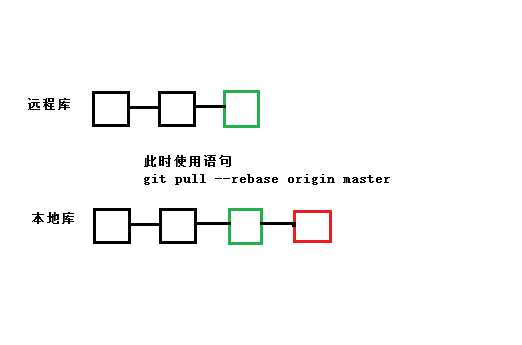
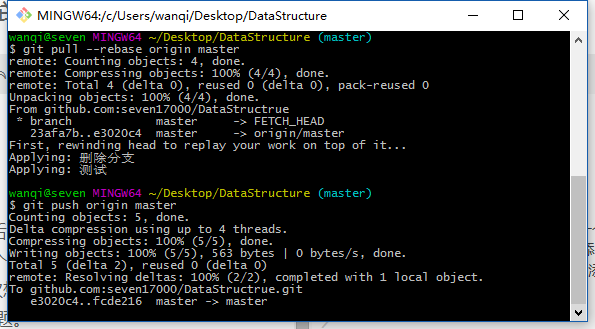
git pull --rebase origin master

This directive merges updates from the remote library into the local library – the rebase function is to cancel the commit from the local library and connect them to the updated version library.


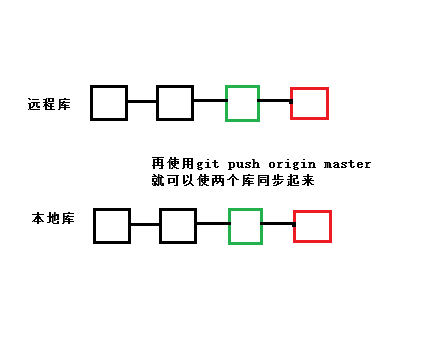
The following is a graphical explanation of the occurrence and resolution of the error situation

git pull –rebase origin master means to cancel commit records, temporarily save them as patches (in the “.git/rebase” directory), synchronize the remote repository to the local repository, and finally merge the patches into the local repository.

will then be able to push the local library into the remote library.

Login failed in rabbitmq

First, use the following command to see why the log is logged:

 tail /var/log/rabbitmq/rabbit\@wzb1.log

Note: The default user guest only allows localhost login.
 
To create a remote login user, the guest user can only run under localhost:

rabbitmqctl add_user admin admin
rabbitmqctl set_user_tags admin administrator
rabbitmqctl set_permissions -p/admin ".*" ".*" ".*"


Error in loadNamespace(j <- i[[1L]], c(lib.loc, .libPaths()) error appears in the R language installation package

In the evening, when I was studying in hefei, a lab sent me QQ and asked me a drawing question in R language. It required the numerical value to be added on the bar chart. I tried it, but instead of solving it with R, I used EXCEL instead, and pretend bility was not reduced.
But anyway,

> library("ggplot2")
Error in loadNamespace(j <- i[[1L]], c(lib.loc, .libPaths()), versionCheck = vI[[j]]) : 
  不存在叫‘munsell’这个名字的程辑包
In addition: Warning message:
程辑包‘ggplot2’是用R版本3.2.3 来建造的 
Error: ‘ggplot2’程辑包或名字空间载入失败,

This error is caused by not installing Munsell packages. Just install. Packages (“munsell”) in the console

Jenkins SVN error Server SSL certificate verification failed: issuer is not trusted

Jenkins was used for continuous integration in the project. SVN command was found in the BAT file and BAT Times: Server SSL Certificate Verification Failed: Bach is not trusted was executed
The server SSL certificate has failed to authenticate and the issuer is not trusted
The solution,
Add: –non-interactive — trust-server-CERT after the SVN command. Can solve
Refer to SVN for the meaning of the command.

AS error: failed to find target with hash string’Google Inc.:Google APIs:21′ error solution

The original address: https://blog.csdn.net/amylaogong/article/details/51906627

Error:Cause: failed to find target with hash string ‘Google Inc.:Google APIs:21’ in: F:\my_profile\tools\androidSDK
< a href=”openAndroidSdkManager”> Open Android SDK Manager< /a>

AS menu: Tools-> Android-> SDK Manager-> Then pop up the Default Settings window and select Appearance & AMP; Behavior/ System settings /Android SDK -> SDK Platforms TAB.
Click the blue text below to Launch the Standalone SDK Manager-> Pop-up Android SDK Manager-& GT; Select Android5.0.1/Google APIs
install

GConf Error: Failed to contact configuration server solution

GConf Error:Unable to reach configuration server workaround

GConf Error:Unable to contact configuration server; some possible reasons are that you need to enable TCP/IP networking for ORBit, or have an old NFS lock due to a system crash. For information, see http://www.gnome.org/projects/gconf/. (Details- 1:IOR file ‘/tmp/gconfd-chris/lock/ IOR ‘Not open, no such file or directory found 2:IOR file ‘/tmp/gconfd-chris/lock/ IOR ‘Not open, no such file or directory found’)
GConf Error: contact configuration server failed; some possible reasons are that you need to enable TCP/IP networking for ORBit, or have old NFS locks due to a system crash. For information, see http://www.gnome.org/projects/gconf/. (Details- 1:IOR file ‘/tmp/gconfd-chris/lock/ IOR ‘not open, no such file or directory found; 2:IOR file ‘/tmp/gconfd-chris/lock/ IOR not open, no such file or directory found)
==================================================
Some on the Internet say it was because of the execution of this order.
#chmod -R 0777 /tmp
Not on my machine, it’s a result of manually upgrading glibc2.7 according to the default path.

Solution.
# rm – r *user*
Then delete the .gnome2 and .gnome folders from the user’s home directory.

Centos7 executes the command service mysqld start and prompts Failed to start mysqld.service: Unit mysqld.service not loaded

An error condition
After mysql is installed on Centos7, service Mysqld Start cannot be started and Service Mysqld Stop cannot be stopped
The solution
find/-name mysql.server
The following path is found
/usr/share/mysql/mysql.server
so
/usr/share/mysql/mysql.server start
It can start successfully
Use the/usr/share/mysql/mysql. Server stop
You can close it successfully
 

Configure Nvidia graphics card on ubuntu18.04 xrandr Failed to get size of gamma for output default

Initial problem: when I used teamViewer to connect uBuntu18.04, I immediately lost the display window. At first, I thought that it might be the resolution, so I looked up the resolution of Ubuntu18.04. The result showed that there was only a default 800×600, xrandr Failed to get size of Gamma for output default for a long time
Ubuntu18.04 for Nvidia graphics card configuration
https://blog.csdn.net/qq_37935670/article/details/80377196
 
 
Solve ubuntu18.04 installation of nvidia driver that nvidia-dkms dependent cannot be installed (complete picture matching)
https://blog.51cto.com/cfy10/2450167

Problems encountered in window10 system configuration tesseract


Mainly according to the tutorial to http://www.wangtuizhijia.com/archives/272
The runtime reports an error like this:
pytesseract.pytesseract.TesseractError: (1, ‘Error opening data file \\Program Files (x86)\\Tesseract-OCR\\eng.traineddata Please make sure the TESSDATA_PREFIX environment variable is set to your “tessdata” directory. Failed loading language \’eng\’ Tesseract couldn\’t load any languages! Could not initialize tesseract. ‘)
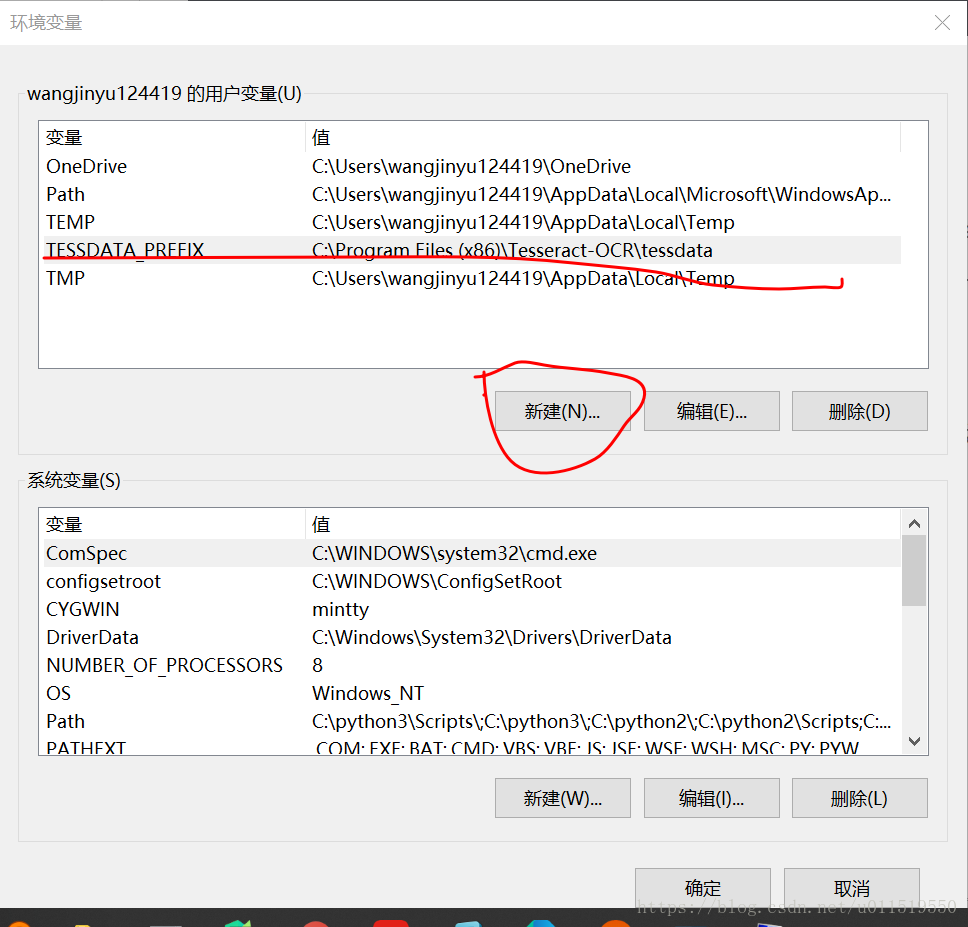
The key message is underlined: the environment configuration should be configured to the path of ‘tessdata
Because global variables are not configured to perform data conversion across disks, we add a configuration message to the environment variable.
 
Maybe the tutorial is win7 system slightly different, Win10 Under my operation
Environment variable – New – Variable name :TESSDATA_PREFIX Variable value :C:\Program Files (x86)\Tesseract-OCR\ tessData
Then the system might just need to be rebooted

INSTALL PARSE FAILED INCONSISTENT CERTIFICATES error solution

Share my teacher’s artificial intelligence tutorial! Zero basis, easy to understand! http://blog.csdn.net/jiangjunshow

You are also welcome to reprint this article. Share knowledge, benefit the people, and realize the great rejuvenation of the Chinese nation!

               
A prompt similar to INSTALL_PARSE_FAILED_INCONSISTENT_CERTIFICATES appears when installing the APK file, along with the following similar prompt:
Android Launch!
adb is running norm.
Performing com. android123.cwj activity launch
Automatic Target Mode: Using device ‘HT840GZ25974’
Uploading CWJ. Apk onto device ‘HT840GZ25974’
Uploading
Application already exists. Attempting to re – install home…
re-installation failed due to different application signatures.
You must perform a full uninstall of the application. WARNING: This will remove the application data! Android123.cwj ‘in a shell.
Launch canceled!
Such problems mainly due to signature conflict, such as you use the ADB debug permissions signature, but then use standard sign signature and then install the same file will appear such errors, the solution in addition to honestly uninstall the original version to install again from the mobile phone, the ADB install – r parameter can’t solve this problem.            

Call my teacher’s artificial intelligence tutorial! http://blog.csdn.net/jiangjunshow