Author Archives: Robins

Error reported in react events.js:160 throw er; // Unhandled’error’ event

events.js:160
      throw er; // Unhandled 'error' event
      ^

Error: listen EADDRINUSE :::8081
    at Object.exports._errnoException (util.js:1020:11)
    at exports._exceptionWithHostPort (util.js:1043:20)
    at Server._listen2 (net.js:1258:14)
    at listen (net.js:1294:10)
    at Server.listen (net.js:1390:5)

This problem is caused by the occupied port of 99.99%, such as the 8081 port mentioned above, so if you encounter this problem, please don’t be nervous, just find the corresponding port and close the application! How to check which application is used according to the port, this network a search a lot, here is not repeated! If you have any difficulty, please leave a message.)
Actually it’s not just react, as long as you use NPM to package, ports being occupied will report this error.

Fatal error: Please read “Security” section of the manual to find out how to run mysqld as root!

The root of the problem is mysql installed by root and started by default./mysqld Restart reports the following error;
Mysql installation directory is: /usr/local/mysql/

[root@SHB-L0120796 bin]# ./mysqld restart
2020-03-06T09:02:19.361027Z 0 [Warning] TIMESTAMP with implicit DEFAULT value is deprecated. Please use --explicit_defaults_for_timestamp server option (see documentation for more details).
2020-03-06T09:02:19.361168Z 0 [Note] --secure-file-priv is set to NULL. Operations related to importing and exporting data are disabled
2020-03-06T09:02:19.361213Z 0 [Note] ./mysqld (mysqld 5.7.27) starting as process 29670 ...
2020-03-06T09:02:19.364761Z 0 [ERROR] Fatal error: Please read "Security" section of the manual to find out how to run mysqld as root!

2020-03-06T09:02:19.364806Z 0 [ERROR] Aborting

2020-03-06T09:02:19.364835Z 0 [Note] Binlog end
2020-03-06T09:02:19.367170Z 0 [Note] ./mysqld: Shutdown complete

Temporary solutions:
Root /mysqld –user=root start in the installation directory /usr/local/mysql/bin using root:./mysqld –user=root start

./mysqld --user=root start

Or try /usr/local/mysql/bin under the installation directory:

service mysqld start

Best solution: Without modifying the my.cnF file, execute the following command line

./mysqld --skip-grant-tables --skip-networking --user=root &

python reads csv file is an error _csv.Error: iterator should return strings, not bytes (did you open the file in text)

Python reads the CSV file and reports an error

import csv

with open('E:/Selenium2script/DDTModle/test.csv','rb') as f:
    readers = csv.reader(f)
    next(readers,None)
    for line in readers:
        print(line)

_csv.Error: iterator should return strings, not bytes (did you open the file in text mode?)

Problem analysis: This CSV file is a text file, not a binary file.

Solution:

import csv

with open('E:/Selenium2script/DDTModle/test.csv','rt') as f:
    readers = csv.reader(f)
    next(readers,None)
    for line in readers:
        print(line)

Or we could replace rt with R.

Note: The next statement here does not read the header key value

with open(file_name,'wt',newline='') as f:

Add newline= “‘, the data written will not be blank.

[Fixed]Error executing Jupyter command ‘notebook’: [Errno ‘jupyter-notebook’ not found] 2

The problem
First install jupyter, command PIP install jupyter

(venv) D:\MLiA>pip install jupyter

Collecting jupyter
  Downloading https://files.pythonhosted.org/packages/83/df/0f5dd132200728a86190397e1ea87cd76244e42d39ec5e88efd25b2abd7e/jupyter-1.0.0-py2
.py3-none-any.whl
Collecting ipywidgets (from jupyter)
  Downloading https://files.pythonhosted.org/packages/34/3a/5b258ea6d584f5a8527c2295d0ebf7ffb1654e3de38d37697f88bbef6621/ipywidgets-7.4.0-
py2.py3-none-any.whl (109kB)
    100% |████████████████████████████████| 112kB 728kB/s

Then, it started jupyter , but prompted an error

(venv) D:\MLiA>jupyter notebook

Error executing Jupyter command 'notebook': [Errno 'jupyter-notebook' not found] 2

The solution
Enter jupyter - notebook </ code>

(venv) D:\MLiA>jupyter-notebook

[I 15:33:17.594 NotebookApp] Writing notebook server cookie secret to C:\Users\AppData\Roaming\jupyter\runtime\notebook_cookie_secre
t
[W 15:33:18.032 NotebookApp] Terminals not available (error was No module named 'winpty.cywinpty')
[I 15:33:18.032 NotebookApp] Serving notebooks from local directory: D:\MLiA
[I 15:33:18.032 NotebookApp] The Jupyter Notebook is running at:
[I 15:33:18.032 NotebookApp] http://localhost:8888/?token=58d6cbb67aba487dc5f952ebdea19a8462f2ba551cd24a21
[I 15:33:18.032 NotebookApp] Use Control-C to stop this server and shut down all kernels (twice to skip confirmation).
[C 15:33:18.063 NotebookApp]

Reference data: https://stackoverflow.com/questions/42648610/error-when-executing-jupyter-notebook-no-such-file-or-directory

matlab Error Subscript indices must either be real positive integers or logicals.

Matlab errors: Subscript Indices must either be real positive integers or Logicals.Subscript index must be of positive integer type or logical type

Cause of error: in the process of accessing the matrix (including vector, two-dimensional matrix, multidimensional array, same below), the index of the subscript either starts at 0 or has a negative number. Note: The syntax of MATLAB stipulates that the index of the matrix starts from 1, which is different from the habit of programming languages such as C.

Solution: Debug the program yourself and fix subscripts that are zero or negative.

I made a mistake when I was writing the program. I should have done the transpose of the matrix, but I forgot…

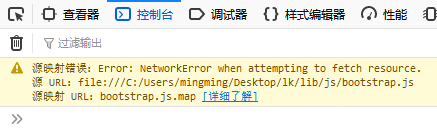
Browser console prompt: Error: NetworkError when attempting to fetch resource.

The tips are as follows:

Error: NetworkError occurred while trying to obtain a resource.

The reason:
Missing mapping file (Sourcemap File)
Solution 1:
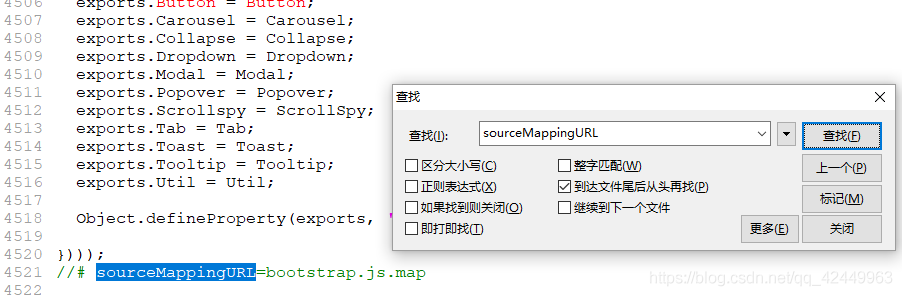
Find and open the file, search sourceMappingURL, delete the code like //# sourceMappingURL=bootstrap.js.map, and then exit with an error

Add the corresponding map file. In the plug-in download, there will be the corresponding map file under the same directory, and add this file to the path referenced by sourceMappingURL
Extension: What is a Sourcemap file?
Source after the map is js file compression, the location of the file name to replace the corresponding variables such as meta information data file, popular understanding is the Source map is a storage location information of files, the transformed code before each position of the corresponding transformation, when wrong, debugging tool can directly display the original code, rather than the code after the transformation, provides great convenience for developers.
Js the original variable is the map, for example, compressed by variable substitution rules may be replaced with a, then the source map file will keep a record of the mapping information, developers if there is a js error, when debugging browser will by parsing the map file to merge compressed js, so developers can use to debug the code before compression.
The sourcemap file is typically placed in the same directory as the min.js main file.
prompt: source map function requires the support of the browser, such as the mainstream browser Firefox, Chrome, etc. are supported. Firefox is enabled by default. Chrome needs to check the Enable JavaScript Source Maps option in Settings. The new version of Chrome seems to be enabled by default.

Synergy 1.4.12 “ipc connection error, connection refused” and other issues

You have encountered the same problems with installing the latest version of Synergy 1.4.12 as I did. If you have encountered the same problems as I did, I hope you can take less detour

Installation steps and tutorials, a search on the Internet without saying a few points need to pay attention to the problem

1. I suggest you download the latest version of Synergy, because the operation of the latest version has been greatly simplified and many bugs have been solved

2. The two versions should be consistent. If they are not consistent, all kinds of weird problems will occur

Example: Your server has 64-bit Synergy installed while your client has 32-bit Synergy installed

3
.”ipc connection error, connection refused”

“Failed to connect to Server: Protocol Error from Server “error prompt

I encountered a situation that worked the first time it was configured, but didn’t work the next day when it was restarted. The client kept reporting this error when connecting

My configuration environment: My server synergys is MAC and my Synergyc is WIN7

The reason was that I used syner1.4.10 version of synergy1.4.10 inexplicably after synergy1.4.10 was installed before and restarted. The server and client versions failed to match, so I kept reporting this error

Solution: Delete synergy from previous releases completely, and don’t be distracted

4. The inconsistency between the protocols of the Server and the Client will also result in the problems described above. For example, the Client chooses the “encryption protocol”, while the Server chooses other protocols, which can be seen in the configuration

If you have any questions, please leave a message to discuss

syntax error near unexpected token `then’ problem solution

#! /bin/bash
#if program test

echo ‘a:’
read a
If [“$a” = “English”]; then
echo “right”
else
echo “wrong”
fi

I wrote the shell script according to the procedure on the video, but “syntax error near token ‘then'” appeared during the execution. After looking at the syntax error near token’ then’ for half a day, I did not find out the reason. After searching the Internet for a long time, I finally understood the reason: There is no space between if and ‘[‘. In addition, when executing, I also found that there must be space on both sides of’ = ‘, otherwise there will be an error, not a syntax error, but no matter what value is assigned to a, the program will get the statement after if is false, thus resulting in wrong.

An error is displayed when virtualbox uses modifyhd command to expand capacity: Resize medium operation for this format is not implemented yet

Virtualbox implemented capacity using the modifyhd command: Resize Medium Operation for this Format is not implemented yet
The 10gb virtual disk you created requires more space and you don’t want to use the additional virtual disk method.
through checking the data, we found that the VBoxManage modifyhd command provided by VirtulBox can be solved. The specific usage of this command:
VBoxManage modifyhd
[– type normal|writethrough| shareable>0
readonly>1 multiattach]
[– autoreset on>2 off]
[– property]
[– compact]
[– resize>3 — resizebyte]

pengdeMacBook-Air:windows pengchen$ cd VirtualBox\ VMs/windows/

Modify fixed size virtual hard disks to dynamically allocate storage to hard disks:

pengdeMacBook-Air:windows pengchen$ VBoxManage modifyhd windows-disk1.vmdk -type normal

Modify the size of the virtual hard disk to 50G:

C:\Program Files\Oracle\VirtualBox>VBoxManage modifyhd e:\vbox\Ubuntu12.04\Ubuntu1204-201302-disk1.vmdk --resize 30000
0%...
Progress state: VBOX_E_NOT_SUPPORTED
VBoxManage.exe: error: Resize hard disk operation for this format is not implemented yet!

The original virtual machine is in VMDK format, and this command only supports VDI format. What to do
find VBoxManager can be used to convert virtual hard disk storage file format

C:\Program Files\Oracle\VirtualBox>VBoxManage clonehd e:\vbox\Ubuntu12.04\Ubuntu1204-201302-disk1.vmdk  e:\vbox\Ubuntu12.04\Ubuntu1204-201310-disk1.vdi --format VDI
0%...10%...20%...30%...40%...50%...60%...70%...80%...90%...100%
Clone hard disk created in format 'VDI'. UUID: 455b7aa4-d776-4254-8353-d9b5b3fa109b

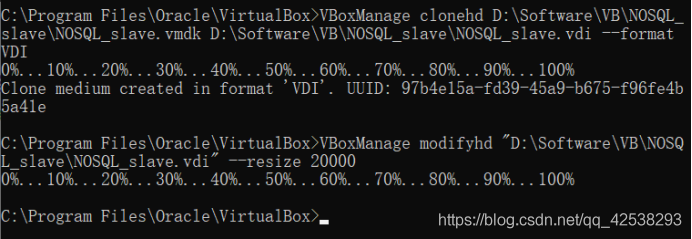
Finally, VBoxManager is used to set the expansion capacity of the transferred VDI file

C:\Program Files\Oracle\VirtualBox>VBoxManage modifyhd e:\vbox\Ubuntu12.04\Ubunt
u1204-201310-disk1.vdi --resize 30000
0%...10%...20%...30%...40%...50%...60%...70%...80%...90%...100%

I didn’t report that mistake
Note: after opening the virtual machine, the actual disk size has not changed. At this time, you need to use the disk management tool to expand your partition size.
From above: https://blog.csdn.net/weiguang1017/article/details/52252448?utm_medium=distribute.pc_relevant.none-task-blog-BlogCommendFromBaidu-4& Depth_1 -utm_source=distribute. Pc_relevant. None-task-blog-blogcommendfrombaidu -4
my action pictures

OpenSSL SSL_connect: SSL_ERROR_SYSCALL in connection to github.com:443

The github project was suddenly unavailable with Git today, error reporting:
Fatal: unable to access “https://github.com/dmlc/xgboost.git/” : OpenSSL SSL_connect: SSL_ERROR_SYSCALL in connection to github.com: 443
It doesn’t work in all kinds of ways. I found many ways on the Internet:
https://blog.csdn.net/daerzei/article/details/79528153
 
https://stackoverflow.com/questions/49345357/fatal-unable-to-access-https-github-com-xxx-openssl-ssl-connect-ssl-error
 
If that doesn’t work, try switching to a network, such as a hotspot or your own broadband connection, because you may be using a company Intranet and have a proxy set up.
If not, I don’t know what to do