Author Archives: Robins

luajit: not enough memory

Error running code:

luajit: not enough memory

The reason for the search seems to be that LuaJIT limit of 2GB,

The solution is to install LUA5.1. Since LuaJIT 2.1 is the default when installing Torch, the /install command allows you to install LUA5.1 in this step, with the following commands:

TORCH_LUA_VERSION=LUA51 ./install.sh

When the installation is complete, re-run the code and there will be no errors.

“Permission denied” error in Oracle10g installation

Reason: Before the software was uploaded to the Linux server, it was unzipped and then uploaded in the Windows environment. When it was uploaded, it was already the folder after decompression, so the execution permission of those three files was lost.
Solutions:
1, enter database folder
2, chmod 755 runInstaller(grant permissions)
3, enter install LLL a(view files)
4, chmod 755. Oui (solve install/. Oui this hidden file does not have permissions to execute)
5, chmod 755 unzip(solve unzip permissions)
6, then execute in the Database folder./runInstaller

Abnormal crash of APP startup — pointer being free was not allocated * * set a breakpoint in malloc_ error_ break to debug

1. Problem scene
APP startup exception crashes

BlockChainStep(1332,0x7000057ad000) malloc: * error for object 0x600000008300: pointer being freed was not allocated
* set a breakpoint in malloc_error_break to debug

Second, the cause of the crash

In Xcode8 this will occur if your image resource file has 16 bitmaps or if the image display mode is P3 and the Deployment Target is below iOS9.3. (As a matter of fact, a small button appeared in the project of our company, which caused this crash. I don’t know how the designer made this special picture…) If your App needs to support the wide color functionality, you’ll have to set the Deployment Target to above iOS9.3. If your APP doesn’t need to support wide color functionality and you want to be compatible with the older versions of iOS, you’ll need to convert all the 16-bit or P3 images to 8-bit sRGB assets

3. Solutions
Convert image to 8-bit sRGB Assets format
Reference article: Xcode assets problem caused by running iOS8 crash solution

AE ram preview requires 2 or more frameworks to solve playback

After Effects error:RAM preview needs 2 or more frames to playback
 
“RAM preview requires 2 or more frames for playback “or” explained that memory capacity is too small”
 
 
Another small finding was that WHEN AE rendered by pressing the “0” button, if it said “After Effects Error :RAM Preview needs 2 or more frames to Playback “, the popular online message was that it was running out of memory, so just release it. In fact, there is a small side door, which is to check the From Current Time check box on the right. Accidentally discovered..

 
I used the English version and noticed that the RAM preview changed when I adjusted to different Settings.

in the AE menu, you can follow the following steps to find out the RAM preview memory configuration options:

so if you set the adjustment bar to the far right for the fastest preview speed, press 0 again, the following prompt may appear:

“After Effects Error :RAM Preview needs 2 or more Frames to Playback”, so this graphical option should be adjusted to avoid this error.

the other RAM preview also have different options:

I am will adjust the tie rod moved to the far left, anyway, large memory capacity (64 – bit Windows 7 of 8 gb of memory), then I am chose “From the current frame” this option, the English meaning is From now this frame (start preview), activate this option has the advantage of, avoid to start From scratch every time.

then I first move the pointer of the timeline to the place I want to review, and then press the 0 key of the keypad to start the rendering, I found that the RAM render preview can be accumulated.
although rendered will likely stop somewhere, if you press the keypad 0, can timely preview with audio clips, and then if you press the keypad 0, if memory allocation is reasonable, can also continue to accumulate, every rendering is tight as the last rendering the end point, this section after accumulation, the green line of time online will have different rendering process with time, gradually accumulate, until will run out the allocation of memory. This allows you to view long rendered content.

also:

render after press 0 can only play the part of the green line, if it is a green line between the blue line or blank, then press 0 when the preview will be stopped on the blue line starting point (or starting point of the blank, the end of the green), if you would turn it into green and sustainable, in former time pointer positioned in the green line, and choose “” From the current frame”, continue to press the keypad 0, and the green line in the middle of the blue lines or fill blank section was JiCheng green. It is recommended that you always use the 0 key of the keypad, so that you can watch long segments of accumulated content with sound. When viewing the RAM preview, if you reach the key point, press the * key on the keypad to mark, which is useful for audio editing in the future.

preview window has the “SHIFT+RAM” option, which can be rendered every other frame preview, generally defined in the project default resolution about half of the definition, and for the frame-by-frame jump preview. Also associated with this is the option “SKIP”, which allows you to choose how many frames you want to render in to save time. Above SHIFT + RAM is to skip a frame.
, of course, selects 0 to render everything (no omitted interval frames). The above two items should be noted: because some people may like to keep RAM rendering content, but you should pay attention to the interval frame parameters (1 and 2 or 0?). And possible audio spacing issues. Note that select 0: is all the spaceless render!

(CTRL+ keyboard 0 can save RAM preview content)

with audio preview, might as well CTRL+4 to activate the audio level indicator to see if the audio is overloaded…

preview has a lot to play with… As long as you stick to the zero key on your keypad, you’ll iterate over the steps, render, play, accumulate render…
green line is part of the timeline can be spliced together, mainly is the stitching together of the persistent green line, can real-time with audio playback preview, if you insist on cumulative preview render, allocated memory segment will make the corresponding adjustment, is likely to be behind the rendering gradually turn green, and in front of the green line is gradually becoming blue…
13.2 spring boot start error: whitelabel error page

13.2 Spring Boot Boot Error: Whitelabel Error Page
Problem description

Whitelabel Error Page
This application has no explicit mapping for /error, so you are seeing this as a fallback.
Tue Mar 28 22:25:43 CST 2017
There was an unexpected error (type=Internal Server Error, status=500).
Circular view path [login]: would dispatch back to the current handler URL [/login] again. Check your ViewResolver setup! (Hint: This may be the result of an unspecified view, due to default view name generation.)

Cause analysis,
First, the error page is the default error page for SpringBoot. Source in: org. Springframework. Boot. Autoconfigure. Web. Servlet. Error. ErrorMvcAutoConfiguration line 151.
This error is usually caused by a configuration error, or an MVC error.
The solution
Properly configure the named presuffix of the template file in the Application.properties file:

spring.mvc.view.prefix=/WEB-INF/jsp/
spring.mvc.view.suffix=.jsp

In addition, in earlier versions of Springboot, MVC was not included in the key.

spring.view.prefix: /WEB-INF/jsp/
spring.view.suffix: .jsp

This configuration is version 1.1 after class, in the org. Springframework. Boot. Autoconfigure. Web. Servlet. WebMvcProperties class. The above annotation @ConfigurationProperties(prefix = “spring.MVC “) indicates the key.
Accordingly, the template files should be placed in the correct directory. For the above configuration, the corresponding directory can be:

/src/main/webapp/WEB-INF/jsp/
/src/main/resources/META-INF/resources/WEB-INF/jsp

The default directory for common SpringBoot template files is as follows:

# THYMELEAF (ThymeleafAutoConfiguration)
spring.thymeleaf.cache=true # Enable template caching.
spring.thymeleaf.check-template=true # Check that the template exists before rendering it.
spring.thymeleaf.check-template-location=true # Check that the templates location exists.
spring.thymeleaf.enabled=true # Enable Thymeleaf view resolution for Web frameworks.
spring.thymeleaf.encoding=UTF-8 # Template files encoding.
spring.thymeleaf.excluded-view-names= # Comma-separated list of view names that should be excluded from resolution.
spring.thymeleaf.mode=HTML5 # Template mode to be applied to templates. See also StandardTemplateModeHandlers.
spring.thymeleaf.prefix=classpath:/templates/ # Prefix that gets prepended to view names when building a URL.
spring.thymeleaf.reactive.max-chunk-size= # Maximum size of data buffers used for writing to the response, in bytes.
spring.thymeleaf.reactive.media-types=text/html # Media types supported by the view technology.
spring.thymeleaf.servlet.content-type=text/html # Content-Type value written to HTTP responses.
spring.thymeleaf.suffix=.html # Suffix that gets appended to view names when building a URL.
spring.thymeleaf.template-resolver-order= # Order of the template resolver in the chain.
spring.thymeleaf.view-names= # Comma-separated list of view names that can be resolved.


# FREEMARKER (FreeMarkerAutoConfiguration)
spring.freemarker.allow-request-override=false # Set whether HttpServletRequest attributes are allowed to override (hide) controller generated model attributes of the same name.
spring.freemarker.allow-session-override=false # Set whether HttpSession attributes are allowed to override (hide) controller generated model attributes of the same name.
spring.freemarker.cache=false # Enable template caching.
spring.freemarker.charset=UTF-8 # Template encoding.
spring.freemarker.check-template-location=true # Check that the templates location exists.
spring.freemarker.content-type=text/html # Content-Type value.
spring.freemarker.enabled=true # Enable MVC view resolution for this technology.
spring.freemarker.expose-request-attributes=false # Set whether all request attributes should be added to the model prior to merging with the template.
spring.freemarker.expose-session-attributes=false # Set whether all HttpSession attributes should be added to the model prior to merging with the template.
spring.freemarker.expose-spring-macro-helpers=true # Set whether to expose a RequestContext for use by Spring's macro library, under the name "springMacroRequestContext".
spring.freemarker.prefer-file-system-access=true # Prefer file system access for template loading. File system access enables hot detection of template changes.
spring.freemarker.prefix= # Prefix that gets prepended to view names when building a URL.
spring.freemarker.request-context-attribute= # Name of the RequestContext attribute for all views.
spring.freemarker.settings.*= # Well-known FreeMarker keys which will be passed to FreeMarker's Configuration.
spring.freemarker.suffix= # Suffix that gets appended to view names when building a URL.
spring.freemarker.template-loader-path=classpath:/templates/ # Comma-separated list of template paths.
spring.freemarker.view-names= # White list of view names that can be resolved.

# GROOVY TEMPLATES (GroovyTemplateAutoConfiguration)
spring.groovy.template.allow-request-override=false # Set whether HttpServletRequest attributes are allowed to override (hide) controller generated model attributes of the same name.
spring.groovy.template.allow-session-override=false # Set whether HttpSession attributes are allowed to override (hide) controller generated model attributes of the same name.
spring.groovy.template.cache= # Enable template caching.
spring.groovy.template.charset=UTF-8 # Template encoding.
spring.groovy.template.check-template-location=true # Check that the templates location exists.
spring.groovy.template.configuration.*= # See GroovyMarkupConfigurer
spring.groovy.template.content-type=test/html # Content-Type value.
spring.groovy.template.enabled=true # Enable MVC view resolution for this technology.
spring.groovy.template.expose-request-attributes=false # Set whether all request attributes should be added to the model prior to merging with the template.
spring.groovy.template.expose-session-attributes=false # Set whether all HttpSession attributes should be added to the model prior to merging with the template.
spring.groovy.template.expose-spring-macro-helpers=true # Set whether to expose a RequestContext for use by Spring's macro library, under the name "springMacroRequestContext".
spring.groovy.template.prefix= # Prefix that gets prepended to view names when building a URL.
spring.groovy.template.request-context-attribute= # Name of the RequestContext attribute for all views.
spring.groovy.template.resource-loader-path=classpath:/templates/ # Template path.
spring.groovy.template.suffix=.tpl # Suffix that gets appended to view names when building a URL.
spring.groovy.template.view-names= # White list of view names that can be resolved.


mysqli_ Error() has no return value (Fixed)

<?php
$mysqli=mysqli_connect('localhost','root','123','test');
if(mysqli_connect_errno()){
    printf("Connect failed:%s\n",mysqli_connect_error());
    exit();
}
else
{
    $sql="CREATE TABLE testTable(
    id int not null primary key auto_increment,
    testField varchar(20)
    )";
    $res=mysql_query($mysql,$sql);   //I wrote $mysqli as $mysql, so it doesn't operate on the specified database.
    var_dump($res);
    echo "<br/>";
    if($res===true){
        echo "Table testTable successfully created.";
    }   
    else{
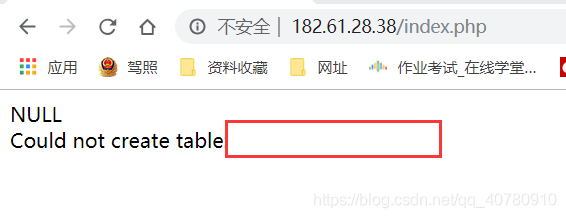
       printf("Could not create table:%s\n",mysqli_error($mysqli));
    }   
    mysqli_close($mysqli);
}
?>

Output result: (mysqli_error() returns no error message)

The first argument to mysqli_query() should be $mysqli, but I wrote $mysql, which doesn’t exist. So mysqli_query() doesn’t actually find it
Specified database, so no table build operation is performed. So mysqli_error() does not return a value.

Since my VIM configuration is not complete, this error should be detectable by IDE syntax correction.
So an operation error to the database, and mysqli_error() does not return a value, could be a parameter error passed to mysqli_query().
Mysqli_error () returns an error from the last database operation. If the first parameter was written incorrectly, no operation was performed to the specified database
Error message.

Java error prompt….. cannot be resolved

Error message:
Type:… Always be resolved.
Reason analysis:
:
/* Any hint that… Always be resolved.
* 1. Variables are used without being declared or defined.
* 2. Some class, no import or definition
* 3. An object that is not defined or declared.
*
*
*/

Examples in specific projects:

import java.util.Scanner;
public class AppCAC
{
public static int Avg(int temp)
{
int avg1;
avg1=temp; // When written like this: avg1=temp; The error shown is: AvG1 cannot be Resolved // i.e. Avg1 cannot be resolved.
avg1=avg1+temp;

return avg1;
}

public static int Max(int temp)
{
int M=0;
if(temp> =M)
M=temp;
return M;

}

public static int Min(int temp)
{
int Min=0;
if(Min> =temp)
{
Min=temp;
}
return Min;
}

public static void main(String[] args)
{
int com;
int avg;
int max;
int min;
// here I want to define three methods
// how do I define methods?

/*Scanner scan=new Scanner(system.in); Multiple markers at this line
-scanner cannot be resolved to
a type*/

for(int I =1; i< 11. I++)
{
system.out.println (” please enter: “);
// com=scan.nextInt(); I can conclude by saying:

/* any scan cannot be resolved. Always be resolved.
* 1. Variables are used without being declared or defined.
* 2. Some class, no import or definition
* 3. An object that is not defined or declared.
*
*
*/
Avg(com);
Max(com);
Min(com);
}
/*for(i=1; i< 11. I++)
{
system.out.println (” please enter: “);
com=scan.nextInt();
Avg (com);
Max(com);
Min(com);
}
, this code shows: Multiple markers at this line
-i cannot be
-i cannot be
resolved
-i cannot be
resolved

this error, : error: I cannot be processed. Why can’t I be processed??The reason: I use it without defining I, and variables can only be used if they are defined.
*
*/
avg=Avg/10;
system.out.println (” now start output: \n”);
system.out.println (” mean: “,avg);
system.out.println (” Max: “,Max); // The method println(int) is not applicable for The arguments (String, int),
// learn how to use println method.

}

}

Mount error (112): host is down


centos7 minial system when sharing directory with a storage device, use mount-t cifs-o username=”***”,password=”***” \\ \ storage device IP \\ directory name \\ directory name, system error mount error(112): Host is down, after performing yum install cifs-utils and smb-related dependencies, mount -t cifs-o vers=1.0,username=”***”,password=”***” \\ \ storage device IP \ directory name \\ directory name, load successfully, this situation mainly involves two problems:
1, cifs and SMB. SMB (Server Message Block) is also known as CIFS(Common Internet File System), an application layer network transport protocol (developed by Microsoft and Intel in 1987). The main function of SMB is to enable machines on the network to share computer files, printers, serial ports, communications and other resources. It also provides certified interprocess communication skills. It is mainly used on Windows machines. CIFS is a protocol developed by Microsoft based on SMB and extended to the Internet. It has nothing to do with the specific OS; CIFS is available after Samba is installed on Unix. It enables a program to access files on a remote Internet computer and request the services of that computer. CIFS USES client/server mode. The client requests the server application on the remote server to serve it. The server gets the request and returns the response.
CIFS is a public or open version of the SMB protocol and is used by Microsoft. The SMB protocol is now a LAN protocol for accessing and printing server files. Like the SMB protocol, CIFS runs at a high level, rather than at the bottom, as TCP/IP does. CIFS can be seen as an implementation of application protocols such as file transfer protocol and hypertext transfer Protocol. Ii. The first packet sent by cifs protocol contains version information. Mount vfstype
mount vfstype
DOS fat16 file system: msdos
Windows 9x fat32 file system: vfat
Windows NT NTFS
mount Windows file network sharing: SMBFS
UNIX(LINUX) file network sharing: NFS

Java prompt unmappable character for encoding solution

We Java developers may often encounter unmappable Character for Encoding errors. The reason for this error is that the source code contains characters not included in the GBK encoding. The solution: The source code contains characters not included in the GBK encoding.

• delete the character
• save the source code file as utf-8 encoding

unmappable character for encoding error. However, after looking it up on the Internet, we know that the class file of Java USES utf-8 encoding. Test2.java is compiled to Test2.class, including the utF-8 encoding conversion process.

solution

0

1

2

copy code copy code
compile javac-encoding GBK test2. Java runs java-dfile.encoding = “GBK” test2

3