Tag Archives: python

Python:ImportError: No module named indexes.base

When I use pickle to reload data, all the errors are as follows:

Traceback (most recent call last):
  File "segment.py", line 17, in <module>
    word2id = pickle.load(pk)
  File "/System/Library/Frameworks/Python.framework/Versions/2.7/lib/python2.7/pickle.py", line 1378, in load
    return Unpickler(file).load()
  File "/System/Library/Frameworks/Python.framework/Versions/2.7/lib/python2.7/pickle.py", line 858, in load
    dispatch[key](self)
  File "/System/Library/Frameworks/Python.framework/Versions/2.7/lib/python2.7/pickle.py", line 1090, in load_global
    klass = self.find_class(module, name)
  File "/System/Library/Frameworks/Python.framework/Versions/2.7/lib/python2.7/pickle.py", line 1124, in find_class
    __import__(module)
ImportError: No module named indexes.base
 

one hundred and twenty-three trillion and four hundred and fifty-six billion seven hundred and eighty-nine million one hundred and one thousand one hundred and twelve

one hundred and twenty-three trillion and four hundred and fifty-six billion seven hundred and eighty-nine million one hundred and one thousand one hundred and twelve

The reason for this

The same code and data run on two different machines. At first, I thought the wrong machine was missing some Python packages. But there are too many packages to install, so I can’t try them one by one. Fortunately, I use virsualenv to copy the environment from another machine to this machine directly. After running, there is no problem. But in order to find out which Python installation package is missing, I use the original compilation environment, reuse pickle to generate the original data to be loaded, and then reload it At this time, there was no error.

summary

To sum up, the reason is that the original version of panda used in the generation of pickle file is different from the current version of load pickle file. So whether it is to write code in Python or other languages, the compiling environment is very important. Once the version of a package is different, it may also lead to program errors.

Install the specified version of the package with PIP.

pip install pandas==x.x.x

[problem solving] target is multiclass but average =’binary ‘. Please choose another average setting

Today, when compiling Python code, we encountered the following error:
target is multiclass but average =’binary ‘. Please choose another average setting, one of [none,’ micro ‘,’ macro ‘,’ weighted ‘]

The original code is as follows, is to require a data set of F1 (precision and recall combined into a single index).

from sklearn.metrics import precision_score, recall_score

precision_score(y_train, y_train_pred)

terms of settlement

Average =’micro’is added to the original code.

from sklearn.metrics import precision_score, recall_score

precision_score(y_train, y_train_pred, average='micro')

The average parameter defines the calculation method of the index. In binary classification, the average parameter is binary by default; in multi classification, the optional parameters are micro, macro, weighted and samples.

None: returns the score of each class. Otherwise, this determines the average type of execution on the data.

Binary: only report the result POS of the specified class_ label。 Only if targets (Y_ Only when {true, PRED}) is binary.

Micro: global indicators are calculated by calculating total true positives, false negatives and false positives. That is to say, all classes are calculated together (to be specific to precision), and then the TP sum of all classes is divided by the sum of TP and FN of all classes. Therefore, precision and recall in micro method are equal to accuracy.

Macro: calculate the indicators of each tag to find their unweighted average. This does not take into account label imbalance. In other words, the precision of each class is calculated first, and then the arithmetic average is calculated.

Weighted: calculate the indicators of each tag, find their average value, and weight by support (the number of real instances of each tag). This would change the “macro” to address the label imbalance; it could result in an F-score that is not between precision and recall.

Samples: calculate the indicators of each instance and find their average value (only meaningful for different multi label classification)_ score)。

reference resources: https://blog.csdn.net/datongmu_ yile/article/details/81750737

Typeerror: object of type ‘response’ has no len() why?

The code is as follows:

rom bs4 import BeautifulSoup
import requests
url='XXX'
web=requests.get(url)
soup=BeautifulSoup(web,'lxml')
print(soup)

On these lines, the error is:

E:\Python\Python35-32\python.exe C:/Users/ty/PycharmProjects/untitled3/src/Reptile.py
Traceback (most recent call last):
File "C:/Users/ty/PycharmProjects/untitled3/src/Reptile.py", line 7, in <module>
soup=BeautifulSoup(web,'lxml')
File "E:\Python\Python35-32\lib\site-packages\beautifulsoup4-4.5.1-py3.5.egg\bs4\__init__.py", line 192, in __init__
TypeError: object of type 'Response' has no len()


Process finished with exit code 1

Why??

answer


soup=BeautifulSoup(web,'lxml')

There is a mistake in this place. The web here is a response object, which can’t be parsed by using beautiful soup. If you want to parse, the parsing object should be web.content So the correct way to write it is

soup=BeautifulSoup(web.content,'lxml')

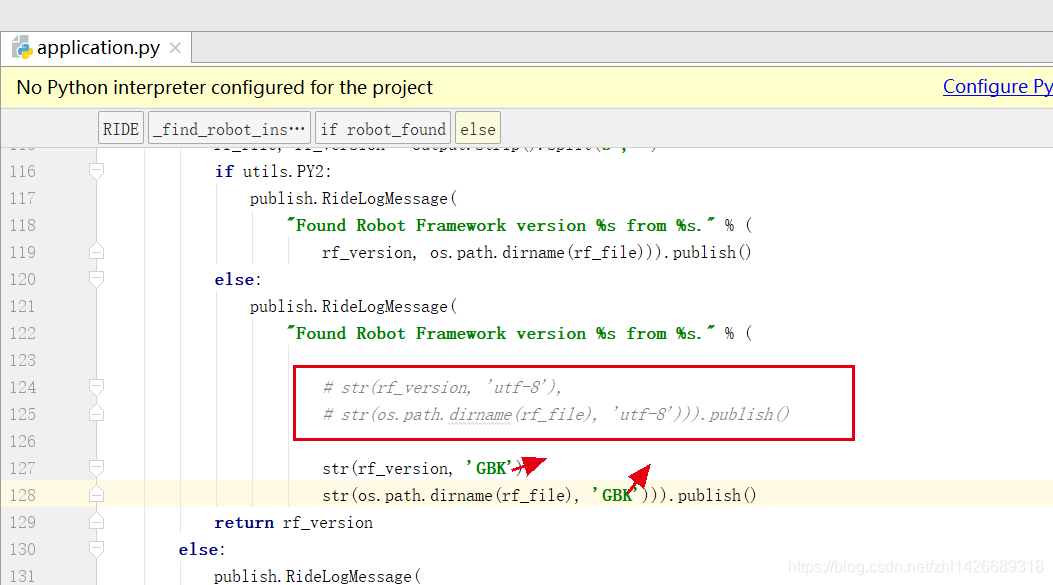
UTF-8 encoding error when starting robotframework ride

Record the error when starting the robot framework ride

start-up ride.py The following error occurred

D:\Program Files(x86)\python\Scripts>python ride.py
Traceback (most recent call last):
  File “D:\Program Files(x86)\python\lib\site-packages\robotide\application\ application.py “, line 70, in OnInit
    self._ find_ robot_ installation()
  File “D:\Program Files(x86)\python\lib\site-packages\robotide\application\ application.py “, line 124, in _ find_ robot_ installation
    str( os.path.dirname (rf_ file), ‘utf-8’))).publish()
UnicodeDecodeError: ‘utf-8’ codec can’t decode byte 0xa3 in position 20: invalid start byte
OnInit returned false, exiting…
Error in atexit._ run_ exitfuncs:
wx._ core.wxAssertionError : C++ assertion “GetEventHandler() == this” failed at ..\..\src\common\ wincmn.cpp (478) in wxWindowBase::~wxWindowBase(): any pushed event handlers must have been removed


Check the log. UTF-8 can’t encode 20,

Therefore, we tried the next step application.py The UTF-8 coding form in the file is changed to “GBK”, restart ride.py After that, ride is turned on

Warning when using numpy: runtimewarning: numpy.dtype size changed, may indicate binary incompatibility

You may encounter the following warnings when running Python programs after a new numpy installation:

/usr/local/lib/python2.7/dist-packages/scipy/linalg/basic.py:17: RuntimeWarning: numpy.dtype size changed, may indicate binary incompatibility. Expected 96, got 88
  from ._solve_toeplitz import levinson
/usr/local/lib/python2.7/dist-packages/scipy/linalg/__init__.py:207: RuntimeWarning: numpy.dtype size changed, may indicate binary incompatibility. Expected 96, got 88
  from ._decomp_update import *
/usr/local/lib/python2.7/dist-packages/scipy/special/__init__.py:640: RuntimeWarning: numpy.dtype size changed, may indicate binary incompatibility. Expected 96, got 88
  from ._ufuncs import *
/usr/local/lib/python2.7/dist-packages/scipy/special/_ellip_harm.py:7: RuntimeWarning: numpy.dtype size changed, may indicate binary incompatibility. Expected 96, got 88
  from ._ellip_harm_2 import _ellipsoid, _ellipsoid_norm
/usr/local/lib/python2.7/dist-packages/scipy/interpolate/_bsplines.py:10: RuntimeWarning: numpy.dtype size changed, may indicate binary incompatibility. Expected 96, got 88
  from . import _bspl
/usr/local/lib/python2.7/dist-packages/scipy/sparse/lil.py:19: RuntimeWarning: numpy.dtype size changed, may indicate binary incompatibility. Expected 96, got 88
  from . import _csparsetools
/usr/local/lib/python2.7/dist-packages/scipy/sparse/csgraph/__init__.py:165: RuntimeWarning: numpy.dtype size changed, may indicate binary incompatibility. Expected 96, got 88
  from ._shortest_path import shortest_path, floyd_warshall, dijkstra,\
/usr/local/lib/python2.7/dist-packages/scipy/sparse/csgraph/_validation.py:5: RuntimeWarning: numpy.dtype size changed, may indicate binary incompatibility. Expected 96, got 88
  from ._tools import csgraph_to_dense, csgraph_from_dense,\
/usr/local/lib/python2.7/dist-packages/scipy/sparse/csgraph/__init__.py:167: RuntimeWarning: numpy.dtype size changed, may indicate binary incompatibility. Expected 96, got 88
  from ._traversal import breadth_first_order, depth_first_order, \
/usr/local/lib/python2.7/dist-packages/scipy/sparse/csgraph/__init__.py:169: RuntimeWarning: numpy.dtype size changed, may indicate binary incompatibility. Expected 96, got 88
  from ._min_spanning_tree import minimum_spanning_tree
/usr/local/lib/python2.7/dist-packages/scipy/sparse/csgraph/__init__.py:170: RuntimeWarning: numpy.dtype size changed, may indicate binary incompatibility. Expected 96, got 88
  from ._reordering import reverse_cuthill_mckee, maximum_bipartite_matching, \
/usr/local/lib/python2.7/dist-packages/scipy/spatial/__init__.py:95: RuntimeWarning: numpy.dtype size changed, may indicate binary incompatibility. Expected 96, got 88
  from .ckdtree import *
/usr/local/lib/python2.7/dist-packages/scipy/spatial/__init__.py:96: RuntimeWarning: numpy.dtype size changed, may indicate binary incompatibility. Expected 96, got 88
  from .qhull import *
/usr/local/lib/python2.7/dist-packages/scipy/spatial/_spherical_voronoi.py:18: RuntimeWarning: numpy.dtype size changed, may indicate binary incompatibility. Expected 96, got 88
  from . import _voronoi
/usr/local/lib/python2.7/dist-packages/scipy/spatial/distance.py:122: RuntimeWarning: numpy.dtype size changed, may indicate binary incompatibility. Expected 96, got 88
  from . import _hausdorff

At this point, you can check the version of numpy below

python
>>> import numpy
>>> numpy.__version__

If version 1.15.0 or above is displayed, the warning is caused by too high numpy version. Downgrade numpy version, such as 1.14.5

sudo pip uninstall numpy
sudo pip install numpy==1.14.5

Coursera Using python to access Web data quiz 4


1

point

1。

Which of the following Python data structures is most similar to the value returned in this line of Python:


1

*

*

*

*

List available video modes. If resolution is given show only modes matching it.x

= urllib.request.urlopen (

‘ http://data.pr4e.org/romeo.txt ‘)

*

*

*

*

socket

regular expression

-ise suffixes and with accents

file handle

list

1

point

2.

In this Python code, which line actually reads the data?


1

2

3

4

5

6

7

8

9

10

11

12

13


import socket


mysock = socket.socket(socket.AF_INET, socket.SOCK_STREAM)

mysock.connect((‘data.pr4e.org’, 80))

cmd = ‘GET http://data.pr4e.org/romeo.txt HTTP/1.0\n\n’.encode()

mysock.send(cmd)


while True:

data = mysock.recv(512)

if (len(data) < 1):

break

print(data.decode())

mysock.close()


mysock.recv()

socket.socket()

mysock.close()

mysock.connect()

mysock.send()

1

point

3。

Which of the following regular expressions would extract the URL from this line of HTML:


one


&lt;

P

&gt Please click;

&lt;

a

href

=

the United Nations http://www.dr-chuck.com/ the United Nations

&gt here;

&lt/

a

&gt;

&lt/

P

&gt;


href=)+”。

href=”

http:/ *

&lt.&gt;

one

point

4。

In this Python code,which line is most like the open)call to read a file:


1

2

3

4

5

6

7

8

9

10

11

12

13


import socket


mysock = socket.socket(socket.AF_INET, socket.SOCK_STREAM)

mysock.connect((‘data.pr4e.org’, 80))

cmd = ‘GET http://data.pr4e.org/romeo.txt HTTP/1.0\n\n’.encode()

mysock.send(cmd)


while True:

data = mysock.recv(512)

if (len(data) < 1):

break

print(data.decode())

mysock.close()


mysock.connect()

import socket

mysock.recv()

mysock.send()

socket.socket()

1

point

5。

Which HTTP header tells the browser the kind of document that is being returned?

HTML-Document:

Content-Type:

Document-Type:

ETag:

Metadata:

1

point

6。

What should you check before scraping a web site?

That the web site returns HTML for all pages

That the web site supports the HTTP GET command

That the web site allows scraping

That the web site only has links within the same site

1

point

7。

What is the purpose of the BeautifulSoup Python library?

It builds word clouds from web pages

It allows a web site to choose an attractive skin

It optimizes files that are retrieved many times

It animates web operations to make them more attractive

It repairs and parses HTML to make it easier for a program to understand

1

point

8。

What ends up in the “x” variable in the following code:


1

2

3


html
= urllib.request.urlopen(url).read()

soup
= BeautifulSoup(html,
‘html.parser’)

x
= soup(
‘a’)


A list of all the anchor tags (<a..) in the HTML from the URL

True if there were any anchor tags in the HTML from the URL

All of the externally linked CSS files in the HTML from the URL

All of the paragraphs of the HTML from the URL

1

point

9。

What is the most common Unicode encoding when moving data between systems?

UTF-32

UTF-64

UTF-16

UTF-128

UTF-8

1

point

10。

What is the decimal (Base-10) numeric value for the upper case letter “G” in the ASCII character set?

71

7

103

25073

14

1

point

11。

What word does the following sequence of numbers represent in ASCII:
108, 105, 110, 101
 

lost

tree

ping

line

func

1

point

12。

How are strings stored internally in Python 3?

Byte Code

UTF-8

ASCII

EBCDIC

Unicode

1

point

13。

When reading data across the network (i.e. from a URL) in Python 3, what method must be used to convert it to the internal format used by strings?

decode()

upper()

find()

trim()

encode()
1

point

1。

Which of the following Python data structures is most similar to the value returned in this line of Python:


1

*

*

*

*

x = urllib.request.urlopen (‘ http://data.pr4e.org/romeo.txt ‘)

*

*

*

*

socket

regular expression

-ise suffixes and with accents

file handle

list

1

point

2.

In this Python code, which line actually reads the data?


1

2

3

4

5

6

7

8

9

10

11

12

13


import socket


mysock
= socket.socket(socket.AF_INET, socket.SOCK_STREAM)

mysock.connect((
‘data.pr4e.org’,
80))

cmd
=
‘GET http://data.pr4e.org/romeo.txt HTTP/1.0
\n\n
‘.encode()

mysock.send(cmd)


while
True:

data
= mysock.recv(
512)

if (
len(data)
<
1):

break

print(data.decode())

mysock.close()


mysock.recv()

socket.socket()

mysock.close()

mysock.connect()

mysock.send()

1

point

3。

Which of the following regular expressions would extract the URL from this line of HTML:


one


&lt p&gt Please click&lt; http://www.dr-chuck.com/ “&gt here&lt


href=)+”。

href=”

http:/ *

&lt.&gt;

one

point

4。

In this Python code,which line is most like the open)call to read a file:


1

2

3

4

5

6

7

8

9

10

11

12

13


import socket


mysock
= socket.socket(socket.AF_INET, socket.SOCK_STREAM)

mysock.connect((
‘data.pr4e.org’,
80))

cmd
=
‘GET http://data.pr4e.org/romeo.txt HTTP/1.0
\n\n
‘.encode()

mysock.send(cmd)


while
True:

data
= mysock.recv(
512)

if (
len(data)
<
1):

break

print(data.decode())

mysock.close()


mysock.connect()

import socket

mysock.recv()

mysock.send()

socket.socket()

1

point

5。

Which HTTP header tells the browser the kind of document that is being returned?

HTML-Document:

Content-Type:

Document-Type:

ETag:

Metadata:

1

point

6。

What should you check before scraping a web site?

That the web site returns HTML for all pages

That the web site supports the HTTP GET command

That the web site allows scraping

That the web site only has links within the same site

1

point

7。

What is the purpose of the BeautifulSoup Python library?

It builds word clouds from web pages

It allows a web site to choose an attractive skin

It optimizes files that are retrieved many times

It animates web operations to make them more attractive

It repairs and parses HTML to make it easier for a program to understand

1

point

8。

What ends up in the “x” variable in the following code:


1

2

3


html = urllib.request.urlopen(url).read()

soup = BeautifulSoup(html, ‘html.parser’)

x = soup(‘a’)


A list of all the anchor tags (<a..) in the HTML from the URL

True if there were any anchor tags in the HTML from the URL

All of the externally linked CSS files in the HTML from the URL

All of the paragraphs of the HTML from the URL

1

point

9。

What is the most common Unicode encoding when moving data between systems?

UTF-32

UTF-64

UTF-16

UTF-128

UTF-8

1

point

10。

What is the decimal (Base-10) numeric value for the upper case letter “G” in the ASCII character set?

71

7

103

25073

14

1

point

11。

What word does the following sequence of numbers represent in ASCII:
108, 105, 110, 101
 

lost

tree

ping

line

func

1

point

12。

How are strings stored internally in Python 3?

Byte Code

UTF-8

ASCII

EBCDIC

Unicode

1

point

13。

When reading data across the network (i.e. from a URL) in Python 3, what method must be used to convert it to the internal format used by strings?

decode()

upper()

find()

trim()

encode()


Python about typeerror: required argument ‘mat’ (POS 2) not found error resolution

This error prompt means that the required parameter is not found, that is, the function in the code is missing the necessary parameter. Here’s an example of displaying a picture

import cv2
img = cv2.imread('./data/wiki.png')
cv2.imshow(img)
cv2.waitKey(0)

The following error occurs at runtime:

Traceback (most recent call last):
  File “D:/python_ opencv/ ss.py “, line 3, in <module>
    cv2.imshow(img)
TypeError: Required argument ‘mat’ (pos 2) not found

Process finished with exit code 1

A closer inspection shows that there are two necessary parameters from the CV2. Imshow() function, and another parameter is the name of the image window. The results are as follows

import cv2
img = cv2.imread('./data/wiki.png')
cv2.imshow('img',img)
cv2.waitKey(0)

Lingerror last 2 dimensions of the array must be square

Lingerror last 2 dimensions of the array must be square

reason

Because numpy uses X directly= numpy.linalg.solve (a, b) we must make sure that a is a square matrix, but my matrix is not a square matrix

solve

The least square method: C= np.linalg.lstsq (A, B, rcond=None)[0]

problem

It seems to be an equation with infinite solutions, and I don’t know how to output a unique solution in a specific range

Python TypeError: return arrays must be of ArrayType

from numpy import *
np.log(1.1, 2)

The above code will appear at run time

Typeerror: return arrays must be of arraytype, because the second parameter of log is not base but out array. If you just want to perform normal log operations, you can choose to use numpy.math.log (1.1, 2) or use the log function of Python’s math module