Collectionutils.isempty (list)
when the list is empty, return true
collectionutils.isnotempty (list)
when not empty, return true if not empty
Tag Archives: java
Postman – local opened Charles packet capture tool, postman issued a request error: error: self signed certificate
Background
Charles postman has been opened locally. The post request cannot be sent normally. Error: self signed certificate
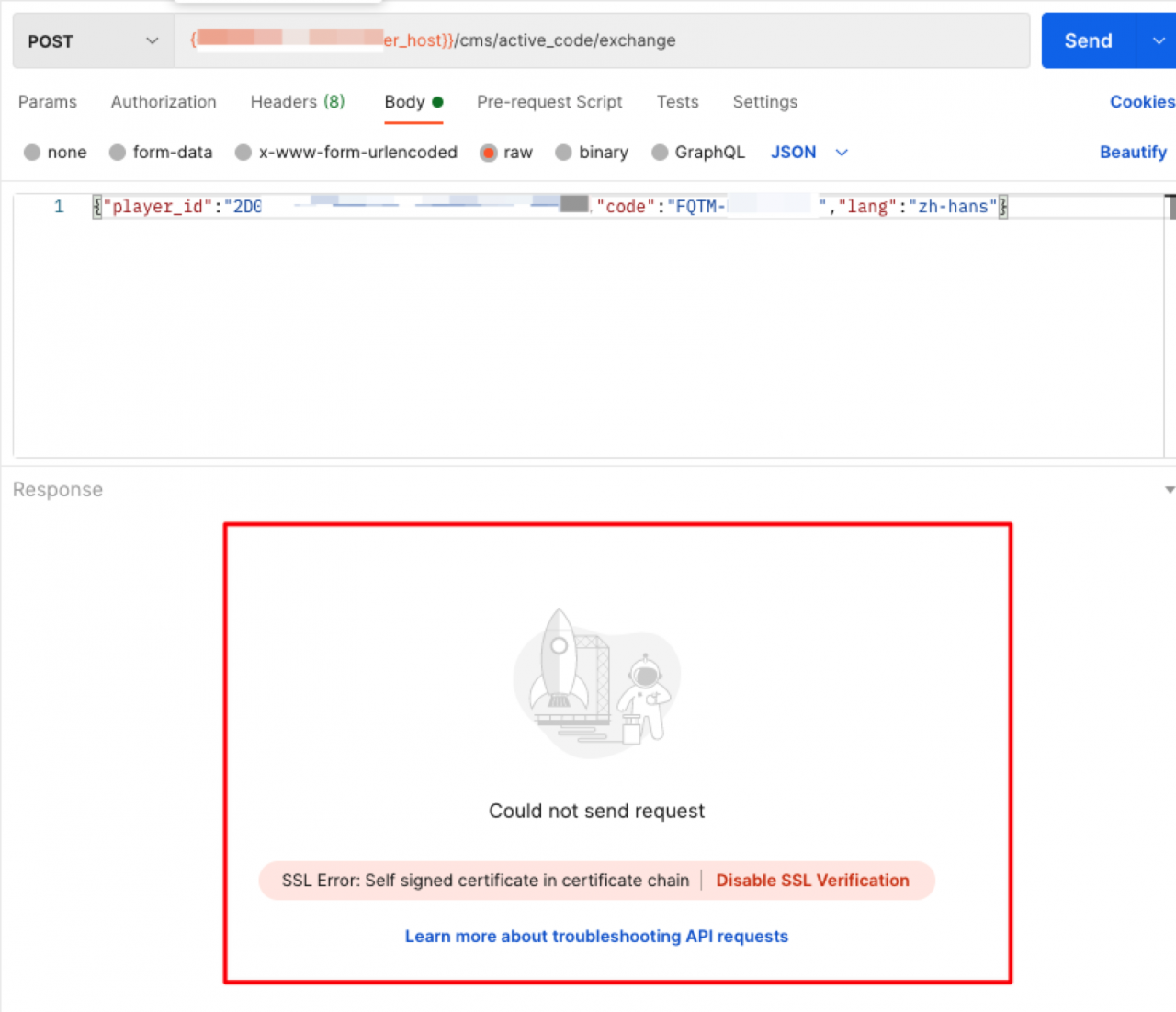
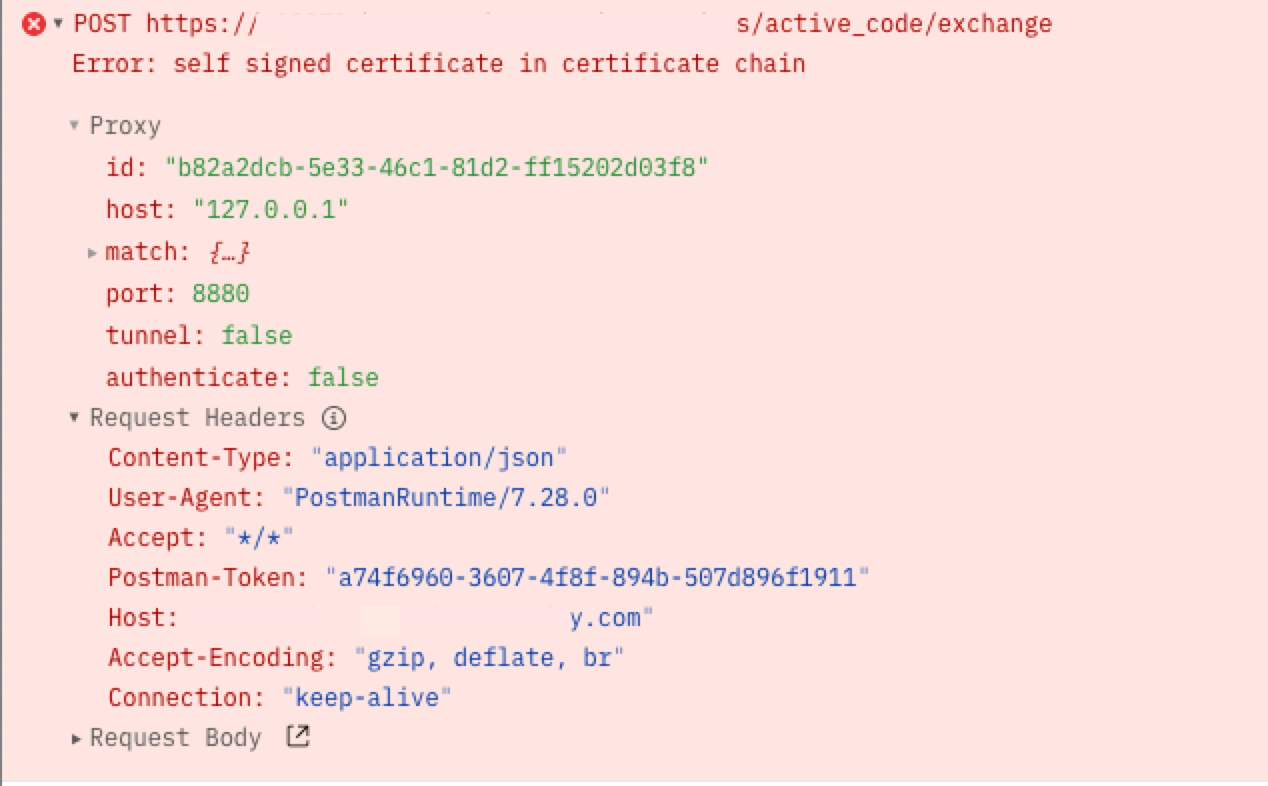
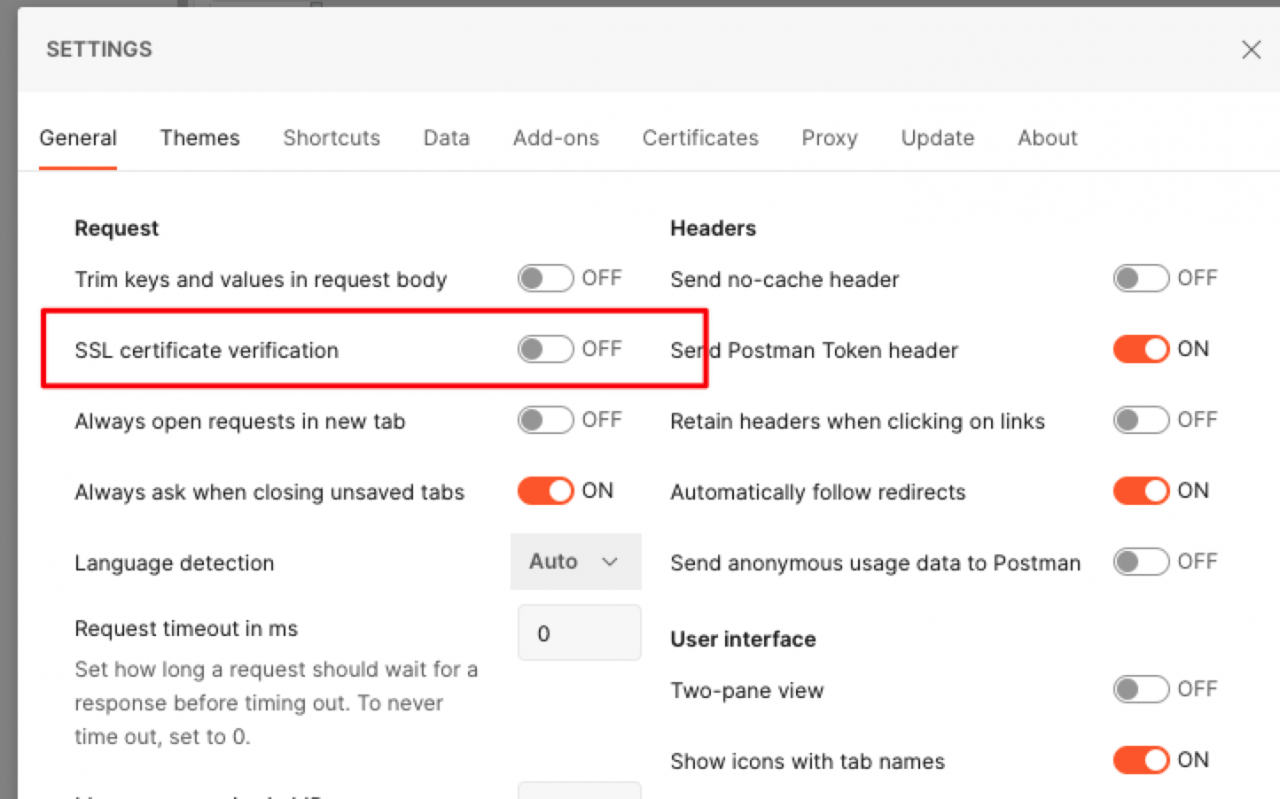
Solution
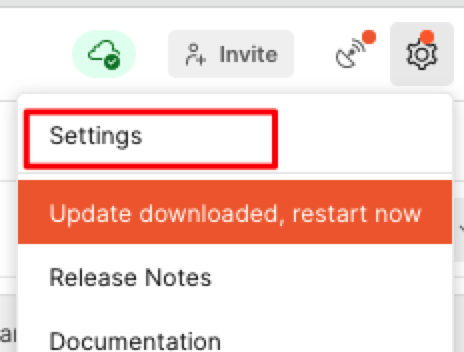
Just turn off the switch
How to Solve Error: Element ‘dependency’ cannot have character [children], because the type’s content type is element-
The phenomenon is as follows:
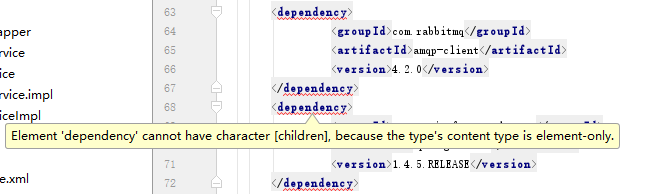
The reason:
It’s when you copy it, you bring some special symbols.
The reason:
It’s when you copy it, you bring some special symbols.
Solution:
Copy that string of code to NotPad ++ or text, and then copy it into your compiler, and you’ll solve the problem
Copy that string of code to NotPad ++ or text, and then copy it into your compiler, and you’ll solve the problem
How to Solve IBM MQ Connect Error Code 2035
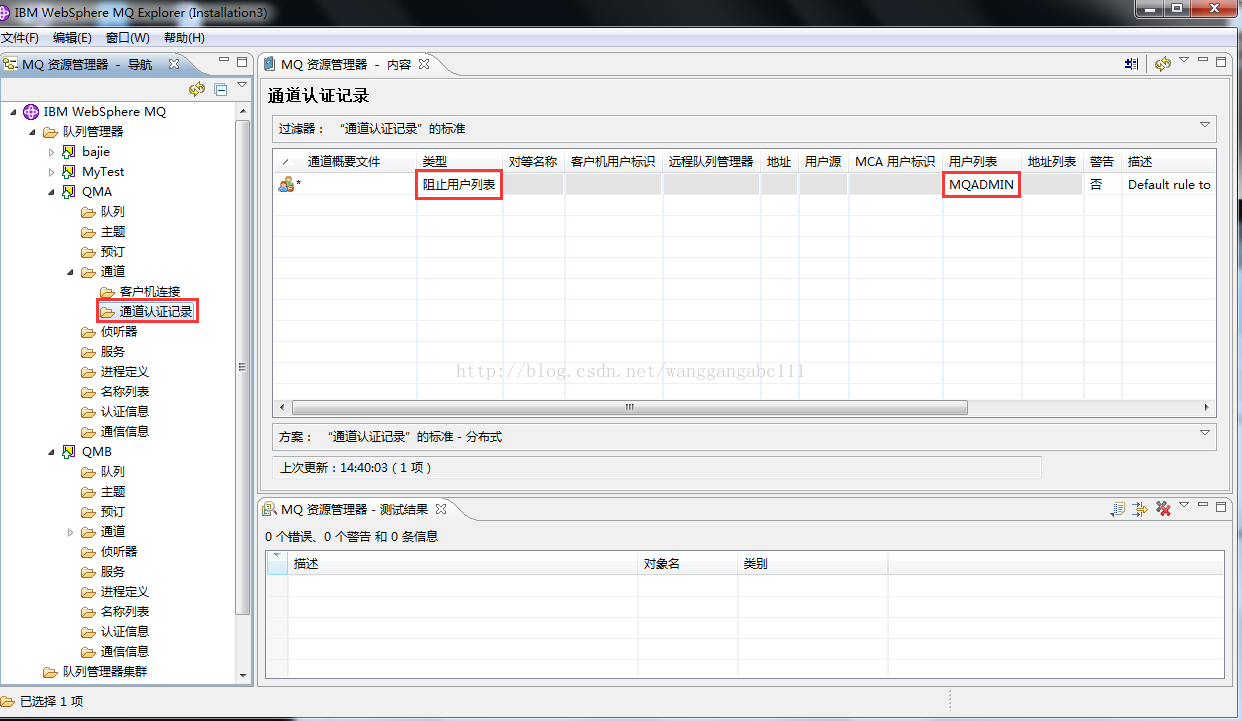
With some development experience with IBM MQ, you should realize when you look at 2035 that it was a permissions issue. The following figure
MQJE001: Completion code is '2', reason is '2035'.
Exception in thread "main" com.ibm.mq.MQException: MQJE001: Completion code is '2', reason is '2035'.
	at com.ibm.mq.MQManagedConnectionJ11.<init>(MQManagedConnectionJ11.java:247)
	at com.ibm.mq.MQClientManagedConnectionFactoryJ11._createManagedConnection(MQClientManagedConnectionFactoryJ11.java:588)
	at com.ibm.mq.MQClientManagedConnectionFactoryJ11.createManagedConnection(MQClientManagedConnectionFactoryJ11.java:630)
	at com.ibm.mq.StoredManagedConnection.<init>(StoredManagedConnection.java:107)
	at com.ibm.mq.MQSimpleConnectionManager.allocateConnection(MQSimpleConnectionManager.java:205)
	at com.ibm.mq.MQQueueManagerFactory.obtainBaseMQQueueManager(MQQueueManagerFactory.java:911)
	at com.ibm.mq.MQQueueManagerFactory.procure(MQQueueManagerFactory.java:799)
	at com.ibm.mq.MQQueueManagerFactory.constructQueueManager(MQQueueManagerFactory.java:750)
	at com.ibm.mq.MQQueueManagerFactory.createQueueManager(MQQueueManagerFactory.java:157)
	at com.ibm.mq.MQQueueManager.<init>(MQQueueManager.java:681)
	at com.yusys.SendMsg.connect(SendMsg.java:30)
	at com.yusys.SendMsg.main(SendMsg.java:76)
Of course, you can also view the log file under the error folder of MQ, which has detailed error instructions.
Here is the test code:
package com.yusys;


import java.io.IOException;

import com.ibm.mq.MQEnvironment;
import com.ibm.mq.MQException;
import com.ibm.mq.MQMessage;
import com.ibm.mq.MQPutMessageOptions;
import com.ibm.mq.MQQueue;
import com.ibm.mq.MQQueueManager;
import com.ibm.msg.client.wmq.v6.base.internal.MQC;

public class SendMsg {
	static MQQueueManager qMgr;
	static int CCSID = 1381;
	static String queueName = "RQ_0000";
	static String message;

	public static void connect() throws MQException{
		MQEnvironment.hostname = "172.20.35.98";
		MQEnvironment.channel = "JMS_RECEIVE";
		MQEnvironment.port = 1416;
		MQEnvironment.CCSID = CCSID;
		//User name with privileges in MQ
		MQEnvironment.userID = "MUSR_MQADMIN";
		// the password corresponding to the user name
		MQEnvironment.password = "123456";

		qMgr = new MQQueueManager("QMA");
	}

	public static void sendMsg(String msgStr){
		int openOptions = MQC.MQOO_OUTPUT|MQC.MQOO_FAIL_IF_QUIESCING;
		MQQueue queue = null;
		try {
			//Open the queue
			queue = qMgr.accessQueue(queueName, openOptions);
			// Create message buffer
			MQMessage msg = new MQMessage();
			//set the options for placing messages
			MQPutMessageOptions pmo = new MQPutMessageOptions();
			//the message data to be sent
			msg.format = MQC.MQFMT_STRING;
			msg.characterSet = CCSID;
			msg.encoding = CCSID;
			msg.writeString(msgStr);
			msg.expiry = -1;//Set messages to never expire
			queue.put(msg,pmo);
			qMgr.commit();

		} catch (MQException e) {
			e.printStackTrace();
		} catch (IOException e){
			e.printStackTrace();
		} catch (Exception e){
			e.printStackTrace();
		} finally {
			if(queue!=null){
				try {
					queue.close();
				} catch (MQException e) {
					e.printStackTrace();
				} finally{
					try {
						qMgr.disconnect();
					} catch (MQException e) {
						e.printStackTrace();
					}
				}
			}
		}
	}

	public static void main(String[] args) throws MQException{
		connect();
//		String msg = HttpClientUtil.doGet("http://localhost:8080/user/all");
//		sendMsg(msg);
		sendMsg("Zhuang Sheng dawned a butterfly and wished the emperor a cuckoo in spring");
		System.out.println("End of insertion");
	}
}
Usually, MQ client and MQ server communication, using the MQ server connection channel service in the MCAUSER attribute specified by the user as the MQ client even come up with the user, if the MCAUSER attribute value is empty, use the MQ client in the operating system used by the user as the MQ client even come up with the user, communication, reported a 2035 error, is due to the client and server communication used by the user without permission, there are two solutions.
Method one:
If you set the MCAUSER property to MUSR_MQADMIN(CHANNEL definition name JMS_RECEIVE) in the server’s service connection CHANNEL definition: ALTER CHANNEL(JMS_RECEIVE) CHLTYPE(SVRCONN); MCAUSER(MUSR_MQADMIN) must ensure that the MUSR_MQADMIN user is a member of the MQM group as follows:
Usermod-g GroupName Username (change the group of the existing user)
Useradd-g GroupName Username (create new user and group)
Method 2:
If MQ channel definition on the server MCAUSER attribute values for vacant province, namely is empty, the MQ client can be used by the users to add to the MQ server’s operating system, for example, if the MQ client USES for the ADMIN user, the user is added to the MQ server ADMIN, and ensure the users in the MQM group MQ the server, and how to perform the necessary permissions on the queue manager operation.
Special note: When claiming MCA authentication under Windows and finding 2035, it may be because the channel authentication record Settings are blocked. You just need to change the list of users.
When the database table field is set to self incrementing, use the entity class to insert or update the data to solve the error (Hibernate Framework)
Problem: there are self increasing columns in database table fields. When you add or update data using entity classes, you will report an error (Hibernate Framework)
[2021-05-06 15:12:04] [WARN] [org.hibernate.engine.jdbc.spi.SqlExceptionHelper:143] SQL Error: -2664, SQLState: 22000
[2021-05-06 15:12:04] [ERROR] [org.hibernate.engine.jdbc.spi.SqlExceptionHelper:144] Fehler bei Zeile 1:
Versuch, die selbstinkrementierende Spalte [NUM] zu ändern
org.hibernate.exception.DataException: Fehler bei Zeile 1:
Versuch, die selbstinkrementierende Spalte [NUM] zu ändern
	at org.hibernate.exception.internal.SQLStateConversionDelegate.convert(SQLStateConversionDelegate.java:134)
	at org.hibernate.exception.internal.StandardSQLExceptionConverter.convert(StandardSQLExceptionConverter.java:49)
	at org.hibernate.engine.jdbc.spi.SqlExceptionHelper.convert(SqlExceptionHelper.java:125)
	at org.hibernate.engine.jdbc.spi.SqlExceptionHelper.convert(SqlExceptionHelper.java:110)
	at org.hibernate.engine.jdbc.internal.proxy.ConnectionProxyHandler.continueInvocation(ConnectionProxyHandler.java:146)
	at org.hibernate.engine.jdbc.internal.proxy.AbstractProxyHandler.invoke(AbstractProxyHandler.java:81)
	at com.sun.proxy.$Proxy502.prepareStatement(Unknown Source)
	at org.hibernate.engine.jdbc.batch.internal.AbstractBatchImpl.buildBatchStatement(AbstractBatchImpl.java:144)
	at org.hibernate.engine.jdbc.batch.internal.AbstractBatchImpl.getBatchStatement(AbstractBatchImpl.java:127)
	at org.hibernate.persister.entity.AbstractEntityPersister.update(AbstractEntityPersister.java:2964)
	at org.hibernate.persister.entity.AbstractEntityPersister.updateOrInsert(AbstractEntityPersister.java:2915)
	at org.hibernate.persister.entity.AbstractEntityPersister.update(AbstractEntityPersister.java:3244)
	at org.hibernate.action.internal.EntityUpdateAction.execute(EntityUpdateAction.java:113)
	at org.hibernate.engine.spi.ActionQueue.execute(ActionQueue.java:362)
	at org.hibernate.engine.spi.ActionQueue.executeActions(ActionQueue.java:354)
	at org.hibernate.engine.spi.ActionQueue.executeActions(ActionQueue.java:276)
	at org.hibernate.event.internal.AbstractFlushingEventListener.performExecutions(AbstractFlushingEventListener.java:326)
	at org.hibernate.event.internal.DefaultAutoFlushEventListener.onAutoFlush(DefaultAutoFlushEventListener.java:59)
	at org.hibernate.internal.SessionImpl.autoFlushIfRequired(SessionImpl.java:1099)
	at org.hibernate.internal.SessionImpl.list(SessionImpl.java:1528)
	at org.hibernate.internal.CriteriaImpl.list(CriteriaImpl.java:374)
	at org.jeecgframework.core.common.dao.impl.GenericBaseCommonDao.findByPropertys(GenericBaseCommonDao.java:184)
	at org.jeecgframework.core.common.service.impl.CommonServiceImpl.findByPropertys(CommonServiceImpl.java:145)
	at sun.reflect.NativeMethodAccessorImpl.invoke0(Native Method)
	at sun.reflect.NativeMethodAccessorImpl.invoke(NativeMethodAccessorImpl.java:62)
	at sun.reflect.DelegatingMethodAccessorImpl.invoke(DelegatingMethodAccessorImpl.java:43)
	at java.lang.reflect.Method.invoke(Method.java:498)
	at org.springframework.aop.support.AopUtils.invokeJoinpointUsingReflection(AopUtils.java:317)
	at org.springframework.aop.framework.ReflectiveMethodInvocation.invokeJoinpoint(ReflectiveMethodInvocation.java:190)
	at org.springframework.aop.framework.ReflectiveMethodInvocation.proceed(ReflectiveMethodInvocation.java:157)
	at org.springframework.transaction.interceptor.TransactionInterceptor$1.proceedWithInvocation(TransactionInterceptor.java:98)
	at org.springframework.transaction.interceptor.TransactionAspectSupport.invokeWithinTransaction(TransactionAspectSupport.java:262)
	at org.springframework.transaction.interceptor.TransactionInterceptor.invoke(TransactionInterceptor.java:95)
	at org.springframework.aop.framework.ReflectiveMethodInvocation.proceed(ReflectiveMethodInvocation.java:179)
	at org.springframework.aop.framework.JdkDynamicAopProxy.invoke(JdkDynamicAopProxy.java:207)
	at com.sun.proxy.$Proxy80.findByPropertys(Unknown Source)
	at com.aisino.platform.lhjh.service.impl.FgwLhjhZbServiceImpl.doTzAudit(FgwLhjhZbServiceImpl.java:538)
	at sun.reflect.NativeMethodAccessorImpl.invoke0(Native Method)
	at sun.reflect.NativeMethodAccessorImpl.invoke(NativeMethodAccessorImpl.java:62)
	at sun.reflect.DelegatingMethodAccessorImpl.invoke(DelegatingMethodAccessorImpl.java:43)
	at java.lang.reflect.Method.invoke(Method.java:498)
	at org.springframework.aop.support.AopUtils.invokeJoinpointUsingReflection(AopUtils.java:317)
	at org.springframework.aop.framework.ReflectiveMethodInvocation.invokeJoinpoint(ReflectiveMethodInvocation.java:190)
	at org.springframework.aop.framework.ReflectiveMethodInvocation.proceed(ReflectiveMethodInvocation.java:157)
	at org.springframework.transaction.interceptor.TransactionInterceptor$1.proceedWithInvocation(TransactionInterceptor.java:98)
	at org.springframework.transaction.interceptor.TransactionAspectSupport.invokeWithinTransaction(TransactionAspectSupport.java:262)
	at org.springframework.transaction.interceptor.TransactionInterceptor.invoke(TransactionInterceptor.java:95)
	at org.springframework.aop.framework.ReflectiveMethodInvocation.proceed(ReflectiveMethodInvocation.java:179)
	at org.springframework.aop.framework.JdkDynamicAopProxy.invoke(JdkDynamicAopProxy.java:207)
	at com.sun.proxy.$Proxy208.doTzAudit(Unknown Source)
	at com.aisino.platform.lhjh.controller.FgwLhjhZbController.doAudit(FgwLhjhZbController.java:524)
	at sun.reflect.NativeMethodAccessorImpl.invoke0(Native Method)
	at sun.reflect.NativeMethodAccessorImpl.invoke(NativeMethodAccessorImpl.java:62)
	at sun.reflect.DelegatingMethodAccessorImpl.invoke(DelegatingMethodAccessorImpl.java:43)
	at java.lang.reflect.Method.invoke(Method.java:498)
	at org.springframework.web.method.support.InvocableHandlerMethod.doInvoke(InvocableHandlerMethod.java:221)
	at org.springframework.web.method.support.InvocableHandlerMethod.invokeForRequest(InvocableHandlerMethod.java:137)
	at org.springframework.web.servlet.mvc.method.annotation.ServletInvocableHandlerMethod.invokeAndHandle(ServletInvocableHandlerMethod.java:104)
	at org.springframework.web.servlet.mvc.method.annotation.RequestMappingHandlerAdapter.invokeHandleMethod(RequestMappingHandlerAdapter.java:747)
	at org.springframework.web.servlet.mvc.method.annotation.RequestMappingHandlerAdapter.handleInternal(RequestMappingHandlerAdapter.java:676)
	at org.springframework.web.servlet.mvc.method.AbstractHandlerMethodAdapter.handle(AbstractHandlerMethodAdapter.java:85)
	at org.springframework.web.servlet.DispatcherServlet.doDispatch(DispatcherServlet.java:938)
	at org.springframework.web.servlet.DispatcherServlet.doService(DispatcherServlet.java:870)
	at org.springframework.web.servlet.FrameworkServlet.processRequest(FrameworkServlet.java:961)
	at org.springframework.web.servlet.FrameworkServlet.doPost(FrameworkServlet.java:863)
	at javax.servlet.http.HttpServlet.service(HttpServlet.java:652)
	at org.springframework.web.servlet.FrameworkServlet.service(FrameworkServlet.java:837)
	at javax.servlet.http.HttpServlet.service(HttpServlet.java:733)
	at org.apache.catalina.core.ApplicationFilterChain.internalDoFilter(ApplicationFilterChain.java:231)
	at org.apache.catalina.core.ApplicationFilterChain.doFilter(ApplicationFilterChain.java:166)
	at org.apache.tomcat.websocket.server.WsFilter.doFilter(WsFilter.java:52)
	at org.apache.catalina.core.ApplicationFilterChain.internalDoFilter(ApplicationFilterChain.java:193)
	at org.apache.catalina.core.ApplicationFilterChain.doFilter(ApplicationFilterChain.java:166)
	at com.alibaba.druid.support.http.WebStatFilter.doFilter(WebStatFilter.java:123)
	at org.apache.catalina.core.ApplicationFilterChain.internalDoFilter(ApplicationFilterChain.java:193)
	at org.apache.catalina.core.ApplicationFilterChain.doFilter(ApplicationFilterChain.java:166)
	at filter.FrameTao.doFilter(FrameTao.java:22)
	at org.apache.catalina.core.ApplicationFilterChain.internalDoFilter(ApplicationFilterChain.java:193)
	at org.apache.catalina.core.ApplicationFilterChain.doFilter(ApplicationFilterChain.java:166)
	at org.jeecgframework.core.aop.GZipFilter.doFilter(GZipFilter.java:114)
	at org.apache.catalina.core.ApplicationFilterChain.internalDoFilter(ApplicationFilterChain.java:193)
	at org.apache.catalina.core.ApplicationFilterChain.doFilter(ApplicationFilterChain.java:166)
	at org.springframework.web.filter.CharacterEncodingFilter.doFilterInternal(CharacterEncodingFilter.java:88)
	at org.springframework.web.filter.OncePerRequestFilter.doFilter(OncePerRequestFilter.java:107)
	at org.apache.catalina.core.ApplicationFilterChain.internalDoFilter(ApplicationFilterChain.java:193)
	at org.apache.catalina.core.ApplicationFilterChain.doFilter(ApplicationFilterChain.java:166)
	at org.springframework.orm.hibernate4.support.OpenSessionInViewFilter.doFilterInternal(OpenSessionInViewFilter.java:150)
	at org.springframework.web.filter.OncePerRequestFilter.doFilter(OncePerRequestFilter.java:107)
	at org.apache.catalina.core.ApplicationFilterChain.internalDoFilter(ApplicationFilterChain.java:193)
	at org.apache.catalina.core.ApplicationFilterChain.doFilter(ApplicationFilterChain.java:166)
	at org.apache.catalina.core.StandardWrapperValve.invoke(StandardWrapperValve.java:199)
	at org.apache.catalina.core.StandardContextValve.invoke(StandardContextValve.java:96)
	at org.apache.catalina.authenticator.AuthenticatorBase.invoke(AuthenticatorBase.java:543)
	at org.apache.catalina.core.StandardHostValve.invoke(StandardHostValve.java:139)
	at org.apache.catalina.valves.ErrorReportValve.invoke(ErrorReportValve.java:81)
	at org.apache.catalina.valves.AbstractAccessLogValve.invoke(AbstractAccessLogValve.java:690)
	at org.apache.catalina.core.StandardEngineValve.invoke(StandardEngineValve.java:87)
	at org.apache.catalina.connector.CoyoteAdapter.service(CoyoteAdapter.java:343)
	at org.apache.coyote.http11.Http11Processor.service(Http11Processor.java:615)
	at org.apache.coyote.AbstractProcessorLight.process(AbstractProcessorLight.java:65)
	at org.apache.coyote.AbstractProtocol$ConnectionHandler.process(AbstractProtocol.java:818)
	at org.apache.tomcat.util.net.NioEndpoint$SocketProcessor.doRun(NioEndpoint.java:1626)
	at org.apache.tomcat.util.net.SocketProcessorBase.run(SocketProcessorBase.java:49)
	at java.util.concurrent.ThreadPoolExecutor.runWorker(ThreadPoolExecutor.java:1149)
	at java.util.concurrent.ThreadPoolExecutor$Worker.run(ThreadPoolExecutor.java:624)
	at org.apache.tomcat.util.threads.TaskThread$WrappingRunnable.run(TaskThread.java:61)
	at java.lang.Thread.run(Thread.java:748)
Caused by: dm.jdbc.driver.DMException: Fehler bei Zeile 1:
Versuch, die selbstinkrementierende Spalte [NUM] zu ändern
	at dm.jdbc.driver.DBError.throwException(DBError.java:636)
	at dm.jdbc.c.b.p.S(MSG.java:225)
	at dm.jdbc.c.b.p.P(MSG.java:185)
	at dm.jdbc.c.b.p.O(MSG.java:166)
	at dm.jdbc.c.a.a(DBAccess.java:786)
	at dm.jdbc.c.a.a(DBAccess.java:206)
	at dm.jdbc.driver.DmdbPreparedStatement.prepareSql(DmdbPreparedStatement.java:198)
	at dm.jdbc.driver.DmdbPreparedStatement.allocateHandle(DmdbPreparedStatement.java:167)
	at dm.jdbc.driver.DmdbPreparedStatement.<init>(DmdbPreparedStatement.java:120)
	at dm.jdbc.driver.DmdbPreparedStatement.<init>(DmdbPreparedStatement.java:134)
	at dm.jdbc.driver.DmdbConnection.do_prepareStatement(DmdbConnection.java:791)
	at dm.jdbc.driver.DmdbConnection.do_prepareStatement(DmdbConnection.java:777)
	at dm.jdbc.driver.DmdbConnection.prepareStatement(DmdbConnection.java:1395)
	at com.alibaba.druid.filter.FilterChainImpl.connection_prepareStatement(FilterChainImpl.java:476)
	at com.alibaba.druid.filter.FilterAdapter.connection_prepareStatement(FilterAdapter.java:929)
	at com.alibaba.druid.filter.FilterEventAdapter.connection_prepareStatement(FilterEventAdapter.java:122)
	at com.alibaba.druid.filter.FilterChainImpl.connection_prepareStatement(FilterChainImpl.java:473)
	at com.alibaba.druid.proxy.jdbc.ConnectionProxyImpl.prepareStatement(ConnectionProxyImpl.java:342)
	at com.alibaba.druid.pool.DruidPooledConnection.prepareStatement(DruidPooledConnection.java:349)
	at sun.reflect.GeneratedMethodAccessor102.invoke(Unknown Source)
	at sun.reflect.DelegatingMethodAccessorImpl.invoke(DelegatingMethodAccessorImpl.java:43)
	at java.lang.reflect.Method.invoke(Method.java:498)
	at org.hibernate.engine.jdbc.internal.proxy.ConnectionProxyHandler.continueInvocation(ConnectionProxyHandler.java:138)
	... 102 more
Solution: add the properties insertable = false and updatable = false to the @ column annotation with self increasing attribute fields.
@Column(name = "num", insertable = false, updatable = false)
    private Integer num;
Java learning unreported exception java.io.IOException ; must be caught or declared to be thrown
Code:
public class A
{
    public void showfile() throws java.io.IOException
    {
        // do someting
    }
}
What the method does is:Throw IOException
So when you use/call it, you have to either catch that exception or look for it again.
For example:
try
{
    showfile();
}
catch(IOException e)
{
    e.printStackTrace();
}Using jgit to report errors: the solution of algorithm negotiation failure
In today’s Java project, when using the jgit library to pull the remote code with SSH protocol, we encountered a lot of errors and stepped on a lot of holes to solve the problem. I’d like to record it here to help you
first of all, let’s talk about the use environment:
-
- there is no problem for the code to run on the Linux server. You can use SSH to pull the code. The local MacBook can pull code with SSH, but not with java code
Problem solving
-
-
-
- code error:
com.jcraft.jsch.jschexception: algorithm negotiation failure
-
-
-
-
- this means that the algorithm negotiation fails, and SSH communication protocol has a stage of secret agreement and algorithm negotiation, in which both parties negotiate the final algorithm according to the algorithm supported by the local end and the opposite end. Different versions of openssh have different default algorithm lists, which may lead to the failure of algorithm negotiation. Use SSH – version to view the current openssh version
-
$ ssh -Version
OpenSSH_7.9p1, LibreSSL 2.7.3
View_ Protocol used in RSA private key file header
-----BEGIN OPENSSH PRIVATE KEY-----
Use SSH keygen - M PEM - t RSA to generate old format keys
-----BEGIN RSA PRIVATE KEY-----
When configuring the newly generated public key of SSH in gitlab repository settings in Git clone repository, specify the SSH private key file 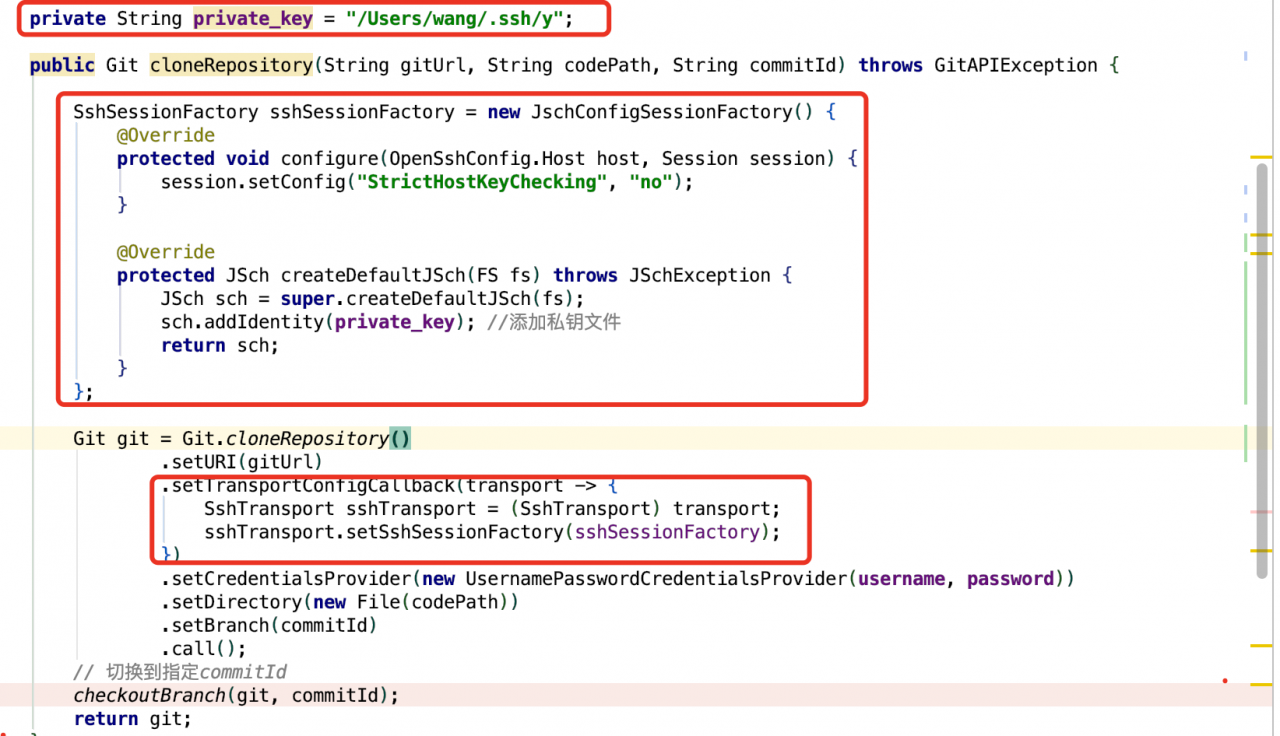
private String private_key = "/Users/wang/.ssh/y";
SshSessionFactory sshSessionFactory = new JschConfigSessionFactory() {
            @Override
            protected void configure(OpenSshConfig.Host host, Session session) {
                session.setConfig("StrictHostKeyChecking", "no");
            }

            @Override
            protected JSch createDefaultJSch(FS fs) throws JSchException {
                JSch sch = super.createDefaultJSch(fs);
                sch.addIdentity(private_key);
                return sch;
            }
        };

        Git git = Git.cloneRepository()
                .setURI(gitUrl)
                .setTransportConfigCallback(transport -> {
                    SshTransport sshTransport = (SshTransport) transport;
                    sshTransport.setSshSessionFactory(sshSessionFactory);
                })
                .setCredentialsProvider(new UsernamePasswordCredentialsProvider(username, password))
                .setDirectory(new File(codePath))
                .setBranch(commitId)
                .call();
        checkoutBranch(git, commitId);
        return git;
Other issues
-
-
- an error is reported when jsch connects to SSH: the invalid private key reports an error in the private key file that uses
-
--- begin open private key -----
-
-
- protocol by default. Just use the above method to generate the old RSA private key. In
-
/etc/SSH/sshd_ Add the following two lines to the config
-
-
- file to enable SSH to support corresponding algorithms and Macs
-
KexAlgorithms [email protected],ecdh-sha2-nistp256,ecdh-sha2-nistp384,ecdh-sha2-nistp521,diffie-hellman-group-exchange-sha256,diffie-hellman-group14-sha1,diffie-hellman-group-exchange-sha1,diffie-hellman-group1-sha1

MACs [email protected],[email protected],[email protected],[email protected],hmac-sha2-512,hmac-sha2-256,hmac-ripemd160,[email protected],hmac-md5,hmac-sha1,hmac-sha1-96,hmac-md5-96
Restart sshd service on MAC
sudo launchctl load -w /System/Library/LaunchDaemons/ssh.plist
Stop sshd service on MAC
sudo launchctl unload -w /System/Library/LaunchDaemons/ssh.plist
How to check whether a process is started
sudo launchctl list | grep sshd
0   com.openssh.sshd
[Elasticsearch Exception]Found interface org.elasticsearch.common.bytes.BytesReference
24322; normal information
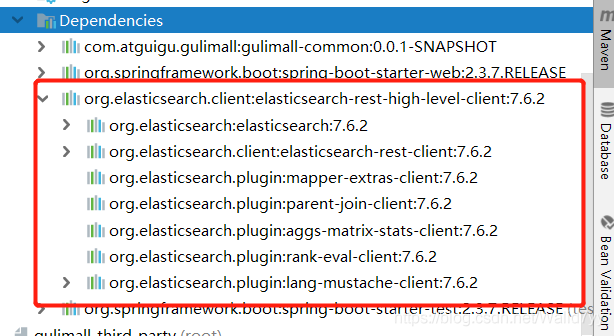
Found interface org.elasticsearch.common.bytes.BytesReference, but class was expected
picture of child problems.
To solve the solution,
<elasticsearch.version> 7.6.2
<dependency>
         <groupId>org.elasticsearch.client</groupId>
         <artifactId>elasticsearch-rest-high-level-client</artifactId>
         <version>${elasticsearch.version}</version>
     </dependency>
[Solved] IO exception: NL exception was generated
An exception to a database connection was reported by someone today:
Could not get JDBC Connection; nested exception is org.apache.commons.dbcp.SQLNestedException: Cannot create PoolableConnectionFactory (Io Exceptions: NL Exception was generated)
org.springframework.jdbc.CannotGetJdbcConnectionException: Could not get JDBC Connection; nested exception is org.apache.commons.dbcp.SQLNestedException: Cannot create PoolableConnectionFactory (Io Exceptions: NL Exception was generated)
Because the program has been running normally for a long time, so the basic rule out code logic problems, check the configuration found that the JDBC connection string problem;
The original URL was written as:
jdbc:oracle:thin:@(DESCRIPTION =(DESCRIPTION =(ADDRESS_LIST =(ADDRESS = (PROTOCOL = TCP)(HOST = 127.0.0.1)(PORT = 1521))(ADDRESS = (PROTOCOL = TCP)(HOST = 127.0.0.1)(PORT = 1521))(LOAD_BALANCE = yes))(CONNECT_DATA =(SERVER = DEDICATED)(SERVICE_NAME = orcl)(FAILOVER_MODE =(TYPE = SELECT)(METHOD = BASIC)(RETRIES = 180)(DELAY = 5))))Where, DESCRIPTION appears twice, which is incorrect, and the correct connection string should be:
jdbc:oracle:thin:@(DESCRIPTION =(ADDRESS_LIST =(ADDRESS = (PROTOCOL = TCP)(HOST = 127.0.0.1)(PORT = 1521))(ADDRESS = (PROTOCOL = TCP)(HOST = 127.0.0.1)(PORT = 1521))(LOAD_BALANCE = yes))(CONNECT_DATA =(SERVER = DEDICATED)(SERVICE_NAME = orcl)(FAILOVER_MODE =(TYPE = SELECT)(METHOD = BASIC)(RETRIES = 180)(DELAY = 5))))Conclusion:
A JDBC connection string syntax error may result in Io exceptions: NL Exception was generated.
Flutter FAQ-Error retrieving device properties for ro.product.cpu.abi
The solution
In order to avoid any detours seen later, the solution is posted directly. The rest of the content is just to record and restore the problem.
How to: Replace Android Platform Tools 29 with Android Platform Tools 28. Download the link at the end of the article.
Problem reproduction
Oddly enough, I went out for an experimental class, and when I came back Android Studio couldn’t compile the Flutter app. The output of the console part is as follows:
Exit code -1073740940 from C:\SDK\platform-tools\adb -s emulator-5554 shell -x logcat -v time -t lBash adb --version output:
Android Debug Bridge version 1.0.40
Version 29.0.1-5303910
Installed as C:\SDK\platform-tools\adb.exe
Since taicai did not see any problem, he thought to go to doctor to check the problem with flutter. The partial output is as follows:
[√] Flutter (Channel master, v1.7.2-pre.30, on Microsoft Windows [Version 10.0.17763.529], locale zh-CN)
[!]  Android toolchain - develop for Android devices (Android SDK version 29.0.1)
     × Android license status unknown.
     Try re-installing or updating your Android SDK Manager.
     See https://developer.android.com/studio/#downloads or visit https://flutterchina.club/using-ide/ to get more instructions.
[√] Android Studio (version 3.4)
[√] VS Code, 64-bit edition (version 1.34.0)
[!] Connected device
    ! No devices available
!   Doctor found issuses in 2 categories.
So the problem is probably the Android License, right?Fortunately, the solution is as follows: reinstall or upgrade SDK Manager
First, enter the bin directory of SDK tools, CD C:\SDK\tools\bin, and directly execute sdkmanager --update. I thought everything would be ok, but the output is as follows:
Exception in thread "main" java.lang.NoClassDefFoundError: javax/xml/bind/annotation/XmlSchemaApparently the solution given by Doctor Flutter didn’t work, so I had to scan the Internet for a flutter. Solutions such as adb kill don’t work
In my anger, I reinstalled Android Studio. After docor, I got an extra line of output as follows:
Error retrieving device properties for ro.product.cpu.abiHowever, there was still no solution for goose to search with this method, so she had to go out and look for over the wall (after all, Google stuff) and soon found the first issue of 26 May 2017. The dropdown is basically an unresolved problem. So I continued to find the issue of the second 23 Apr 2018. At the end of the page, I found the following comment, which was published two days ago, namely June June 2019, which was about the same time as my problem
This is a problem with platform tools 29. Temporary fix in my issueAccording to the comment, it should be the problem of Platform Tools 29. He mentioned an issue later and got a solution after clicking on it.
Install the latest version of android studio beta on windows (platform tools 29 will be installed)OK, so that’s the easy part, degrade Platform Tools
- open the folder where the SDK is located and remove the platform-tools folder (make sure the adb related process is finished) unzip the platform-tools 28 and put it in and replace it with
(The SDK Manager for Android Studio also seems to be able to degrade directly, but I don’t know why this doesn’t work, so I recommend downloading a manual replacement.)
Here is the download address:
Windows: http://dl-ssl.google.com/android/repository/platform-tools_r28.0.2-windows.zip
macOS: http://dl-ssl.google.com/android/repository/platform-tools_r28.0.2-darwin.zip
Linux: http://dl-ssl.google.com/android/repository/platform-tools_r28.0.2-linux.zip
OK, bash once doctor, all green through ~
Open AVD group photo, end scattering flowers ~
I found a temporary fix while we wait for a solution provided by the Flutter team
Hopefully flutter will be good for me ~ less of this bug~
JAVA ERROR: JDWP Unable to get JNI 1.2 environment, jvm->GetEnv() return code = -2 JDWP exit erro
When running the program is suddenly the following exception occurs
ERROR: JDWP Unable to get JNI 1.2 environment, jvm->GetEnv() return code = -2
JDWP exit error AGENT_ERROR_NO_JNI_ENV(183):  [util.c:840]
The reason:
1.JDK1.6.1
2. There is an error in the last debugging code, which causes the process not to terminate and take up the Console output, and such error occurs when starting debugging later.
Solutions:
At the end of the program, the main() function adds: System.exit(0);
System.exit(0); will cause the program to be terminated immediately, and if there are threads in the program that are still executing tasks, subsequent tasks will not be able to continue.
org.hibernate.exception.SQLGrammarException: could not extract ResultSet, Resolve MySQL 5.7.5 or above GROUP_BY is not supported
Title: org.hibernate.exception.sqlgrammarexception: could not extract resultset, solve group above MySQL 5.7.5_ By is not supported
The reason for the problem:
MySQL 5.7.5 and above functions rely on the detection function. If only is enabled_ FULL_ GROUP_ By SQL mode (by default), MySQL will reject queries that select lists, having conditions, or order by lists, refer to non collection columns that are neither named nor functionally dependent on them in the group by clause( Before 5.7.5, MySQL did not detect any functional dependency, and only was not enabled by default_ FULL_ GROUP_ BY。 For a description of the behavior before 5.7.5, please refer to the MySQL 5.6 reference manual.)
Solution 1:
Open navcat,
Query with SQL:
select @@global.sql_ mode
The values are as follows:
ONLY_ FULL_ GROUP_ BY,STRICT_ TRANS_ TABLES,NO_ ZERO_ IN_ DATE,NO_ ZERO_ DATE,ERROR_ FOR_ DIVISION_ BY_ ZERO,NO_ AUTO_ CREATE_ USER,NO_ ENGINE_ SUBSTITUTION
Remove only_ FULL_ GROUP_ By, reset the value.
set @@global.sql_ mode
=’STRICT_ TRANS_ TABLES,NO_ ZERO_ IN_ DATE,NO_ ZERO_ DATE,ERROR_ FOR_ DIVISION_ BY_ ZERO,NO_ AUTO_ CREATE_ USER,NO_ ENGINE_ SUBSTITUTION’;
Solution 2:
Successful steps:
Item open
sudo vim /etc/mysql/conf.d/mysql.cnf
Scroll to the bottom of the file and copy and paste
[mysqld]
sql_ mode=STRICT_ TRANS_ TABLES,NO_ ZERO_ IN_ DATE,NO_ ZERO_ DATE,ERROR_ FOR_ DIVISION_ BY_ ZERO,NO_ AUTO_ CREATE_ USER,NO_ ENGINE_ SUBSTITUTION
Go to the bottom of the file
Save and exit input mode
sudo service mysql restart
Restart mysql
complete