In the project, Spring JPA and Spring JDBC were used, but in the actual use, it was found that transactions in Spring JDBC were not committed, and the handling methods were mainly as follows
ensure that transactions are enabled in the project
@EnableTransactionManagement
ensure that the transaction annotation
is added on the method
@Transactional
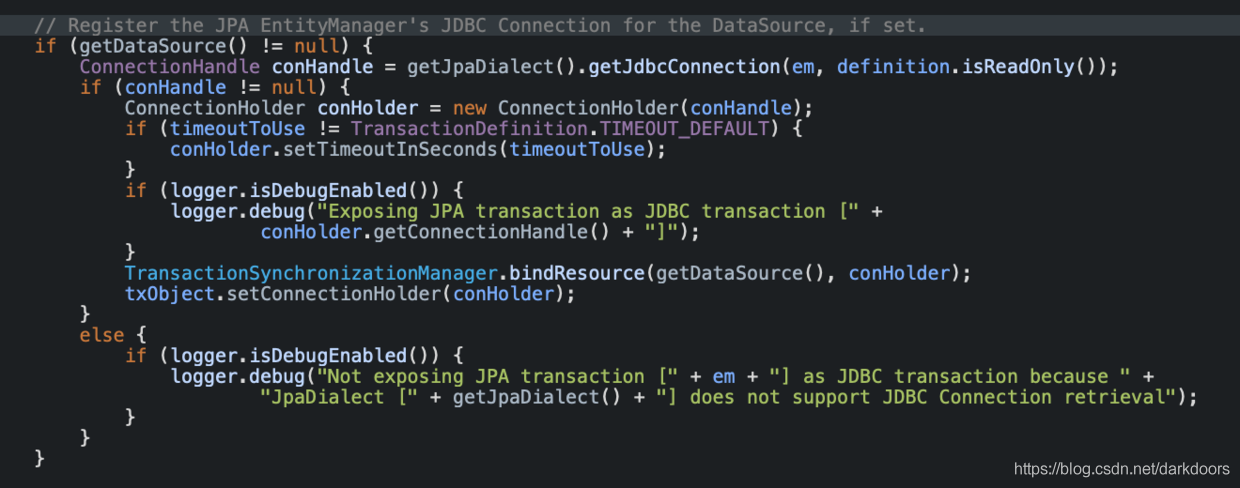
These two points have been added in the system, but still not effective, see the spring jpa document found is, indeed, support for jpa transactions and JDBC transaction https://docs.spring.io/spring-framework/docs/current/javadoc-api/org/springframework/orm/jpa/JpaTransactionManager.html , On the debug the Jpa's transaction processing mainly in the JpaTransactionManager. DoBegin , the execution will determine whether using JDBC transaction; the system specifies JpaTransactionManager but does not specify jpaDialect. If not specified, it defaults to DefaultJpaDialect, while DefaultJpaDialect does not handle 0 JdbcConnection1. Therefore, the JDBC transaction could not be committed, and the solution was relatively simple. Manually specify jpaDialect as HibernateJpaDialect;
1. A JAR is just a ZIP package that can be unzip, and the possible path of unzip files is exactly the same.
2. If the JAR package contains exactly the same file, the ZIP add will not be used and a zip error will be reported: zip file structure invalid
3. Add classes to a JAR package, such as classes from the compiled classes, go to the classes directory and use the command zip-r your. Jar./*
4. The FAT JAR packaged with assembly may not contain its own classes, so use the methods in 3 to ensure that the JAR contains its own classes
1. The question is:
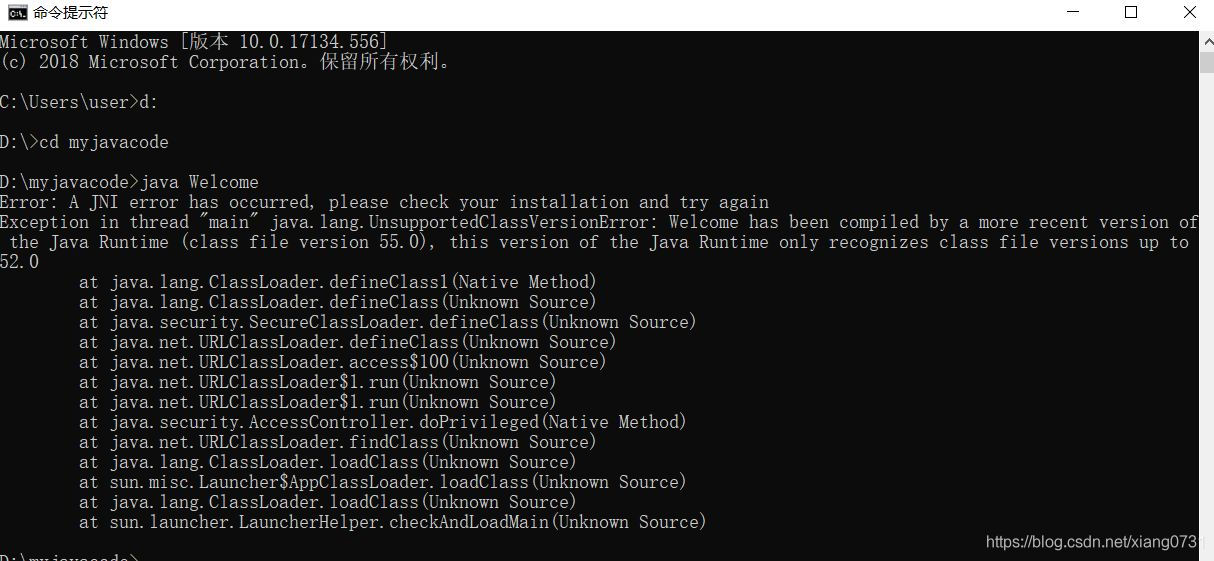
A JNI error has occurred once again, please check your installation and try again
2. Analysis:
The JDK was installed repeatedly and there were different versions on the computer
3. Solution:
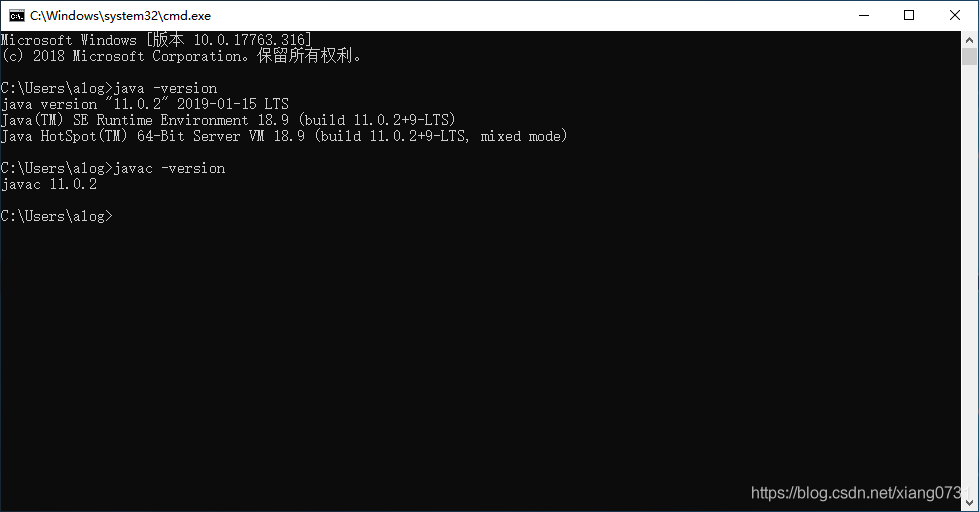
The command line through “Java-version” and “Javac-version” query SDK version
Delete the unwanted version (uninstall in the control panel)
(3) Adjust the environment variable to leave the JDK related information
Recompile to see whether there is still an error
4. The validation:
Javac is the same version as the Java directive
Exception in thread "main" java.lang.UnsupportedClassVersionError: helloworld has been compiled by a more recent version of the Java Runtime (class file version 57.0), this version of the Java Runtime only recognizes class file versions up to 52.0
Error message. after thinking about it, I probably made a java8 environment by playing mine craft before. Later, I downloaded and installed jdk13 for development, which caused the problems caused by the difference between javac and Java version. then reset JAVA_HOME to C:\Program Files\Java\jdk-13 should be solved. when something weird happens, still report this error. In a rage, I deleted and reported an error after I deleted directory which caused the conflict
Error: could not open `C:\Program Files\Java\jre1.8.0_201\lib\amd64\jvm.cfg
The problem should be clear, because I don’t know which environment variable is still pointing to this folder, I find the same problem in stackoverflow, where Jason Hughes mentioned that this guideline exists in C:\Program Files\Common Files\oracle\ folder, (my word is C:\Program Files(x86)\Common Files\oracle\), delete the directory directly and restart once it comes. problem solved.
When trying to connect to the LDAP server via SSL in Websphere, I encountered the following error:
used by:com.ibm.jsse2.util:KIX path building failed: java.security.cert.CertPathBuilderException: PKIXCertPathBuilderImpl could not build a valid CertPath.; internal cause is:
java.security.cert.CertPathValidatorException: The certificate issued by CN=VeriSign class 3 xxxxxxx [color=red]is not trusted[/color]; internal cause is:
JVM startup error: Could not Reserve enough space for Object Heap error
First, understand what the parameters mean:
The
parameter
meaning
— Xms2G Xmx2G
represents the minimum and maximum JVM heap available memory
– XX: PermSize -xx :MaxPermSize
represents the JVM’s metadata memory size
Solve problems:
eclipse startup error is: Could not reserve enough space for object heap error current configuration is: -xms512m-xmx1024m-xx :PermSize 512M : many SO answers are recommended to use JAVA_OPTION variable, but one answer is that the 32-bit process of Windows 7 cannot get more than 1200M of memory. This answer is a little reliable, SO I tried it. Download and install the 64BIT JDK and boot it up without error.
Appendix:
When
was converted to a 64-bit JDK, jrebel was found to fail. After a long search, one of the answers given on the official forums is to back up Jrebel32.dll, and then change the 64-bit Jrebel32.DLL to Jrebel32.dll. JVM out of memroy error report summary:
Java heap space: Increases -XMXpermgen space: Increases -xx :PermSizeRequested Array size: Error means that the size of the array created exceeds the maximum heap size, so the apparent solution is to either increase the size of -XMX or reduce the size of the array to be created.
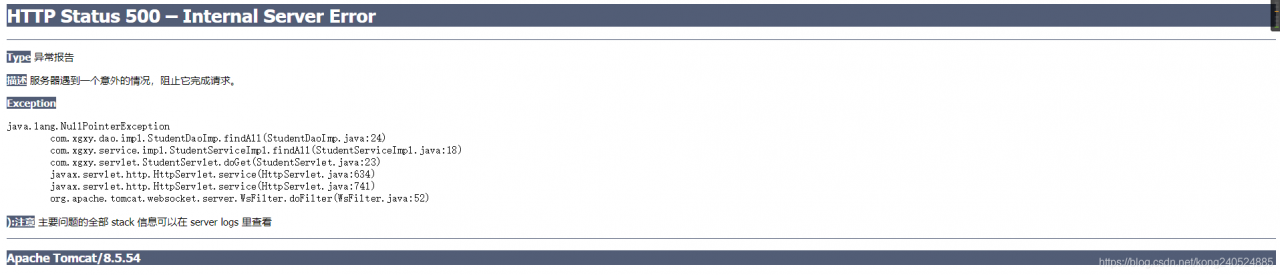
Today, when I was working on the student information management system, I just ran tomcat and opened the web page and clicked on the student table. program could not go when I went to the Servlet. I checked the content of the Servlet and found that there was no mistake, and there was no problem after I looked at the interface implementation of Dao layer.
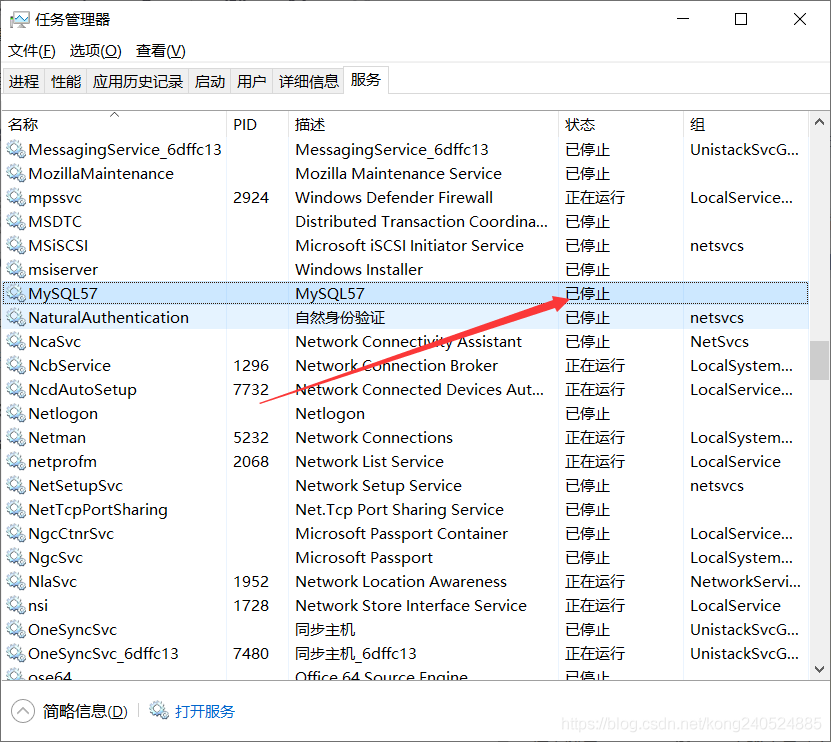
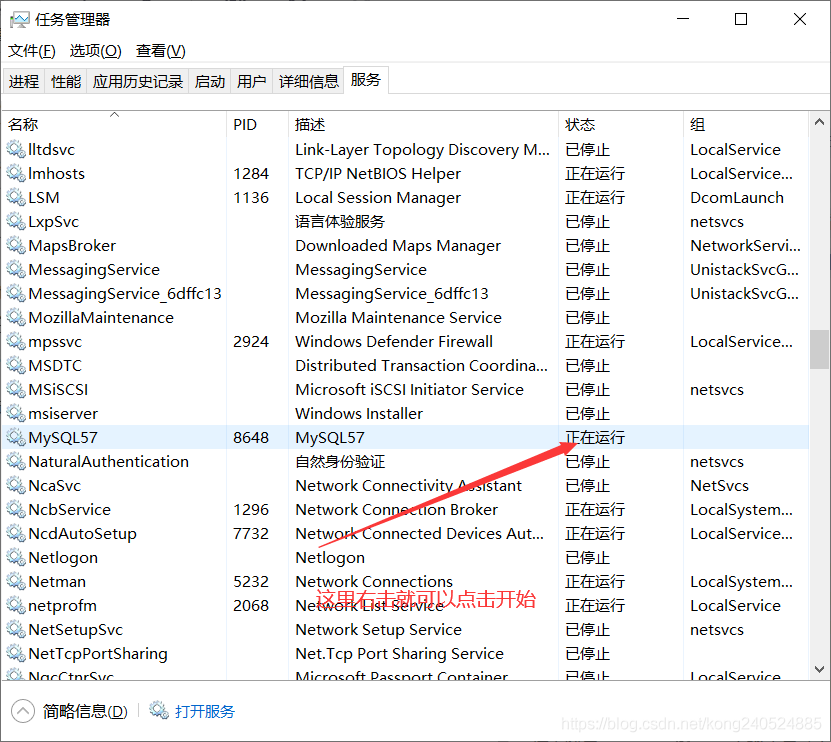
Finally, I thought about it and found that My Mysql was turned off when I ran PHPstudy yesterday. Then I opened the service and found that my Mysql was in a stopped state. here because yesterday when using PHPStudy, because the integrated environment in PHPStudy contains Mysql, when Mysql on our computer is turned on, Mysql in PHPStudy cannot run. So I shut down Mysql on my computer.
So if we right click on Mysql, we can start, and Mysql is up and running, and our project is running successfully.
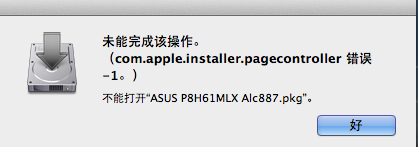
Downloaded a PKG installation file on the Internet;
An error occured on a dozen installations on a MAC
The reason is that the file is directly downloaded from the Internet, there will be permission problems, need to repair the installation permission of the installation software;
My reason is, downloaded is a RAR MAC decompression can not, online decompression, got PKG installation error
I finally downloaded a MAC under the RAR decompression software
http://www.pc6.com/softview/SoftView_53196.html
Reference: https://discussions.apple.com/thread/2628710
1, StackOverflow: Whenever a Java program starts a new thread, the Java virtual machine allocates a stack for it, and the Java stack keeps the thread running in frames. When a thread calls a method, the JVM presses a new stack frame onto the thread’s stack, and the stack frame exists as long as the method has not returned. if the method has too many layers of nested calls (such as recursive calls), as the number of frames in the Java stack increases, the total size of all stack frames in the stack of this thread will eventually be greater than the value set by -xss, resulting in a StackOverflowError overflow exception. When the Java program starts a new thread, there is not enough space to allocate the Java stack for the thread. The size of a thread’s Java stack is determined by the -XSS setting. The JVM throws an OutOfMemoryError exception. The Java heap is used to store instances of objects. When it is necessary to allocate memory for instances of objects, and the heap occupation has reached the maximum set value (via -Xmx), OutOfMemoryError will be thrown. The method area is used to store information about Java classes, such as class names, access modifiers, constant pools, field descriptions, method descriptions, and so on. As the class loader loads the class file into memory, the JVM extracts the class information and places it in the method area. when the class information needs to be stored and the method area has reached its maximum memory footprint (via -xx :MaxPermSize); An OutOfMemoryError exception will be thrown for tests in this case, the basic idea being that the runtime generates a large number of classes to fill the method area until it overflows. You need to manipulate the bytecode runtime directly with the help of CGLib to generate a large number of dynamic classes.
LoadLibrary failure: %1 is not a valid Win32 application.
Error: failed to load ‘rJava’ package or namespace,
The reason for the above error is that your JAVA version is 32-bit and your R is 64-bit, so download the 64-bit version of the JRE and change the environment variable JAVA_HOME to the position of the 64-bit JRE
The JRE can be downloaded in the website: http://www.java.com/en/download/manual.jsp
When the Connection is created in the database Connection pool and long time not to use cases, the Connection will automatically recycling and failure, but the client does not know, still use for database operations is an invalid database Connection, in this way, will lead to the client program to “Java. SQL. SQLException: Io exception: Connection reset” or “Java. SQL. SQLException closed Connection”.
Add after configuring the data source
< property name=”validationQuery” value=”select * from dual”/>
After the configuration, the client tests an invalid connection before using it, and if it finds that the connection is invalid, it retrieves a valid database connection from the connection pool for use.
When setting the data source in Tomcat’s context.xml, please refer to:
& lt; Resource auth=”Container” driverClassName=” OracleDriver” type=”javax.sql.DataSource” url=” JDBC :oracle:thin:@11.11.11.45:1521:orcl” name=” JDBC /login” The username = “login” the password = “login” maxActive = “15” maxIdle = “10” maxWait = “1” minIdle = “2”, “ removeAbandonedTimeout =” 5 “ testOnBorrow =” true “ TestWhileIdle =”true” testOnReturn=” br> “ removeAbandoned=”true” logAbandoned=”true” validationQuery=”select 1 from dual” />
————————————————————-
The above is an article from the Internet. There are several possible reasons for Connection Reset:
1. The number of connections in the configured data connection pool is insufficient;
2. The connection in the database connection pool is not used for a long time, the database actively disconnects, and the client does not know that it still gets an invalid connection when it is in use;
Corresponding to the causes of the above two conjectures, the following are processed:
1. Configure the maximum, minimum and free connections of the connection pool, etc.;
2. Configure the connection in the connection pool to check the validity of the connection, for example, configure the validity of the connection to check the SQL statement, whether the configuration to check the validity of the connection;
The above is just an idea. The specific configuration content should be configured according to different data sources, and the solution can be referred to above. As for whether there are other reasons, it is unknown for now.
In my project, I used c3P0 data source. At that time, I added configuration related to validity check according to the configuration mode of C3P0. For detailed configuration of C3P0, please refer to:
http://blog.csdn.net/majian_1987/article/details/18598857