Tag Archives: java

ImageIO.read () unsupported image type when reading picture_ exception Unsupported Image Type

ImageIO.read Error in reading a picture:

javax.imageio.IIOException : Unsupported Image Type_ exception Unsupported Image Type

Adding dependencies to Maven projects can solve this problem

<dependency>
	<groupId>com.twelvemonkeys.imageio</groupId>
	<artifactId>imageio-jpeg</artifactId>
	<version>3.3.2</version>
</dependency>

Saw local status change event statuschangeevent error during springcloud client registration

Start error message

2020-06-12 11:48:54.815  WARN 7728 --- [      Thread-31] com.netflix.discovery.DiscoveryClient    : Saw local status change event StatusChangeEvent [timestamp=1591933734815, current=DOWN, previous=UP]
2020-06-12 11:48:54.819  INFO 7728 --- [      Thread-31] com.netflix.discovery.DiscoveryClient    : Shutting down DiscoveryClient ...
2020-06-12 11:48:54.831  INFO 7728 --- [nfoReplicator-0] com.netflix.discovery.DiscoveryClient    : DiscoveryClient_KOALA-AI-PLATFORM-APP/192.168.100.1:18087 - registration status: 204
2020-06-12 11:48:54.832  INFO 7728 --- [nfoReplicator-0] com.netflix.discovery.DiscoveryClient    : DiscoveryClient_KOALA-AI-PLATFORM-APP/192.168.100.1:18087: registering service...
2020-06-12 11:48:54.836  INFO 7728 --- [nfoReplicator-0] com.netflix.discovery.DiscoveryClient    : DiscoveryClient_KOALA-AI-PLATFORM-APP/192.168.100.1:18087 - registration status: 204
2020-06-12 11:48:54.837  INFO 7728 --- [      Thread-31] com.netflix.discovery.DiscoveryClient    : Unregistering ...
2020-06-12 11:48:54.843  INFO 7728 --- [      Thread-31] com.netflix.discovery.DiscoveryClient    : DiscoveryClient_KOALA-AI-PLATFORM-APP/192.168.100.1:18087 - deregister  status: 200
2020-06-12 11:48:54.854  INFO 7728 --- [      Thread-31] com.netflix.discovery.DiscoveryClient    : Completed shut down of DiscoveryClient

The client can’t be registered in Eureka. After looking around, we found that spring boot starter web is missing in the client POM file, plus

    <dependency>
        <groupId>org.springframework.boot</groupId>
        <artifactId>spring-boot-starter-web</artifactId>
    </dependency>

Notes on @ pathvariable annotation in springcloud openfeign

SpringCloud-Feign-@PathVariable
Feign pathvariable annotation was empty on param 0.
when using feign, if the parameter contains

@If the parameter is in the form of pathvariable, the corresponding parameter should be marked with value =, otherwise the IllegalStateException exception will be thrown

as

@GetMapping(value = "/payment/consumer/hystrix/ok/get/{id}")
    public String payment_ok(@PathVariable Integer id)

The above code will report feign pathvariable annotation was empty on param 0

    @GetMapping(value = "/payment/consumer/hystrix/ok/get/{id}")
    public String payment_ok(@PathVariable(value="id") Integer id)

So you can go through

Java:java.lang.OutOfMemoryError : GC overhead limit exceeded solution

1、 The exception is as follows:
exception in thread “main” java.lang.OutOfMemoryError : GC overhead limit exceeded


2、 Explanation:
JDK6 adds a new error type. Thrown when the GC takes a lot of time to free a small space.
It’s usually because the pile is too small. Cause of exception: not enough memory.


3、 Solution:

1. Check whether the system has large memory code or dead loop.
2. You can add the startup parameters of the JVM to limit the use of memory: – XX: – usegcoverheadlimit

Docker install zookeeper 3.6.2

1. Install image

 docker pull zookeeper:3.6.2

2. Start ZK

 docker run --privileged=true -d --name zookeeper -p 2181:2181  \
 -v /home/workspace/zookeeper/data:/data \
 -v /home/workspace/zookeeper/logs:/datalog \
 -d zookeeper:3.6.2

3. Go to ZK image summary

 docker exec -it zookeeper /bin/bash

3. View ZK log

 docker logs -f zookeeper 

4. Validation and FAQs

Refer to my last article:

https://blog.csdn.net/qq_ 42390636/article/details/114986157

JDK disable tlsv1.0

Some web servers need to disable some protocols after deployment. Let’s take tlsv1.0 as an example to talk about how to disable them.

Find the JRE directory in your JDK installation directory and JRE/lib/security in the JRE directory/ java.security File, and then in the file

jdk.tls.disabledAlgorithms=SSLv3 , RC4, md5withrsa, DH keysize & lt; 768, add tlsv1.0.

Idea access denied for user ‘xxx’ @ ‘localhost’ solution

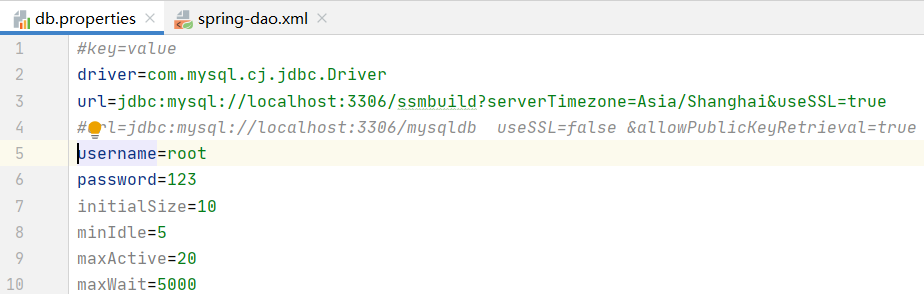
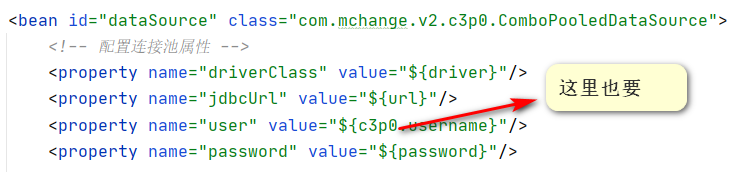
Solutions to access denied for user ‘xxx’ @’localhost ‘problem

Key to error reporting

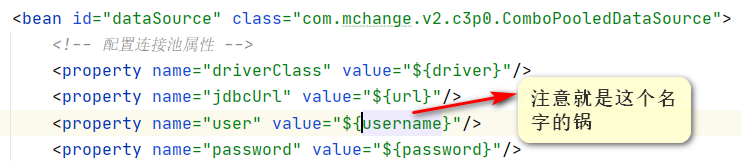
java.sql.SQLException : access denied for user ‘xxx’ @’localhost ‘(using password: Yes). Note that XXX here is not root, root is a permission problem

Solution

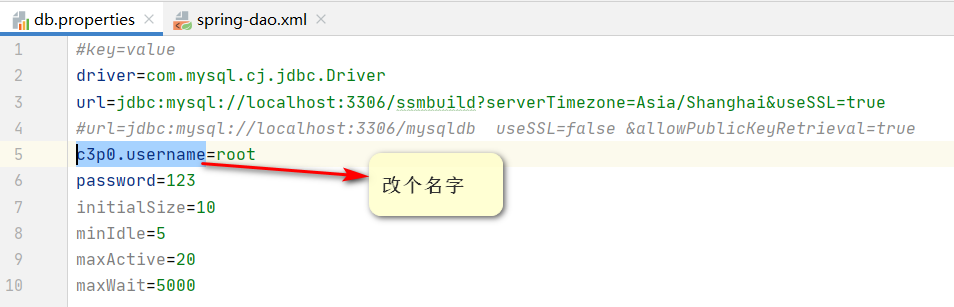
Change the user name for the configuration file

You can choose any name you like

And then 🆗 It’s over

Cause analysis

The framework did not get the correct user name of datasource, which is related to the configuration. When such a framework constructs an instance of abstractdriverbaseddatasource, the user name it gets is always the current machine name, that is, XXX. The underlying reason is not clear.

Some projects cannot be imported because they already exist in the workspace

Some projects cannot be imported because they already exist in the But I have modified the project name in the. Project file, but I still can’t import it. I found this article from the Internet. It turns out that you need to find the relevant record in the eclipse workspace and delete it: there is no project with the same name in the workspace, but there must be a place to record the previous project information, which may be… Find the following: XXXXXXXX, workspace,. Metadata,. Plugins\ org.eclipse.core . resources \. Projects folder, delete the folder with the same name

Record how to solve this problem:

MyEclipse is unable to import Java projects. There are two common situations:

1、Some projects cannot be imported because they already exist in the workspace

2、Some projects were hidden because they exist in the workspace directory

Reason: a project with the same name already exists in the workspace, so it cannot be imported.

solve:

1. Modify project name: right click refactor rename or F2

2. Open the. Project file in the project — modify & lt; name & gt; ProjectName & lt; / Name & gt;

3. There is no project with the same name in the workspace. There must be a place to record the previous project information… Find the following: XXXXXXXX, workspace,. Metadata,. Plugins\ org.eclipse.core . resources \. Projects folder, delete the folder with the same name.

Article from http://blog.csdn.net/leo_ Thanks to the author.

Eclipse: unable to open editor: no ID org.eclipse.jdt . ui.CompilationUnitEditor Editor descriptor for

Eclipse: unable to open editor: no ID org.eclipse.jdt . ui.CompilationUnitEditor Eclipse: could not open the editor: no editor descriptor for ID org.eclipse.jdt . ui.CompilationUnitEditor )


As you can see here, a workaround for your problem is just move the “~/.eclipse” to another folder.

So:

    Close EclipseOpen “Terminal”Type the following command:

e.g.:

mv ~/.eclipse somewhereYouWant

When I got this problem, I just:

mv ~/.eclipse home/paladini/Downloads