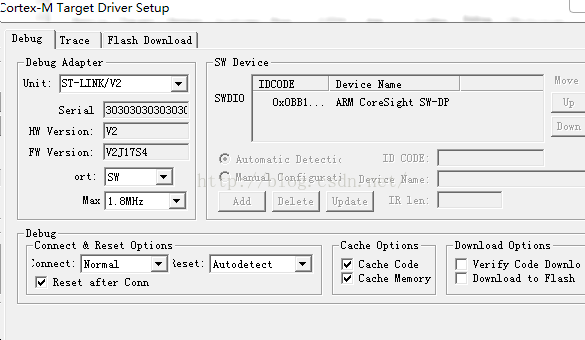
Because Cache Options is not checked
Download Options is checked
The setting shown above is the correct choice
Problem description:
in the process of work, sometimes encountered such a problem, write a SQL query to query data in the database, see the number of rows (such as 1000 rows), but make a copy of the query results to Excel, but happened mismatch, and lead to Excel in the number of lines is more than 1000 lines, caused the number of rows of data inconsistency.
field value contains char(10) newline character, copy the field value to Excel.
Source:
some corresponding cell contains a newline, lead to dislocation happened in copy to Excel.
Option 1 (Recommended) : Enclose the field values in question in double quotation marks so that the newline characters in the field values are restricted to the correct Excel cell.
scenario 2: use the script to remove the corresponding field value newline character.
create table #t
(
Name nvarchar(50),
Remark nvarchar(50)
)
insert into #t
lues (‘ A1 ‘+ char(10) +’ B1 ‘, ‘row 1’), (‘ A2B2 ‘, ‘row 2’)
select Name, Remark
om #t
— Solution 1: You can put double quotation marks directly in the field, and copy it to Excel without misplacing or showing redundant double quotation marks.
select ‘”‘ + Name + ‘”‘ as Name, Remark
om #t
select replace(replace(Name, char(13), ‘ ‘), char(10), ‘ ‘) as Name, Remark
om #t
drop table #t
Explanation:
FutureWarning: The behavior of this method will change in future versions. Use specific 'len(elem)' or 'elem is not None' test instead.
  if next_page_a:
if next_page_a:
if next_page_a is not None: or if len(next_page_a)> 0: That’s fine
RuntimeError: CUDA out of memory occurs using the PyTorch training model
Training: Due to the limited GPU video memory resources, the batchsize of training input should not be too large, which will lead to Out of Memory errors.
Solution: Reduce the batchSize to even 1
Use with torch.no_grad():fore testing the code
angle, idx, _, gender, expression, gaze = image_name.split('_')The format of image_name is: dataset000_01_caucasian_female_angry_left.jpg
There have been some errors running on the server
ValueError: not enough values to unpack (expected 6, got 1)Solution:
Later, it was found that after decompressing the data set in the unified format, the zip file was not deleted after the execution of the unzip command, so it was not easy to find. The main reason for this problem is that the file name of the compressed price can not be divided into 6 parts, so the error has been reported.
Delete the ZIP file.
Traceback (most recent call last):
  File "/Users/zhangsf/code/python/my-project/Subsidy.py", line 83, in <module>
    xy1.boxplot(column='ranking', by='subsidy')
  File "/Users/zhangsf/anaconda3/lib/python3.7/site-packages/pandas/plotting/_core.py", line 2254, in boxplot_frame
    return_type=return_type, **kwds)
  File "/Users/zhangsf/anaconda3/lib/python3.7/site-packages/pandas/plotting/_core.py", line 2223, in boxplot
    return_type=return_type)
  File "/Users/zhangsf/anaconda3/lib/python3.7/site-packages/pandas/plotting/_core.py", line 2682, in _grouped_plot_by_column
    keys, values = zip(*gp_col)
ValueError: not enough values to unpack (expected 2, got 0)
It means that python expected there to be two return values from zip(), but there were none.
Error: This means that Python expects zip () to return two values, but neither
The error statement is:
xy1.boxplot(column='ranking', by='subsidy')The reason is that there is a problem with the imported data, which causes the ranking of the column to be NaN and no return value
Just re-introduce the correct data
Not enough values to unpack (expected 2, got 1
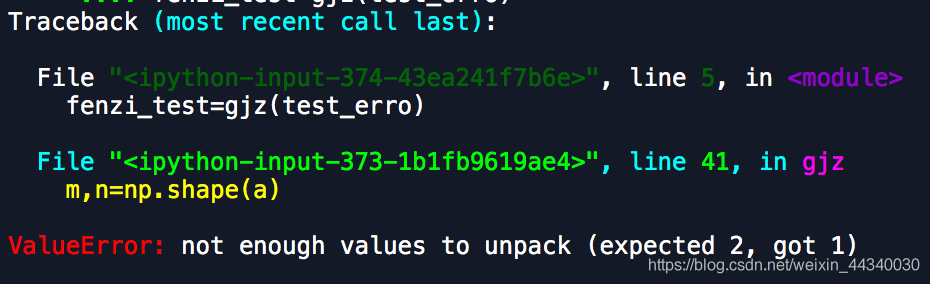

where the code was originally of type array

so fenzi_test is substituted here as an array
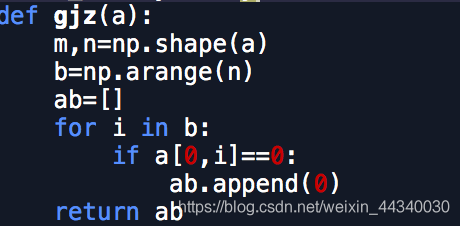
so m,n is wrong
Showed by an example, the
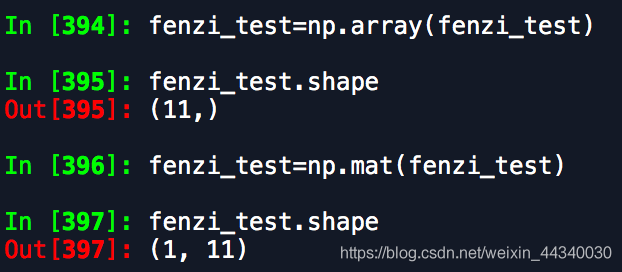
you can see that the shape of array and matrix lose unless the result is not the same m, n = np. Shape (data)
so, change the type

Python has an error: TabError: inconsistent use of tabs and Spaces in indentation
If you use a TAB with four Spaces, you can use a TAB with four Spaces.
Solution: Check the code and either use all tabs, all 4 Spaces, or correct with the IDE editor.
import web

urls = (
    '/(.*)', 'hello'
)
app = web.application(urls, globals())

class hello:
    def GET(self, name):
        if not name:
            name = 'World'
        return 'Hello, ' + name + '!'

if __name__ == "__main__":
    app.run()
The exceptions are as follows:
Traceback (most recent call last):
  File "C:\Users\HHHHH\AppData\Local\Programs\Python\Python37-32\lib\site-packages\web\utils.py", line 526, in take
    yield next(seq)
StopIteration

The above exception was the direct cause of the following exception:

Traceback (most recent call last):
  File "D:\workspace\HelloPython\Helloworld.py", line 7, in <module>
    app = web.application(urls, globals())
  File "C:\Users\HHHHH\AppData\Local\Programs\Python\Python37-32\lib\site-packages\web\application.py", line 62, in __init__
    self.init_mapping(mapping)
  File "C:\Users\HHHHH\AppData\Local\Programs\Python\Python37-32\lib\site-packages\web\application.py", line 130, in init_mapping
    self.mapping = list(utils.group(mapping, 2))
  File "C:\Users\HHHHH\AppData\Local\Programs\Python\Python37-32\lib\site-packages\web\utils.py", line 531, in group
    x = list(take(seq, size))
RuntimeError: generator raised StopIteration
Follow the exception prompt to find the appropriate code (… Utils.py “, line 531, in group), as follows:
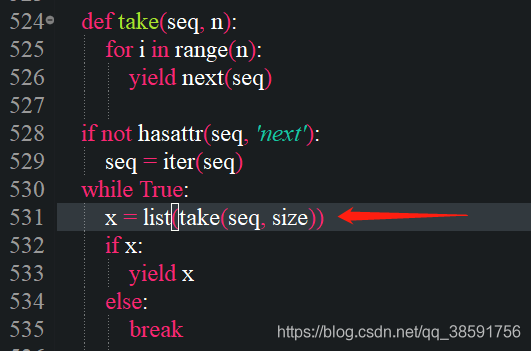
Here, call line 524 take method and modify it as follows according to the information on the official website (note the indentation) :
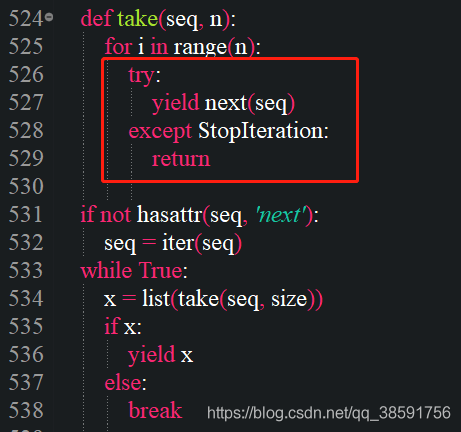
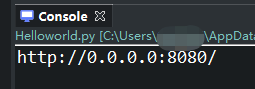
Restart successfully after modification:
END
Enumeration type and collection type of MySQL
CREATE TABLE CREATE TABLE CREATE TABLE CREATE TABLE CREATE TABLE
create table consumer(
    id int,
    name char(16),
    sex enum('male','female','other'),
    level enum('vip1','vip2','vip3'),
    hobbies set('play','music','read','run')
)
Enumeration here means that you can select only one from here, and set means that you can select more than one from set.
Input insert statement
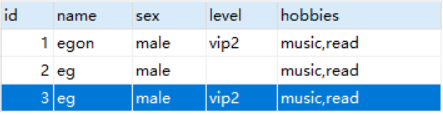
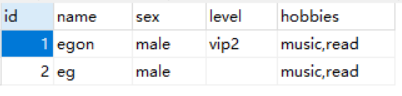
insert into consumer values(1,'egon','male','vip2','music,read')
And you might be wondering, what happens if I put multiple entries in the corresponding enum?
insert into consumer values(2,'eg','male','vip1,vip2','music,read')
ah