[Solved] Failed to initialize the editor as the document is not in standards mode. TinyMCE requires standards mode.

error message

  • Failed to initialize the editor as the document is not in standards mode. TinyMCE requires standards mode.

general meaning

  • TinyMCE cannot initialize properly in non-standard document mode.

Solution

  • Make sure the html file starts with a <!DOCTYPE html>single line.

Common scenarios

  • Such a problem will occur when using php\java\js and other languages ​​to write above the head of the html page.

How to Solve Error: Maven ‘parent.relativePath‘ of POM…

Exception information: ‘parent.relativePath’ of POM package name: xxx (the previous level of E:\app\IdeaProjects\xxx\xxx\pom.xml ) points at package name: the previous level of xxx instead of org.springframework. boot:spring-boot-starter-parent, please verify your project structure @ line 5, column 13It is highly recommended to fix these problems because they threaten the stability of your build.
For this reason, future Maven versions might no longer support building such malformed projects.

What is written in the parent of xxx is not the upper level of xxx, but inherits springboot:

<parent>
	<groupId>org.springframework.boot</groupId>
	<artifactId>spring-boot-starter-parent</artifactId>
	<version>2.2.5.RELEASE</version>
</parent>

Add:

<relativePath />

Modify to:

<parent>
	<groupId>org.springframework.boot</groupId>
	<artifactId>spring-boot-starter-parent</artifactId>
	<version>2.2.5.RELEASE</version>
	<relativePath />
</parent>

[Solved] VScode Configurate Python Interpreter Error: D:\Pros\virtuals\venvs\Scripts\Activate.ps1 cannot be loaded

Error: After win vscode configures the python environment, the file D:\Pros\virtuals\venvs\Scripts\Activate.ps1 cannot be loaded

Solution:

1. Run powershell as administrator

2. Enter get-ExecutionPolicy and return Restricted, indicating that the status is prohibited

3. Enter set-ExecutionPolicy RemoteSigned, reply Y, and press Enter

Note:

1. If you are not running as an administrator, an error will be reported in step 3, and access is denied.

2. Run as administrator (not unique): run powershell first, enter the command Start-Process powershell -Verb runas

[Solved] ES Query SIZE too large Error: ENTITY CONTENT IS TOO LONG [105539255] FOR THE CONFIGURED BUFFER LIMIT [104857600]

RequestOptions.Builder builder = RequestOptions.DEFAULT.toBuilder();
builder.setHttpAsyncResponseConsumerFactory(
          new HttpAsyncResponseConsumerFactory
            // Modified to 500MB 
            .HeapBufferedResponseConsumerFactory(300 * 1024 * 1024 ));
            request.source(SearchSourceBuilder.searchSource().query(boolQueryBuilder).size(10000));

SearchResponse response = null;
  try {
       response = yqClient.search(request, builder.build());
  } catch (IOException e) {
       e.printStackTrace();
  }

Can also be set by reflection

   // Set es query buffer size 
        RequestOptions requestOptions = RequestOptions.DEFAULT;
        Class<? extends RequestOptions> reqClass = requestOptions.getClass();
        Field reqField = reqClass.getDeclaredField("httpAsyncResponseConsumerFactory");
        reqField.setAccessible(true);
        //remove final
        Field modifiersField = Field.class.getDeclaredField("modifiers");
        modifiersField.setAccessible(true);
        modifiersField.setInt(reqField, reqField.getModifiers() & ~Modifier.FINAL);
 
        // Set the default factory 
        reqField.set(requestOptions, new HttpAsyncResponseConsumerFactory() {
            @Override
            public HttpAsyncResponseConsumer<HttpResponse> createHttpAsyncResponseConsumer() {
                //500MB
                return new HeapBufferedAsyncResponseConsumer(5 * 100 * 1024 * 1024);
            }

[Solved] Vue Route Error: Uncaught TypeError: (0 , vue__WEBPACK_IMPORTED_MODULE_42__.defineComponent) is not a function

Problem Description

When running the Vue project, I used the route and found that the page had no effect. Press F12 to open the browser inspection mode, and found that the error is as follows:

Uncaught TypeError: (0 , vue__WEBPACK_IMPORTED_MODULE_42__.defineComponent) is not a function

the cause of the problem

The installed Vue routing plugin version is too high

solution

Reduce the version, use the command to npm install [email protected]install version 3.2.0 (Work for me)
and then restart the project

[Solved] mmdetection yolox Error: find_unused_parameters

Updated on June 10, 2022 at 09:54:00

—————————————————————————————————

The problem is that the number of categories is not modified

————————————————————————————————————

This issue has been reported on github: https://github.com/open-mmlab/mmdetection/issues/7298

Problem Description:

I used 2 2080ti cards for training, and after a few iterations in epoch1, it stopped moving, but the gpu utilization was still floating; then I used one card for training, and the problem under this issue was reported.

Solution:

I checked all my pictures, each picture has a frame, the frame position is normal, and then I use the error message to try the method find_unused_parameters=True (add it under if distributed in mmdet/apis/train.py), under two cards Currently training 2 epochs without error, continue to observe

[Solved] kubectl error: sou-bash: _get_comp_words_by_ref: command not found

After deploying the k8s cluster architecture through kubeadm, using the kubectl tool, I want to use the tab key to associate the auto-completion and find that it does not work, and the error is as follows:

[root@k8s-master]# kubectl - bash: _get_comp_words_by_ref: command not found

Google it and found out that the bash-completion package needs to be installed first. The operation is as follows:

#Install bash-completion
 yum install bash -completion -y

#source takes effect
source /usr/share/bash-completion/ bash_completion

source <(kubectl completion bash)
You can use the tab key, the problem is solved!

[Solved] kubeadm init initialize error: “unknown service runtime.v1alpha2.RuntimeService”

Version: v1.24.1


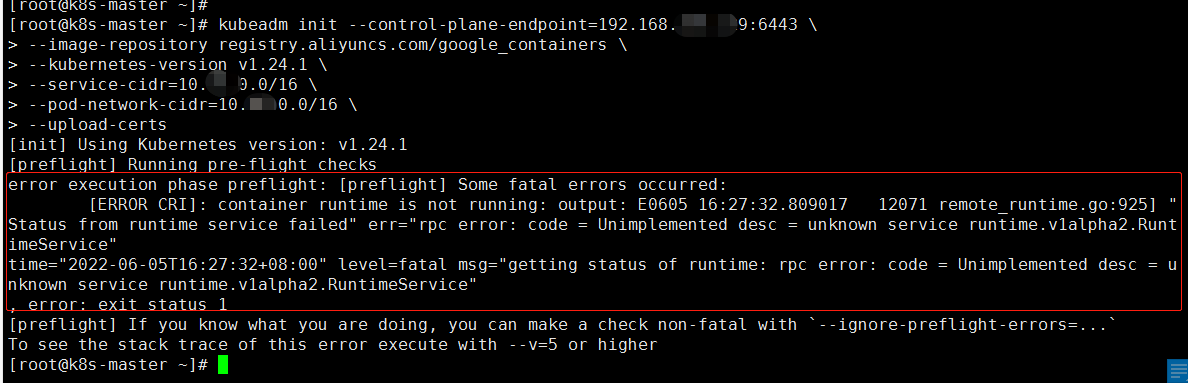
In the test to build a k8s cluster, it is found that kubeadm init initialization error, as shown below: 


Looking for Google to search a lot, some bloggers said that it can be solved by deleting the config.toml file. So I made a bold attempt…

rm /etc/containerd/config.toml
systemctl restart containerd


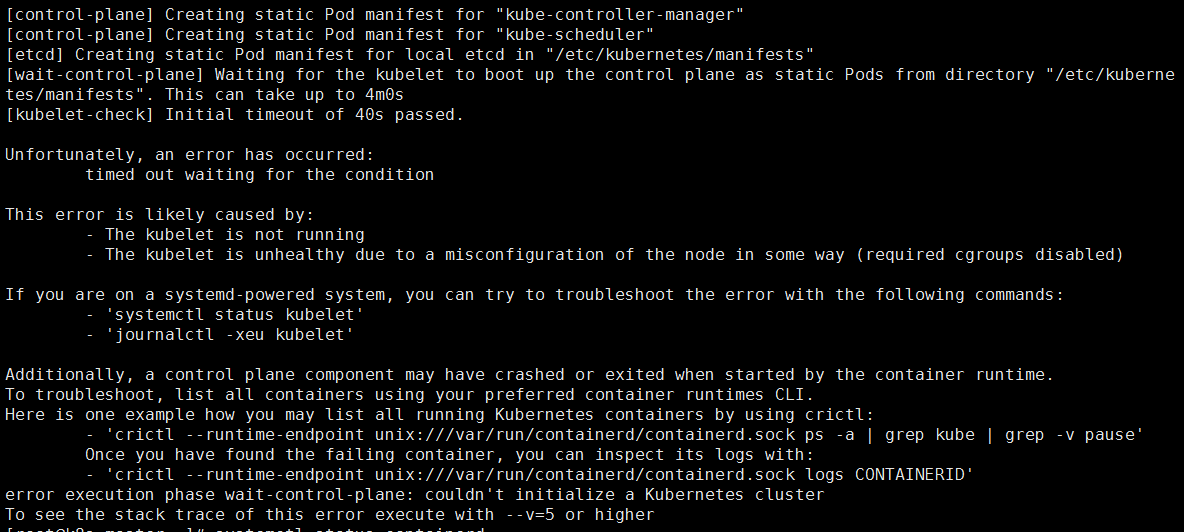
After trying the above method, it is found that the problem is not solved, and the error report has new changes. 


 I tried the following plan again, and it worked! !

cat > /etc/containerd/config.toml << EOF
[plugins. " io.containerd.grpc.v1.cri " ]
systemd_cgroup = true 
EOF

#Restart
 systemctl restart containerd

,,,

success! ! ! ! !

[Solved] kettle Error: Unexpected problem reading shared objects from XML file: null

question:

When saving  kettle the conversion, an error is reported Unexpected problem reading shared objects from XML file:null

Solution:

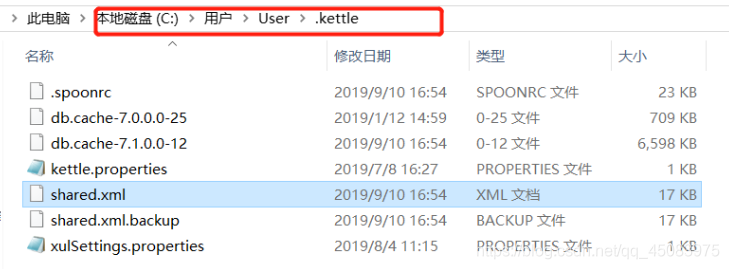
1. Find the C drive directory,C:\Users\Windows_login_name\.kettle

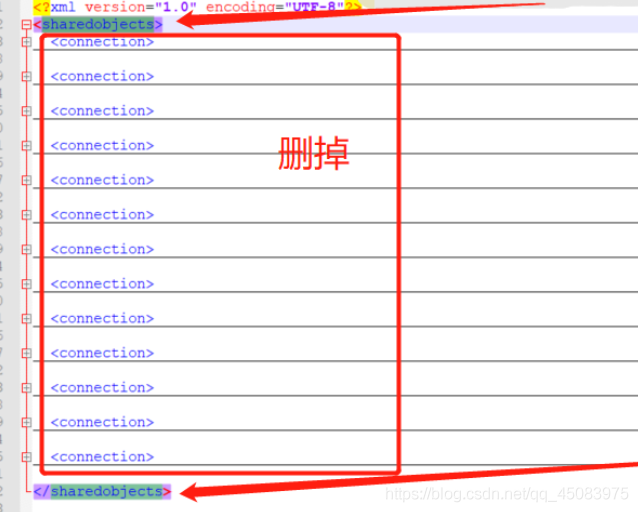
2. Open the  file and delete  the contents of the shared.xml tag <sharedobjects>

As shown below
<? xml version="1.0" encoding="UTF-8" ?> 
< sharedobjects > 
</ sharedobjects >
Finally try to save the conversion/job flow, it’s OK

[Solved] react18 swiper Error: Cannot read properties of undefined (reading ‘wrapperClass’)

Using swiperjs in nextjs, after upgrading the react version to 18.x, an error is reported:

Cannot read properties of undefined (reading ‘wrapperClass’)

Current version information:

"next": "^12.1.7-canary.30",
"react": "^18.2.0-next-e531a4a62-20220505",
"react-dom": "^18.2.0-next-e531a4a62-20220505",
"swiper": "^7.4.1"

Solution: Via the settings next.config.jsinreactStrictMode : false

or:

Upgrade swiper to the latest version

"next": "^12.1.7-canary.30",
"react": "^18.2.0-next-e531a4a62-20220505",
"react-dom": "^18.2.0-next-e531a4a62-20220505",
"swiper": "^8.2.2"

See More: Swiper crashing with React 18 + Strict Mode

[Solved] swiper Error: The requested module ‘react’ is expected to be of type CommonJS, which does not support named exports. CommonJS modules can be imported by importing the default export

Errors caused by lower versions of node and swiper versions

Recently, swiper is used in the nextjs project, and the version information is as follows:

node version12.9.1

"next": "11.1.0",
"swiper": "7.4.1",

After the project is packaged, an error is reported:

(node:159) ExperimentalWarning: The ESM module loader is experimental.

> Build error occurred
file:///shark/web-book/node_modules/swiper/react/use-isomorphic-layout-effect.js:1
import { useEffect, useLayoutEffect } from 'react';
         ^^^^^^^^^
SyntaxError: The requested module 'react' is expected to be of type CommonJS, which does not support named exports. CommonJS modules can be imported by importing the default export.
For example:
import pkg from 'react';
const { useEffect, useLayoutEffect } = pkg;
    at ModuleJob._instantiate (internal/modules/esm/module_job.js:97:21)
    at async ModuleJob.run (internal/modules/esm/module_job.js:143:20)
    at async Loader.import (internal/modules/esm/loader.js:182:24) {
  type: 'SyntaxError'
}

key error messageThe requested module 'react' is expected to be of type CommonJS, which does not support named exports. CommonJS modules can be imported by importing the default export

It means that the packaging environment does not yet support EMS packages.

solution:

  • Upgrade node version to 14.x
  • Downgrade swiper version to 6.x version