Look up the data to indicate destroy (object, time); the first parameter in it should be of the object type, and then change destroy( Cube.gameObject ); success
Rtmpdump open source project
Rtmpdump open source project: http://rtmpdump.mplayerhq.hu/
You can download the latest source code: git clone git://git.ffmpeg.org/rtmpdump
When compiling all functions, zlib can be used in combination with OpenSSL by default,
gnutls or polarssl can also be used instead.
Rtmpdump home page: http://rtmpdump.mplayerhq.hu/rtmpdump.1.html
Rtmpgw home page: http://rtmpdump.mplayerhq.hu/rtmpgw.8.html
Librtmp home page: http://rtmpdump.mplayerhq.hu/librtmp.3.html
Two server programs rtmpsrv and rtmpsuck have been added since v2.1.
rtmpsrv is a stub for a server; it logs the connect and play parameters from a regular client that connects to it. It then invokes rtmpdump with those parameters to retrieve the stream.
rtmpsuck is a transparent proxy; it intercepts connections from a client and then makes an outbound connection to the real server. After all handshaking is complete and encryption keys with both sides are negotiated, it records the cleartext stream data into files while relaying the data from the server to the client.
Unofficial versions can be found on the forum;
Forum address:
http://ffmpeg.zeranoe.com/forum/viewforum.php?f=29 note, this forum is not affiliated with the RTMPDump project.
http://stream-recorder.com/forum/rtmpdump-f54.html – note, that site is not affiliated with the RTMPDump project, but they’re pretty active with helping answer questions.
Rtmpdump is used in the following projects:
livestreamer
get flash videos
get_ iplayer(discontinued)
get_ iplayer
iFetch
yle-dl
youtube-dl
python-iview
mlbviewer
iViewNapper
TV3 al Cabàs
streamCapture
PlayDownloader
MTV.it download
Ed’s iPlayer Javascript BBC ripper
rtmpdumphelper (windows network hook for rtmpsuck/rtmpsrv)
SupercamBR
you-get
Librtmp is used in the following projects:
ffmpeg
Mplayer (THR ffmpeg)
HTS home theater system
curl
Patches for librtmp on other projects:
XBMC
Forks:
flvstreamer
xVideoServiceThief
See Also: rtspdump
rtspdump is a program which downloads rtsp:// multimedia stream from a Microsoft WMServer.
Unable to locate executable for jre1.8.0_261
Go to Windows > Preferences.Locate Java > Installed JREs. (Or simply type JREs in the search box).The screen will show the list of JREs.Click on Add button, locate the new folder on your machine and select.Remove the old JRE from the list.
0001: unable to locate the content swf directory: app:/mod/win
resolvent:
X:\Riot Games\League of Legends\RADS\projects\lol_ air_ Client / releases / 0.0.1.195 delete s_ OK file, the client will force the difference matching again, check the integrity of the file
Reproduced in: https://www.cnblogs.com/knightluffy/p/5373579.html
Solution: about the problem “C + + – unresolved inclusion: < iostream >“
Problem description
Develop C + + program with eclipse for C + + and CDT plug-in and compilation tool MinGW, write in the head of C + + source program
#include <iostream>
#include <stdio>
When you wait for such a standard library, the editor will prompt:
Unresolved inclusion: <iostream>resolvent
First, select the project name, in the selection menu: Project & gt; properties & gt; C / C + + general & gt; preprocessor includes ≫ providers
and check “CDT GCC build in compiler settings”, then click the Apply button.
I’ve tried other solutions on the Internet, but they don’t work.
Access restriction: the type ‘application’ is not API (restriction on required LIB)
When using eclipse to build JavaFX with jdk8 for the first time, a compiler error occurred
Access restriction: The type ‘Application’ is not API (restriction on required library ‘E:\JAVA\jdk1.8\jre\lib\ext\ jfxrt.jar ‘)
Solution: right click the project name — & gt; build path — & gt; configure build path — & gt; select JRE System Library — & gt; remove — & gt; add library to add system JRE library
grin 1.2.1 requires argparse>=1.1, which is not installed.
implement
pip install argparse
Android Studio could not resolve resource
Refer here: http://blog.csdn.net/dong19870625/article/details/50833433
Original text:
In the development project, the XML file suddenly appears
couldn’t resolve resource @ color / title_ The color (58 similar errors not show) problem caught people off guard. It’s no problem to write the color and other resource files directly, but it’s not the fundamental solution to the problem
Android Studio just gets crazy. But a restart ain’t always enough.
Invalidate your caches and restart.
File -> Invalidate Caches / Restart… -> Invalidate and Restart
According to the above practice, the effect is good, solved my problem, the original as itself also has cache
reference resources: http://stackoverflow.com/questions/8390733/relativelayout-couldnt-resolve-resource-android
———————————————
I also met similar, but I can’t find the relevant style. It can’t be displayed normally in the preview, but it runs normally. No matter refresh or rebuild, it can’t be eliminated. Just follow the above procedure
The use of BibTex
BibTex is used as the reference format management library of latex documents.
The operation steps are as follows:
Step 1: create a BibTex file;
Create a new TXT file and change the suffix to bib, that is, create a BibTex reference library. For example, the name of the created BibTex library is: ref.bib .
Step 2: add the content of the quoted article;
0
Copy the BibTex format content of the document to be quoted to ref.bib The BibTex content of a document to be cited is as follows:
the BibTex content of a document to be cited is as follows:
@Inbook{Wille1982,
author="Wille, Rudolf",
editor="Rival, Ivan",
title="Restructuring Lattice Theory: An Approach Based on Hierarchies of Concepts",
bookTitle="Ordered Sets: Proceedings of the NATO Advanced Study Institute held at Banff, Canada, August 28 to September 12, 1981",
year="1982",
publisher="Springer Netherlands",
address="Dordrecht",
pages="445--470",
isbn="978-94-009-7798-3",
doi="10.1007/978-94-009-7798-3_15",
url="http://dx.doi.org/10.1007/978-94-009-7798-3_15"
}
Step 3: add cite package to latex document;
Add package reference to latex document: usepackage {cite}.
Step 4: add reference configuration;
Step 4: add reference configuration
Add the BibTex library reference in latex document. Where you want to display the references, you can add the following contents:
\bibliographystyle{plain}
\bibliography{ref}
\The bibliography {ref} command specifies the previously generated. Bib library.
The common default styles are as follows:
1 Alpha, using the first letter of the author’s name + the last two digits of the year as the label, in alphabetical order;
4. Abbrv, similar to plain, change the full spelling of the month to abbreviation, which is more compact;
5. IEEE TR, journal style of International Association of electrical and electronic engineers;
6. ACM, journal style of American Society of computer science;
7. Siam, journal style of American Society of industrial and applied mathematics;
8 Apalike, the journal style of American Psychological Society;
a
Step 5: Add Reference;
The quotation format is as follows:
\cite{Wille1982}The content in the curly brackets is the first line of the quotation format of the related literature.
Step 6: the process of generating PDF;
1. Compile latex document with latex;
2. Compile Bib document with BibTex;
3. Using latex to compile latex documents;
4. View PDF through dvipdf.
Markdown and latex: approximately equal to the writing of symbols
$\approx$
≈
\approx
≈
Latex bracket size control
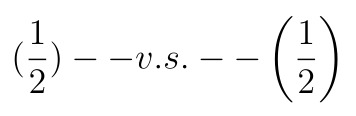
Various brackets are often used when editing formulas under latex. If you directly input brackets (curly brackets need to be escaped), the size is fixed. If the height of the formula is large, it will be very inconsistent.
As shown in the figure below, the brackets on the right are better than those on the left.
There are two main control methods
1. Use left and right
\Left in front of the left bracket and right in front of the right bracket.
Precautions for use
Need to pair use, can automatically control the size of different levels of brackets
Use examples
The following formula:
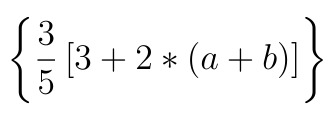
The corresponding latex code is:
\begin{equation}
\left \{ \frac{3}{5}  \left [ 3 + 2 * \left ( a + b \right ) \right ] \right \}
\end{equation}
2. Use the big series label
This is a series of tags, including the tag of \\\\\\\\\\\\\\\. In order, the brackets they control keep getting bigger.
Precautions for use
It doesn’t need to be used in pairs. You can control half brackets separately. The size of brackets is controlled by the specific label and can’t be adjusted automatically, so you need to pay attention to matching.
Use examples
Replace the corresponding tag in the previous example with a series of tags, as follows:
\begin{equation}
\bigg \{ \frac{3}{5}  \Big [ 3 + 2 * \big ( a + b \big ) \Big ] \bigg \}
\end{equation}
The following formula:
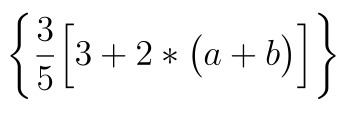
After a little comparison, we can find that the size of brackets is obviously different. This is because the size of brackets displayed by the left and right can be controlled automatically. It does not think it is necessary to use such large brackets, while the size of brackets displayed by the big is relatively fixed.
Therefore, it is recommended to control the size of parentheses by using both left and right
TypeError: Required argument ‘mat‘ (pos 2) not found
Traceback (most recent call last):
  File "/Users/*******/*****.py", line 225, in <module>
    cv2.imshow(r_image)
TypeError: Required argument 'mat' (pos 2) not found
This error prompt means that the required parameter is not found, that is, the function in the code is missing the necessary parameter.
cv2.imshow()
There should be two parameters: one is the name of the image window, namely title, and the other is the pixel value matrix of the displayed image.
In addition, the data type of the matrix is np.uint8 , floating point type will display exception.
Error will be reported:
TypeError: img is not a numpy array, neither a scalar
Solution:
transform the data type
image = numpy.array(image)