- select: product — & gt; scheme — & gt; edit scheme in the top menu bar of Xcode, select: run — & gt; arguments in the left menu bar, click the Add button in environment variables, and add the variable named OS_ ACTIVITY_ The value of mode is no
TypeError: drop() got an unexpected keyword argument ‘columns’
TypeError: drop() got an unexpected keyword argument ‘columns’
train.drop(columns=["Unnamed: 0"], inplace=True)
test.drop(columns=["Unnamed: 0"], inplace=True)
The reason for the above error is that pandas only added the columns keyword in version 0.21, but not in 0.20.
Solution:
upgrade panda package
pip install --upgrade pandas
View panda version
print (pd.__version__)
Bad default revision ‘head’
HEAD
Git reported the above error, which literally means “wrong default version of head”. Let’s figure out what head is. The GIT manual says:
The head file is a symbolic reference to the branch you’re currently on. By symbolic reference, we mean that unlike a normal reference, it doesn’t generally contain a SHA-1 value but rather a point to another reference.
the head file is a symbolic reference to the current branch. By symbolic reference, we mean that, unlike a normal reference, it usually does not contain a SHA-1 value, but a pointer to another reference.
In short, the head file points to the current branch. If you do not create a custom branch, head points to the Master branch by default. Open the head file, and you can see:
$ cat .git/HEAD
ref: refs/heads/master
The head file is a link file of the file refs / heads / Master . When we create a new user-defined branch, such as dev , switch to the branch and submit the modification under the branch, head points to the branch where the modification was made dev , and open the head file
$ cat .git/HEAD
ref: refs/heads/dev
Therefore, GIT reports an error bad default revision 'head' , which means that the current branch of head is wrong.
terms of settlement
- Modify symbolic links
You can also manually edit this file, but again a safer command exists to do so:
symbolic ref.
you can modify theheadfile manually, but there is a more secure command to do it: symbolic Ref.
for example, I changed head from pointing to Master to pointing to dev :
git symbolic-ref HEAD refs/heads/dev
Switch branches and submit again
reference resources
Git: fatal: bad default revision ‘head’ git internal – git references creating and merging branches – Liao Xuefeng git tutorial
Failed to execute goal org.codehaus.mojo:exec-maven-plugin:3.0.0:exec (default-cli) on project Hello
HBase only adds a sentence, and the following error will appear when running
failed to execute goal org.codehaus.mojo :exec-maven- plugin:3.0.0 :exec (default-cli) on project HelloSpring: Command execution failed.
Solution: in pom.xml Add in
    <build>
    <finalName>HelloSpring</finalName>
        <pluginManagement><!-- lock down plugins versions to avoid using Maven defaults (may be moved to parent pom) -->
            <plugins>
                <!-- clean lifecycle, see https://maven.apache.org/ref/current/maven-core/lifecycles.html#clean_Lifecycle -->
                <plugin>
                    <artifactId>maven-clean-plugin</artifactId>
                    <version>3.1.0</version>
                </plugin>
                <!-- default lifecycle, jar packaging: see https://maven.apache.org/ref/current/maven-core/default-bindings.html#Plugin_bindings_for_jar_packaging -->
                <plugin>
                    <artifactId>maven-resources-plugin</artifactId>
                    <version>3.0.2</version>
                </plugin>
                <plugin>
                    <artifactId>maven-compiler-plugin</artifactId>
                    <version>3.8.0</version>
                </plugin>
                <plugin>
                    <artifactId>maven-surefire-plugin</artifactId>
                    <version>2.22.1</version>
                </plugin>
                <plugin>
                    <artifactId>maven-jar-plugin</artifactId>
                    <version>3.0.2</version>
                </plugin>
                <plugin>
                    <artifactId>maven-install-plugin</artifactId>
                    <version>2.5.2</version>
                </plugin>
                <plugin>
                    <artifactId>maven-deploy-plugin</artifactId>
                    <version>2.8.2</version>
                </plugin>
                <!-- site lifecycle, see https://maven.apache.org/ref/current/maven-core/lifecycles.html#site_Lifecycle -->
                <plugin>
                    <artifactId>maven-site-plugin</artifactId>
                    <version>3.7.1</version>
                </plugin>
                <plugin>
                    <artifactId>maven-project-info-reports-plugin</artifactId>
                    <version>3.0.0</version>
                </plugin>
            </plugins>
        </pluginManagement>
    </build>
Or as follows:
<build>
        <finalName>HelloSpring</finalName>
        <pluginManagement><!-- lock down plugins versions to avoid using Maven defaults (may be moved to parent pom) -->
            <plugins>
                <plugin>
                    <groupId>org.codehaus.mojo</groupId>
                    <artifactId>exec-maven-plugin</artifactId>
                    <version>1.3</version>
                    <executions>
                        <execution>
                            <goals>
                                <goal>java</goal>
                            </goals>
                        </execution>
                    </executions>
                    <configuration>
                        <mainClass>org.company.Main</mainClass>
                    </configuration>
                </plugin>
            </plugins>
        </pluginManagement>
    </build>
The third method: I tried it myself, but I didn’t report this exception
that is, I deleted all the things in the warehouse and re imported them
Nohup command in Linux: nohup: assigning input and attaching output to‘ nohup.out ’
A few days ago, I found a giant cow’s AI learning website, which is easy to understand, funny and humorous. I can’t help sharing it with you. Click to jump to the tutorial.
1、 Using nohup in Linux
Under UNIX / Linux, for example, if you want a program to run in the background, many of them use & amp; at the end of the program to make the program run automatically.
For example, we need to run Weblogic in the background:
/ startWebLogic.sh &
But many of our programs are not made into daemons like Weblogic. Maybe our programs are just ordinary programs, which usually use & amp; endings.
But if the terminal is shut down, the program will also be shut down.
But in order to be able to run in the background, we can use the nohup command.
For example, we have a startWebLogic.sh To run in the background, use nohup:
nohup ./ startWebLogic.sh &
Tips:
[~]$ appending output to nohup.out
Well, prove that the program runs successfully, and put the output information of the program running into the current directory nohup.out Go to the file.
Nohup command
Purpose: Linux command usage, running command without hang up.
Syntax: nohup command [Arg…] [& amp;]
Description: the nohup command runs the command specified by the command parameter and any associated Arg parameters, ignoring all the up signals.
After logging off, use the nohup command to run the program in the background. To run the nohup command in the background, add & amp; (the symbol for “and”) to the end of the command.
nohup: ignoring input and appending output to ` nohup.out ‘ignore input and output, record information to nohup.out File.
2、 Using Linux redirection to solve the problem nohup.out No write permission problem
■ scene
When executing the nohup command, the following error without write permission often occurs.
nohup: ignoring input and appending output to ` nohup.out ‘
nohup: failed to run command `/etc/nginx_ check.sh ‘: Permission denied
■ Linux redirection:
0, 1 and 2 represent standard input, standard output and standard error message output respectively, which can be used to specify the standard input or output to be redirected.
In general use, the default is the standard output, which is 1. When we need special use, we can use other labels.
For example, output the error information of a program to the log file. / program 2 & gt; log.
In this way, the standard output is still on the screen, but the error information will be output to the log file.
In addition, the redirection between 0, 1 and 2 can also be realized. 2 & gt; & amp; 1: redirect error messages to standard output.
There is also a special file / dev / null under Linux, which is like a bottomless hole. All the information redirected to it will disappear without a trace.
This is useful to redirect the output to / dev / null when we don’t need to echo all of the program’s information.
If you want both normal output and error information not to be displayed, redirect both standard output and standard error to / dev / null, for example:
# ls 1>/dev/null 2>/dev/null
Another way is to redirect the error to standard output and then to / dev / null, for example:
# ls >/dev/null 2>&1
Note: the order here cannot be changed, otherwise the desired effect cannot be achieved. At this time, redirect the standard output to / dev / null,
Standard errors are then redirected to standard output.
Since standard output has been redirected to / dev / null, standard error will also be redirected to / dev / null, so everything is quiet.
About nohup
When using the nohup command, it is often due to the output nohup.out The path for does not have write permission and nohup cannot be used.
This is a way to use Linux redirection to nohup.out Redirect to a path with write permission, or throw it directly into / dev / null.
nohup ./program >/dev/null 2>/dev/null &
perhaps
nohup ./program >/dev/null 2>&1 &
3、 Using nohup to set background process
Introduction: sometimes you need to set up a background process on Linux, but when you close terminal, it will be killed by the system. How to make the background process run continuously?
Usage:
nohup command-with-options &
When you tap the above command on the screen, the following information will appear on the screen:
$ nohup: ignoring input and appending output to ` nohup.out ’
Hit enter and exit nohup.out In the current interface, enter the normal command line.
Output log information:
The next output log information will be output to nohup.log . that is, the log information output on the screen is directly output to nohup.log Documents.
Flag of background process:
If a command is only identified by & amp;, it is running in the background in the current session. If the current session is closed or the current terminal tool is closed, its affiliated processes will be closed.
The normal running background process needs nohup and & amp; to ensure its normal running in the background.
Transferred from: https://blog.csdn.net/blueheart20/article/details/78226066
https://www.cnblogs.com/quchunhui/p/5582371.html
http://aniyo.iteye.com/blog/1496442
ImportError: cannot import name ‘cross_validation’ from ‘sklearn’
Using sklearn (scikit learn) import cross_ An error is reported during validation as follows:
ImportError: cannot import name ‘cross_ validation’ from ‘sklearn’

The original code is:
from sklearn import cross_validation as cvreason:
sklearn.cross_ Validation is a module in the old version of sklearn
The new versions are all migrated to sklearn.model_ selection
The solution will be
cross_ Replace validation with “model”_ selection
from sklearn import model_selection as cvProblem solving.
Unity3d mount script error “can’t add script behavior TMP”_ CoroutineTween. …”
“Can’t add script behaviour TMP_ CoroutineTween. The script needs to derive from MonoBehaviour!”
If you can’t hang up the script when you hang up the game object in unity3d, the above error occurs, and the previously hung script can’t be hung back after being cancelled, then you may have the same problem as me
There is a compilation error in a script…
If it’s done, it’s done.
Sending message to a handler on a dead thread
The slightly more subtle message is: handler( android.os.Handler ) {215ddea8} sending message to a Handler on a dead thread。
In another case, when using mediaplayer in intentservice to play the ring tone, the error is also reproduced. The message is: handler) {42414500} sending message to a handler on a dead thread.
The complete information is as follows:
W/ActivityManager( 1394): getTasks: caller 10034 is using old GET_ TASKS but privileged; allowing
W/MessageQueue( 7666): Handler ( android.os.Handler ) {215ddea8} sending message to a Handler on a dead thread
W/MessageQueue( 7666): java.lang.IllegalStateException : Handler ( android.os.Handler ) {215ddea8} sending message to a Handler on a dead thread
W/MessageQueue( 7666): at android.os.MessageQueue .enqueueMessage( MessageQueue.java:325 )
W/MessageQueue( 7666): at android.os.Handler .enqueueMessage( Handler.java:635 )
W/MessageQueue( 7666): at android.os.Handler .sendMessageAtTime( Handler.java:604 )
W/MessageQueue( 7666): at android.os.Handler .sendMessageDelayed( Handler.java:574 )
W/MessageQueue( 7666): at android.os.Handler .postDelayed( Handler.java:398 )
W/MessageQueue( 7666): at com.bandwidthx.library .l.a(S ourceFile:367 )
W/MessageQueue( 7666): at com.bandwidthx.library .l.B(S ourceFile:357 )
W/MessageQueue( 7666): at com.bandwidthx.library . BxApproval.aZ (S ourceFile:4563 )
W/MessageQueue( 7666): at com.bandwidthx.library . BxApproval.aT (S ourceFile:4440 )
W/MessageQueue( 7666): at com.bandwidthx.library . BxApproval.aS (S ourceFile:4431 )
W/MessageQueue( 7666): at com.bandwidthx.library . BxApproval.aG (S ourceFile:4044 )
W/MessageQueue( 7666): at com.bandwidthx.library .l.a(S ourceFile:1320 )
W/MessageQueue( 7666): at com.bandwidthx.library .l.j(S ourceFile:1275 )
W/MessageQueue( 7666): at com.bandwidthx.library .q.w(S ourceFile:2280 )
W/MessageQueue( 7666): at com.bandwidthx.library .q.a(S ourceFile:3399 )
W/MessageQueue( 7666): at com.bandwidthx.library .q.a(S ourceFile:3103 )
W/MessageQueue( 7666): at com.bandwidthx.library .q$1.a(S ourceFile:1959 )
W/MessageQueue( 7666): at com.bandwidthx.library .q$1.doInBackground(S ourceFile:1928 )
W/MessageQueue( 7666): at android.os.AsyncTask $2.call( AsyncTask.java:292 )
W/MessageQueue( 7666): at java.util.concurrent . FutureTask.run ( FutureTask.java:237 )
W/MessageQueue( 7666): at android.os.AsyncTask $SerialExecutor$1.run( AsyncTask.java:231 )
W/MessageQueue( 7666): at java.util.concurrent . ThreadPoolExecutor.runWorker ( ThreadPoolExecutor.java:1112 )
W/MessageQueue( 7666): at java.util.concurrent .ThreadPoolExecutor$ Worker.run ( ThreadPoolExecutor.java:587 )
W/MessageQueue( 7666): at java.lang.Thread .run( Thread.java:818 )
It’s estimated that looper, message queue and so on have been rotten by you.
I’ll just give you a brief summary (of course, there are also very detailed ones below)
Once a thread’s message loop exits, it can no longer send messages to it, otherwise runtimeException will be thrown.
That’s what you see in general:
"RuntimeException: Handler{xxxx} sending message to a Handler on a dead thread"。
Generally speaking, if you implement your own looper and handler, it is recommended that Looper.prepare After (), call Looper.myLooper () to get a reference to the thread looper.
Purpose: 0. You can call quit() to terminate the service thread. 1. When receiving a message, check whether the message loop has exited
It is worth mentioning that the thread is terminated. Sometimes it is not terminated by yourself. It may be caused by some normal timing of the system (you just don’t pay attention to this sequence, and then you don’t pay attention to it when writing code)
The above has been made clear, and the following is the detailed information & amp; wordy demarcation line
Case: (using intentservice to send SMS, the code is as follows)
Inside the intentservice, it is actually a worker thread opened.
@Override
protected void onHandleIntent(Intent intent) {
Bundle data = intent.getExtras ();
String[] recipients = null;
String message = getString(R. string.unknown_ event);
String name = getString(R. string.app_ name);
if (data != null && data.containsKey ( Constants.Services.RECIPIENTS )) {
recipients = data.getStringArray ( Constants.Services.RECIPIENTS );
name = data.getString ( Constants.Services.NAME );
message = data.getString ( Constants.Services.MESSAGE );
for (int i = 0; i < recipients.length ; i++) {
if(! StringUtils.isNullOrEmpty (recipients[i])) {
try {
Intent sendIntent = new Intent(this, SMSReceiver.class );
sendIntent.setAction ( Constants.SMS.SEND_ ACTION);
PendingIntent sendPendingIntent = PendingIntent.getBroadcast (getApplicationContext(), 0, sendIntent, PendingIntent.FLAG_ UPDATE_ CURRENT);
Intent deliveryIntent = new Intent(this, SMSReceiver.class );
deliveryIntent.setAction ( Constants.SMS.DELIVERED_ ACTION);
PendingIntent deliveryPendingIntent = PendingIntent.getBroadcast (getApplicationContext(), 0, deliveryIntent, PendingIntent.FLAG_ UPDATE_ CURRENT);
SmsManager.getDefault ().sendTextMessage(recipients[i].trim(), null, “[” + name + “] ” + message, sendPendingIntent, deliveryPendingIntent);
} catch (Exception e) {
Log.e(TAG, “sendTextMessage”, e);
e.printStackTrace();
Toast.makeText (this, e.getMessage(), Toast.LENGTH_ LONG).show();
MainActivity.instance.writeToLogFile (e.getMessage(), System.currentTimeMillis ());
}
}
}
}
}
(people with a clear eye will know that there is something wrong with the catch sentence)
catch (Exception e) {
     Log.e(TAG, "sendTextMessage", e);
     e.printStackTrace();
     Toast.makeText(this, e.getMessage(), Toast.LENGTH_LONG).show();
     MainActivity.instance.writeToLogFile(e.getMessage(), System.currentTimeMillis());
}
It turned out to be a mistake
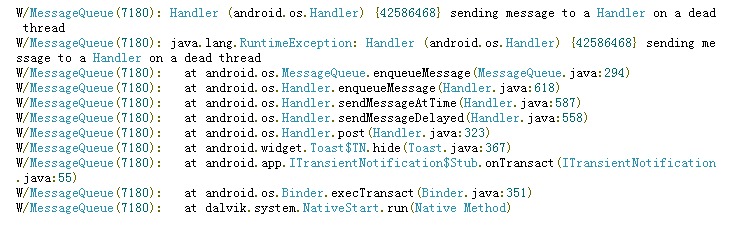
Google took a look at the information, and the website said:
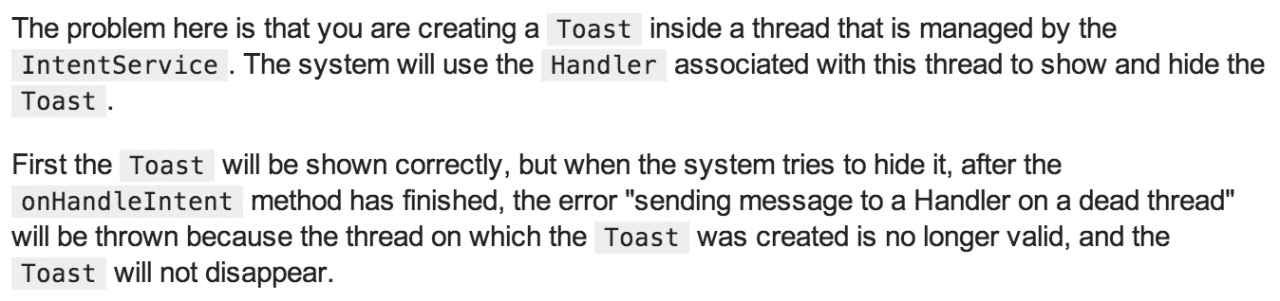
The reason is that you create a toast in a thread whose life cycle is controlled by intentservice. The phone will display the toast first, and then hide it with the handler of the thread; Close the toast, but when onhandleintent ends, the thread will hang up, and then the handler bound to the thread will not exist, and the toast will not close after the completion. What should I do? Send it to the main thread. The handeler of its toast is still alive. You can hide toast.)
What about the solution? (simple, rough)
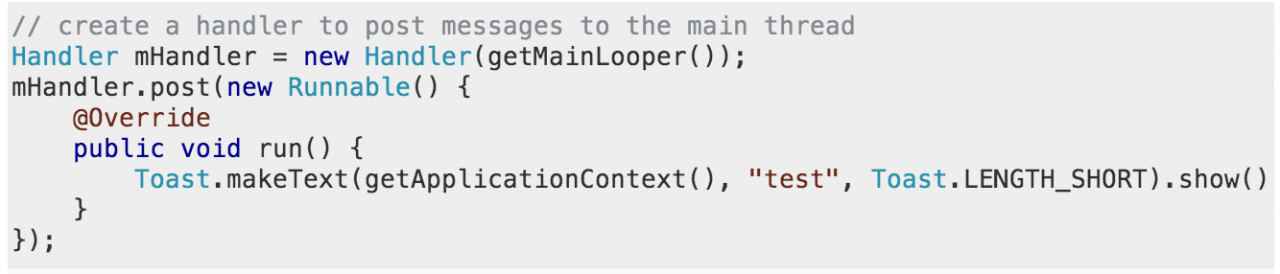
What questions do you have to say?
Why send a message to a dead thread?
Because the onhandle intent (intent intent) ends, the thread is gone. What’s going on?
Handler is gone, so can’t hide toast?
If I remember correctly, the life cycle of this toast should be controlled by notification manager service, right?
(analysis of intentservice source code) — todo
Analysis of toast life cycle source code
Cannot remove entries from nonexistent file /usr/local/bin/anaconda2/lib/python2.7/site-packages/eas
Problems encountered:
Cannot remove entries from nonexistent file /usr/local/bin/anaconda2/lib/python2.7/site-packages/easy-install.pth
Delete it and run it again
conda remove setuptools
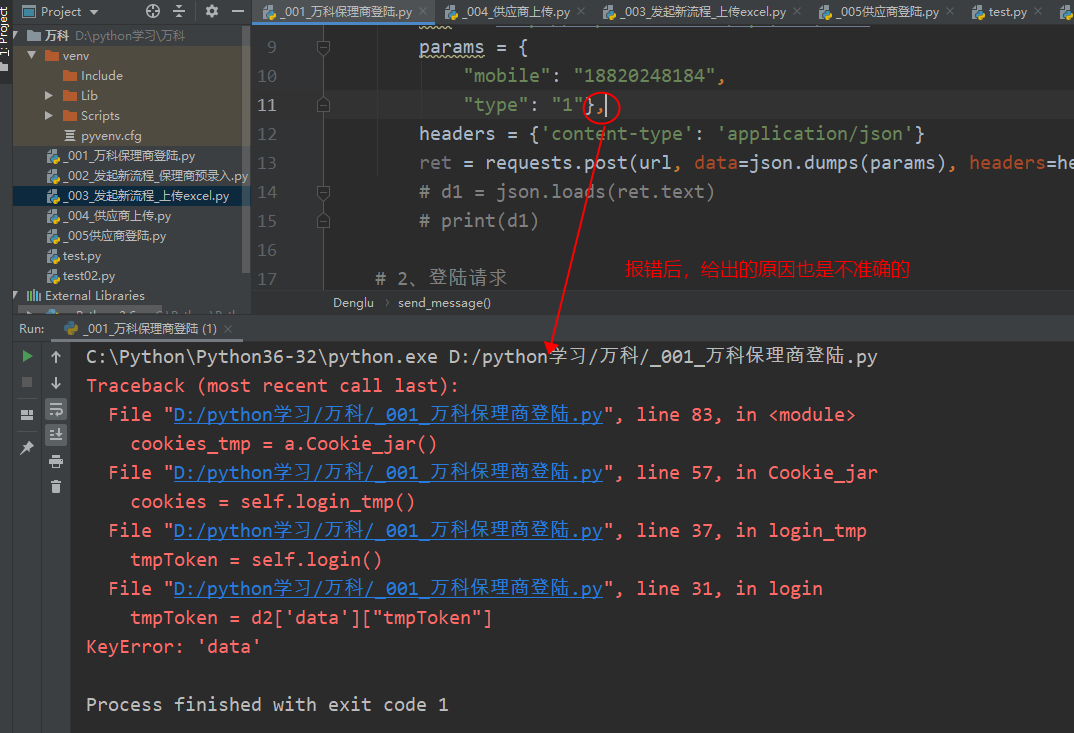
requests.exceptions.InvalidSchema : no connection adapters were found for a murder case caused by a comma
Question: requests.exceptions.InvalidSchema : No connection adapters
Reason: add a comma after the URL, resulting in no connection
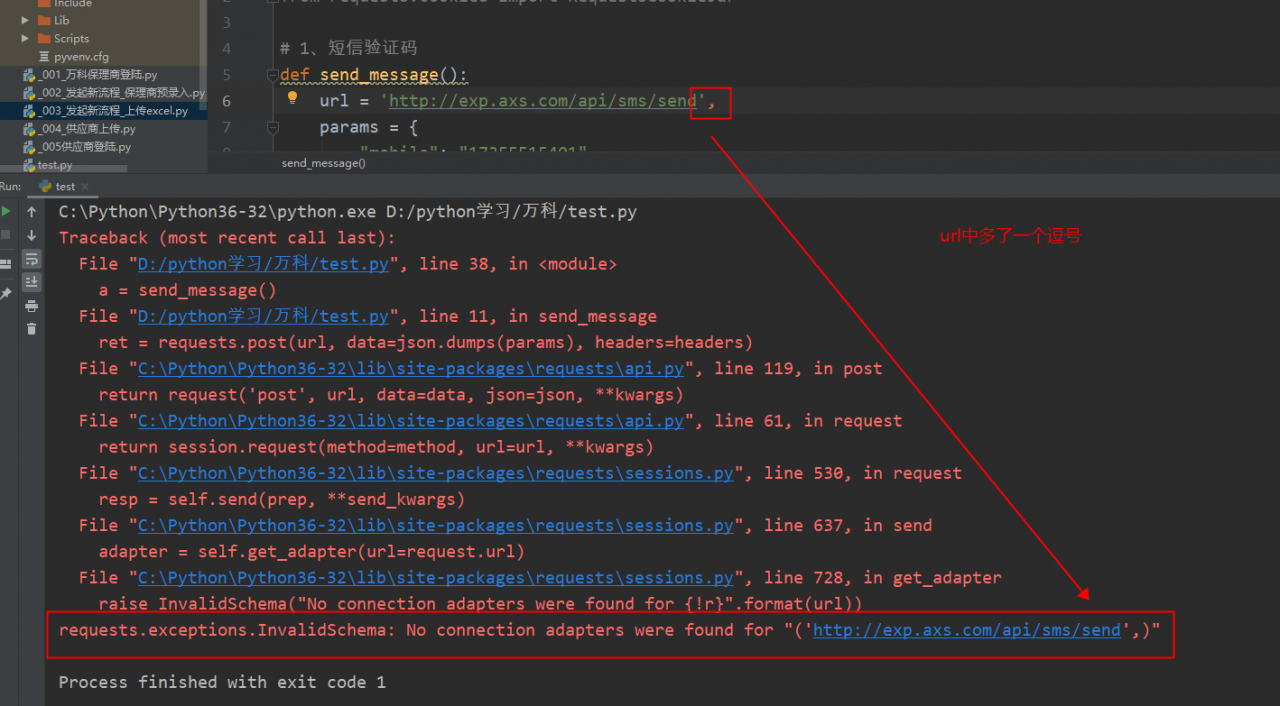
Don’t add commas between variables in Python, especially pay attention to the format of Python
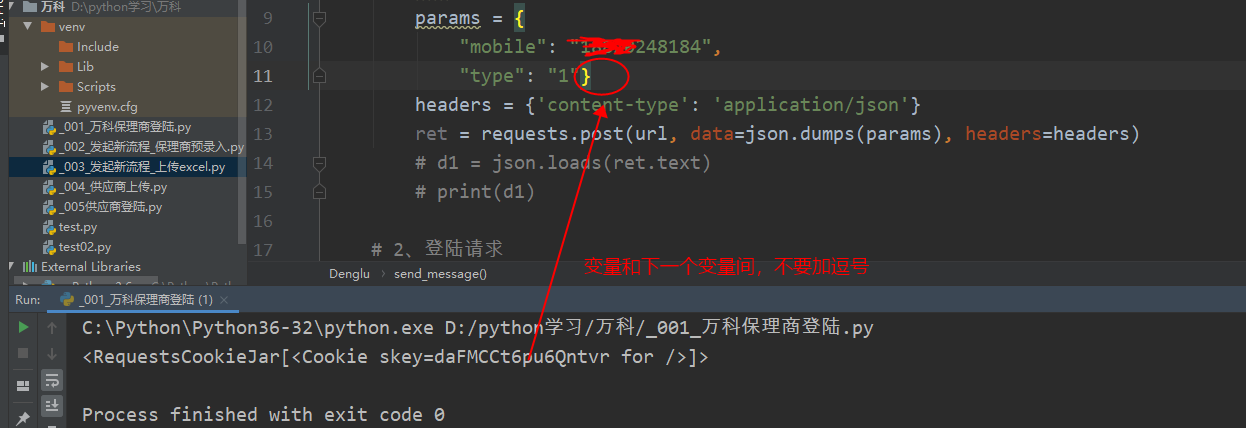
If you add a comma, you will report an error
The second operation of software engineering
The second operation of software engineering
8.5 The department of public works for a large city has decided to develop a Web-based pothole tracking and repair system(PHTRS). Draw a UML use case diagram for the PHTRS system. You’ll have to make a number ofassumptions about the manner in which a user interacts with this system. A description follows:
Citizens can log onto a website and report the location and severity of potholes. As potholes are reported they are logged with a “public works department repair system” and are assigned an identifying number, stored by street address, size(on a scale of 1 to 10), location(middle, curb, etc.),district(determined from street address), and repair priority(determined from the size of the pothole). Work order data are associated with each pothole and include pothole location and size, repair crew identifying number, number of people on crew, equipment assigned, hours applied to repair, hole status(work in progress, repaired, temporary repair, not repaired), amount of filler material used, and cost of repair (computed from hours applied, number of people, material and equipment used). Finally, a damage file is created to hold information about reported damage due to the pothole and includes citizen’s name, address, phone number, type of damage, and dollar amount of damage, PHTRS is an online system; all queries a to be made interactively.
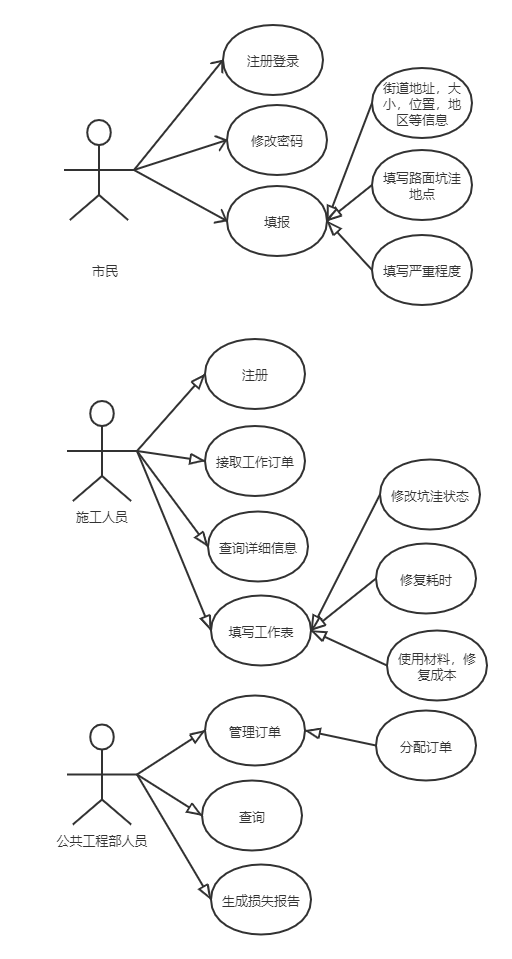
1. UML use case
8.6 Write two or three use cases that describe the roles of various actors in the PHTRS .
Case 1: filling situation
Participants: Citizens
- when citizens log in to phtrs, they input their account number, and they input two passwords (each at least 8 characters in length). The system displays all the main function buttons. Citizens select “fill in” from the main functions. Citizens fill in the street address, size, location, region, and repair priority. Citizens choose to save. The system assigns an identification number for the fill in and generates an order to be sent to the public works department Staff
Case 2: fill in the worksheet
Participants: construction workers
- when the construction personnel log in phtrs, the construction personnel input the account number, the construction personnel input two passwords (each with a length of at least 8 characters), the system displays all the main function buttons, the construction personnel select “fill in the worksheet” from the main functions, the system displays the work order assigned by the construction personnel, the construction personnel select the corresponding work order, the construction personnel fill in the number of personnel, and the allocated equipment, Repair time, pothole state, filling materials, repair cost and other information submitted by construction personnel
8.7 Develop an activity diagram for one aspect of PHTRS.
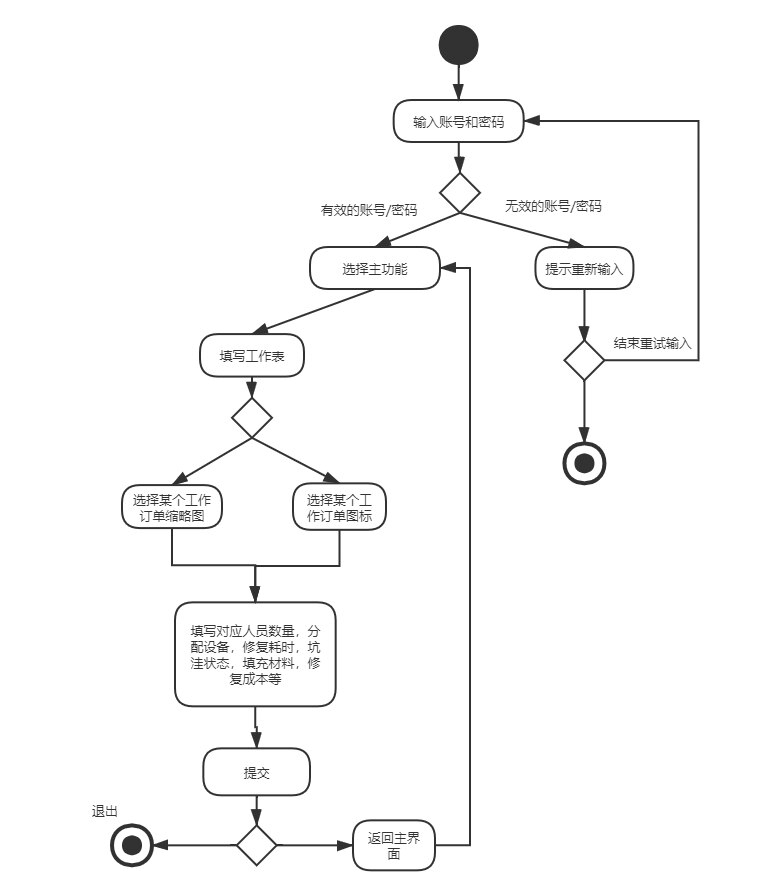
2. The activity chart of the construction personnel filling in the work sheet
8.8 Develop a swimlane diagram for one or more aspects of PHTRS.
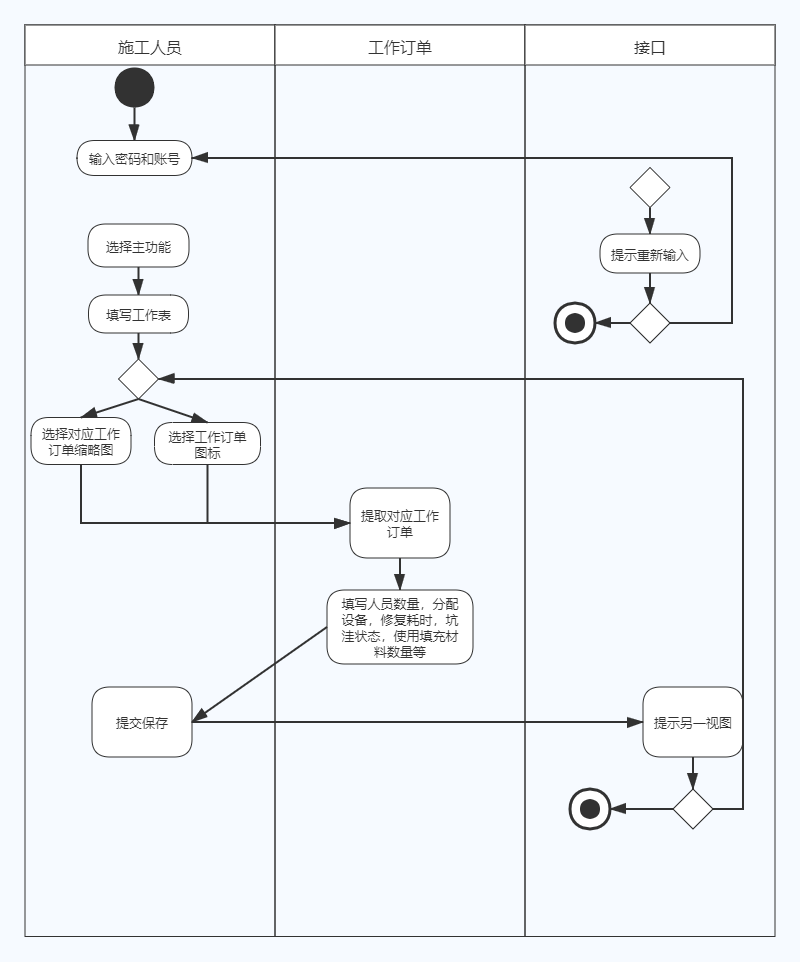
3. The construction personnel fill in the swimlane chart of the work sheet
ERROR: pygame-1.9.2-cp35-cp35m-win32.whl is not a supported wheel on this platform.
Why?
The downloaded pyGame is not compatible with the python version.
How do you do it?
Go to the website and download the pyGame installation related to your Python version.
(check your Python version: if you enter Python in CMD, you will be prompted for the python version.)
Process:
When installing pyGame last night, I went to the website: link according to the process in the textbook “Python Programming: from introduction to practice”, and downloaded the corresponding pyGame. However, the above errors occurred during the installation.
Looking all over the network, there is no suitable solution for me.
Then I look at the error report carefully:
pygame-1.9.2-cp35-cp35m-win32.whl is not supported by this platform (wheel, please point out what it is). The previous file is used to install pyGame.
1.9.2 refers to PIP version.
Cp35 refers to Python version 3.5, while mine is 3.7.
So far, the event is clear. Each pyGame corresponds to a different version of Python. The version is incompatible and an error is reported.
After downloading, the installation is successful!
(no screenshots here: I forgot to cut them last night)