The solution of push D command execution error (/ bin / sh: 1: push D: not found) on Ubuntu

The solution of push D command execution error (/ bin / sh: 1: push D: not found) on Ubuntu

View reason: enter the / bin directory to view the link file of SH, which is shown as follows: the SH command is linked to dash, while the pushd command needs to be executed in the bash environment.

Solution: execute the sudo dpkg reconfigure dash command and set the dash to No.

Check again: the link to check SH has been changed to bash.

Segmentation fault (SIGSEGV) location method

When we develop programs under Linux, if the program code is not rigorous, we often encounter problems

segmentation fault

Error, the result of this error is that the program will hang up directly, it is difficult to locate the problem code in the program.

reason

Segmentation fault is often referred to as memory leak / overflow: when a process executes an invalid memory reference or breaks, SIGSEGV signal will be triggered, and the kernel’s default action is to terminate the process.
For example, we use illegal pointers:


 1 #include <stdio.h>
 2 #include <string.h>
 3 
 4 int main(void)
 5 {
 6         char *str = "abcd123";
 7         char *p = NULL;
 8         char a;
 9 
10         p = strstr(str, "456");
11 
12         a = *p;
13 
14         return 0;
15 
16 }

When the above code is executed, there will be an error in memory. Because P is null, if we access the null pointer, there will be an error.
Revision:

char *str = "abcd123";
char *p = NULL;
char a;
p = strstr(str, "456");
if(p != NULL){
  a = *p;
}

So the key is to program strictly.

Solutions

    using GDB to debug and run, which needs to be positioned step by step, is obviously not optimal. Using the core file, Linux will generate a core file for SIGSEGV fault by default, which records the stack information when the fault occurs. The GDB program core can quickly trace the problem code. However, we need to add the compilation parameter – G
when compiling

gcc -g a.c -o test

GDB view command: BT and where

jsq@jsq:/opt/tmp/sigsegv-test$ gdb ./test core
GNU gdb (Ubuntu 8.1-0ubuntu3) 8.1.0.20180409-git
Copyright (C) 2018 Free Software Foundation, Inc.
License GPLv3+: GNU GPL version 3 or later <http://gnu.org/licenses/gpl.html>
This is free software: you are free to change and redistribute it.
There is NO WARRANTY, to the extent permitted by law.  Type "show copying"
and "show warranty" for details.
This GDB was configured as "x86_64-linux-gnu".
Type "show configuration" for configuration details.
For bug reporting instructions, please see:
<http://www.gnu.org/software/gdb/bugs/>.
Find the GDB manual and other documentation resources online at:
<http://www.gnu.org/software/gdb/documentation/>.
For help, type "help".
Type "apropos word" to search for commands related to "word"...
Reading symbols from ./test...done.
[New LWP 5868]
Core was generated by `./test'.
Program terminated with signal SIGSEGV, Segmentation fault.
#0  0x0000561a6e023680 in main () at a.c:12
12		a = *p;
(gdb) bt
#0  0x0000561a6e023680 in main () at a.c:12
(gdb) where
#0  0x0000561a6e023680 in main () at a.c:12
(gdb) 

As you can easily see from the above information, the problem is located at line 12 of A.C.

Unable to generate core file resolution

The core file is usually generated in the current directory where the program is executed. If it cannot be generated, there are two common reasons:
1. Linux kernel is limited. You need to set it through ulimit – C, and you can check whether there are restrictions through ulimit – A

jsq@jsq:/opt/tmp/sigsegv-test$ ulimit -a
core file size          (blocks, -c) 0
data seg size           (kbytes, -d) unlimited
scheduling priority             (-e) 0
file size               (blocks, -f) unlimited
pending signals                 (-i) 15071
max locked memory       (kbytes, -l) 16384
max memory size         (kbytes, -m) unlimited
open files                      (-n) 1024
pipe size            (512 bytes, -p) 8
POSIX message queues     (bytes, -q) 819200
real-time priority              (-r) 0
stack size              (kbytes, -s) 8192
cpu time               (seconds, -t) unlimited
max user processes              (-u) 15071
virtual memory          (kbytes, -v) unlimited
file locks                      (-x) unlimited

In the figure above, we can see that the size of the core file is 0, which indicates that it is forbidden. We can set the size through the – C option, for example:

ulimit -c 1024

Set to 1024
2. The current program does not have “write” permission in the current directory
this has been encountered before. In some hardware configurations or special paths, if the core file is not 0, the core file still cannot be generated. At this time, we need to consider the issue of write permission (LS – L view), which mainly involves the permissions of program users and user groups, We can set users and user groups through chown and chrgp commands, for example:

chown test root
chrgp test root

Set the user and user group of the test program to root.

Summary

Segmentation fault is an abnormal memory fault. The fastest way to locate it is to trace the core file, so it is necessary to set the Linux environment to be able to run and generate the core file.

Python: How to Use os.path.join()

os.path.join() is often used to read path splicing operations.

import os
import cv2

a='D:\\download'  #  Note the double slash, if not spliced address, you can use r' ', quotation marks available single slash, but with the splicing operation, I will only use the double slash at present
b='dog.jpg'
path=os.path.join(a,b) 
img = cv2.imread(path)
print(img)
# D:\download\dog.jpg

How to Use the Reverse() Function

How to use the reverse() function

1. Reverse function reverses string

string N;
cin>>N;
reverse(N.begin(), N.end());//begin & end;

2. The reverse function reverses the character array

char s[101];
cin.getline(s,sizeof(s));      //You can also do without cin.getline
int m=strlen(s);
reverse(s,s+m);
puts(s);

3. The reverse function reverses the integer array

int a[100];
reverse(a,a+10);         //The second parameter is the next address of the last element of the array;

Use Maven install to type the war package, which shows that the package XXX does not exist

Today, a jar package has been introduced into the project. When install is typed as war package, the package XXX does not exist.

The solution is as follows: add a paragraph to the POM file.

<configuration>
	<source>1.7</source>
	<target>1.7</target>
	<!--Add this paragraph here, because my jar package is introduced under the WEB-INF path, so write this path here-->
	<compilerArguments>
		<extdirs>src/main/webapp/WEB-INF/lib</extdirs>
	</compilerArguments>
</configuration>

Finally, install succeeded!

Ioremap function and iounmap() function

Original post address: http://blog.chinaunix.net/uid-21289517-id-1828602.html

void * __ ioremap(unsigned long phys_ Addr, signed long size, signed long flags)
entry: phys_ Addr: the initial IO address to be mapped;

Size: the size of the space to be mapped;

Flags: marks related to permissions of IO space to be mapped;

Function: map an IO address space to the virtual address space of the kernel for easy access;

*void ioremap(unsigned long offset, unsigned long size);

Parameter:
offset: physical address
size: the size of the space to be mapped

Return value: page mapping, return virtual address


Iounmap() function to unmap the virtual address;
for example: iounmap (gpsetl0);

Table ‘sell.hibernate_sequence‘ doesn‘t exist

Problem Description:

When adding data to the database, the primary key of the data is not specified, and the entity auto increment is not set at this time. As a result, the data cannot be added to the database

Solution:

Set entity class as primary key auto increment, or specify primary key when adding data

    @Id
    @GeneratedValue(strategy = GenerationType.IDENTITY)
    private Integer categoryId;

When executing hive – f script com.mysql.jdbc . exceptions.jdbc4 .CommunicationsException: Communications link failure

cd $HIVE_ HOME/bin
vi hive- site.xml
The reason for the error is hive- site.xml The configuration in is incomplete or the configuration item is wrong

<configuration>
<property>
<name>hive.metastore.warehouse.dir</name>
<value>/opt/software/hadoop/hive110/warehouse</value>
</property>
<property>
<name>javax.jdo.option.ConnectionURL</name>
<value>jdbc:mysql://192.168.56.130:3306/hive110?createDatabaseIfNotExist=true</value>
</property>
<property>
<name>javax.jdo.option.ConnectionDriverName</name>
 <value>com.mysql.jdbc.Driver</value>
</property>
<property>
<name>javax.jdo.option.ConnectionUserName</name>
 <value>root</value>
</property>
<property>
<name>javax.jdo.option.ConnectionPassword</name>
 <value>root</value>
</property>
</configuration>

In particular, we should pay attention to whether the IP address in the IP address configuration item is correct

<name>javax.jdo.option.ConnectionURL</name>
<value>jdbc:mysql://192.168.56.130:3306/hive110?createDatabaseIfNotExist=true</value>

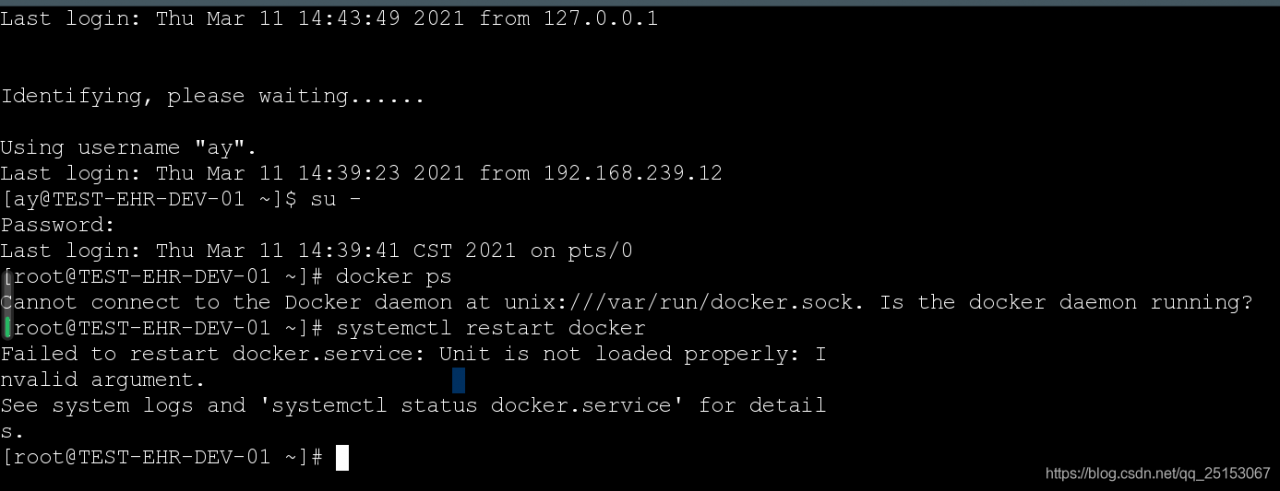
See system logs and ‘systemctl status docker.service‘ for details

(Linex) error reported when executing systemctl restart docker
failed to restart docker.service : Unit is not loaded properly: Invalid argument. See system logs and ‘systemctl status docker.service ’ for details.

If the docker is shut down abnormally, it will be unable to restart the docker. If the docker is shut down abnormally, it will result in / etc / SYSTEMd / system/ docker.service Some processes in the file are still operating, resulting in the problem that docker cannot be restarted. Failed to restart docker.service : Unit is not loaded properly: Invalid argument. See system logs and ‘systemctl status docker.service ’ for details.

Analyze the reasons
/ etc / SYSTEMd / system/ docker.service There are cache or process blocking


Solutions

move file

    1. 1.Add the file just moved to MV/home/docker.service/Etc/SYSTEMd/system.
      will/etc/SYSTEMd/system/docker.service Move files first (MV/etc/SYSTEMd /system)/docker.service /If you run systemctl restart docker, you will be prompted to report an error and let you see the status docker.service (view status) , 2.showing/etc/SYSTEMd/system/docker.service File, open this file, magic display and content, we have just moved this file.
      1. 3.Rerun systemctl restart docker

    again

Backup files

    1. 1.CD/etc/SYSTEMd/system
      2.docker.service Backup CP docker.service docker.service_Bak
      3.force delete docker.service File RM – RF docker.service
      4.Restart systemctl restart docker
      5.View the docker status

Vscode HTML file auto supplement HTML skeleton failure

Vscode HTML files automatically supplement HTML skeleton invalidation

Input! +Tab key to complete HTML skeleton failure

terms of settlement:

1. Let the HTML file be in editing state, press the shortcut key Ctrl + Shift + P

2. Enter change language mode in the jump dialog box, find the “HTML” configuration file in the drop-down options bar and set it

Numpy realizes the forward propagation process of CNN

Due to the natural tensor property of numpy, the implementation code with numpy is very concise and has few parameters.

In this version, only a small number of operations are numpy processed, and most operations are for loops, only to understand the algorithm

import numpy as np

def zero_pad(X, pad):
    """
    Pad with zeros all images of the dataset X. The padding is applied to the height and width of an image, 
    as illustrated in Figure 1.
    
    Argument:
    X -- python numpy array of shape (m, n_H, n_W, n_C) representing a batch of m images
    pad -- integer, amount of padding around each image on vertical and horizontal dimensions
    
    Returns:
    X_pad -- padded image of shape (m, n_H + 2*pad, n_W + 2*pad, n_C)
    """

    return np.pad(X, ((0, 0), (pad, pad), (pad, pad), (0, 0)), 'constant', constant_values=0)


def conv_single_step(a_slice_prev, W, b):
    """
    Apply one filter defined by parameters W on a single slice (a_slice_prev) of the output activation 
    of the previous layer.
    
    Arguments:
    a_slice_prev -- slice of input data of shape (f, f, n_C_prev)
    W -- Weight parameters contained in a window - matrix of shape (f, f, n_C_prev)
    b -- Bias parameters contained in a window - matrix of shape (1, 1, 1)
    
    Returns:
    Z -- a scalar value, result of convolving the sliding window (W, b) on a slice x of the input data
    """
    s = np.multiply(a_slice_prev, W) + b
    Z = np.sum(s)
    return Z

def conv_forward(A_prev, W, b, hparameters):
    """
    Implements the forward propagation for a convolution function
    
    Arguments:
    A_prev -- output activations of the previous layer, numpy array of shape (m, n_H_prev, n_W_prev, n_C_prev)
    W -- Weights, numpy array of shape (f, f, n_C_prev, n_C)
    b -- Biases, numpy array of shape (1, 1, 1, n_C)
    hparameters -- python dictionary containing "stride" and "pad"
        
    Returns:
    Z -- conv output, numpy array of shape (m, n_H, n_W, n_C)
    cache -- cache of values needed for the conv_backward() function
    """
    
    # Retrieve dimensions from A_prev's shape  
    (m, n_H_prev, n_W_prev, n_C_prev) = A_prev.shape
    
    # Retrieve dimensions from W's shape
    (f, f, n_C_prev, n_C) = W.shape

    # Retrieve information from "hparameters"
    stride = hparameters['stride']
    pad = hparameters['pad']
    
    # Compute the dimensions of the CONV output volume using the formula given above.
    n_H = int((n_H_prev - f + 2 * pad) / stride) + 1
    n_W = int((n_W_prev - f + 2 * pad) / stride) + 1
    
    # Initialize the output volume Z with zeros.
    Z = np.zeros((m, n_H, n_W, n_C))
    
    # Create A_prev_pad by padding A_prev
    A_prev_pad = zero_pad(A_prev, pad)
    
    for i in range(m):                                 
        a_prev_pad = A_prev_pad[i]                    
        for h in range(n_H):                           
            for w in range(n_W):                       
                for c in range(n_C):                  
                    # Find the corners of the current "slice"
                    vert_start = h * stride
                    vert_end = vert_start + f
                    horiz_start = w * stride
                    horiz_end = horiz_start + f
                    # Use the corners to define the (3D) slice of a_prev_pad
                    a_slice_prev = a_prev_pad[vert_start:vert_end, horiz_start:horiz_end, :]
                    # Convolve the (3D) slice with the correct filter W and bias b, to get back one output neuron.
                    Z[i, h, w, c] = conv_single_step(a_slice_prev, W[...,c], b[...,c])
                                        
    # Making sure your output shape is correct
    assert(Z.shape == (m, n_H, n_W, n_C))
    
    # Save information in "cache" for the backprop
    cache = (A_prev, W, b, hparameters)
    
    return Z, cache

def relu(Z):
    return np.maximum(0, Z)


def pool_forward(A_prev, hparameters, mode = "max"):
    """
    Implements the forward pass of the pooling layer
    
    Arguments:
    A_prev -- Input data, numpy array of shape (m, n_H_prev, n_W_prev, n_C_prev)
    hparameters -- python dictionary containing "f" and "stride"
    mode -- the pooling mode you would like to use, defined as a string ("max" or "average")
    
    Returns:
    A -- output of the pool layer, a numpy array of shape (m, n_H, n_W, n_C)
    cache -- cache used in the backward pass of the pooling layer, contains the input and hparameters 
    """
    
    # Retrieve dimensions from the input shape
    (m, n_H_prev, n_W_prev, n_C_prev) = A_prev.shape
    
    # Retrieve hyperparameters from "hparameters"
    f = hparameters["f"]
    stride = hparameters["stride"]
    
    # Define the dimensions of the output
    n_H = int(1 + (n_H_prev - f) / stride)
    n_W = int(1 + (n_W_prev - f) / stride)
    n_C = n_C_prev
    
    # Initialize output matrix A
    A = np.zeros((m, n_H, n_W, n_C))              
    
    for i in range(m):                           
        for h in range(n_H):                     
            for w in range(n_W):                
                for c in range (n_C):            
                    vert_start = h * stride
                    vert_end = vert_start + f
                    horiz_start = w * stride
                    horiz_end = horiz_start + f
                    
                    # Use the corners to define the current slice on the ith training example of A_prev, channel c. (≈1 line)
                    a_prev_slice = A_prev[i, vert_start:vert_end, horiz_start:horiz_end, c]
                    
                    # Compute the pooling operation on the slice. Use an if statment to differentiate the modes. Use np.max/np.mean.
                    if mode == "max":
                        A[i, h, w, c] = np.max(a_prev_slice)
                    elif mode == "average":
                        A[i, h, w, c] = np.mean(a_prev_slice)
    
    # Store the input and hparameters in "cache" for pool_backward()
    cache = (A_prev, hparameters)
    
    # Making sure your output shape is correct
    assert(A.shape == (m, n_H, n_W, n_C))
    
    return A, cache


def conv_relu_pooling_forward(A_prev, W, b, hparameters_conv, hparameters_pool, mode_pool = "max"):
    # Retrieve dimensions from A_prev's shape  
    (m, n_H_prev, n_W_prev, n_C_prev) = A_prev.shape
    
    # Retrieve dimensions from W's shape
    (f, f, n_C_prev, n_C) = W.shape

    # Retrieve information from "hparameters"
    stride_conv = hparameters_conv['stride']
    pad_conv = hparameters_conv['pad']

    stride = hparameters_pool['stride']
    f = hparameters_pool['f']
    
    # Compute the dimensions of the CONV output volume using the formula given above.
    n_H_conv = int((n_H_prev - f + 2 * pad_conv) / stride_conv) + 1
    n_W_conv = int((n_W_prev - f + 2 * pad_conv) / stride_conv) + 1
    
    # Initialize the output volume Z with zeros.
    Z = np.zeros((m, n_H_conv, n_W_conv, n_C))
    
    # Create A_prev_pad by padding A_prev
    A_prev_pad = zero_pad(A_prev, pad_conv)

    n_H = int(1 + (n_H_conv - f) / stride)
    n_W = int(1 + (n_W_conv - f) / stride)
    n_C = n_C_prev

    Z_out = np.zeros((m, n_H, n_W, n_C))  


    for i in range(m):                                 
        a_prev_pad = A_prev_pad[i]

        for h in range(n_H_conv):                           
            for w in range(n_W_conv):                       
                for c in range(n_C):                  
                    # Find the corners of the current "slice"
                    vert_start = h * stride_conv
                    vert_end = vert_start + f
                    horiz_start = w * stride_conv
                    horiz_end = horiz_start + f
                    # Use the corners to define the (3D) slice of a_prev_pad
                    a_slice_prev = a_prev_pad[vert_start:vert_end, horiz_start:horiz_end, :]
                    # Convolve the (3D) slice with the correct filter W and bias b, to get back one output neuron.
                    Z[i, h, w, c] = conv_single_step(a_slice_prev, W[...,c], b[...,c])
                    Z[i, h, w, c] = max(0.0, Z[i, h, w, c])

        for h in range(n_H):                     
            for w in range(n_W):                
                for c in range (n_C):            
                    vert_start = h * stride
                    vert_end = vert_start + f
                    horiz_start = w * stride
                    horiz_end = horiz_start + f
                    
                    # Use the corners to define the current slice on the ith training example of A_prev, channel c. (≈1 line)
                    a_prev_slice = Z[i, vert_start:vert_end, horiz_start:horiz_end, c]
                    
                    # Compute the pooling operation on the slice. Use an if statment to differentiate the modes. Use np.max/np.mean.
                    if mode_pool == "max":
                        Z_out[i, h, w, c] = np.max(a_prev_slice)
                    elif mode_pool == "average":
                        Z_out[i, h, w, c] = np.mean(a_prev_slice)
                
    # Making sure your output shape is correct
    assert(Z_out.shape == (m, n_H, n_W, n_C))
    
    # Save information in "cache" for the backprop
    # cache = (A_prev, W, b, hparameters)
    
    return Z


[How to Solve]Warning: connect.static is not a function

grant contrib connect is not supported since version 0.11. X connect.static And connect.directory

you should install serve static (load static files) and serve index (load directory)

npm install --save-dev grunt-contrib-connect serve-static 


Examples


var serveStatic = require('serve-static');
var serveIndex = require('serve-index');

grunt.initConfig({
    connect: {
        options: {
            test: {
               directory: 'somePath',
               middleware: function(connect, options){
                    var _staticPath = path.resolve(options.directory);
                    return [serveStatic(_staticPath), serveIndex(_staticPath)]
               }
            }
        }
    }
})


Reference link
http://stackoverflow.com/questions/32961124/warning-connect-static-is-not-a-function-use-force-to-continue