MySQL modify character set

First of all, there are two main concepts about MySQL character set, one is character sets, the other is collations, the former is character content
and encoding, and the latter is some rules for comparing the former. These two parameter sets can be specified at four levels: database instance, single database, table and column.

For users, utf8 encoding is generally recommended to store data. To solve the problem of garbled code, it is not only the storage of MySQL data, but also related to the coding mode of user program files and the connection mode between user program and MySQL database.

first of all, MySQL has a default character set, which is determined during installation. When compiling mysql, you can use default_ Charset =
utf8 and default_ COLLATION=utf8_ general_ CI (MySQL version 5.5, version 5.1 uses — with charset =
utf8 — with collation = utf8)_ general_ The default character set is utf8, which is also the most once and for all method. After this is specified,
the coding mode of client connecting to database is utf8 by default, and the application does not need any processing.

unfortunately, many people don’t specify these two parameters when compiling and installing mysql, and most people install it through binary programs.
at this time, the default character set of MySQL is Latin1. At this time, we can still specify the default character set of MySQL by my.cnf Add two parameters to the file:
1. Add
default character set = utf8 under [mysqld]
2. Add
default character set = utf8 under [Client]
2 In this way, we don’t need to specify utf8 character set when we build database and table. This writing method in the configuration file solves the problem of data storage and comparison
, but it has no effect on the connection of the client. At this time, the client usually needs to specify utf8 connection to avoid garbled code. This is the general set
Names command. In fact, the set names utf8 command corresponds to the following server-side commands:
set character_ set_ client = utf8;
SET character_ set_ results = utf8;
SET character_ set_ Connection = xutf8;
but these three parameters cannot be written in the configuration file my.cnf It’s in the library. It can only be modified dynamically by the set command. What we need is to write a way to
Yongyi in the configuration file. At this time, is there a way to solve the problem on the server?The feasible idea is in init_ Set in connect. This command will be triggered every time an ordinary user connects. You can add the following line in the [mysqld] section to set the connection character set:
Add under [mysqld]:
init_ Connect =’set names utf8 ‘
summary:
1. It is preferred to specify two parameters to use utf8 encoding when compiling and installing mysql.
2. Select in the configuration file my.cnf or my.ini Set two parameters and init at the same time_ Connect parameter.
3. The third is in the configuration file my.cnf or my.ini Set two parameters, and specify the set names command for the client connection.
4. In the configuration file my.cnf The default character set parameter is added to the client and server in to facilitate management.

Using common file upload to upload files in SSH project

Today, the project used to upload. What I store in my database is the URL of the file, so I have to do some processing in the background. I have written several times before uploading, and I feel that the amount of code is too large. Today, I searched the Internet, and it will be much easier to upload with common file upload. After groping for an afternoon, I finally got it done. The background code is as follows

//The uploaded file
private File upload;
//file name and type
private String uploadContentType;
private String uploadFileName;
/*This is the variable to be written in the action, you must write it, otherwise it will be very troublesome, Struts2 will automatically assign the file to be uploaded, the file name, type, etc.*/

/// The following is the processing method
public String uploadStaffImage() throws Exception{
	//Take the file name and path, rename the file name with uuid to prevent Chinese mess
	String fileName = UUID.randomUUID().toString();
        //intercept file type
        String fileType = this.uploadFileName.substring(this.uploadFileName.lastIndexOf("."), this.uploadFileName.length());
        //New file name
        String file = fileName + fileType;
        // My directory is under "StaffImg" folder
        String path = request.getSession().getServletContext().getRealPath("/StaffImg");
	InputStream is = new FileInputStream(getUpload());  
        //Create an output stream to generate a new file  
        OutputStream os = new FileOutputStream(path + "//" + file);  
        //write disk 
        IOUtils.copy(is, os);
        os.flush();  
        IOUtils.closeQuietly(is);
        IOUtils.closeQuietly(os);
        //Update the URL in the database
        String imgURL = "StaffImg/"+file;
        this.staffFileUpLoadService.updataStaffImgURL(this.staffId, imgURL);
	return SUCCESS;
}

A total of 13 lines of code, compared to the previous written to be a lot more concise, method use is relatively simple.

This method can only upload a single file. If you upload in batches, the idea is the same, and you should add a loop in the outer layer
instead

Nginx, which is suitable for front-end H5 requests, routes and forwards according to the URL and cuts the URL

1. Ruqirement
nginx accepts the request url uniformly and forwards it
http://172.16.51.91:9000/api/order/create/44010000
http://172.16.51.91:9000/api/order/create/44060000
目标:
http://172.15.10.13:9001/api/order/create
http://172.15.10.13:9002/api/order/create
2. nginx Settings

server {
        listen      9000;
        server_name  172.16.51.91;

		location ~*(44010000)$ {
                rewrite ^/(.*)/44010000$ http://172.15.10.13:9001/$1 permanent;
        }
		 location ~*(44060000)$ {
                 rewrite ^/(.*)/44060000$ http://172.15.10.13:9002/$1 permanent;
        }	

}

Nginx routes and forwards according to the URL and cuts the URL

1. Ruqirement
nginx accepts the request url uniformly and forwards it
http://172.16.51.91:9000/44010000/api/order/create
http://172.16.51.91:9000/44060000/api/order/create
goal:
http://172.15.10.13:9001/api/order/create
http://172.15.10.13:9002/api/order/create
2. nginx Setting

server {
    listen   9000;
    server_name 172.16.51.91;

	location /44010000/ {
		    proxy_pass http://172.15.10.13:9001/;
    }
		 location /44060000/ {
         proxy_pass http://172.15.10.13:10002/;
    }
}

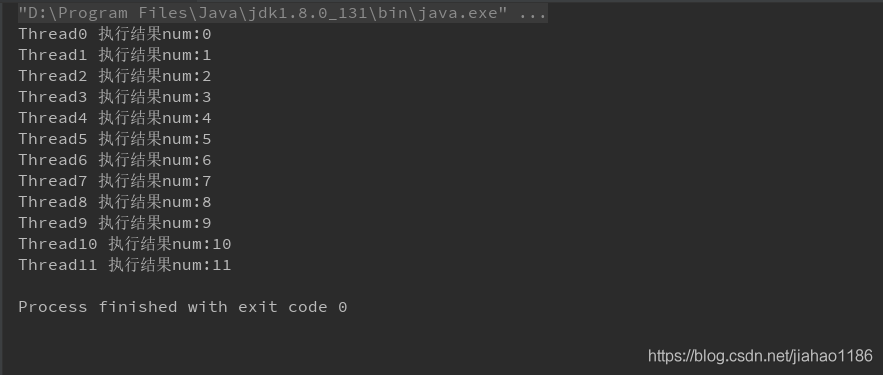
Java uses single thread pool to realize multi thread sequential execution (non alternating, non synchronous)

1. Principle and mechanism

Use one-way pool to ensure orderly submission and execution.

explain:

1) Alternate execution between threads is not supported.

2) Multithreading is not synchronous, only to ensure the order of execution, multithreading is concurrent execution.

2. Code examples

package com.thread;

import java.util.concurrent.ExecutorService;
import java.util.concurrent.Executors;
import java.util.concurrent.locks.Condition;
import java.util.concurrent.locks.Lock;
import java.util.concurrent.locks.ReentrantLock;

public class TasksWithoutLockTest extends Thread {

    private static int num = 0;
    private int id;

    public TasksWithoutLockTest(int id) {
        this.id = id;
    }


    @Override
    public void run() {
        System.out.println("Thread" + id + "output num:" + num++);
        try {
            Thread.sleep(3);
        } catch (InterruptedException e) {
            e.printStackTrace();
        }
    }

    public static void main(String[] args) {
        //ExecutorService exec = Executors.newFixedThreadPool(1);
        ExecutorService exec = Executors.newSingleThreadScheduledExecutor();
        for (int i = 0; i < 12; i++) {
            exec.submit(new TasksWithoutLockTest(i));
        }

        exec.shutdown();

    }
}

3. Output results

Asynchronous processing of HTTP request by Java_ Method 2: through deferredresult

1.DeferredResult

Spring supports HTTP asynchronous return

2. Asynchronous processing

Start a new thread, process the data and return the value.

3. Code examples

1)controller

package com.liuxd.controller;

import com.liuxd.entity.Responses;
import com.liuxd.service.TaskService2;
import lombok.extern.slf4j.Slf4j;
import org.springframework.beans.factory.annotation.Autowired;
import org.springframework.web.bind.annotation.GetMapping;
import org.springframework.web.bind.annotation.RestController;
import org.springframework.web.context.request.async.DeferredResult;

@Slf4j
@RestController
public class AsyncCtr2 {

    @Autowired
    private TaskService2 taskService2;

    @GetMapping(value = "/getResult")
    public DeferredResult<Responses<String>> getResult() {
        log.info("HTTP request received...");
        long startTime = System.currentTimeMillis();

        DeferredResult<Responses<String>> deferredResult = new DeferredResult<Responses<String>>();

        new Thread(new Runnable() {
            @Override
            public void run() {
                taskService2.getData(deferredResult);
            }
        }).start();

        log.info("The task of the receiving HTTP request thread has been completed, exit!");
        long endTime = System.currentTimeMillis();
        log.info("http Total request time. " + (endTime - startTime) + "ms");

        return deferredResult;

    }
}

2)service

package com.liuxd.service;

import com.liuxd.entity.Responses;
import lombok.extern.slf4j.Slf4j;
import org.springframework.stereotype.Service;
import org.springframework.web.context.request.async.DeferredResult;

@Slf4j
@Service
public class TaskService2 {

    public void getData(DeferredResult<Responses<String>> deferredResult) {

        log.info("Call service asynchronous with return method, start execution...");
        long startTime = System.currentTimeMillis();

        try {
            Thread.sleep(2500L);
        } catch (InterruptedException e) {
            e.printStackTrace();
        }

        log.info("Call service asynchronous has return method, the end of execution!!!") ;

        long endTime = System.currentTimeMillis();
        log.info("Total time taken to call service asynchronous return method. " + (endTime - startTime) + "ms");

        deferredResult.setResult(new Responses<>(0, "Done", "SUCCESS"));

    }


}

3)Responses

package com.liuxd.entity;

import lombok.AllArgsConstructor;
import lombok.Builder;
import lombok.Data;
import lombok.NoArgsConstructor;

@Data
@Builder
@NoArgsConstructor
@AllArgsConstructor
public class Responses<T> {

    private Integer code;

    private String msg;

    private T data;

}

4) Print results

5) Result analysis

1) The HTTP main thread accepts the request and ends after processing the request

2) After the asynchronous thread ends, returns the

Three ways of thread sequence alternate execution in Java lock free programming

1. Principle analysis

Atomicinteger is thread safe, and autoincrement is thread safe.

2. Code examples

package com.thread;

import java.util.concurrent.ExecutorService;
import java.util.concurrent.Executors;
import java.util.concurrent.atomic.AtomicInteger;

public class TasksTest extends Thread {
    private static AtomicInteger atomic = new AtomicInteger(1);
    private int id;

    public TasksTest(int id) {
        this.id = id;
    }

    @Override
    public void run() {
        while (atomic.get() <= 12) {
            while (atomic.get() % 3 == id) {
                System.out.println("thread_" + id + " output:" + atomic.get());
                atomic.incrementAndGet();
            }
        }
    }

    public static void main(String[] args) {
        Thread thread0 = new TasksTest(0);
        Thread thread1 = new TasksTest(1);
        Thread thread2 = new TasksTest(2);

        ExecutorService exec = Executors.newFixedThreadPool(3);

        exec.submit(thread0);
        exec.submit(thread1);
        exec.submit(thread2);

        exec.shutdown();

    }
}

Implementation of retrial mechanism in Java

Keywords: thread, thread pool, queue, task scheduling

1. Retrying tool class

package com.iretry;

import com.alibaba.fastjson.JSON;
import lombok.extern.slf4j.Slf4j;
import org.springframework.scheduling.concurrent.ThreadPoolTaskExecutor;
import org.springframework.scheduling.concurrent.ThreadPoolTaskScheduler;

import java.util.Queue;
import java.util.concurrent.ConcurrentLinkedQueue;
import java.util.concurrent.Executor;
import java.util.concurrent.ThreadPoolExecutor;

/**
 * Retry Tools Class
 */
@Slf4j
public class RetryUtils {

    private final static int DEFAULT_RETRY_TIMES = 6;
    private final static int[] DEFAULT_DELAY_SECONDS = {3, 30, 180, 600, 1800, 3600};

    private static Queue<RetryRunnable> TASK_QUEUE = new ConcurrentLinkedQueue<>();

    public static ThreadPoolTaskExecutor executor = new ThreadPoolTaskExecutor();
    public static ThreadPoolTaskScheduler scheduler = new ThreadPoolTaskScheduler();

    static {
        //Configure the number of core threads
        executor.setCorePoolSize(10);
        // Configure the maximum number of threads
        executor.setMaxPoolSize(20);
        //configure queue size
        executor.setQueueCapacity(1000);
        //configure the name prefix of the threads in the thread pool
        executor.setThreadNamePrefix("async_");
        // rejection-policy: how to handle new tasks when the pool has reached max size
        // CALLER_RUNS: instead of executing the task in a new thread, the caller's thread will execute it
        executor.setRejectedExecutionHandler(new ThreadPoolExecutor.CallerRunsPolicy());
        //Perform initialization
        executor.initialize();

        scheduler.setThreadNamePrefix("scheduler_");
        scheduler.setPoolSize(5);
        scheduler.setRejectedExecutionHandler(new ThreadPoolExecutor.CallerRunsPolicy());
        scheduler.initialize();
    }

    public RetryUtils() {
        //Check every second: iterate through the task queue, if needed, the thread pool schedules execution
        scheduler.scheduleAtFixedRate(() -> {
            for (RetryRunnable task : TASK_QUEUE) {
                long nextRetryMillis = task.nextRetryMillis;
                if (nextRetryMillis != -1 && nextRetryMillis <= System.currentTimeMillis()) {
                    task.nextRetryMillis = -1;
                    executor.execute(task);
                }
            }
        }, 1000);
    }

    public void doRetry(Task task) {
        doRetry(DEFAULT_RETRY_TIMES, DEFAULT_DELAY_SECONDS, task);
    }

    public void doRetry(int maxRetryTime, Task task) {
        doRetry(maxRetryTime, DEFAULT_DELAY_SECONDS, task);
    }

    public void doRetry(int[] retryDelaySeconds, Task task) {
        doRetry(retryDelaySeconds.length, retryDelaySeconds, task);
    }

    /**
     * @param maxRetryTime      Maximum number of retries
     * @param retryDelaySeconds array of retry interval times
     * @param task task
     */
    public void doRetry(final int maxRetryTime, final int[] retryDelaySeconds, final Task task) {
        Runnable runnable = new RetryRunnable(maxRetryTime, retryDelaySeconds, task);
        executor.execute(runnable);
    }

    /**
     * Custom Threads Class
     */
    private static class RetryRunnable implements Runnable {

        private final Task task;
        private final int maxRetryTimes;
        private final int[] retryDelaySeconds;

        private int retryTimes;
        private volatile long nextRetryMillis;

        //Constructors
        public RetryRunnable(final int maxRetryTimes, final int[] retryDelaySeconds, final Task task) {
            this.task = task;
            if (maxRetryTimes <= 0) {
                this.maxRetryTimes = DEFAULT_RETRY_TIMES;
            } else {
                this.maxRetryTimes = maxRetryTimes;
            }
            if (retryDelaySeconds == null || retryDelaySeconds.length == 0) {
                this.retryDelaySeconds = DEFAULT_DELAY_SECONDS;
            } else {
                this.retryDelaySeconds = retryDelaySeconds;
            }
        }

        //Implementation of business methods
        @Override
        public void run() {
            try {

                task.run();

            } catch (Throwable e) {
                int sleepSeconds = retryTimes < retryDelaySeconds.length ?retryDelaySeconds[retryTimes] : retryDelaySeconds[retryDelaySeconds.length - 1];

                if (retryTimes < maxRetryTimes) {
                    if (retryTimes == 0) {
                        TASK_QUEUE.add(this);
                        log.error("task executed error, " + sleepSeconds + " seconds do next... ", e);
                    } else {
                        log.error("retry " + retryTimes + " times error, " + sleepSeconds + " seconds do next... ", e);
                    }
                    nextRetryMillis = System.currentTimeMillis() + sleepSeconds * 1000;

                } else {
                    log.error("retry " + retryTimes + " times error", e);
                    log.error("retry snapshot: {}", JSON.toJSONStringWithDateFormat(task.snapshot(), "yyyy-MM-dd HH:mm:ss"));

                    TASK_QUEUE.remove(this);
                    task.retryFailed(e);

                }

                retryTimes++;

            }
        }
    }

}

2. Business class interface

package com.iretry;

public interface Task {

    void run() throws Exception;

    default void retryFailed(Throwable e) {
    }

    default Object snapshot() {
        return null;
    }
}

3. Test class

package com.iretry;

import lombok.AllArgsConstructor;
import lombok.Data;
import lombok.NoArgsConstructor;
import lombok.extern.slf4j.Slf4j;
import org.springframework.scheduling.concurrent.ThreadPoolTaskExecutor;
import org.springframework.scheduling.concurrent.ThreadPoolTaskScheduler;

import java.util.concurrent.ThreadPoolExecutor;

@Slf4j
public class IRetryTest {

    public static void main(String[] args) {
        RetryUtils retryUtils = new RetryUtils();

        IRetryTest iRetryTest = new IRetryTest();
        iRetryTest.executeBusiness(retryUtils, new IRetryTest().new UserInfo("Jack"));

    }

    //Business methods that require retries
    private void executeBusiness(RetryUtils retryUtils, UserInfo user) {

        retryUtils.doRetry(new int[]{6, 12}, new Task() {
            @Override
            public void run() throws Exception {
                user.setName("Henry");
                log.info("Execute the operation, change the name of the employee to: " + user.getName());
                Integer a = 1/0;

            }

            // Support rollback operations after final failure
            @Override
            public void retryFailed(Throwable e) {
                user.setName("Jack");
                log.info("Retry failed, business data rolled back...") ;
                log.info("Username is called." + user.getName());
            }

            @Override
            public Object snapshot() {
                return user;
            }
        });
    }


    @Data
    @NoArgsConstructor
    @AllArgsConstructor
    private class UserInfo {
        private String name;
    }


}

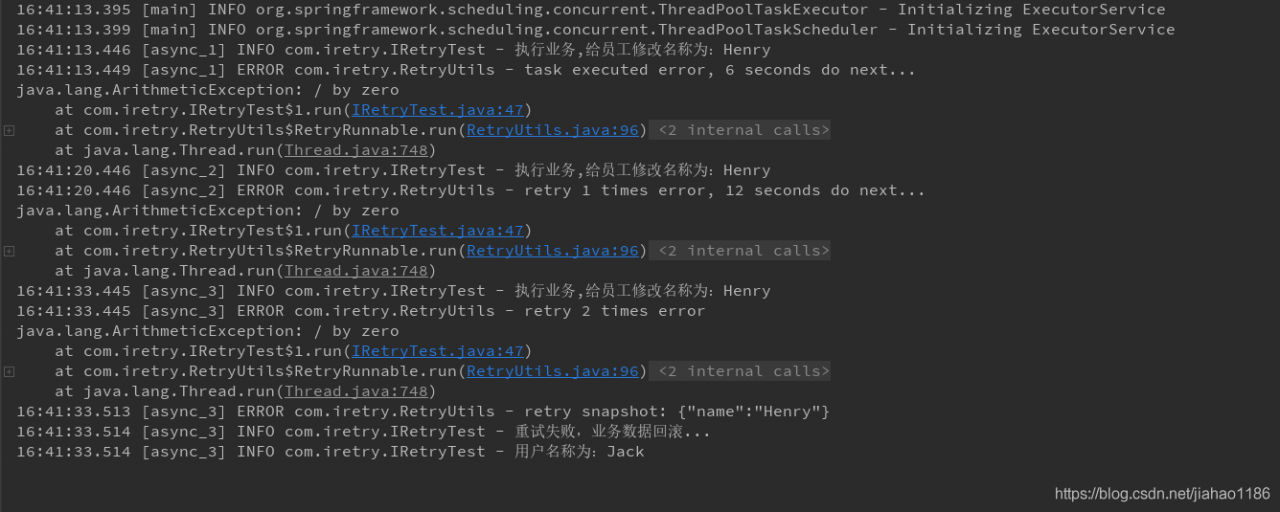
4. Implementation results

Split log by date in log4j2 of spring boot

1、application.yml

logging:
  config: classpath:log4j2.xml

2、log4j2.xml

<?xml version="1.0" encoding="UTF-8"?>
<Configuration monitorInterval="30">
    <Properties>
        <!--System variable ${sys:logPath:-/var/logs} Retrieve the value of the system variable logPath, or set the default value if it is empty./var/logs-->
       <Property name="LOG_HOME">${sys:catalina.home:-.}/logs</Property>
        <Property name="LOG_BACK_HOME">${sys:catalina.home:-.}/logs/backup</Property>
        <Property name="LOG_PATTERN_LAYOUT">%date %highlight{[%-5.5level]}{STYLE=Logback} [%-10.10thread] [%X{employeeCode}] [%X{X-B3-TraceId}/%X{X-B3-SpanId}] %cyan{[%-50.50class:%-4.4line]} - %msg%xEx%n </Property>
        <Property name="DEFAULT_CHARSET">UTF-8</Property>
        <Property name="ERROR_FILE_NAME">error</Property>
        <Property name="INFO_FILE_NAME">info</Property>
    </Properties>

    <Appenders>
        <!-- Configure daily logs -->
        <RollingFile name="${INFO_FILE_NAME}" fileName="${LOG_HOME}/${INFO_FILE_NAME}.log" filePattern="${LOG_BACK_HOME}/$${date:yyyy-MM}/${INFO_FILE_NAME}-%d{yyyy-MM-dd}.log.gz" append="true">
            <PatternLayout charset="${DEFAULT_CHARSET}" pattern="${LOG_PATTERN_LAYOUT}"/>
            <!-- Setting Policy -->
            <Policies>
                <TimeBasedTriggeringPolicy interval="1" modulate="true" />
            </Policies>
            <DefaultRolloverStrategy >
                <!--Delete log from 30 days ago-->
                <Delete basePath="${LOG_BACK_HOME}" maxDepth="2">
                    <IfFileName glob="*/*.log.gz" />
                    <IfLastModified age="30d" />
                </Delete>
            </DefaultRolloverStrategy>
        </RollingFile>
        <!-- Configuration error log -->
        <RollingFile name="${ERROR_FILE_NAME}" fileName="${LOG_HOME}/${ERROR_FILE_NAME}.log" filePattern="${LOG_BACK_HOME}/$${date:yyyy-MM}/${ERROR_FILE_NAME}-%d{yyyy-MM-dd}.log.gz" append="true">
            <PatternLayout charset="${DEFAULT_CHARSET}" pattern="${LOG_PATTERN_LAYOUT}"/>
            <!-- Setting Policy -->
            <Policies>
                <TimeBasedTriggeringPolicy interval="1" modulate="true" />
            </Policies>
            <Filters>
                <!--Logs with levels greater than or equal to WARN can be written-->
                <ThresholdFilter level="WARN" onMatch="ACCEPT" onMismatch="DENY"/>
            </Filters>
        </RollingFile>
    </Appenders>

    <Loggers>
        <Logger name="org.springframework" level="INFO" additivity = "false">
            <AppenderRef ref="${INFO_FILE_NAME}"/>
            <AppenderRef ref="${ERROR_FILE_NAME}"/>
        </Logger>
        <Logger name="com.picc" level="DEBUG" additivity = "false">
            <AppenderRef ref="${INFO_FILE_NAME}"/>
            <AppenderRef ref="${ERROR_FILE_NAME}"/>
        </Logger>
        <Root level="INFO">
            <AppenderRef ref="${INFO_FILE_NAME}"/>
            <AppenderRef ref="${ERROR_FILE_NAME}"/>
        </Root>
    </Loggers>
</Configuration>

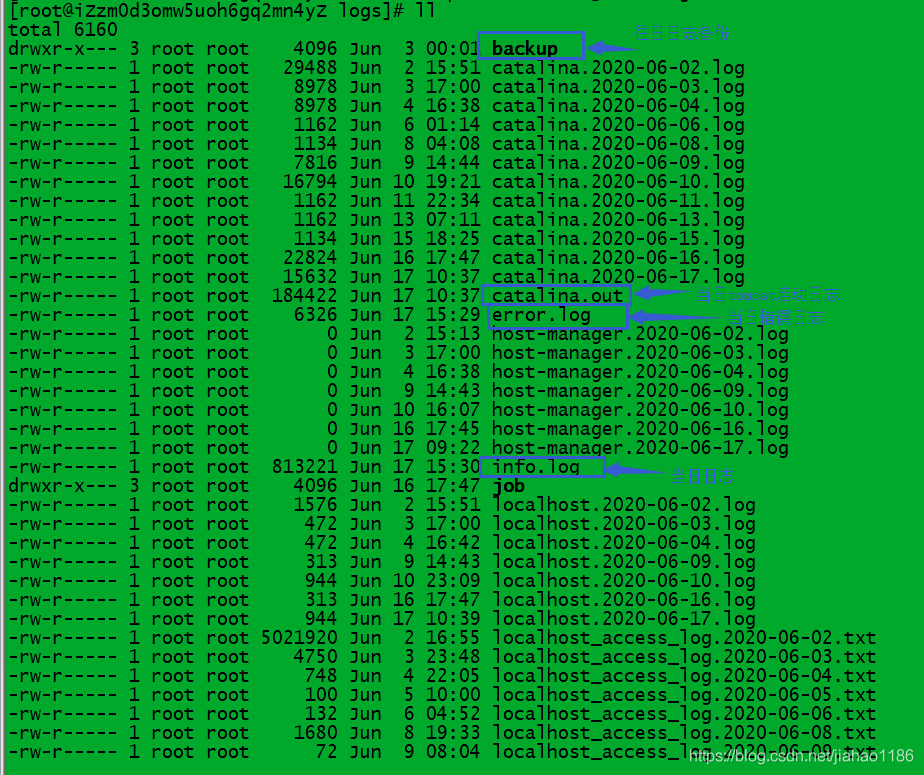
3. Use result display

cd backup/

You’ll find monthly backups

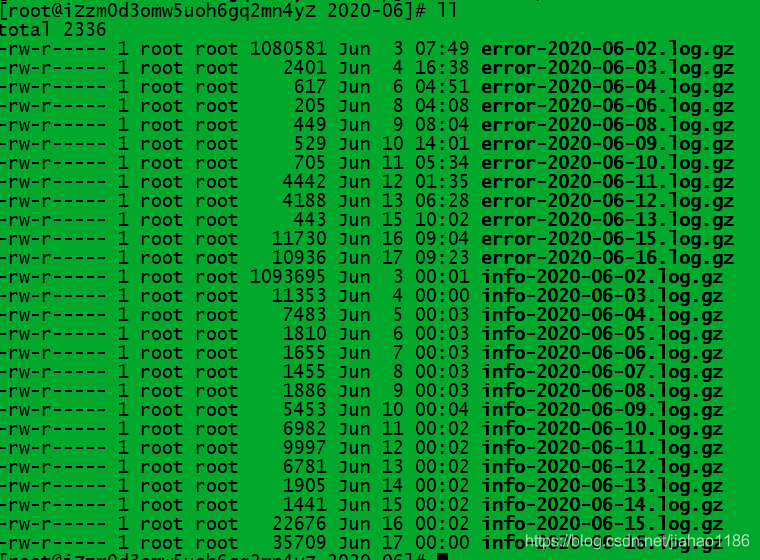
 cd 2020-06/

Log is compressed, self decompression view

Code case of XXL job executor

1. POM is introduced. Note: the version number should be consistent with XXL job admin.

       <dependency>
            <groupId>com.xuxueli</groupId>
            <artifactId>xxl-job-core</artifactId>
            <version>1.9.2-SNAPSHOT</version>
        </dependency>

2、application.yml

xxl:
  job:
    admin:
      addresses: http://47.102.168.36:9500
    executor:
      log-path: ${catalina.home:/usr}/logs/job
      log-retention-days: 30
      ip: 127.0.0.1
      port: 10001

3. Configure executor bean

import com.xxl.job.core.executor.XxlJobExecutor;
import org.slf4j.Logger;
import org.slf4j.LoggerFactory;
import org.springframework.beans.factory.annotation.Value;
import org.springframework.context.annotation.Bean;
import org.springframework.context.annotation.Configuration;


/**
 * xxl-job config
 */
@Configuration
public class XxlJobConfig {
    private Logger logger = LoggerFactory.getLogger(XxlJobConfig.class);

    @Value("${xxl.job.admin.addresses}")
    private String adminAddresses;

    @Value("${spring.application.name}")
    private String appName;

    @Value("${xxl.job.executor.ip}")
    private String ip;

    @Value("${xxl.job.executor.port}")
    private Integer port;

    @Value("${xxl.job.executor.log-path}")
    private String logPath;

    @Value("${xxl.job.executor.log-retention-days}")
    private int logRetentionDays;


    @Bean(initMethod = "start", destroyMethod = "destroy")
    public XxlJobExecutor xxlJobExecutor() {
        logger.info(">>>>>>>>>>> xxl-job config init.");
        XxlJobExecutor xxlJobExecutor = new XxlJobExecutor();
        xxlJobExecutor.setAdminAddresses(adminAddresses);
        xxlJobExecutor.setAppName(appName);
        xxlJobExecutor.setIp(ip);
        xxlJobExecutor.setPort(port);
        xxlJobExecutor.setPort(-1);
        xxlJobExecutor.setAccessToken(null);
        xxlJobExecutor.setLogPath(logPath);
        xxlJobExecutor.setLogRetentionDays(logRetentionDays);
        return xxlJobExecutor;
    }
}

4. Task code

import com.xxl.job.core.biz.model.ReturnT;
import com.xxl.job.core.handler.IJobHandler;
import com.xxl.job.core.handler.annotation.JobHandler;
import com.xxl.job.core.log.XxlJobLogger;
import org.slf4j.Logger;
import org.slf4j.LoggerFactory;
import org.springframework.stereotype.Component;

import javax.annotation.Resource;

/**
 * JOB
 */
@JobHandler(value = "iFlyTenantJob")
@Component
public class IFlyTenantJob extends IJobHandler {

    private static final Logger log = LoggerFactory.getLogger(IFlyTenantJob.class);

    @Override
    public ReturnT<String> execute(String s) {
        XxlJobLogger.log("The mission begins...") ;
        log.info("Task started...");

        iFlyAiService.queryTenants();
        try {
            Thread.sleep(6000);
            //int a = 1/0;
        } catch (InterruptedException e) {
            e.printStackTrace();
        }

        XxlJobLogger.log("End of mission...");
        log.info("End of mission...");
        return ReturnT.SUCCESS;

    }


}

Spring boot uses thread pool to realize asynchronous processing without return and asynchronous processing with return

1. Scene

HTTP requests are processed asynchronously;

1) No need to return, such as sending SMS, push messages, e-mail and other ancillary services, asynchronous processing, reduce the total time consumption of HTTP requests, improve customer experience.

2) If you need to return, the front-end will wait for the business processing result data, and the asynchronous processing will return to the main thread of HTTP request, and return to the front-end; if it is a single business that can be optimized here, please check the previous and next articles in this blog; if it is multiple business processing, you can use multiple asynchronous processing with return, and the total weight will summarize the result and return.

2. Knowledge points

1) Thread pool threadpooltaskexecutor

2) Note: @ enableasync, @ async (“asyncserviceexecutor”)

3) Return value encapsulates future & lt; T & gt;, new asyncresult & lt; & gt; (T)

3. Code examples

1)controller

package com.liuxd.controller;

import com.liuxd.entity.Responses;
import com.liuxd.service.TaskService;
import lombok.extern.slf4j.Slf4j;
import org.springframework.beans.factory.annotation.Autowired;
import org.springframework.web.bind.annotation.RequestMapping;
import org.springframework.web.bind.annotation.RequestMethod;
import org.springframework.web.bind.annotation.RestController;

import java.util.concurrent.Future;

@Slf4j
@RestController
public class AsyncCtr {

    @Autowired
    private TaskService taskService;

    @RequestMapping(value = "/get", method = RequestMethod.GET)
    public Responses<String> getResult() throws Exception {

        log.info("HTTP request received...") ;
        long startTime = System.currentTimeMillis();

        //1. Asynchronous execution_processing_data_without_waiting
        taskService.handleData();

        //2. Asynchronous execution_processing_data_waiting_for_processing_results
        Future<String> future = taskService.getData();
        String result = future.get();

        log.info("Receiving HTTP request thread task completed, exit!") ;
        long endTime = System.currentTimeMillis();
        log.info("Total time spent on http request. " + (endTime - startTime) + "ms");

        return new Responses<>(0, result, "SUCCESS");

    }

}

2)service

package com.liuxd.service;

import lombok.extern.slf4j.Slf4j;
import org.springframework.scheduling.annotation.Async;
import org.springframework.scheduling.annotation.AsyncResult;
import org.springframework.stereotype.Service;

import java.util.concurrent.Future;

@Slf4j
@Service
public class TaskService {

    @Async("asyncServiceExecutor")
    public void handleData() {

        log.info("Call service no return asynchronous method, start execution...");
        long startTime = System.currentTimeMillis();
        try {
            Thread.sleep(2500L);
        } catch (InterruptedException e) {
            e.printStackTrace();
        }

        log.info("Call service no return asynchronous method, the end of execution!!!") ;
        long endTime = System.currentTimeMillis();
        log.info("Total time taken to call service without return asynchronous method. " + (endTime - startTime) + "ms");

    }

    @Async("asyncServiceExecutor")
    public Future<String> getData(){

        log.info("Call service has return asynchronous method, start execution...");
        long startTime = System.currentTimeMillis();

        try {
            Thread.sleep(2500L);
        } catch (InterruptedException e) {
            e.printStackTrace();
        }

        log.info("Call service has returned asynchronous methods, the end of execution!!!") ;

        long endTime = System.currentTimeMillis();
        log.info("Total time to call service with return asynchronous method: " + (endTime - startTime) + "ms");

        return new AsyncResult<>("Asynchronous processing completed!");

    }


}

3) Thread pool

package com.liuxd.config;

import org.springframework.context.annotation.Bean;
import org.springframework.context.annotation.Configuration;
import org.springframework.scheduling.annotation.EnableAsync;
import org.springframework.scheduling.concurrent.ThreadPoolTaskExecutor;

import java.util.concurrent.Executor;
import java.util.concurrent.ThreadPoolExecutor;

/**
 * @program: unif-insure-service
 * @description: Thread Pool
 **/
@Configuration
@EnableAsync
public class ExecutorConfig {
    @Bean
    public Executor asyncServiceExecutor() {
        ThreadPoolTaskExecutor executor = new ThreadPoolTaskExecutor();
        //Configure the number of core threads
        executor.setCorePoolSize(5);
        // Configure the maximum number of threads
        executor.setMaxPoolSize(5);
        //configure queue size
        executor.setQueueCapacity(1000);
        //configure the name prefix of the threads in the thread pool
        executor.setThreadNamePrefix("async-system-");

        // rejection-policy: How to handle new tasks when the pool has reached its max size
        // CALLER_RUNS: instead of executing the task in the new thread, the caller's thread will execute it
        executor.setRejectedExecutionHandler(new ThreadPoolExecutor.CallerRunsPolicy());
        //Execution initialization
        executor.initialize();
        return executor;
    }
}

4)Responses

package com.liuxd.entity;

import lombok.AllArgsConstructor;
import lombok.Builder;
import lombok.Data;
import lombok.NoArgsConstructor;

@Data
@Builder
@NoArgsConstructor
@AllArgsConstructor
public class Responses<T> {

    private Integer code;

    private String msg;

    private T data;

}

5) Print results

6) Result analysis

1) There are three threads, HTTP request main thread, asynchronous no return thread, asynchronous return thread

2) The main thread does not need to wait for no return thread, it will wait for the result of return thread, and finally return