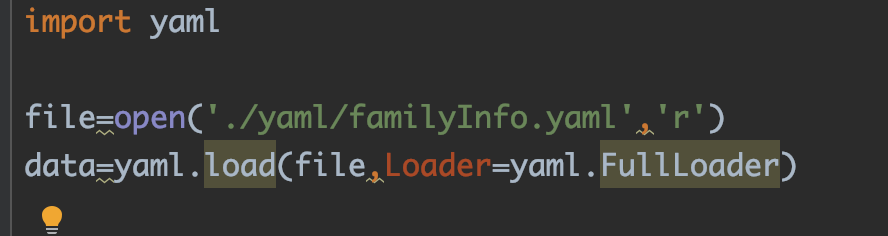
Yaml is installed, and the error YAMLLoadWarning is reported as soon as the code runs: calling yaml.load() without Loader=… is deprecated, as the default Loader is unsafe.

Yaml is installed and the old code runs as soon as the error is reported
YAMLLoadWarning: calling yaml.load() without Loader=… is deprecated, as the default Loader is unsafe. Please read https://msg.pyyaml.org/load for full details .

solve

You don’t need to change a lot of code and add a sentence. Just yaml.load(list, Loader=yaml.FullLoader) add Loader=yaml.FullLoader. But there are more usages. See below

Then no more errors

Configure the node environment under Linux, internal/modules/cjs/loader.js:583 throw err; solution

When installing node using the direct deployment method, internal/modules/cjs/loader.js:583 appears

After downloading the node package and decompressing it, establish a soft connection

Configure node
ln -s /root/node-v10.16.3-linux-x64/bin/node /usr/local/bin/node

Configure npm
ln -s /root/node-v10.16.3-linux-x64/bin/npm /usr/local/bin/npm

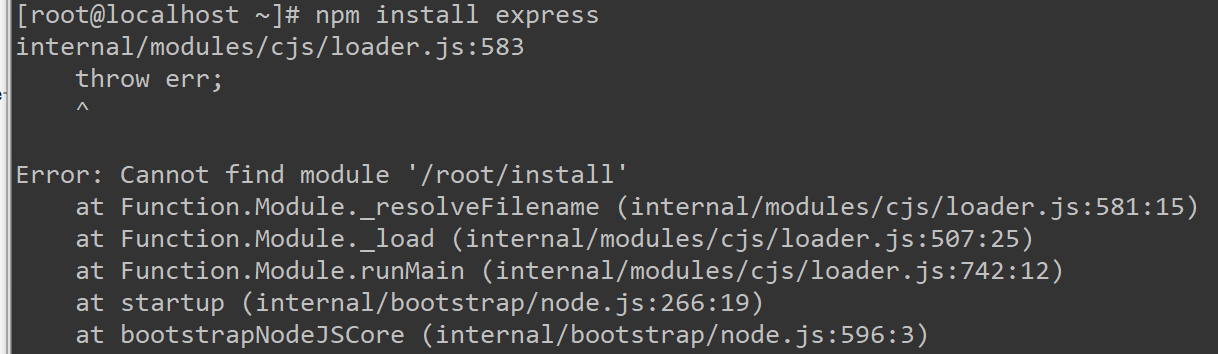
But when using npm install “XX”, I got a crazy error. I saw that it was an error when establishing a soft connection on the Internet.
Error: Cannot find module’/root/install’

Solution:
ln -sf /root/node-v10.16.3-linux-x64/bin/npm /usr/local/bin/npm

OK, solve

ORA-29913 ORA-06512 external table query prompt: error

exp:

SQL> select * from T_TEMP_LZY_QYDJ_1;

ORA-29913: an error occurred when calling out ODCIEXTTABLEFETCH ORA-30653: the
rejection limit has been reached
ORA-06512: in “SYS.ORACLE_LOADER”, line 14
ORA-06512: in line 1

Check the external table log T_TEMP_LZY_QYDJ_1_2696_1384.log, which indicates an error:

error processing column ZCLX in row 63 for datafile e: mplsbd.txt
ORA-01401: inserted value too large for column

It turns out that the column width of the table is insufficient!!

Runtime error occurred: 1843 (ORA-01843: invalid month)

1) When we use the following SQL statement
INSERT INTO “temptable” (DELIVER_DATE) VALUES (TO_DATE(’27-Jun-2007 15:57:30′,’DD-MON-YYYY HH24:MI: SS’))
Runtime error occurred: 1843 (ORA-01843: invalid month) The 
database will report an ORA-01843 error. This is because the client is in a Chinese environment, and the format mon cannot be written in English. It must be written in Chinese
If you don’t want to modify the sql statement to run in June , you need to use the alter session command to modify nls_date_language to american before executing the statement, as follows:
alter session set nls_date_language=’american’ –display the date in English
2)
Today An error of ORA-01843 has occurred. This error represents an invalid month, which is usually prompted when the date is converted. 
Solution 
alter session set NLS_DATE_FORMAT=’DD-MON-YY’; 

Redis cannot double-click redis-server.exe to start normally

Redis error: Creating Server TCP listening socket 127.0.0.1:6379: bind: No error shutdowncan not be solved

redis error message
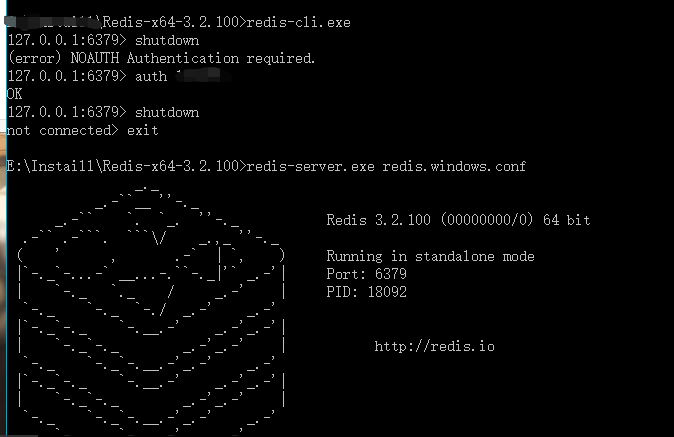
First use redis-cli.exeand then use the shutdownfollowing error message and can not quit is:
(error) NOAUTH Authentication required.
this time redis need to enter the password set before.
127.0.0.1:6379> auth password
Enter after entering the correct password shutdownto
final execution exit
and then enter redis-server.exe redis.windows.conf to normal operation
image

fatal error C1189: #error : WINDOWS.H already included. MFC apps must not #include

fatal error C1189: #error: WINDOWS.H already included. MFC apps must not #include <windows.h>

About fatal error C1189: #error: WINDOWS.H already included. MFC apps must not #include

guitao_w 2010-03-18 21:55:00 3791 Collection
classification column: C/C++ Article Tags: mfc c
copyright
program has this problem:

fatal error C1189: #error: WINDOWS.H already included. MFC apps must not #include <windows.h>


The solution is as follows, under Mark

  1. Add in the stdafx.h file: #include “afx.h”  
  2. Delete in the stdafx.h file: #include <windows.h>  

[Solved] Cannot open .xlsx file, xlrd.biffh.XLRDError: Excel xlsx file; not supported

The reason is that xlrd has recently been updated to version 2.0.1 and only supports .xls files. So it x1 = xlrd.open_workbook("data.xlsx")will report an error.

You can install the old version of xlrd and run it in cmd:
it is recommended to uninstall the new version directly and download the old version of xlrd

pip uninstall xlrd
pip install xlrd==1.2.0

You can also use openpyxl instead of xlrd to open .xlsx files:

df=pandas.read_excel(‘data.xlsx’,engine=’openpyxl’)

If you are willing to be mediocre, please shoot yourself!

Java parsing xml file encounters special symbols & will be abnormal solutions

Text/Zhu Jiqian

In the development process of a Java parsing xml file, when using SAX parsing, such an exception message appeared:

Error on line 60 of document : References to the entity "xxx" must end with a ';' separator;

After I opened the xml file, I found that the “xxx” symbol was followed by an “&” symbol. Later, I learned that this type of symbol is a special symbol in xml, and if the special symbol is not represented by an escape character, it is used directly In the xml file, there will be strange exceptions when using SAX and other methods for parsing.

In fact, this is all caused by these special characters.

Special symbols in XML include <> & ‘”, etc. They are not allowed as PCDATA in xml files. If you want to use them, you need to use escape characters instead:

&lt;    <
&gt;    >
&amp;   &
&quot;  "
&apos;  '

So, if you want to read the xml file data normally, how should you use the escape character to replace it?

At the beginning, I was thinking about how to solve Baidu, but found that many posts were several years ago, and there was no clear way to solve it. Most of them mentioned that the analysis abnormality caused by special symbols, but how to filter it out, it seems It’s vague, so I can only make a fool of myself and come up with a more appropriate solution for filtering special characters.

The realization idea is actually very simple. We can read the xml file through the Reader before reading the xml file and use SAX to parse it, and then read it out by line and concatenate it into a String string, and then use the string replacement method replaceAll() After replacing the special symbols, you can directly convert the xml in the form of a string into a Document object for xml parsing:

  String xmlStr=s.replaceAll("&","&amp;");

The conversion method code is as follows:

  StringBuffer buffer = new StringBuffer();
  BufferedReader bf= new BufferedReader(new FileReader("D:\\测试.xml"));
  String s = null;
     while((s = bf.readLine())!=null){
     buffer.append(s.trim());
  }

  String str = buffer.toString();
  //In this step character replacement is performed, replacing them with legal escaped characters
  String xml=str.replaceAll("&","&amp;");

  //Here the processed xml file can be read and parsed
  Document document =  DocumentHelper.parseText(xml);

So far, you can solve the problem of special symbols & abnormalities encountered in Java parsing xml files.
Install and start the tftp-server server and possible solutions to Redirecting to /bin/systemctl restart xinetd.service problems

1) First, check the tftp-server installed on the server
        using the command: rpm -qa | grep tftp-server
        If there is an installed tftp, it will be listed here
2) Install tftp-server and xinetd
        using the following commands to perform corresponding services Installation:
        $yum -y install tftp-server
        $yum -y install xinetd
3) Modify the tftp configuration file
    using the following command:
        $vi /etc/xinetd.d/tftp Open the configuration file
        service tftp
        {
            socket_type = dgram
            protocol = udp
            wait = yes
            user = root
            server = /usr/sbin/in.tftpd
            server_args = -s /var/lib/tftpboot
            disable = no //The place that needs to be modified, the initial time is yes
            per_source = 11
            cps = 100 2
            flags = IPv4
        }
4) To restart the service,
        use the following command to restart the service
        $/bin/systemctl restart xinetd.service
        If it does not work, use the following command
        $/bin/systemctl enable xinetd.service / /Start the service
        $/bin/systemctl start xinetd.service //Start the service to
        view the service startup status
        $ps aux | grep xinetd or $ps -ef|grep xinetd or ps -a | grep tftp
5) Possible problems
        5.1) In When starting xinetd.service, it prompts
            Redirecting to /bin/systemctl restart xinetd.service
            Failed to issue method call: Unit xinetd.service failed to load: No such file or directory.
            Help system is not installed xinetd, the need to use yum -y instal xinetd.service serving install
        5.2) occurs when you start xinetd.service:
            Redirecting to / bin / systemctl restart xinetd.service
            command may be initiated systemctl restart xinetd.service
            more These are the steps I took to install tftp and some of the problems I encountered. Maybe the reader has other problems during the installation process, but the problem should not be big.

6) xinetd started successfully, you can check the running status of xinetd

         netstat -tnlp