[Solved] mindinsight modelart Error: RuntimeError: An attempt has been made to start a new process before…


Question:

Mindinsight uses error reporting on modelart.

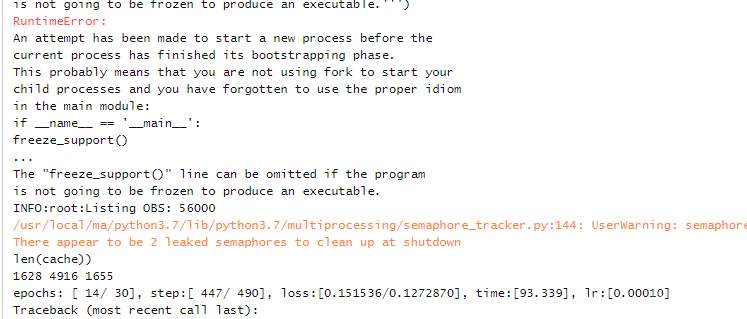
After adding the summary and training some epoch normally, the operation will report an error:

Solution:

When using SummaryCollector, you need to put the code block in if__name__ == __main__:

The official mindspire tutorial has been updated. You can refer to the writing method of the latest tutorial: collect summary data – mindspire master document

Codes like this:

def train():
  summary_collector = SummaryCollector(summary_dir='./summary_dir')

  ...

  model.train(...., callback=[summary_collector])

if __name__ == '__main__':
    train()


How to Solve Oracle 11g Install Stuck 86% error on Linux

Linux Installation Oracle 11g 86% error:

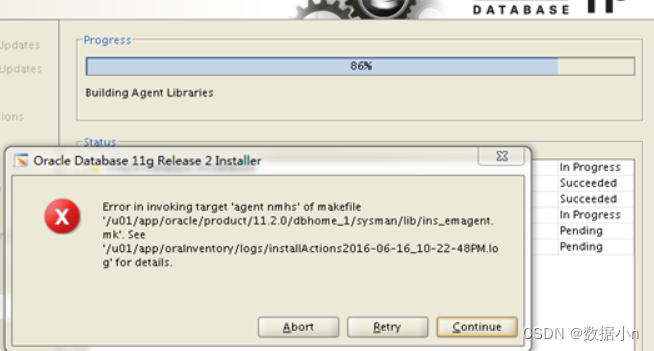
Error in invoking target ‘agent nmhs’ of makefile
os:oracle Linux 7.9 64bit
db:oracle 11.2.0.4
Error in invoking target ‘agent nmhs’ of makefile occurs at 86%

cd $ORACLE_HOME/sysman/lib
cp ins_emagent.mk ins_emagent.mk.bak #backup
vi ins_emagent.mk

Solution:

Once in the vi editor, type /NMECTL to find and quickly locate the line you want to modify
Append the parameter -lnnz11 to the first letter l and the next two numbers 1

Hive operation TMP file viewing content error [How to Solve]

1. Hive operation TMP file viewing content error

Permission denied: user=dr.who, access=READ_EXECUTE, inode="/tmp":hadoopadmin:supergroup:drwx-wx-wx

2. Cause analysis:

In case of insufficient user permissions, you can see that this tmp folder does not have read r permission for other users. The default login user of the page is dr.who users


3. Solution:

1. Change the permissions of TMP

Just execute the code:

hdfs dfs -chmod -R 777 /tmp

2. Modify the default login user of 50070

The core-site.xml can be configured as the user name corresponding to Hadoop

<property>
    <name>hadoop.http.staticuser.user</name>
    <value>username</value>
</property>

[Solved] Emacs27.1 cscope Error: process-kill-without-query

1. Background:

Using emacs27.1 and cscope on XUbuntu22.04, I get an error when looking for a function.

process-kill-without-query
process-kill-without-query is a compiled Lisp function in `subr.el'.

(process-kill-without-query PROCESS &optional FLAG)

This function is obsolete since 22.1;
use `process-query-on-exit-flag' or `set-process-query-on-exit-flag'.

Say no query needed if PROCESS is running when Emacs is exited.
Optional second argument if non-nil says to require a query.
Value is t if a query was formerly required. 

2. Solutions

Solution idea.
Replace all containing (process-kill-without-query xxx) with
as follows.

(process-query-on-exit-flag xxx)
or
(set-process-query-on-exit-flag xxx nil)

1. Replace all the files containing process-kill-without-query in /usr/share/dictionaries-common/site-elisp directory
debian-ispell.el flyspell.el ispell.el

2. replace all process-kill-without-query under ~/.emacs.d

3. delete all .elc files with process-kill-without-query


[Solved] Neo4j Error: Error occurred during initialization of VM Incompatible minimum and maximum heap sizes spec

The run instruction neo4j console displays the following error messages

WARNING: Max 1024 open files allowed, minimum of 40 000 recommended. See the Neo4j manual.
Starting Neo4j Server console-mode...
Using additional JVM arguments:  -server -XX:+DisableExplicitGC -Dorg.neo4j.server.properties=conf/neo4j-server.properties -Djava.util.logging.config.file=conf/logging.properties -Dlog4j.configuration=file:conf/log4j.properties -XX:+UseConcMarkSweepGC -XX:+CMSClassUnloadingEnabled -Xms512m -Xmx1024 #as large as you canm
Error occurred during initialization of VM
Incompatible minimum and maximum heap sizes specified

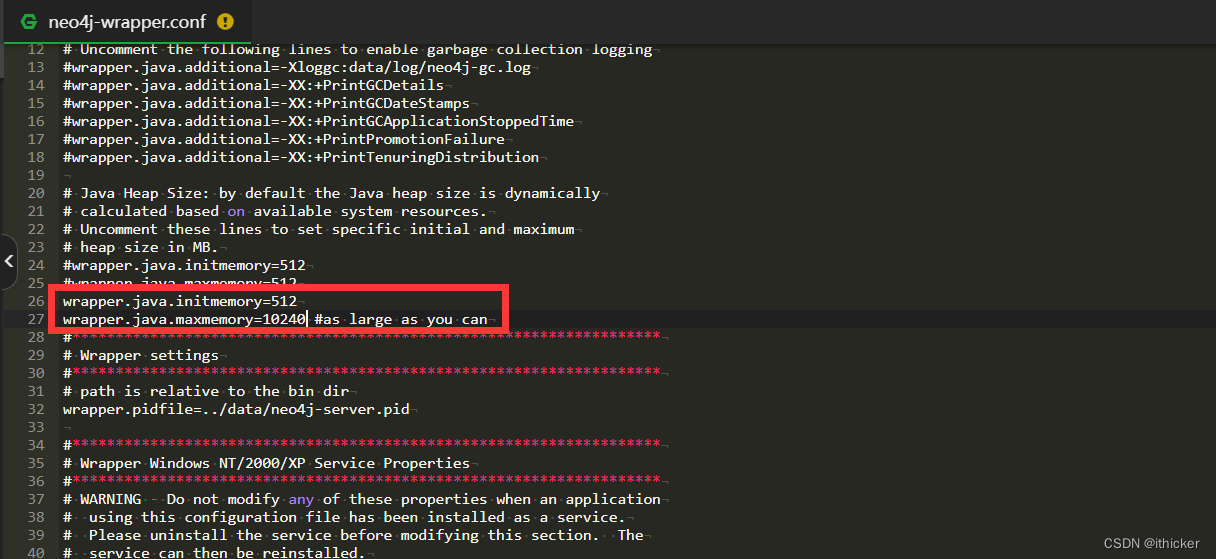
I suspected that the problem was the configuration of my Neo4j parameters. so I open the file neo4j-wrapper.conf,(sudo) vim neo4j-wrapper.conf

later, I delete the note “`#as large you kan“  after the wrapper.java.maxmemory=10240 , it can run normally, and the results are as follows:

root@VM-12-7-ubuntu:/home/thicker/GNN/FIRST/neo4j/bin# neo4j console
WARNING: Max 1024 open files allowed, minimum of 40 000 recommended. See the Neo4j manual.
Starting Neo4j Server console-mode...
Using additional JVM arguments:  -server -XX:+DisableExplicitGC -Dorg.neo4j.server.properties=conf/neo4j-server.properties -Djava.util.logging.config.file=conf/logging.properties -Dlog4j.configuration=file:conf/log4j.properties -XX:+UseConcMarkSweepGC -XX:+CMSClassUnloadingEnabled -Xms512m -Xmx10240m
2022-07-23 08:15:48.452+0000 INFO  [API] Setting startup timeout to: 120000ms based on -1
2022-07-23 08:15:48.508+0000 INFO  [Configuration] WARNING! Physical memory(8003MB) is less than assigned JVM memory(10451MB). Continuing but with available JVM memory set to available physical memory
2022-07-23 08:15:49.724+0000 INFO  [API] Successfully started database
2022-07-23 08:15:49.777+0000 INFO  [API] Starting HTTP on port :7474 with 40 threads available
2022-07-23 08:15:49.904+0000 INFO  [API] Enabling HTTPS on port :7473
2022-07-23 08:15:49.905+0000 INFO  [API] No SSL certificate found, generating a self-signed certificate..
2022-07-23 08:15:50.133+0000 INFO  [API] Mounted discovery module at [/]
2022-07-23 08:15:50.159+0000 INFO  [API] Loaded server plugin "GremlinPlugin"
2022-07-23 08:15:50.160+0000 INFO  [API]   GraphDatabaseService.execute_script: execute a Gremlin script with 'g' set to the Neo4j2Graph and 'results' containing the results. Only results of one object type is supported.
2022-07-23 08:15:50.160+0000 INFO  [API] Mounted REST API at [/db/data/]
2022-07-23 08:15:50.162+0000 INFO  [API] Mounted management API at [/db/manage/]
2022-07-23 08:15:50.162+0000 INFO  [API] Mounted webadmin at [/webadmin]
2022-07-23 08:15:50.162+0000 INFO  [API] Mounted Neo4j Browser at [/browser]
2022-07-23 08:15:50.204+0000 INFO  [API] Mounting static content at [/webadmin] from [webadmin-html]
2022-07-23 08:15:50.243+0000 INFO  [API] Mounting static content at [/browser] from [browser]
16:15:50.245 [main] WARN  o.e.j.server.handler.ContextHandler - o.e.j.s.ServletContextHandler@21da484c{/,null,null} contextPath ends with /
16:15:50.245 [main] WARN  o.e.j.server.handler.ContextHandler - Empty contextPath
16:15:50.247 [main] INFO  org.eclipse.jetty.server.Server - jetty-9.0.5.v20130815
16:15:50.267 [main] INFO  o.e.j.server.handler.ContextHandler - Started o.e.j.s.h.MovedContextHandler@6d97768d{/,null,AVAILABLE}
16:15:50.340 [main] INFO  o.e.j.w.StandardDescriptorProcessor - NO JSP Support for /webadmin, did not find org.apache.jasper.servlet.JspServlet
16:15:50.349 [main] INFO  o.e.j.server.handler.ContextHandler - Started o.e.j.w.WebAppContext@660e8081{/webadmin,jar:file:/home/thicker/GNN/FIRST/neo4j/system/lib/neo4j-server-2.1.5-static-web.jar!/webadmin-html,AVAILABLE}
16:15:50.703 [main] INFO  o.e.j.server.handler.ContextHandler - Started o.e.j.s.ServletContextHandler@31621b95{/db/manage,null,AVAILABLE}
16:15:50.903 [main] INFO  o.e.j.server.handler.ContextHandler - Started o.e.j.s.ServletContextHandler@12fb3db8{/db/data,null,AVAILABLE}
16:15:50.917 [main] INFO  o.e.j.w.StandardDescriptorProcessor - NO JSP Support for /browser, did not find org.apache.jasper.servlet.JspServlet
16:15:50.918 [main] INFO  o.e.j.server.handler.ContextHandler - Started o.e.j.w.WebAppContext@3fe9713a{/browser,jar:file:/home/thicker/GNN/FIRST/neo4j/system/lib/neo4j-browser-2.1.5.jar!/browser,AVAILABLE}
16:15:51.097 [main] INFO  o.e.j.server.handler.ContextHandler - Started o.e.j.s.ServletContextHandler@21da484c{/,null,AVAILABLE}
16:15:51.105 [main] INFO  o.e.jetty.server.ServerConnector - Started ServerConnector@db18be0{HTTP/1.1}{0.0.0.0:7474}
16:15:51.497 [main] INFO  o.e.jetty.server.ServerConnector - Started ServerConnector@56a2b12b{SSL-HTTP/1.1}{0.0.0.0:7473}
2022-07-23 08:15:51.497+0000 INFO  [API] Server started on: http://0.0.0.0:7474/
2022-07-23 08:15:51.498+0000 INFO  [API] Remote interface ready and available at [http://0.0.0.0:7474/]

Then run the instruction “`neo4j start“ to display the following error messages

root@VM-12-7-ubuntu:~# neo4j start
WARNING: Max 1024 open files allowed, minimum of 40 000 recommended. See the Neo4j manual.
Using additional JVM arguments:  -server -XX:+DisableExplicitGC -Dorg.neo4j.server.properties=conf/neo4j-server.properties -Djava.util.logging.config.file=conf/logging.properties -Dlog4j.configuration=file:conf/log4j.properties -XX:+UseConcMarkSweepGC -XX:+CMSClassUnloadingEnabled -Xms512m -Xmx10240m
Starting Neo4j Server...process [17130]... waiting for server to be ready.... Failed to start within 120 seconds.
Neo4j Server failed to start, please check the logs for details.
If startup is blocked on a long recovery, use '/home/thicker/GNN/FIRST/neo4j/bin/neo4j start-no-wait' to give the startup more time.

Follow the prompt and run the command ` ` ` neo4j start-no-wait “

Hive: How to Solve dearby database initialization error

Error Messages:

Metastore connection URL:     jdbc:derby:;databaseName=metastore_db;create=true
Metastore Connection Driver :     org.apache.derby.jdbc.EmbeddedDriver
Metastore connection User:     APP
Starting metastore schema initialization to 3.1.0
Initialization script hive-schema-3.1.0.derby.sql
 
Error: FUNCTION 'NUCLEUS_ASCII' already exists. (state=X0Y68,code=30000)
org.apache.hadoop.hive.metastore.HiveMetaException: Schema initialization FAILED! Metastore state would be inconsistent !!
Underlying cause: java.io.IOException : Schema script failed, errorcode 2
Use --verbose for detailed stacktrace.
*** schemaTool failed ***


Solution:

Go to share/common/lib/guava-27.0-jre.jar in hadoop
and Replace the lib/guava-27.0-jre.jar file in hive.

[Solved] dynamic-datasource can not find primary datasource

Error reporting details

When using mybatis plus multiple data sources, the startup message cannot find the master data source

com.baomidou.dynamic.datasource.exception.CannotFindDataSourceException: dynamic-datasource can not find primary datasource
	at com.baomidou.dynamic.datasource.DynamicRoutingDataSource.determinePrimaryDataSource(DynamicRoutingDataSource.java:91) ~[dynamic-datasource-spring-boot-starter-3.5.1.jar:3.5.1]
	at com.baomidou.dynamic.datasource.DynamicRoutingDataSource.getDataSource(DynamicRoutingDataSource.java:120) ~[dynamic-datasource-spring-boot-starter-3.5.1.jar:3.5.1]
	at com.baomidou.dynamic.datasource.DynamicRoutingDataSource.determineDataSource(DynamicRoutingDataSource.java:78) ~[dynamic-datasource-spring-boot-starter-3.5.1.jar:3.5.1]
	at com.baomidou.dynamic.datasource.ds.AbstractRoutingDataSource.getConnection(AbstractRoutingDataSource.java:48) ~[dynamic-datasource-spring-boot-starter-3.5.1.jar:3.5.1]
......

Solution:

① The dependency of multiple data sources is introduced, but multiple data sources are not used

<!--This is the dependent version I use-->
<dependency>
    <groupId>com.baomidou</groupId>
    <artifactId>dynamic-datasource-spring-boot-starter</artifactId>
    <version>3.5.1</version>
</dependency>

<!--document-->
<dependency>
    <groupId>com.baomidou</groupId>
    <artifactId>dynamic-datasource-spring-boot-starter</artifactId>
    <version>${version}</version>
</dependency>

Multi data source usage: use @ds to switch data sources.

@DS can be annotated on methods or classes, and there is a proximity principle that annotations on methods take precedence over annotations on classes.

annotation result
no @DS Default data source
@DS(“databaseName”) databaseName can be a group name or the name of a specific library

② Multiple data sources are used but the main data source is not specified
spring:
  datasource:
    dynamic:
      primary: master # Set the default data source or data source group, the default value is master
      strict: false #Strictly match the datasource, default false. true does not match the specified datasource throw an exception, false uses the default datasource
      datasource:
        master:
          url: jdbc:mysql://xx.xx.xx.xx:3306/dynamic
          username: root
          password: 123456
          driver-class-name: com.mysql.jdbc.Driver # This configuration can be omitted for SPI support since 3.2.0
        slave_1:
          url: jdbc:mysql://xx.xx.xx.xx:3307/dynamic
          username: root
          password: 123456
          driver-class-name: com.mysql.jdbc.
        slave_2:
          url: ENC(xxxxxx) # Built-in encryption, please check the detailed documentation for use
          username: ENC(xxxxxxxxxx)
          password: ENC(xxxxxxxxxx)
          driver-class-name: com.mysql.jdbc.
       #...... omit
       #The above will configure a default library master, a group slave with two sub-banks slave_1,slave_2

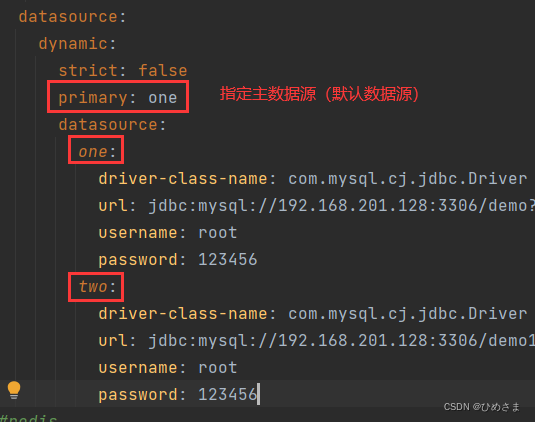
③ Check carefully if there is any alignment in the configuration

# Correct format
spring:
  datasource:
    dynamic:
      strict: false
      primary: one
      datasource:
        one:
          driver-class-name: com.mysql.cj.jdbc.Driver
          url: jdbc:mysql://localhost:3306/demo?allowMultiQueries=true&zeroDateTimeBehavior=convertToNull&useUnicode=true&characterEncoding=utf-8&serverTimezone=Asia/Shanghai&useSSL=false
          username: root
          password: 123456

        two:
          driver-class-name: com.mysql.cj.jdbc.Driver
          url: jdbc:mysql://localhost:3306/demo1?allowMultiQueries=true&zeroDateTimeBehavior=convertToNull&useUnicode=true&characterEncoding=utf-8&serverTimezone=Asia/Shanghai&useSSL=false
          username: root
          password: 123456

 

Linux Mint: linuxbrew Install and Boot Error [How to Solve]

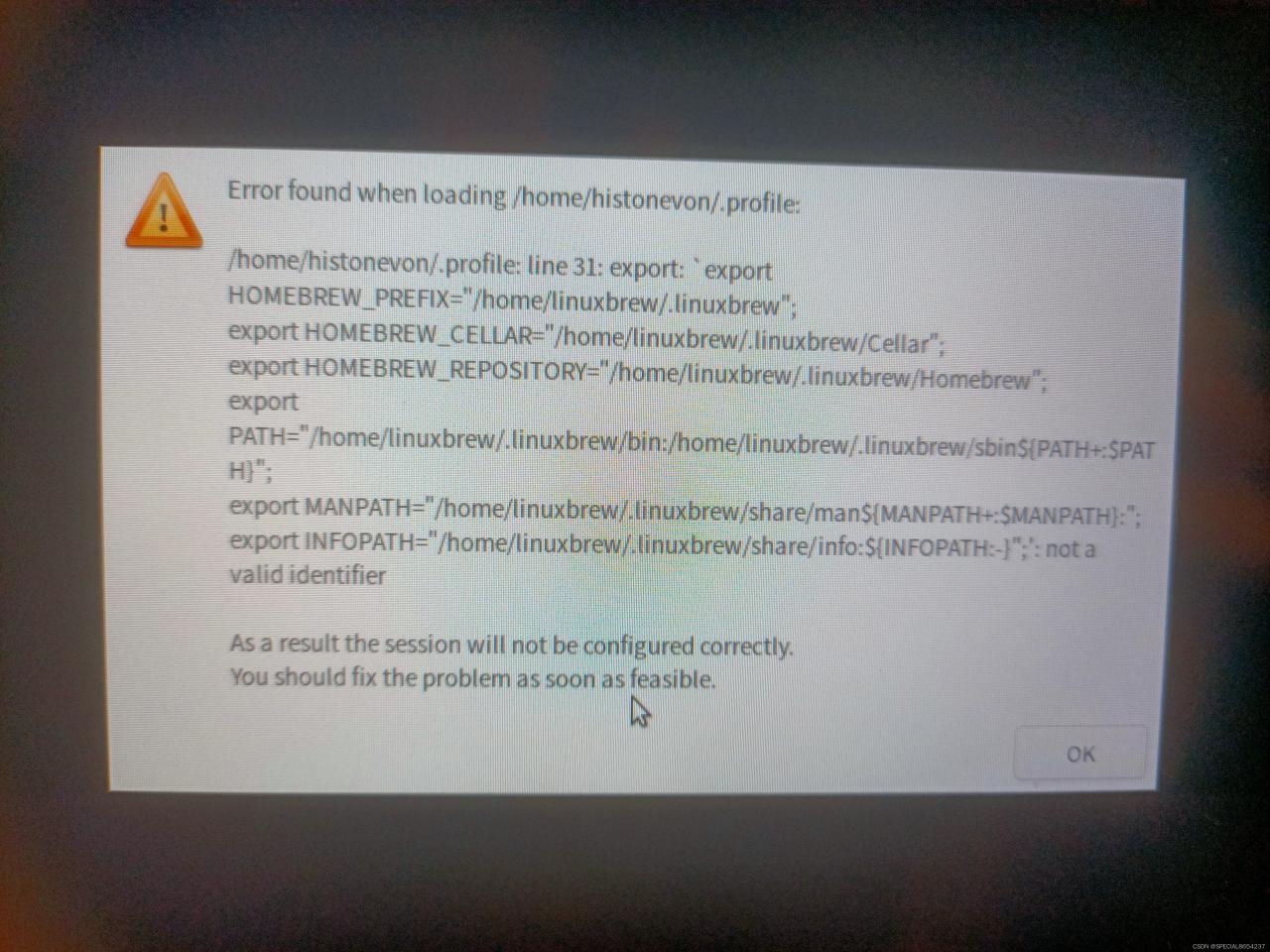
Linux Mint installs linuxbrew and resolves the boot error

Errors are reported as follows


Solution:
Checking the **.profile file** in the user directory, I found that eval was linked to the previous line, presumably because of a bug in the installation of the jetbrains toolbox

change Eval to the next line and save it (with administrator permission)

Mybatis-Plus logical delete mapping error [How to Solve]

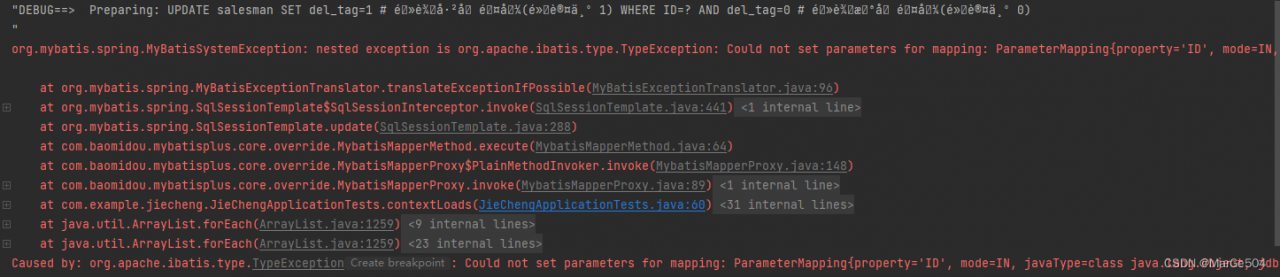
The error reports are as follows: has been unable to understand why there is a pile of garbled code in my SQL. It has always been thought that there is an error in my own usage or configuration

But I didn’t find any problems after consulting the MP manual

Until you suddenly wake up, it may be a configuration problem

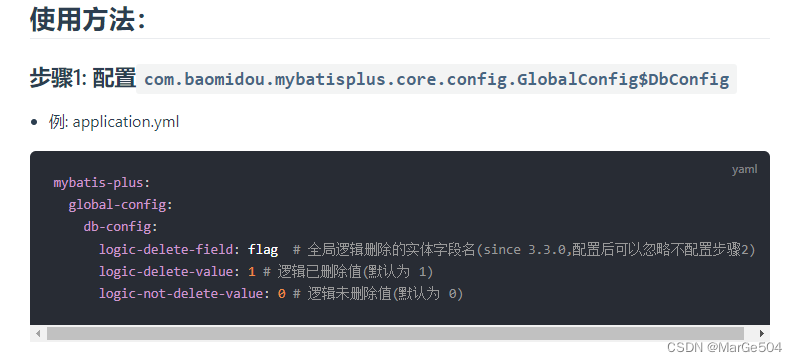
Because I use application.properties but the manual use yml, there are certain format problems

Official website:

My:

Move the comment to a place other than the statement and start successfully


[Solved] Nacos offline service error: errCode: 500

Error Messages:

caused: errCode: 500, errMsg: do metadata operation failed ;caused: com.alibaba.nacos.consistency.exception.ConsistencyException: com.alibaba.nacos.core.distributed.raft.exception.NoLeaderException: The Raft Group [naming_instance_metadata] did not find the Leader node;caused: com.alibaba.nacos.core.distributed.raft.exception.NoLeaderException: The Raft Group [naming_instance_metadata] did not find the Leader node;


Solution:
The reason for the error is the registered Ip or something confusing
1. Stop nacos first,
2. Delete the protocol folder in the data directory,
3. reboot. Done!

[Solved] Kafka Error: is/are not present and missingTopicsFatal is true


1. Error message

org.springframework.context.ApplicationContextException: Failed to start bean 'org.springframework.kafka.config.internalKafkaListenerEndpointRegistry'; nested exception is java.lang.IllegalStateException: Topic(s) [350002000000000042] is/are not present and missingTopicsFatal is true
	at org.springframework.context.support.DefaultLifecycleProcessor.doStart(DefaultLifecycleProcessor.java:185)
	at org.springframework.context.support.DefaultLifecycleProcessor.access$200(DefaultLifecycleProcessor.java:53)
	at org.springframework.context.support.DefaultLifecycleProcessor$LifecycleGroup.start(DefaultLifecycleProcessor.java:360)
	at org.springframework.context.support.DefaultLifecycleProcessor.startBeans(DefaultLifecycleProcessor.java:158)
	at org.springframework.context.support.DefaultLifecycleProcessor.onRefresh(DefaultLifecycleProcessor.java:122)
	at org.springframework.context.support.AbstractApplicationContext.finishRefresh(AbstractApplicationContext.java:893)
	at org.springframework.boot.web.servlet.context.ServletWebServerApplicationContext.finishRefresh(ServletWebServerApplicationContext.java:162)
	at org.springframework.context.support.AbstractApplicationContext.refresh(AbstractApplicationContext.java:552)
	at org.springframework.boot.web.servlet.context.ServletWebServerApplicationContext.refresh(ServletWebServerApplicationContext.java:141)
	at org.springframework.boot.SpringApplication.refresh(SpringApplication.java:744)
	at org.springframework.boot.SpringApplication.refreshContext(SpringApplication.java:391)
	at org.springframework.boot.SpringApplication.run(SpringApplication.java:312)
	at org.springframework.boot.SpringApplication.run(SpringApplication.java:1215)
	at org.springframework.boot.SpringApplication.run(SpringApplication.java:1204)
	at com.iwhalecloud.oss.res.search.ApplicationMain.main(ApplicationMain.java:21)
	at sun.reflect.NativeMethodAccessorImpl.invoke0(Native Method)
	at sun.reflect.NativeMethodAccessorImpl.invoke(NativeMethodAccessorImpl.java:62)
	at sun.reflect.DelegatingMethodAccessorImpl.invoke(DelegatingMethodAccessorImpl.java:43)
	at java.lang.reflect.Method.invoke(Method.java:498)
	at org.springframework.boot.loader.MainMethodRunner.run(MainMethodRunner.java:48)
	at org.springframework.boot.loader.Launcher.launch(Launcher.java:87)
	at org.springframework.boot.loader.Launcher.launch(Launcher.java:51)
	at org.springframework.boot.loader.JarLauncher.main(JarLauncher.java:52)
Caused by: java.lang.IllegalStateException: Topic(s) [350002000000000042] is/are not present and missingTopicsFatal is true
	at org.springframework.kafka.listener.AbstractMessageListenerContainer.checkTopics(AbstractMessageListenerContainer.java:318)
	at org.springframework.kafka.listener.ConcurrentMessageListenerContainer.doStart(ConcurrentMessageListenerContainer.java:136)
	at org.springframework.kafka.listener.AbstractMessageListenerContainer.start(AbstractMessageListenerContainer.java:292)
	at org.springframework.kafka.config.KafkaListenerEndpointRegistry.startIfNecessary(KafkaListenerEndpointRegistry.java:311)
	at org.springframework.kafka.config.KafkaListenerEndpointRegistry.start(KafkaListenerEndpointRegistry.java:255)
	at org.springframework.context.support.DefaultLifecycleProcessor.doStart(DefaultLifecycleProcessor.java:182)
	... 22 common frames omitted

2. Cause analysis

The above error is caused because the monitored Kafka topic does not exist.


3. Solutions

1. Enable Kafka to automatically create topics

2. Manually go to Kafka to create the required topic.

3. The function of Kafka monitoring and checking topic is turned off in the code, as shown in the following code:

spring.kafka.listener.missing-topics-fatal=false