1. The problem is as follows:

2. The solutions are as follows:
When linux driver writes a function, when there is no formal parameter, void type data should be passed in.
static int led_init(void)
{
    int ret = 0;

    return ret;
}
1. The problem is as follows:
2. The solutions are as follows:
When linux driver writes a function, when there is no formal parameter, void type data should be passed in.
static int led_init(void)
{
int ret = 0;
return ret;
}
An error is reported when closing redis
(error) ERR Errors trying to SHUTDOWN. Check logs.First, we need to understand that when we shutdown, redis will save the data, whether it is rdb or aof depends on your own settings. But when you save the file, you may encounter the save path does not exist, or the save path does not have permission, in the configuration file, the default save path for rdb is . /. So we have a problem because of path permissions.
Modify . / file permissions
[atguigu@hadoop100 bin]$ sudo chown atguigu:atguigu -R /usr/local/bin/redis-config/Shut down again and stop successfully
From the official explanation:
CentOS Linux 8 had reached the End Of Life (EOL) on December 31st, 2021. It means that CentOS 8 will no longer receive development resources from the official CentOS project. After Dec 31st, 2021, if you need to update your CentOS, you need to change the mirrors to vault.centos.org where they will be archived permanently.
Solution: Execute the following statements in sequence
cd /etc/yum.repos.d/
sed -i 's/mirrorlist/#mirrorlist/g' /etc/yum.repos.d/CentOS-*
sed -i 's|#baseurl=http://mirror.centos.org|baseurl=http://vault.centos.org|g' /etc/yum.repos.d/CentOS-*
yum updateProblem description
When running the code, an error is reported attributeerror: 'nonetype' object has no attribute 'asttype', as shown in the following figure:
Traceback (most recent call last):
  File "work/person_search-master/tools/demo.py", line 82, in <module>
    query_feat = net.inference(query_img, query_roi).view(-1, 1)
  File "/home/featurize/work/person_search-master/tools/../lib/models/network.py", line 178, in inference
    processed_img, scale = img_preprocessing(img)
  File "/home/featurize/work/person_search-master/tools/../lib/datasets/data_processing.py", line 49, in img_preprocessing
    processed_img = img.astype(np.float32)
AttributeError: 'NoneType' object has no attribute 'astype'
Solution:
According to the error message, the error is reported because the img is a ‘NoneType’ object, so the ‘astype’ property cannot be used.
In general, the above error occurs when the img does not exist, so
python XXX.py in the correct directory to ensure that XXX.py searches for the image in the correct directory.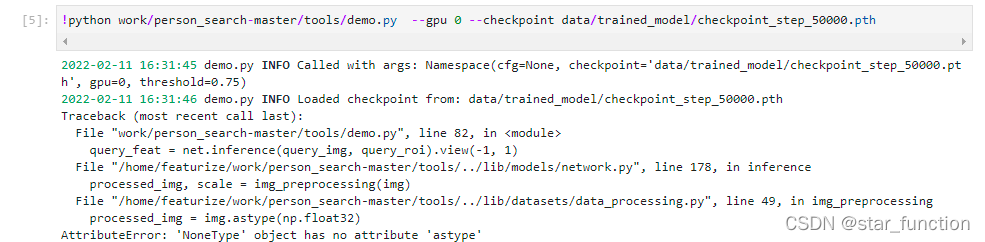
Label pictures are not displayed
Address error
When going to reference local images in the .js file, the path should be introduced in the form of require(), modified as follows
billboard: {
        image: require("../img/boshi.png"),
        pixelOffset: new Cesium.Cartesian2(-120, 0),
        // eyeOffset: new Cesium.Cartesian3(0.0, 0.0, 0.0),
        horizontalOrigin: Cesium.HorizontalOrigin.LEFT,
        verticalOrigin: Cesium.VerticalOrigin.CENTER,
        // scale: 0.25,
        distanceDisplayCondition: new Cesium.DistanceDisplayCondition(100, 20000)
 }
When Linux server cross compiles opencv, cmake reports an error
cmake: symbol lookup error: cmake: undefined symbol: _ZN4Json5ValueC1ERKSs
Version information:
opencv is 4.5
cmake uses 3.4
Solution:
update cmake to 3.16.4
The Vue project reports an error after running NPM run dev/NPM run serve:
Error: Rule can only have one resource source (provided resource and test + include + exclude) in {
  "type": "javascript/auto",
  "include": [
    {}
  ],
  "use": []
}
    at checkResourceSource (D:\Program Files\vue_shop\node_modules\@vue\cli-service\node_modules\webpack\lib\RuleSet.js:167:11)
    at Function.normalizeRule (D:\Program Files\vue_shop\node_modules\@vue\cli-service\node_modules\webpack\lib\RuleSet.js:198:4)
    at D:\Program Files\vue_shop\node_modules\@vue\cli-service\node_modules\webpack\lib\RuleSet.js:110:20
    at Array.map (<anonymous>)
    at Function.normalizeRules (D:\Program Files\vue_shop\node_modules\@vue\cli-
    ```
    Process finished with exit code 1
Cause of problem:
Webpack version conflict.
Webpack version conflict issue.
Some new versions of libraries require webpack@5, and when updating dependencies, webpack@5 is installed as the primary dependency based on the rules of dependency selection. However, @vue/cli relies on webpack@4, and its own webpack configuration is not compatible with webpack@5, so it reports an error and cannot continue to compile. If you’re also using @vue/cli, then don’t upgrade webpack@5 rashly.
Following its solution, I found a conflict between webpack and the previously installed version of less,less-loader
The overall solution is as follows:
//uninstall webpack
npm uninstall webpack
//Install the specified version of webpack
npm install [email protected] --save-dev

npm uninstall less-loader
npm uninstall less

//Install compliant versions of less and less-loader
npm install [email protected] [email protected] --save-dev
An exception is thrown when using the static variable Map as a return
com.alibaba.fastjson.JSONException: write javaBean error, fastjson version 1.2.76, class org.apache.flink.table.data.binary.BinaryStringData, fieldName : id, Memory segment does not represent off heap memory
The rest of the code remains unchanged, and only an empty new Map is returned. The result is normal, which proves that there is a problem with the encoding of the fields inside, so it can be re-encoded
for (Map<String, Object> map : FakerConstant.TABLE_ROW_DATA_RESULT) {
            Map<String, Object> m = new HashMap<>();
            map.forEach((key, value) -> {
                m.put(
                        // You need to re-encode it, otherwise it will report FastJson exception. write javaBean error, fastjson version 1.2.76
                        new String(key.getBytes(), StandardCharsets.UTF_8),
                        new String(String.valueOf(value).getBytes(), StandardCharsets.UTF_8)););
            });
            res.add(m);
        }
After extracting filebeat from the virtual machine, enter #: ./filebeat -c filebeat.yml
Encountered the following problems!!!!!!

Exiting: error unpacking config data: more than one namespace configured accessing ‘output’ (source:’filebeat.yml’)
resolvent:
#Note that you must install filebeat in your own directory to modify filebeat.yml
[filebeat directory] #: VIM filebeat.yml
After entering, find the following configuration location
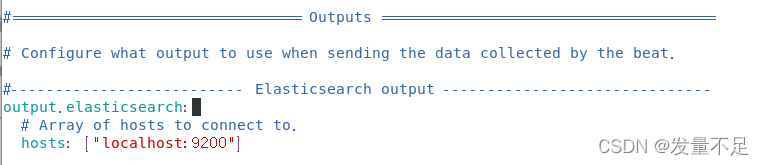
#—————————-Elasticsearch output ———————————-
output. elasticsearch:
#Array of hosts to connecr to.
hosts: [“localhost:9200”]
=====================Modification====================
Just comment out the contents under Elasticsearch output
#—————————-Elasticsearch output ———————————-
#output. elasticsearch:
#Array of hosts to connecr to.
hosts: [“localhost:9200”]
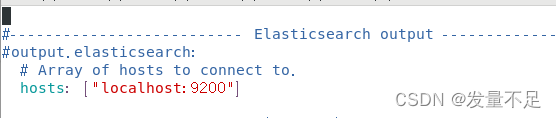
Save exit after modification
Restart filebeat
Enter #:/ filebeat -c filebeat.yml

View process
Enter #:/ filebeat -e -c filebeat.yml
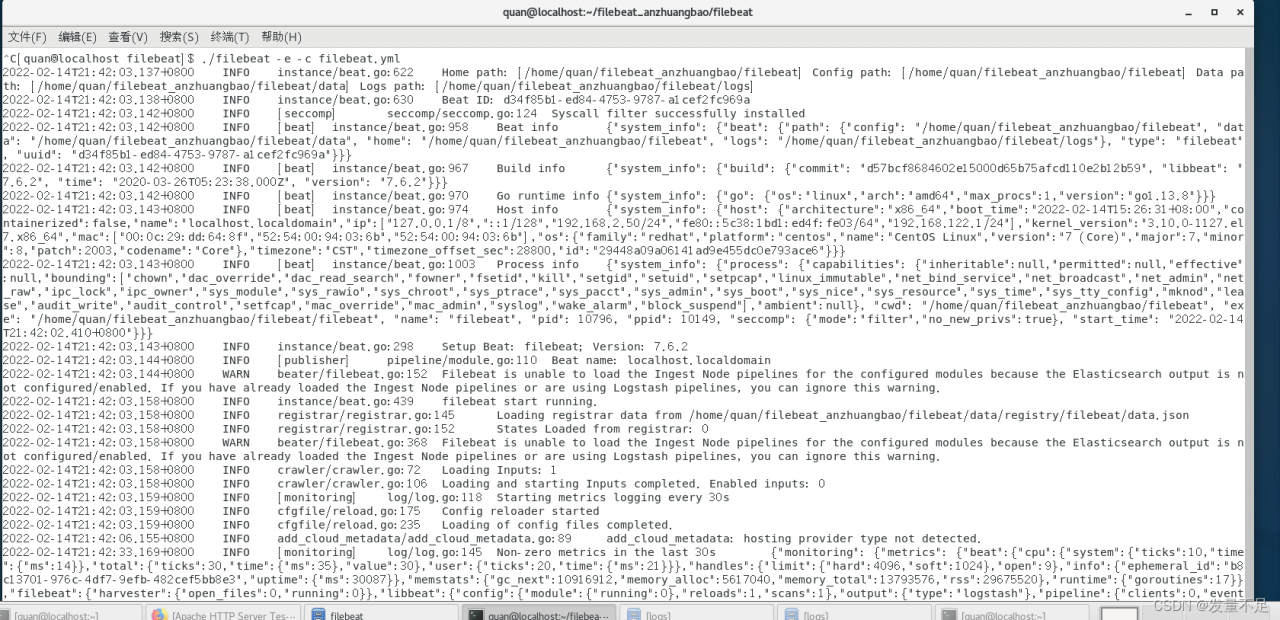
Successfully started filebeat!!!!!
1. preface
After using vscode to install the plug-in: glsl lint, there is an error every time you start vscode:
glsl lint: failed to spawn ‘glslangvalidator’ binary Error: spawn glslangValidator. Exe enoent
and vscode will not be automatically colored and highlighted every time the shader program is opened. At this time, I reinstall the glsl lint plug-in. It’s troublesome
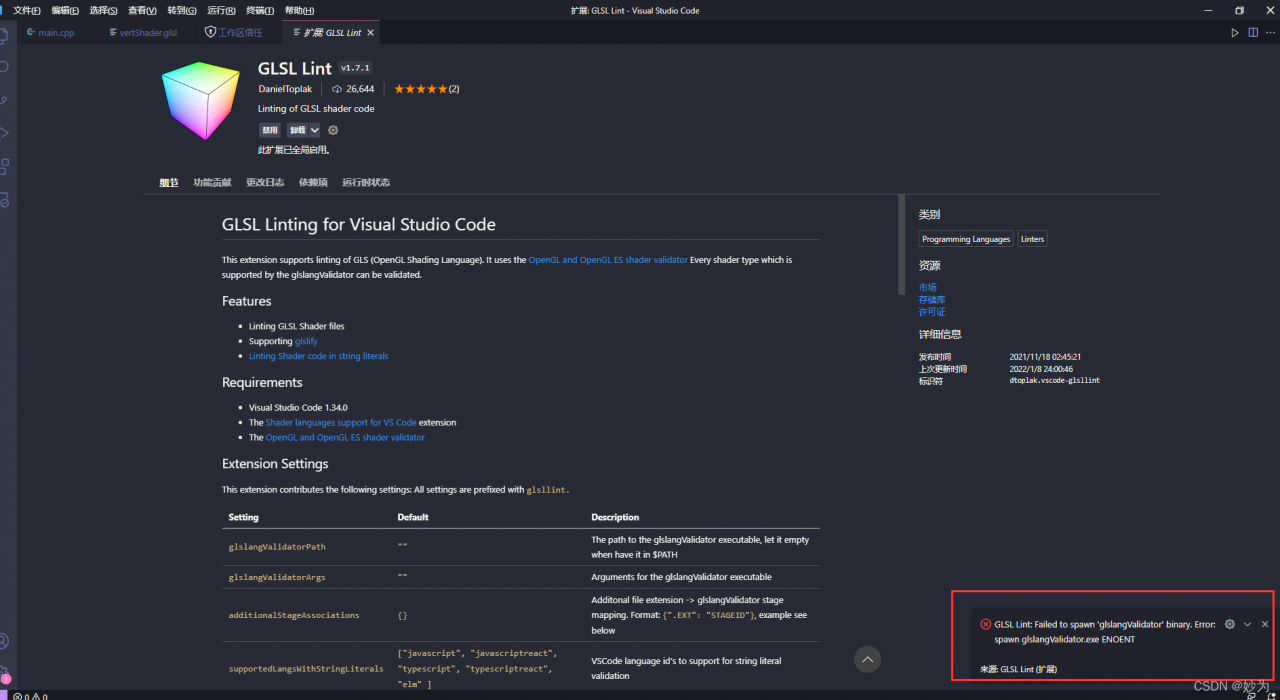
glslangValidator is a custom GLSL reference compiler from the Khronos Group, the official OpenGL standard customizer. The command line compilation mode facilitates users to test glsl syntax directly and bypass the C/C++ related dependency libraries compilation, and there is no need to write a lot of initialization code in the main file. This can save a lot of time in practical testing. In many websites such as shadertoy, the glsl code written by users can be compiled and run directly in the main function, which requires a convenient syntax check, and the shadertoy website also provides a simple syntax check. However, glslang is a standard custom official compiler, so the compiled glsl code can be compiled correctly on all kinds of drivers that support GLSL syntax.
2. Solution steps
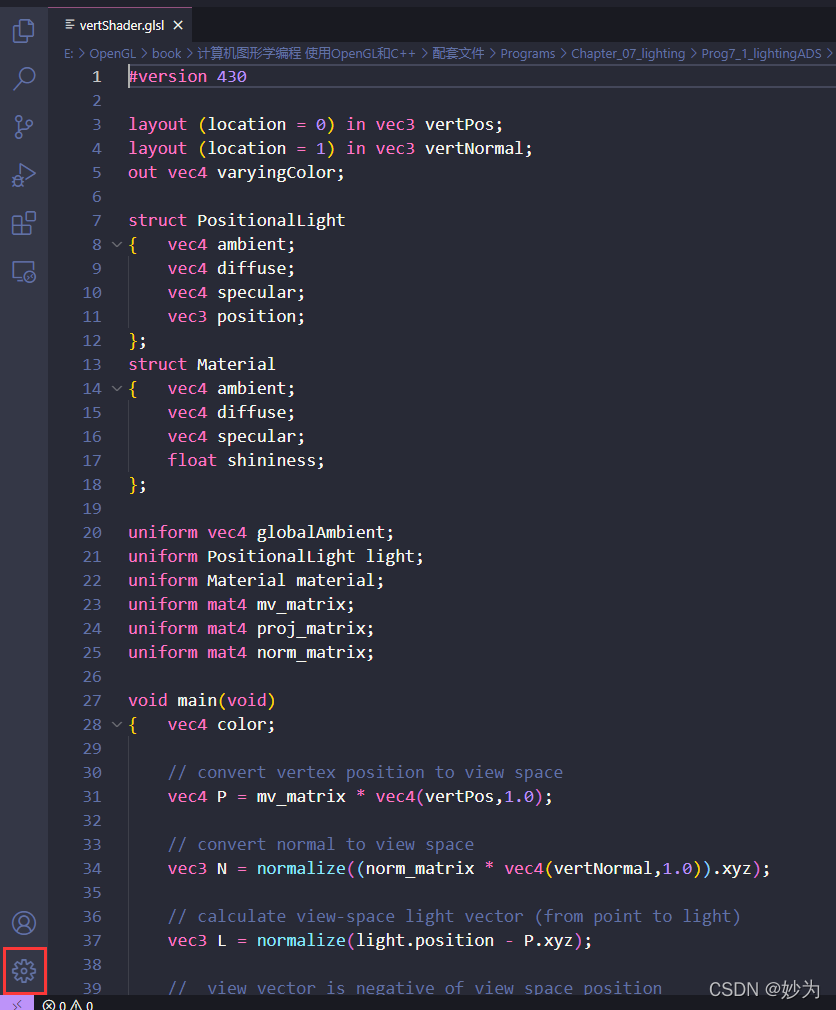
1. Open vscode settings
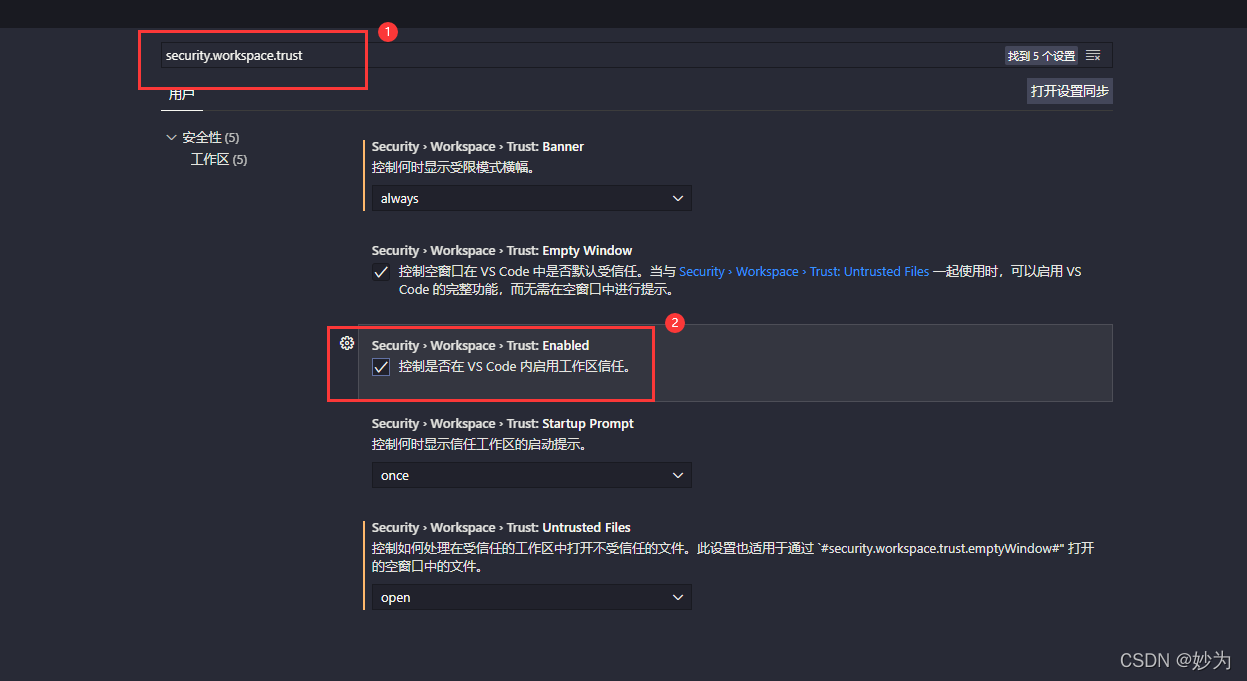
2. Search “security.workspace.trust”
Enter “security.workspace.trust” in “search settings” (just enter “security”)
3. Cancel ssecurity.workspace.trust:Enabled
Remove the hook in front of “security.workspace.trust:Enabled”
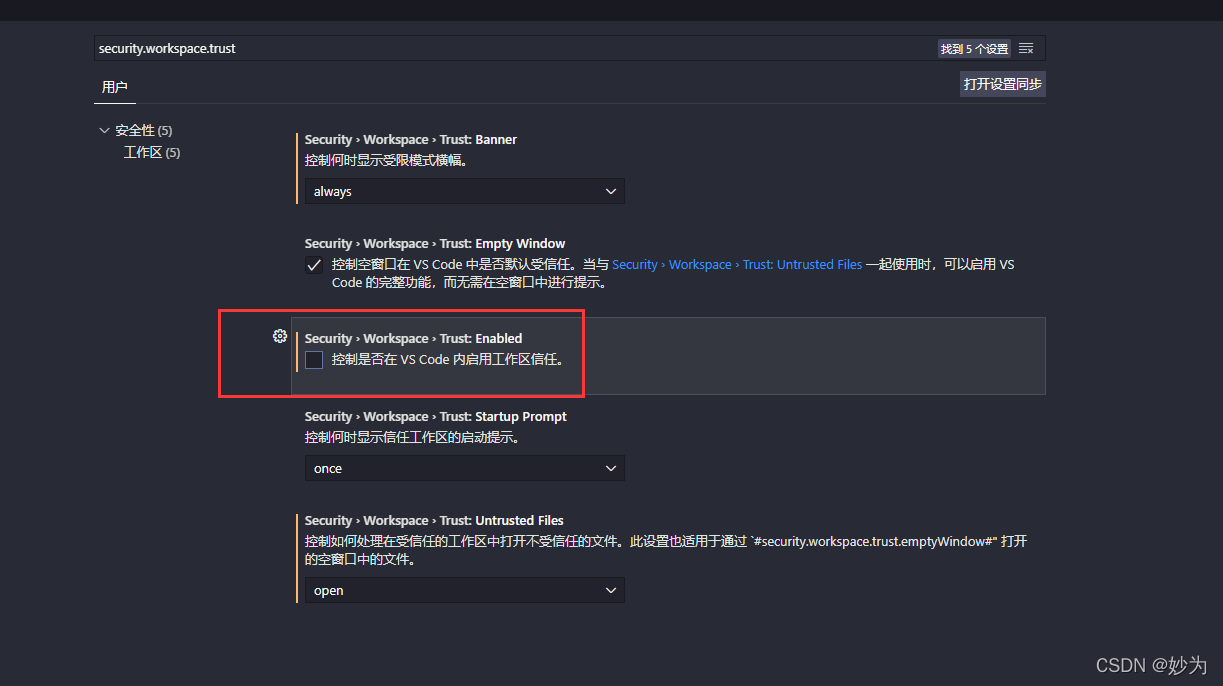
Just restart vscode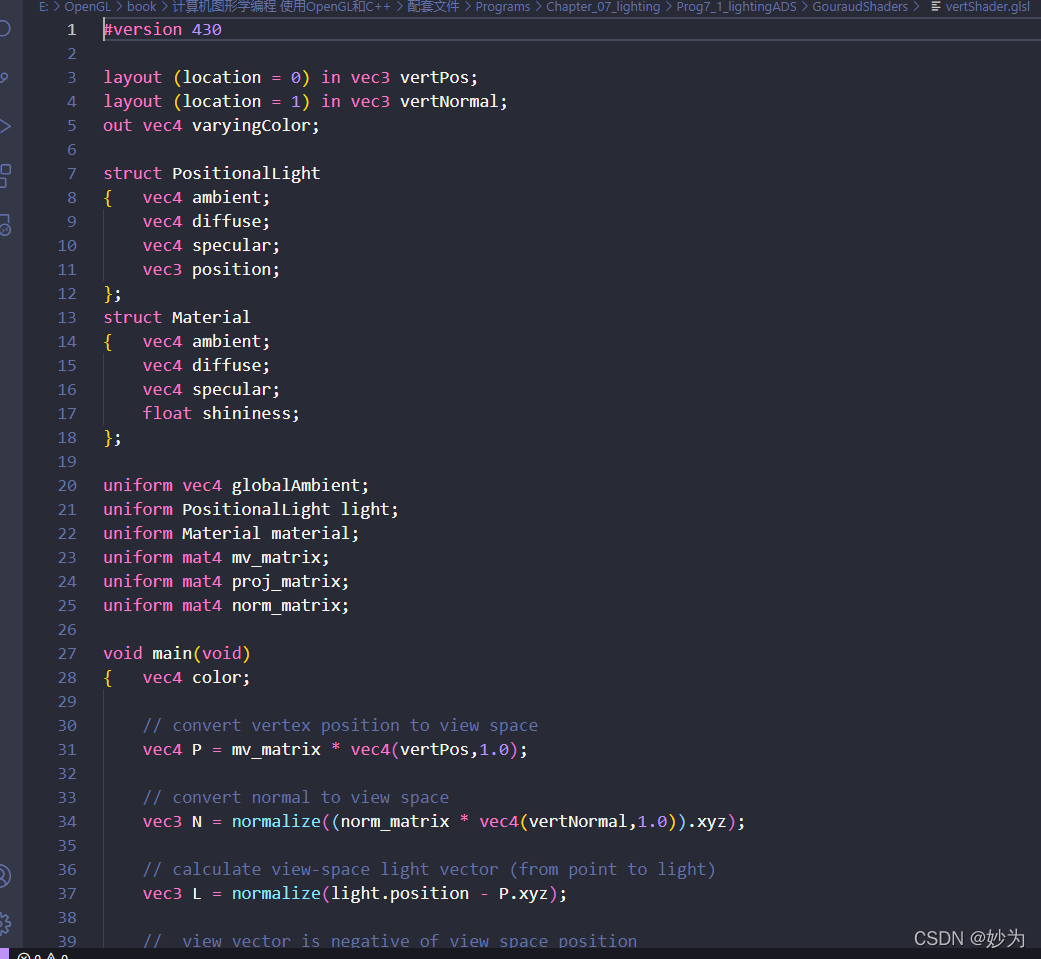
Problem Description:
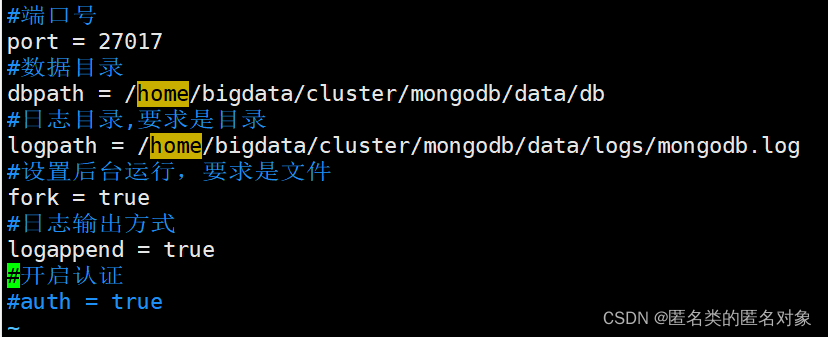
Error: 14 when starting mongodb, check mongodb.log for MongoDB – Unable to unlink socket file / tmp / mongodb-27017

Cause analysis:
Check /tmp/mongodb-27017.sock, found that the owner is root

Solution:
Delete the /tmp/mongodb-27017.sock file and restart the mongod process. Check the /tmp/mongodb-27017.sock permissions again and change the ownership to the “mongodb” user.

also started successfully

Summary:
1. Check more logs, mongodb.log
2. The mongodb error column, such as 1100, is mostly due to the wrong specification of the data path and log path in the configuration file. The data path needs to be created in advance, which is a directory, and the log path also needs to be created in advance, which is a file
Solve the redis client on error: error: write econnaborted config rightwe
Problem Description:
 Solution:
1. First, check whether the firewall of Linux is turned on
Turn off the firewall
[root@localhost]# systemctl stop firewalld.service
Open 6379 port
[root@localhost]# sudo firewall-cmd --zone=public --add-port=6379/tcp --permanent
success
[root@localhost]# sudo firewall-cmd --reload
success
2. Check whether the redis startup configuration is correct
Check whether redis is started
ps -ef | grep redis
For versions above redis 3.2, Internet access is not allowed by default, and needs to be modified redis.conf configuration file
Modify peetected-mode
Modify peotected-mode yes
to: protected-mode no.
#The protected-mode parameter is used to disable access to redis from outside the network, if enabled, only the localhost ip (127.0.0.1) will be able to access Redis

Close bind 127.0.0.1
Comment out bind 127.0.0.1, or modify bind 0.0.0.0, to allow access to all ip addresses

After modifying the configuration file, remember to restart redis,
./redis-server /usr/local/redis/redis.conf