Category Archives: Python

Python: leetcode 1672. Richest Customer Wealth

You are given an m x n integer grid accounts where accounts[i][j] is the amount of money the i​​​​​​​​​​​th​​​​ customer has in the j​​​​​​​​​​​th​​​​ bank. Return the wealth that the richest customer has.
A customer’s wealth is the amount of money they have in all their bank accounts. The richest customer is the customer that has the maximum wealth.
Example 1:

Input: accounts = [[1,2,3],[3,2,1]]
Output: 6
Explanation:
1st customer has wealth = 1 + 2 + 3 = 6
2nd customer has wealth = 3 + 2 + 1 = 6
Both customers are considered the richest with a wealth of 6 each, so return 6.	

Example 2:

Input: accounts = [[1,5],[7,3],[3,5]]
Output: 10
Explanation: 
1st customer has wealth = 6
2nd customer has wealth = 10 
3rd customer has wealth = 8
The 2nd customer is the richest with a wealth of 10.

Example 3:

Input: accounts = [[2,8,7],[7,1,3],[1,9,5]]
Output: 17

Note:

m == accounts.length
n == accounts[i].length
1 <= m, n <= 50
1 <= accounts[i][j] <= 100

parsing
The sum of the numbers in each row in the table Accounts is the total amount of the user’s deposits.
answer

class Solution(object):
    def maximumWealth(self, accounts):
        """
        :type accounts: List[List[int]]
        :rtype: int
        """
        mx = -1
        for account in accounts:
            mx = max(mx, sum(account))
        return mx
        	      
# be simple
class Solution(object):
	    def maximumWealth(self, accounts):
	        """
	        :type accounts: List[List[int]]
	        :rtype: int
	        """
	        return max(map(sum, accounts))			

The results

Runtime: 32 ms, faster than 95.52% of Python online submissions for Richest Customer Wealth.
Memory Usage: 13.6 MB, less than 8.15% of Python online submissions for Richest Customer Wealth.

Python custom convolution kernel weight parameters

Pytorch build convolution layer generally use nn. Conv2d method, in some cases we need custom convolution kernels weight weight, and nn. Conv2d custom is not allowed in the convolution parameters, can use the torch at this time. The nn. Functional. Conv2d referred to as “f. onv2d

torch.nn.functional.conv2d(input, weight, bias=None, stride=1, padding=0, dilation=1, groups=1)

F.onv2d can and must be required to input the convolution weight and bias bias. Therefore, build the desired convolution kernel parameters, and then input F.conv2d. Here is an example of using f.conv2d to build the convolution layer, where a class is needed for the network model:

class CNN(nn.Module):
    def __init__(self):
        super(CNN, self).__init__()
        self.weight = nn.Parameter(torch.randn(16, 1, 5, 5))  # Customized weights
        self.bias = nn.Parameter(torch.randn(16))    # Customized bias

    def forward(self, x):
        x = x.view(x.size(0), -1)
        out = F.conv2d(x, self.weight, self.bias, stride=1, padding=0)
        return out

It is worth noting that the data type of weights to be trained for each layer in the PyTorch is set to nn.parameter rather than Tensor or Variable. Parameter’s require_grad defaults to true, and Varaible defaults to False.

linux ubuntu pip search Fault: <Fault -32500: “RuntimeError: PyPI‘s XMLRPC API is currently disab

Pip search does not work properly. The following error is reported
Complete error report:

$ pip search absl-py --proxy http://10.xxx.xxx.xxx:8080 --trusted-host=pypi.python.org
/usr/share/python-wheels/urllib3-1.22-py2.py3-none-any.whl/urllib3/connectionpool.py:860: InsecureRequestWarning: Unverified HTTPS request is being made. Adding certificate verification is strongly advised. See: https://urllib3.readthedocs.io/en/latest/advanced-usage.html#ssl-warnings
Exception:
Traceback (most recent call last):
  File "/usr/lib/python2.7/dist-packages/pip/basecommand.py", line 215, in main
    status = self.run(options, args)
  File "/usr/lib/python2.7/dist-packages/pip/commands/search.py", line 45, in run
    pypi_hits = self.search(query, options)
  File "/usr/lib/python2.7/dist-packages/pip/commands/search.py", line 62, in search
    hits = pypi.search({'name': query, 'summary': query}, 'or')
  File "/usr/lib/python2.7/xmlrpclib.py", line 1243, in __call__
    return self.__send(self.__name, args)
  File "/usr/lib/python2.7/xmlrpclib.py", line 1602, in __request
    verbose=self.__verbose
  File "/usr/lib/python2.7/dist-packages/pip/download.py", line 778, in request
    return self.parse_response(response.raw)
  File "/usr/lib/python2.7/xmlrpclib.py", line 1493, in parse_response
    return u.close()
  File "/usr/lib/python2.7/xmlrpclib.py", line 800, in close
    raise Fault(**self._stack[0])
Fault: <Fault -32500: "RuntimeError: PyPI's XMLRPC API is currently disabled due to unmanageable load and will be deprecated in the near future. See https://status.python.org/ for more information.">

Because the website is temporarily turned off this feature, see: https://status.python.org/

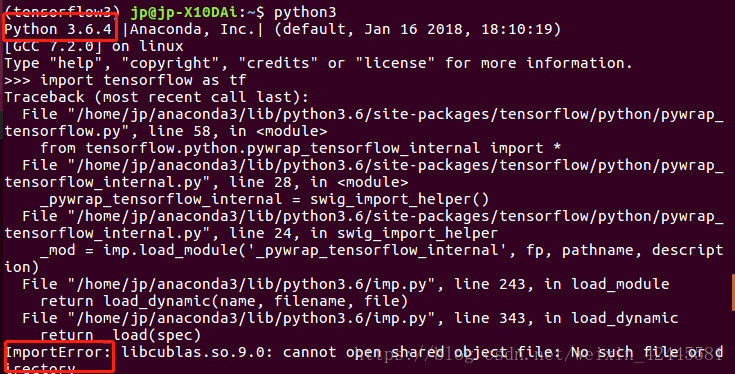
ImportError: libcublas.so.9.0: cannot open shared object file: No such file or directory

Runtime environment: Anaconda’s virtual environment
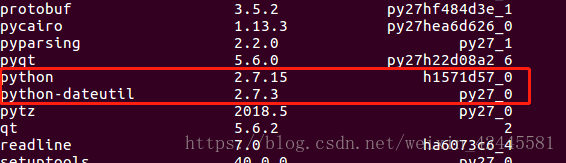
A lot of people say this is because of the CUDA version, but I’ve found that another reason is the Python version of TensorFlow. If you look at the picture, TensorFlow at this point is Python 2.7.
So when I’m using Python 2.7, I don’t get anything wrong

I got an error when I imported TensorFlow in Python 3.6

Use the Conda List to see the Python version

I found that the default version of Python is 2.7. I created this virtual environment with 3.6, but for some reason it changed to 2.7.
The solution. Re-create the Conda environment and re-install TensorFlow.

conda create --name tensorflow python=3.6
conda install tensorflow      
conda install tensorflow-gpu 
conda list

Once installed, you will notice that TensorFlow is now Python 3.6.

Look at the default Python version

Is 3.6. The TensorFlow version corresponds to the Python version, so it should work fine.

As for why the Python version of the Anaconda virtual environment changed, I’m not sure.

Tesseract OCR text recognition using tess4j encapsulation

This paper uses Tesseract-OCR for text recognition. Tesseract is an open source OCR (Optical Character Recognition) engine that can recognize image files in multiple formats and convert them to text, and currently supports more than 60 languages (including Chinese). Tesseract was originally developed by HP, and later maintained by Google.

The first part of me first download good tesseract and jTessBosEditorFX, then prepare the training data, training data with the "temporary regulations of real estate registration" of 10 pictures, using Tesseract-OCR of the realization of the picture to text, that is, the contents of the picture translated into Chinese, Tesseract-OCR for pictures in English and digital often recognition rate is also ideal, but for Chinese existing english.traindata translation Chinese effect is not ideal, Tesseract provides training for the data, so you can first all the pictures in the first few pictures as training data, training at their own .traindata, and then use their own .traindata to give text recognition. Prepare the data

1. generate a tif file of the dataset using the jTessBoxEditer tool

2. subsequently generate 5 box files by means of the cmd command

3. Use jTessBoxEditor tool to open each tif for character and position correction, and then save

4. Then generate a TR file by command line

5. Then create a new font feature file

6. Next, extract characters from all files

7. Enter the command to generate the unicharset file, and then generate the shape file

8. Enter the command to generate shapetable file:, then generate the aggregated character feature file

9. Finally, merge all tr files to generate training results to form Traindata files

Specific operations are as follows.


1. Use jTessBosEditorFX to train the text, I trained a total of 10 sheets here, and then form the traindata file


! [insert image description here](https://img-blog.csdnimg.cn/20210112142019930.png?x-oss-process=image/watermark,type_ZmFuZ3poZW5naGVpdGk,shadow_10, text_aHR0cHM6Ly9ibG9nLmNzZG4ubmV0L3dlaXhpbl80NDgyMTkyMA==,size_16,color_FFFFFF,t_70#pic_center)

2. use Tess4j package, call tesseract to recognize text, first use the Chinese library chi_sim in tesseract to recognize

! [insert image description here](https://img-blog.csdnimg.cn/20210112142139714.png?x-oss-process=image/watermark,type_ZmFuZ3poZW5naGVpdGk,shadow_10, text_aHR0cHM6Ly9ibG9nLmNzZG4ubmV0L3dlaXhpbl80NDgyMTkyMA==,size_16,color_FFFFFF,t_70#pic_center)
3. Check the recognition results by text comparison software, the result error rate of 20%

! [insert image description here](https://img-blog.csdnimg.cn/2021011214224235.gif)
4. import 5 traindata trained by ourselves in tesseract's traindata folder for text recognition
! [insert image description here](https://img-blog.csdnimg.cn/2021011214232064.png?x-oss-process=image/watermark,type_ZmFuZ3poZW5naGVpdGk,shadow_10,text) _aHR0cHM6Ly9ibG9nLmNzZG4ubmV0L3dlaXhpbl80NDgyMTkyMA==,size_16,color_FFFFFF,t_70#pic_center)
5. Using text comparison software to check, the recognition rate is up to 98%
! [insert image description here](https://img-blog.csdnimg.cn/20210112141518372.png?x-oss-process=image/watermark,type_ZmFuZ3poZW5naGVpdGk,shadow_10,text_aHR0cHM6Ly9ibG9nLmNzZG4ubmV0L3dlaXhpbl80NDgyMTkyMA==,size_16,color_FFFFFF,t_70#pic_center)


Python ProgressBar adds its own dynamic information to the progress bar

Python progressbar adds its own dynamic information to the progressbar (prevent visuals)

import progressbar
import time
widgets = ['Progress:', 
                   progressbar.Percentage(), ' ', 
                   progressbar.Bar('='),' ', 
                   progressbar.Timer(), ' ',
                   progressbar.DynamicMessage("training_batch_acc"),
                  ]
bar=progressbar.ProgressBar(widgets=widgets, max_value=1000)
for i in range(1000):
    time.sleep(1)
    bar.dynamic_messages.training_batch_acc = 10
    bar.update(i)

Dynamic information added by training_batch_ACC in the code, variable is set by Widgets, dynamic_messages.training_batch_ACC modify value, which can be displayed dynamically in real time, concise and clear

[leetcode] 295. Find Median from Data Stream Python

Median is the middle value in an ordered integer list. If the size of the list is even, there is no middle value. So the median is the mean of the two middle value.
For example,
[2,3,4], the median is 3
[2,3], the median is (2 + 3)/2 = 2.5
Design a data structure that supports the following two operations:
void addNum(int num) – Add a integer number from the data stream to the data structure.
double findMedian() – Return the median of all elements so far.
Example:
addNum(1)
addNum(2)
findMedian() -> 1.5
addNum(3)
findMedian() -> 2
Follow up:
If all integer numbers from the stream are between 0 and 100, how would you optimize it?
If 99% of all integer numbers from the stream are between 0 and 100, how would you optimize it?
Solution
Using the bisect module, bisect.insort_left keeps the list in ascending order each time a number is inserted, and then evaluates to the median, (self. data[l//2] + self.data[(l-1)//2])/2.0 so that the result is the median regardless of whether the list has even or odd elements. .
.

class MedianFinder:

    def __init__(self):
        """
        initialize your data structure here.
        """
        self.data = []
        

    def addNum(self, num):
        """
        :type num: int
        :rtype: void
        """
        bisect.insort_left(self.data, num)
        

    def findMedian(self):
        """
        :rtype: float
        """
        l = len(self.data)
        median = (self.data[l//2] + self.data[(l-1)//2])/2.0
        return median


# Your MedianFinder object will be instantiated and called as such:
# obj = MedianFinder()
# obj.addNum(num)
# param_2 = obj.findMedian()

[Python] How to Sort a Group of Tuples Using the Sorted() Function

[question]
Suppose we use a set of tuples to represent students’ names and grades:

L = [('Bob', 75), ('Adam', 92), ('Bart', 66), ('Lisa', 88)]

With sorted() sorted the above lists by name:

# Sort by name

L = [('Bob', 75), ('Adam', 92), ('Bart', 66), ('Lisa', 88)] 

def by_name(t):
    return t[0].lower()

L2 = sorted(L, key=by_name)
print(L2)

Operation results:

[('Adam', 92), ('Bart', 66), ('Bob', 75), ('Lisa', 88)]

【 description 】
About indexes:
L = [(‘ Bob ‘, 75), (‘ Adam ‘, 92), (‘ Bart, 66), (88) ‘Lisa’]
L [0] is (75), ‘Bob’
L[0][0] is “Bob”
and so on
Here, we need to understand:
The key to sorting () is implementing a mapping function. The function specified by the key will act on each element of the list and sort by the result returned by the key function. The final result: Returns the corresponding elements of the original list in the order of the key function
So the actual argument to the by_name function is each element in L, the tuple primitive in the list.

so, sort the contents of the list by name:
The by_name function does all the lowercase handling of the first element of the tuple, the name string t[0], with the lower() function, and returns the result. The by_name function ACTS one by one on each primitive in L, and sorts the original elements in L according to the order of function results.
In the same way, it can be realized and ranked from high to low in terms of performance:

# In descending order of performance

L = [('Bob', 75), ('Adam', 92), ('Bart', 66), ('Lisa', 88)] 

def by_score(t):
    return t[1]

L2 = sorted(L, key=by_score,reverse=True)
print(L2)

Operation results:

[('Adam', 92), ('Lisa', 88), ('Bob', 75), ('Bart', 66)]

Django WSGI protocol application, based on wsgiref module DIY a web framework

1. Web framework
Web framework (Web framework) is a development framework used to support the development of dynamic Web sites, Web applications and Web services. Most of these Web frameworks provide a set of ways to develop and deploy web sites, as well as a common set of methods for Web behavior. The Web framework has already implemented many functions, and developers can quickly develop Web applications by using the methods provided by the framework and completing their own business logic. The browser and server communicate based on the HTTP protocol. It can also be said that the Web framework is in the above dozens of lines of code base extension, there are a lot of simple and convenient use of methods, greatly improve the efficiency of development.
2. Web application background
By understanding the HTTP protocol and HTML documents, we understand the essence of a Web application: </font b>
The browser sends an HTTP request; server receives a request to generate an HTML document; The server sends the HTML document to the browser as the Body of the HTTP response; browser receives the HTTP response, pulls out the HTML document from the HTTP Body and displays it.
3. WSGI Protocol
the simplest Web application is to save the HTML with a file, use an off-the-shelf HTTP server software, receive user requests, read HTML from the file, return. Common static servers such as Apache, Nginx, Lighttpd, and others do just that.
if you want to generate HTML dynamically, you need to do the above steps yourself. However, accepting HTTP requests, parsing HTTP requests, and sending HTTP responses are all hard work, and if we write the underlying code ourselves and haven’t started writing dynamic HTML yet, we’ll have to spend months reading the HTTP specification.
The correct approach is that the underlying code is implemented by specialized server software, and we focus on generating HTML documents in Python. Because we don’t want to touch the TCP connection, HTTP raw request and response formats, we need a unified interface, and let’s focus on writing Web business in Python.
This Interface is the WSGI: Web Server Gateway Interface.

WSGI, (Web Server Gateway Interface), is a Web Server Gateway Interface standard/protocol that implements Python parsing. It is a simple and common Interface between a Web Server and a Web application or framework.

4. Wsgiref module
The wsgiref module is a service module developed by python based on wsgi protocol. It is a reference implementation of wsgi server written in pure python. A “reference implementation” means that the implementation is fully compliant with the WSGI standards, but does not consider any operational efficiency, and is used only for development and testing purposes.

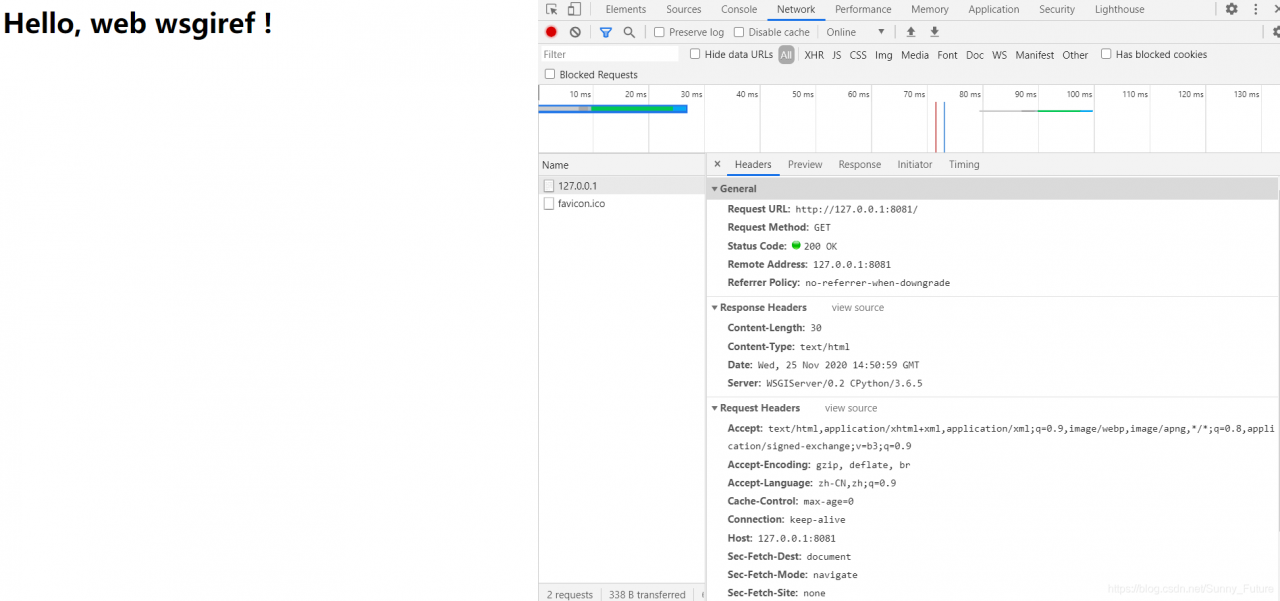
from wsgiref.simple_server import make_server


def application(environ, start_response):
    start_response('200 OK', [('Content-Type', 'text/html')])
    return [b'<h1>Hello, web  wsgiref !</h1>']


httpd = make_server('', 8081, application)

print('Serving HTTP on port 8081...')
# Start listening to HTTP requests:
httpd.serve_forever()

5. DIY a Web framework
in order to make a dynamic website, we need to extend the functions, such as the user accesses the url through a login page when the path is login, and responds to a front page when the path is index.
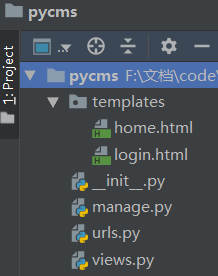
5.1 Startup file: manager.py

from wsgiref.simple_server import make_server
from views import *
from urls import urlpatterns


def application(environ, start_response):
    # print("environ",environ)
    start_response('200 OK', [('Content-Type', 'text/html')])
    # Get the current request path
    print("PATH_INFO",environ.get("PATH_INFO"))
    path=environ.get("PATH_INFO")
    # Branches
    func = None
    for item in urlpatterns:
        if path == item[0]:
            func = item[1]
            break
    if not func:
        ret = notFound(environ)
    else:
        ret = func(environ)
    return [ret]


httpd = make_server('', 8080, application)
# Start listening to HTTP requests:
httpd.serve_forever()

5.2 URL control file: URls.py

from views import *

urlpatterns = [
    ("/login", login),
    ("/home", home),
]

5.3 View file :views. Py

# View Functions
def home(environ):
    with open("templates/home.html", "rb") as f:
        data = f.read()
    return data


def login(environ):
    with open("templates/login.html", "rb") as f:
        data = f.read()
    return data


def notFound(environ):
    return b"<h1>404...</h1>"

5.4 Templates file Templates
login.html:

<!DOCTYPE html>
<html lang="en">
<head>
    <meta charset="UTF-8">
    <title>Title</title>
</head>
<body>
<form action="http://127.0.0.1:8080/home" method="post">
    Username <input type="text" name="user" placeholder="user">
    Password <input type="password" name="pwd"  placeholder="pwd">
    <input type="submit">
</form>
</body>
</html>

home:

<!DOCTYPE html>
<html lang="en">
<head>
    <meta charset="UTF-8">
    <title>Title</title>
</head>
<body>
<h3> GOOD JOB!! This is home!</h3>
</body>
</html>

5.5 Start the Web framework and request access
Start the manage. Py files, listen on port 8080
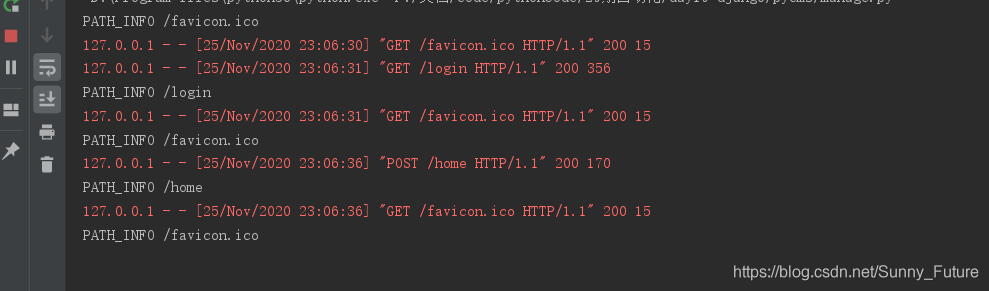
visit http://127.0.0.1:8080/login
will redirect after login the home page, http://127.0.0.1:8080/home

5.6 Framework application
At this point, the PyCMS package is a Web framework, and once this framework is built, it is easy to add business functions. For example, if we add a time view page, we only need to complete two parts:
(1) Add:

("/timer", timer),

(2) Add in views. Py:

def timer(request):
    import datetime
    now=datetime.datetime.now().strftime("%Y-%m-%d %X")
    return now.encode()

Isn’t that easy! With the web framework, no longer has to start line after line of code from creating a socket!
At this point, exclamation, Django framework really sweet!!


Python+OpenCV: How to Use Background Subtraction Methods

Python+OpenCV:How to Use Background Subtraction Methods
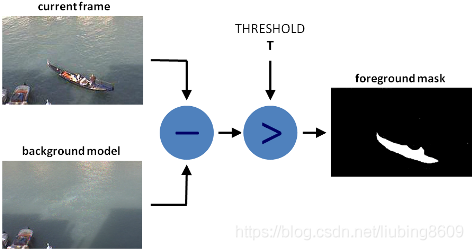
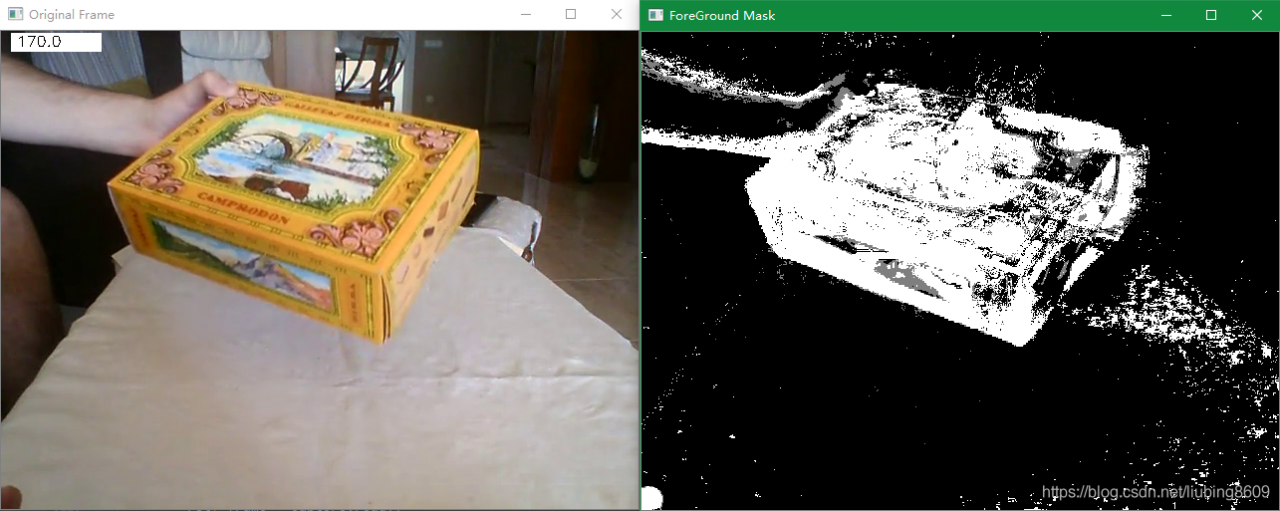
Background subtraction (BS) is a common and widely used technique for generating a foreground mask (namely, a binary image containing the pixels belonging to moving objects in the scene) by using static cameras. As the name suggests, BS calculates the foreground mask performing a subtraction between the current frame and a background model, containing the static part of the scene or, more in general, everything that can be considered as background given the characteristics of the observed scene.

Background modeling consists of two main steps:

    Background Initialization;Background Update.

In the first step, an initial model of the background is computed, while in the second step that model is updated in order to adapt to possible changes in the scene.
Background Subtraction in OpenCV

####################################################################################################
# 图像背景减法(Background Subtraction Methods)
def lmc_cv_background_subtraction():
    """
        Function: Background Subtraction Methods.
    """"

    # Read the vide
    parser = argparse.ArgumentParser(description='This program shows how to use background subtraction methods\
                                                provided by OpenCV. You can process both videos and images.')
    parser.add_argument('--input', type=str, help='Path to a video or a sequence of image.',
                        default='D:/99-Research/Python/Image/box.mp4')
    parser.add_argument('--algo', type=str, help='Background subtraction method (KNN, MOG2).', default='MOG2')
    args = parser.parse_args()
    # A lmc_cv::BackgroundSubtractor object will be used to generate the foreground mask.
    if args.algo == 'MOG2':
        back_sub = lmc_cv.createBackgroundSubtractorMOG2()
    else:
        back_sub = lmc_cv.createBackgroundSubtractorKNN()
    # A lmc_cv::VideoCapture object is used to read the input video or input images sequence.
    capture = lmc_cv.VideoCapture(lmc_cv.samples.findFileOrKeep(args.input))
    if not capture.isOpened:
        print('Unable to open: ' + args.input)
        exit(0)
    while True:
        ret, frame = capture.read()
        if frame is None:
            break
        # Every frame is used both for calculating the foreground mask and for updating the background.
        fg_mask = back_sub.apply(frame)
        # get the frame number and write it on the current frame
        lmc_cv.rectangle(frame, (10, 2), (100, 20), (255, 255, 255), -1)
        lmc_cv.putText(frame, str(capture.get(lmc_cv.CAP_PROP_POS_FRAMES)), (15, 15),
                       lmc_cv.FONT_HERSHEY_SIMPLEX, 0.5, (0, 0, 0))
        # show the current frame and the ForeGround masks
        lmc_cv.imshow('Original Frame', frame)
        lmc_cv.imshow('ForeGround Mask', fg_mask)
        # quit
        keyboard = lmc_cv.waitKey(30)
        if keyboard == 'q' or keyboard == 27:
            break
    return