[Problem] IDEA Maven pom.xml is grayed out and strikethrough appears
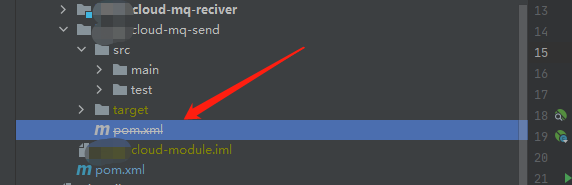
Project pom.xml file is set in a maven ignore list in
Solution As shown in the figure, the file with strikethrough will be grayed out and uncheck
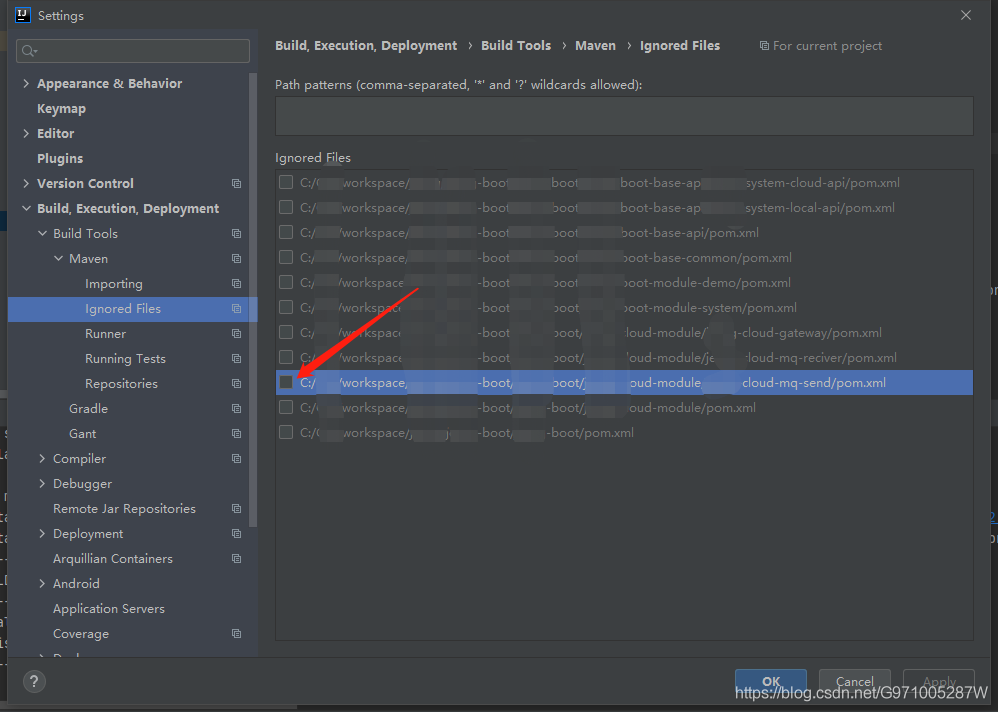
Don’t panic when you encounter this problem, go check the opinions. Let me summarize here
There are several situations where this problem exists
1. The ws connection is unstable and often disconnected;
answer:
1) It may be a network problem between the client and the server
2) The thread may be cleaned up abnormally due to insufficient memory on the server side
2. After the ws connection is successful, it will automatically disconnect after a while
answer:
1) In general, nginx forwarding or tomcat connection timeout causes the container layer to actively close the connection
(1) Modify the container layer tomcat or nginx [proxy_read_timeout 5000s ; keepalive_timeout 5000s ; ] configuration is enough , but it is not recommended to treat the symptoms rather than the root cause
(2) The server actively sends a heartbeat message to the client. It is not recommended because it will cause the server to load
(3) The client takes the initiative to send a heartbeat message to the server. I personally recommend this solution
3. After the ws connection, the server actively closes the connection due to various reasons such as authentication failure, which causes the exception to be thrown
Answer: The solution code is below [The key point is the CloseReason.CloseCodes.TLS_HANDSHAKE_FAILURE error code. When you use this error code, it will cause an io error, which means handshake failure]
|
1
2
3
4
5
6
7
8
9
10
11
12
13
14
15
16
|
/** * Operation for downline * @param session */ public void optClose(Session session){ // Determine if the current connection is still online if (session.isOpen()){ try { // Closed CloseReason closeReason = new CloseReason(CloseReason.CloseCodes.NORMAL_CLOSURE,"Error!"); session.close(closeReason); } catch (IOException e) { e.printStackTrace(); } } } |
Note: When an abnormal error occurs, the connection should be closed in time and the related users’ online and offline operations should be handled!
@RequestMapping(method = RequestMethod.GET,value="/{provinceId}_{levelId}.htm") public Map<String, Appointment> test() { return appointmentBook.getAppointmentsForToday(); }@RequestMapping(method = RequestMethod.GET,value="/{provinceId}_{levelId}_s{id}.htm") public Map<String, Appointment> test1() { return appointmentBook.getAppointmentsForToday(); } |
As with the above two URLs, when I enter /2_3_s1.htm on the browser (here omitting the thing in front of the URL), I always enter the first method, and the order of your two methods is also the same, always enter the first method. One, the problem is not difficult to see. In fact, the first URL contains the first one. Both methods of the request link of /2_3_s1.htm are consistent (equivalent to treating 3_s1 as a whole, so the first method is also consistent). As for why it entered the first One, it should be that the first URL contains the second, which is equivalent to a parent-child relationship.
Solution:
Change the first method to the following
|
1
2
3
4
|
@RequestMapping(method = RequestMethod.GET,value="/{provinceId}_{levelId:\\d*}.htm") public Map<String, Appointment> test() { return appointmentBook.getAppointmentsForToday(); } |
It is to add \\d* after levelId, which means that levelId can only match integers. If written in this way, our previous link/2_3_s1.htm will enter the second method, because you treat 3_s1 even as A link does not meet the condition of an integer, so it will enter the second method.
\\d{6}: Represents 6 digits
\\?-[0,9]d: Represents a negative integer
[az]{3}: Three letters,
etc.
If the configuration file of a multi-person collaborative development project is not submitted, it will cause the startup of other people’s projects to fail. You can provide a default value for the class attribute @value
|
1
2
3
4
5
|
//The null value is wrapped in #{}, if not parsed as a string by default@Value("${cpris.docRootPath:#{null}}")private String rootPath;@Value("${cpris.ip:1}")private String ip; |

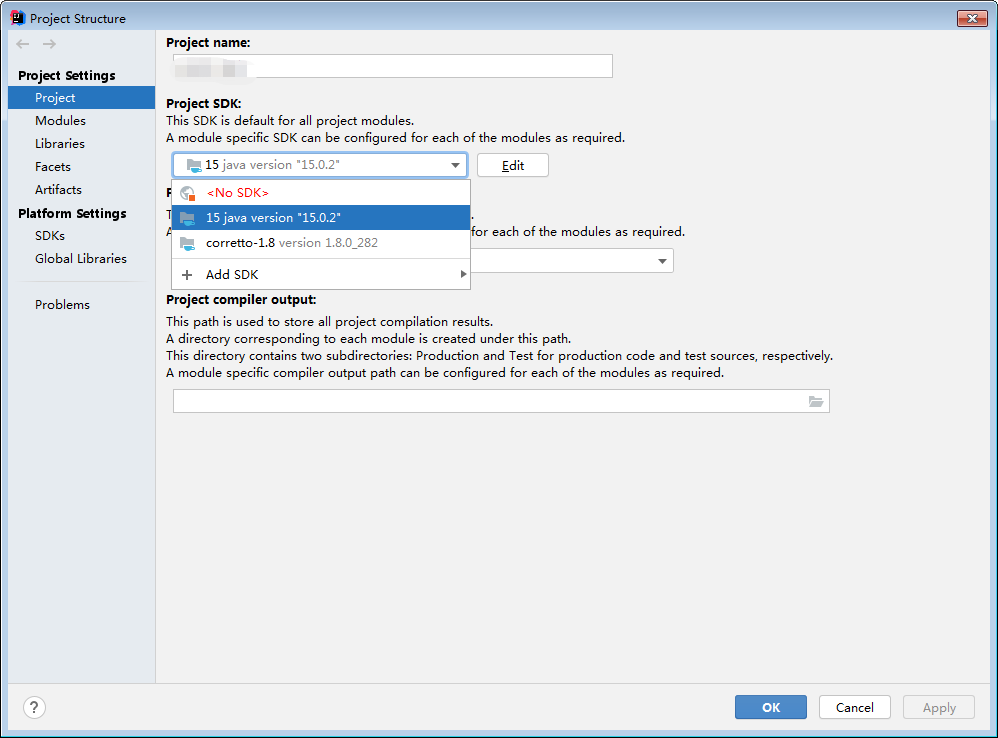
The warning is shown in the figure. The warning is because the jdk version is too high (I use 15.0, and it is said that it will be the same for 9.0). The specific principle has not been studied. It does not affect the normal operation of the project, but it looks very sad There is wood there~~~~
The solution is to reduce the project jdk to 1.8 and below, 1.8 is recommended.
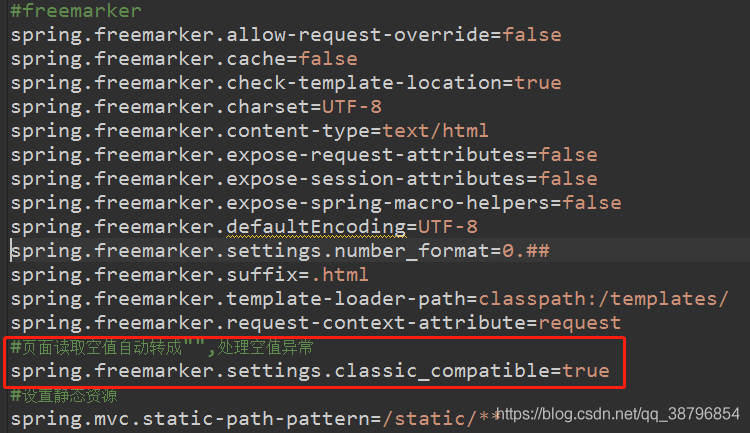
When using freemarker in the springboot project recently, when a certain null value is taken in the page for judgment, an exception will be reported, and all the exception information will be displayed on the page. Through a configuration, it can be solved globally
by adding in the freemarker property configuration of application.properties:
spring.freemarker.settings.classic_compatible=true
jar: itext-4.2.1.jar
Absolute positioning is required for the signing of many official documents, so record this code as follows:
PdfWriter writer = PdfWriter.getInstance(document, new FileOutputStream( "test.pdf" ));
PdfContentByte cb = writer.getDirectContent();
BaseFont bf = BaseFont.createFont( "STSong-Light" , "UniGB-UCS2-H" ,BaseFont.EMBEDDED);
cb .beginText();
cb .setFontAndSize(bf, 12 );
cb .showTextAligned(PdfContentByte.ALIGN_CENTER, text + "This text is centered" , 250 , 700 , 0 );
cb .endText();
Sometimes the absolute positioning of the picture (official seal) is also needed:
Image image = Image.getInstance(request.getSession().getServletContext().getRealPath( "/" )+ "common/images/starpilot/signet.png" );
image .scaleAbsolute(mmTopx( 40 ), mmTopx( 39 ));
image .setAbsolutePosition( 400 , flagHeight);
document .add(image);Suddenly found that the total data of the page is wrong; after turning on the debugging, it is found that the count statement is executed normally
Finally, it was found that the incoming generic entity classes were inconsistent and normal after modification!
    Calendar calendar = Calendar.getInstance();
    //Subtract 3 months from the current time. If it is a negative number, the year will be pushed forward. For example, January-3, 2010 will become October 2009
    calendar. add (Calendar.MONTH, -3 );
    Timestamp time = new Timestamp(calendar.getTimeInMillis());
    //Get the customer's last order time---orderTime
    CustomerOrder cusOrder = this .df.getCustomerOrderDao(). get (customerId);
    Timestamp orderTime = cusOrder.getTime();
    //Determine whether it has expired, true means more than 3 months
    if (time.after(orderTime)){
};When using jasypt to encrypt sensitive information in the spring boot configuration file, an exception was encountered when using statuser to start directly
<dependency>
    <groupId>com.github.ulisesbocchio</groupId>
    <artifactId>jasypt-spring-boot-starter</artifactId>
    <version>3.0.3</version>
</dependency>
Encountered the following exception:
org.springframework.beans.factory.UnsatisfiedDependencyException: Error creating bean with name 'enableEncryptablePropertySourcesPostProcessor' defined in class path resource [com/ulisesbocchio/jasyptspringboot/configuration/EnableEncryptablePropertiesConfiguration.class]: Unsatisfied dependency expressed through method 'enableEncryptablePropertySourcesPostProcessor' parameter 0; nested exception is org.springframework.beans.factory.UnsatisfiedDependencyException: Error creating bean with name 'xxxDao' defined in xxxDao defined in @EnableJpaRepositories declared on Application: Unsatisfied dependency expressed through constructor parameter 1: Ambiguous argument values for parameter of type [javax.persistence.EntityManager] - did you specify the correct bean references as arguments?
	at org.springframework.beans.factory.support.ConstructorResolver.createArgumentArray(ConstructorResolver.java:797)
	at org.springframework.beans.factory.support.ConstructorResolver.instantiateUsingFactoryMethod(ConstructorResolver.java:538)
	at org.springframework.beans.factory.support.AbstractAutowireCapableBeanFactory.instantiateUsingFactoryMethod(AbstractAutowireCapableBeanFactory.java:1336)
	at org.springframework.beans.factory.support.AbstractAutowireCapableBeanFactory.createBeanInstance(AbstractAutowireCapableBeanFactory.java:1176)
	at org.springframework.beans.factory.support.AbstractAutowireCapableBeanFactory.doCreateBean(AbstractAutowireCapableBeanFactory.java:556)
	at org.springframework.beans.factory.support.AbstractAutowireCapableBeanFactory.createBean(AbstractAutowireCapableBeanFactory.java:516)
	at org.springframework.beans.factory.support.AbstractBeanFactory.lambda$doGetBean$0(AbstractBeanFactory.java:324)
	at org.springframework.beans.factory.support.DefaultSingletonBeanRegistry.getSingleton(DefaultSingletonBeanRegistry.java:234)
	at org.springframework.beans.factory.support.AbstractBeanFactory.doGetBean(AbstractBeanFactory.java:322)
	at org.springframework.beans.factory.support.AbstractBeanFactory.getBean(AbstractBeanFactory.java:207)
	at org.springframework.context.support.PostProcessorRegistrationDelegate.invokeBeanFactoryPostProcessors(PostProcessorRegistrationDelegate.java:172)
	at org.springframework.context.support.AbstractApplicationContext.invokeBeanFactoryPostProcessors(AbstractApplicationContext.java:707)
	at org.springframework.context.support.AbstractApplicationContext.refresh(AbstractApplicationContext.java:533)
	at org.springframework.boot.web.servlet.context.ServletWebServerApplicationContext.refresh(ServletWebServerApplicationContext.java:143)
	at org.springframework.boot.SpringApplication.refresh(SpringApplication.java:758)
	at org.springframework.boot.SpringApplication.refresh(SpringApplication.java:750)
	at org.springframework.boot.SpringApplication.refreshContext(SpringApplication.java:397)
	at org.springframework.boot.SpringApplication.run(SpringApplication.java:315)
	at org.springframework.boot.SpringApplication.run(SpringApplication.java:1237)
	at org.springframework.boot.SpringApplication.run(SpringApplication.java:1226)
...
The above information refers to the enableEncryptablePropertySourcesPostProcessorfailure due to the failure to create other types of Bean when it was created.
Let me talk about this problem first because the spring boot BeanFactoryPostProcessor and the custom repositoryFactoryBeanClass in the custom @EnableJpaRepositories are not compatible when they are created at startup. The @Repository annotated bean is initialized in advance (when the enableEncryptablePropertySourcesPostProcessor is created, because of the spring boot mechanism As a result, some classes are instantiated in advance, but the BeanFactoryPostProcessor processing @Repository has not been loaded)
If you do not customize the custom repositoryFactoryBeanClass in @EnableJpaRepositories, the above exception will not occur
After that, I wanted to implement the jasypt method by myself, but the BeanFactoryPostProcessor implementation method that still needs jasypt appeared, so I gave up, and finally used the rewriting PropertySource method, plus reflection to complete itself to decrypt the encrypted information that has been read (in the Before the bean is placed in the container, that is, before the annotations such as @Value take effect)
<dependency>
    <groupId>com.github.ulisesbocchio</groupId>
    <artifactId>jasypt-spring-boot</artifactId>
    <version>3.0.3</version>
</dependency>
//JasyptPropertyValueConfig.java

import org.springframework.beans.factory.config.PropertyOverrideConfigurer;
import org.springframework.context.annotation.Bean;
import org.springframework.context.annotation.Configuration;

@Configuration
public class JasyptPropertyValueConfig {

    @Bean
    public PropertyOverrideConfigurer jasyptPropertyOverrideConfigurer() {
        return new JasyptPropertyValueHandler();
    }
}
//JasyptPropertyValueHandler.java

import org.jasypt.util.text.BasicTextEncryptor;
import org.springframework.beans.BeansException;
import org.springframework.beans.factory.config.ConfigurableListableBeanFactory;
import org.springframework.beans.factory.config.PropertyOverrideConfigurer;
import org.springframework.boot.env.OriginTrackedMapPropertySource;
import org.springframework.boot.origin.OriginTrackedValue;
import org.springframework.context.EnvironmentAware;
import org.springframework.core.env.Environment;
import org.springframework.core.env.MutablePropertySources;
import org.springframework.core.env.PropertySource;
import org.springframework.core.env.SimpleCommandLinePropertySource;
import org.springframework.web.context.support.StandardServletEnvironment;

import java.lang.reflect.Field;
import java.util.List;
import java.util.Map;
import java.util.Properties;
import java.util.stream.StreamSupport;


public class JasyptPropertyValueHandler extends PropertyOverrideConfigurer implements EnvironmentAware {

    private static BasicTextEncryptor textEncryptor = null;
    private final String KEY_SEED = "jasypt.encryptor.password";
    private final String PREFIX = "ENC(";
    private final String SUFFIX = ")";
    private final byte[] tmp_lock = new byte[1];
    private boolean isInit;
    private String seed;
    private Environment environment;

    public JasyptPropertyValueHandler() {

    }

    @Override
    public void setEnvironment(Environment environment) {
        this.environment = environment;
    }

    @Override
    public void postProcessBeanFactory(ConfigurableListableBeanFactory beanFactory) throws BeansException {
        MutablePropertySources propertySources = ((StandardServletEnvironment) environment).getPropertySources();
        convertPropertySources(propertySources);
        super.postProcessBeanFactory(beanFactory);
    }


    public void convertPropertySources(MutablePropertySources propSources) {
        initSeed();
        // Command line parameter SimpleCommandLinePropertySource
        // yml profile parametersOriginTrackedMapPropertySource
        StreamSupport.stream(propSources.spliterator(), false)
                .filter(ps -> (ps instanceof OriginTrackedMapPropertySource) || (ps instanceof SimpleCommandLinePropertySource))
                .forEach(ps -> {
                    if (ps instanceof OriginTrackedMapPropertySource) {
                        handleConfigFile(ps);
                    } else if (ps instanceof SimpleCommandLinePropertySource) {
                        handleCommandLine(ps);
                    }
                    propSources.replace(ps.getName(), ps);
                });
    }
    //Handle spring boot's default configuration file, such as application.yml or application.properties to load all the content
    private void handleConfigFile(PropertySource ps) {
        Map<String, OriginTrackedValue> result = (Map<String, OriginTrackedValue>) ps.getSource();
        for (String key : result.keySet()) {
            OriginTrackedValue value = result.get(key);
            if (checkNeedProcessOverride(key, String.valueOf(value.getValue()))) {
                System.out.println(value);
                String decryptedValue = decryptValue(seed, String.valueOf(value.getValue()));
                try {
                    Field valueField = OriginTrackedValue.class.getDeclaredField("value");
                    valueField.setAccessible(true);
                    valueField.set(value, decryptedValue);
                } catch (NoSuchFieldException e) {
                    e.printStackTrace();
                } catch (IllegalAccessException e) {
                    e.printStackTrace();
                }
            }
        }
    }
    //Handle the replacement of spring boot arguments on the command line, for example in the form of the --spring.datasource.password argument
    private void handleCommandLine(PropertySource ps) {
        try {
            Object commandLineArgs = ps.getSource();
            Field valueField = commandLineArgs.getClass().getDeclaredField("optionArgs");
            valueField.setAccessible(true);
            boolean hasEncrypt = false;
            Map<String, List<String>> result = (Map<String, List<String>>) valueField.get(commandLineArgs);
            for (String key : result.keySet()) {
                List<String> values = result.get(key);
                if (values.size() == 1) {
                    if (checkNeedProcessOverride(key, String.valueOf(values.get(0)))) {
                        hasEncrypt = true;
                        String decryptedValue = decryptValue(seed, String.valueOf(values.get(0)));
                        values.clear();
                        values.add(decryptedValue);
                    }
                }
            }

            if (hasEncrypt) {
                valueField.set(commandLineArgs, result);
            }


        } catch (NoSuchFieldException e) {
            e.printStackTrace();
        } catch (IllegalAccessException e) {
            e.printStackTrace();
        }

    }


    private boolean checkNeedProcessOverride(String key, String value) {
        if (KEY_SEED.equals(key)) {
            return false;
        }
        return StringUtils.isNotBlank(value) && value.startsWith(PREFIX) && value.endsWith(SUFFIX);
    }

    private void initSeed() {
        if (!this.isInit) {
            this.isInit = true;
            this.seed = this.environment.getProperty(KEY_SEED);
            if (StringUtils.isNotBlank(this.seed)) {
                return;
            }
            try {
                Properties properties = mergeProperties();
                //From the startup command line, get the value of -Djasypt.encryptor.password
                this.seed = properties.getProperty(KEY_SEED);
            } catch (Exception e) {
                System.out.println("No encryption key configured");
            }
        }
    }

    private String decryptValue(String seed, String value) {
        value = value.replace(PREFIX, "").replace(SUFFIX, "");
        value = getEncryptor(seed).decrypt(value);
        return value;
    }

    private BasicTextEncryptor getEncryptor(String seed) {
        if (textEncryptor == null) {
            synchronized (tmp_lock) {
                if (textEncryptor == null) {
                    textEncryptor = new BasicTextEncryptor();
                    textEncryptor.setPassword(seed);
                }
            }
        }
        return textEncryptor;
    }
}
//JasyptController.java

import org.jasypt.util.text.BasicTextEncryptor;
import org.springframework.web.bind.annotation.RequestMapping;
import org.springframework.web.bind.annotation.RestController;

@RestController
@RequestMapping("jasypt")
public class JasyptController {
    @Value(${jasypt.encryptor.password})
    private String seed;
    private static BasicTextEncryptor textEncryptor = null;
    private final byte[] tmp_lock = new byte[1];

    @RequestMapping("encrypt")
    public String encrypt(String value){
        textEncryptor=getEncryptor(seed);
        return textEncryptor.encrypt(value);
    }

    @RequestMapping("decrypt")
    public String decrypt(String value){
        textEncryptor=getEncryptor(seed);
        return textEncryptor.decrypt(value);
    }

    private BasicTextEncryptor getEncryptor(String seed) {
        if (textEncryptor == null) {
            synchronized (tmp_lock) {
                if (textEncryptor == null) {
                    textEncryptor = new BasicTextEncryptor();
                    textEncryptor.setPassword(seed);
                }
            }
        }
        return textEncryptor;
    }
}
/jasypt/encrypt?value=Need to encrypt content, you can request the interface to get the ciphertextAfter the above configuration is completed, you can use the configuration file and command line method of jasypt
Write an application.properties here
spring.datasource.password=ENC(Encrypted ciphertext)
Then the command line uses the password to start the jar package
java -Djasypt.encrypt.password=Encrypted password -jar xxx.jar
java -Djasypt.encrypt.password=Encrypted password -jar --spring.datasource.password=ENC(Encrypted ciphertext) xxx.jar
The above follows the coverage priority of spring boot.
Because this is not an implementation of jasypt, it just simulates the commonly used configuration files and command decryption methods by default, so the custom content of jasypt cannot be used, and those who are interested can implement it by themselves
tips:
    1. jasypt the same content is encrypted with different ciphertext every time
2. The ciphertext after different items encrypt the same content cannot be decrypted by the same passwordWhen you run hexo g, you might get the following error:
call_and_retry_last allocation failed - javascript heap out of memory
Try to run export NODE_OPTIONS=--max-old-space-size=8192
Alt + ?   #Code tips

ctrl + l #Go to a line

ctrl + D #delete the line where the cursor is

ctrl + shift + r #Access a file

ctrl + shiif + f #Formatting

ctrl + shift + o #Package introduction

alt + arrow keys down # Move the cursor down the line

alt + arrow keys up # Move the cursor up the line

ctrl + alt + arrow keys down # Copy down the line where the cursor is

ctrl + alt + arrow keys up # Copy cursor row up

alt + shift + R # Rename method name

ctrl +/ #Add single line comment, uncomment if comment is already added

Ctrl + 1 # Quick fix

Shift + Enter # insert empty line in the next line of the current line (this time the mouse can be anywhere in the current line, not necessarily at the end)

Shift+Ctrl+Enter # insert a blank line in the current line (same principle as the previous article)

Ctrl+M # Maximize the current Edit or View (press again to do the opposite)

Ctrl+H #Search in the whole project