Category Archives: JAVA

Spring Cloud Hoxton.SR9 gateway and reactor-netty 0.9.0.RELEASE is Incompatible [How to Solve]

Spring cloud hoxton.sr9 gateway is not compatible with reactor netty 0.9.0.release

An error occurred when starting the spring cloud Gateway project
runtime

Spring boot version: 2.2.0.release
spring cloud version: Hoxton. SR9
spring cloud Alibaba version: 2.2.1.release

***************************
APPLICATION FAILED TO START
***************************

Description:

An attempt was made to call a method that does not exist. The attempt was made from the following location:

    org.springframework.cloud.gateway.config.GatewayAutoConfiguration$NettyConfiguration.gatewayHttpClient(GatewayAutoConfiguration.java:675)

The following method did not exist:

    'reactor.netty.resources.ConnectionProvider reactor.netty.resources.ConnectionProvider.elastic(java.lang.String, java.time.Duration, java.time.Duration)'

The method's class, reactor.netty.resources.ConnectionProvider, is available from the following locations:

    jar:file:/E:/apache-maven-3.6.3/repo/io/projectreactor/netty/reactor-netty/0.9.0.RELEASE/reactor-netty-0.9.0.RELEASE.jar!/reactor/netty/resources/ConnectionProvider.class

It was loaded from the following location:

    file:/E:/apache-maven-3.6.3/repo/io/projectreactor/netty/reactor-netty/0.9.0.RELEASE/reactor-netty-0.9.0.RELEASE.jar


Action:

Correct the classpath of your application so that it contains a single, compatible version of reactor.netty.resources.ConnectionProvider


Process finished with exit code 1

Try to upgrade the reactor netty version to 0.9.4. Release
as a result, the spring weblux version is incompatible

***************************
APPLICATION FAILED TO START
***************************

Description:

An attempt was made to call a method that does not exist. The attempt was made from the following location:

    org.springframework.cloud.gateway.config.GatewayAutoConfiguration$NettyConfiguration.reactorNettyWebSocketClient(GatewayAutoConfiguration.java:803)

The following method did not exist:

    'void org.springframework.web.reactive.socket.client.ReactorNettyWebSocketClient.setHandlePing(boolean)'

The method's class, org.springframework.web.reactive.socket.client.ReactorNettyWebSocketClient, is available from the following locations:

    jar:file:/E:/apache-maven-3.6.3/repo/org/springframework/spring-webflux/5.2.0.RELEASE/spring-webflux-5.2.0.RELEASE.jar!/org/springframework/web/reactive/socket/client/ReactorNettyWebSocketClient.class

It was loaded from the following location:

    file:/E:/apache-maven-3.6.3/repo/org/springframework/spring-webflux/5.2.0.RELEASE/spring-webflux-5.2.0.RELEASE.jar


Action:

Correct the classpath of your application so that it contains a single, compatible version of org.springframework.web.reactive.socket.client.ReactorNettyWebSocketClient


Process finished with exit code 1

Restore the original version, and finally downgrade the spring cloud version to hoxton.sr1. It runs successfully. As a result, a new hole appears, and Nacos has a version incompatibility problem. There is no way to find the official recommended configuration of spring cloud Alibaba, and modify the spring boot, spring cloud, and spring cloud Alibaba versions. It runs successfully

Spring boot version: 2.3.2. Release
spring cloud version: Hoxton. SR8
spring cloud Alibaba version: 2.2.5. Release


Attach the official recommended version address of spring cloud Alibaba
recommended version

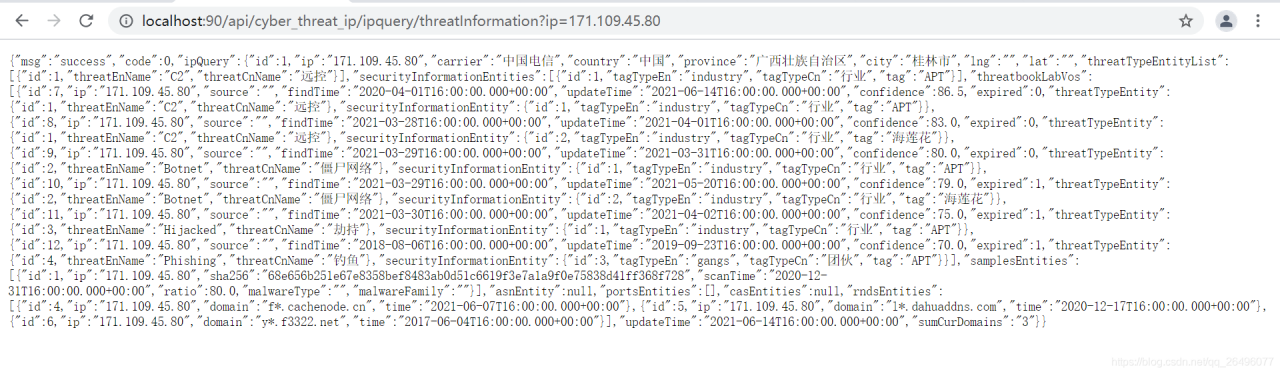
Solution to the problem of using Alibaba gateway but unable to route successfully

One of the important functions of gateway is routing and forwarding. We often encounter the problem of forwarding failure
for example, the front-end configuration is as follows:

 // api interface request address
 window.SITE_CONFIG['baseUrl'] = 'http://localhost:90/api';

The application.yml configuration of gateway is as follows:

server:
  port: 90
spring:
  application:
    name: threat-gateway
  cloud:
    gateway:
      routes:
#        threat-ip microservice routing and forwarding
        - id: ip_route
# The forwarding address of the matching route
          uri: lb://threat-ip
          predicates:
            - Path=/api/cyber_threat_ip/**
          filters:
            - RewritePath=/api/(?<segment>.*),/$\{segment}

The reason for the error may be that the registry (such as Nacos) is not enabled, resulting in the unrecognized name of the microservice
it is revised as follows:

#          Match the forwarding address of the route (8082 is the threat-ip microservice port)
          uri: localhost:8082

As a result, an error was reported because http://, should be added in front of the URI, as follows:

#          Match the forwarding address of the route (8082 is the threat-ip microservice port)
          uri: http://localhost:8082

As a result, you can visit it

of course, the rewritepath path rewriting error in filters may also cause access error. Other reasons will be added later.

Idea unified setting code to UTF-8 code and solution of Tomcat garbled code

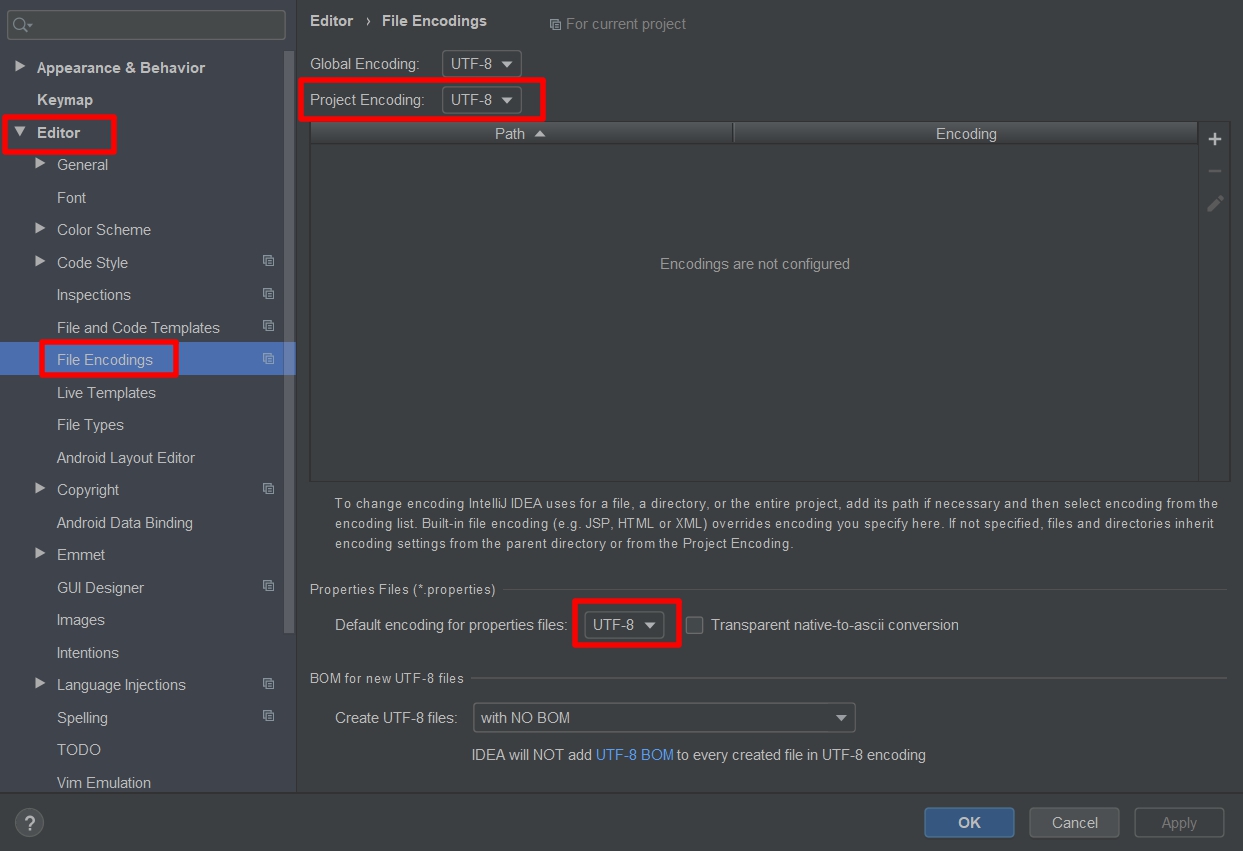
Modify project space code

File-> Settings-> Editor-> File encodings
check the bottom box

Modifying the relevant configuration in Tomcat

Step 1: modify Tomcat configuration file and add UTF-8 code

Change the service.xml configuration in Tomcat's conf folder to add URIEncoding="UTF-8", as follows.

<Connector port="8080" protocol="HTTP/1.1" ​ connectionTimeout="20000" ​ redirectPort="8443" URIEncoding="UTF-8"/>

It was found that the start-up condition remained unchanged

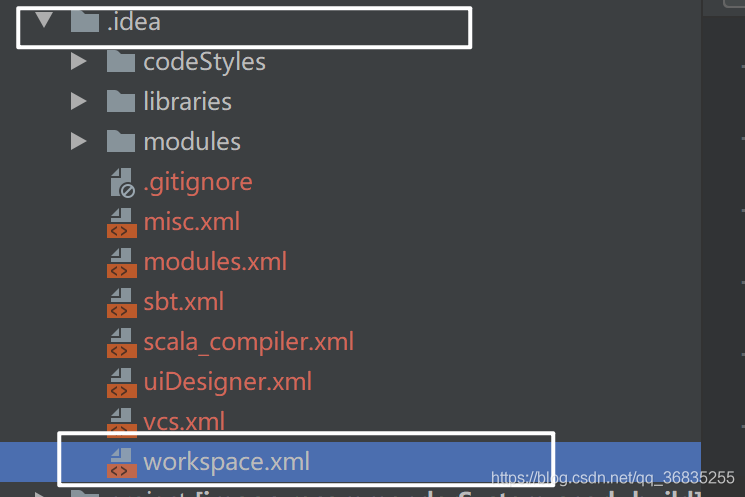
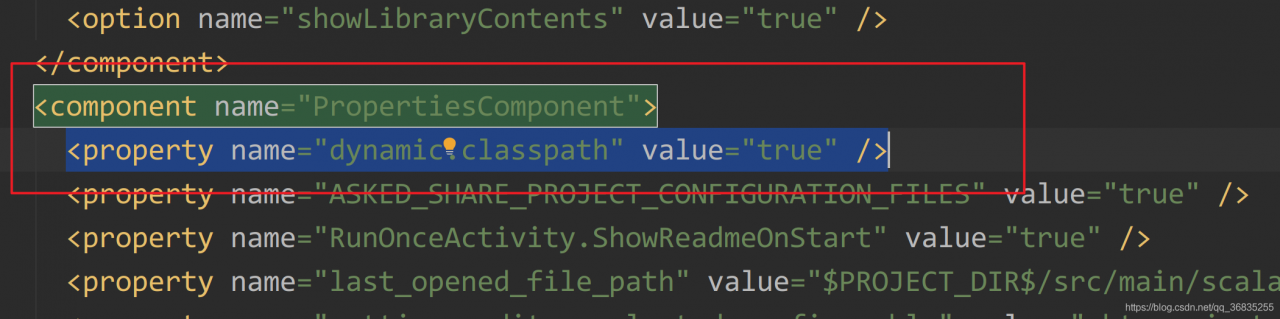
Step 2: change the idea configuration and set the encoding to UTF-8

Refer to the above method

Step 3: modify the parameters in logging. Properties under conf of Tomcat

Change java.util.logging.ConsoleHandler.encoding = GBK

to

java.util.logging.ConsoleHandler.encoding = UTF-8

How to Converte Java objects to jsonnode in Jackson (Four Methods)

Can I convert Java objects to jsonnode objects directly
the only way to solve this problem is to convert the Java object to string and then to jsonnode

ObjectMapper mapper = new ObjectMapper();
//Method 1
String json = mapper.writeValueAsString(Java Object);
JsonNode jsonNode = mapper.readTree(json);
//Method 2
JsonNode jsonNode = mapper.valueToTree(Java Object);
//Method 3
JsonNode jsonNode = mapper.convertValue(Java Object, JsonNode.class);

Examples

	/**
	 * Converting Java objects to JsonNode in Jackson
	 *
	 * @param object
	 * @return
	 */
	public static JsonNode getJsonNode(Object object) {
		ObjectMapper mapper = new ObjectMapper();
		return mapper.convertValue(object, JsonNode.class);

	}

Mybatis Error: Cause: org.apache.ibatis.builder.BuilderException: Error creating document instance.

Error reporting in mybatis learning: cause: org.apache.ibatis.builder.builderexception: error creating document instance. Cause: com.sun.org.apache.xerces.internal.impl.io.malformedbytesequenceexception: byte 1 of 1-byte UTF-8 sequence is invalid.)

Error details solution

Error details

java.lang.ExceptionInInitializerError
	at com.yy.dao.UserDaoTest.test(UserDaoTest.java:16)
	at sun.reflect.NativeMethodAccessorImpl.invoke0(Native Method)
	at sun.reflect.NativeMethodAccessorImpl.invoke(NativeMethodAccessorImpl.java:62)
	at sun.reflect.DelegatingMethodAccessorImpl.invoke(DelegatingMethodAccessorImpl.java:43)
	at java.lang.reflect.Method.invoke(Method.java:498)
	at org.junit.runners.model.FrameworkMethod$1.runReflectiveCall(FrameworkMethod.java:50)
	at org.junit.internal.runners.model.ReflectiveCallable.run(ReflectiveCallable.java:12)
	at org.junit.runners.model.FrameworkMethod.invokeExplosively(FrameworkMethod.java:47)
	at org.junit.internal.runners.statements.InvokeMethod.evaluate(InvokeMethod.java:17)
	at org.junit.runners.ParentRunner.runLeaf(ParentRunner.java:325)
	at org.junit.runners.BlockJUnit4ClassRunner.runChild(BlockJUnit4ClassRunner.java:78)
	at org.junit.runners.BlockJUnit4ClassRunner.runChild(BlockJUnit4ClassRunner.java:57)
	at org.junit.runners.ParentRunner$3.run(ParentRunner.java:290)
	at org.junit.runners.ParentRunner$1.schedule(ParentRunner.java:71)
	at org.junit.runners.ParentRunner.runChildren(ParentRunner.java:288)
	at org.junit.runners.ParentRunner.access$000(ParentRunner.java:58)
	at org.junit.runners.ParentRunner$2.evaluate(ParentRunner.java:268)
	at org.junit.runners.ParentRunner.run(ParentRunner.java:363)
	at org.junit.runner.JUnitCore.run(JUnitCore.java:137)
	at com.intellij.junit4.JUnit4IdeaTestRunner.startRunnerWithArgs(JUnit4IdeaTestRunner.java:68)
	at com.intellij.rt.junit.IdeaTestRunner$Repeater.startRunnerWithArgs(IdeaTestRunner.java:33)
	at com.intellij.rt.junit.JUnitStarter.prepareStreamsAndStart(JUnitStarter.java:230)
	at com.intellij.rt.junit.JUnitStarter.main(JUnitStarter.java:58)
Caused by: org.apache.ibatis.exceptions.PersistenceException: 
### Error building SqlSession.
### Cause: org.apache.ibatis.builder.BuilderException: Error creating document instance.  Cause: com.sun.org.apache.xerces.internal.impl.io.MalformedByteSequenceException: 1 字节的 UTF-8 序列的字节 1 无效。
	at org.apache.ibatis.exceptions.ExceptionFactory.wrapException(ExceptionFactory.java:30)
	at org.apache.ibatis.session.SqlSessionFactoryBuilder.build(SqlSessionFactoryBuilder.java:80)
	at org.apache.ibatis.session.SqlSessionFactoryBuilder.build(SqlSessionFactoryBuilder.java:64)
	at com.yy.utils.MybatisUtils.<clinit>(MybatisUtils.java:20)
	... 23 more
Caused by: org.apache.ibatis.builder.BuilderException: Error creating document instance.  Cause: com.sun.org.apache.xerces.internal.impl.io.MalformedByteSequenceException: 1 字节的 UTF-8 序列的字节 1 无效。
	at org.apache.ibatis.parsing.XPathParser.createDocument(XPathParser.java:260)
	at org.apache.ibatis.parsing.XPathParser.<init>(XPathParser.java:126)
	at org.apache.ibatis.builder.xml.XMLConfigBuilder.<init>(XMLConfigBuilder.java:81)
	at org.apache.ibatis.session.SqlSessionFactoryBuilder.build(SqlSessionFactoryBuilder.java:77)
	... 25 more
Caused by: com.sun.org.apache.xerces.internal.impl.io.MalformedByteSequenceException: 1 字节的 UTF-8 序列的字节 1 无效。
	at com.sun.org.apache.xerces.internal.impl.io.UTF8Reader.invalidByte(UTF8Reader.java:701)
	at com.sun.org.apache.xerces.internal.impl.io.UTF8Reader.read(UTF8Reader.java:567)
	at com.sun.org.apache.xerces.internal.impl.XMLEntityScanner.load(XMLEntityScanner.java:1895)
	at com.sun.org.apache.xerces.internal.impl.XMLEntityScanner.scanData(XMLEntityScanner.java:1375)
	at com.sun.org.apache.xerces.internal.impl.XMLScanner.scanComment(XMLScanner.java:801)
	at com.sun.org.apache.xerces.internal.impl.XMLDocumentFragmentScannerImpl.scanComment(XMLDocumentFragmentScannerImpl.java:1034)
	at com.sun.org.apache.xerces.internal.impl.XMLDocumentFragmentScannerImpl$FragmentContentDriver.next(XMLDocumentFragmentScannerImpl.java:2982)
	at com.sun.org.apache.xerces.internal.impl.XMLDocumentScannerImpl.next(XMLDocumentScannerImpl.java:602)
	at com.sun.org.apache.xerces.internal.impl.XMLDocumentFragmentScannerImpl.scanDocument(XMLDocumentFragmentScannerImpl.java:505)
	at com.sun.org.apache.xerces.internal.parsers.XML11Configuration.parse(XML11Configuration.java:842)
	at com.sun.org.apache.xerces.internal.parsers.XML11Configuration.parse(XML11Configuration.java:771)
	at com.sun.org.apache.xerces.internal.parsers.XMLParser.parse(XMLParser.java:141)
	at com.sun.org.apache.xerces.internal.parsers.DOMParser.parse(DOMParser.java:243)
	at com.sun.org.apache.xerces.internal.jaxp.DocumentBuilderImpl.parse(DocumentBuilderImpl.java:339)
	at org.apache.ibatis.parsing.XPathParser.createDocument(XPathParser.java:258)
	... 28 more


Process finished with exit code -1

When I taught mybatis by myself, I always reported this error because I wrote comments in two. XML files for easy learning

resolvent

Just delete all the Chinese comments in. XML

Just use this to record the error report, so as to avoid wasting time to find solutions when reporting errors again in the future.

[Solved] java.sql.SQLException: Unknown system variable cache query size

Recently, when I was learning springboot + MySQL + mybatis and doing a project with CSDN boss, I encountered an error when connecting to MySQL:

java.sql.SQLException: Unknown system variable 'query_cache_size'

Error reason:
the version of MySQL connector Java is too low, and the database driver version does not match the local MySQL version. Query cache has been out of date since MySQL 5.7.20, but it has been removed since MySQL 8.0
solution:
first, modify the driver name in the application. YML or application. Properties file

driver-class-name: com.mysql.cj.jdbc.Driver  #Linked Drivers for MySQL 8.0 onwards
com.mysql.jdbc.Driver #Older linked drivers

Then modify the driver version in the POM. XML file

<dependency>
			<groupId>mysql</groupId>
			<artifactId>mysql-connector-java</artifactId>
			<version>8.0.25</version>
			<scope>runtime</scope>
		</dependency>

The previous version here is 5. X. just change it to the actual MySQL version number. Mine is 8.0.25
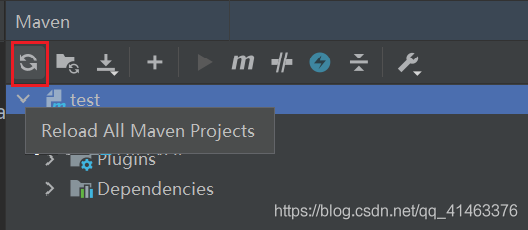
remember to reload Maven’s dependencies after changing. Otherwise, it will still report an error:

Cannot load driver class:com.mysql.cj.jdbc.Driver

Click this icon to reload the dependency

perfect solution!

[Solved] com.mysql.jdbc.exceptions.jdbc4.CommunicationsException: Communications link failure error

This error was encountered during the test of integrating mybatis with springboot

com.mysql.jdbc.exceptions.jdbc4.CommunicationsException: Communications link failure

The last packet successfully received from the server was 317 milliseconds ago.  The last packet sent successfully to the server was 314 milliseconds ago.
	at sun.reflect.NativeConstructorAccessorImpl.newInstance0(Native Method) ~[na:1.8.0_181]
	。。。。
	followed by a long list of

The solution is to add usessl = false to the connection string
or change usessl = true to use = false
for example

 url: jdbc:mysql://localhost:3306/sqmb?useUnicode=true&characterEncoding=utf-8&useSSL=false&serverTimezone=UTC


end!!

Continuous Error 404 in servlet operation [How to Solve]

When writing the project, the servlet has been unable to work normally. After consulting the data for many times, we found the following possibilities.

First, automatic editing is not turned on

In the top project option, check build automatically from the drop-down list

Second: the version of the top header in web.xml is too low

The author uses @ webservlet (urlpatterns =/xxservlet) mode, which does not need to configure servlet file in web.xml, but only version 3.0 or above supports this mode. Therefore, in web.xml, there must be version = 3.1.

You can directly copy the following code to use.

<?xml version="1.0" encoding="UTF-8"?>
<web-app xmlns:xsi="http://www.w3.org/2001/XMLSchema-instance" xmlns="http://xmlns.jcp.org/xml/ns/javaee" xsi:schemaLocation="http://xmlns.jcp.org/xml/ns/javaee http://xmlns.jcp.org/xml/ns/javaee/web-app_3_1.xsd" version="3.1">
  <display-name>Project Name</display-name>
  <welcome-file-list>
    <welcome-file>index.jsp</welcome-file>
  </welcome-file-list>
</web-app>

Third: Tomcat configuration problems

Remove Tomcat from the server and install Tomcat again according to the process.

1. Delete Tomcat

2. Select preference in the top window option. In the pop-up box, select server — runtime environment — and select the original Tomcat — remove

3. Then click Add to configure the Tomcat you downloaded.

I hope eclipse will work properly.