Category Archives: JAVA

[Solved] In case of “transactionmanager” while setting bean property “transactionmanager” error

When learning to write XML transactions in spring, you can refer to ‘transactionmanager’ while setting bean property ‘transactionmanager’

Warning: Exception encountered during context initialization - cancelling refresh attempt: org.springframework.beans.factory.BeanCreationException: Error creating bean with name 'userService' defined in file [D:\Codeworkstation\IDEAGuigu\Spring5\spring5_tedemo1\out\production\spring5_tedemo1\com\atgui\spring\service\UserService.class]: Initialization of bean failed; nested exception is org.springframework.beans.factory.BeanCreationException: Error creating bean with name 'txadvice': Cannot resolve reference to bean 'transactionManager' while setting bean property 'transactionManager'; nested exception is org.springframework.beans.factory.NoSuchBeanDefinitionException: No bean named 'transactionManager' available

org.springframework.beans.factory.BeanCreationException: Error creating bean with name 'userService' defined in file [D:\Codeworkstation\IDEAGuigu\Spring5\spring5_tedemo1\out\production\spring5_tedemo1\com\atgui\spring\service\UserService.class]: Initialization of bean failed; nested exception is org.springframework.beans.factory.BeanCreationException: Error creating bean with name 'txadvice': Cannot resolve reference to bean 'transactionManager' while setting bean property 'transactionManager'; nested exception is org.springframework.beans.factory.NoSuchBeanDefinitionException: No bean named 'transactionManager' available

XML configuration transaction code

 <!-- Create the transaction manager - >
    <bean id="dataSourceTransactionManager" class="org.springframework.jdbc.datasource.DataSourceTransactionManager">
<! -- Inject data source -- >
        <property name="dataSource" ref="dataSource"></property>
    </bean>

    <! -2 Configuration Notifications-->
    <tx:advice id="txadvice">
        <! -- Configure transaction parameters -->
        <tx:attributes>
            <! -- Specify which rule's method to add a transaction on top of -->
            <tx:method name="account" propagation="REQUIRED"/>
            <! --<tx:method name="account*"/>-->
        </tx:attributes>
    </tx:advice>

    <! -3 Configuring entry points and cut-planes -->
    <aop:config>
        <! -- Configure entry points -->
        <aop:pointcut id="pt" expression="execution(* com.atgui.spring.service.UserService.*(...))" />
        <! --configuration cutscene ->
        <aop:advisor advice-ref="txadvice" pointcut-ref="pt"/>
    </aop:config>

Service layer code

@Service
//@Transactional
public class UserService {

    @Autowired
    private UserDao userDao;

    public void account(){

        //Reduce money
        userDao.reducemo();
        int i=13/0;
        //Increase money
        userDao.addmo();
    }
}

The above error appears when running

You can modify the error code section in XML

 <!-- Creating a Transaction Manager-->
    <bean id="dataSourceTransactionManager" class="org.springframework.jdbc.datasource.DataSourceTransactionManager">
<!--        Injecting data sources-->
        <property name="dataSource" ref="dataSource"></property>
    </bean>

Change the above id = “datasourcetransactionmanager” to id = “transactionmanager”\

That’s it

    <bean id="transactionManager" class="org.springframework.jdbc.datasource.DataSourceTransactionManager">
<!--        Injecting data sources-->
        <property name="dataSource" ref="dataSource"></property>
    </bean>
``

This will solve the above problem

[Solved] ln: failed to create symbolic link ‘/usr/bin/java’: File exists

Install Java environment in CentOS, add soft link times: ln: failed to create symbolic link ‘/ usr/bin/Java’: file exists

[root@iZbp12f9404um3f6avsm29Z /]# ln -s /usr/local/java/jdk1.8.0_291/bin/java /usr/bin/java
ln: failed to create symbolic link ‘/usr/bin/java’: File exists

Failed to create symbolic link, file exists.

-s   The meaning of the command is to add symbolic links to play the role of a link

resolvent

[root@iZbp12f9404um3f6avsm29Z /]# ln -sf /usr/local/java/jdk1.8.0_291/bin/java /usr/bin/java
[root@iZbp12f9404um3f6avsm29Z /]# java -version
java version "1.8.0_291"
Java(TM) SE Runtime Environment (build 1.8.0_291-b10)
Java HotSpot(TM) 64-Bit Server VM (build 25.291-b10, mixed mode)

Modify the – s command to – SF command- The f command means to enforce, which means to create if it does not exist and to override if it does exist

So far, the creation of soft connection is completed

How to Solve Errors encountered by maven

Could not transfer artifact
org.apache.maven.surefire:surefire-junit-platform:pom:2.22.2 from/to
alimaven (http://maven.aliyun.com/nexus/content/groups/public/):
java.lang.RuntimeException: Unexpected error:
java.security.InvalidAlgorithmParameterException: the trustAnchors
parameter must be non-empty

Solution:

Just load this dependency

            <plugin>
                <groupId>org.apache.maven.plugins</groupId>
                <artifactId>maven-surefire-plugin</artifactId>
                <configuration>
                    <skipTests>true</skipTests>
                </configuration>
            </plugin>

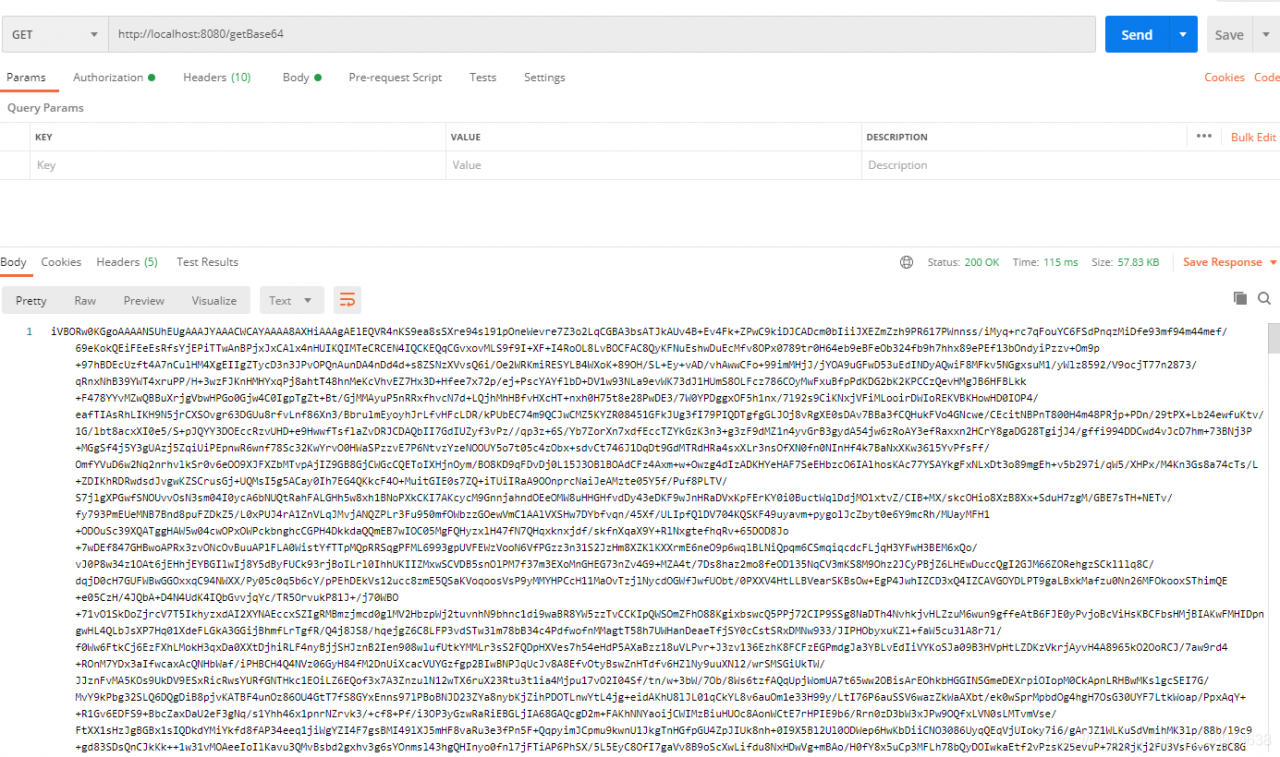
Java implementation of inputsteam to Base64

1 inputsteam to Base64

    /**
     * InputStream to Base64
     *
     * @param inputStream
     * @return
     */
    public static String toBase64(InputStream inputStream) {
        try {
            //switch to base64
            byte[] bytes = IOUtils.toByteArray(inputStream);
            return Base64.getEncoder().encodeToString(bytes);
        } catch (Exception e) {
            e.printStackTrace();
            return "";
        }
    }

2 debugging code

    /**
     * get Base64
     *
     * @return
     * @throws IOException
     */
    @GetMapping("/getBase64")
    public String getBases64() throws IOException {
        InputStream inputStream = new ClassPathResource("/img/logo.jpg").getInputStream();
        return toBase64(inputStream);
    }

3 picture address

4 debugging results

[Solved] Kafka Error: Discovered coordinator XXXXX:9092 (id: 2147483647 rack: null) for group itstyle.

Error information:

Discovered coordinator DESKTOP-NRTTBDM:9092 (id: 2147483647 rack: null) for group itstyle.

reason:

The host of Kafka running on windows is the machine name, not the IP address

So it will lead to error reporting

Desktop-nrttbdm is the host name of the server where the Kafka instance is located
and 9092 is the port of Kafka, that is, the connection address of Kafka.

Solution

Modify the hosts file directly

The windows hosts file is located in

C:\Windows\System32\drivers\etc\hosts

Open it with administrator’s permission and append the corresponding relationship between IP and host name

Add the

172.18.0.52 DESKTOP-NRTTBDM

Restart the service again

Problem solved!

Solution to javax.naming.noinitialcontextexception error

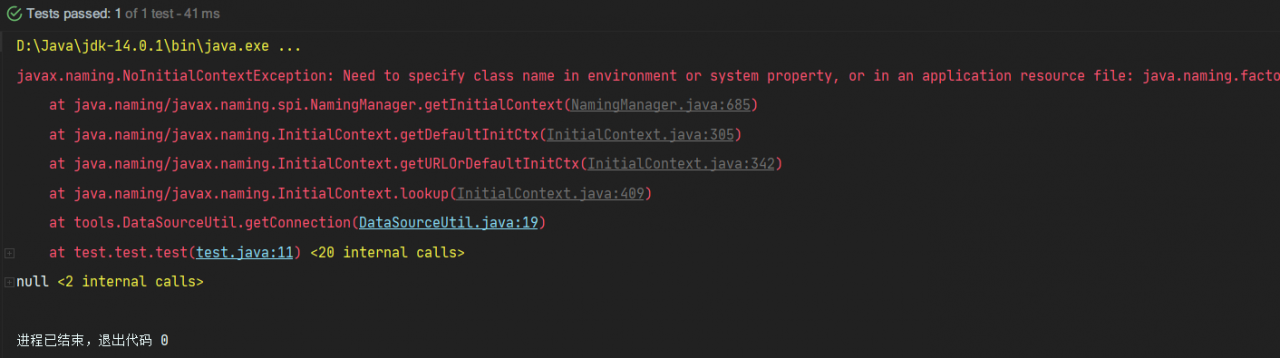
When using DBCP to configure data sources, a test class was written. In the test class, DBCP was called to get the database connection error: javax.naming.NoInitialContextException: Need to specify class name in environment or or in,

Check whether the dependent jar package is imported:
commons-dbcp2-2.8.0. Jar
commons-pool2-2.10.0. Jar
mysql8.0 jar package
mysql5.0 jar package

Test code:

package test;

import org.junit.Test;
import tools.DataSourceUtil;

import java.sql.Connection;

public class test {
    @Test
    public void test(){
        Connection connection = DataSourceUtil.getConnection();
        System.out.println(connection);
    }
}

Database source code:

package tools;

import javax.naming.InitialContext;
import javax.naming.NamingException;
import javax.sql.DataSource;
import java.sql.Connection;
import java.sql.SQLException;

public class DataSourceUtil {

    // Get the connection
    public static Connection getConnection() {
        // ctrl + alt + t --- select 6
        // instantiate the object of the initial context
        Connection connection = null;
        try {
            InitialContext initialContext = new InitialContext();
            // Get the data in the configuration and get the object object
            Object lookup = initialContext.lookup("java:comp/env/jdbc/easybuy");
            // unboxing strong turn to get the connection pool
            DataSource ds = (DataSource) lookup;
            // get the connection pool to give me a connection
            connection = ds.getConnection();
        } catch (NamingException e) {
            e.printStackTrace();
        } catch (SQLException throwables) {
            throwables.printStackTrace();
        }
        // Return to link
        return connection;
    }

    // close connection
    public static void closeConnection(Connection connection) {
        if (connection != null) {
            try {
                connection.close();
            } catch (SQLException throwables) {
                throwables.printStackTrace();
            }
        }
    }
}

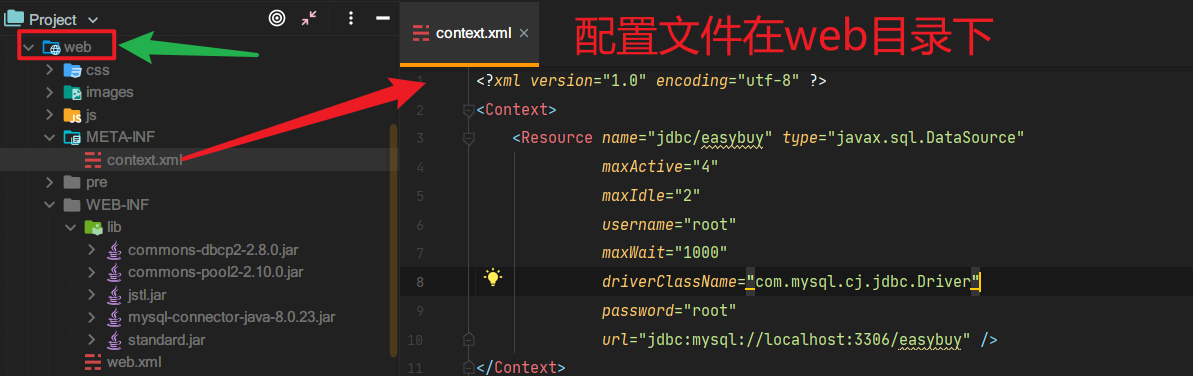
Bug map:

reason:

When DBCP is used to connect to the database, the main function is always used to test. The initialcontext is only available in the context of the web application server. While the configuration file is in the web directory, it is obvious that if initialcontext wants to access the configuration file, it must run on the web server to connect to the database and get the connection object

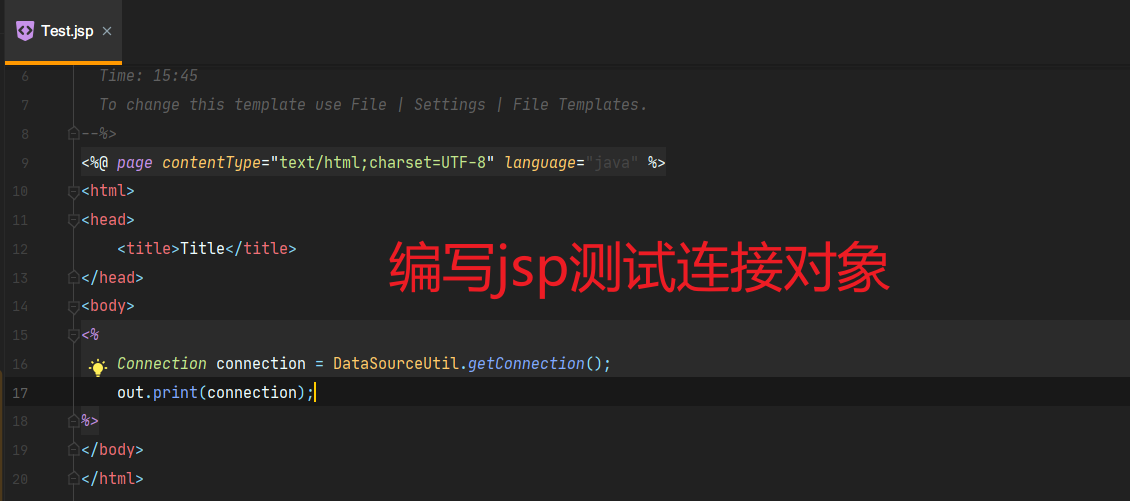
It can’t be tested directly with the main function, it can only be displayed in Tomcat or servlet or JSP

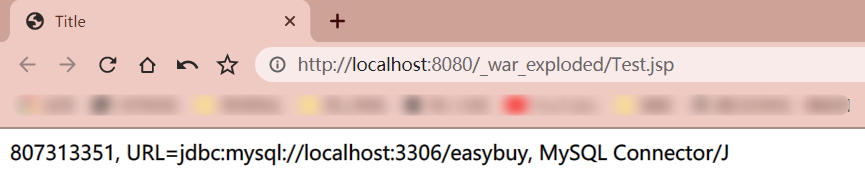
Running results:

#Successfully get the connection object!

Frequent log swiping after Nacos client starts [How to Solve]

# 1, according to the heartbeat log, locate the package name of the log output
c.a.n.client.config.impl.ClientWorker : get changedGroupKeys:[]

# 2. Search the package path where ClientWorker is located in IDEA  
package com.alibaba.nacos.client.config.impl;

# 3. Set the package path logging to ERROR or WARN in any configuration file format
# Nacos registry client heartbeat logging is disabled get changedGroupKeys:[] 
logging:
  level:
    com.alibaba.nacos.client.config.impl: WARN
  
# 4. If it is Spring Cloud Gateway then you need to configure it as logging:
  level:
    com.alibaba.nacos.client.*: WARN    

[Solved] javax.servlet.ServletException: Servlet[springmvc] Servlet.init()

1. There are many cases of this exception. First of all,
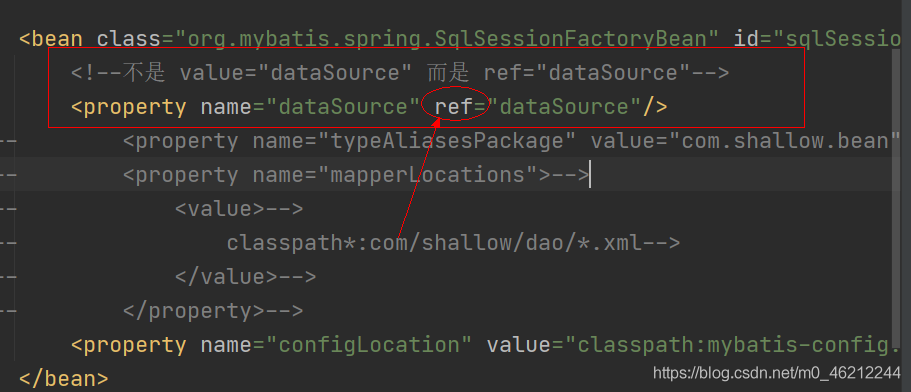
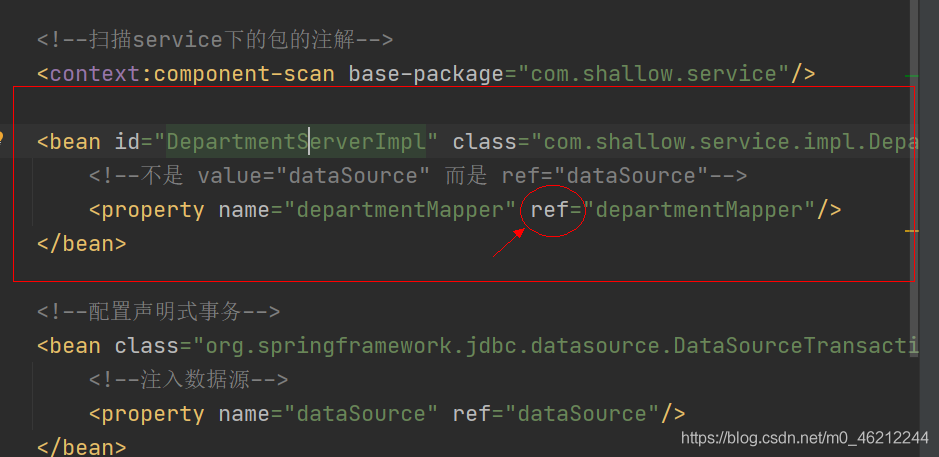
when configuring sqlsessionfactorybean, you should not pay attention to the problem (see the figure)

the same as above, when configuring other places, you also use ref as value. For example,

PS: combined with the above, it can discharge itself. Pay attention to whether it is this problem

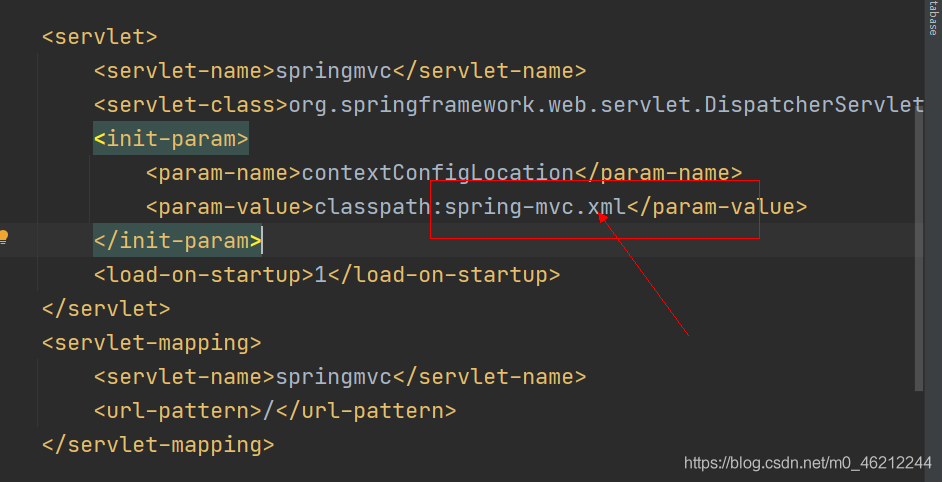
2. Problems that we didn’t pay attention to when configuring servlets with web.xml

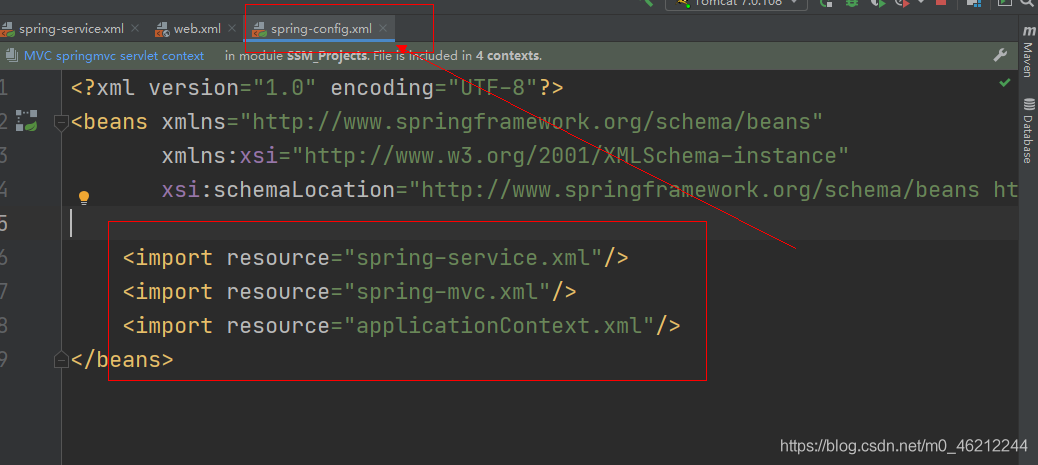
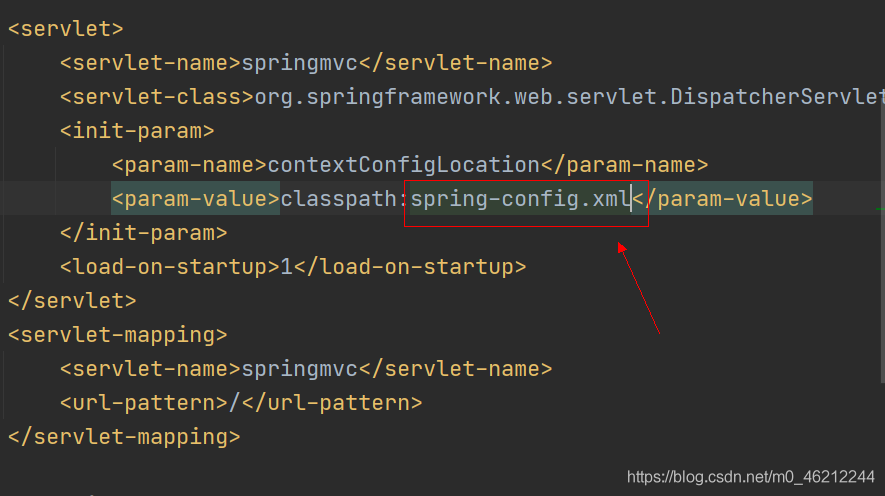
as shown in the figure: after the integration, the configuration file should not be MVC, but should be all. Generally, when creating a configuration file, there will be a prompt in the upper right corner, which may cause this kind of problem if you don’t pay attention to it. Generally, my solution is to use the import tag (as shown in the figure)

import all the configuration files into a general file
and then import the web and XML into the general file as follows

PS: there are some special reasons, which vary from person to person. Hope someone can add!

Not showing null elements JAVA [How to Solve]

Reason:
the list set allows null values. When you add null values to the list, you will report an error after a series of processing

Not showing null elements

Solution:

list.removeAll(Collections.singleton(null));

Before you need to process the list, just use this code
removeAll is to remove all elements in brackets. If the parameter in brackets is empty, it means to remove all elements

The problem of date format conversion between springboot and front end

A unique experience of stepping on a pit

When there is a date of string type in the current page request, the Java backend needs to convert the string type to the date type. In springboot, the convertor interface is implemented through the custom dateconverterconfig class, which is put into the spring container for conversion.

! Here’s the key point:
when I knock step by step, there is still an exception * * here was an unexpected error (type = bad request, status = 400). * * *. Finally, I found that the converter’s package was wrong
remember: import org.springframework.core.convert.converter.converter;

package com.jiansheng.util;

import org.springframework.core.convert.converter.Converter;
import org.springframework.stereotype.Component;

import java.text.DateFormat;
import java.text.SimpleDateFormat;
import java.util.ArrayList;
import java.util.Date;
import java.util.List;

/**
 * @Author: Jiansheng
 * @DateTime: 2021/6/27 10:35
 * @Description:Date
 */
@Component
public class DateConverterConfig implements Converter<String, Date> {

    private static final List<String> formarts = new ArrayList<>(4);
    static{
        formarts.add("yyyy-MM");
        formarts.add("yyyy-MM-dd");
        formarts.add("yyyy-MM-dd HH:mm");
        formarts.add("yyyy-MM-dd HH:mm:ss");
    }

    @Override
    public Date convert(String source) {
        String value = source.trim();
        if ("".equals(value)) {
            return null;
        }
        if(source.matches("^\\d{4}-\\d{1,2}$")){
            return parseDate(source, formarts.get(0));
        }else if(source.matches("^\\d{4}-\\d{1,2}-\\d{1,2}$")){
            return parseDate(source, formarts.get(1));
        }else if(source.matches("^\\d{4}-\\d{1,2}-\\d{1,2} {1}\\d{1,2}:\\d{1,2}$")){
            return parseDate(source, formarts.get(2));
        }else if(source.matches("^\\d{4}-\\d{1,2}-\\d{1,2} {1}\\d{1,2}:\\d{1,2}:\\d{1,2}$")){
            return parseDate(source, formarts.get(3));
        }else {
            throw new IllegalArgumentException("Invalid boolean value '" + source + "'");
        }
    }

    /**
     * Formatting the date
     * @param dateStr String Character type date
     * @param format String Format
     * @return Date Date
     */
    public  Date parseDate(String dateStr, String format) {
        Date date=null;
        try {
            DateFormat dateFormat = new SimpleDateFormat(format);
            date = dateFormat.parse(dateStr);
        } catch (Exception e) {

        }
        return date;
    }

}

Jiansheng

[Solved] Cannot find class: com.mysql.jdbc.Driver

When using mybatis to write the entry instance for the first time, I encountered the error of cannot find class: com.mysql.jdbc.driver database property configuration file content:

jdbc.driver=com.mysql.cj.jdbc.Driver
jdbc.url=jdbc:mysql://localhost:3306/exercise?serverTimezone=GMT%2B8
jdbc.user=root
jdbc.password=1996mysqlyue

Mybatis configuration part:

            <!--Four basic information for connecting to the database-->
            <dataSource type="POOLED">
                <property name="driver" value="${jdbc.driver}"/>
                <property name="url" value="${jdbc.url}"/>
                <property name="username" value="${jdbc.user}"/>
                <property name="password" value="${jdbc.password}"/>
            </dataSource>

Confirm that there is no space in the quotation marks of the value value in the configuration file, and there is no space in the configuration information of the database property file, but still report an error
subsequent solution:
modified the dependency version of MySQL connector introduced by Maven.