Category Archives: JAVA

Mybatis-plus: How to Execute Native SQL

Define the method to execute in the mapper file

@Repository
public interface ZbArticleCEIResultPerformanceMapper extends BaseMapper<ZbArticleCEIResultPerformance> {

    @Select({"${sql}"})
    @ResultType(ArrayList.class)
    List<ZbArticleCEIResultPerformance> executeQuery(@Param("sql") String sql);

}

maven.TestGenerateMojo.execute(TestGenerateMojo.java:65) [How to Solve]

When packing the module, the following error occurs:

Error:(80,77) java:, org.springframework.aot.maven.TestGenerateMojo.execute(TestGenerateMojo.java:65), org.apache.maven.plugin.DefaultBuildPluginManager.executeMojo(DefaultBuildPluginManager.java:137), org.apache.maven.lifecycle.internal.MojoExecutor.execute(MojoExecutor.java:210), org.apache.maven.lifecycle.internal.MojoExecutor.execute(MojoExecutor.java:156), org.apache.maven.lifecycle.internal.MojoExecutor.execute(MojoExecutor.java:148), org.apache.maven.lifecycle.internal.LifecycleModuleBuilder.buildProject(LifecycleModuleBuilder.java:117), org.apache.maven.lifecycle.internal.LifecycleModuleBuilder.buildProject(LifecycleModuleBuilder.java:81), org.apache.maven.lifecycle.internal.builder.singlethreaded.SingleThreadedBuilder.build(SingleThreadedBuilder.java:56), org.apache.maven.lifecycle.internal.LifecycleStarter.execute(LifecycleStarter.java:128), org.apache.maven.DefaultMaven.doExecute(DefaultMaven.java:305), org.apache.maven.DefaultMaven.doExecute(DefaultMaven.java:192), org.apache.maven.DefaultMaven.execute(DefaultMaven.java:105), org.apache.maven.cli.MavenCli.execute(MavenCli.java:957), org.apache.maven.cli.MavenCli.doMain(MavenCli.java:289), org.apache.maven.cli.MavenCli.main(MavenCli.java:193), sun.reflect.NativeMethodAccessorImpl.invoke0(Native Method), sun.reflect.NativeMethodAccessorImpl.invoke(NativeMethodAccessorImpl.java:62), sun.reflect.DelegatingMethodAccessorImpl.invoke(DelegatingMethodAccessorImpl.java:43), java.lang.reflect.Method.invoke(Method.java:498), org.codehaus.plexus.classworlds.launcher.Launcher.launchEnhanced(Launcher.java:282), org.codehaus.plexus.classworlds.launcher.Launcher.launch(Launcher.java:225), org.codehaus.plexus.classworlds.launcher.Launcher.mainWithExitCode(Launcher.java:406), org.codehaus.plexus.classworlds.launcher.Launcher.main(Launcher.java:347), org.codehaus.classworlds.Launcher.main(Launcher.java:47)]

Later corrected the pom.xml, for build, there will be a plug-in comments up on the good:

<build>
        <plugins>
            <plugin>
                <groupId>org.springframework.boot</groupId>
                <artifactId>spring-boot-maven-plugin</artifactId>
                <version>2.1.6.RELEASE</version>
                <configuration>
                    <classifier>${repackage.classifier}</classifier>
                </configuration>
            </plugin>

			<plugin>
				<groupId>org.apache.maven.plugins</groupId>
				<artifactId>maven-compiler-plugin</artifactId>
				<configuration>
					<source>1.8</source>
					<target>1.8</target>
				</configuration>
			</plugin>

            <!--<plugin>
                <groupId>org.springframework.experimental</groupId>
                <artifactId>spring-aot-maven-plugin</artifactId>
                <version>${spring-native.version}</version>
                <executions>
                    <execution>
                        <id>test-generate</id>
                        <goals>
                            <goal>test-generate</goal>
                        </goals>
                    </execution>
                    <execution>
                        <id>generate</id>
                        <goals>
                            <goal>generate</goal>
                        </goals>
                    </execution>
                </executions>
            </plugin>-->
            <plugin>
                <groupId>org.apache.maven.plugins</groupId>
                <artifactId>maven-surefire-plugin</artifactId>
                <version>2.22.2</version>
                <configuration>
                    <skip>true</skip>
                    <argLine>-Dfile.encoding=UTF-8</argLine>
                </configuration>
            </plugin>
        </plugins>
    </build>

At present, it is judged that the plug-in I commented out reported an error.

JAVA: How to Use Minio to upload pictures

In the recent project, the Minio drawing bed server is used to upload pictures. Make a record here. The environment of the project is as follows:
Nacos, gradle, springboot, mybatis, MySQL

First, you need to add Minio dependency in gradle. Version 3.0.10 is used in this project

compile 'io.minio:minio:3.0.10'

Then add the configuration class of minioutils in the project to call the service of Minio and provide the interface for calling Minio to upload pictures. All the parameters required in the project are written in the Nacos configuration center. Therefore, take the corresponding parameters from the Nacos configuration file in the annotation form of @ nacosvalue and call the interface for uploading pictures, Returns the URL of a Minio domain name/bucket name/file name stored in the bucket

import com.alibaba.nacos.api.config.annotation.NacosValue;
import com.iid.common.helper.IdHelper;
import io.minio.MinioClient;
import io.minio.errors.*;
import lombok.extern.slf4j.Slf4j;
import org.springframework.stereotype.Component;
import org.xmlpull.v1.XmlPullParserException;

import javax.annotation.PostConstruct;
import java.io.IOException;
import java.io.InputStream;
import java.security.InvalidKeyException;
import java.security.NoSuchAlgorithmException;

/**
 * @ClassName MinioUtils
 * @Description: TODO
 * @Author XuJianSong
 * @Date 2021-01-07
 * @Version V1.0
 **/
@Slf4j
@Component
public class MinioUtils {
    private MinioClient minioClient;
    @NacosValue(value = "${ymukj.minio.endpoint}")
    private String endPoint;
    @NacosValue(value = "${ymukj.minio.accessKey}")
    private String accessKey;
    @NacosValue(value = "${ymukj.minio.secretKey}")
    private String secretKey;
    @NacosValue(value = "${ymukj.minio.preUrl}")
    private String preUrl;

    @PostConstruct
    public void initMinioClient() {
        try {
            minioClient = new MinioClient(endPoint, accessKey, secretKey);
        } catch (InvalidEndpointException e) {
            log.error(e.getMessage(), e);
        } catch (InvalidPortException e) {
            log.error(e.getMessage(), e);
        }
    }

    public String uploadFile(String bucketName, String objName, InputStream inputStream, Long lenght, String contentType) {
        // Use putObject to upload a file to the storage bucket.
        try {
            minioClient.putObject(bucketName, objName, inputStream, lenght, contentType);
            boolean isExist = minioClient.bucketExists(bucketName);
            if (!isExist) {
                minioClient.makeBucket(bucketName);
            }
            return preUrl+"/"+objName;
        } catch (Exception e) {
            e.printStackTrace();
            log.info(">>>>>>>>>>>>>>>>>>>>>>>>>Error:" + e);
            return null;
        }
    }
}

In Minio, there is the concept of “bucket”. The so-called bucket is the folder on the Minio drawing bed. If the bucket name passed to the parameter already exists on the drawing bed, the uploaded picture will be stored in the current bucket
if the bucket name transferred to the parameter does not exist on the drawing bed, the bucket will be created in the source code method first and then saved
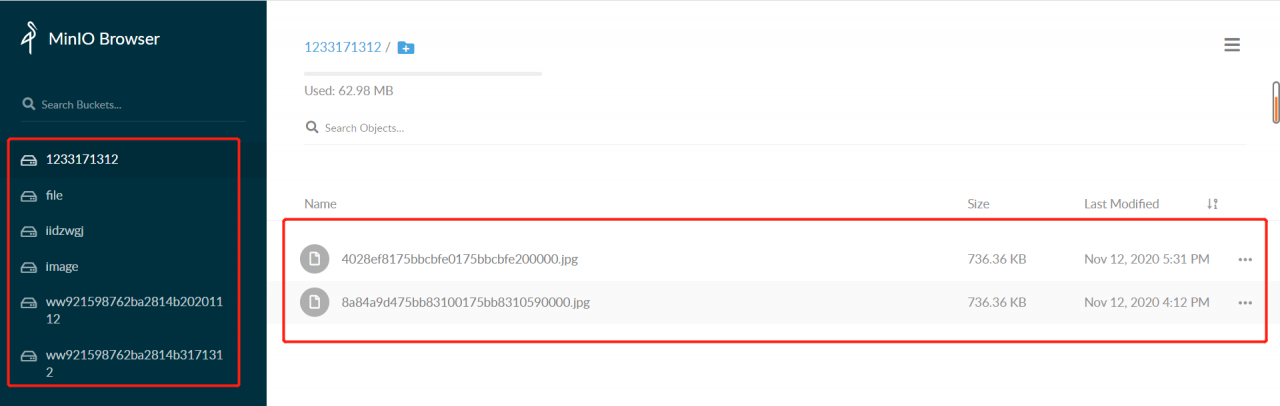
As shown in the figure: the bucket in the Minio drawing bed is on the left, and the files in the bucket are on the right. Minio supports uploading all files. Video and document files are OK, but these functions are not involved in the project, which will be studied later

The next step is to write the interface for uploading pictures in the project. Because it does not involve the operation of the database, I directly wrote all the interfaces in the controller layer and did not call the method of the service layer
the controller layer interface receives the file parameters from the front end, and then processes the files according to the requirements of the parameters received by the method for uploading pictures in the minioutils configuration class, First, we can see that the upload image interface in the miniutils configuration file requires four parameters: bucket, objname, InputStream, lenght and contenttype. The four parameters are: bucket name, file name uploaded and saved to bucket, file input stream and file type. If the upload is successful, a URL will be returned. Put the URL in the browser to directly open the picture. If you need to use the picture in the project, you can directly store the URL in the database and get it from the database later

public GlobalResponse uploadPic(MultipartFile file) {
    String bucket = "pic";
    String filename = file.getOriginalFilename();
    String[] exts = filename.split("\\.");
    String ext = exts[exts.length - 1];
    String caselsh = filename.substring(0,filename.lastIndexOf("."));
    String objName = SystemHelper.now() + caselsh + "." + ext;
    log.info(">>>>>>>>>>>>>>>>>>>>>>>>>>objName:" + objName);
    String contentType = file.getContentType();
    InputStream inputStream = null;
    Long lenght = null;
    try {
        inputStream = file.getInputStream();
        lenght = Long.valueOf(inputStream.available());
    } catch (IOException e) {
        e.printStackTrace();
    }
    String picUrl = minioUtils.uploadFile(bucket, objName, inputStream, lenght, contentType);
    log.info(">>>>>>>>>>>>>>>>>>>>>>>>>>picUrl:" + picUrl);
    return GlobalResponse.success(picUrl);
}

Note that the file name uploaded to the bucket should not be repeated! Don’t repeat! Don’t repeat
because duplicate file names can cause a problem: for example, if you upload a picture a.png first and save it in the bucket with the name 111.png, then the Minio domain name/bucket name/111.png can directly open the picture a.png, but if you upload a picture B.png and save it to the same name 111.png, then the Minio domain name/bucket name/111.png opens the picture B.png, If the picture a.png has been stored in the database and has been used, the consequences can be imagined
therefore, the solution used in the interface is to use the form of timestamp + original file name + suffix. Because the timestamp is 13 bits and milliseconds, even if a file with the same name is uploaded, there will be no problem that the file name saved in the bucket will be repeated

That’s all for this sharing. If you have any mistakes, please correct them!
Flink Error: is not serializable. The object probably contains or references non serializable fields.

Today, a colleague suddenly reported such an error. At first, he really didn’t react. Member variables can’t be serialized….

Exception in thread "main" org.apache.flink.api.common.InvalidProgramException: java.lang.ref.ReferenceQueue$Lock@11fc564b is not serializable. The object probably contains or references non serializable fields.
	at org.apache.flink.api.java.ClosureCleaner.clean(ClosureCleaner.java:151)
	at org.apache.flink.api.java.ClosureCleaner.clean(ClosureCleaner.java:126)
	at org.apache.flink.api.java.ClosureCleaner.clean(ClosureCleaner.java:126)
	at org.apache.flink.api.java.ClosureCleaner.clean(ClosureCleaner.java:126)
	at org.apache.flink.api.java.ClosureCleaner.clean(ClosureCleaner.java:126)
	at org.apache.flink.api.java.ClosureCleaner.clean(ClosureCleaner.java:126)
	at org.apache.flink.api.java.ClosureCleaner.clean(ClosureCleaner.java:71)
	at org.apache.flink.streaming.api.environment.StreamExecutionEnvironment.clean(StreamExecutionEnvironment.java:1821)
	at org.apache.flink.streaming.api.datastream.DataStream.clean(DataStream.java:188)
	at org.apache.flink.streaming.api.datastream.KeyedStream.process(KeyedStream.java:398)
	at org.apache.flink.streaming.api.datastream.KeyedStream.process(KeyedStream.java:374)
	at com.xintujing.flinkdemo.text.UserCount_3.main(UserCount_3.java:53)
Caused by: java.io.NotSerializableException: java.lang.ref.ReferenceQueue$Lock
	at java.io.ObjectOutputStream.writeObject0(ObjectOutputStream.java:1184)
	at java.io.ObjectOutputStream.writeObject(ObjectOutputStream.java:348)
	at org.apache.flink.util.InstantiationUtil.serializeObject(InstantiationUtil.java:586)
	at org.apache.flink.api.java.ClosureCleaner.clean(ClosureCleaner.java:133)
	... 11 more

When you see this error, you are in an ignorant state and cannot be serialized. What do you mean?

First, analyze the problem. He tells us that a class cannot be serialized,

What happens if a member in a class does not implement a serializable interface?A simple question about the Java serialization process. If you try to serialize an object that implements a serializable class, but the object contains a reference to a non serializable class, a non serializable exception notserializableexception will be thrown at run time,

Well, if you take an object as a member variable of another object, all member variables of the object must be serializable. If the member variables cannot be serialized, this error will be reported. So. Don’t treat non serializable things as member variables.

[Solved] Failed to execute goal org.apache.maven.plugins:maven-install-plugin:2.4:install (default-cli) on

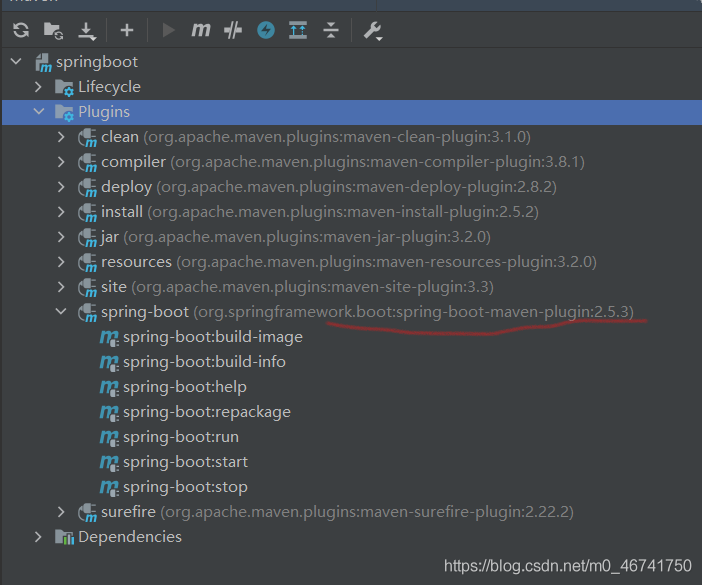
This problem bothered me for a while. What I want to say is that I couldn’t find the problem when deploying springboot through Maven. Therefore, after quickly arranging a springboot project, I found that the error will still be reported

So I looked at this version number and added it in and it worked
   <build>
        <plugins>
            <plugin>
                <groupId>org.springframework.boot</groupId>
                <artifactId>spring-boot-maven-plugin</artifactId>
<version>2.5.3</version>
            </plugin>
        </plugins>
    </build>

[Solved] Java.lang.IllegalStateException: getReader() has already been called for this request

For the project, it is necessary to obtain the data in the request body in the interceptor for data verification, because the @ requestbody annotation is used in the self-defined controller, resulting in an error in the project. The content of the error is: Java. Lang. IllegalStateException: getreader() has already been called for this request

After consulting the data, it is found that the getReader and getinputstream in the request are obtained by stream. After reading once, they can’t be used again. The solution is:

Step 1: define a filter in which a self-defined request is passed in. The self-defined request inherits the wrapper class httpservletrequestwrapper and rewrites the getinputstream and getReader methods
the filter code is as follows:

package com.chinastock.filter;

import com.chinastock.util.CustomHttpServletRequestWrapper;

import javax.servlet.*;
import javax.servlet.http.HttpServletRequest;
import java.io.IOException;

/**
 * @author zhoule
 * @description: handle request
 */
public class IMTAFilter implements Filter {
    @Override
    public void doFilter(ServletRequest servletRequest, ServletResponse servletResponse, FilterChain filterChain) throws IOException, ServletException {
        ServletRequest requestWrapper = null;
        if(servletRequest instanceof HttpServletRequest) {
            requestWrapper = new CustomHttpServletRequestWrapper((HttpServletRequest) servletRequest);
        }
        if(requestWrapper == null) {
            filterChain.doFilter(servletRequest, servletResponse);
        } else {
            filterChain.doFilter(requestWrapper, servletResponse);
        }
    }
}

The custom request code is as follows:

import javax.servlet.ReadListener;
import javax.servlet.ServletInputStream;
import javax.servlet.http.HttpServletRequest;
import javax.servlet.http.HttpServletRequestWrapper;
import java.io.*;
import java.nio.charset.StandardCharsets;

/**
 * @author zhoule
 * @description: Custom request wrapper for processing messages in the request body
 */
public class CustomHttpServletRequestWrapper extends HttpServletRequestWrapper {
    private byte[] body;

    public CustomHttpServletRequestWrapper(HttpServletRequest request) throws IOException
    {
        super(request);

        BufferedReader reader = request.getReader();
        try (StringWriter writer = new StringWriter()) {
            int read;
            char[] buf = new char[1024 * 8];
            while ((read = reader.read(buf)) != -1) {
                writer.write(buf, 0, read);
            }
            this.body = writer.getBuffer().toString().getBytes();
        }
    }

    public String getBody(){
        return new String(body, StandardCharsets.UTF_8);
    }

    @Override
    public ServletInputStream getInputStream() throws IOException
    {
        final ByteArrayInputStream byteArrayInputStream = new ByteArrayInputStream(body);
        return new ServletInputStream()
        {
            @Override
            public boolean isFinished() {
                return false;
            }

            @Override
            public boolean isReady() {
                return false;
            }

            @Override
            public void setReadListener(ReadListener readListener) {

            }

            public int read() throws IOException
            {
                return byteArrayInputStream.read();
            }
        };
    }

    @Override
    public BufferedReader getReader() throws IOException
    {
        return new BufferedReader(new InputStreamReader(this.getInputStream()));
    }
}

The second step is to write the interceptor of the project. Some codes of the interceptor are as follows:

    @Override
    public boolean preHandle(HttpServletRequest request, HttpServletResponse response, Object handler) throws Exception {
        CustomHttpServletRequestWrapper wrapper = (CustomHttpServletRequestWrapper) request;
        String body = wrapper.getBody();
        System.out.println(body);
        return true;
    }

Defining a bean of type ‘org.springframework.data.redis.core.RedisTemplate‘ in your configuration.

The spring-boot integration redis startup project reports an error with the following message:
defining a bean of type 'org.springframework.data.redis.core.RedisTemplate' in your configuration.
orConsider defining a bean of type 'org.springframework.data.redis.core.StringRedisTemplate' in your configuration.
Modify the pom file
Change the

        <dependency>
            <groupId>org.springframework.data</groupId>
            <artifactId>spring-data-redis</artifactId>
        </dependency>

is changed to

        <dependency>
            <groupId>org.springframework.boot</groupId>
            <artifactId>spring-boot-starter-data-redis</artifactId>
        </dependency>

After modification, if you want to customize redistemplate, you can refer to the following configuration


    @Bean
    public RedisTemplate<String, Object> template(RedisConnectionFactory factory) {
        // Create RedisTemplate<String, Object>object
        RedisTemplate<String, Object> template = new RedisTemplate<>();
        // Configuring the connection factory
        template.setConnectionFactory(factory);
        // Define the Jackson2JsonRedisSerializer serialization object
        Jackson2JsonRedisSerializer<Object> jacksonSeial = new Jackson2JsonRedisSerializer<>(Object.class);
        ObjectMapper om = new ObjectMapper();
        // Specify the field, field, get and set to be serialized, and the range of modifiers, ANY of which are included in private and public
        om.setVisibility(PropertyAccessor.ALL, JsonAutoDetect.Visibility.ANY);
        // Specify the type of serialized input, the class must be non-final modified, final modified class, such as String, Integer, etc. will report an exception
        om.activateDefaultTyping(LaissezFaireSubTypeValidator.instance, ObjectMapper.DefaultTyping.NON_FINAL, JsonTypeInfo.As.WRAPPER_ARRAY);
        jacksonSeial.setObjectMapper(om);
        StringRedisSerializer stringSerial = new StringRedisSerializer();
        // redis key Serialization method used stringSerial
        template.setKeySerializer(stringSerial);
        // redis value Serialization method usedjackson
        template.setValueSerializer(jacksonSeial);
        // redis hash key Serialization method usedstringSerial
        template.setHashKeySerializer(stringSerial);
        // redis hash value Serialization method usedjackson
        template.setHashValueSerializer(jacksonSeial);
        template.afterPropertiesSet();
        return template;
    }

[PROJECT] itdage java to get the weather and send text messages

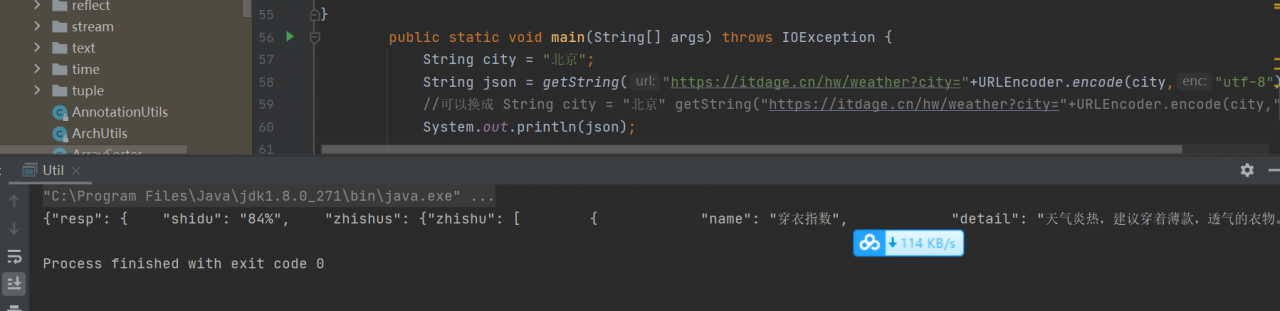
Output JSON data:

    public class Util {
        //
        public static String getString(String url) throws IOException {
            try {
                URL u = new URL(url);

                //
                URLConnection conn = u.openConnection();
                InputStream in = conn.getInputStream();
                BufferedReader br = new BufferedReader(new InputStreamReader(in, "UTF-8"));
                StringBuffer sf = new StringBuffer();
                String text = null;
                while((text = br.readLine()) != null)
                {
                    sf.append(text);
                }
                return sf.toString();
            }
            catch (Exception e)
            {
                e.printStackTrace();
            }
            return null;

        }

        public static void main(String[] args) throws IOException {
            String json = getString("https://itdage.cn/hw/weather?city=%E6%9D%AD%E5%B7%9E");
            System.out.println(json);
        }

}

Note:

   //change to
    String city = "北京" json = getString("https://itdage.cn/hw/weather?city="+URLEncoder.encode(city,"utf-8")

send message:

Test sending fixed content first


        public static void main(String[] args) throws IOException {
            String city = "北京";
            String name="b( ̄▽ ̄)d 宝";
            name = URLEncoder.encode(name,"utf-8");
     //       String json = getString("https://itdage.cn/hw/weather?city="+URLEncoder.encode(city,"utf-8"));
       //z     System.out.println(json);
  
            //String phoneNumber = "19976883561";
            String s1 = "天晴";
            s1 = URLEncoder.encode(s1,"utf-8");
                String s2 = "30-32";
                String s3 = "Relex";
            s2 = URLEncoder.encode(s2,"utf-8");
s3 = URLEncoder.encode(s3,"utf-8");
                String json2 = getString("https://itdage.cn/hw/hwSms?name="+name+"&phoneNumber="+phoneNumber+"&s1="+s1+"&s2="+s2+"&s3="+s3);
            System.out.println(json2);

        }

Output OK, SMS can be seen on the mobile phone

Use one thread to execute the task:


public class SNStask {
    private static Boolean flag;
private static Thread t1;
    public static void start(long time,String name,String phoneNumber,String city)
    {
        if(!flag)
        {

            t1 = new Thread()
            {
@Override
                public void run() {
    flag = true;
    task:
    while (flag) {
        String text = Util.send(name, phoneNumber, city);
        if (!"OK".equals(text)) {
            continue;
        }
        try {
            Thread.sleep(time);

        } catch (InterruptedException e) {
            e.printStackTrace();
            break task;
        }
    }
}
        };
            t1.start();
        }
    }
    public static  void end(){
        flag = false;
        if(t1 != null)
        {
            t1.interrupt();
        }
    }
}

Set access path:


@WebServlet("/start")
public class StartServlet extends HttpServlet {
    protected void doPost(HttpServletRequest request, HttpServletResponse response) throws ServletException, UnsupportedEncodingException {
        request.setCharacterEncoding("utf-8");
        response.setContentType("text/json;charset=utf-8");
        String name = request.getParameter("name");
        String phoneNumber = request.getParameter("phoneNumber");
        String city = request.getParameter("city");
        SNStask.start(time,name,phoneNumber,city);
    }

}

[Solved] AndroidStudio Error: Could not initialize class com.android.sdklib.repository.AndroidSdkHandler

Error: Could not initialize class com.android.sdklib.repository. AndroidSdkHandler@TOC

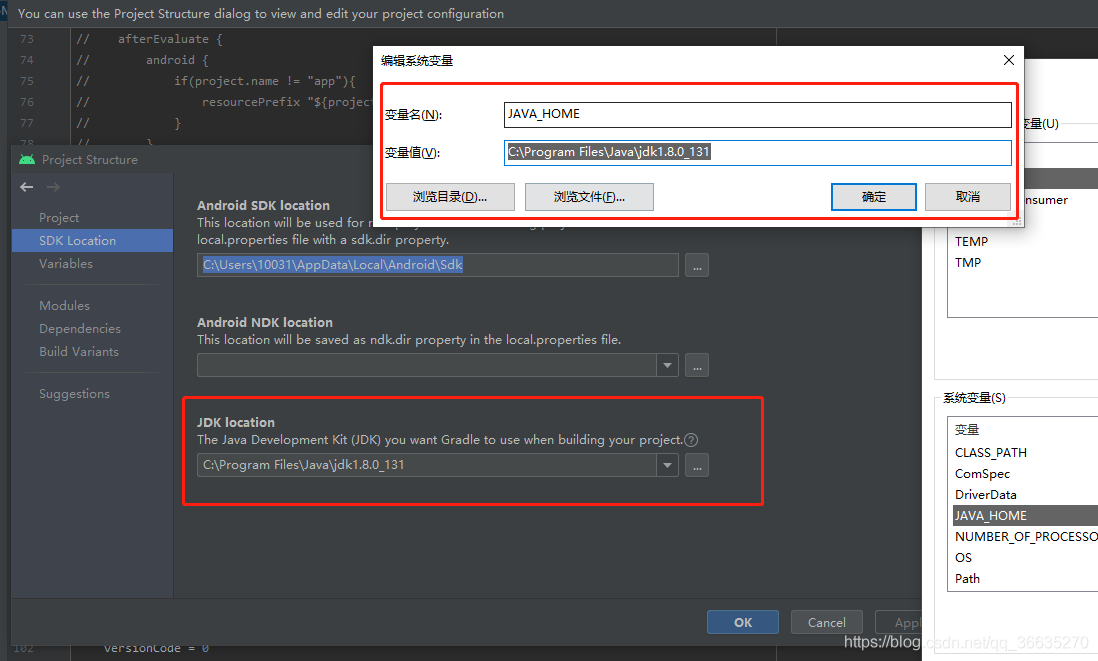
After studio installs or upgrades to 4.2 + for the first time, an error is reported in the construction project. The reason is very simple, because the Java path configured for the project is wrong

because the default JDK path of the project will become the JDK path of studio after updating the version. At this time, you need to add your SDK as Java in the “environment variable”_ Home, and then the JDK path of the project must be the same as Java_Home remains the same and error is eliminated

[Solved] Rabbitmq injection failed, bean creation failed, error creating bean with name ‘rabbitconnectionfactory’‘

Error creating bean with name ‘spring.rabbitmq-org.springframework.boot.autoconfigure.amqp.RabbitProperties’

org.springframework.beans.factory.UnsatisfiedDependencyException: Error creating bean with name 'rabbitConnectionFactory' defined in class path resource [org/springframework/boot/autoconfigure/amqp/RabbitAutoConfiguration$RabbitConnectionFactoryCreator.class]: Unsatisfied dependency expressed through method 'rabbitConnectionFactory' parameter 0; nested exception is org.springframework.beans.factory.BeanCreationException: Error creating bean with name 'spring.rabbitmq-org.springframework.boot.autoconfigure.amqp.RabbitProperties': Lookup method resolution failed; nested exception is java.lang.IllegalStateException: Failed to introspect Class [org.springframework.boot.autoconfigure.amqp.RabbitProperties] from ClassLoader [sun.misc.Launcher$AppClassLoader@18b4aac2]
	at org.springframework.beans.factory.support.ConstructorResolver.createArgumentArray(ConstructorResolver.java:800)
	at org.springframework.beans.factory.support.ConstructorResolver.instantiateUsingFactoryMethod(ConstructorResolver.java:541)
	at org.springframework.beans.factory.support.AbstractAutowireCapableBeanFactory.instantiateUsingFactoryMethod(AbstractAutowireCapableBeanFactory.java:1336)
	at org.springframework.beans.factory.support.AbstractAutowireCapableBeanFactory.createBeanInstance(AbstractAutowireCapableBeanFactory.java:1179)
	at org.springframework.beans.factory.support.AbstractAutowireCapableBeanFactory.doCreateBean(AbstractAutowireCapableBeanFactory.java:571)
	at org.springframework.beans.factory.support.AbstractAutowireCapableBeanFactory.createBean(AbstractAutowireCapableBeanFactory.java:531)
	at org.springframework.beans.factory.support.AbstractBeanFactory.lambda$doGetBean$0(AbstractBeanFactory.java:335)
	at org.springframework.beans.factory.support.DefaultSingletonBeanRegistry.getSingleton(DefaultSingletonBeanRegistry.java:234)
	at org.springframework.beans.factory.support.AbstractBeanFactory.doGetBean(AbstractBeanFactory.java:333)
	at org.springframework.beans.factory.support.AbstractBeanFactory.getBean(AbstractBeanFactory.java:208)
	at org.springframework.beans.factory.support.DefaultListableBeanFactory.preInstantiateSingletons(DefaultListableBeanFactory.java:944)
	at org.springframework.context.support.AbstractApplicationContext.finishBeanFactoryInitialization(AbstractApplicationContext.java:923)
	at org.springframework.context.support.AbstractApplicationContext.refresh(AbstractApplicationContext.java:588)
	at org.springframework.boot.web.servlet.context.ServletWebServerApplicationContext.refresh(ServletWebServerApplicationContext.java:144)
	at org.springframework.boot.SpringApplication.refresh(SpringApplication.java:767)
	at org.springframework.boot.SpringApplication.refresh(SpringApplication.java:759)
	at org.springframework.boot.SpringApplication.refreshContext(SpringApplication.java:426)
	at org.springframework.boot.SpringApplication.run(SpringApplication.java:326)
	at org.springframework.boot.SpringApplication.run(SpringApplication.java:1311)
	at org.springframework.boot.SpringApplication.run(SpringApplication.java:1300)
	at com.ata.sms.simulator.Application.main(Application.java:14)
Caused by: org.springframework.beans.factory.BeanCreationException: Error creating bean with name 'spring.rabbitmq-org.springframework.boot.autoconfigure.amqp.RabbitProperties': Lookup method resolution failed; nested exception is java.lang.IllegalStateException: Failed to introspect Class [org.springframework.boot.autoconfigure.amqp.RabbitProperties] from ClassLoader [sun.misc.Launcher$AppClassLoader@18b4aac2]
	at org.springframework.beans.factory.annotation.AutowiredAnnotationBeanPostProcessor.determineCandidateConstructors(AutowiredAnnotationBeanPostProcessor.java:289)
	at org.springframework.beans.factory.support.AbstractAutowireCapableBeanFactory.determineConstructorsFromBeanPostProcessors(AbstractAutowireCapableBeanFactory.java:1286)
	at org.springframework.beans.factory.support.AbstractAutowireCapableBeanFactory.createBeanInstance(AbstractAutowireCapableBeanFactory.java:1203)
	at org.springframework.beans.factory.support.AbstractAutowireCapableBeanFactory.doCreateBean(AbstractAutowireCapableBeanFactory.java:571)
	at org.springframework.beans.factory.support.AbstractAutowireCapableBeanFactory.createBean(AbstractAutowireCapableBeanFactory.java:531)
	at org.springframework.beans.factory.support.AbstractBeanFactory.lambda$doGetBean$0(AbstractBeanFactory.java:335)
	at org.springframework.beans.factory.support.DefaultSingletonBeanRegistry.getSingleton(DefaultSingletonBeanRegistry.java:234)
	at org.springframework.beans.factory.support.AbstractBeanFactory.doGetBean(AbstractBeanFactory.java:333)
	at org.springframework.beans.factory.support.AbstractBeanFactory.getBean(AbstractBeanFactory.java:208)
	at org.springframework.beans.factory.config.DependencyDescriptor.resolveCandidate(DependencyDescriptor.java:276)
	at org.springframework.beans.factory.support.DefaultListableBeanFactory.doResolveDependency(DefaultListableBeanFactory.java:1380)
	at org.springframework.beans.factory.support.DefaultListableBeanFactory.resolveDependency(DefaultListableBeanFactory.java:1300)
	at org.springframework.beans.factory.support.ConstructorResolver.resolveAutowiredArgument(ConstructorResolver.java:887)
	at org.springframework.beans.factory.support.ConstructorResolver.createArgumentArray(ConstructorResolver.java:791)
	... 20 common frames omitted
Caused by: java.lang.IllegalStateException: Failed to introspect Class [org.springframework.boot.autoconfigure.amqp.RabbitProperties] from ClassLoader [sun.misc.Launcher$AppClassLoader@18b4aac2]
	at org.springframework.util.ReflectionUtils.getDeclaredMethods(ReflectionUtils.java:481)
	at org.springframework.util.ReflectionUtils.doWithLocalMethods(ReflectionUtils.java:321)
	at org.springframework.beans.factory.annotation.AutowiredAnnotationBeanPostProcessor.determineCandidateConstructors(AutowiredAnnotationBeanPostProcessor.java:267)
	... 33 common frames omitted
Caused by: java.lang.NoClassDefFoundError: org/springframework/amqp/rabbit/connection/AbstractConnectionFactory$AddressShuffleMode
	at java.lang.Class.getDeclaredMethods0(Native Method)
	at java.lang.Class.privateGetDeclaredMethods(Class.java:2701)
	at java.lang.Class.getDeclaredMethods(Class.java:1975)
	at org.springframework.util.ReflectionUtils.getDeclaredMethods(ReflectionUtils.java:463)
	... 35 common frames omitted
Caused by: java.lang.ClassNotFoundException: org.springframework.amqp.rabbit.connection.AbstractConnectionFactory$AddressShuffleMode
	at java.net.URLClassLoader.findClass(URLClassLoader.java:382)
	at java.lang.ClassLoader.loadClass(ClassLoader.java:424)
	at sun.misc.Launcher$AppClassLoader.loadClass(Launcher.java:349)
	at java.lang.ClassLoader.loadClass(ClassLoader.java:357)
	... 39 common frames omitted

Error reason: spring boot is used, but MQ. In spring boot is not used

Original dependence

<dependency>
    <groupId>org.springframework.amqp</groupId>
    <artifactId>spring-rabbit</artifactId>
    <version>2.2.5.RELEASE</version>
</dependency>

Amend to read

<dependency>
    <groupId>org.springframework.boot</groupId>
    <artifactId>spring-boot-starter-amqp</artifactId>
</dependency>

Mybatis plus configuration console prints complete SQL statement with parameters

Solution
if it is application.yml

#mybatis-plus configures the console to print full SQL statements with parameters
mybatis-plus:
  configuration:
    log-impl: org.apache.ibatis.logging.stdout.StdOutImpl

If it is application.properties, add:

#mybatis-plus configures the console to print full SQL statements with parameters
mybatis-plus.configuration.log-impl=org.apache.ibatis.logging.stdout.StdOutImpl

Cannot call sendRedirect() after the response has been committed

Cannot call sendredirect() after the response has been committed exception

For the HTTP response, if it has been submitted (redirection, request forwarding, release in the filter), you can’t perform any operation on the response, such as modifying it or submitting it again.

For the submitted response, the method will not end (different from return), it will continue to execute, so if the code that you continue to execute after submitting will still run, the submit response will also cause this error.

For example:

    1. the following code will report an error because it released and submitted the response, and now it operates the response, because the filter release does not return the method, and the method is still executed downward </ OL> instead

        HttpServletRequest httpRequest = (HttpServletRequest) request;
        HttpServletResponse httpResponse = (HttpServletResponse) response;
        boolean boo = "Your judgment conditions";
        if (boo) {
            log.info("enter chain");
            chain.doFilter(request, response);
            //return;
        }
        //This is where the error will be reported because the response was submitted in the above release and now the resposne is being operated
        httpResponse.sendRedirect(TOLOGINURL);

2. The following code will report an error because it is submitted again after redirection, because the redirection will continue


httpResponse.sendRedirect(TOLOGINURL);
//This will report an error because it was committed (redirected) and then committed again
httpResponse.sendRedirect(TOLOGINURL);

The solution is to return after submitting</ Code>, or the check logic will not enter the submit again.