Category Archives: JAVA

[Solved] Classnotfoundexception: org.springframework.core.nativedetector error

To build a microservice architecture using springcloud, the spring boot starter web dependency is referenced in the parent, but the subproject cannot be started. The error is as follows:

Build springcloud project encountered problems
Exception in thread "main" java.lang.IllegalArgumentException: Cannot instantiate interface org.springframework.context.ApplicationListener : org.springframework.boot.autoconfigure.BackgroundPreinitializer
	at org.springframework.boot.SpringApplication.createSpringFactoriesInstances(SpringApplication.java:450)
	at org.springframework.boot.SpringApplication.getSpringFactoriesInstances(SpringApplication.java:429)
	at org.springframework.boot.SpringApplication.getSpringFactoriesInstances(SpringApplication.java:420)
	at org.springframework.boot.SpringApplication.<init>(SpringApplication.java:270)
	at org.springframework.boot.SpringApplication.<init>(SpringApplication.java:249)
	at org.springframework.boot.SpringApplication.run(SpringApplication.java:1260)
	at org.springframework.boot.SpringApplication.run(SpringApplication.java:1248)
	at com.hm.SchoolApplication.main(SchoolApplication.java:17)
Caused by: java.lang.NoClassDefFoundError: org/springframework/core/NativeDetector
	at org.springframework.boot.autoconfigure.BackgroundPreinitializer.<clinit>(BackgroundPreinitializer.java:71)
	at sun.reflect.NativeConstructorAccessorImpl.newInstance0(Native Method)
	at sun.reflect.NativeConstructorAccessorImpl.newInstance(NativeConstructorAccessorImpl.java:62)
	at sun.reflect.DelegatingConstructorAccessorImpl.newInstance(DelegatingConstructorAccessorImpl.java:45)
	at java.lang.reflect.Constructor.newInstance(Constructor.java:423)
	at org.springframework.beans.BeanUtils.instantiateClass(BeanUtils.java:172)
	at org.springframework.boot.SpringApplication.createSpringFactoriesInstances(SpringApplication.java:446)
	... 7 more
Caused by: java.lang.ClassNotFoundException: org.springframework.core.NativeDetector
	at java.net.URLClassLoader.findClass(URLClassLoader.java:382)
	at java.lang.ClassLoader.loadClass(ClassLoader.java:418)
	at sun.misc.Launcher$AppClassLoader.loadClass(Launcher.java:355)
	at java.lang.ClassLoader.loadClass(ClassLoader.java:351)
	... 14 more

Solution: it is not enough to rely only on spring boot starter web in the parent project. You should add

	<parent>
        <artifactId>spring-boot-starter-parent</artifactId>
        <groupId>org.springframework.boot</groupId>
        <version>2.1.0.RELEASE</version>
    </parent>

Just start again.

Gateway Error: allowedOrigins cannot contain the special value “*“

java.lang.IllegalArgumentException: When allowCredentials is true, allowedOrigins cannot contain 
the special value "*" since that cannot be set on the "Access-Control-Allow-Origin" response 
header. To allow credentials to a set of origins, list them explicitly or consider using "allowedOriginPatterns" instead.
	at org.springframework.web.cors.CorsConfiguration.validateAllowCredentials(CorsConfiguration.java:460)

	Suppressed: reactor.core.publisher.FluxOnAssembly$OnAssemblyException: 
Error has been observed at the following site(s):
	|_ checkpoint ⇢ org.springframework.cloud.gateway.filter.WeightCalculatorWebFilter [DefaultWebFilterChain][from www.fhadmin.cn]

The reason for the problem is that the new version of gateway cancels allowedorigins and the corresponding change is   allowedOriginPatterns

The configuration is modified to:

#--------gateway config---fhadmin.cn-----
spring.cloud.gateway.discovery.locator.enabled=true
spring.cloud.gateway.discovery.locator.lower-case-service-id=true
#(java fhadmin.cn)
spring.cloud.gateway.globalcors.corsConfigurations.[/**].allowedOriginPatterns=*
spring.cloud.gateway.globalcors.corsConfigurations.[/**].allowedHeaders=*
spring.cloud.gateway.globalcors.corsConfigurations.[/**].allowedMethods=*
spring.cloud.gateway.globalcors.corsConfigurations.[/**].allowCredentials=true

How to Solve Nosuchmethoderror Error

1. reason
this error may be triggered when the project dependency is complex, there is a problem with the Java running environment, or there are different versions of the same type of jar package. In essence, the JVM cannot find a specific method of a class, that is, the JVM loads the wrong version of the class. To put it bluntly, the JVM can’t find the method it really wants to call! There are two main situations in which this error occurs:

Imported mismatched package version
the development environment is inconsistent with the running environment

2. solutions
check “external libraries” to see whether the error reporting method exists. If it does not exist, there must be a problem with the package. Just update the package; If it exists, it indicates that the package has been successfully introduced, but the integrated development environment may not be synchronized to. You can try to force the update. In addition, you can check whether the development environment is consistent with the running environment. If not, modify it.

3. special reminder
in case of Maven project, there are two main methods in the process of updating the package:

Go to the local Maven warehouse, delete the corresponding package, and then click refresh in “Maven project”
directly enter the command in the command line of “Maven project” to force the update
among them, method 1 is not reliable, and the operation may not be successful. The reason is unknown. Method 2 is strongly recommended. Nothing else, reliable!

Fatal error compiling: invalid target release: 1.8 [How to Solve]

MVN install reports an error in the title, which is checked in two steps:

    1. idea file – setting
    1. Maven – runner
    1. check whether the JDK version is 1.8

2. Confirm POM file configuration

<plugin>                                                                                                                                      
    <!-- Specify the maven compile jdk version, if not specified, maven3 default with jdk 1.5 maven2 default with jdk1.3 -->                                                                           
    <groupId>org.apache.maven.plugins</groupId>                                                                                               
    <artifactId>maven-compiler-plugin</artifactId>                                                                                            
    <version>3.1</version>                                                                                                                    
    <configuration>                                                                                                                           
        <!-- In general, target and source are kept consistent, however, sometimes there are cases where target differs from source in order to allow the program to run in other versions of jdk (for low version target jdk, syntax not supported in low version jdk cannot be used in the source code) -->                    
        <source>1.8</source> <! -- the JDK version used by the source code -->                                                                                             
        <target>1.8</target> <! -- The compiled version of the target class file to be generated -->                                                                                     
        <encoding>UTF-8</encoding><! -- Character set encoding -->
        <skipTests>true</skipTests><! -- skip tests-->                                                                             
        <verbose>true</verbose>
        <showWarnings>true</showWarnings>                                                                                                                        
    </configuration>                                                                                                                          
</plugin>   

org.springframework.http.converter.HttpMessageNotReadableException: JSON parse error: Cannot deseria

org.springframework.http.converter.HttpMessageNotReadableException:
JSON parse error: Cannot deserialize value of type `java.util.Date` from String “NULL”: not a valid representation
(error: Failed to parse Date value ‘NULL’: Unparseable date: “NULL”);
nested exception is com.fasterxml.jackson.databind.exc.InvalidFormatException: Cannot deserialize value of type `java.util.Date` from String “NULL”: not a valid representation (error: Failed to parse Date value ‘NULL’: Unparseable date: “NULL”)
at [Source: (PushbackInputStream); line: 16, column: 14] (through reference chain: com.starsaiot.battery.entity.PledgeOrder[“payTime”])
=====================================================

I encountered this problem in a project where the front-end and back-end are separated
The front-end input data is “payTime”: “NULL”,
“tradeNum”: “null”,
“updateTime”: “2021-08-17 16:39:50”,
“updated”: “null”,
The console reports this error
====================================================
The reason for the error: the type of payTime is not correct, this capital NULL is the data I copied from the database and put in every too much attention, it should be consistent with the following null.


FIX: SSL error when connecting to the Jack server. [How to Solve]

FIX: SSL error when connecting to the Jack server.
##Background
unbuntu16.04 compiles android 8 source code and suddenly reports an error.

FAILED: setup-jack-server 
/bin/bash -c "(prebuilts/sdk/tools/jack-admin install-server prebuilts/sdk/tools/jack-launcher.jar prebuilts/sdk/tools/jack-server-4.11.ALPHA.jar  2>&1 || (exit 0) ) && (JACK_SERVER_VM_ARGUMENTS=\"-Dfile.encoding=UTF-8 -XX:+TieredCompilation\" prebuilts/sdk/tools/jack-admin start-server 2>&1 || exit 0 ) && (prebuilts/sdk/tools/jack-admin update server prebuilts/sdk/tools/jack-server-4.11.ALPHA.jar 4.11.ALPHA 2>&1 || exit 0 ) && (prebuilts/sdk/tools/jack-admin update jack prebuilts/sdk/tools/jacks/jack-4.32.CANDIDATE.jar 4.32.CANDIDATE || exit 47 )"
Jack server already installed in ".jack-server"
Communication error with Jack server (35), try 'jack-diagnose' or see Jack server log
SSL error when connecting to the Jack server. Try 'jack-diagnose'

Solution

Try according to the prompt:

$ jack-diagnose
error: process ID list syntax error

Usage:
 ps [options]

 Try 'ps --help <simple|list|output|threads|misc|all>'
  or 'ps --help <s|l|o|t|m|a>'
 for additional help text.

For more details see ps(1).
Port 8077 is used by another process (pid=), please ensure to free the port or change port configuration in '/.jack-settings' and 'jack-server/config.properties'
error: process ID list syntax error

Usage:
 ps [options]

 Try 'ps --help <simple|list|output|threads|misc|all>'
  or 'ps --help <s|l|o|t|m|a>'
 for additional help text.

For more details see ps(1).
Port 8076 is used by another process (pid=), please ensure to free the port or change port configuration in '.jack-settings' and '/.jack-server/config.properties'
SSL error when connecting to the Jack server. Try 'jack-diagnose'

The problem remains the same, so the focus is still on SSL communication:
finally, it is solved by the following methods:

1. Edit/etc/java-8-openjdk/security/java.security 
#
# Algorithm restrictions for Secure Socket Layer/Transport Layer Security
# (SSL/TLS) processing
#
# In some environments, certain algorithms or key lengths may be undesirable
# when using SSL/TLS.  This section describes the mechanism for disabling
# algorithms during SSL/TLS security parameters negotiation, including
# protocol version negotiation, cipher suites selection, peer authentication
# and key exchange mechanisms.
#
# Disabled algorithms will not be negotiated for SSL/TLS connections, even
# if they are enabled explicitly in an application.
#
# For PKI-based peer authentication and key exchange mechanisms, this list
# of disabled algorithms will also be checked during certification path
# building and validation, including algorithms used in certificates, as
# well as revocation information such as CRLs and signed OCSP Responses.
# This is in addition to the jdk.certpath.disabledAlgorithms property above.
#
# See the specification of "jdk.certpath.disabledAlgorithms" for the
# syntax of the disabled algorithm string.
#
# Note: The algorithm restrictions do not apply to trust anchors or
# self-signed certificates.
#
# Note: This property is currently used by the JDK Reference implementation.
# It is not guaranteed to be examined and used by other implementations.
#
# Example:
#   jdk.tls.disabledAlgorithms=MD5, SSLv3, DSA, RSA keySize < 2048
jdk.tls.disabledAlgorithms=SSLv3, TLSv1, TLSv1.1, RC4, DES, MD5withRSA, \
    DH keySize < 1024, EC keySize < 224, 3DES_EDE_CBC, anon, NULL, \
    include jdk.disabled.namedCurves


2. Find the line of TLSv1, delete TLSv1, TLSv1.1, and save it.

3. switch to the Android compiled source project directory: prebuilts/sdk/tools/

4. Run.

./jack-admin kill-server 

./jack-admin start-server

Error querying database.Cause: java.sql.SQLException: Error setting driver on UnpooledDataSource.

Record the problems encountered in the learning process of Java mybatis framework

1. An exception occurred while building the first mybatis project:

Exception in thread "main" org.apache.ibatis.exceptions.PersistenceException: 

Error querying database. Cause: java.sql.SQLException: Error setting driver on UnpooledDataSource. 
Cause: java.lang.ClassNotFoundException: Cannot find class: com.mysql.cj.jdbc.Driver

Solution: the MySQL connector Java driver version is used incorrectly
I use MySQL version 8.0.22

import the driver of version 5.1.23, and the dependency declared in pom.xml file is

<dependency>
      <groupId>mysql</groupId>
      <artifactId>mysql-connector-java</artifactId>
      <version>5.1.23</version>
    </dependency>

The two versions do not correspond, so the driver error cannot be found.
the solution is to download the driver of version relative to, that is, the driver of version 8.0.22. The official website address is version 8.0.22
and then change the dependency in the POM file to:

<!--MySQL-->
<dependency>
      <groupId>mysql</groupId>
      <artifactId>mysql-connector-java</artifactId>
      <version>8.0.22</version>
    </dependency>

Another point is that the POM file should include not only driver dependencies, but also mybatis dependencies

<!--mybatis-->
<dependency>
      <groupId>org.mybatis</groupId>
      <artifactId>mybatis</artifactId>
      <version>3.4.5</version>
    </dependency>

org.postgresql.util.PSQLException: ERROR: operator does not exist: character varying XXX

PG database SQL error:
error reason: is caused by SQL writing error or parameter transfer error
database error information

[42883] ERROR: operator does not exist: character varying = record 
No operator matches the given name and argument types. You might need to add explicit type casts. 
line: 1063

error example:

select * from d_allotmoveai_setarea a where a.bills_id = ('123','456')

correct example:

select * from d_allotmoveai_setarea a where a.bills_id = ('456')
select * from d_allotmoveai_setarea a where a.bills_id in ('123','456')

ERROR Message:
org.postgresql.util.PSQLException: ERROR: operator does not exist: character varying <> record No operator matches the given name and argument types. You might need to add explicit type casts. line: 323 at org.postgresql.core.v3.QueryExecutorImpl.receiveErrorResponse(QueryExecutorImpl.java:2578) ~[postgresql-42.2.11.jar:42.2.11] at org.postgresql.core.v3.QueryExecutorImpl.processResults(QueryExecutorImpl.java:2313) ~[postgresql-42.2.11.jar:42.2.11] at org.postgresql.core.v3.QueryExecutorImpl.execute(QueryExecutorImpl.java:331) ~[postgresql-42.2.11.jar:42.2.11] at org.postgresql.jdbc.PgStatement.executeInternal(PgStatement.java:448) ~[postgresql-42.2.11.jar:42.2.11] at org.postgresql.jdbc.PgStatement.execute(PgStatement.java:369) ~[postgresql-42.2.11.jar:42.2.11] at org.postgresql.jdbc.PgPreparedStatement.executeWithFlags(PgPreparedStatement.java:159) ~[postgresql-42.2.11.jar:42.2.11] at org.postgresql.jdbc.PgPreparedStatement.executeQuery(PgPreparedStatement.java:109) ~[postgresql-42.2.11.jar:42.2.11] at com.p6spy.engine.wrapper.PreparedStatementWrapper.executeQuery(PreparedStatementWrapper.java:78) ~[p6spy-3.9.1.jar:na] at com.zaxxer.hikari.pool.ProxyPreparedStatement.executeQuery(ProxyPreparedStatement.java:52) ~[HikariCP-3.4.2.jar:na] at com.zaxxer.hikari.pool.HikariProxyPreparedStatement.executeQuery(HikariProxyPreparedStatement.java) ~[HikariCP-3.4.2.jar:na]

[Solved] Android Could not determine artifacts for XXXX: Skipped due to earlier error

Recently, I encountered the following problems when using robolectric unit test:

It has been reported that the resource class cannot be found, so it needs to be added to gradle under the app (the code is manually typed, there may be an error, sorry)

testOptions{
	unitTests{
			includeAndroidResources = true
	}
}

After adding the above code, there is an error in the title, specifically android.test.monitor2… This can’t be found. Each time sync takes a long time, and then report the same error. Refer to the following link article, but it doesn’t help me much.

Ask colleagues for help. After comparing our configurations, we found that the gradle version references are different (gradle/wrapper/gradle wrapper. Properties). The previous references are:

distributionUrl:=https\://service.gradle.org/distributions/gradle-5.4.1-all.zip

Mine is taken directly from the company mapping Maven library. It is a local reference with a lower version:

distributionUrl:=../../../../tools/gradle-4.1-all.zip

I changed the gradle configuration according to her configuration and synced again. The problem was solved.

[Solved] Method threw ‘java.lang.StackOverflowError‘ exception. Cannot evaluate

Cause of problem

This error occurs when traversing the binary tree hierarchy. At first, it is thought that the stack overflow is caused by circular reference
later, it was found that the causes of the problem are as follows:
because the attribute references the child attribute, the toString method will constantly call the attribute of the child node. Finally, the stack overflowed.

Solution

Rewrite the toString method. Be careful not to print the properties of the calling child nodes
finally, paste a section of tree level traversal implementation code.

package com.zouch.onetoten;

import lombok.Data;
import lombok.Getter;
import lombok.Setter;
import org.springframework.util.CollectionUtils;

import java.util.*;

/**
 * @author Zouch
 * @date 2021/8/25 下午1:13
 * Hierarchical tree traversal (no restriction that it must be a binary tree)
 * Idea.
 * Use a queue, and the condition for the outgoing loop is that the queue element is empty.
 * judge each time a node is out of the queue, and when there is a node in the queue, add all its children to the queue
 * Then add the nodes to the list
 */

@Getter
@Setter
public class TreeOfBfs {

    private TreeNode rootNode;

    @Override
    public String toString() {
        return "TreeOfBfs{" +
                "rootNode=" + rootNode +
                '}';
    }

    @Data
    public static class TreeNode {
        private Object key;

        private TreeNode parent;

        private List<TreeNode> treeNodes;

        @Override
        public String toString() {
            return "TreeNode{" +
                    "key=" + key +
                    ", parent=" + parent;
        }
    }

    public static List<TreeNode> levelTraverse(TreeNode rootNode) {
        if (Objects.isNull(rootNode)) {
            return null;
        }
        Queue<TreeNode> queue = new LinkedList<>();
        queue.add(rootNode);
        List<TreeNode> list = new LinkedList<>();
        while (queue.size() > 0) {
            TreeNode poll = queue.poll();
            list.add(poll);
            List<TreeNode> treeNodes = poll.getTreeNodes();
            if (CollectionUtils.isEmpty(treeNodes)){
                continue;
            }
            queue.addAll(treeNodes);
        }
        return list;
    }

    public static void main(String[] args) {
        TreeOfBfs treeOfBfs = new TreeOfBfs();
        TreeNode rootNode = new TreeNode();
        treeOfBfs.setRootNode(rootNode);

        TreeNode node1 = new TreeNode();
        node1.setParent(rootNode);
        node1.setKey("Left 1");

        TreeNode node2 = new TreeNode();
        node2.setParent(rootNode);
        node2.setKey("Right 2");

        TreeNode node3 = new TreeNode();
        node3.setParent(node2);
        node3.setKey("Left 3");

        TreeNode node4 = new TreeNode();
        node4.setParent(node2);
        node4.setKey("Right4");

        List<TreeNode> treeNodes = new ArrayList<>();
        treeNodes.add(node1);
        treeNodes.add(node2);
        rootNode.setTreeNodes(treeNodes);

        List<TreeNode> treeNodes2 = new ArrayList<>();
        treeNodes2.add(node3);
        treeNodes2.add(node4);
        node2.setTreeNodes(treeNodes2);

        List<TreeNode> result = levelTraverse(rootNode);
        System.out.println(result.toString());

    }

}

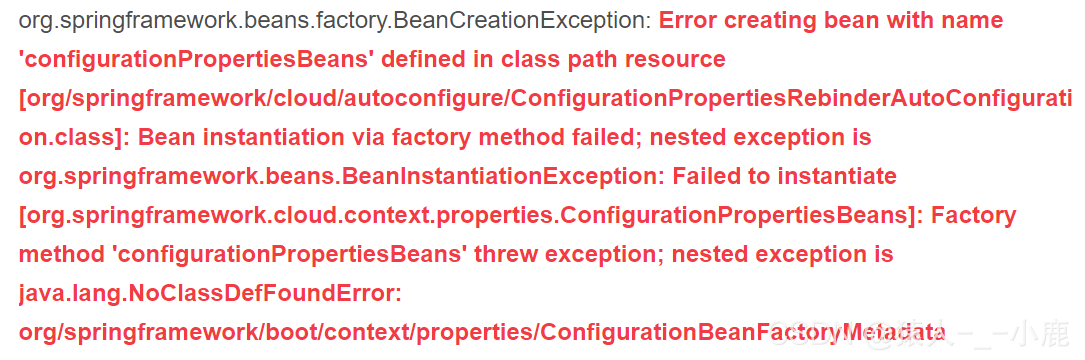
[Solved] Error creating bean with name ‘configurationPropertiesBeans‘ defined in class path resource

Register your spring boot project with the Nacos service using spring cloud, and start the project after configuring the file

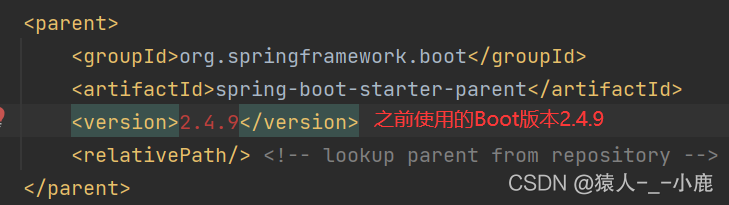
Springboot version

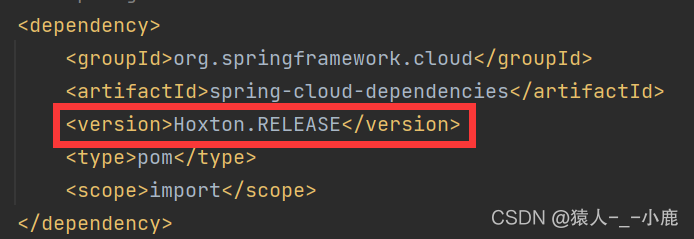
Spring cloud version

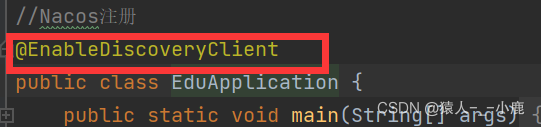
Startup class annotation

Start the class, and the result is an error

Solution:

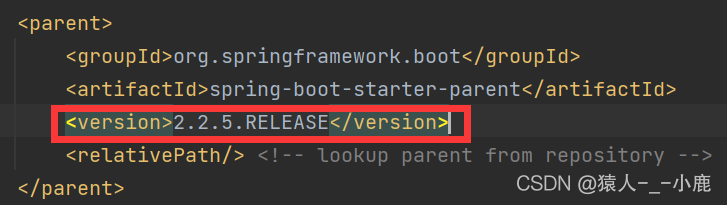
Because the springboot version does not correspond to the Nacos version in springcloud, students who have studied springcloud should know that the springboot version and the Nacos version in springcloud must correspond, and the responsible person cannot register. My problem is that the version does not correspond

Changing my springboot version to 2.2.5 release can solve the problem

This kind of problem is mainly caused by version mismatch

Android Compile Error: “SSL error when connecting to the Jack server. Try ‘jack-diagnose‘”

The code compilation of 8909 A7 has never been a problem before. Suddenly, one day, the compilation encountered SSL-related errors. The specific errors are as follows:

[  0% 12/6140] Ensure Jack server is installed and started
FAILED: /bin/bash -c "(prebuilts/sdk/tools/jack-admin install-server prebuilts/sdk/tools/jack-launcher.jar prebuilts/sdk/tools/jack-server-4.8.ALPHA.jar  2>&1 || (exit 0) ) && (JACK_SERVER_VM_ARGUMENTS=\"-Dfile.encoding=UTF-8 -XX:+TieredCompilation\" prebuilts/sdk/tools/jack-admin start-server 2>&1 || exit 0 ) && (prebuilts/sdk/tools/jack-admin update server prebuilts/sdk/tools/jack-server-4.8.ALPHA.jar 4.8.ALPHA 2>&1 || exit 0 ) && (prebuilts/sdk/tools/jack-admin update jack prebuilts/sdk/tools/jacks/jack-2.28.RELEASE.jar 2.28.RELEASE || exit 47; prebuilts/sdk/tools/jack-admin update jack prebuilts/sdk/tools/jacks/jack-3.36.CANDIDATE.jar 3.36.CANDIDATE || exit 47; prebuilts/sdk/tools/jack-admin update jack prebuilts/sdk/tools/jacks/jack-4.7.BETA.jar 4.7.BETA || exit 47 )"
Jack server already installed in "/fwork1/yuwl/.jack-server"
Communication error with Jack server (35), try 'jack-diagnose' or see Jack server log
SSL error when connecting to the Jack server. Try 'jack-diagnose'
[  0% 12/6140] target R.java/Manifest.java: SnapdragonCamera (out/target/common/obj/APPS/SnapdragonCamera_intermediates/src/R.stamp)

Judging from the error log, it was an SSL exception when connecting to the jack server. At first, it was considered to be a jack server problem. The processing process included restarting the jack server service and configuring the jack server port number. It was ineffective. Finally, it was found that many people encountered the same problem through the network. The solutions are as follows. The personal test is effective

Solution:
delete the tlsv1 and tlsv1.1 configurations of the jdk.tls.disabledalgorithms parameter in the/etc/java-8-openjdk/security/java.security file