Category Archives: How to Fix

Nginx start error: job for nginx.service failed because the control process exited with error code

nginx startup error: nginx working. Service failed because control process exited, error code

>>> service nginx restart
Job for nginx.service failed because the control process exited with error code.
See "systemctl status nginx.service" and "journalctl -xe" for details.

as prompted:

systemctl status nginx.service

>>> systemctl status nginx.service

● nginx.service - A high performance web server and a reverse proxy server
   Loaded: loaded (/lib/systemd/system/nginx.service; enabled; vendor preset: enabled)
   Active: failed (Result: exit-code) since 五 2018-08-31 11:08:14 CST; 5min ago
  Process: 4668 ExecStop=/sbin/start-stop-daemon --quiet --stop --retry QUIT/5 --pidfile /run/nginx.pid (code=exited, status=1/FAILURE)
  Process: 28149 ExecStart=/usr/sbin/nginx -g daemon on; master_process on; (code=exited, status=1/FAILURE)
  Process: 28146 ExecStartPre=/usr/sbin/nginx -t -q -g daemon on; master_process on; (code=exited, status=0/SUCCESS)
 Main PID: 4455 (code=killed, signal=KILL)

8月 31 11:08:13 user-70DGA014CN nginx[28149]: nginx: [emerg] bind() to 0.0.0.0:80 failed (98: Address already in use)
8月 31 11:08:13 user-70DGA014CN nginx[28149]: nginx: [emerg] bind() to [::]:80 failed (98: Address already in use)
8月 31 11:08:13 user-70DGA014CN nginx[28149]: nginx: [emerg] bind() to 0.0.0.0:80 failed (98: Address already in use)
8月 31 11:08:13 user-70DGA014CN nginx[28149]: nginx: [emerg] bind() to [::]:80 failed (98: Address already in use)
8月 31 11:08:14 user-70DGA014CN nginx[28149]: nginx: [emerg] still could not bind()
8月 31 11:08:14 user-70DGA014CN systemd[1]: nginx.service: Control process exited, code=exited status=1
8月 31 11:08:14 user-70DGA014CN systemd[1]: Failed to start A high performance web server and a reverse proxy server.
8月 31 11:08:14 user-70DGA014CN systemd[1]: nginx.service: Unit entered failed state.
8月 31 11:08:14 user-70DGA014CN systemd[1]: nginx.service: Failed with result 'exit-code'.
8月 31 11:08:49 user-70DGA014CN systemd[1]: Stopped A high performance web server and a reverse proxy server.

journalctl -xe

>>> journalctl -xe
8月 31 11:08:12 user-70DGA014CN nginx[28149]: nginx: [emerg] bind() to 0.0.0.0:80 failed (98: Address already in use)
8月 31 11:08:12 user-70DGA014CN nginx[28149]: nginx: [emerg] bind() to [::]:80 failed (98: Address already in use)
8月 31 11:08:12 user-70DGA014CN nginx[28149]: nginx: [emerg] bind() to 0.0.0.0:80 failed (98: Address already in use)
8月 31 11:08:12 user-70DGA014CN nginx[28149]: nginx: [emerg] bind() to [::]:80 failed (98: Address already in use)
8月 31 11:08:13 user-70DGA014CN nginx[28149]: nginx: [emerg] bind() to 0.0.0.0:80 failed (98: Address already in use)
8月 31 11:08:13 user-70DGA014CN nginx[28149]: nginx: [emerg] bind() to [::]:80 failed (98: Address already in use)
8月 31 11:08:13 user-70DGA014CN nginx[28149]: nginx: [emerg] bind() to 0.0.0.0:80 failed (98: Address already in use)
8月 31 11:08:13 user-70DGA014CN nginx[28149]: nginx: [emerg] bind() to [::]:80 failed (98: Address already in use)
8月 31 11:08:14 user-70DGA014CN nginx[28149]: nginx: [emerg] still could not bind()
8月 31 11:08:14 user-70DGA014CN systemd[1]: nginx.service: Control process exited, code=exited status=1
8月 31 11:08:14 user-70DGA014CN systemd[1]: Failed to start A high performance web server and a reverse proxy server.
-- Subject: nginx.service 
-- Defined-By: systemd
-- Support: http://lists.freedesktop.org/mailman/listinfo/systemd-devel
-- 
-- nginx.service 
-- 
-- Output:“failed”。
8月 31 11:08:14 user-70DGA014CN systemd[1]: nginx.service: Unit entered failed state.
8月 31 11:08:14 user-70DGA014CN systemd[1]: nginx.service: Failed with result 'exit-code'.
8月 31 11:08:49 user-70DGA014CN systemd[1]: Stopped A high performance web server and a reverse proxy server.
-- Subject: nginx.service 
-- Defined-By: systemd
-- Support: http://lists.freedesktop.org/mailman/listinfo/systemd-devel
-- 
-- nginx.service 

From the above information, it can be seen that nginx’s port 80 is being used (but this is not the main issue) </p b>

first solution:

note:

if used to modify the/etc/nginx/conf. D/default. Conf or/etc/nginx/nginx. Conf file, and use the command: systemctl restart nginx. The service, so will appear the error information is as follows:

>>> service nginx restart
Job for nginx.service failed because the control process exited with error code.
See "systemctl status nginx.service" and "journalctl -xe" for details.

you need to open default.conf or nginx.conf to see if a semicolon is missing.

second solution:

  1. uninstalls nginx and deletes nginx files.
  2. reload nginx

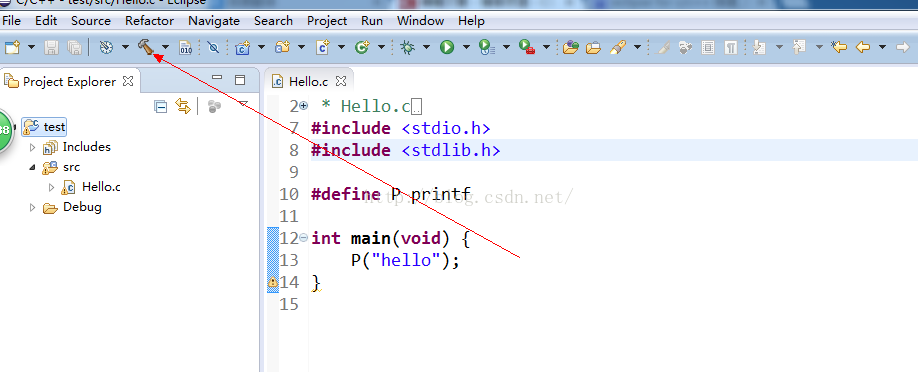
To solve the running error of eclipse for C / C + +: launch failed binary not found

sometimes we don’t like to use vs. Dear friends, like to use the eclipse practice c/c + + code, the construction of the environment, portal: http://jingyan.baidu.com/article/17bd8e523d7b9185ab2bb8f2.html

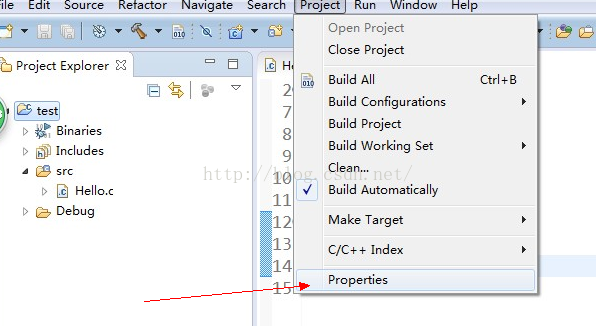
and then you might follow all the above steps and still hang when you run, and then you need to check the following two places:

1. If you haven’t built the project, click on the following position to build it and run it again. If not, scroll down to see

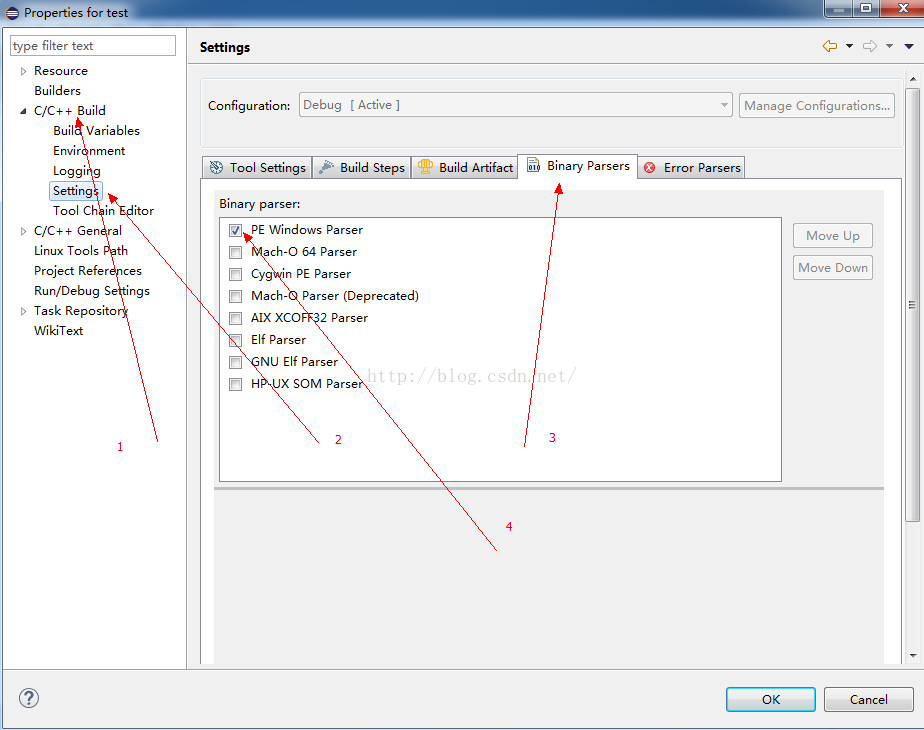
2. Change one setting :


Solve “error: failed to commit transaction” in arch Linux

if you are suffering from the same problem, here is a quick solution. — Sk

useful links to the original text please visit the”
“for clickable in-text links, full-size original images and related articles.

thank you
Compile the |
https://www.ostechnix.com/how-to-solve-error-failed-to-commit-transaction-conflicting-files-in-arch-linux/

The author | Sk

|DarkSun (lujun9972)???83.0 contributions: 318 days

self update Arch Linux desktop has been for a month. Today I tried to update my Arch Linux system, and encountered an error “Error: failed to commit Transaction (conflicting files) STFL: /usr/lib/libstfl.so.0 exists in Filesystem”. It appears that Pacman was unable to update a library that already exists on the file system (/usr/lib/libstfl.so.0). If you have the same problem, here’s a quick solution.

resolves the “error: failed to commit transaction (conflicting files)”

in Arch Linux
There are three ways to do

.

1. Simply ignore the STFL library that caused the problem during the upgrade and try to update the system again. See this guide to learn how [1] can be ignored when updated.

2. Override this package with the command:


  1. $ sudo pacman -Syu --overwrite /usr/lib/libstfl.so.0

3. Manually delete the STFL library and upgrade the system again. Make sure that the target package is not dependent on any other significant package. You can check if there is a conflict by going to Archlinux.org.


  1. $ sudo rm /usr/lib/libstfl.so.0

now, try updating the system:


  1. $ sudo pacman -Syu

I choose the third method, directly delete the file and upgrade the Arch Linux system. It will work!

hope you found this article helpful. There’s more good stuff. Stay tuned!

cheers!


via: https://www.ostechnix.com/how-to-solve-error-failed-to-commit-transaction-conflicting-files-in-arch-linux/

the author: SK [3] topic selection: lujun9972 , lujun9972 proofread: wxy

this article by the LCTT original compilation, Linux China launch honor

Solve gradle project refresh failed

recently reinstalled the system, and then re-installed Android Studio encountered a pit, opened the Studio to create the project prompted gradle project refresh failed to find all kinds of methods, I have seen a lot of solutions on the Internet, some have tried to no effect, the following is my own solution can refer to.

step 1: find the Studio Android directory D:\Android\Android Studio\gradle, copy the downloaded file to the directory

step 2: download the gradle version: https://pan.baidu.com/s/1hsKUK6K password: 7 im3

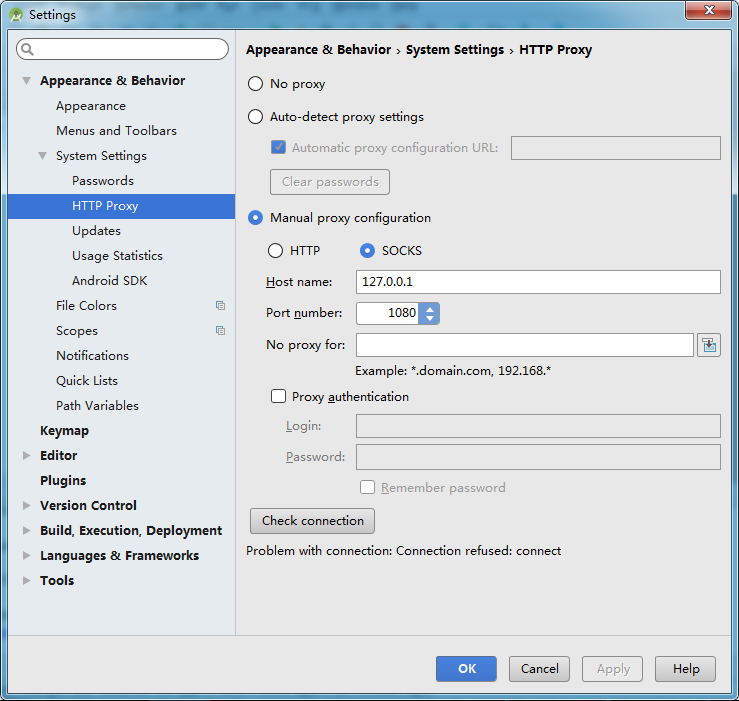
part 3: set the proxy address my Settings are as follows (of course you can also try to set No proxy) :


Step 4: restart Android Studio,


if the problem has not been solved, I recommend using the following solution:

thank blogger: bear bear children turn from: https://www.jianshu.com/p/43b795895a79

different situations will have different solutions, you need to open the log file to find the detailed error information.

C:\Users\{Username}\.AndroidStudio2.1\system\log

1. Mandatory IPV4

add the variables in the environment variable

_JAVA_OPTIONS

set a variable’s value to,

– Djava.net.preferIPv4Stack=true

restart Android Studio, automatic update gradle.

2. Update JDK1.7 to JDK1.8

File-> Other Settings-> Default Project Structure… Delete. Gradle file

delete folder

c:\users\{username}\. Gradle

then restart Android Studiao to update gradle. Open the gradle properties file for the project and add the following configuration items:

org.gradle. Jvmargs = -xmx512m-xx :MaxPermSize=512m

.

5. Set the correct gradle version

File-> Settings

Build,Execution,Deployment-> Build Tools-> Gradle

this solves the Gradle version mismatch problem. 6. Manual synchronous gradle

Tools-> Android-> Sync Project with Gradle Files

7.

Build-> Clean Project

8. Invalidate and Restart

File-> Invalidate Caches/Restart…

Invalidate and Restart

9. Update android SDK

for the problem of not downloading the corresponding version of SDK, download as required.

10. Change the engineering build directory. The grade file

is sometimes Gradle this’ project_name 】 【 ‘project refresh failed: No cached version of the android. View the build: Gradle: 2.10 + available for offline mode.

Encounter this kind of situation will open the project directory of the build. Gradle file, after change

dependencies {

classpath ‘com. Android. View the build: gradle: 2.10 +’

}

open C: \ Users \} {your user name \. Gradle \ caches files, found no below 2.10 directory, under normal circumstances, When you restart Studio, if you don’t, you will re-download the file directory. If you can’t download it normally, just copy it and put it in the directory.

this is just the solution to my problem, maybe you have the same problem as me, I hope this blog can help you.

failed to load resource file osql.rll

running the osql command, an error

is suddenly reported

“failed to load resource file osql.rll”

to search osql.rll, found that the file is still there, not lost.

1. Try to restart the system, but it is invalid;

2, in the Microsoft download center to download (https://www.microsoft.com/en-us/download/)

SQLCMD installer and ODBC Driver 11 for SQL Server

and then restart the system to use

reproduced in: https://blog.51cto.com/301ren/1684162

php_ network_ Getaddresses: getaddressinfo failed: name or service not known solution

php_network_getaddresses: getaddrinfo failed: Name or service not known

PHP connects to alicycle RDS version database. At the beginning, the project domain name is configured. After the resolution is successful, the access is

that cannot be connected to the database

the solution is to restart the PHP service

service php-fpm restart

connect successfully after restart

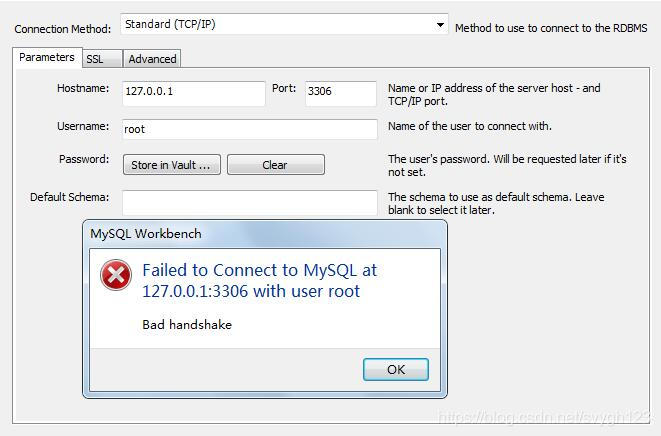
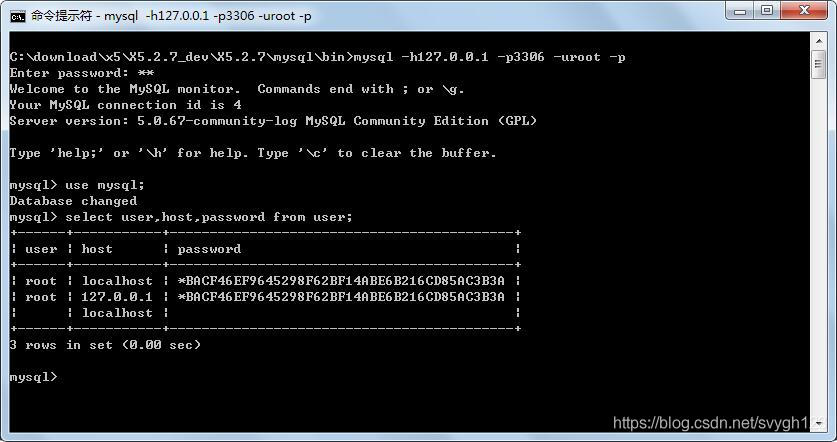
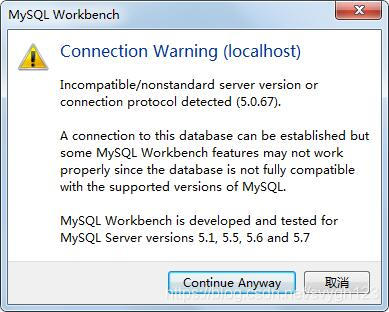
MySQL Workbench Failed to Connect to MySQL at 127.0.0.1:3306 with user root Bad handshake

Msi

installation package: mysql-workbench-community-8.0.18-winx64. Msi

version no. : MySQL Workbench 8.0 CE

connection tip:

tried

1. Neither localhost nor ::1

2. Query whether host exists under user, -> Invalid


3. Add
bind-address = 127.0.0.1


” under [mysqld] in my. Navicat and hedisql can both connect

finally found a solution in bug-75745: due to the high version of the incompatible, download version 6.3.10 at the workbench download address to install

why do you want to use MySQL Workbench?Because you need to switch databases in multiple environments in your work, so after using heidisql(GPL open source) and navicat(charged), I tried a wave of MySQL Workbench(Community GPL open source) and found that there are multiple tabs to switch multiple environment databases, which can be used. If you are used to heidisql and navicat, you can use them without changing

“[warning] failed to retrieve plugin descriptor for caused by Maven security agent settings org.apache.maven . plugins:… “

when creating a simple Maven project with the Maven command, the following tip is given:

Downloading: http://repo.maven.apache.org/maven2/org/apache/maven/plugins/maven-clean-plugin/2.5/maven-clean-plugin-2.5.pom

“[WARNING] Failed to retrieve the plugin descriptor for org.. Apache maven. Plugins: maven – clean – plugin: 2.5: the plugin org. Apache. Maven. Plugins: maven – clean – plugin: 2.5 or one of its dependencies could not be Resolved: Failed to read an artifact descriptor for org.. Apache maven. Plugins: maven – clean – plugin: jar: 2.5 “

from the Internet to see some reasons for analysis, summarized as follows:

1) maven.apache.org

cannot be accessed from the network used

2) the proxy server is not configured or is incorrectly configured.

if your company requires you to use a secure authenticated proxy to access the Internet for security reasons, then you need to configure the HTTP proxy for Maven. Add the agent configuration to the configuration file %MAVEN_HOME%/conf/setting.xml:

<proxies>  
    <proxy>  
      <id>optional</id>  
      <active>true</active>  
      <protocol>http</protocol>  
      <username>proxyuser</username>  
      <password>proxypass</password>  
      <host>proxy.host.net</host>  
      <port>80</port>  
      <nonProxyHosts>local.net|some.host.com</nonProxyHosts>  
    </proxy>      
</proxies>

username: proxy server username

password: proxy server password

host: proxy server address

port: proxy server port

nonProxyHosts: host address

that is not accessed using the proxy server

OpenLDAP main: TLS init def ctx failed: -1

problem error

system: Ubuntu 14.04
version: OpenLDAP 2.4.42
tool: slapd ldap-utils openssl libssl-dev

creates the certificate through openssl and adds it to the cn=config database. Restart the service failed. Syslog error
“main: TLS init def CTX failed: -1”

I created cert file by openssl in ubuntu 14.04. So I installed openssl/libssl-cert before, the error shown in this environment. When started the service, it failed with “main: TLS init def CTX failed: -1 “in syslog.

solution

It works after following steps:

  1. check your certfile path whether it is correct. Check whether the certificate file path in the cn=config configuration exists and is correct
  2. check your file permission. Inspection certificate file permissions
    chown openldap. Openldap/etc/SSL/certs/ldapcert pem
    chown openldap. Openldap/etc/SSL/private/ldapkey pem
    chmod -r 0400/etc/SSL/certs/ldapcert. Pem
    chmod -r 0400 The/etc/SSL/private/ldapkey. Pem
    Example Example:
    – rw – r – r – 1 root root 1383 Dec 1 09:47/etc/SSL/certs/cacert pem
    – r – 1 the openldap openldap 3808 Dec 1 09:48/etc/SSL/certs/ldapcert pem
    – r – 1 the openldap openldap 09:47 891 Dec 1 /etc/ssl/private/ldapkey.pem
  3. Whether install libssl-dev/ssl-cert, especially ssl-cert. Whether libssl-dev/ssl-cert
  4. Whether add user openldap to group ssl-cert. Adduser openldap ssl-cert adduser openldap ssl-cert
  5. Whether certfile is correct. Verification certificate is correct
    openssl verify - CAfile/etc/SSL/certs/cacert pem/etc/SSL/certs/ldapcert pem
  6. Check apparmor. With the 1 st step, if your cert file is not under the path/etc/SSL /... Your should add your cert file path to/etc/apparmor. D/usr. Sbin. Slapd, then reload the apparmor service like this:
    /etc/init. D/apparmor reload
    check apparmor, cooperate with the first, if not in the/etc/SSL /.. Need to configure the/etc/apparmor. D/usr. Sbin. Slapd, and restart the apparmor service
    If you have any other question, do feel free to concat to me 32634366 @qq.com

    ps:
    I have stuck with this for a long time, it done work after installed ssl-cert and added user openldap to group ssl-cert.

    ref:
    http://readthefuckingmanual.net/error/1257/


Asynchronous loading JS does not allow the use of document write solution

asynchronous loading js does not allow the use of document write solution

to recommend a cat smoking website: love cat family (http://15cat.com), I hope you like


var scriptFile = document.createElement('script');

scriptFile.setAttribute("type","text/javascript");

scriptFile.setAttribute("src",'http://api.map.baidu.com/api?type=quick&ak=o9B4Ol99j9NcBXSu5nFTR7uI&v=1.0');

document.getElementsByTagName("head")[0].appendChild(scriptFile);

When you finally want to add it to the head, chrome comes up with the following warning.
Failed to execute ‘write’ on ‘Document’: It isn’t possible to write into a document from an asynchronously-loaded external script Unless it is explicitly opened.
What is this?
PS: An error in chrome in console (a red error mark) will prevent the script from executing after the error, a warning (yellow exclamation mark) just won’t execute where it was warned.

Solution.
This occurs because the code introduced contains a document.write method, and asynchronously loaded js is not allowed to use the document.write method.
Since the document has been loaded and parsed, the document stream is closed.
So the js you load asynchronously can no longer write into the document, such as using document.write.
So two direct links can be introduced.


var usel = '<script src="';
usel += gds[0].imageurl;
usel += '"></script>';
document.write(usel);