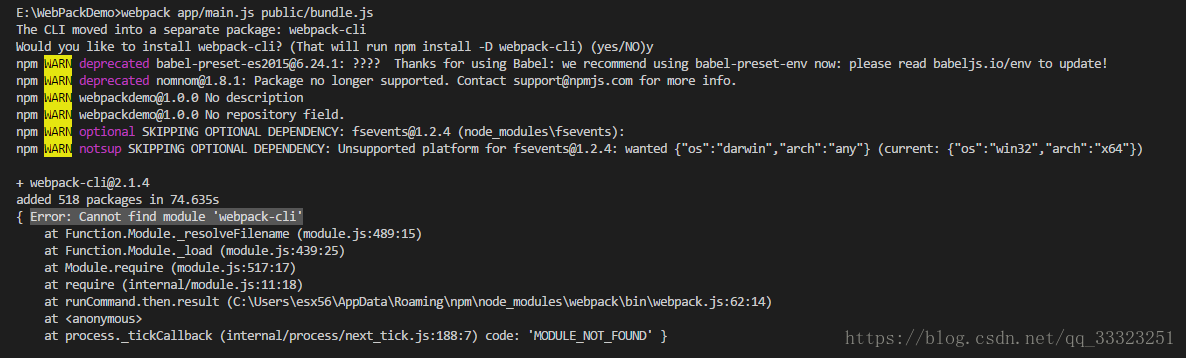
Reason: It has to be installed globally
Solution: NPM install Webpack-CLI-g
Original: Huang Xiaoxian
Error: object of type ‘closure’ is not subsettable
object is not subsettable, see if the object is empty, sometimes the file path or name is wrong, data is not imported successfully
Remove duplicates before running TSNE
there can be duplicate data lines. There is a parameter in the package Rtsne, check_duplicates = FALSE
Error in colMeans(x, na.rm = TRUE) : ‘x’ must be numeric
. The data imported by that numeric contains columns that are not numeric, which may be factors.
can be checked using sapply (x, class)
Error: (list) object cannot be coerced into type ‘double’
. If using as.matrix cannot convert columns whose type is factor to numeric,
can use lapply(x,as.numeric) to convert the factor type to numeric
Error in install. Packages: cannot remove prior installation of package ‘digest’
can directly delete the corresponding package in the folder stored in R package
Error in df$type: $ operator is invalid for atomic vectors
The $method element
Error in file(file, ifelse(append, “a”, “w”)) :
If our js file contains Ajax code, and references the HTML file of this js file, open the test directly locally, this error will appear:
as shown below:
util. Js file
function ajax(url,options,type){
    var oAjax=null;
    var type=type || "GET";
    //alert(type);
    if(window.XMLHttpRequest){
        oAjax=new XMLHttpRequest();

    }
    else{
        oAjax=new ActiveXObject('Microsoft.XMLHTTP');
    }

    oAjax.onreadystatechange=function(){
        if (oAjax.readyState==4) {
            if (oAjax.status==200) {
                options.onsuccess(oAjax.responseText);
            }
            else{
                options.onfail();
            };
        };
    }

    url=url+"?name="+options.data.name+"&password="+options.data.password+"&t="+Math.random();
    oAjax.open(type,url,true);
    oAjax.send();
}
Assuming that there are other functions in the util.js file that we need, when we introduce util.js into the HTML file, the local browser opens the test with an error
<!DOCTYPE html>
<html lang="en">
<head>
    <meta charset="UTF-8">
    <title>task0002</title>
    <script type='text/javascript' src='js/util.js'></script>
</head>
<body>
   <textarea name="hobby" id="hobby" cols="30" rows="10"></textarea><br/>
    <input type="button" id='btn' value='filtration'>
    <script>
        var oTxt=document.getElementById('hobby');
        var btn=document.getElementById('btn');
         var p=document.createElement('p');
         document.body.appendChild(p);
        btn.onclick=function(){
            var hobbys=oTxt.value;
            var ary=hobbys.split(/[,、;\n\s,\u3000]/);
            ary=uniqArray(ary);
            p.innerHTML="";
            p.innerHTML="hobby:"+ary.join("<br/>");
        }
    </script>
</body>
</html>
The reason: When local browsing opens the page, a cross-domain problem occurs, so the message is that you don’t have permission
Solution:
1. Put the ajax code part in the HTML file, there will be no problem
2. By placing the project folders on the server, they will be in one domain by default and cross-domain problems will not occur
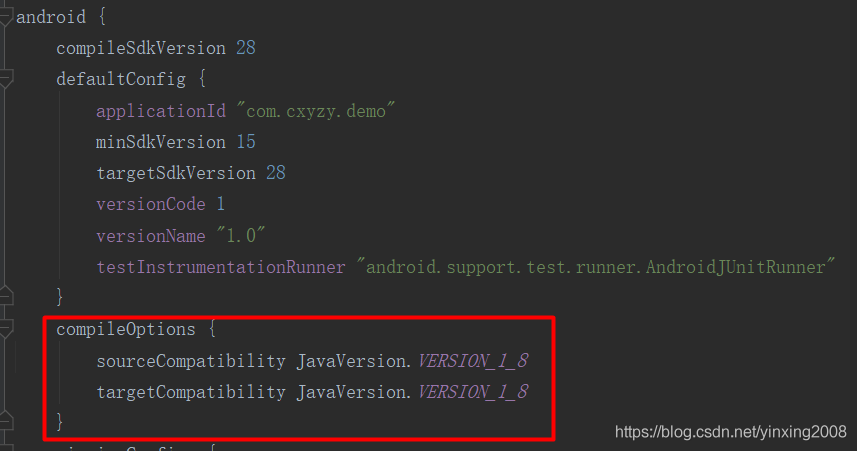
compileOptions {
        sourceCompatibility JavaVersion.VERSION_1_8
        targetCompatibility JavaVersion.VERSION_1_8
    }
Summary of the Android development tutorial series
A preliminary study on the android
Install development tools
Create your first Android project
Developing language learning
Kotlin language foundation
UI control learning series
UI control _TextView
UI control _EditText
UI control _Button
UI control _ImageView
UI control _RadioButton
UI control _CheckBox
UI control _ProgressBar
This may be because MySQL has set foreign Key association in InnoDB, which makes it impossible to update or delete data. You can avoid this situation by setting the FOREIGN_KEY_CHECKS variable.
SET FOREIGN_KEY_CHECKS = 0;
SET
SET FOREIGN_KEY_CHECKS = 1;

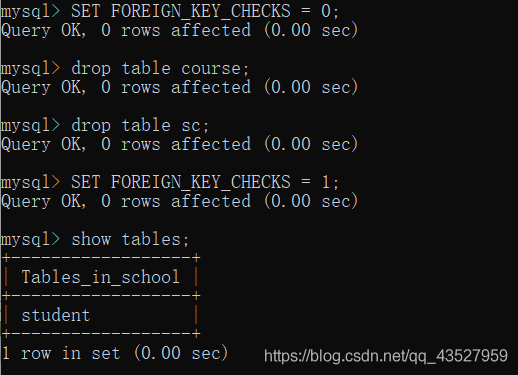
SET FOREIGN_KEY_CHECKS = 0;
SET
SET FOREIGN_KEY_CHECKS = 1;
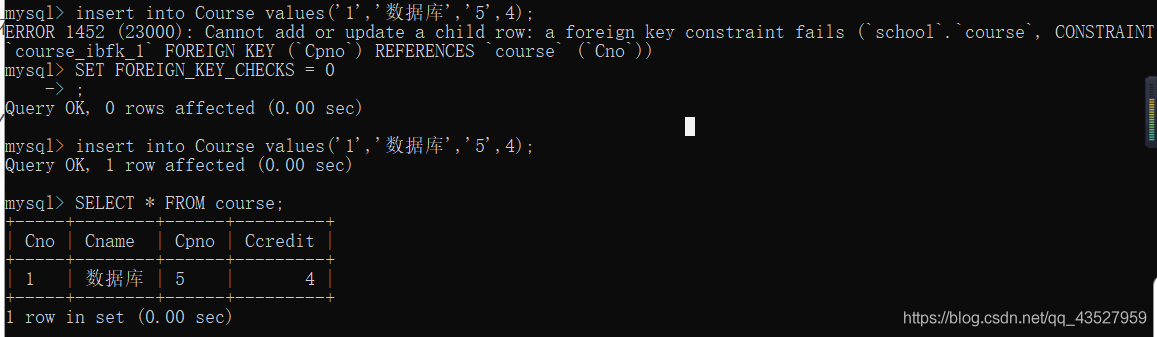
ERROR 1452 (23000): Cannot add or update a Child row: a foreign key constraint fails…… (foreign key restrictions cannot be inserted)
can also use (SET FOREIGN_KEY_CHECKS = 0; ) insert
During thread programming, the compiler broadcasts
Terminate called after throwing an instance of ‘STD ::system_error’
you are able to terminate called br> what(): Unknown error-1
Aborted (core dumped)
and add the -pthread option. G++ -std=c++11 -pthread thread_demo.cpp-o demo.
When Clion compiles, this error is reported. You need to modify the compile option at cmakelists. TXT.
If centos in Docker reports an error, restart Docker service, Service Docker Restart,
Detailed reference “docker port mapping or start the container times wrong” https://blog.csdn.net/whatday/article/details/86762264
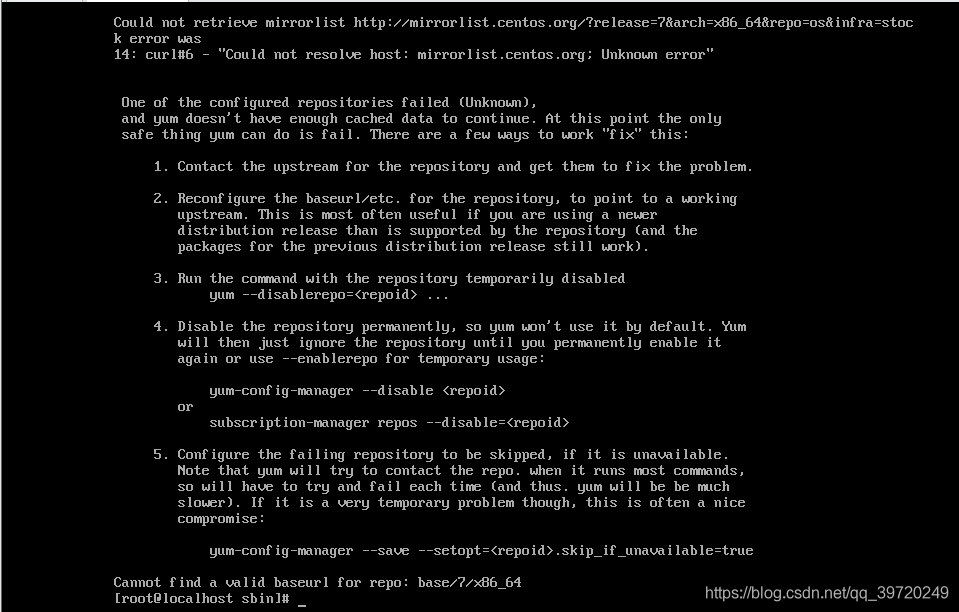
First, report the wrong situation
When using the yum command, you cannot parse the yum source, and an error occurs:
Second, report the cause of the error
The machine cannot parse the yum source, for three reasons:
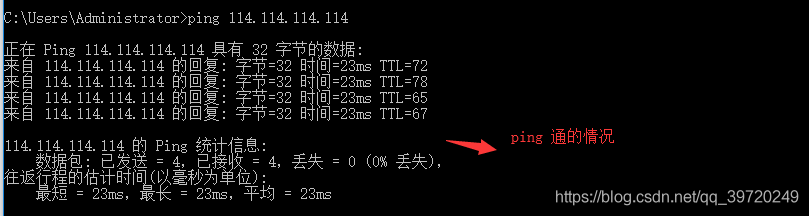
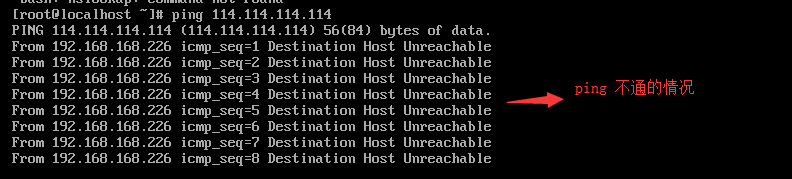
(1) The machine can not access the Internet! Please check the network configuration to make sure that you can surf the Internet and then look at the second situation. A simple point is ping a public network IP, such as ping 114.114.114.114 if ping does not work, is not on the network. If you can ping it, that would be the second case.
(2) DNS configuration problem! Nslookup www.baidu.com
nslookup www.baidu.com
nslookup www.baidu.com
nslookup www.baidu.com
nslookup www.baidu.com
nslookup www.baidu.com


(3) The machine can access the Internet, DNS configuration has also been configured, but still cannot resolve yum source, then you can change to a yum source and try again.
Three, can’t access the Internet solution
(1) Check the network card name and enter the command:

(2) Start to modify the network information configuration file, open the configuration file, and enter the command:
vi /etc/sysconfig/network-scripts/ifcfg-Name of the network card
e.g:vi /etc/sysconfig/network-scripts/ifcfg-ens33
(3) Change ONBOOT=no to ONBOOT=yes
4. DNS configuration error solution
(1) This problem is caused by yum’s inability to resolve the domain name corresponding to the remote packet management library even though it has been connected to the Internet during the process of package installation. Therefore, we only need to add the IP address corresponding to DNS to the network configuration. Open the configuration file and enter the command:
vi /etc/sysconfig/network-scripts/ifcfg-Name(2) Append DNS at the end of the file:
DNS1=8.8.8.8
DNS2=4.2.2.2
(3) Restart the network and enter the command:
ifup Name
e.g:ifup ens33error:
error: request for member ‘start’ in ‘buffers *’, which is of non-class type ‘buffer ‘, which is of non-class type ‘buffers’, which is of non-class type ‘buffers’
error: request for member ‘length’ in ‘buffers’, which is of non-class type ‘buffers’
reason:
Primarily, it is a pointer, but the use of “.” when referring to its members is used as a general variable, which would result in this compilation error.
Of course there are other reasons for this compilation error,
For example, variables are defined but not defined before they are used, and so on
modified:
if (-1 == munmap (buffers)
-> start, buffers-> length))
Fatal error: ‘break’ not in the ‘loop’ or ‘switch’ context in
. /assets/Classes/PHPExcel/Calculation/Functions.php
‘break’ not in the loop ‘or’ switch ‘context
wrong position FILE:/private/var/WWW/backend/ThinkPHP/Library/Org/Util/PHPExcel/Calculation/Functions provides PHP LINE: 576
A search on the Internet, there are indeed a lot of people also asked:
Just delete ‘break’ on line 576!
Some people on the Internet say that the higher version of PHP7.0 is only available because:
As break is after return statement, so it giving fatal error.
Because break reported a syntax error after return! That’s not true!
Others say the bug has been fixed in 1.8.1! I used 1.7.9, you must use the latest version in the future!
— —
copyright notice: this article is the original article of CSDN blogger “deep drifter”, and follows CC 4.0 by-sa copyright agreement. Please attach the link of original source and this statement to reprint.

The error message
The reason for this error is not doing something improper to layer in the view’s -drawrect: method such as UIBezierPath’s – (void)setFill; – (void)setStroke; Method UIColor – (void)setFill; – (void)setStroke; Methods, etc.
2. Solutions
(1). Encapsulate the operations on the View Layer layer separately into the -drawRect: method of a View class
(2). Do not call the related method, the official annotation is generally given, com+ click to view: Drawing the context)

Officially given limits -& GT; drawing context