Category Archives: How to Fix

error: invalid compressed data to inflate file #14: bad zipfile offset (local header sig):

The reason is that the zip file is too large to be extracted directly by using the command unzip name.zip.
Solutions:
1. See the blog on CSDN that jar XVF full.zip is used for decompression, and the actual measurement can be done;
One stateoverflow option is zip-f file.zip --out file-large.zip and then use the command unzip file-large.zip.

HTTPError HTTP Error 500 INTERNAL SERVER ERROR

Problem description
django + mysql + collect.py
When using the collection.py script to collect information into the library, the URllib request is an error, but the data is already in the library

Traceback (most recent call last):
  File "collectRHEL.py", line 201, in <module>
    req = urllib2.urlopen(url, url_encode)
  File "/root/.pyenv/versions/2.7.11/lib/python2.7/urllib2.py", line 154, in urlopen
    return opener.open(url, data, timeout)
  File "/root/.pyenv/versions/2.7.11/lib/python2.7/urllib2.py", line 437, in open
    response = meth(req, response)
  File "/root/.pyenv/versions/2.7.11/lib/python2.7/urllib2.py", line 550, in http_response
    'http', request, response, code, msg, hdrs)
  File "/root/.pyenv/versions/2.7.11/lib/python2.7/urllib2.py", line 475, in error
    return self._call_chain(*args)
  File "/root/.pyenv/versions/2.7.11/lib/python2.7/urllib2.py", line 409, in _call_chain
    result = func(*args)
  File "/root/.pyenv/versions/2.7.11/lib/python2.7/urllib2.py", line 558, in http_error_default
    raise HTTPError(req.get_full_url(), code, msg, hdrs, fp)
urllib2.HTTPError: HTTP Error 500: INTERNAL SERVER ERROR

Solution idea, test method
First, clear the data in the library, modify some ORM field to make its length less than the length of the data to be inserted, which is bound to make an error, and then request with urllib and URllib2 respectively as the last test, but this time give enough length, and then test with urllib and urllib2 respectively
The test results
Whether it’s URllib or URllib2, it’s going to go wrong and whatever module you’re using, it’s going to be fine
conclusion

1. Determine the length of the database field in the ORM model
2. In fact, urllib.urlopen() or urllib2.urlopen() does not matter much

Eclipse software Java solution: editor does not contain a main type error box

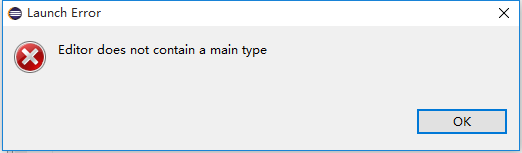
The editor does not contain a main type error box
When you run the Java file is, if the following error box pops up:

Reason for error: The current source code (all packages) is not added to build path (SRC path with the file directory inside)

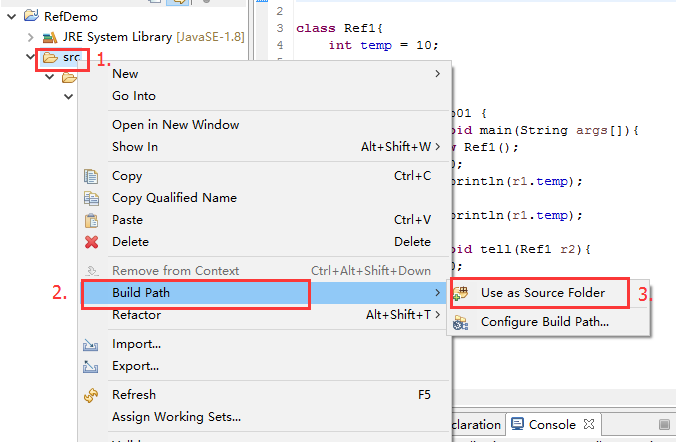
Solution: Right click on: SRC path -> Build Path -> Use as Source Folder

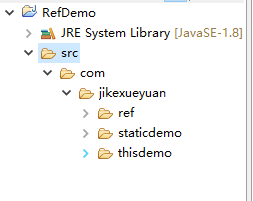
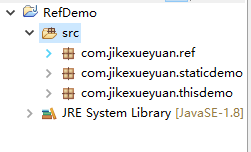
Now, the SRC path should look like this :(instead of a file directory, it looks like a Java package)

Eneditor does not contain a main type. eneditor does not contain a main type.


Reference site:
use the eclipse to run with the main function of the Java file, the editor does not contain a main type of mistakes box
http://blog.csdn.net/zt689/article/details/22161909

Eclipse can’t open an error: Error:could not find java SE Runtime Environment/Error: could not find java.dll

Eclipse could not find Java SE Runtime Environment/Error: could not find Java DLL
It’s not uncommon for a friend to fail to open an error message when using Eclipse
Error:could not find Java SE Runtime Environment/Error: could not find Java
This is mostly due to multiple installations and uninstalls; you may have two versions of the JDK installed on your computer
To solve this problem, there are the following solutions:
Methods a
After uninstalling, reconfigure your environment variables to prevent your environment variables from still being uninstalled.
Method 2
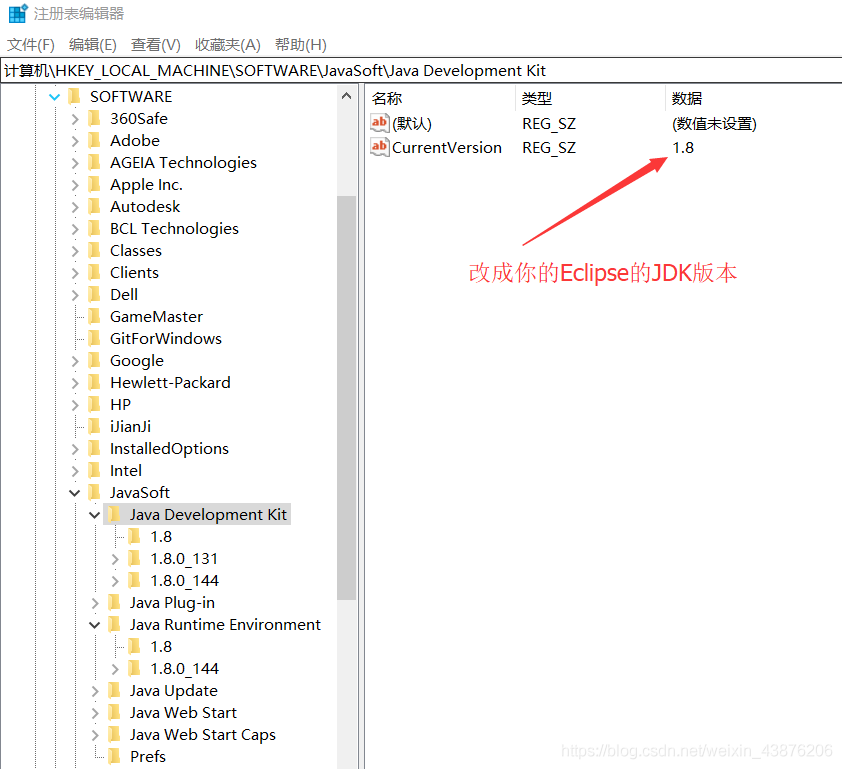
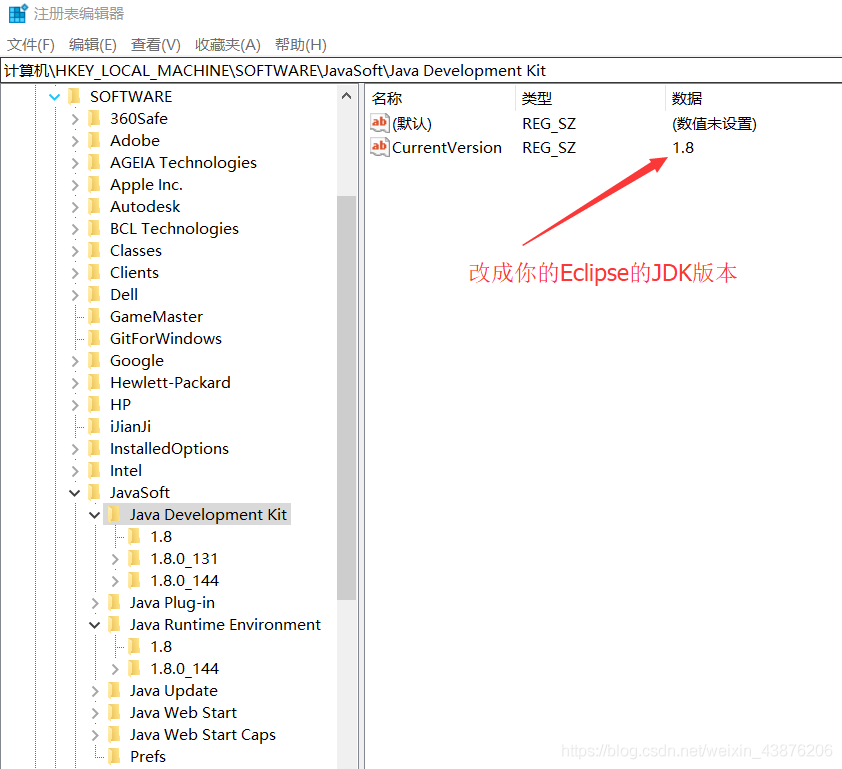
For example, when you open the 1.7 version of Eclipse, but when you install the 1.8 version, the CurrentVersion field of the registry is updated to 1.8, so you cannot open it. Could not find Java.dll change both CurrentVersion as shown by the arrow in the figure below to 1.7.
Note: Just change the version of the Eclipse JDK that you installed.

Syntax error near unexpected token ‘$’Do is reported when running bash file

Write a sh file directly on Pycharm and run it on the server to report an error, such as a title.
Then, vim on the server takes all line breaks, whitespaces, and retyping is invalid
Finally, the reasons for the errors and two solutions are summarized.
The reason:
As many blogs have explained, because of the difference between line breaks in Windows and Linux systems, in Windows the line break is ‘\r\n’ whereas in Linux it is ‘\n’, now we understand the meaning of error reporting. For code written in Windows format to be executed on Linux, there is an extra ‘\r’, this is the reason: “Syntax error near token ‘$’do\r'” ”
Visually, run the command and change your file name.

cat -v bb.sh

There will be:

for i in 1 2 3;^M
do^M
  echo"aa"^M

If you have this to the M, that means you’re a window newline, and if you’re a Linux newline, you’re not going to have a to the M at the end.
The solution
1. Novice White, simple violence
Cat first:

cat bb.sh

Output:


for i in 1 2 3;
do
  echo"aa"

Then select the left key on CMD to copy it, then vim creates a new file, switch to the writing mode (press I), and then right-click to copy once, save and exit.
2. Replace ‘\r’ with sed.

sed 's/\r//' bb.sh > aa.sh

The first S means a replacement, which is to replace the /r in BB.sh with a ‘ ‘and save the replacement to the file aa.sh.
The above


Git error: the requested URL returned error: 500

When Git clone found the following error, research for a long time did not find the reason

$ git clone --bare http://github/lqiqiqi/deepchem deepchem
Cloning into bare repository 'deepchem'...
fatal: unable to access 'http://github/lqiqiqi/deepchem/': The requested URL returned error: 500

Finally found the correct is http://github.com/lqiqiqi/deepchem
url to write wrong, grieve

TIP: Unable to initialize gtk, is DISPLAY set properly?

In addition to some common methods provided online, another possible reason for using xming is that xming rejects the forwarding request of the host. Instead, add the host name to the configuration file x0.hosts for xming :

localhost
10.1.241.70

localhost is the default.
x0.hosts and xming.exe are in the same directory.

Oci-22053: overflow error problem

When connecting Oracle in.NET and using dataAdapter fill, the exception of OCI-22053: overflow error occurs, because the data type precision of.NET is smaller than that of Oracle, such as
Select sysdate- ISSUetime as Timediff from sometable returns an excessive precision
Select TRUNc (sysdate-issuetime,2) as Timediff from sometable.
There are other ways to do this online:
http://excel.cnblogs.com/archive/2005/11/14/276202.html using the new ODP.NET da. SafeMapping. Add (field name 1, typeof (System. String)); Method converts all fields to String. But I went to the Oracle website and found that the 9207 version of ODAC is 80M… I’m too lazy to download.

 
The Oracle numeric data type can store up to 38 bytes of precision.
the Oracle value
may become too large when converting the Oracle value to the common language runtime data type. This causes an Oracle OCI-22053 overflow error.
The solution is to use the round function.
How to use the Oracle Round function (rounded)
Description: Returns a value that is rounded to the specified number of decimal digits.
SELECT ROUND( number, [ decimal_places ] ) FROM DUAL
Parameters:
Number: The number you want to process
Decimal_places: Round up and take a few decimal places (default is 0)
Sample :
Select round (123.456) from dual; The back 123
Select round(123.456, 0) from Dual; The back 123
Select round(123.456, 1) from Dual; The back 123.5
Select round(123.456, 2) from Dual; The back 123.46
Select round(123.456, 3) from Dual; The back 123.456
Select round(-123.456, 2) from dual; The back to 123.46
 
From:
http://blog.csdn.net/xeonol/article/details/726133

Java long type error: error: integer number too large

Java Basic data Types (let’s start with Java basic data types)
A variable is a memory request to store a value. That is, when creating variables, you need to request space in memory.
The memory management system allocates storage space for variables based on their type, which can only be used to store data of that type.
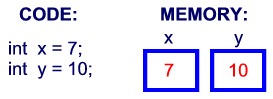
Therefore, by defining different types of variables, you can store integers, decimals, or characters in memory.
The two big data types in Java:
Built-in data types refer to data types


Built-in data type
The Java language provides eight basic types. There are six numeric types (four integers, two floats), one character type, and one Boolean type.
Byte:
A byte data type is an 8-bit, signed integer represented by a binary complement; The minimum is minus 128 times minus 2 to the seventh; The maximum is 127 (2^7-1); The default value is 0; Byte is used in large arrays to save space, replacing integers because byte variables take up only a quarter of the space of an int. Example: Byte a = 100, byte B = -50.
Short:
The minimum value of a 16-bit, signed integer represented by binary complement is -32768 (-2^15). The maximum is 32767 (2^15-1); Short data types can also save as much space as a byte. A short variable is one half of the space occupied by an int variable. The default value is 0; Example: Short s = 1000, short r = -20000.
Int:
The int data type is a 32-bit, signed integer represented as a binary complement; The minimum is -2,147,483,648 (-2^31); The maximum value is 2,147,483,647 (2^ 31-1); Generally, integer variables default to int; The default value is 0; Example: int a = 100000, int B = -200000.
Long:
The long data type is a 64-bit, signed integer represented as a binary complement; The minimum value is – 9223372036854775808 (2 ^ 63); Maximum is 9223372036854775807 (2 ^ 63-1); This type is mainly used on systems that require larger integers; The default value is 0L; Example: long A = 100000L, long B = -200000l.
“L” is not case-sensitive in theory, but if written as “L”, it is easy to confuse with the number “1” and cannot be easily distinguished. So it’s better to capitalize.
Float:
The float data type is a single-precision, 32-bit, IEEE 754 compliant float; Floats save memory when storing large floating point arrays. The default value is 0.0f; Floating-point Numbers cannot be used to represent exact values, such as currency; Example: Float F1 = 234.5F.
Double:
A double data type is a double-precision, 64-bit, IEEE 754 compliant floating point; The default type of floating-point Numbers is double; Double also does not represent exact values, such as currency; The default value is 0.0d; Example: Double D1 = 123.4.
Boolean:
Boolean data types represent bits of information; There are only two values: true and false; This type is used only as a flag to record true/false cases; The default value is false; Example: Boolean One = true.
Char:
Char is a single 16-bit Unicode character; The minimum value is \u0000 (i.e., 0); The maximum value is \ UFFFF (i.e. 65,535); Char data type can store any character; Char letter = ‘A’;

* * * * * * * * * * * * * * * * * * * * * * * * * * * * * * * * * * * * * * * * * * * * * * * * * * * * * * * * * * * * * * * * * * * * * * * * * * * * * * * * * * * * * * * * * * * * * * * * * * * * * * * * * * * * * * * * * * * * * * * * * * * * * * * * * * * * * * * * * * * * * * * * * * * * * * * * * * * * * * * * * * * * * * * * * * * * * * * * * * * * * * * * * * * * * * * * * * * * * * * * * *

Defined in Java:
Long len = 12345678901211;
Result error:
Error: Integer Number too Large: 12345678901211
Correct writing: long len = 12345678901211L;
Reason: The L is treated as long; If you do not add it and treat it as an int, an error will be reported.
 

errorCode: 500, msg: , result: {“Message”:”There was an error processing the request

Recently, I encountered this bug in my project:
sendRequest(L:249): errorCode: 500, msg: , result: {“Message”:”There was an error processing the request.”,”StackTrace”:””,”ExceptionType”:””}, url: http://www.xxxx.cn/api/m1/xx/xx/xxxx?name=0416
Interaction mode :WebService
Request method, using get and post are not good, have not been able to find the reason, baidu and Google, also did not find the desired answer, the question has been stuck here for a long time, and then accidentally, comment out the request header, the result sent the request again, found the problem got, the request through!
It turned out that it was caused by the request head. Why can’t you add the request head?I don’t know for the moment, so I will make a record first and then analyze it later.