Category Archives: How to Fix

Linux running Makefile, G + + / GCC error: suffix or operations invalid for ‘vbroadcasts’

Compiler Error on Linux systems: suffix or operands invalid for ‘vbroadcastss’ solution Error scenario solution reference

Error: suffix or operands invalid for ‘vbroadcastss’ solution
When running Kaggle-2014-Criteo-Master open source program, I encountered errors when compiling and running GBDT, libffm program and Makefile. The intuition was related to the system running the program. A search led to a solution. The
problem is primarily that GCC or g++ compile-time sets the -march parameter, which is a platform-dependent parameter. You need to modify this parameter value to correspond to the machine.
(program download address: https://github.com/ycjuan/kaggle-2014-criteo)
for this open source programs need to modify: Makefile
[file path]/kaggle-2014-criteo/solvers/ GBDT
[file path]/kaggle-2014-criteo/solvers/libffm-1.13 Makefile
-march =native march=broadwel
then Makefile error disappears.
An error scenario
Specifically report the following mistakes:

[dhy@Master kaggle-2014-criteo-master]$ make
make -C solvers/gbdt
make[1]: Entering directory `/home/dhy/code/kaggle-2014-criteo-master/solvers/gbdt'
g++ -Wall -Wconversion -O2 -fPIC -std=c++0x -march=native -fopenmp -o gbdt src/train.cpp src/common.cpp src/timer.cpp src/gbdt.cpp
make[1]: Leaving directory `/home/dhy/code/kaggle-2014-criteo-master/solvers/gbdt'
ln -sf solvers/gbdt/gbdt
make -C solvers/libffm-1.13
make[1]: Entering directory `/home/dhy/code/kaggle-2014-criteo-master/solvers/libffm-1.13'
g++ -Wall -O3 -std=c++0x -march=native -fopenmp -DUSEOMP -c -o ffm.o ffm.cpp
/tmp/ccuUtD2f.s: Assembler messages:
/tmp/ccuUtD2f.s:3671: Error: suffix or operands invalid for `vbroadcastss'
/tmp/ccuUtD2f.s:3787: Error: suffix or operands invalid for `vbroadcastss'
/tmp/ccuUtD2f.s:3917: Error: suffix or operands invalid for `vbroadcastss'
/tmp/ccuUtD2f.s:4071: Error: suffix or operands invalid for `vbroadcastss'
make[1]: *** [ffm.o] Error 1
make[1]: Leaving directory `/home/dhy/code/kaggle-2014-criteo-master/solvers/libffm-1.13'
make: *** [ffm-train] Error 2

The solution
Modify the Makefile, – march = native for – march = broadwell
this is because the GCC/g + + parameters march on different architecture platform corresponding to different – march Options, refer to: https://gcc.gnu.org/onlinedocs/gcc in the “3.18 Machine – Dependent Options” section. To view the machine’s corresponding -march, run the following command 1 :

$gcc -c -Q -march=native --help=target | grep march

My machine to execute the above command appears:

-march=                     		broadwell

Therefore, in the compile file Makefile, the g++ or GCC parameter is set to -march= broadwell.
different cpus corresponding to march selection can refer to the following table: 2
The

CPU type

march option

AMD Barcelona

– march = Barcelona

AMD Bobcat

– march = btver1

AMD Jaguar – march=btver2
AMD Bulldozer – march=bdver1
AMD Piledriver – march=bdver2
AMD Steamroller – march=bdver3
Intel Westmere – march=westmere
Intel Core Nehalem – march=corei7
Intel Core Sandy Bridge – march=corei7-avx
Intel Core Ivy Bridge – march=core-avx-i
Intel Core Haswell – march=core-avx2
Intel Core Broadwell – march=broadwell
Intel Atom Bonnell – march=bonnell
Intel Atom Silvermont – march=silvermont

reference


The

    https://blog.csdn.net/listener51/article/details/80468021 ↩ ︎ http://blog.sciencenet.cn/blog-365047-1014406.html ↩ ︎

Solution to prompt run time error “438” when a VB program is opened

RT, the error is as follows:

Run-time error “438”
Object doesn’t support this property or method

The solution is as follows:
Win + R brings up the run box, type Services.MSC to open the service and stop the following service:

Windows Management Instrumentation

Open the following path and empty the folder:

C:\Windows\System32\wbem\Repository

Be careful not to make the mistake of emptying WBEM, which can have serious consequences unless the files are retrieved from the original system.
Go back to the service, start what you just stopped, open the error reporting program again, and run normally!
The same error solution may not be universal and is for reference only.

Solution: error in the RPC receive loop

Abstract: Cloud computing and virtualization are popular concepts in the field of informatization in recent years. With the deepening of these concepts in China, the new generation of virtual machine, virtualization environment has been more and more in our daily environment. The flexible and fast deployment management mode of virtual machine is gradually accepted by the field of operation and maintenance. In the field of practice, we are also facing new problems and failures when using virtualized environments that require us to…
Cloud computing and virtualization are popular concepts in the field of informatization in recent years. With the deepening of these concepts in China, the new generation of virtual machine, virtualization environment has been more and more in our daily environment. The flexible and fast deployment management mode of virtual machine is gradually accepted by the field of operation and maintenance.
In the field of practice, we also face some new problems and failures when using virtualized environment, which require us to re-study and explore, so as to keep up with the development process and solve the practical problems in the enterprise.
This article records the minor problems I encountered while managing and maintaining a Windows virtual machine (built on VM Ware), and keeps a record of them for those who need them to check.
1. Problem description
The author is installing and maintaining a Windows server running version 2008 R2. The server is based on VM Ware virtual machine environment, and resource allocation and management are carried out through VM Ware console. Due to the server’s purpose, the author conducted additional security hardening operations and log checking operations, and found that the logs contained the following Warning information.
Unlike Linux/AIX text logs, Windows logs are stored and presented in binary mode and organized into different types. As you can see from the screenshot above, in the Application type, the system generates warlike log information at a very high frequency (two per second). Application-type logs are generally the log contents written to the operating system level by Application output.
The Source column prompts to indicate which application wrote the log content. This column we confirm is from VMWare Tools.
2. Problem analysis
VMWare Tools is an optional part of a VMWare virtual machine. In newer versions, VMWare Tools is a mandatory version of the virtual machine. Simply put, VMWare Tools is a plug-in tool that is embedded at the operating system level of a virtual machine. My main responsibility is to improve hardware compatibility and interaction experience. If we compare a virtual machine to a unit running in a container, VMWare Tools is an important component in the communication between the two.
Based on the error case this time, we can find the main contents of the fault log are as follows:
[ warning] [vmusr:vmusr] Error in the RPC receive loop: RpcIn: Unable to send.
The author has no experience with this error, and judging from the prompts and the frequency of failures, it looks like VMware Tools is sending RPC messages over a continuous connection. But the call did not complete successfully. At one point, the author wondered if RPC ports were closed during the strengthening of the operating system, but later confirmed that this was not the case.
3. Problem analysis and solution
By inquiring the data, I found the fault analysis and reason from the VMWare official. This logging phenomenon is possible in both Windows and Linux environments. The official explanation for the problem is as follows:
Cause
This issue occurs when the VMware Tools daemon (vmtoolsd) handles more than two Terminal Sessions. When a user connects to a Windows virtual machine, each terminal session should have one vmtoolsd running; however, vmtoolsd is limited to only two sessions running simultaneously.
Thus the Windows Application Event log fills up with warning messages similar to this until the total connection count is > 2?per session:
Simply put, the problem occurs when multiple users are connected to the virtual machine at the same time. Every time a user connects to a virtual machine using VMTool, the background virtual machine allocates a background daemon that matches vmToolSD. This can occur if multiple users are connected to the system at the same time, or if the remote Desktop interface is simply closed without a formal launch. The vmToolsd process is limited to two sessions at a time.
When this happens, VMTools writes a warning level message to the operating system.
Then, you need to determine the current number of connected users and whether there are more than one VMToolSD working at the same time. An accidental scene, the author looked at the task manager, found clues.
In the task manager, there is indeed more than one VMToolsd.exe connection, which corresponds to the multiple system users I created. This is due to the fact that when I created the user, I used the remote desktop for testing separately and did not quit.
Once you find the cause of the problem, you can start to fix it. The idea of VMWare’s official solution is that if too many logs occur too often, the warn-level log switch can be turned off and not written to the operating system.
Closing the log is done primarily through configuration files. On Windows 7, 2008, the log configuration directory is: C:\ProgramData\VMware\VMware Tools\. In earlier Versions of Windows, the directory path was C:\Documents and Settings\All Users\Application Data\VMware\VMware Tools\.
In Linux, the configuration directory is: /etc/vmware-tools/tools.conf.
On the corresponding directory, the configuration file name is called tools.conf. If the file does not exist, you can create your own directory to configure. The author does not have this file in the corresponding directory of the server, it is created first.
Write the following in the file:
[logging]
vmusr.level = error
vmsvc.level = error
Then restart VMTools Services and ensure that the multi-user connection is disconnected and the configuration takes effect. I chose to restart the server. Then the problem is solved.
4, the conclusion
As virtualization is widely used in operations and maintenance environments, it is believed that more and more virtualization-related failures will appear and be resolved.
The original address: http://blog.itpub.net/17203031/viewspace-1260657
In addition, the ranger safety net webmaster also found this result:
Reason: Due to vmTools limitations, an alert will appear when VMTools processes more than 2 terminal connections
Solution: Disable the alarm generation log as follows
Into the C: \ ProgramData \ VMware \ VMware Tools \
Find the tools. Conf
Notepad editor
Add the following fields
[logging]
vmusr.level = error
Restart the VMware Tools service

Reproduced in: https://blog.51cto.com/prince0330/1713958

javax.xml.ws.soap.SOAPFaultException: Unmarshalling Error: unexpected element


< Jaxws: client id = “testService” serviceClass = “com. Test. TestService”
address = “127.0.0.1”/& gt;
add
< jaxws:properties>
& lt; entry key=”set-jaxb-validation-event-handler” value=”false”/>
& lt; /jaxws:properties>

namely & lt; Jaxws: client id = “testService” serviceClass = “com. Test. TestService”
address = “127.0.0.1” & gt;
& lt; jaxws:properties> < entry key=”set-jaxb-validation-event-handler” value=”false”/> < /jaxws:properties> < /jaxws:client>

linux tomcat Run (DWP exit error AGENT_ERROR_TRANSPORT_INIT(197): No transports initialized [debugIni)


recently started tomcat, the aliyun server, which has been unable to start. I studied it carefully in my spare time.
It is found that the debug port of the current application is in conflict with the debug port of other applications.

netstat -na|grep 8888

Sure enough there is a record trying to find the PID and kill it, plus the parameter showing the pid.

netstat -nap|grep 8888

The results show that.

tcp        0      0 0.0.0.0:8888                0.0.0.0:*                   LISTEN      -

1. Check the process information according to the process name, take the tomcat process name as an example, and check the corresponding process id of 1095(or use ps-aux | grep to check the memory occupation and other information of tomcat)
ps -ef | grep tomcat
2. View the process occupied port according to the process ID and view the corresponding port as 8080 (if you do not have the netstat command, install it using Yum-y Install net-tools).
netstat -nap | grep 1095
3. Check the corresponding process according to the port, and check the process ID occupying port 8080, which is 1095
netstat -tunlp | grep 8080
4. Check the process information according to the process ID, and check the process information with the process ID 1095
ps -ef | grep 1095
5. Kill the process according to the process ID. Kill the process with the process ID of 1095
kill -9 1095

RMSE(Root Mean Squared Error) & RMSLE(Root Mean Squared Logarithmic Error)

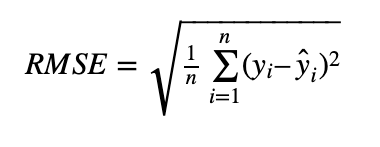
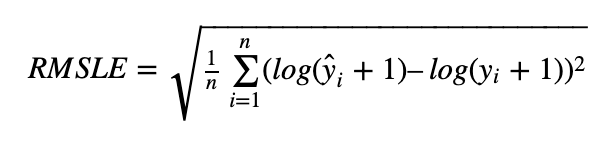
1. Root Mean square Error RMSE (Root Mean Squared Error)

2. Root-mean-square logarithm Error RMSLE (Root Mean Squared MIC Error)

Advantages of using RMSLE
1.RMSLE penalty underprediction is larger than overprediction, which is applicable to some scenarios where underprediction is more costly, such as the prediction of bike-sharing demand.
If the true value is 1000, if the predicted value is 600, then RMSE=400, RMSLE=0.510
if the true value is 1000, if the predicted value is 1400, then RMSE=400, RMSLE=0.336
It can be seen that under the same RMSE condition, RMSLE with a predicted value smaller than the true value is larger, that is, the penalty for a predicted value smaller is larger.
2. If the range of predicted values is large, RMSE will be dominated by some large values. So even if you get a lot of small value predictions right, but one very large value prediction wrong, RMSE will be very large. Accordingly, if another poor algorithm is more accurate for this large value, but many small values are biased, it is possible that RMSE will be smaller than the previous one. You can solve this problem a little bit by taking log first and then RMSE. RMSE is generally a reasonable predictor of a fixed mean distribution.

[How to Fix] sslexeption: received fatal Alert: internal_ error

I. Briefing:
The phenomenon description: javax.net.ssl.SSLException: Received fatal alert: internal_error
Problem location: Different versions of the JDK support SSL/TSL to varying degrees. The problem I have encountered is that JDK1.6 does not support TLSV1.2.
Handle registration: No more errors will be reported after JDK version 1.7 upgrade.Second, detailed process
1. Error message
The client access server reported an error, as shown in the figure below:

2018-09-13 17:37:21,872 E ReqAcquirer-00445821(default) [HttpClientComm      ] - Dedicated line (7-1-2-2-1) @ Component execution error, go to exception handling
javax.net.ssl.SSLException: Received fatal alert: internal_error
        at sun.security.ssl.Alerts.getSSLException(Alerts.java:208) ~[na:1.8.0_162]
        at sun.security.ssl.Alerts.getSSLException(Alerts.java:154) ~[na:1.8.0_162]
        at sun.security.ssl.SSLSocketImpl.recvAlert(SSLSocketImpl.java:2038) ~[na:1.8.0_162]
        at sun.security.ssl.SSLSocketImpl.readRecord(SSLSocketImpl.java:1135) ~[na:1.8.0_162]
        at sun.security.ssl.SSLSocketImpl.performInitialHandshake(SSLSocketImpl.java:1385) ~[na:1.8.0_162]

2. Preliminary analysis of problems
Httpclient sends requests, which should not be a problem for the client. And the client does not validate the server certificate, enforcing trust. So it shouldn’t be the client reporting an error.
A feasible way to network capture packet. The server catches network packets through Tcpdump, downloads files, and opens them for parsing through Wireshark. The simple command, which requires root access, is available through Tcpdump –help and Man Tcpdump.

#tcpdump --help
#tcpdump host somehostip and port someport -w client2server.cap

Through Wireshark, it is resolved as follows:
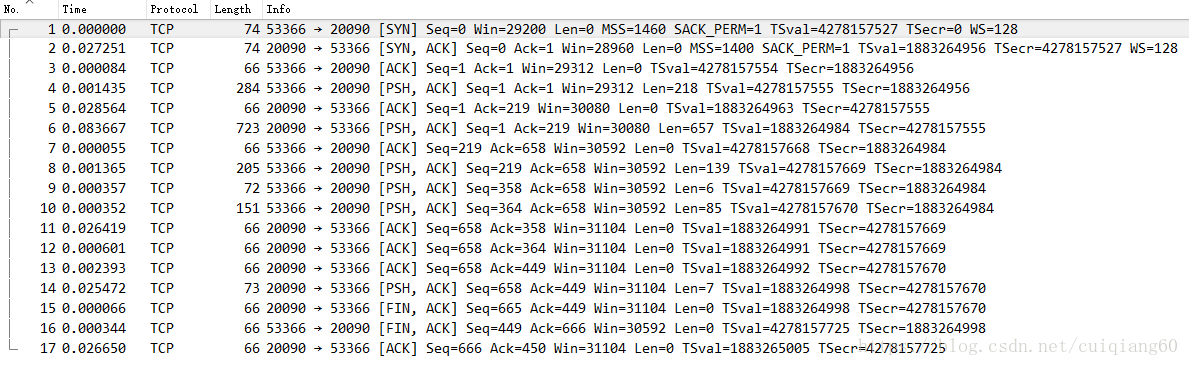
. In this analysis, however, I do not find much useful information.
3. HTTPS Network protocol interaction
For the HTTPS handshake, I searched for a simple, straightforward image.
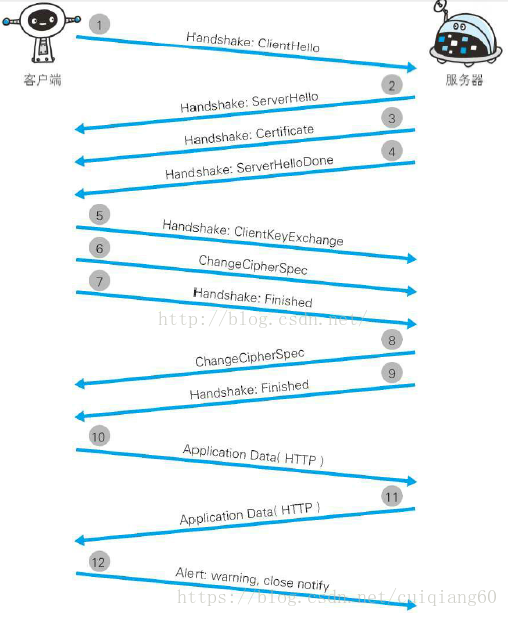
The explanation for each step is as follows:
Step 1: The Client initiates SSL communication by sending the Client Hello message. The message contains the specified version of SSL supported by the client, a list of Cipher suites (the encryption algorithm used, the key length, and so on).
step 2: when the Server is available for SSL communication, the Server Hello message is answered. As with the client, the SSL version and the encryption component are included in the message. The server’s encryption component content is filtered from within the received client encryption component.
step 3: then the server sends the Certificate message. The message contains a public key certificate.
step 4: finally, the Server sends the Server Hello Done message to inform the client that the initial SSL handshake negotiation part is over.
step 5: after the SSL first handshake is over, the Client responds with the Client Key Exchange message. The message contains a random string of passwords, called a pre-master secret, used in communication encryption. This article is encrypted with the public key in Step 3.
step 6: the client then continues to send the Change Cipher Spec message. This message will prompt the server that communications following this message will be encrypted with a pre-master Secret key.
step 7: the client sends the Finished message. This text contains the overall check value of all messages connected so far. The success of the handshake will depend on whether the server can correctly decrypt the paper.
step 8: the server also sends the Change Cipher Spec message.
step 9: the server also sends the Finished message.
step 10: after the Finished message exchange between the server and client, the SSL connection is established. Of course, the communication is protected by SSL. This is where the communication of the application layer protocol begins, that is, the sending of an HTTP request.
step 11: application layer protocol communication, that is, sending an HTTP response.
step 12: finally, the client disconnects. When disconnected, send the close_NOTIFY message. Some omissions are made in the figure above. After this step, the TCP FIN message is sent to shut down communication with TCP. In the above process, the application layer sends the data with an abstract of a Message called Message Authentication Code. The MAC protects the integrity of a message by detecting whether it has been tampered with.
below is a diagram of the whole process. The figure illustrates the entire process of establishing HTTPS communication from a server-only public key certificate (server certificate)
4. Net.debug checks information
Now that you know what HTTPS is like, you can force your way forward. Where exactly does it appear?
In the program startup script we added a configuration item: javax.net.debug=SSl

javax.net.debug=[ssl|all]
If ssl, turns on SSL debugging. If all, turns on SSL debugging with verbose messages.

By turning on debugging of network SSL, we can see the interaction between client and server in more details:

trustStore is: /home/bsp/jdk1.8.0_162/jre/lib/security/cacerts
trustStore type is : jks
trustStore provider is : 
init truststore
adding as trusted cert:
  Subject: CN=Equifax Secure Global eBusiness CA-1, O=Equifax Secure Inc., C=US
  Issuer:  CN=Equifax Secure Global eBusiness CA-1, O=Equifax Secure Inc., C=US
  Algorithm: RSA; Serial number: 0xc3517
  Valid from Mon Jun 21 12:00:00 CST 1999 until Mon Jun 22 12:00:00 CST 2020

adding as trusted cert:
  Subject: CN=Entrust Root Certification Authority - EC1, OU="(c) 2012 Entrust, Inc. - for authorized use only", OU=See www.entrust.net/legal-terms, O="Entrust, Inc.", C=US
  Issuer:  CN=Entrust Root Certification Authority - EC1, OU="(c) 2012 Entrust, Inc. - for authorized use only", OU=See www.entrust.net/legal-terms, O="Entrust, Inc.", C=US
  Algorithm: EC; Serial number: 0xa68b79290000000050d091f9
  Valid from Tue Dec 18 23:25:36 CST 2012 until Fri Dec 18 23:55:36 CST 2037

adding as trusted cert:
  Subject: CN=SecureTrust CA, O=SecureTrust Corporation, C=US
  Issuer:  CN=SecureTrust CA, O=SecureTrust Corporation, C=US
  Algorithm: RSA; Serial number: 0xcf08e5c0816a5ad427ff0eb271859d0
  Valid from Wed Nov 08 03:31:18 CST 2006 until Tue Jan 01 03:40:55 CST 2030

......(N multiple certificates omitted here)

adding as trusted cert:
  Subject: CN=KEYNECTIS ROOT CA, OU=ROOT, O=KEYNECTIS, C=FR
  Issuer:  CN=KEYNECTIS ROOT CA, OU=ROOT, O=KEYNECTIS, C=FR
  Algorithm: RSA; Serial number: 0x1121bc276c5547af584eefd4ced629b2a285
  Valid from Tue May 26 08:00:00 CST 2009 until Tue May 26 08:00:00 CST 2020

adding as trusted cert:
  Subject: CN=DigiCert Global Root G2, OU=www.digicert.com, O=DigiCert Inc, C=US
  Issuer:  CN=DigiCert Global Root G2, OU=www.digicert.com, O=DigiCert Inc, C=US
  Algorithm: RSA; Serial number: 0x33af1e6a711a9a0bb2864b11d09fae5
  Valid from Thu Aug 01 20:00:00 CST 2013 until Fri Jan 15 20:00:00 CST 2038

trigger seeding of SecureRandom
done seeding SecureRandom
trigger seeding of SecureRandom
done seeding SecureRandom
Allow unsafe renegotiation: false
Allow legacy hello messages: true
Is initial handshake: true
Is secure renegotiation: false
Ignoring unsupported cipher suite: TLS_ECDHE_ECDSA_WITH_AES_256_CBC_SHA384 for TLSv1
Ignoring unsupported cipher suite: TLS_ECDHE_RSA_WITH_AES_256_CBC_SHA384 for TLSv1
Ignoring unsupported cipher suite: TLS_RSA_WITH_AES_256_CBC_SHA256 for TLSv1
Ignoring unsupported cipher suite: TLS_ECDH_ECDSA_WITH_AES_256_CBC_SHA384 for TLSv1
Ignoring unsupported cipher suite: TLS_ECDH_RSA_WITH_AES_256_CBC_SHA384 for TLSv1
Ignoring unsupported cipher suite: TLS_DHE_RSA_WITH_AES_256_CBC_SHA256 for TLSv1
Ignoring unsupported cipher suite: TLS_DHE_DSS_WITH_AES_256_CBC_SHA256 for TLSv1
Ignoring unsupported cipher suite: TLS_ECDHE_ECDSA_WITH_AES_256_CBC_SHA384 for TLSv1.1
Ignoring unsupported cipher suite: TLS_ECDHE_RSA_WITH_AES_256_CBC_SHA384 for TLSv1.1
Ignoring unsupported cipher suite: TLS_RSA_WITH_AES_256_CBC_SHA256 for TLSv1.1
Ignoring unsupported cipher suite: TLS_ECDH_ECDSA_WITH_AES_256_CBC_SHA384 for TLSv1.1
Ignoring unsupported cipher suite: TLS_ECDH_RSA_WITH_AES_256_CBC_SHA384 for TLSv1.1
Ignoring unsupported cipher suite: TLS_DHE_RSA_WITH_AES_256_CBC_SHA256 for TLSv1.1
Ignoring unsupported cipher suite: TLS_DHE_DSS_WITH_AES_256_CBC_SHA256 for TLSv1.1
%% No cached client session
*** ClientHello, TLSv1.2
RandomCookie:  GMT: 1520046760 bytes = { 246, 213, 192, 77, 83, 196, 208, 176, 204, 116, 200, 95, 35, 121, 105, 94, 138, 108, 50, 253, 44, 8, 137, 203, 125, 27, 51, 164 }
Session ID:  {}
Cipher Suites: [TLS_ECDHE_ECDSA_WITH_AES_256_CBC_SHA384, TLS_ECDHE_RSA_WITH_AES_256_CBC_SHA384, TLS_RSA_WITH_AES_256_CBC_SHA256, TLS_ECDH_ECDSA_WITH_AES_256_CBC_SHA384, TLS_ECDH_RSA_WITH_AES_256_CBC_SHA384, TLS_DHE_RSA_WITH_AES_256_CBC_SHA256, TLS_DHE_DSS_WITH_AES_256_CBC_SHA256, TLS_ECDHE_ECDSA_WITH_AES_256_CBC_SHA, TLS_ECDHE_RSA_WITH_AES_256_CBC_SHA, TLS_RSA_WITH_AES_256_CBC_SHA, TLS_ECDH_ECDSA_WITH_AES_256_CBC_SHA, TLS_ECDH_RSA_WITH_AES_256_CBC_SHA, TLS_DHE_RSA_WITH_AES_256_CBC_SHA, TLS_DHE_DSS_WITH_AES_256_CBC_SHA, TLS_ECDHE_ECDSA_WITH_AES_128_CBC_SHA256, TLS_ECDHE_RSA_WITH_AES_128_CBC_SHA256, TLS_RSA_WITH_AES_128_CBC_SHA256, TLS_ECDH_ECDSA_WITH_AES_128_CBC_SHA256, TLS_ECDH_RSA_WITH_AES_128_CBC_SHA256, TLS_DHE_RSA_WITH_AES_128_CBC_SHA256, TLS_DHE_DSS_WITH_AES_128_CBC_SHA256, TLS_ECDHE_ECDSA_WITH_AES_128_CBC_SHA, TLS_ECDHE_RSA_WITH_AES_128_CBC_SHA, TLS_RSA_WITH_AES_128_CBC_SHA, TLS_ECDH_ECDSA_WITH_AES_128_CBC_SHA, TLS_ECDH_RSA_WITH_AES_128_CBC_SHA, TLS_DHE_RSA_WITH_AES_128_CBC_SHA, TLS_DHE_DSS_WITH_AES_128_CBC_SHA, TLS_ECDHE_ECDSA_WITH_AES_256_GCM_SHA384, TLS_ECDHE_ECDSA_WITH_AES_128_GCM_SHA256, TLS_ECDHE_RSA_WITH_AES_256_GCM_SHA384, TLS_RSA_WITH_AES_256_GCM_SHA384, TLS_ECDH_ECDSA_WITH_AES_256_GCM_SHA384, TLS_ECDH_RSA_WITH_AES_256_GCM_SHA384, TLS_DHE_RSA_WITH_AES_256_GCM_SHA384, TLS_DHE_DSS_WITH_AES_256_GCM_SHA384, TLS_ECDHE_RSA_WITH_AES_128_GCM_SHA256, TLS_RSA_WITH_AES_128_GCM_SHA256, TLS_ECDH_ECDSA_WITH_AES_128_GCM_SHA256, TLS_ECDH_RSA_WITH_AES_128_GCM_SHA256, TLS_DHE_RSA_WITH_AES_128_GCM_SHA256, TLS_DHE_DSS_WITH_AES_128_GCM_SHA256, TLS_ECDHE_ECDSA_WITH_3DES_EDE_CBC_SHA, TLS_ECDHE_RSA_WITH_3DES_EDE_CBC_SHA, SSL_RSA_WITH_3DES_EDE_CBC_SHA, TLS_ECDH_ECDSA_WITH_3DES_EDE_CBC_SHA, TLS_ECDH_RSA_WITH_3DES_EDE_CBC_SHA, SSL_DHE_RSA_WITH_3DES_EDE_CBC_SHA, SSL_DHE_DSS_WITH_3DES_EDE_CBC_SHA, TLS_EMPTY_RENEGOTIATION_INFO_SCSV]
Compression Methods:  { 0 }
Extension elliptic_curves, curve names: {secp256r1, secp384r1, secp521r1, sect283k1, sect283r1, sect409k1, sect409r1, sect571k1, sect571r1, secp256k1}
Extension ec_point_formats, formats: [uncompressed]
Extension signature_algorithms, signature_algorithms: SHA512withECDSA, SHA512withRSA, SHA384withECDSA, SHA384withRSA, SHA256withECDSA, SHA256withRSA, SHA256withDSA, SHA224withECDSA, SHA224withRSA, SHA224withDSA, SHA1withECDSA, SHA1withRSA, SHA1withDSA
Extension extended_master_secret
***
NBPS.NBPSOUTTER.ReqAcquirerAliPay/ReqAcquirer-2, WRITE: TLSv1.2 Handshake, length = 213
NBPS.NBPSOUTTER.ReqAcquirerAliPay/ReqAcquirer-2, READ: TLSv1.2 Handshake, length = 652
*** ServerHello, TLSv1.2
RandomCookie:  GMT: 1520046909 bytes = { 232, 185, 231, 33, 209, 40, 98, 148, 20, 177, 225, 135, 113, 195, 49, 232, 170, 131, 87, 27, 165, 211, 11, 147, 102, 194, 199, 190 }
Session ID:  {91, 154, 19, 61, 215, 22, 4, 237, 187, 180, 61, 215, 190, 132, 29, 16, 215, 91, 34, 217, 220, 113, 154, 65, 48, 43, 81, 238, 94, 79, 21, 0}
Cipher Suite: TLS_RSA_WITH_AES_128_CBC_SHA256
Compression Method: 0
Extension renegotiation_info, renegotiated_connection: <empty>
***
%% Initialized:  [Session-3, TLS_RSA_WITH_AES_128_CBC_SHA256]
** TLS_RSA_WITH_AES_128_CBC_SHA256
*** Certificate chain
chain [0] = [
[
  Version: V3
  Subject: CN=XXXX, OU=XXXX, O=XXXX, L=XXXX, ST=XXX, C=ZN
  Signature Algorithm: SHA1withRSA, OID = 1.2.840.113549.1.1.5

  Key:  Sun RSA public key, 1024 bits
  modulus: 109660329459022741437327619671185182724841857765365169921016424994461637474017405477331233293849582577525594525417222259293946192607547979725687997737705435309372352898249675054641345778050522664011255588691309420287663442328544092938577243341014550159599942338331465012863451437949619972693990304194043657157
  public exponent: 65537
  Validity: [From: Mon May 07 19:17:10 CST 2018,
               To: Thu May 04 19:17:10 CST 2028]
  Issuer: CN=XXXX, OU=XXXX, O=XXXX, L=XXXXXX, ST=XX, C=ZN
  SerialNumber: [    5af035b6]

]
  Algorithm: [SHA1withRSA]
  Signature:
0000: 4F E7 8E 68 26 DB 61 EB   6F C9 AA E0 C5 7E 09 2D  O..h&.a.o......-
0010: A1 E8 5B 60 F0 D1 E0 3F   EF C1 AF 20 8D 45 20 9C  ..[`...?... .E .
0020: E2 6B F5 31 D6 FB 74 38   C3 B7 7C CF E8 27 E7 A7  .k.1..t8.....'..
0030: 0F DE C4 87 23 E2 71 F1   F8 DB DF 74 5D 58 31 5C  ....#.q....t]X1\
0040: 9A C7 52 3F F2 94 4A 11   50 AF 04 8C D4 31 19 F3  ..R?..J.P....1..
0050: 44 24 07 F5 40 81 7F 01   D5 95 53 75 1E A6 58 93  [email protected].
0060: 8A 99 2E 1F F4 A5 6E 1A   9C 2B 01 E0 25 B2 CC C2  ......n..+..%...
0070: 6A 7A FF 33 84 6A CA 8B   DF 78 EB F6 CF 5C 4B 62  jz.3.j...x...\Kb

]
***
*** ServerHelloDone
*** ClientKeyExchange, RSA PreMasterSecret, TLSv1.2
NBPS.NBPSOUTTER.ReqAcquirerAliPay/ReqAcquirer-2, WRITE: TLSv1.2 Handshake, length = 134
SESSION KEYGEN:
PreMaster Secret:
0000: 03 03 DC 25 D9 AD D2 6E   F7 40 F4 29 4F 1C C5 83  ...%...n.@.)O...
0010: 93 98 AA 96 67 17 94 93   37 9D 77 F3 80 BA 32 19  ....g...7.w...2.
0020: CB 64 B9 64 4A 97 E9 CB   82 21 A3 12 40 CB C5 8C  .d.dJ....!..@...
CONNECTION KEYGEN:
Client Nonce:
0000: 5B 9A 13 A8 F6 D5 C0 4D   53 C4 D0 B0 CC 74 C8 5F  [......MS....t._
0010: 23 79 69 5E 8A 6C 32 FD   2C 08 89 CB 7D 1B 33 A4  #yi^.l2.,.....3.
Server Nonce:
0000: 5B 9A 13 3D E8 B9 E7 21   D1 28 62 94 14 B1 E1 87  [..=...!.(b.....
0010: 71 C3 31 E8 AA 83 57 1B   A5 D3 0B 93 66 C2 C7 BE  q.1...W.....f...
Master Secret:
0000: A5 E4 73 1B 10 AA 2B 54   2A AD C1 13 10 8D CF 9D  ..s...+T*.......
0010: 18 44 E2 E5 CF E5 F8 2A   6B 22 2F C2 42 20 3A 8A  .D.....*k"/.B :.
0020: 52 3F 49 8D 60 B2 50 8A   22 EA 74 67 5D 34 D4 F1  R?I.`.P.".tg]4..
Client MAC write Secret:
0000: 1F E6 44 34 EF 15 79 83   AD E1 1C 1C 56 FD D7 3A  ..D4..y.....V..:
0010: 7A E6 F6 0F 09 2B AB 04   E8 BB 30 C1 42 7E 32 AC  z....+....0.B.2.
Server MAC write Secret:
0000: AC D5 BC E5 DE E0 AB CF   C4 44 95 DE 16 0B 5A E9  .........D....Z.
0010: E1 A7 79 D7 CB 31 86 5E   5E CE 0D D9 C3 7E 32 A5  ..y..1.^^.....2.
Client write key:
0000: 83 01 24 CE 30 38 DF E9   22 34 3F F1 5B 8A 16 9A  ..$.08.."4?.[...
Server write key:
0000: EB 7E 65 67 93 70 36 57   84 73 5F 7E 1B 0F 68 1F  ..eg.p6W.s_...h.
... no IV derived for this protocol
NBPS.NBPSOUTTER.ReqAcquirerAliPay/ReqAcquirer-2, WRITE: TLSv1.2 Change Cipher Spec, length = 1
*** Finished
verify_data:  { 129, 146, 65, 253, 207, 111, 59, 106, 159, 92, 106, 141 }
***
NBPS.NBPSOUTTER.ReqAcquirerAliPay/ReqAcquirer-2, WRITE: TLSv1.2 Handshake, length = 80
NBPS.NBPSOUTTER.ReqAcquirerAliPay/ReqAcquirer-2, READ: TLSv1.2 Alert, length = 2
NBPS.NBPSOUTTER.ReqAcquirerAliPay/ReqAcquirer-2, RECV TLSv1.2 ALERT:  fatal, internal_error
%% Invalidated:  [Session-3, TLS_RSA_WITH_AES_128_CBC_SHA256]
NBPS.NBPSOUTTER.ReqAcquirerAliPay/ReqAcquirer-2, called closeSocket()
NBPS.NBPSOUTTER.ReqAcquirerAliPay/ReqAcquirer-2, handling exception: javax.net.ssl.SSLException: Received fatal alert: internal_error

You can compare the SSL log and HTTPS interactions by yourself. The message is sent in the fourth from the bottom line of the figure above:

RECV TLSv1.2 ALERT:  fatal, internal_error

I don’t know what happened though. One thing we do know, however, is that when the client sends out ** Finished verify_data, the overall validation value of all the messages, the server ignores the client. That we rightfully strong ground looks for the service end to ask. Well, not really.
5. Cause of the problem
But realize that the server-side JDK version is 1.6. Directly post the official website of Oracle:
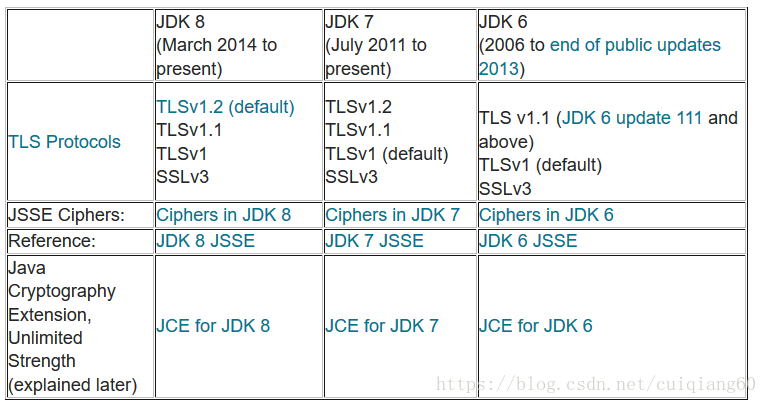
TLSv1.2 is not supported by the 1.6 JDK used on the server. Then verify it, and when the version is upgraded to jdk1.7, then send the deal and it goes through.
At this point the client also needs to do one more thing, by setting the preferred protocol and the highest support protocol, without going into details.

-Dhttps.protocols=TLSv1,TLSv1.1,TLSv1.2
-Djdk.tls.client.protocols=TLSv1	

Reference link:
1, Oracle® Application Server Containers for J2EE User’s Guide
https://docs.oracle.com/cd/B25016_06/doc/dl/web/B14011_02/apdx_a.htm#r28c1-t8
This document explains how to troubleshoot and troubleshoot for TLS, SSL and HTTPS
https://blogs.oracle.com/java-platform-group/diagnosing-tls,-ssl,-and-https
3. HTTP:// Ueno sun yu Junliang (author)
4, “Https protocol” https://www.cnblogs.com/zxj015/p/6530766.html

Error: Cannot find module ‘webpack/schemas/WebpackOptions.json’

1. Error reason

C:\Users\Administrator\cma>webpack you.js today.js
internal/modules/cjs/loader.js:573
    throw err;
    ^

Error: Cannot find module 'webpack/schemas/WebpackOptions.json'
    at Function.Module._resolveFilename (internal/modules/cjs/loader.js:571:15)
    at Function.Module._load (internal/modules/cjs/loader.js:497:25)
    at Module.require (internal/modules/cjs/loader.js:626:17)
    at require (C:\Users\Administrator\node_modules\v8-compile-cache\v8-compile-
cache.js:159:20)
    at Object.<anonymous> (C:\Users\Administrator\node_modules\webpack-cli\bin\c
onfig-yargs.js:1:85)
    at Module._compile (C:\Users\Administrator\node_modules\v8-compile-cache\v8-
compile-cache.js:178:30)
    at Object.Module._extensions..js (internal/modules/cjs/loader.js:689:10)
    at Module.load (internal/modules/cjs/loader.js:589:32)
    at tryModuleLoad (internal/modules/cjs/loader.js:528:12)
    at Function.Module._load (internal/modules/cjs/loader.js:520:3)

C:\Users\Administrator\cma>

2. Error reason
When you use WebPack to package JavaScript files, you first prompt for this

One CLI for webpack must be installed. These are recommended choices, delivered
as separate packages:
 - webpack-cli (https://github.com/webpack/webpack-cli)
   The original webpack full-featured CLI.
 - webpack-command (https://github.com/webpack-contrib/webpack-command)
   A lightweight, opinionated webpack CLI.
We will use "npm" to install the CLI via "npm install -D".
Which one do you like to install (webpack-cli/webpack-command):

Webpack-cli was selected and installed

Installing 'webpack-cli' (running 'npm install -D webpack-cli')...
npm WARN deprecated [email protected]: Package no longer supported. Contact support@n
pmjs.com for more info.
npm WARN rm not removing C:\Users\Administrator\node_modules\.bin\esparse.cmd as
 it wasn't installed by C:\Users\Administrator\node_modules\[email protected]@espri
ma
npm WARN rm not removing C:\Users\Administrator\node_modules\.bin\esparse as it
wasn't installed by C:\Users\Administrator\node_modules\[email protected]@esprima
npm WARN rm not removing C:\Users\Administrator\node_modules\.bin\esvalidate.cmd
 as it wasn't installed by C:\Users\Administrator\node_modules\[email protected]@es
prima
npm WARN rm not removing C:\Users\Administrator\node_modules\.bin\esvalidate as
it wasn't installed by C:\Users\Administrator\node_modules\[email protected]@esprim
a
npm WARN rm not removing C:\Users\Administrator\node_modules\.bin\coffee.cmd as
it wasn't installed by C:\Users\Administrator\node_modules\coffee-script
npm WARN rm not removing C:\Users\Administrator\node_modules\.bin\cake.cmd as it
 wasn't installed by C:\Users\Administrator\node_modules\coffee-script
npm WARN rm not removing C:\Users\Administrator\node_modules\.bin\coffee as it w
asn't installed by C:\Users\Administrator\node_modules\coffee-script
npm WARN rm not removing C:\Users\Administrator\node_modules\.bin\cake as it was
n't installed by C:\Users\Administrator\node_modules\coffee-script
npm WARN rm not removing C:\Users\Administrator\node_modules\.bin\semver.cmd as
it wasn't installed by C:\Users\Administrator\node_modules\[email protected]@semver
npm WARN rm not removing C:\Users\Administrator\node_modules\.bin\semver as it w
asn't installed by C:\Users\Administrator\node_modules\[email protected]@semver
npm WARN rm not removing C:\Users\Administrator\node_modules\.bin\rimraf.cmd as
it wasn't installed by C:\Users\Administrator\node_modules\[email protected]@rimraf
npm WARN rm not removing C:\Users\Administrator\node_modules\.bin\rimraf as it w
asn't installed by C:\Users\Administrator\node_modules\[email protected]@rimraf
npm WARN rm not removing C:\Users\Administrator\node_modules\.bin\mkdirp.cmd as
it wasn't installed by C:\Users\Administrator\node_modules\[email protected]@mkdirp
npm WARN rm not removing C:\Users\Administrator\node_modules\.bin\mkdirp as it w
asn't installed by C:\Users\Administrator\node_modules\[email protected]@mkdirp
npm WARN saveError ENOENT: no such file or directory, open 'C:\Users\Administrat
or\package.json'
npm WARN enoent ENOENT: no such file or directory, open 'C:\Users\Administrator\
package.json'
npm WARN [email protected] requires a peer of webpack@^4.0.0 but none is install
ed. You must install peer dependencies yourself.
npm WARN Administrator No description
npm WARN Administrator No repository field.
npm WARN Administrator No README data
npm WARN Administrator No license field.

+ [email protected]
added 615 packages from 252 contributors, removed 615 packages and updated 30 pa
ckages in 139.557s
[!] 855 vulnerabilities found [13424 packages audited]
    Severity: 846 Low | 9 High
    Run `npm audit` for more detail

{ Error: Cannot find module 'webpack/schemas/WebpackOptions.json'
    at Function.Module._resolveFilename (internal/modules/cjs/loader.js:571:15)
    at Function.Module._load (internal/modules/cjs/loader.js:497:25)
    at Module.require (internal/modules/cjs/loader.js:626:17)
    at require (C:\Users\Administrator\node_modules\v8-compile-cache\v8-compile-
cache.js:159:20)
    at Object.<anonymous> (C:\Users\Administrator\node_modules\webpack-cli\bin\c
onfig-yargs.js:1:85)
    at Module._compile (C:\Users\Administrator\node_modules\v8-compile-cache\v8-
compile-cache.js:178:30)
    at Object.Module._extensions..js (internal/modules/cjs/loader.js:689:10)
    at Module.load (internal/modules/cjs/loader.js:589:32)
    at tryModuleLoad (internal/modules/cjs/loader.js:528:12)
    at Function.Module._load (internal/modules/cjs/loader.js:520:3) code: 'MODUL
E_NOT_FOUND' }

During the installation process, a lot of prompts can not be removed, can not find the relevant JSON file

3. Solutions
CNPM install – save – dev webpack

C:\Users\Administrator>cnpm install --save-dev webpack
\ [0/1] Installing object.pick@^1.3.0[[email protected]] download Error: GET
 http://registry.npm.taobao.org/fast-deep-equal/download/fast-deep-equal-2.0.1.t
gz response 504 status, fail count: 1
/ [0/1] Installing uglifyjs-webpack-plugin@^1.2.4[npminstall:get] retry GET http
s://registry.npm.taobao.org/uglifyjs-webpack-plugin after 100ms, retry left 4, e
rror: SyntaxError: Unexpected end of JSON input
- [0/1] Installing is-descriptor@^1.0.0[npminstall:get] retry GET https://regist
ry.npm.taobao.org/acorn after 100ms, retry left 4, error: ResponseError: socket
hang up (req "error"), GET https://registry.npm.taobao.org/acorn -1 (connected:
true, keepalive socket: false, agent status: {"createSocketCount":21,"createSock
etErrorCount":0,"closeSocketCount":3,"errorSocketCount":0,"timeoutSocketCount":1
,"requestCount":138,"freeSockets":{"registry.npm.taobao.org:443::::::::true:::::
:::":4},"sockets":{"registry.npm.taobao.org:443::::::::true::::::::":4,"cdn.npm.
taobao.org:443::::::::true::::::::":10},"requests":{"cdn.npm.taobao.org:443:::::
:::true::::::::":12}})
headers: {}
\ [0/1] Installing kind-of@^3.0.2platform unsupported [email protected] › watchpac
[email protected][email protected] › fsevents@^1.1.2 Package require os(darwin) not comp
atible with your platform(win32)
[fsevents@^1.1.2] optional install error: Package require os(darwin) not compati
ble with your platform(win32)
/ [0/1] Installing minimalistic-crypto-utils@^1.0.1[npminstall:get] retry GET ht
tps://registry.npm.taobao.org/move-concurrently after 100ms, retry left 4, error
: ResponseError: socket hang up (req "error"), GET https://registry.npm.taobao.o
rg/move-concurrently -1 (connected: true, keepalive socket: true, agent status:
{"createSocketCount":23,"createSocketErrorCount":0,"closeSocketCount":4,"errorSo
cketCount":0,"timeoutSocketCount":2,"requestCount":415,"freeSockets":{"registry.
npm.taobao.org:443::::::::true::::::::":8},"sockets":{"cdn.npm.taobao.org:443:::
:::::true::::::::":10,"registry.npm.taobao.org:443::::::::true::::::::":1},"requ
ests":{"cdn.npm.taobao.org:443::::::::true::::::::":16}})
headers: {}
\ [0/1] Installing once@^1.4.0[npminstall:get] retry GET https://registry.npm.ta
obao.org/component-emitter after 100ms, retry left 4, error: ResponseError: sock
et hang up (req "error"), GET https://registry.npm.taobao.org/component-emitter
-1 (connected: true, keepalive socket: true, agent status: {"createSocketCount":
26,"createSocketErrorCount":0,"closeSocketCount":7,"errorSocketCount":0,"timeout
SocketCount":3,"requestCount":436,"freeSockets":{"registry.npm.taobao.org:443:::
:::::true::::::::":9},"sockets":{"cdn.npm.taobao.org:443::::::::true::::::::":10
},"requests":{"cdn.npm.taobao.org:443::::::::true::::::::":21}})
headers: {}
\ [0/1] Installing is-buffer@^1.1.5[npminstall:get] retry GET https://registry.n
pm.taobao.org/run-queue after 100ms, retry left 4, error: ResponseError: socket
hang up (req "error"), GET https://registry.npm.taobao.org/run-queue -1 (connect
ed: true, keepalive socket: true, agent status: {"createSocketCount":26,"createS
ocketErrorCount":0,"closeSocketCount":14,"errorSocketCount":0,"timeoutSocketCoun
t":7,"requestCount":499,"freeSockets":{"cdn.npm.taobao.org:443::::::::true::::::
::":7,"registry.npm.taobao.org:443::::::::true::::::::":1},"sockets":{"cdn.npm.t
aobao.org:443::::::::true::::::::":3,"registry.npm.taobao.org:443::::::::true:::
:::::":1},"requests":{}})
headers: {}
/ [0/1] Installing aproba@^1.1.1[npminstall:get] retry GET https://registry.npm.
taobao.org/p-limit after 100ms, retry left 4, error: ResponseError: socket hang
up (req "error"), GET https://registry.npm.taobao.org/p-limit -1 (connected: tru
e, keepalive socket: true, agent status: {"createSocketCount":27,"createSocketEr
rorCount":0,"closeSocketCount":25,"errorSocketCount":0,"timeoutSocketCount":17,"
requestCount":506,"freeSockets":{"cdn.npm.taobao.org:443::::::::true::::::::":1,
"registry.npm.taobao.org:443::::::::true::::::::":1},"sockets":{},"requests":{}}
)
headers: {}
√ Installed 1 packages
√ Linked 256 latest versions
√ Run 0 scripts
Recently updated (since 2018-05-25): 21 packages (detail see file C:\Users\Admin
istrator\node_modules\.recently_updates.txt)
  Today:
    → [email protected] › acorn@^5.0.0(5.6.1) (15:49:17)
√ All packages installed (263 packages installed from npm registry, used 3m, sp
eed 26.89kB/s, json 257(1.73MB), tarball 3.23MB)

node.js Cannot find module “XXX” solution

Node. js can’t find a solution for the module XXX.
in order. 1. Check for spelling mistakes.
2. This module is written by myself. Check to see if the path is correct.
3. If it is the imported module. Use the NPM List command to output whether this module exists. 4. Also note that the global module installation directory defaults to users/ user /node_modules below. The module that your project is reading is your installation directory (and probably the two directories are different). So sometimes you don’t have this module, and after you install it, you continue to report that you can’t find the module
The solution is to output the path of your installation module with NPM, find the reading path of the current project, and copy the corresponding module to it

Analysis of [error code [942], ora-00942 in synchronization of DDL statements in ogg

Recently, we encountered an OGG environment configured with DDL synchronization. During the synchronization, there was a synchronization exception on the backup library, and Fatal Error executing DDL Replication was reported: Error [Error Code [942], ORA-00942: By analyzing the OGG error log GGserr.log, it can be found that during the normal DDL synchronization, there is an operation to set the current SCHEMA, while during the synchronization error, the OGG software does not set the current SCHEMA operation; at this time, the USER OGGDBA executes the DDL, so the orA-00942 table does not exist.
In the future, I will further query from MOS. This problem may be caused by a BUG. The following documents are related to this problem:
OGG V11.2 Extract operator Session schema name in to the trails Causing replicat to fail on DDL Operations (ORA-00942) Table or View does not exist (document ID 1484499.1) for DDL Replication, Replicat Sets Session To different Schema than original one in source (document ID 1270161.1)
Related error reporting and troubleshooting analysis:
1. As can be seen from the reperp.rPT file, the information of the current OGG version is as follows:

$ cat REPPER.rpt
***********************************************************************
                 Oracle GoldenGate Delivery for Oracle
    Version 11.2.1.0.1 OGGCORE_11.2.1.0.1_PLATFORMS_120423.0230_FBO
   Linux, x64, 64bit (optimized), Oracle 11g on Apr 23 2012 08:48:07</span>

2. From the GGserr.log file, it can be found that the log information when the problem occurred: ### Normal DDL synchronization information when OGG backup was applied: — column edit condition deleted the irrelevant column output

2018-01-30 21:38:47 :  Setting current schema for DDL operation to [JS_PERSONAL_TSM].
2018-01-30 21:38:47 :  Executing DDL operation.
2018-01-30 21:38:47 :  DDL operation successful.
2018-01-30 21:38:47 :  Restoring current schema for DDL operation to [ogg].
===========>>>>>Start a DDL sync.
2018-01-30 21:38:47 :  DDL found, operation [ALTER TABLE "AAABBB" ADD CONSTRAINT "FK_BMK_ABCDE_3" FOREIGN KEY ("KEK_INDEX") REFERENCES "T_ABCDE" ("KMS_ABCDE_INDEX") ENABLE NOVALIDATE  (size 131)].
2018-01-30 21:38:47 :  DDL is of mapped scope, after mapping new operation [ALTER TABLE JS_PERSONAL_TSM."AAABBB" ADD CONSTRAINT "FK_BMK_ABCDE_3" FOREIGN KEY ("KEK_INDEX") REFERENCES "T_ABCDE" ("KMS_ABCDE_INDEX") ENABLE NOVALIDATE  (size 147)].
2018-01-30 21:38:47 :  DDL operation included [INCLUDE MAPPED], optype [ALTER], objtype [TABLE], objowner [JS_PERSONAL_TSM], objname [AAABBB].
2018-01-30 21:38:47 :  Setting current schema for DDL operation to [JS_PERSONAL_TSM].
2018-01-30 21:38:47 :  Executing DDL operation.
2018-01-30 21:38:47 :  DDL operation successful.
2018-01-30 21:38:47 :  Restoring current schema for DDL operation to [ogg].
===========>>>>>stop a DDL sync.
===========>>>>>Start a DDL sync.
2018-01-30 21:38:47 :  DDL found, operation [ALTER TABLE "AAABBB" ADD CONSTRAINT "FK_BMK_ABCDE_2" FOREIGN KEY ("MAC_WK_INDEX") REFERENCES "T_ABCDE" ("KMS_ABCDE_INDEX") ENABLE NOVALIDATE  (size 134)].
2018-01-30 21:38:47 :  DDL is of mapped scope, after mapping new operation [ALTER TABLE JS_PERSONAL_TSM."AAABBB" ADD CONSTRAINT "FK_BMK_ABCDE_2" FOREIGN KEY ("MAC_WK_INDEX") REFERENCES "T_ABCDE" ("KMS_ABCDE_INDEX") ENABLE NOVALIDATE  (size 150)].
2018-01-30 21:38:47 :  DDL operation included [INCLUDE MAPPED], optype [ALTER], objtype [TABLE], objowner [JS_PERSONAL_TSM], objname [AAABBB].
2018-01-30 21:38:47 :  Executing DDL operation.
2018-01-30 21:38:47 :  Fatal error executing DDL replication: error [Error code [942], ORA-00942: 琛ㄦ垨瑙嗗浘涓嶅瓨鍦SQL ALTER TABLE JS_PERSONAL_TSM."AAABBB" ADD CONSTRAINT "FK_BMK_ABCDE_2" FOREIGN KEY ("MAC_WK_INDEX") REFERENCES "T_ABCDE" ("KMS_ABCDE_INDEX") ENABLE NOVALIDATE  /* GOLDENGATE_DDL_REPLICATION */], due to explicit ABEND error handling and filter [include all (default)].
2018-01-30 21:38:47 :  PROCESS ABENDING.
===========>>>>>DDL Synchronized post-error process ABENDING

From the above normal DDL synchronization log information, it can be found that when DDL is synchronized, the information displayed on the OGG backup library is as follows:
Line 1 log: DDL found. What is the specific DDL operation statement
Row 3: DDL operation included, which shows the operations, object types, OWNER, etc., that are mapped into the REP process in the OGG library. Row 4: Setting current schema for DDL operation to [JS_PERSONAL_TSM]., namely, to set the current schema for the subsequent execution of DDL statement, the fifth row log: executive DDL operation.
Line 6 Log: DDL operation Successful.
Mice with ALZHEIMER’s Disease Have been restored in mice with alzheimer’s disease. Restores the current SCHEMA to the OGG synchronization user.
The DDL synchronization information when the problem occurred was applied in the OGG backup library, and the current SCHEMA setting was missing in step 4, so the OGG user was used at this time and the table could not be found when executing the DDL statement: [Error Code [942], OrA-00942:
Further reason analysis: by referring to the log information of OGG data synchronization, it can be found that compared to the log information of successful DDL synchronization, there is less operation of Setting current schema for DDL operation when OGG data synchronization occurs. At this point, an abnormal operation SCHEMA is used, so the report of executing DDL statement does not exist -[Error code [942], OrA-00942.
Validation on the source side: — Look at the GGS_MARKER TABLE under the OGG user on the source side, press the OPTIME information of the field or the file information of the MARKER_TEXT field (ALTER TABLE “AAABBB” ADD CONSTRAINT*), find the DDL statement that is causing the problem, and see if there is a problem with the DDL capture. Select * from GGS_MARKER