Category Archives: How to Fix

Error: pg_config executable not found.

PIP installation PsyCOPG2 installation and errors
Phenomenon:

Error: pg_config executable not found.

Please add the directory containing pg_config to the PATH
or specify the full executable path with the option:

python setup.py build_ext --pg-config /path/to/pg_config build ...

or with the pg_config option in 'setup.cfg'.
Complete output from command python setup.py egg_info:
running egg_info

creating pip-egg-info/psycopg2.egg-info

writing pip-egg-info/psycopg2.egg-info/PKG-INFO

writing top-level names to pip-egg-info/psycopg2.egg-info/top_level.txt

writing dependency_links to pip-egg-info/psycopg2.egg-info/dependency_links.txt

writing manifest file 'pip-egg-info/psycopg2.egg-info/SOURCES.txt'

warning: manifest_maker: standard file '-c' not found

The solution
1. Install libpq-dev

sudo apt-get install libpq-dev python-dev

2, PIP installation
··
PIP install psycopg2
··· ·
For more information, please pay attention to the public account

Java learning error information 3 — Java notes

Java common error messages and solutions

compile error

common compile error on Windows

‘javac’ is not recognized as an internal or external command, operable program or batch file.

this prompt indicates that the Windows system cannot find the compiler (compiler).

solution: (suppose the JDK installation location is C:\jdk1.7.0)

1. Include the JDK installation path on the command line;

& gt; C: \ jdk1.7.0 \ bin \ javac HelloWorldApp. Java

by default, the compiler (javac) is in the bin folder under the JDK installation path.

2. Include the JDK installation path in the Windows environment variable.

1) Start & gt; Control Panel > System > Advanced > Environment Variables;
(start > Control panel & GT; System & gt; Advanced system Setup & GT; Environment variables…) 2) add the bin PATH under the installed JDK to the PATH variable and remember to add the semicolon (;) .

PATH variable has a value of: < The end of the original PATH value & GT; ; C: \ jdk1.7.0 \ bin
After adding the PATH variable
, you can use the compiler (javac) directly from the command line without entering the PATH where the compiler is located.

Class names, “HelloWorldApp”, are only accepted if annotation processing is explicitly requested

found this prompt at compile time, indicating that the.java suffix was not added at compile time. The command to compile the Java file is Javac HelloWorldApp.java instead of Javac HelloWorldApp.

UNIX system common compile error

javac: Command not found

this prompt indicates that the compiler (javac) cannot be found for UNIX systems.

solution :(assume JDK installation location is /usr/local/jdk1.7.0)

1. Include the JDK installation path on the command line;

/usr/local/jdk1.7.0/javac HelloWorldApp. Java

is mainly where the compiler (javac) is added.
2. Modify the system PATH variable.

needs to be modified according to the Shell used, and different Shell modification methods are different.

Class name, ‘HelloWorldApp’, are only accepted if annotation processing is explicitly requested

this prompt is the same as in Windows, indicating that the filename on the command line was not added when compiling the file. Java suffix.

syntax Errors (all platforms) – Synatx Errors

the compiler displays a syntax error message when there is a typo in the program source file. The error message contains the file name of the error, line number, error type, error line code, and error code location.

as the following error message:

testing.java:14:’; ‘ expected.

System.out.println(“Input has ” + count + ” chars.”)

^

1 error

error file name: testing. Java

error line number: line 14

error message: semicolon (;) required

error line: system.out.println (“Input has “+ count +” chars.”)

error location: ^ indicates location, end of error code

error number: 1

multiple error messages are given if the compiler cannot accurately locate the error due to indenting, block scope, missing semicolon, etc.

any compilation error will indicate that the compilation was unsuccessful and the.class file will not be generated. You need to find and fix all compilation errors, and then recompile.

semantic error
In addition to checking the syntax, the
compiler also checks the underlying semantics, such as undefined variables, objects not instantiated being used directly, and so on.

runtime error

runtime error message on Windows/UNIX systems

Exception in thread “main” java.lang.NoClassDefFoundError: HellowWorldApp
An error above
indicates that the initiator program (Java) did not find a bytecode file (.class) that could be executed. By default, the Java launcher looks for the.class file that has been started in the current directory. You need to switch the current working directory to the directory containing the target.class file and execute Java HelloWorldApp again.

Could not find or load main class HelloWorldApp.class
The error message above
indicates that Java helloworldapp.class was executed. On the command line, the Java command should be followed by the required class name, not the.clAS file name. The correct execution is Java HelloWorldApp.

Exception in thread “main” java.lang.NoSuchMethodError:main
The error message above
indicates that the class being used does not contain a main function. The Java virtual machine requires that classes executed by Java commands contain a main function.

Ref: http://docs.oracle.com/javase/tutorial/getStarted/problems/index.html

compile error in hidden module: link

When Word 2016 for Mac is opened and quit, the popover always tells us “Compile error in Hidden Module: link”.
in the Finder press Shift + Command + G, enter the following address enter:
~/Library/Group Containers/UBF8T346G9 Office/User Content/Startup/Word/
then watch it. Is there a call linkCreation dotm file, so can be deleted. Don’t move the other files.
Refer to
https://zhidao.baidu.com/question/364609475164188372.html

E: sub process / usr / bin / dpkg returned an error code (2) solution under Ubuntu

preface
It has been roughly two or three years with ubuntu, and this is the first time I have encountered this problem, so I wrote down
. Thank you very much for letting me solve the code[2] error
error


This error occurred

dpkg: unrecoverable fatal error, aborting:
 files list file for package 'linux-libc-dev:amd64' is missing final newline
E: Sub-process /usr/bin/dpkg returned an error code (2)

Linux-libc-dev: AMD64 cannot be found, we need to fix this problem.
The solution


Find the damaged package and remove its status.

sudo gedit /var/lib/dpkg/status

If a Linux-LIBc-dev error is reported, delete the following:

Package: linux-libc-dev
Status: install ok installed
Priority: optional
Section: devel
Installed-Size: 5077
Maintainer: Ubuntu Kernel Team <[email protected]>
Architecture: amd64
Multi-Arch: same
Source: linux
Version: 4.15.0-46.49
Replaces: linux-kernel-headers
Provides: aufs-dev, linux-kernel-headers
Conflicts: linux-kernel-headers
Description: Linux Kernel Headers for development
 This package provides headers from the Linux kernel.  These headers
 are used by the installed headers for GNU glibc and other system
 libraries. They are NOT meant to be used to build third-party modules for
 your kernel. Use linux-headers-* packages for that.
    rename, backup the original info directory
sudo mv /var/lib/dpkg/info /var/lib/dpkg/info_old

Create an empty Info directory

sudo mkdir /var/lib/dpkg/info

Use apt – get updated

sudo apt-get update

Reinstall the package

sudo apt-get -f install

Code [1] Error resolution

Microsoft Remote Desktop (Android version) connection appears the solution of the error of 0x204

We couldn’t connect to the remote PC.Make sure the PC is turned on and connected to the network, and Thar remote Access is enabled. Error code:0x204 prompt message appears.
The solution: open the control panel -& GT; Management tool -& GT; Service, find the Remote Desktop Service and Remote Desktop Configuration. If the startup type is disabled, right-click -& GT; Property, change to manual or automatic, and then set both to boot. Open the command line and type Netstat-ano to see that port 3389 is open.
You can connect with your phone again.
Also, check if the Remote Desktop Services UserMode Port Redirector service is enabled. If it is not enabled, the voice on the PC cannot be played on the mobile phone.
— — — — — — — —
the original link: https://blog.csdn.net/u012436908/article/details/49693279

CreateProcess error=193, %1 is not a valid Win32 application

 
Error: Failed to execute goal com. Making. Eirslett: frontend – maven – XXXXXXXX
You can perform MVN Clean Package-e viewing, which will wrap and display more detailed error information
The error message is CreateProcess error=193, %1 is not an valid Win32 Application.
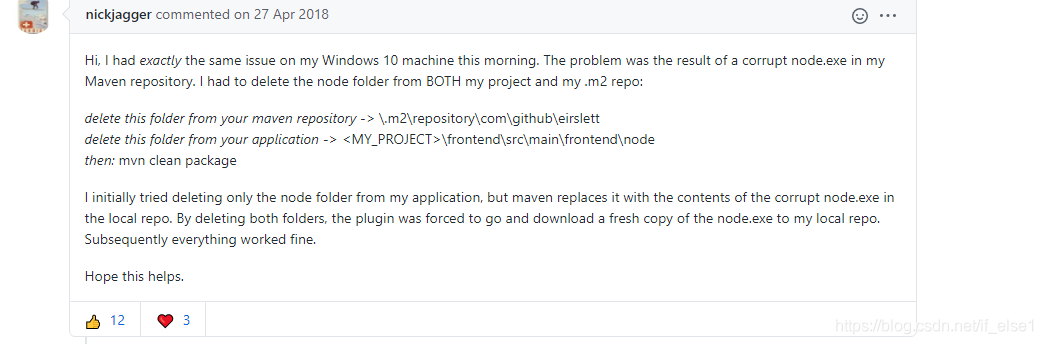
The Frontend – Maven-Plugin’s GtiHub has an explanation for an error
https://github.com/eirslett/frontend-maven-plugin/issues/487
 

Dell R710 PCIE Fatal Err

E171F PCIE Fatal Err B0 D3 F0 is shown in orange on the front display panel as the server crashes.
to restart the monitor to the PCIE Fatal Err: Critical Event sensor, bus
Fatal error (bus 0 Device 3 Function 0) was asserted 】, cannot be started.
fault cause: two liquid capacitors on SAS 5i card are damaged. The top of the capacitor can be seen bulging in appearance.
solution: replace the capacitance, the capacitance is 1500uf, the voltage is 6.3v, the temperature resistance is 105℃.
you only need to remove the SAS 5i card and go to the local place where the computer can be repaired. You can spend from 10 yuan to
20 yuan and ask the computer repairman to remove the broken capacitor and replace it with a new one.
capacitance selection: the height of the capacitance shall be less than or equal to the original capacitance (too high, the chassis cover will not be able to be covered), the capacitance shall be
amount, the voltage must be consistent, the temperature resistance shall be approximately equal to the original temperature resistance.
sanyo’s solid capacitance is the best choice, followed by sanyo’s liquid capacitance.
SAS 5i card disassembly method: SAS 5i position is in front of the server display board behind, the left front section of the server. 1, open the cover of the case,
2, find the position of SAS 5i card,
3, remove the line on the right,
4, first lift the blue plastic handle on the left, then drag it out to the right. 5. Wrap it in newspaper, put it in a cardboard box, and take it to the computer repair shop.
SAS 5i card is easy to install, no more details.

Reproduced in: https://blog.51cto.com/kunka/1891241

Record of solving the failure of installing ie11 (9c59) under 64 bit Windows 7 system

On 64-bit windows7 sp1, the attempt to install IE11 always prompts errorCode=9c59 with an unknown error.
after the network search finally eliminated the error, the installation was successful. Because the cause of the problem has not been found accurately at last, several factors conducive to the elimination of errors are listed as follows for reference.
Benefit factor 1: Take advantage of all updates other than IE11 installed for Windows Update. (IE9, 10,11 can be installed automatically with Windows update.) help solve factor 2: remove the Windows update pack stored directory. Here’s how: Turn on computer management — & GT; Service – & gt; Find Windows Update, stop service — & GT; Remove the C :\ Windows \softwareDistribution directory and restart your computer. Help to solve factor 3: use IE11 offline installation package. 5. Before installing IE11, install the System Update Readiness Tool (500M+). More than this will be well taken up by http://it.englishtong
This article solution derived from: http://www.wintips.org/fix-error-code-9c59-insternet-explorer-installation-failed/ (note that this page outside the wall interior wall I don’t know)

Eclipse startup error: an error has occurred.See the log file E:\workspace\.metadata\.log.

This is due to an eclipse shutdown exception, which you can resolve by following these steps:
1. Open the eclipse workspace E: \ eclipse \ workspace \. Metadata \. Plugins \ org eclipse. The core resources found. The projects files
So, open the projects file, and remove. Markers. Snap and. Syncinfo.snap from all projects from last started
3. Start Eclipse again and you’re done!