Category Archives: How to Fix

Internal error 2503 solution in endnote installation

Windows 10, 64
Internal Error2503 appeared when Endnote X9 was installed, followed by an error of Internal error2502.
I. Installation instructions
(1) Double-click [EndNote X9 V19.0.12062 Setup.msi] to install EndNote X9, choose to try it during installation, and do not run EndNote after installation;
(2) if you want to use the Chinese version, you can copy [endnote.exe] from the CHS folder to the software installation directory (right-click desktop software shortcut -> Property – & gt; Open the file location), replace the original file can.
(3) if you want to use the English version, you can copy [endnote.exe] in ENG folder to the installation directory of EndNote, and replace the original file to use directly for free. Note: no matter the English version or Chinese version is used, it can be used after substitution without the input of serial number.
EndNote installation directory default is:
64-bit system: C:\Program Files (x86)\EndNote X9
32-bit system: C:\Program Files\EndNote X9
Second, solutions
(1) Open the resource manager, find the program “Explorer.exe” in the column of “Details”, and click “End task (E)”
(2) Click “File (F)” in the menu bar of Resource Manager and select “Run New Task (N)”.
(3) Click the “Browse” button, and the file addition dialog box will pop up. Find “C disk –System–Windows– Select Explorer Application”, and finally click “Open”.
(4) Check “Create this task with System Permission”
(5) Through the above operation to complete the following operation as an administrator
After that, you can install Endnote software in the normal way, and there will be no error prompt of Internal Error 2503

Sync Error: some files/attrs were not transferred (see previous errors) (code 23) at main

1 Rsync error:

rsync error: some files/attrs were not transferred (see previous errors) (code 23) at main.c(1518)

According to the experience of others, rsync error: some files/attrs were not transferred and http://www.lingzhong.cn/tech/23765.htm
Method 1 is to modify the configuration file, and method 2 is to change the permissions.
The first one was a bit of a hassle, the second one was too much.
At this point, run the sync again,

linlf@ccrfox247:~/project/man$ ./transfer-cuda90.sh 
[email protected]'s password: 
sending incremental file list
rsync: send_files failed to open "/home/linlf/project/nohup.out": Permission denied (13)

sent 20,428,254 bytes  received 232 bytes  1,634,278.88 bytes/sec
total size is 211,679,681,443  speedup is 10,361.99
rsync error: some files/attrs were not transferred (see previous errors) (code 23) at main.c(1183) [sender=3.1.1]

List that file cannot be synchronized. The original owner and group of this file are root, but I synchronized the past user is a normal user, not root, so I reported an error.

ls -lh /home/linlf/project/nohup.out
-rw------- 1 root root 207K 6月  14 17:27 /home/linlf/project/nohup.out

It’s also easy to change the file permissions to my own:

sudo chown linlf /home/linlf/project/nohup.out
sudo chgrp linlf /home/linlf/project/nohup.out

Finally, modify the permissions of the folders to be synchronized altogether:

sudo chown -R linlf /home/linlf/project
sudo chgrp -R linlf /home/linlf/project

Re-run the script:

rsync -avz /home/linlf/project [email protected]:/home/linlf

Done

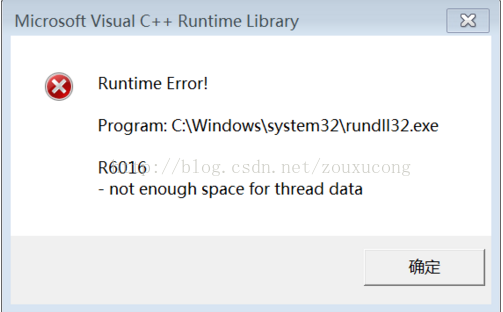
Microsoft Visual C++ Runtime library not enough space for thread data

When the computer has been running recently, a prompt box will pop up, as follows:

Solutions:

Start-->Run-->Type cmd Enter at the command prompt (paste the following characters) 
for %1 in (%windir%\system32\*.dll) do regsvr32.exe /s %1 
Enter (don't move the keyboard or mouse here) until the flash is finished and then do something else. After that there will be no more error boxes. This method does not work try this 
for %1 in (%windir%\system32\*.ocx) do regsvr32/s %1 (success rate %80) 
If it appears (there should be no doregsvr32.exe) can not operate please before: start --> run --> type regsvr32actxprxy.dll Enter; then run the following command: regsvr32 shdocvw.dll regsvr32 oleaut32.dll  regsvr32 actxprxy.dll regsvr32 mshtml.dll regsvr32 msjava.dll regsvr32 browseui.dll regsvr32 urlmon.dll Enter. 
If it appears (not an internal or external command, nor a runnable or batch file) My Computer Properties - >Advanced - >Environment Variables - >Find path in System Variables - >Edit - >See if the default value is this (%SystemRoot%\system32;%SystemRoot%;%) SystemRoot%\System32\Wbem ) If it doesn't work, just add ( ;%systemroot%\system32;%systemroot% ) to the end.

Idea update failure problem: couldn’t save uncommitted changes solution

An error occurred during the update of the project today, which could not be solved after a long period of debugging.
error reason:

  Couldn't save uncommitted changes.
  Tried to save uncommitted changes in stash before Update, but failed with an error.
  Couldn't stash file://H:/IdeaProjects/SVSP_0.4: git-write-tree: error building trees
  Cannot save the current index state

After gradual investigation, it was found that colleagues uploaded redundant files, which caused the collective failure to update. The solution is as follows:
Enter

    into your project directory. My directory is H:\IdeaProjects\ svsp_0.4 . Right-click on Git Bash here and type Git status. Notice the Unmerged paths
Unmerged paths:
  (use "git reset HEAD <file>..." to unstage)
  (use "git rm <file>..." to mark resolution)
        both deleted:    .idea/artifacts/SVSP0_4.xml
    was found because there were extra files uploaded, and both deleted: followed by .idea/artifacts/ svsp0_4.xml this file is typed in git rm.idea /artifacts/ svsp0_4.xml and then enter the idea update to resolve the problem

[ ERROR ] Error loading xmlfile: squeezenet1.1\FP16\squeezenet1.1.xml, File was not found at line: 1

1. Encounter problems:
ERROR loading XMLFile: C:\Users\USER\Documents\Intel\OpenVINO\ Openvino_models \ir\ Public \ Squeezenet1.1 \FP16\ Squeezenet1.1.XML, File was not found at line: 1 pos: 0
2. Solutions:
Find the Squeezenet1.1.caffemodel file

cd /home/kang/openvino_models/models/public/squeezenet1.1/
ls

Switch to the model_optimizer directory and use mo_caffe.py to optimize your models

cd /opt/intel/openvino/deployment_tools/model_optimizer
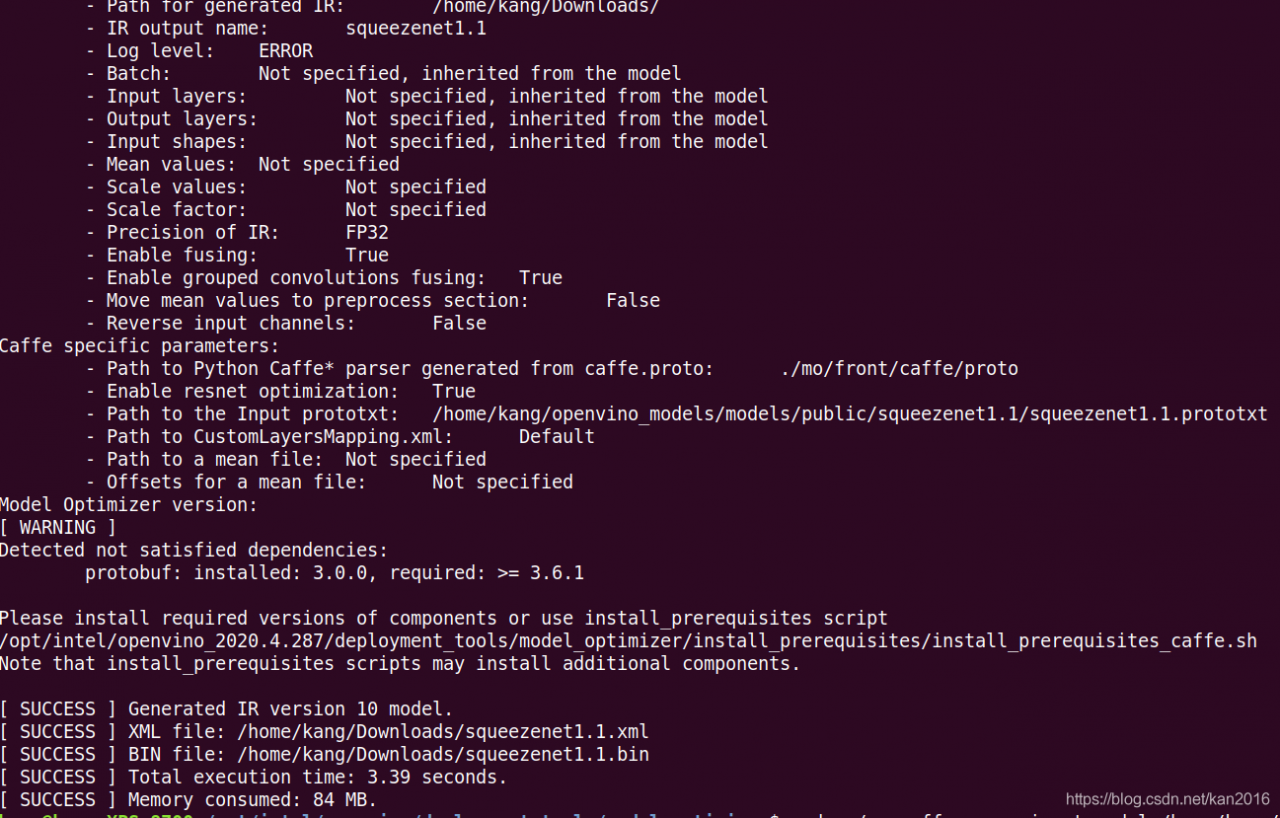
sudo ./mo_caffe.py  --input_model /home/kang/openvino_models/models/public/squeezenet1.1/squeezenet1.1.caffemodel --output_dir  ~/Downloads/

The parsed XML and bin are ready to use

About the problem of collect2.exe [error] LD returned 1 exit status in dev!!!

This is the problem I encountered in writing C++ code in DEV. Description of the problem: at the beginning, I didn’t know what option was checked, which led to collect2.exe [Error] ld returned 1 exit status for all C++ codes run.

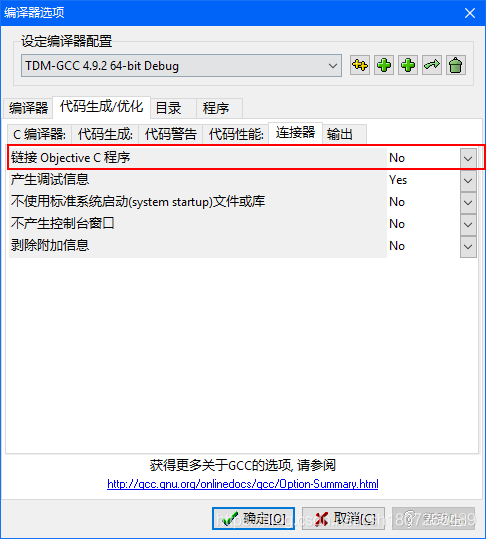
solution: open tool -> Compile options -& GT; Code generation/optimization -& GT; Connector, let’s see if this link to the Objective C program checks this option.

Swift fatal error: unexpectedly found nil while unwrapping an Optional value?

Reason for error: The control may not be associated with a definition in the code.
Solution one: Second, click the control, drag the dot to the control in the interface from Show the Connections Inspector, select the correct control and make the connection. Leave the object unreleased and remove the weak keyword.
Solution 2: Use the Guard keyword for judgment.

1, the judgment is not empty
If the sender. TitleLabel. Text! = nil {
Print (” Contains a value!” )
} else {
Print (” Doesn ‘t contain a value. “)
}
             
             
2. Optional binding
If let text = sender.titlelabel.text {
Print (” Contains a value! It is \(number)!” )
} else {
Print (” Doesn ‘t contain a number “)
}
            
             
3. Guard statement
Guard let text = sender.titlelabel.text else {
The return
}

MySQL failed to add foreign key: SQL 1452 cannot add or update a child row:a foreign key constraint fails

Today, adding a foreign key to one of the two existing tables encountered the following error:
sql 1452 Cannot add or update a child row:a foreign key constraint fails
The reason:
The foreign key set does not match the primary key value of the corresponding table.
Solutions:
Find the mismatched value changes.
Or empty both tables of data.
 
The original link
 
It is my personal understanding that the cause should be (untested) :
1. The names of fields in the two tables are different;
2. The types of fields in two tables are different (such as an int and a VARCHar);
3. According to the original author’s idea, there should be data in the two tables, and the data are different;

Samba mount directory file rename strange failure

Let’s start with the scenario where the problem occurs:
two Linux servers mount via samba, one for writing files and one for reading files. To prevent files from being read before they are written, a temporary file name is used first, then a rename
As a result, there is a problem that rename calls successfully, but the file name does not change. Mv command is executed manually and the error is “are the same file”. This situation occurs frequently after a machine is rebooted.
All kinds of search on the Internet, there is no appropriate keywords, search not useful information. I suddenly remembered to look at Dmesg and found useful error messages

CIFS VFS: Unexpected lookup error -112
CIFS VFS: cifs_mount failed w/return code = -112
CIFS VFS: Unexpected lookup error -112

Using this keyword to search the solution, tried renaming success

echo 0 > /proc/fs/cifs/OplockEnabled
# The following sentence didn't work. Renaming was successful.
echo 0 > /proc/fs/cifs/LookupCacheEnabled