Category Archives: How to Fix

Command not found: ADB appears on Mac

Method one:

    open the MAC terminal, enter CD ~ enter touch.bash_profile [if you don’t have .bash_profile , create this file] enter open.bash_profile [open the file we created, a text edit box should pop up, if this is the first time to configure the environment, Write the following code in the open text editor:
• export ANDROID_HOME=/usr/local/opt/android-sdk
• export PATH=${PATH}:${ANDROID_HOME}/tools
• export PATH=${PATH}:${ANDROID_HOME}/platform-tools
    note that in [4] ANDROID_HOME should be filled in according to its own SDK path, the rest can be copied directly. As for the SDK path, you can open Android Studio and view in the Preference [Android SDK] and enter source.bash_profile in the terminal and enter adb [verify that the configuration is complete and if not show adb: command not found that the configuration is complete]

Method 2:

    make sure whether to install the adb, /Library/Android/SDK/platform - the tools/adb if there is, if there is a skip the following steps, directly to the last step 5; Open [Android Studio]; Open the SDK Manager check 】 【 SDK Platform - the Tools), run the following command on the Mac
    echo export "PATH = ~/Library/Android/SDK/Platform - the Tools: $PATH" & gt; > ~/. Bash_profile
    6. Restart the terminal

after completing the above steps
Note: if ZSH is used, replace .bash_profile with .zshenv
Quote from: https://stackoverflow.com/questions/10303639/adb-command-not-found/45063101#45063101?newreg=f632609fe6154f9580a49153cb0387e5
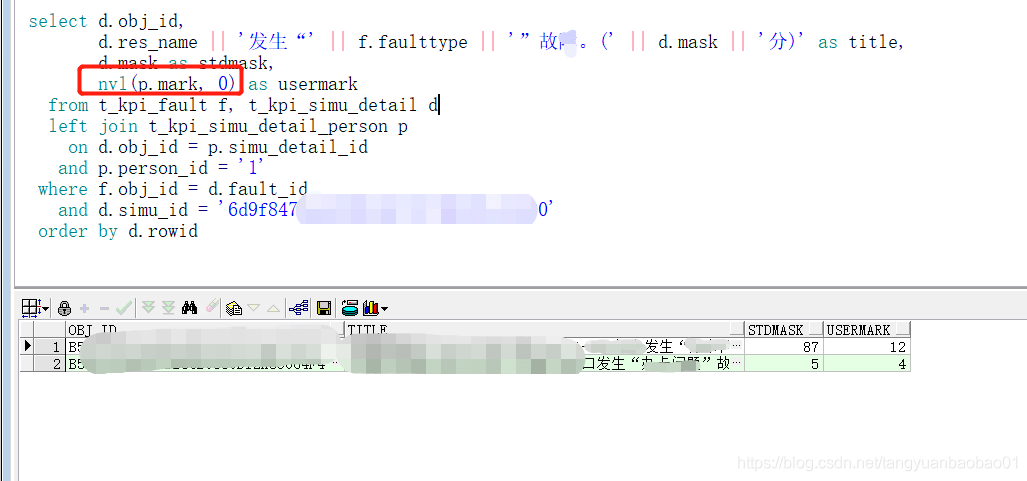
Usage of NVL in SQL

, for example, in the figure above: NVL (p.mark, 0)
p.mark is a value of type number. If the mark score is null, the value is 0; if not null, the value of p.mark is **
An NVL function is a null value conversion function
NVL (expression 1, expression 2)
If expression 1 is null, NVL returns the value of expression 2; otherwise, it returns the value of expression 1. The purpose of this function is to convert a null value (NULL) into an actual value. The value of its expression can be numeric, character, or date. But expressions 1 and 2 must have the same data type.
Logarithmic font: NVL (COMM,0);
To character NVL(TO_CHAR(COMM), ‘No Commission’)
NVL for date type (HireDate,’ 31-DEC-99′)

Python call DLL pointer parameter


#coding=utf-8
import threading
from ctypes import *

class DeviceAttribute(Structure):
    _fields_ = [("vendorId", c_uint16),
                ("productId", c_uint16),
                ("deviceAddress", c_uint32),
                ("serialNumber", c_char * 64),
                ("uri", c_char * 255)]

class Device(Structure):
    pass


deviceAttributeHandle = POINTER(DeviceAttribute)
deviceAttributeHandle_p = POINTER(deviceAttributeHandle)

dll = CDLL("./Nectaf.dll")


a = dll.Initialize()

if a!=0:
    exit(1)

print("init ok")

deviceCount = c_int(0)

GetDeviceList = dll.GetDeviceList
GetDeviceList.argtypes = [deviceAttributeHandle_p,POINTER(c_int)]
GetDeviceList.restype = c_int

# pDeviceAttr = POINTER(POINTER(DeviceAttribute))

# dll.GetDeviceList(deviceAttributeHandle_p,byref(deviceCount))

deviceAttribute = deviceAttributeHandle()
# ret = getDeviceList(byref(self.deviceAttribute), byref(nCount))

dll.GetDeviceList(byref(deviceAttribute),byref(deviceCount))

print(deviceCount.value)


In Struts2, the value read from the foreground JSP page is null

Problem description:
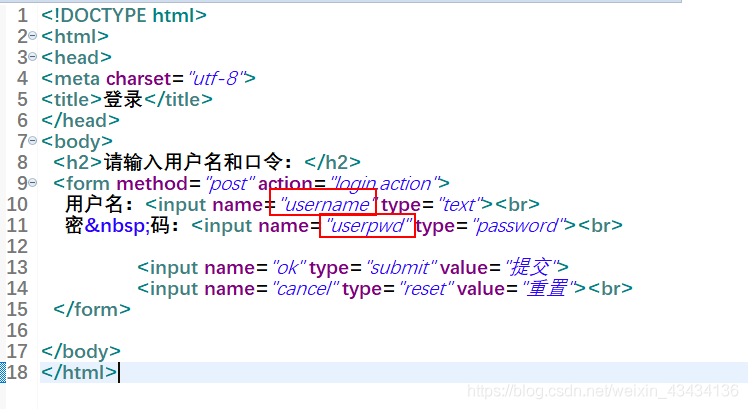
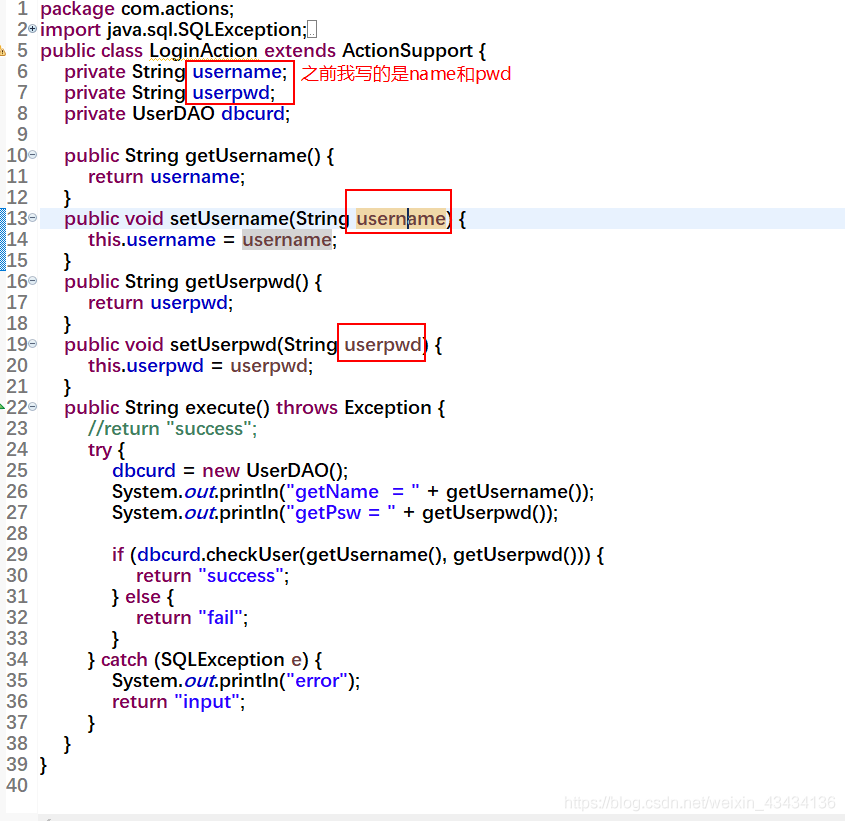
has the name attribute in the HTML (JSP) page, but the value printed out in the background is null.

problem solved:
really spit out blood. The member variables of the action class corresponding to the (HTML) JSP should have the same value as the name attribute of the input tag in the HTML (JSP).

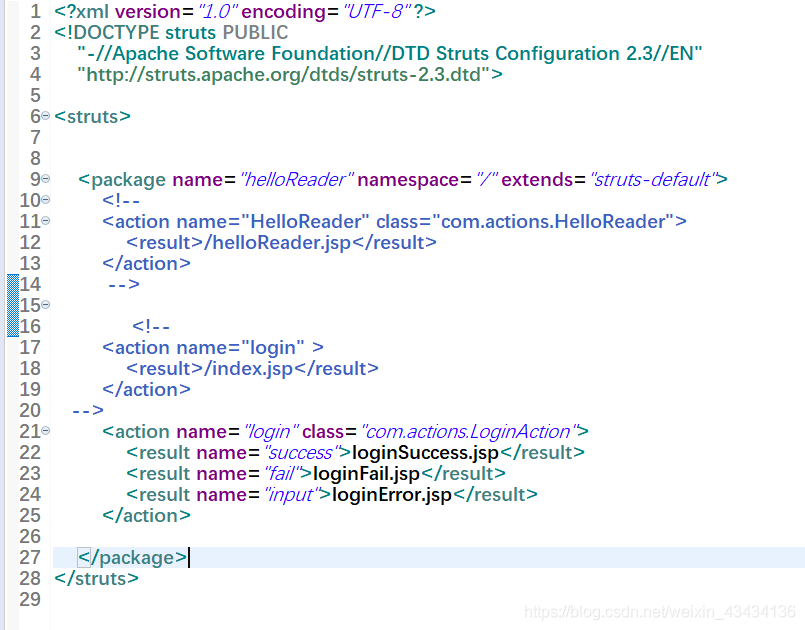
my struts.xml configuration

Index error: invalid index to scalar variable

IndexError: invalid index to scalar variable.
invalid index
generally appears in the np array index error
Here are some examples:

    a = np.array([[1, 2], [3, 4], [5, 6]])
    print(a[0][0][1])

After running, report an error:

IndexError: invalid index to scalar variable.

Therefore, when the above error occurs, we should check whether the index is wrong, such as the original two-dimensional array, using three levels of index.

CRM related SQL statements

CustomerReport.xml

select ${groupType} groupType,count(c.id) number
    from customer c
    left join employee e
    on c.seller_id = e.id
    <where>
      c.status = 0
      <if test="keyword!=null">
        and e.name like concat('%',#{keyword},'%')
      </if>
      <if test="beginDate!=null">
        and c.input_time &gt;=#{beginDate}
      </if>
      <if test="endDate!=null">
        and c.intput_time &lt;=#{endDate}
      </if>
    </where>
    group by ${groupType}

EmployeeMapper

 <select id="selectByName" resultMap="BaseResultMap">
      select * from employee where name = #{name}
    </select>

PermissionMapper

<select id="list" resultType="cn.wolfcode.domain.Permission">
      select * from permission
    </select>
  <select id="selectExpressionByCurrentuserId" resultType="java.lang.String">
    select p.expression
    from employee_role er
    left join role_permission rp
    on er.role_id = rp.role_id
    left join permission p
    on rp.permission_id = p.id
    where er.employee_id = #{id}
  </select>
  <select id="selectAllExpression" resultType="java.lang.String">
    select expression from permission
  </select>

RoleMapper

 <select id="selectByEmployeeId" resultType="cn.wolfcode.domain.Role">
    select r.*
    from employee_role er
    left join role r
    on er.employee_id = r.id
    where er.employee_id = #{id}
  </select>

After Java application is deployed in Linux environment, Chinese is displayed as square solution

Reason: The server has no corresponding font
Solutions:
In Java environments above JRE 5, Java automatically loads the fonts under the $JAVA_HOME/ JRE /lib/ Fonts directory. Link or copy text or Microsoft yahei fonts to this directory to solve.
 
For example, if Java application is deployed in Docker container, font files need to be put into the corresponding directory when building the image, as follows
1. Create a new directory under Project Resources, TTF, and put the font file into the directory
2. Add configuration to the Maven plug-in Docker-Maven-Plugin in poM configuration
configuration.resources
< resource>
& lt; targetPath> /< /targetPath>
& lt; directory> ${project.build.outputDirectory}< /directory> < ! — Resource directory –& GT;
& lt; include> ttf/*< /include> < ! — The font file in the TTF directory that the program depends on –& GT;
< /resource> # font file

ADD the vera.ttf/* $JAVA_HOME/jre/lib/fonts/fallback/
3. DockerFile new are as follows
# font file
ADD the vera.ttf/* $JAVA_HOME/jre/lib/fonts/fallback
 
Fonts files can be downloaded from the web. The Windows environment Fonts file is located in the directory C:\Windows\ \Fonts\; you can also get the corresponding font files
 
Extension :(if the server has installed the corresponding font, the jre directory can not put the font file)
The Linux server installs fonts
01. Install font related software packages

yum install -y fontconfig mkfontscale
02, copy fonts to the specified directory
cp simsun.ttc /usr/share/fonts/
Mkfontscale // font extension
mkfontdir // new font directory
fc-cache-fv // refresh cache
03. Verify font installation
fc-list //” song style “Chinese font has been installed successfully
 

Ganglia cannot access: you don’t have permission to access / ganglia on this server

Ganglia cannot access: You don’t have permission to access/Ganglia on this server


requires all granted
insert image description in the flume directory
[root@centos04 flume]# vim /etc/httpd/conf.d/ganglia.conf
Save exit Esc -& GT; :wq!
then restart it:
sudo service HTTPD restart
sudo service gmetad restart
sudo service gmond restart
Visit http://192.168.56.136/ganglia again, success

Flicker problem of Vue

Vue has to go through a series of operations, first load the template before rendering data,
solution :
can let the page load data after the display

<div v-clock>
   {{message}}
</div>
 <style>
       [v-clock]{
           display: none;
       }
   </style>

Finding the longest connection path of a string

Topic describes
Given n strings, arrange n strings in lexicographic order.
The input describing
Enter the first action with a positive integer N (1≤n≤1000), and the following action with n strings (string length ≤100), which contain only upper and lower case letters.
Output description
The data outputs n lines of a lexicographical string.
The sample
Type :
9
cap
to
cat
two
too
up
boat
boot

boat
boot
cap
card
cat
to
too
two
up
Train of thought
The container Set can insert elements into the container at any time, quickly find elements at any time, and need to be traversed in some order. Multiset is an extension of set. Compared with set, multiset contains duplicate elements, that is, set considers key-like elements as the same element, and for counting +1, multiset considers key-like elements as equivalent elements and stores them in turn. Insert the input word into the container multiset in some order, and then print out the elements in the container.

#include <iostream>
#include <set>
using namespace std;
int main(){
    int n;
    cin>>n;
    string input;
    multiset<string> arr;
    while(n--){
        cin>>input;
        arr.insert(input);
    }
    for(auto myarr:arr){
        cout<<myarr<<endl;
    }
    return 0;
}

Using the container Vector, input strings are pressed into the container one by one, and the elements in the container are sorted after all are pressed.

#include <iostream>
#include <vector>
#include <algorithm>
using namespace std;
bool compare(string str1,string str2){
    return str1<str2;
}
int main(){
    int n;
    cin>>n;
    string input;
    vector<string> arr;
    while(n--){
        cin>>input;
        arr.push_back(input);
    }
    sort(arr.begin(),arr.end(),compare);
    for(int i=0;i<arr.size();i++){
        cout<<arr[i]<<endl;
    }
    return 0;
}