Category Archives: How to Fix

Error: Cannot find module ‘process-nextick-args’

1. Error description

C:\Users\Administrator>cd cma

C:\Users\Administrator\cma>webpack you.js today.js
C:\Users\Administrator\node_modules\webpack-cli\bin\webpack.js:449
                                throw err;
                                ^

Error: Cannot find module 'process-nextick-args'
    at Function.Module._resolveFilename (internal/modules/cjs/loader.js:571:15)
    at Function.Module._load (internal/modules/cjs/loader.js:497:25)
    at Module.require (internal/modules/cjs/loader.js:626:17)
    at require (C:\Users\Administrator\node_modules\v8-compile-cache\v8-compile-
cache.js:159:20)
    at Object.<anonymous> (C:\Users\Administrator\node_modules\_readable-stream@
2.3.6@readable-stream\lib\_stream_readable.js:26:11)
    at Module._compile (C:\Users\Administrator\node_modules\v8-compile-cache\v8-
compile-cache.js:178:30)
    at Object.Module._extensions..js (internal/modules/cjs/loader.js:689:10)
    at Module.load (internal/modules/cjs/loader.js:589:32)
    at tryModuleLoad (internal/modules/cjs/loader.js:528:12)
    at Function.Module._load (internal/modules/cjs/loader.js:520:3)
    at Module.require (internal/modules/cjs/loader.js:626:17)
    at require (C:\Users\Administrator\node_modules\v8-compile-cache\v8-compile-
cache.js:159:20)
    at Object.<anonymous> (C:\Users\Administrator\node_modules\_readable-stream@
2.3.6@readable-stream\readable.js:12:30)
    at Module._compile (C:\Users\Administrator\node_modules\v8-compile-cache\v8-
compile-cache.js:178:30)
    at Object.Module._extensions..js (internal/modules/cjs/loader.js:689:10)
    at Module.load (internal/modules/cjs/loader.js:589:32)
    at tryModuleLoad (internal/modules/cjs/loader.js:528:12)
    at Function.Module._load (internal/modules/cjs/loader.js:520:3)
    at Module.require (internal/modules/cjs/loader.js:626:17)
    at require (C:\Users\Administrator\node_modules\v8-compile-cache\v8-compile-
cache.js:159:20)
    at Object.<anonymous> (C:\Users\Administrator\node_modules\[email protected]@
duplexify\index.js:1:76)
    at Module._compile (C:\Users\Administrator\node_modules\v8-compile-cache\v8-
compile-cache.js:178:30)
    at Object.Module._extensions..js (internal/modules/cjs/loader.js:689:10)
    at Module.load (internal/modules/cjs/loader.js:589:32)
    at tryModuleLoad (internal/modules/cjs/loader.js:528:12)
    at Function.Module._load (internal/modules/cjs/loader.js:520:3)
    at Module.require (internal/modules/cjs/loader.js:626:17)
    at require (C:\Users\Administrator\node_modules\v8-compile-cache\v8-compile-
cache.js:159:20)
    at Object.<anonymous> (C:\Users\Administrator\node_modules\[email protected]@pu
mpify\index.js:3:17)
    at Module._compile (C:\Users\Administrator\node_modules\v8-compile-cache\v8-
compile-cache.js:178:30)
    at Object.Module._extensions..js (internal/modules/cjs/loader.js:689:10)
    at Module.load (internal/modules/cjs/loader.js:589:32)
    at tryModuleLoad (internal/modules/cjs/loader.js:528:12)
    at Function.Module._load (internal/modules/cjs/loader.js:520:3)
    at Module.require (internal/modules/cjs/loader.js:626:17)
    at require (C:\Users\Administrator\node_modules\v8-compile-cache\v8-compile-
cache.js:159:20)
    at Object.<anonymous> (C:\Users\Administrator\node_modules\[email protected].
0@mississippi\index.js:3:27)
    at Module._compile (C:\Users\Administrator\node_modules\v8-compile-cache\v8-
compile-cache.js:178:30)
    at Object.Module._extensions..js (internal/modules/cjs/loader.js:689:10)
    at Module.load (internal/modules/cjs/loader.js:589:32)
    at tryModuleLoad (internal/modules/cjs/loader.js:528:12)
    at Function.Module._load (internal/modules/cjs/loader.js:520:3)

C:\Users\Administrator\cma>

2. Cause of error

When prompted that the relevant JSON file is missing, execute the cnpm install — save dev webpack installation command, and then switch to the specified folder again to you.js The above error occurred when packaging.

3. Solutions

Run “cnpm install — save process next args”

C:\Users\Administrator>cnpm install --save process-nextick-args
√ Installed 1 packages
√ Linked 0 latest versions
√ Run 0 scripts
√ All packages installed (1 packages installed from npm registry, used 236ms, s
peed 13.95kB/s, json 1(3.29kB), tarball 0B)
The cause, discrimination, test and solution of Multicollinearity

Recently, in regression analysis, the sign of correlation coefficient is opposite to that of regression equation coefficient. After research, it is confirmed that it is a multicollinearity problem and the solution is explored.

Here, the related knowledge of multicollinearity is sorted out as follows.

It is possible that the two explanatory variables are highly correlated in theory, but the observed values may not be highly correlated, and vice versa. So multicollinearity is essentially a data problem.

There are several reasons for multicollinearity

1. All explanatory variables share the same time trend;

2. One explanatory variable is the lag of the other, and they tend to follow the same trend;

3. Because the basis of data collection is not wide enough, some explanatory variables may change together;

4. There is a linear relationship between some explanatory variables;

distinguish:

1. It is found that the sign of coefficient estimation is not correct;

2. Some important explanatory variables t value is low, but r square is not low

3. When an unimportant explanatory variable was deleted, the regression results changed significantly;

Inspection;

1. In correlation analysis, the correlation coefficient higher than 0.8 indicates the existence of multicollinearity, but the low correlation coefficient does not indicate the absence of multicollinearity;

2. Vif test;

3. Conditional coefficient test;

resolvent:

1. Increase data;

2. Some constraints are imposed on the model;

3. Delete one or more collinear variables;

4. Deform the model properly;

5. Principal component regression

The principle of dealing with multicollinearity is as follows

1. Multicollinearity is universal, and no measures can be taken for minor multicollinearity problems;

2. Serious multicollinearity problems can be found by experience or regression analysis. Such as the sign of influence coefficient, the important explanatory variable t value is very low. Necessary measures should be taken according to different situations.

3. If the model is only used for prediction, as long as the fitting degree is good, it can not deal with the multicollinearity problem. When the multicollinearity model is used for prediction, it often does not affect the prediction results;

Above is excerpt “econometrics intermediate course” pan Shengchu chief editor

Solution to can’t bind to local 8600 for debugger

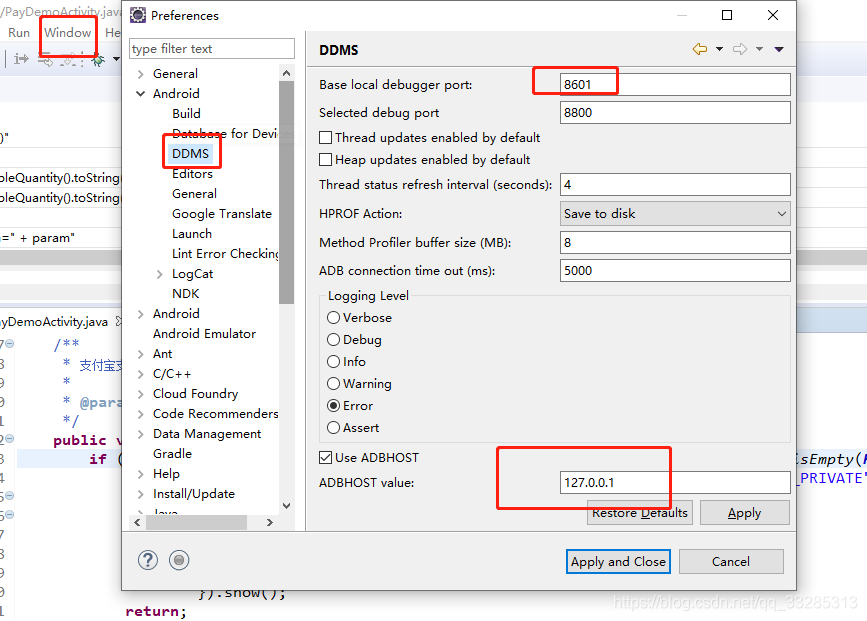
1 change the port to 8601 (don’t want to kill the process that occupies 8600 port, if 8600 port is occupied by other processes that you open, such as Android studio, consul, etc.)

Open eclipse window – & gt; preferences – & gt; Android – & gt; DDMS:

Set Base local debugger port to “8601”Check the box that says “Use ADBHOST” and the value should be “127.0.0.1”              

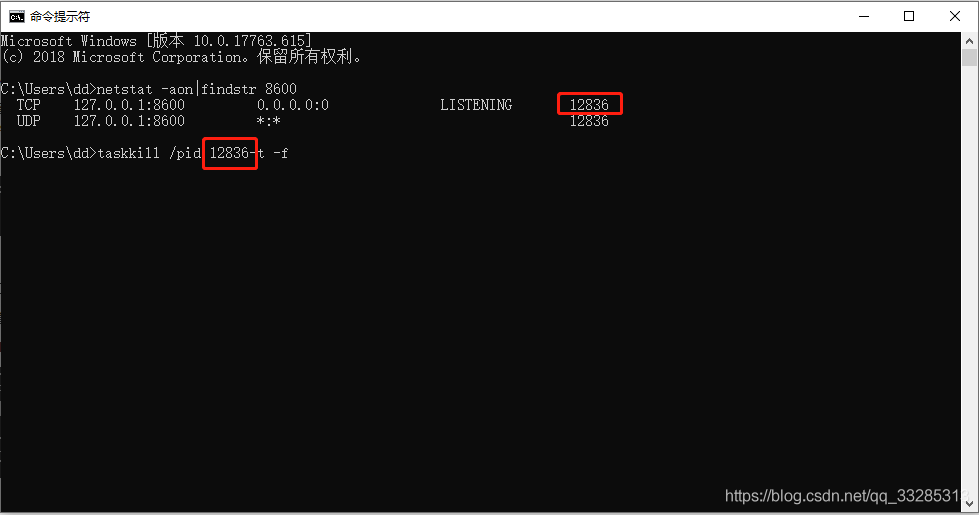
2 CMD to kill the process occupying port 8600 (it can kill the process occupying port 8600)

netstat -aon|findstr 8600

taskkill /pid 12836-t -f


[problem solving] target is multiclass but average =’binary ‘. Please choose another average setting

Today, when compiling Python code, we encountered the following error:
target is multiclass but average =’binary ‘. Please choose another average setting, one of [none,’ micro ‘,’ macro ‘,’ weighted ‘]

The original code is as follows, is to require a data set of F1 (precision and recall combined into a single index).

from sklearn.metrics import precision_score, recall_score

precision_score(y_train, y_train_pred)

terms of settlement

Average =’micro’is added to the original code.

from sklearn.metrics import precision_score, recall_score

precision_score(y_train, y_train_pred, average='micro')

The average parameter defines the calculation method of the index. In binary classification, the average parameter is binary by default; in multi classification, the optional parameters are micro, macro, weighted and samples.

None: returns the score of each class. Otherwise, this determines the average type of execution on the data.

Binary: only report the result POS of the specified class_ label。 Only if targets (Y_ Only when {true, PRED}) is binary.

Micro: global indicators are calculated by calculating total true positives, false negatives and false positives. That is to say, all classes are calculated together (to be specific to precision), and then the TP sum of all classes is divided by the sum of TP and FN of all classes. Therefore, precision and recall in micro method are equal to accuracy.

Macro: calculate the indicators of each tag to find their unweighted average. This does not take into account label imbalance. In other words, the precision of each class is calculated first, and then the arithmetic average is calculated.

Weighted: calculate the indicators of each tag, find their average value, and weight by support (the number of real instances of each tag). This would change the “macro” to address the label imbalance; it could result in an F-score that is not between precision and recall.

Samples: calculate the indicators of each instance and find their average value (only meaningful for different multi label classification)_ score)。

reference resources: https://blog.csdn.net/datongmu_ yile/article/details/81750737

Typeerror: object of type ‘response’ has no len() why?

The code is as follows:

rom bs4 import BeautifulSoup
import requests
url='XXX'
web=requests.get(url)
soup=BeautifulSoup(web,'lxml')
print(soup)

On these lines, the error is:

E:\Python\Python35-32\python.exe C:/Users/ty/PycharmProjects/untitled3/src/Reptile.py
Traceback (most recent call last):
File "C:/Users/ty/PycharmProjects/untitled3/src/Reptile.py", line 7, in <module>
soup=BeautifulSoup(web,'lxml')
File "E:\Python\Python35-32\lib\site-packages\beautifulsoup4-4.5.1-py3.5.egg\bs4\__init__.py", line 192, in __init__
TypeError: object of type 'Response' has no len()


Process finished with exit code 1

Why??

answer


soup=BeautifulSoup(web,'lxml')

There is a mistake in this place. The web here is a response object, which can’t be parsed by using beautiful soup. If you want to parse, the parsing object should be web.content So the correct way to write it is

soup=BeautifulSoup(web.content,'lxml')

Prompt “namespace ‘app’ not bound” when compiling Android studio

Prompt “namespace ‘app’ not bound” when compiling Android studio

The problem is that the root node is missing a declaration.

xmlns:app= " http://schemas.android.com/apk/res-auto "

Original:

<?xml version=”1.0″ encoding=”utf-8″?> <menu xmlns:android= ” http://schemas.android.com/apk/res/android ” >

Change to:

<?xml version=”1.0″ encoding=”utf-8″?> <menu xmlns:android= ” http://schemas.android.com/apk/res/android ” xmlns:app= ” http://schemas.android.com/apk/res-auto “>


Can

ninja Compiling the C compiler identification source file CMakeCCompilerId.c failed


Compiling the C compiler identification source file “CMakeCCompilerId.c” failed

At the same time, the console also reported an error:

— The C compiler identification is unknown
— The CXX compiler identification is unknown
— The ASM compiler identification is unknown
— Didn’t find assembler
CMake Error at CMakeLists.txt:30 (project):
  No CMAKE_ C_ COMPILER could be found.

  Tell CMake where to find the compiler by setting either the environment
  variable “CC” or the CMake cache entry CMAKE_ C_ COMPILER to the full path to
  the compiler, or to the compiler name if it is in the PATH.

CMake Error at CMakeLists.txt:30 (project):
  No CMAKE_ CXX_ COMPILER could be found.

  Tell CMake where to find the compiler by setting either the environment
  variable “CXX” or the CMake cache entry CMAKE_ CXX_ COMPILER to the full path
  to the compiler, or to the compiler name if it is in the PATH.

resolvent:

one

“C:\Program Files (x86)\Microsoft Visual Studio\2017\Professional\VC\Auxiliary\Build\ vcvarsall.bat ” x64

two

“C:\Program Files (x86)\Microsoft Visual Studio 14.0\VC\ vcvarsall.bat ” x64


Compiling the C compiler identification source file “CMakeCCompilerId.c” failed.
Compiler: CMAKE_ C_ COMPILER-NOTFOUND 
Build flags: 
Id flags:  

The output was:
the system cannot find the specified file.

Compiling the C compiler identification source file “CMakeCCompilerId.c” failed.
Compiler: CMAKE_ C_ COMPILER-NOTFOUND 
Build flags: 
Id flags: -c 

The output was:
the system cannot find the specified file.

Compiling the C compiler identification source file “CMakeCCompilerId.c” failed.
Compiler: CMAKE_ C_ COMPILER-NOTFOUND 
Build flags: 
Id flags: -Aa 

The output was:
the system cannot find the specified file.

Compiling the C compiler identification source file “CMakeCCompilerId.c” failed.
Compiler: CMAKE_ C_ COMPILER-NOTFOUND 
Build flags: 
Id flags: -D__ CLASSIC_ C__  

The output was:
the system cannot find the specified file.

Compiling the C compiler identification source file “CMakeCCompilerId.c” failed.
Compiler: CMAKE_ C_ COMPILER-NOTFOUND 
Build flags: 
Id flags: –target=arm-arm-none-eabi;-mcpu=cortex-m3 

The output was:
the system cannot find the specified file.

Compiling the C compiler identification source file “CMakeCCompilerId.c” failed.
Compiler: CMAKE_ C_ COMPILER-NOTFOUND 
Build flags: 
Id flags:  

The output was:
the system cannot find the specified file.

Compiling the C compiler identification source file “CMakeCCompilerId.c” failed.
Compiler: CMAKE_ C_ COMPILER-NOTFOUND 
Build flags: 
Id flags: -c 

The output was:
the system cannot find the specified file.

Compiling the C compiler identification source file “CMakeCCompilerId.c” failed.
Compiler: CMAKE_ C_ COMPILER-NOTFOUND 
Build flags: 
Id flags: -Aa 

The output was:
the system cannot find the specified file.

Compiling the C compiler identification source file “CMakeCCompilerId.c” failed.
Compiler: CMAKE_ C_ COMPILER-NOTFOUND 
Build flags: 
Id flags: -D__ CLASSIC_ C__  

The output was:
the system cannot find the specified file.

Compiling the C compiler identification source file “CMakeCCompilerId.c” failed.
Compiler: CMAKE_ C_ COMPILER-NOTFOUND 
Build flags: 
Id flags: –target=arm-arm-none-eabi;-mcpu=cortex-m3 

The output was:
the system cannot find the specified file.

Compiling the CXX compiler identification source file ” CMakeCXXCompilerId.cpp ” failed.
Compiler: CMAKE_ CXX_ COMPILER-NOTFOUND 
Build flags: 
Id flags:  

The output was:
the system cannot find the specified file.

Compiling the CXX compiler identification source file ” CMakeCXXCompilerId.cpp ” failed.
Compiler: CMAKE_ CXX_ COMPILER-NOTFOUND 
Build flags: 
Id flags: -c 

The output was:
the system cannot find the specified file.

Compiling the CXX compiler identification source file ” CMakeCXXCompilerId.cpp ” failed.
Compiler: CMAKE_ CXX_ COMPILER-NOTFOUND 
Build flags: 
Id flags: –c++ 

The output was:
the system cannot find the specified file.

Compiling the CXX compiler identification source file ” CMakeCXXCompilerId.cpp ” failed.
Compiler: CMAKE_ CXX_ COMPILER-NOTFOUND 
Build flags: 
Id flags: –ec++ 

The output was:
the system cannot find the specified file.

Compiling the CXX compiler identification source file ” CMakeCXXCompilerId.cpp ” failed.
Compiler: CMAKE_ CXX_ COMPILER-NOTFOUND 
Build flags: 
Id flags: –target=arm-arm-none-eabi;-mcpu=cortex-m3 

The output was:
the system cannot find the specified file.

Compiling the CXX compiler identification source file ” CMakeCXXCompilerId.cpp ” failed.
Compiler: CMAKE_ CXX_ COMPILER-NOTFOUND 
Build flags: 
Id flags:  

The output was:
the system cannot find the specified file.

Compiling the CXX compiler identification source file ” CMakeCXXCompilerId.cpp ” failed.
Compiler: CMAKE_ CXX_ COMPILER-NOTFOUND 
Build flags: 
Id flags: -c 

The output was:
the system cannot find the specified file.

Compiling the CXX compiler identification source file ” CMakeCXXCompilerId.cpp ” failed.
Compiler: CMAKE_ CXX_ COMPILER-NOTFOUND 
Build flags: 
Id flags: –c++ 

The output was:
the system cannot find the specified file.

Compiling the CXX compiler identification source file ” CMakeCXXCompilerId.cpp ” failed.
Compiler: CMAKE_ CXX_ COMPILER-NOTFOUND 
Build flags: 
Id flags: –ec++ 

The output was:
the system cannot find the specified file.

Compiling the CXX compiler identification source file ” CMakeCXXCompilerId.cpp ” failed.
Compiler: CMAKE_ CXX_ COMPILER-NOTFOUND 
Build flags: 
Id flags: –target=arm-arm-none-eabi;-mcpu=cortex-m3 

The output was:
the system cannot find the specified file.