Category Archives: Error

How to Fix TNS 12560 Error

alert.log error

Fatal NI connect error 12170.

VERSION INFORMATION:

TNS for Solaris: Version 11.2.0.1.0 – Production

Oracle Bequeath NT Protocol Adapter for Solaris: Version 11.2.0.1.0 – Production

TCP/IP NT Protocol Adapter for Solaris: Version 11.2.0.1.0 – Production

Time: 09-SEP-2011 10:19:05

Tracing not turned on.

Tns error struct:

ns main err code: 12535

TNS-12535: TNS:operation timed out

ns secondary err code: 12560

nt main err code: 505

TNS-00505: Operation timed out

nt secondary err code: 145

nt OS err code: 0

Client address: (ADDRESS=(PROTOCOL=tcp)(HOST=10.201.54.197)(PORT=65205))

Fri Sep 09 10:19:36 2011

This question can be found in metalink [ID 1286376.1]

‘Fatal NI connect error 12170′, ‘TNS-12535: TNS:operation timed out’ Reported in 11g Alert Log

Problems Description:

Suggested Actions:

– Search the corresponding text version of the listener log located on the database server for the corresponding client connection referenced by the Client address details referenced in the alert log message.

For the message incident below you would search the listener log for the ‘Client address’ string:

(ADDRESS=(PROTOCOL=tcp)(HOST=10.159.34.117)(PORT=1092))

The search of the listener log should find the most recent connection before the time reference displayed in the alert log message, e.g. ’22-JAN-2011 21:48:23′.

-Corresponding listener log entry:

22-JAN-2011 21:20:12 * (CONNECT_DATA=(SERVER=DEDICATED)(SERVICE_NAME=AMN11264.us.oracle.com)(CID=(PROGRAM=D:\app\mcassady\product\11.2.0\dbhome_1\bin\sqlplus.exe)(HOST=mcassady-lap)(USER=mca

ssady))) * (ADDRESS=(PROTOCOL=tcp)(HOST=10.159.34.117)(PORT=1092)) * establish * AMN11264.us.oracle.com * 0

– Alert log entry:

————

Fatal NI connect error 12170.

VERSION INFORMATION:

TNS for Solaris: Version 11.2.0.1.0 – Production

Oracle Bequeath NT Protocol Adapter for Solaris: Version 11.2.0.1.0 – Production

TCP/IP NT Protocol Adapter for Solaris: Version 11.2.0.1.0 – Production

Time: 22-JAN-2011 21:48:23

Tracing not turned on.

Tns error struct:

ns main err code: 12535

TNS-12535: TNS:operation timed out

ns secondary err code: 12560

nt main err code: 505

TNS-00505: Operation timed out

nt secondary err code: 145

nt OS err code: 0

Client address: (ADDRESS=(PROTOCOL=tcp)(HOST=10.159.34.117)(PORT=1092))

————

Problem Analytis:

Note the time of the client corresponding client connection(s) in the listener log.  Here you may find a particular client, set of clients or particular applications that are improperly disconnecting causing the timeout errors to be raised and recorder in the database alert log.

You may choose to revert from the new Automatic Diagnostic Repository (ADR) method to prevent the Oracle Net diagnostic details from being written to the alert log(s) by setting the following Oracle Net configuration parameters:

How to Fix:

To revert to Oracle Net Server tracing/logging, set following parameter in the server’s sqlnet. ora :

DIAG_ADR_ENABLED = OFF

Also, to back out the ADR diag for the Listener component, set following parameter in the server’s listener.ora:

DIAG_ADR_ENABLED_<listenername> = OFF

– Where the <listenername> would be replaced with the actual name of the configured listener(s) in the listener. ora configuration file.  For example, if the listener name is ‘LISTENER’, the parameter would read:

DIAG_ADR_ENABLED_LISTENER = OFF

-Reload or restart the TNS Listener for the parameter change to take effect.

How to Fix Spoolsv.exe Application Error

[quote]

[url]http://www.instant-registry-fixes.org/how-to-fix-spoolsvexe-application-error/[/url]

[/quote]

“Spoolsv.exe – Application Error”

“The instruction at “0x77fcc2c0” referenced memory at “0x00000000″.

“The memory could not be written.”

How to Fix[list]

[*]Open [b]Control Panel[/b], select Performance and Maintenance, select [b]Administrative Tools[/b] and then select the [b]Services [/b]option.

[*]In the Services management console, locate the [b]Print Spooler[/b] services, right-click on it and select [b]Stop[/b].

[*]Next, open the C[b]:\Windows\System32\Spool\Printers[/b] folder. (Here, we are assuming that your Windows is installed in the default C:\Windows folder)

[*]Delete all the [b]. SHD[/b] and [b]. SPL[/b] files from this folder.

[*]Next, open the TMP folder and delete all old and unused files from this folder.

[*]Finally, [b]restart [/b]the Spooler service from the Services management console.

[/list]

WordPress update failed 429 too many requests (How to Fix)

Why is this happening?
This is because the OFFICIAL CDN of WordPress blocks some Chinese IP. How to solve it?
1. Download the offline installation package from various channels
2. Functions.php code points to the domestic mirror installation package
The code is from WS234.com

//WordPress Custom upgrade packages
add_filter('site_transient_update_core', function($value){
    foreach ($value->updates as &$update) {
        if($update->locale == 'zh_CN'){
            $update->download   = 'https://ws234.com/img/wordpress-5.3.1-zh_CN.zip';
            $update->packages->full = 'https://ws234.com/img/wordpress-5.3.1-zh_CN.zip';
        }
    }
    return $value;
});

3. Use plug-in WP-China-Yes
“The Real Bad Guy” has set up a cache acceleration node in Mainland China to speed up the access of WordPress official service in Mainland China and avoid 429 error. This node can accelerate the “plugins and theme stores” you see in the background of the WordPress website, including the download of theme plug-ins and the loading of images in the mall, etc.
In order to enable more WordPress users to use the Mainland acceleration node, “The Real Bad Guy” has developed the WP-China-Yes plug-in, in order to help you easily and succinctly replace the service links.
Reference source:
https://www.wpdaxue.com/wordpress-org-429-too-many-requests.html#comment-30578
https://www.ibadboy.net/archives/3204.html
https://github.com/sunxiyuan/wp-china-yes
4. Use the plug-in kill 429
Lightwave recently developed a plugin, Kill 429, which solves the problem of 429 error reporting and quickly installs WordPress versions, themes and plugin updates by optimizing the network of the server in China to access the WordPress data server. The plug-in comes with its own circuit, which can be modified to its own circuit.
But it seems that the current built-in circuit is not very good
Reference source
https://www.wbolt.com/plugins/kill-429?invite=2363
https://static.wpdaxue.com/img/2013/08/kill-429.1.0.0.zip

On error resume next, on error goto 0, err usage

The VBScript language provides two statements and an object to handle “runtime errors,” as follows:

On Error Resume Next statement

On Error Goto 0 statement

Err object

A brief introduction to On Error Resume Next, On Error Goto 0, Err

The On Error Resume Next statement and On Error Goto 0 statements indicate what to do when “runtime Error” occurs.
When you add the On Error Resume Next statement, if the following program has a “runtime Error,” it will continue to run without interruption.
When the On Error Goto 0 statement is added, if the following program has a “runtime Error”, an “Error message” is displayed and execution of the program is stopped.
The Err object holds the error message

The following examples are used to explain On Error Resume Next, On Error Goto 0, and Err

The On Error Resume Next statement was not added

If the “On Error Resume Next” statement is not included, when “run time Error” occurs, an “Error message” is displayed and execution of the program is stopped.
Example (/test.asp) :

i = 1/0   Divide by '0', generate "runtime error", display "error message" and stop program execution.
Response.Write "After the divide is executed" 'This sentence will not be executed'
%>

Results:

Microsoft VBScript runtime error error ‘800A000b’
Be zero except
/ test. The asp, line 2

Add the On Error Resume Next statement

When we add the “On Error Resume Next” statement somewhere, subsequent programs don’t show “Error messages” and continue to run even if they do.
For example:

On Error Resume Next   The program that follows will continue to run even if a "runtime error" occurs.
i = 1/0 '0 to divide, this is a "runtime error", but because of the above On Error Resume Next, the execution will not be interrupted, but will continue to run.
Response.Write "after the divide is executed" 'This will be executed'
%>

Results:

After the division is performed

With the On Error Resume Next statement, use the Err object to get the Error message

After using On Error Resume Next, if there is an Error, the Err object will put the last Error message.
There are three important properties of Err object: Number, Source, and Description. They are error number, error source, and error description.
All you can catch are runtime errors, and If Err then is equivalent to If Err.Number then

Dim i
i = 1/0   'the fisrt wrong
undefined_function "test"   'the second wrong,Function undefined_function undefined
Response.Write Err.Description

Operation results:

Type mismatch

As you can see, it’s not being divided by zero

Use the On Error Goto 0 statement to let the system take over the handling of the Error

With the On Error Resume Next statement, the following programs will continue to run even if there is a “runtime Error.” But what if you want a later program to stop executing and display an error when it has a “runtime error”?
The answer is: use the On Error Goto 0 statement
Using the statement “On Error Goto 0”, the following program will prompt an Error and terminate the execution of the script as soon as an Error occurs.

Dim i
i = 1/0
Response.Write "After the execution of the first exclusion"
On Error Goto 0 'The statement after 'will alert for an error and end script execution as soon as an error occurs.
i = 1/0
Response.Write "After the execution of the second division"

Operation results:

After the first division is performed
Microsoft VBScript runtime error error ‘800A000b’
Be zero except
/ test. The asp, line 2

As you can see, the first response.write executes and prints the content, while the second response.write does not execute.

Talk about On Error Resume Next in detail

Scope of action for On Error Resume Next statement

The On Error Resume Next statement only applies to subsequent statements at this level. Does not apply to the function or subroutine being called, nor does it apply to the parent segment
The On Error Resume Next statement affects only this function if it appears in a function. It has no effect on either the “calling function” or the “called function”
If there is no On Error Resume Next statement in a subroutine, an Error in the subroutine will interrupt the subroutine and jump to the outer program that calls the subroutine. If the outer program contains the On Error Resume Next statement before the function call in question, it will then execute the statement after the function call. If the outer program does not have an On Error Resume Next statement before the function call that went wrong, it jumps to the outer program. This process is repeated until the environment containing the On Error Resume Next statement is found to continue running. If the outermost program also does not contain the On Error Resume Next statement, the default Error handler is used, which is to display the Error message and stop running.
For example:

 Dim i
 i = 1/0
 Response.Write "OK"
End Sub
Sub test1()
 test
 Response.Write "OK"
End Sub
On Error Resume Next
test1

Results:

After the division is performed

Neither OK is printed. Since On Error Resume Next is issued in the outermost layer, when something goes wrong with the subroutine being called, it jumps right out of the subroutine and into the outer code.
If you put an On Error Resume Next statement at the beginning of the subroutine, the runtime Error does not abort the subroutine.
For example, if you need to write a string to a file, you can access the file through a separate function to prevent errors from interrupting the entire program:

'returns True if it succeeds, or False on any error
Function WriteNewFile(strFileName, strContent)
  On Error Resume Next   'turn off the default error handler
  WiteNewFile = Flase   'default return value of function
  Set objFSO = CreateObject("scripting.FileSystemObject")
  If Err.Number = 0 Then Set objFile = objFSO.CreateTextFile(strFileName,True)
  If Err.Number = 0 Then objFile.WriteLine strContent
  If Err.Number = 0 Then objFile.Close
  If Err.Number = 0 Then WriteNewFile = True
End Function

The above program checks the Err object’s Number attribute before processing each program statement. If the value is 0 (no errors have occurred yet), then the creation and writing of the file can continue. If an error occurs, the script engine sets the value of the Err object’s property and proceeds to the next line.
The return value of the function is set to “True” as long as it works without causing an error. Otherwise, the function returns “False”.

On Error Goto 0 statement

In ASP 2.0 (although not documented) and ASP 3.0, the On Error Goto 0 statement restores the default Error handling behavior.
After running this statement, a run-time error results in default error handling, checking each nested program in the environment chain up to the home page code. If no other environment turns off the default error handling, the execution of the page will stop and the IIS default error page will be displayed.

Err object

In the previous example, after turning off default error handling, check to see if an error has occurred by checking the Number attribute of the Err object.
The Err object stores information about run-time errors
The following table shows the properties provided by the Err object.

</ th> </ th> </ tr>
Description </ td> sets or returns a string Description error </ td> </ tr> Number </ td> (default property) sets or returns a false value specified </ td> </ tr> Source </ td> Sets or returns the name of the object that generated the error

You can use these properties to check what kind of error occurred. For example, you can take different actions based on the error number, or you can provide the user with error information using the attribute values of Source and Description.

The following table shows the methods provided by the Err object.

</ th> </ th> </ tr>
Clear </ td> remove all current Err object set </ td> </ tr> Raise </ td> generate a runtime error </ td> </ tr> </ tbody> </ table>

A “custom error” is generated using the Err object.

You can generate a “custom error” using the Err object. Why do we do this?Because sometimes you want to send a custom error message to the user. You can set the Err object’s properties to whatever value you want, and then call the Raise method to cause such an error, which will stop the program and pass the error back down the call chain.
The following example shows how to handle errors when reading a text file on a server disk. Notice how to use the constant vbObjectError to make sure that the selected error number does not confuse an existing error number. By adding arbitrarily selected error Numbers to this constant, you can ensure that you are not confused with predefined errors.

  Set objFSO = CreateObject("scripting.FileSystemObject")
  Set objFile = objFSO.OpenTextFile("strFileName", ForReading)
  Select Case Err.Number
   Case 0   'OK, take no action
   Case 50,53   'standard file or path not found errors
    'create custom error values and raise error back up the call chain
    intErrNumber = vbObjectError + 1073     'custom error number
    strErrDescription = "The file has been deleted or moved. "
    strErrSource = " ReadThisFile function"
    Err.Raise intErrNumber, strErrSource, strErrDescription
    Exit Function
   Case Else   'som other error
    'raise the standard error back up the call chain
    Err.Raise Err.Number, Err.Source, Err.Description
    Exit Function
  End Select
  ReadThisFile = objFile.ReadAll   ' we opened it OK, so return the content
  objFile.Close
End Function

The code that calls this function can use the On Error Resume Next statement and catch the Error that this function produces.

strContent = ReadThisFile("myfile.txt")
If Err.Number = 0 Then
    Response.Write "File content is:<br/>" & strContent
Else
    Response.Write Err.Source & "<br/>" & Err.Description
End If

How to Fix HTTP Error 500: the default page enter their own routing can’t find a result

The same code, in the company’s operation is normal, the home was down wrong
HTTP ERROR 500, basic all could not see, the default page enter their own routing, said can’t find a result,
began to think that is a question of the composer, is composer install and found nothing to install
has examined the data access problem

chmod -R 777 xxlaravel/

Give the maximum permissions and the results will be fine

SSIS Error Code DTS_E_CANNOTACQUIRECONNECTIONFROMCONNECTIONMANAGER. Error code 0xC020801C,0xC02…

The error info:
[Excel Destination [20]] Error: SSIS Error Code DTS_E_CANNOTACQUIRECONNECTIONFROMCONNECTIONMANAGER.   The AcquireConnection method call to the connection manager “Excel Connection Manager” failed with error code 0xC0209303.   There may be error messages posted before this with more information on why the AcquireConnection method call failed.
[SSIS. Pipeline] Error: Excel Destination failed validation and returned error code 0xC020801C.

The solution:
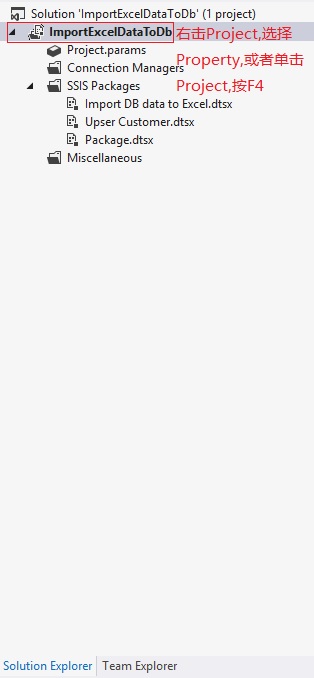
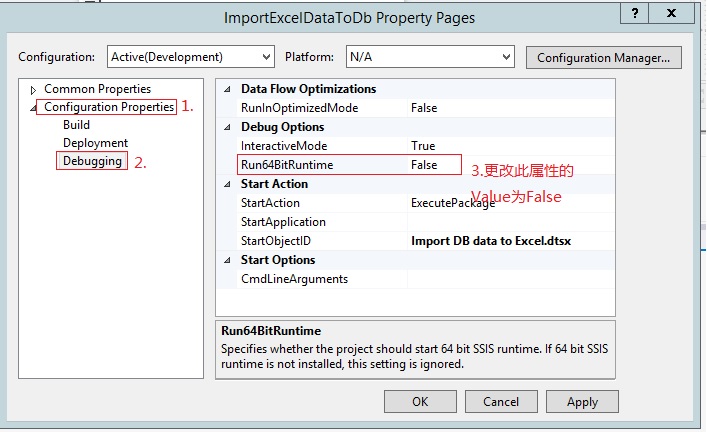
1. Click Project in the solution,

2. Do the following on the project property form

flutter, Unable to buy item, Error response code: 7 & flutter_inapp_purchase

Problem description: Flutter_inapp_purchase payment repository, error occurred when clicking to buy the managed item;

W/BillingClient(25436): Unable to buy item, Error response code: 7
E/DoobooUtils(25436): Error Code : 7
I/ Flutter (25436): [Price: 65.99, monthPrice: 5.50]
I/ Flutter (25436): [Price: 29.99, monthPrice: 10.00]
I/ Flutter (25436): [Price: 149.99, monthPrice:]
D/FA (25436): Logging Events (FE): HWPurchaseSelect, Bundle[{source=, ga_event_origin(_O)=app, ga_screen_class(_SC)=MainActivity, ga_screen_id(_SI)=-2672549720685398148, Purchase_month =lifetime}]
I/flutter (25436): kiit0611==== 3 responseCode: 7, debugMessage: Item is already owned., code: E_ALREADY_OWNED, message: You already own this item.

The error is obvious: you already have this item, indicating that the current account logged into Google Play has already purchased this item.
Solutions:
Change your Google Play account directly and clear the Google Account cache (clear the Google Play cache). To buy again, sometimes you need to restart the phone.

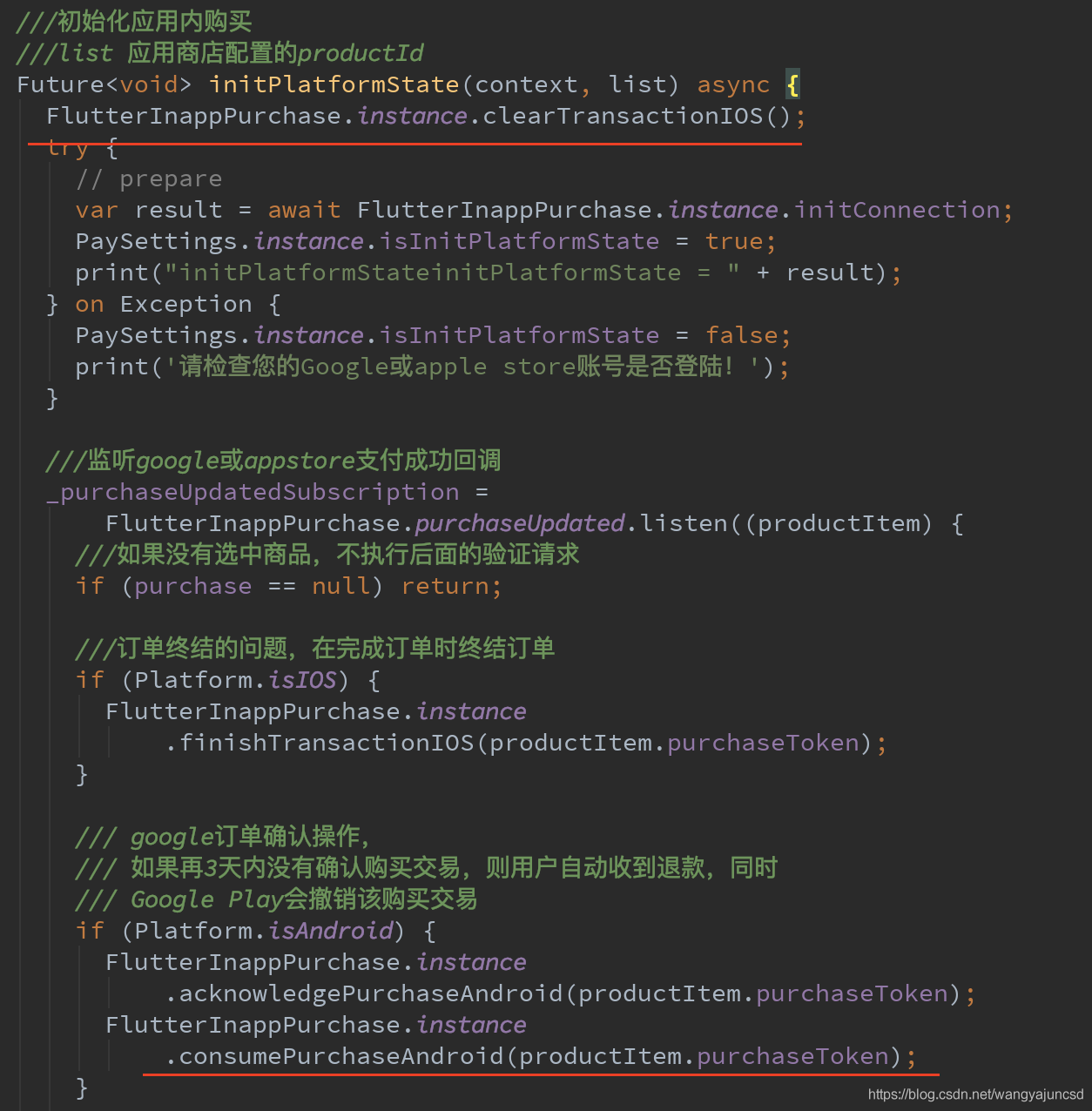
This problem usually occurs on the ios side, but if it does occur in Google, it can be solved according to the above method. However, it is important to note that when using the library, the code looks like this:

FlutterInappPurchase.instance.clearTransactionIOS();

/// google order confirmation operation.
/// If the purchase transaction is not confirmed within a further 3 days, the user will automatically receive a refund, along with
// Google Play will revoke that purchase transaction
if (Platform.isAndroid) {
  FlutterInappPurchase.instance
      .acknowledgePurchaseAndroid(productItem.purchaseToken);
  FlutterInappPurchase.instance
      .consumePurchaseAndroid(productItem.purchaseToken);
}

The screenshot is as follows:

Please have such code. FlutterInappPurchase.instance .consumePurchaseAndroid(productItem.purchaseToken); That means consume it, or else it will always be there and report errorCode = 7.

The source code in the Flutter_inapp_Purchase payment repository is as follows: See the red comment.

/// Consumes a purchase on `Android`.
///
/// No effect on `iOS`, whose consumable purchases are consumed at the time of purchase.
///
/// if you already invoked [getProducts],you ought to invoked this method to confirm you have consumed.
/// that means you can purchase one IAPItem more times, otherwise you'll receive error code : 7
///
/// in DoobooUtils.java error like this:
/// case BillingClient.BillingResponseCode.ITEM_ALREADY_OWNED:
///        errorData[0] = E_ALREADY_OWNED;
///        errorData[1] = "You already own this item.";
///        break;
Future<String> consumePurchaseAndroid(String token, { String developerPayload }) async {
  if (_platform.isAndroid) {
    String result =
        await _channel.invokeMethod('consumeProduct', <String, dynamic>{
      'token': token,
      'developerPayload': developerPayload,
    });
    return result;
  } else if (_platform.isIOS) {
    return 'no-ops in ios';
  }
  throw PlatformException(
      code: _platform.operatingSystem, message: "platform not supported");
}

Keep in mind that google-enabled phones can sometimes get weird with lots of accounts and caches (clear the Goole Play cache), so it’s best to switch accounts, clear the cache, and restart the phone.

When Wireshark grabs packets, IP check sum error is displayed

During the packet capture process, it is found that many TCP packets sent from the local host (client) are reported with IP Checksum error, but the application is normal, and the packets returned from the server are all normal, which is very strange.
As shown in the figure, many black items, black is usually the package in question:

5.23 EtherealTCP checksum errors are found during packet capture

Q:
TCP checksum errors found when grabbing packets with Ethereal on Windows platform.
But the response from the application layer tells me that the TCP checksum is OK for this message.

A: 2000-03
Network Card Configuration->Advanced->Rx Checksum Offload/Tx Checksum Offload.
It is likely that your two settings are Enable, just adjust them to Disable at the cost of reduced network performance.

The computation of TCP/UDP/IP checksums is typically done by the operating system's TCP/IP stack.
After these two locations are set to Enable, the protocol stack no longer performs the checksum calculations, but rather the NIC itself.
If no Rx Checksum Offload/Tx Checksum Offload entries are found in the aforementioned locations.
There are two possibilities, one is that the network card itself does not support this feature, and the other is that the driver of the network card does not provide a configuration item, the latter case is the most common.

In fact, the problem has nothing to do with what kind of Sniffer software is used.

Solutions:
Disable the Checksum Offload (the idea is to let the network card hardware compute the Checksum itself, rather than handing it over to the OPERATING system’s TCP/IP stack) by changing the properties of the card:

When Checksum Offload is disabled, the captured package displays much more cleanly:

Nginx: How to Use Error_Page

Error_page is touched, and it’s logged here
1. Error_page syntax
Grammar:

error_page code [ code... ] [ = | =answer-code ] uri | @named_location 

Default value:

no 

Use fields:
HTTP, Server, location, if field in location
Example 2.
The nginx directive error_page is designed to display a predefined URI when an error occurs, such as:

error_page 502 503 /50x.html;
location = /50x.html {
    root /usr/share/nginx/html;
}   

This actually creates an internal redirect, which returns the contents of 50x.html when the visit appears 502 or 503. Notice if you can find the 50x.html page, so add a location to make sure you find your custom 50x page.
Can we also define the return state in this case by ourselves, such as:

error_page 502 503 =200 /50x.html;
location = /50x.html {
    root /usr/share/nginx/html;
}   

In this way, when the user accesses 502 and 503, the return status of the user is 200 and the content is 50x.html.
When the error_page is followed by something other than a static message, such as proxyed Server or FastCGI/ UWSGI /SCGI Server, the status returned by the server (200, 302, 401, or 404) can also be returned to the user.

error_page 404 = /404.php;
location ~ \.php$ {
    fastcgi_pass 127.0.0.1:9000;
    fastcgi_param SCRIPT_FILENAME $document_root$fastcgi_script_name;
    include fastcgi_params;
}   

You can also set a named location and do the corresponding processing inside.

error_page 500 502 503 504 @jump_to_error;
location @jump_to_error {    
    proxy_pass http://backend;
}

It also handles error pages by having clients redirect 302, 301, etc. The default status code is 302.

error_page 403      http://example.com/forbidden.html;
error_page 404 =301 http://example.com/notfound.html;

Meanwhile, error_page can only respond once in a request, and the corresponding nginx has another configuration that controls this option: recursive_error_pages
default to false, which controls whether error_page can trigger multiple times in a request.
2. Nginx custom 404 error page configuration has no difference between equals sign
Error_page 404 /404. HTML displays custom 404 page content and normally returns a 404 status code. Error_page 404 = /404.html displays custom 404 page content but returns a 200 status code. Error_page 404 /404. PHP if it is a dynamic 404 error page containing header code (such as a 301 jump), it will not execute properly. Returns the 404 code normally. Error_page 404 = /404.php If it is a dynamic 404 error page that contains header code (such as a 301 jump), the equal sign configuration executes normally, and returns a status code defined in PHP. However, if the PHP definition returns a 404 status code, the 404 status code can be returned normally, but the custom page content cannot be displayed (the default 404 page appears), in this case, consider using the 410 code instead (header(“HTTP/1.1 410 Gone”); Normal return 410 status code, and can normally display custom content).

example

server  {
    listen 80;
    server_name  test.com;
    index       index.html index.htm;

    location/{ 
        proxy_pass http://online;
        error_page 404 = @fallback;
        proxy_intercept_errors on;
    }
    location @fallback {
        proxy_pass http://backend;
    }
}

upstream online {
         server 192.168.88.18:80;
         server 192.168.88.28:80;
}

upstream backend {
         server 192.168.88.38:80;
}

example
Limit_req traffic limit is set in the nginx configuration, so many requests return 503 error Code. For the purpose of improving the user experience, we want to return normal Code 200 and frequent operation information:

location  /test {
  ... 
  limit_req zone=zone_ip_rm burst=1 nodelay; 
  error_page 503 =200 /dealwith_503?callback=$arg_callback;
}
location /dealwith_503{ 
  set $ret_body '{"code": "V00006","msg": "Operate too often, please sit down and have a cup of tea."}';
   if ( $arg_callback != "" ) 
   { 
       return 200 'try{$arg_callback($ret_body)}catch(e){}'; 
   } 
   return 200 $ret_body; 
}

Centos7 hive started to report an error. There is no route to the host. The firewall has been closed

Problem
hive startup error, firewall closed

	at java.lang.reflect.Constructor.newInstance(Constructor.java:423)
	at org.datanucleus.plugin.NonManagedPluginRegistry.createExecutableExtension(NonManagedPluginRegistry.java:606)
	at org.datanucleus.plugin.PluginManager.createExecutableExtension(PluginManager.java:301)
	at org.datanucleus.NucleusContextHelper.createStoreManagerForProperties(NucleusContextHelper.java:133)
	at org.datanucleus.PersistenceNucleusContextImpl.initialise(PersistenceNucleusContextImpl.java:420)
	at org.datanucleus.api.jdo.JDOPersistenceManagerFactory.freezeConfiguration(JDOPersistenceManagerFactory.java:821)
	... 58 more
Caused by: com.mysql.jdbc.exceptions.jdbc4.CommunicationsException: Communications link failure

The last packet sent successfully to the server was 0 milliseconds ago. The driver has not received any packets from the server.
	at sun.reflect.NativeConstructorAccessorImpl.newInstance0(Native Method)
	at sun.reflect.NativeConstructorAccessorImpl.newInstance(NativeConstructorAccessorImpl.java:62)
	at sun.reflect.DelegatingConstructorAccessorImpl.newInstance(DelegatingConstructorAccessorImpl.java:45)
	at java.lang.reflect.Constructor.newInstance(Constructor.java:423)
	at com.mysql.jdbc.Util.handleNewInstance(Util.java:404)
	at com.mysql.jdbc.SQLError.createCommunicationsException(SQLError.java:981)
	at com.mysql.jdbc.MysqlIO.<init>(MysqlIO.java:339)
	at com.mysql.jdbc.ConnectionImpl.coreConnect(ConnectionImpl.java:2253)
	at com.mysql.jdbc.ConnectionImpl.connectOneTryOnly(ConnectionImpl.java:2286)
	at com.mysql.jdbc.ConnectionImpl.createNewIO(ConnectionImpl.java:2085)
	at com.mysql.jdbc.ConnectionImpl.<init>(ConnectionImpl.java:795)
	at com.mysql.jdbc.JDBC4Connection.<init>(JDBC4Connection.java:44)
	at sun.reflect.NativeConstructorAccessorImpl.newInstance0(Native Method)
	at sun.reflect.NativeConstructorAccessorImpl.newInstance(NativeConstructorAccessorImpl.java:62)
	at sun.reflect.DelegatingConstructorAccessorImpl.newInstance(DelegatingConstructorAccessorImpl.java:45)
	at java.lang.reflect.Constructor.newInstance(Constructor.java:423)
	at com.mysql.jdbc.Util.handleNewInstance(Util.java:404)
	at com.mysql.jdbc.ConnectionImpl.getInstance(ConnectionImpl.java:400)
	at com.mysql.jdbc.NonRegisteringDriver.connect(NonRegisteringDriver.java:327)
	at java.sql.DriverManager.getConnection(DriverManager.java:664)
	at java.sql.DriverManager.getConnection(DriverManager.java:208)
	at com.jolbox.bonecp.BoneCP.obtainRawInternalConnection(BoneCP.java:361)
	at com.jolbox.bonecp.BoneCP.<init>(BoneCP.java:416)
	... 70 more
Caused by: java.net.NoRouteToHostException: No route to the host (Host unreachable)
	at java.net.PlainSocketImpl.socketConnect(Native Method)
	at java.net.AbstractPlainSocketImpl.doConnect(AbstractPlainSocketImpl.java:350)
	at java.net.AbstractPlainSocketImpl.connectToAddress(AbstractPlainSocketImpl.java:206)
	at java.net.AbstractPlainSocketImpl.connect(AbstractPlainSocketImpl.java:188)
	at java.net.SocksSocketImpl.connect(SocksSocketImpl.java:392)
	at java.net.Socket.connect(Socket.java:589)
	at com.mysql.jdbc.StandardSocketFactory.connect(StandardSocketFactory.java:211)
	at com.mysql.jdbc.MysqlIO.<init>(MysqlIO.java:298

I read all the tutorials on the Internet that it’s a firewall problem
but my firewall has been turned off

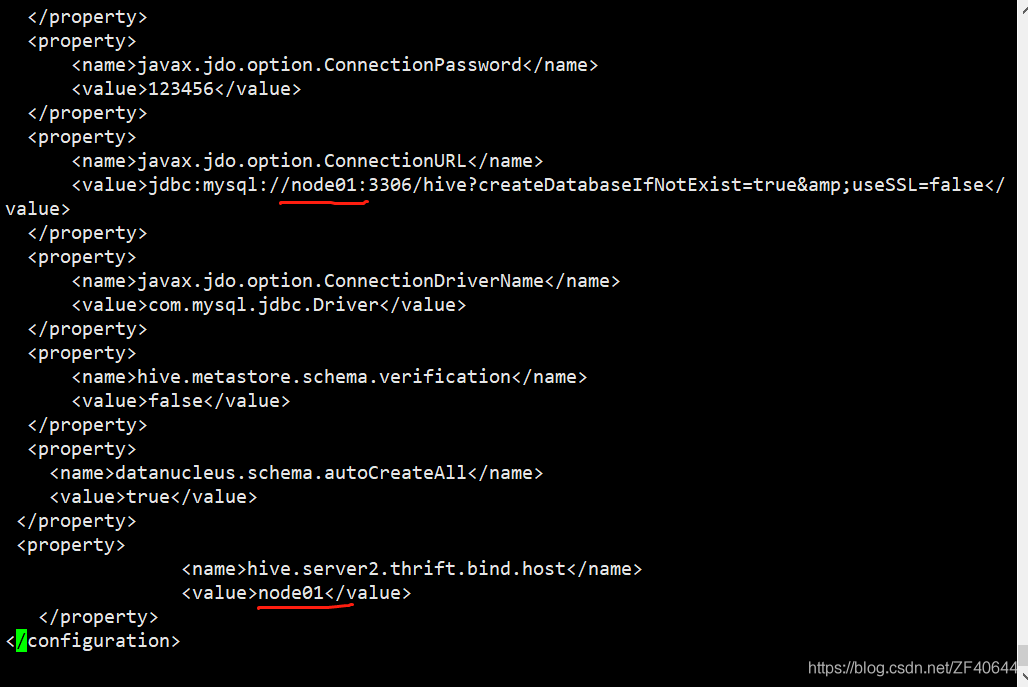
this hive is the one I copied from another virtual machine via SCP command
but the parameters in the hive site.xml have not changed

is changed to the corresponding host name
wq remains exit

start hadoop cluster
start hive
success!

[root@node01 conf]# hive
which: no hbase in (/usr/local/sbin:/usr/local/bin:/usr/sbin:/usr/bin:/export/servers/jdk1.8.0_131/bin:/export/servers/apache-zookeeper-3.6.2-bin/bin/:/export/servers/hadoop-2.7.7/bin/:/export/servers/hadoop-2.7.7/sbin/:/export/servers/apache-hive-2.1.1-bin/bin/:/root/bin)
SLF4J: Class path contains multiple SLF4J bindings.
SLF4J: Found binding in [jar:file:/export/servers/apache-hive-2.1.1-bin/lib/log4j-slf4j-impl-2.4.1.jar!/org/slf4j/impl/StaticLoggerBinder.class]
SLF4J: Found binding in [jar:file:/export/servers/hadoop-2.7.7/share/hadoop/common/lib/slf4j-log4j12-1.7.10.jar!/org/slf4j/impl/StaticLoggerBinder.class]
SLF4J: See http://www.slf4j.org/codes.html#multiple_bindings for an explanation.
SLF4J: Actual binding is of type [org.apache.logging.slf4j.Log4jLoggerFactory]

Logging initialized using configuration in jar:file:/export/servers/apache-hive-2.1.1-bin/lib/hive-common-2.1.1.jar!/hive-log4j2.properties Async: true
Hive-on-MR is deprecated in Hive 2 and may not be available in the future versions. Consider using a different execution engine (i.e. spark, tez) or using Hive 1.X releases.
hive> 

Error using tensorflow GPU: could not create cudnn handle: cudnn_STATUS_NOT_INITIALIZED

Error in using Tensorflow-GPU:
Error

Could not create cudnn handle: CUDNN_STATUS_NOT_INITIALIZED
***Error: Failed to get convolution algorithm. This is probably because cuDNN Failed to initialize, so try looking to see if a warning log message was printed above.

The error mainly points to cudnn, but the CUDA version and cudnn version are in line with the current tensorflow requirements (meaning there is no need to change the CUDA version and cudnn version)
, so it can only be caused by GPU use problem (meaning it is not the fault caused by the program needs to call GPU for many times)
The solution: **
Set GPU on-demand allocation mode
Tensorflow – GPU 2.3.1(be aware of the version of TensorFlow)****

config= tf.compat.v1.ConfigProto()
config.gpu_options.per_process_gpu_memory_fraction = 0.7 #0.7parameter, meaning the percentage allocated to gpu-memory.
sess=tf.compat.v1.Session(config=config)

Older version of TensorFlow-GPU

`config= tf.ConfigProto()
config.gpu_options.per_process_gpu_memory_fraction = 0.7 #0.7parameter, meaning the percentage allocated to gpu-memory.
sess=tf.Session(config=config)`

* Set GPU to apply video memory dynamically
Tensorflow – GPU 2.3.1(be aware of the version of TensorFlow)****

config = tf.compat.v1.ConfigProto()
config.gpu_options.allow_growth = True
session = tf.compat.v1.Session(config=config)

Older version of TensorFlow-GPU

`config = tf.ConfigProto()
config.gpu_options.allow_growth = True
session = tf.Session(config=config)

Please insert the above code into the front of any part of the program to solve the problem