Category Archives: Error

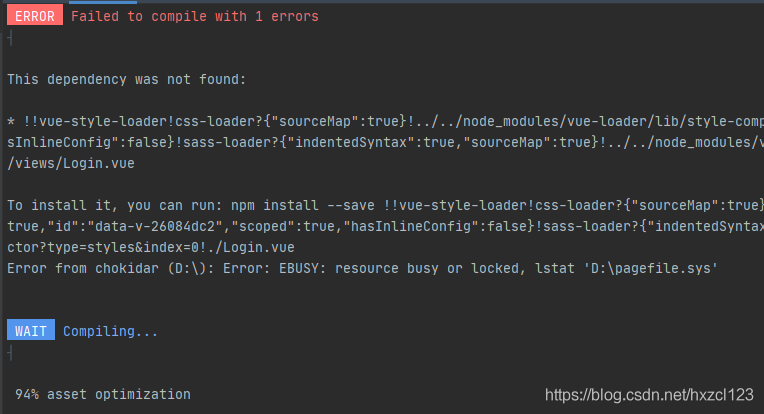
Module not found: Error: Can‘t resolve ‘sass-loader‘


there are many situations, such as not installing
SASS loader NPM install sass-loader node-sass –save-dev
or installing a version too high to support, the following is to solve the version too high

//First remove the version we have already installed.
npm uninstall node-sass 
npm uninstall sass-loader
npm uninstall style-loader
//Note that when we clean up, we can choose to clean up globally install globally, otherwise we will get the same error the next time we create the project.
npm i node-sass --sass_binary_site=https://npm.taobao.org/mirrors/node-sass/ //Taobao image installation
npm install [email protected] --save-dev //Install version 7.3.1 of sass
npm install style-loader --save-dev // install style-loader
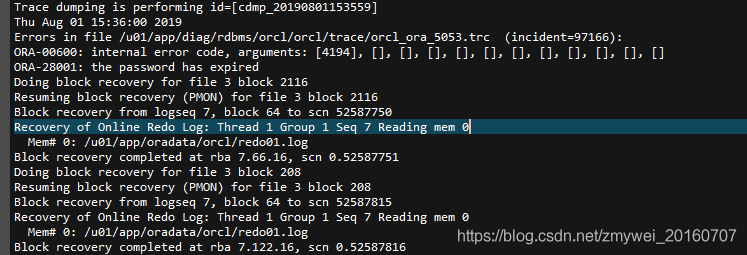
(How to Fix) Ora-00600: internal error code, arguments: [4194]


4194:indicates that undo and redo are inconsistent(Arg [a] Maximum Undo record number in Undo block,Arg [b] Undo record number from Redo block)
How to Fix:

1. Log in and start mount status.
[oracle@oracle ~]$ sqlplus/as sysdba
SQL*Plus: Release 11.2.0.1.0 Production on Thu Aug 1 16:08:26 2019
Copyright (c) 1982, 2009, Oracle.  All rights reserved.
Connected to an idle instance.
SQL>  startup mount;
ORACLE instance started.
Total System Global Area 1.3429E+10 bytes
Fixed Size                  2217992 bytes
Variable Size            1.0335E+10 bytes
Database Buffers         3087007744 bytes
Redo Buffers                4661248 bytes
Database mounted.

2、View undo parameters
SQL> show parameter undo;
NAME                                 TYPE        VALUE
———————————— ———– ——————————
undo_management                      string      AUTO
undo_retention                       integer     900
undo_tablespace                      string      UNDOTBS1
SQL>  select name from v$datafile;
NAME
——————————————————————————–
/u01/app/oradata/orcl/system01. dbf
/u01/app/oradata/orcl/sysaux01.dbf
/u01/app/oradata/orcl/undotbs01. dbf
/u01/app/oradata/orcl/users01. dbf
/u01/app/oradata/orcl/example01. dbf
/u01/app/oradata/orcl/IBIS_DATA_TS. dbf1
/u01/app/oradata/orcl/IBIS_DATA_TS. log1
/u01/app/oradata/orcl/DATAM_TS11. dbf
/u01/app/oradata/orcl/CQDX.dbf
9 rows selected.

3. Set to manual and restart
SQL> alter system set undo_management=manual scope=spfile;
System altered.
SQL> shutdown immediate;
ORA-01109: database not open

Database dismounted.
ORACLE instance shut down.
SQL> startup;
ORACLE instance started.
Total System Global Area 1.3429E+10 bytes
Fixed Size                  2217992 bytes
Variable Size            1.0335E+10 bytes
Database Buffers         3087007744 bytes
Redo Buffers                4661248 bytes
Database mounted.
Database opened.

4. create a new tablespace, modify the parameters to use the new undo tablespace, and reboot.
SQL> CREATE UNDO TABLESPACE UNDOTBS02 DATAFILE ‘/u01/app/oradata/orcl/undotbs02. dbf’ SIZE 3G AUTOEXTEND ON NEXT   10M;
Tablespace created.
SQL> alter system set undo_tablespace=”UNDOTBS02″ scope=spfile;
System altered.
SQL> alter system set undo_management=auto scope=spfile;
System altered.
SQL> shutdown immediate;
Database closed.
Database dismounted.
ORACLE instance shut down.
SQL> startup;
ORACLE instance started.
Total System Global Area 1.3429E+10 bytes
Fixed Size                  2217992 bytes
Variable Size            1.0335E+10 bytes
Database Buffers         3087007744 bytes
Redo Buffers                4661248 bytes
Database mounted.
Database opened.
SQL> show parameter undo;
NAME                                 TYPE        VALUE
———————————— ———– ——————————
undo_management                      string      AUTO
undo_retention                       integer     900
undo_tablespace                      string      UNDOTBS02

Done!

Error: (list) object cannot be coerced to type ‘double’

How to Fix Error: (list) object cannot be coerced to type ‘double’

> data5b2<-as.numeric(data5b1)
Error: (list) object cannot be coerced to type 'double'

When you want all the data in a data box to be numeric, the following error occurs

Error: (list) object cannot be coerced to type 'double'

Perfect solution with **unlist()** function

> data5b2<-as.numeric(unlist(data5b1))

Google Play googleapi: Error 403: Google Play Android Developer API has not been used in project

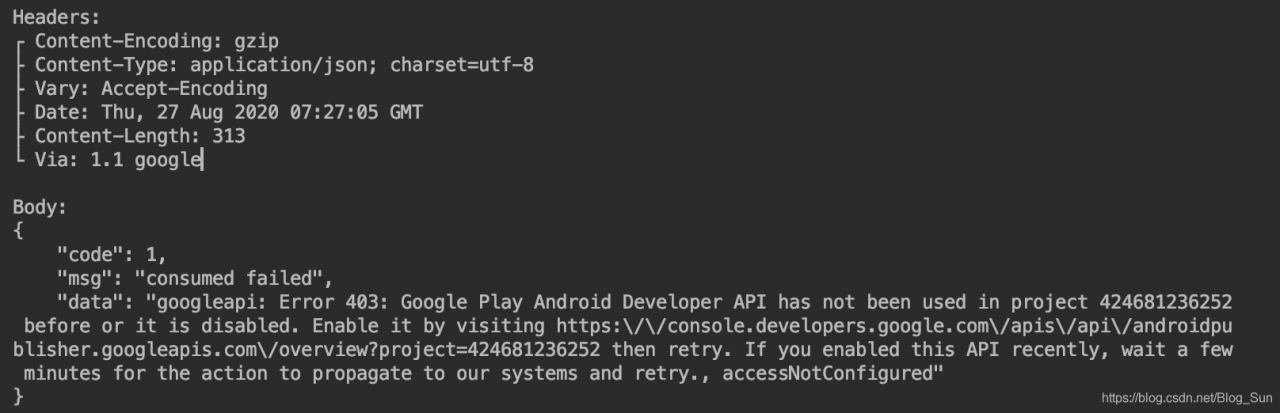
When testing Google payment order, the payment was successful, but the error was reported when querying the order as follows:


403 means that you do not have permission to access it. Just go to Google Play and enable API correlation project through the link address given by error. PS: It will take a while before the correlation becomes effective
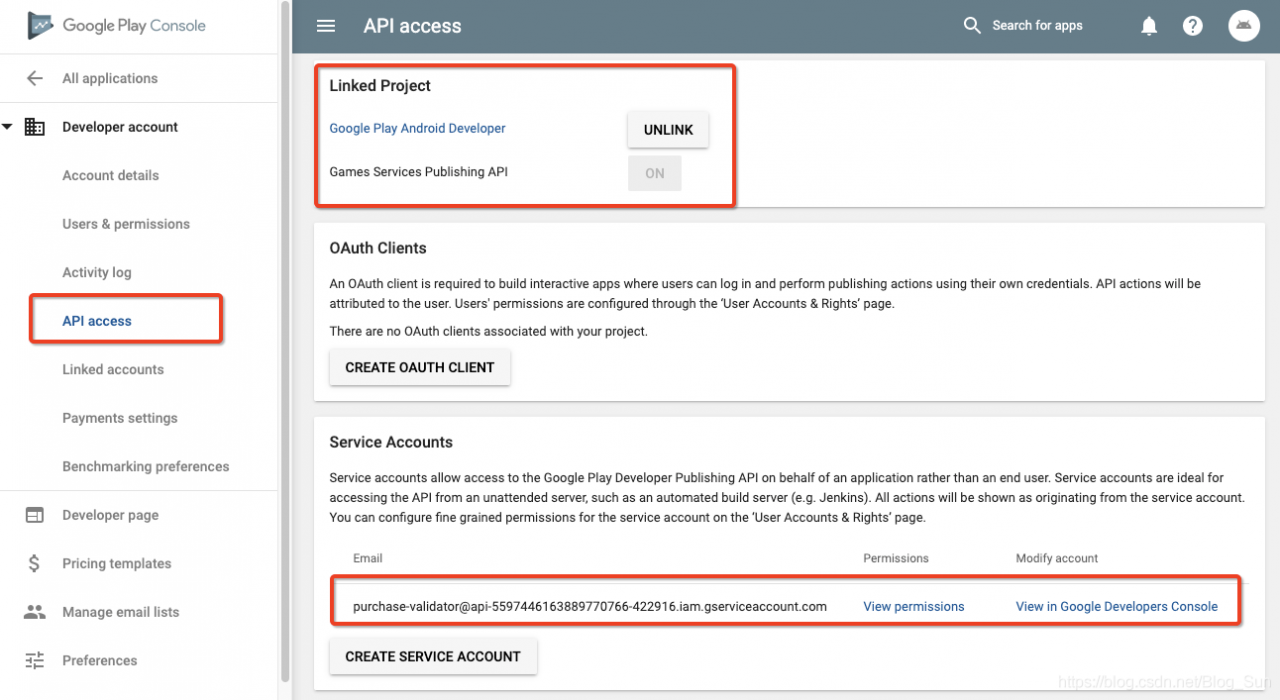
You also need to go to the background of Google to do the correlation

Find your project under Link Projects, and then click the Link button.
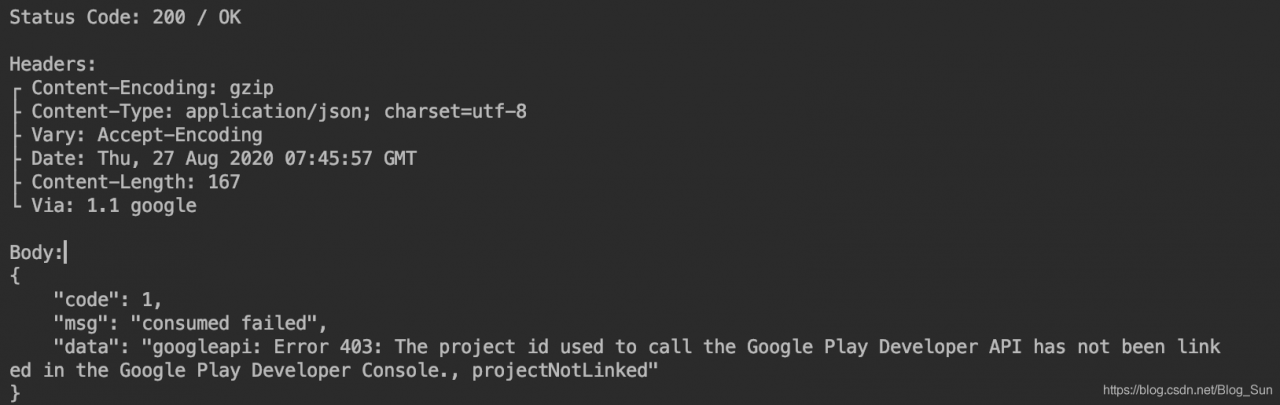
If the same error occurs again, it may be because you configured and purchased the product in the console before linking the project.
This means that in-app purchases need to be created after the associated api-project. If the order is reversed, even if it is configured, it will report projectNotLinked errors. . If you have the reverse order like me, one solution is to create a new in-app purchase item (temporary use, create and delete, do not need to re-delete the original item, just create a test item, created can be deleted, but this operation must have).
To solve this problem, simply add a new product to your application.
Reference :Google Play single interface 403

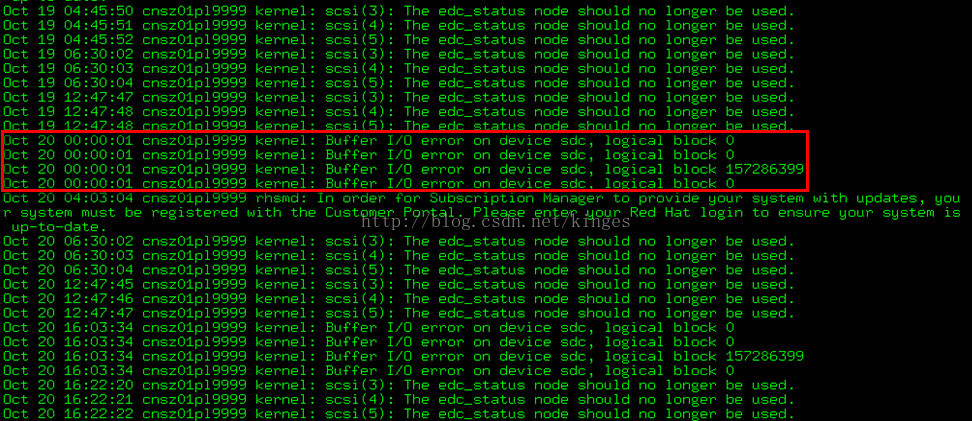
Buffer I/O Error in /var/log/messages

Host error message.

Buffer I/O errors occurring on SAN devices presented to Linux host using Linux native multipathing.
kernel: Buffer I/O error on device sdb, logical block 0
kernel: Buffer I/O error on device sdb, logical block 1
kernel: Buffer I/O error on device sdb, logical block 2
kernel: Buffer I/O error on device sdb, logical block 3

A server using a LUN, which is presented by a storage array through fabric channels, may show buffer I/O errors while the server is booting or commands such as fdisk and vgscan are being run. The access can be a read or write attempt. These messages are sometimes harmless. When using PowerPath, these errors are suppressed. However, in the case where Linux native multipathing is used, there is no automatic provision for filtering these messages.
The errors can occur when using an active/passive storage array, such as EMC Clarion series. These types of SANs contain two storage processors. LUNs are assigned to only one of the processors at the time of LUN creation. The LUN can receive I/O only via that one processor. The other processor is passive; it acts as a backup, ready to receive I/O if the active controller fails, or if all paths to the LUN via the active controller fails.
Paths to the LUN going via the passive controller are passive paths and will generate an I/O errors should I/O be sent over them. At bootup, the kernel’s SCSI mid-layer scans all paths to find devices. Thus it will scan both active and passive paths and will generate buffer I/O errors for the passive paths.
This is a normal behavior for Linux native multipath, and the errors do not indicate an array issue. The errors can safely be filtered through the OS logging configuration or the user can avoid access to native devices (as opposed to using /dev/mapper devices). Alternatively, a qualified version of PowerPath may be installed, which will automatically filter these errors.

django Internal server error 500 Modify source code to view print errors

Internal Server Error 500 is an annoying error that will probably make you want to smash your computer.
because this error caused too many sources, (I, often encountered the background py file error, including some very incredible format errors)
so looking for a long time on the Internet finally found a good solution

use python pyamf client connect to the server, only quote us this error:
pyamf.remoting.RemotingError: HTTP Error 500: INTERNAL SERVER ERROR
If you just look at this mistake, you’ll get confused. You have to make the error report more specific.
Think about it, there are two ways to make the error location, one is to change pyAMf source code, one is to change the source code of Django, let Django directly print out 500 error messages.
This is done with the second idea.
Django 500 source: python2.7/site – packages/django/core/handlers/base. Py
The source code is as follows, the middle section is added by me, so that the detailed error can be displayed:
def handle_uncaught_exception(self, request, resolver, Exc_info):
“”
Processing for any otherwise uncaught exceptions (those that will
generate HTTP 500 responses). Can be overridden by subclasses who want
customised 500 handling

    Be *very* careful when overriding this because the error could be
    caused by anything, so assuming something like the database is always
    available would be an error.
    """
    from django.conf import settings

    if settings.DEBUG_PROPAGATE_EXCEPTIONS:
        raise

    logger.error('Internal Server Error: %s', request.path,
        exc_info=exc_info,
        extra={
            'status_code': 500,
            'request': request
        }
    )
    #============= Code start ========== by chang
    print "---------- HTTP 500 Error Msg ---------- "
    print exc_info
    import traceback
    print traceback.format_exc()
    print "---------------------------------------- " 
    #============= Code end =========

    if settings.DEBUG:
        from django.views import debug
        return debug.technical_500_response(request, *exc_info)

    # If Http500 handler is not installed, re-raise last exception
    if resolver.urlconf_module is None:
        raise exc_info[1], None, exc_info[2]
    # Return an HttpResponse that displays a friendly error message.
    callback, param_dict = resolver.resolve500()
    return callback(request, **param_dict)

Excel VBA on error resume next error handling

Original Code
Sub test()
Dim arr() As String                                  'Define dynamic arrays
Dim n As Long
Dim c As Integer
Dim i As Integer
Dim q As Integer
Dim pvc As Variant

Sheets("Sheet1").Select
n = Application.WorksheetFunction.CountA(Range("A:A")) 'Determine the amount of data in column A
ReDim arr(1 To n) As String 'Redefine array based on column A data.
For i = 1 To n
    arr(i) = Cells(i, 2) 'Assign value to array
Next
Sheets("Experian Content Spreadsheet").Select

For c = 2 To [I65535].End(xlUp).Row Step 1
    If Len(LTrim(Range("I" & c).Value)) <> 0 Then
        pvc = Split(Range("I" & c), "|")
        For i = LBound(pvc) To UBound(pvc) Step 1
            On Error Resume Next
            q = WorksheetFunction.Match(pvc(i), arr, 0)
            If q = 0 Then
                Range("I" & c).Interior.Color = RGB(255, 255, 0)
                msgbox "I" & c
            End IF
        Next i
    End If
Next c
End Sub

修改后的代码
Sub test()
Dim arr() As String                                  'Define dynamic arrays
Dim n As Long
Dim c As Integer
Dim i As Integer
Dim q As Integer
Dim pvc As Variant

Sheets("Sheet1").Select
n = Application.WorksheetFunction.CountA(Range("A:A")) 'Determine the amount of data in column A
ReDim arr(1 To n) As String 'Redefine array based on column A data.
For i = 1 To n
    arr(i) = Cells(i, 2) 'Assign value to array
Next
Sheets("Experian Content Spreadsheet").Select

On Error Resume Next
For c = 2 To [I65535].End(xlUp).Row Step 1
    If Len(LTrim(Range("I" & c).Value)) <> 0 Then
        pvc = Split(Range("I" & c), "|")
        For i = LBound(pvc) To UBound(pvc) Step 1
            q = WorksheetFunction.Match(pvc(i), arr, 0)
            If Err.Number <> 0 Then
                Range("I" & c).Interior.Color = RGB(255, 255, 0)
                MsgBox "I" & c
                Err.Number = 0
            End If
        Next i
    End If
Next c
On Error GoTo 0
End Sub

The first time an error occurs, Q is not assigned a value, and the initial value is 0. Later, when an error occurs, Q is not assigned a value, and the previous value is kept. In fact, you should not be judging Q, but whether there is an error value Err.
Number, which is changed when Match makes an error, and is not assigned to Q. Unless there are consecutive errors, the last Q value cannot be 0.
The first time you use I2 to execute Q, the error is skipped and Q is the initial value of 0.
The second time I12 is used to perform Q with a value of 1.
......
Error again at I34, where the Q value is the value after I32 execution1


Windows update failed to update, indicating the solution of 0x80244021

Recently, it was found that one of the company’s windows7 computers could not be automatically updated. When clicking the “check update” button, 0x80244021 error will be prompted. The Windows update.log is as follows:


    2011-11-08  09:51:13:363     972    13d8    AU  Triggering AU detection through DetectNow API  2011-11-08  09:51:13:363     972    13d8    AU  Triggering Online detection (interactive)  2011-11-08  09:51:13:363     972    a10 AU  #############  2011-11-08  09:51:13:363     972    a10 AU  ## START ##  AU: Search for updates  2011-11-08  09:51:13:363     972    a10 AU  #########  2011-11-08  09:51:13:363     972    a10 AU  <<## SUBMITTED ## AU: Search for updates [CallId = {1436F467-82EE-4DED-A72D-5694818E7E49}]  2011-11-08  09:51:13:363     972    2b54    Agent   *************  2011-11-08  09:51:13:363     972    2b54    Agent   ** START **  Agent: Finding updates [CallerId = AutomaticUpdates]  2011-11-08  09:51:13:363     972    2b54    Agent   *********  2011-11-08  09:51:13:363     972    2b54    Agent     * Online = Yes; Ignore download priority = No 2011-11-08  09:51:13:363     972    2b54    Agent     * Criteria = “IsInstalled=0 and DeploymentAction=’Installation’ or IsPresent=1 and DeploymentAction=’Uninstallation’ or IsInstalled=1 and DeploymentAction=’Installation’ and RebootRequired=1 or IsInstalled=0 and DeploymentAction=’Uninstallation’ and RebootRequired=1” 2011-11-08  09:51:13:363     972    2b54    Agent     * ServiceID = {3DA21691 -E39D-4DA6-8A4B-B43877BCB1B7} Managed  2011-11-08  09:51:13:363     972    2b54    Agent     * Search Scope = {Machine}  2011-11-08  09:51:13:363     972    2b54    Setup   Checking for agent SelfUpdate  2011-11-08  09:51:13:363     972    2b54    Setup   Client version: Core: 7.5.7601.17514  Aux: 7.5.7601.17514  2011-11-08  09:51:13:363     972    2b54    Misc    Validating signature for C:\windows\SoftwareDistribution\SelfUpdate\wuident. cab:  2011-11-08  09:51:13:378     972    2b54    Misc     Microsoft signed: Yes  2011-11-08  09:51:13:409     972    2b54    Misc    WARNING: WinHttp: SendRequestToServerForFileInformation failed with 0x801901f6  2011-11-08  09:51:13:409     972    2b54    Misc    WARNING: WinHttp: ShouldFileBeDownloaded failed with 0x801901f6  2011-11-08  09:51:13:409     972    2b54    Misc    WARNING: DownloadFileInternal failed for http://172.16.160.236:8530/selfupdate/wuident. cab: error 0x801901f6  2011-11-08  09:51:13:409     972    2b54    Setup   WARNING: SelfUpdate check failed to download package information, error = 0x80244021  2011-11-08  09:51:13:409     972    2b54    Setup   FATAL: SelfUpdate check failed, err = 0x80244021  2011-11-08  09:51:13:409     972    2b54    Agent     * WARNING: Skipping scan, self-update check returned 0x80244021  2011-11-08  09:51:13:409     972    2b54    Agent     * WARNING: Exit code = 0x80244021  2011-11-08  09:51:13:409     972    2b54    Agent   *********  2011-11-08  09:51:13:409     972    2b54    Agent   **  END  **  Agent: Finding updates [CallerId = AutomaticUpdates]  2011-11-08  09:51:13:409     972    2b54    Agent   *************  2011-11-08  09:51:13:409     972    2b54    Agent   WARNING: WU client failed Searching for update with error 0x80244021  2011-11-08  09:51:13:409     972    2148    AU  >>##  RESUMED  ## AU: Search for updates [CallId = {1436F467-82EE-4DED-A72D-5694818E7E49}]  2011-11-08  09:51:13:409     972    2148    AU    # WARNING: Search callback failed, result = 0x80244021  2011-11-08  09:51:13:409     972    2148    AU    # WARNING: Failed to find updates with error code 80244021  2011-11-08  09:51:13:409     972    2148    AU  #########  2011-11-08  09:51:13:409     972    2148    AU  ##  END  ##  AU: Search for updates [CallId = {1436F467-82EE-4DED-A72D-5694818E7E49}]  2011-11-08  09:51:13:409     972    2148    AU  #############

The company’s environment is such that all client computers use ISA server2006 proxy to access the Internet via an internal WSUS server (172.16.160.236) update patch, and some computers have ISA firewall client software installed.
The windows 7 computer on which the problem was found had the ISA firewall client installed on it.
Solution.
On this problematic windows 7, open a cmd command prompt window and type.

 netsh winhttp set proxy proxy-server=”http=isasvr.xxx.com:8080″ bypass-list=”172.16.160.236″

The effect of the above command is that the communication with the internal WSUS server does not go through the ISA proxy server, i.e., it is updated directly from the WSUS server.

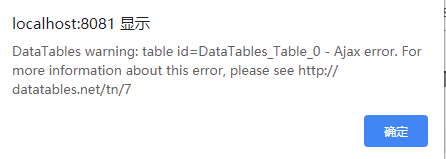
DataTables warning encountered using DataTables: table id = DataTables_Table_0 – Ajax error. For more information ab

Using DataTables met this error page DataTables warning: table id = DataTables_Table_0 – Ajax error. For more information about this error, please see http://datatables.net/tn/7, record the hope to help everyone.

is the ajax parameter problem, adminid must be the same as the background Controller parameter name, otherwise the interface will not be implemented and error will be reported.

/*  Adding request parameters to data */
	"fnServerParams" : function(data) {
		data.adminid=$("#adminid").val()
		console.log("id为"+$("#adminid").val())
	},

If an error is reported after the Controller is executed, then the return value is usually faulty, null pointer or the data is not converted to JSON data back.

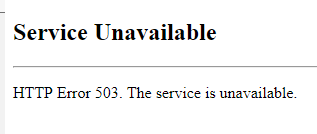
SharePoint site shows ‘Service Unavailable. HTTP Error 503. The service is unavailable’

I haven’t started the SharePoint server for a while, and when I start it up, I find that Central Administration can’t access it, which displaysService Unavailable HTTP Error 503. The service is unavailable,

How to Fix this Issue?

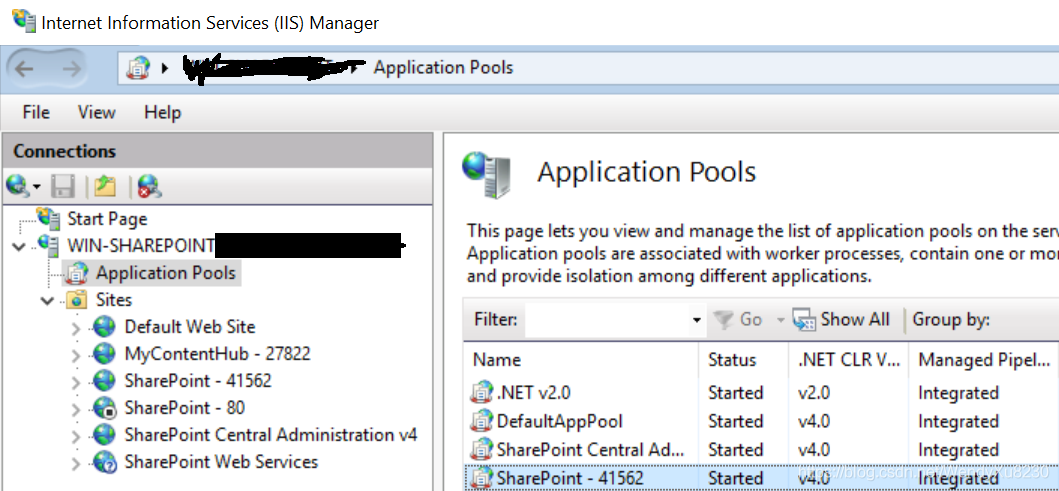
    Go to Start >> All Programs >> Administrative Tools >> Internet Information Services (IIS) Manager. Locate your App Pool account(such as SharePoint Central Administration v4, the third line on the right panel, see below figure) and right-click on it and select ‘Advanced Settings’. Go to process model then Identity Click on the Identity >> Set and then give the user name, password, and confirm password.

The reason may be that the account password has expired and needs to be reset.

https://sharepoint.stackexchange.com/questions/22605/http-503-service-unavailable-error-messages-when-attempting-to-open-sharepoint

How to Fix NSS error 12190 in curl accessing to HTTPS

Environment.
CentOS 7
Question.
In use
curl https://192.168.1.8:6443/api/v1/nodes –cert /etc/kubernetes/pki/apiserver-kubelet-client. crt –key /etc/kubernetes/pki/apiserver-kubelet-client. key –cacert /etc/kubernetes/pki/ca. crt -v
Error NSS error -12190 (SSL_ERROR_PROTOCOL_VERSION_ALERT):
* Connection died, retrying a fresh connect
* Closing connection 0
* Issue another request to this URL: ‘https://192.168.1.8:6443/api/v2/nodes’
* About to connect() to 192.168.1.8 port 6443 (#1)
*   Trying 192.168.231.224…
* Connected to 192.168.1.8 (192.168.1.8) port 6443 (#1)
* TLS disabled due to previous handshake failure
*   CAfile: /etc/kubernetes/pki/ca. crt
CApath: none
* NSS error -12190 (SSL_ERROR_PROTOCOL_VERSION_ALERT)
* Peer reports incompatible or unsupported protocol version.
* Closing connection 1
How to Fix:
(1) yum update nss nss-util nspr(2)yum update curl
Updating only (1) doesn’t work, it should be that (2) this works (not verified).

Reference.
1、https://stackoverflow.com/questions/43975973/how-to-fix-error-failed-to-download-on-rbenv-install
2、https://stackoverflow.com/questions/30678583/centos-6-6-curl-returns-error-when-connecting-to-some-ssl-site