Category Archives: Error

How to Solve “/usr/bin/ld: skipping incompatible”

Today, when I was working on a project, I used the make command to solve the problem of / usr/bin/LD: skipping incompatible.

The essence of this problem is that when linking library files, the library file version does not correspond to the platform version.

Solution: objdump – P libmylib. A. check whether the library version is 32-bit or 64 bit, or arm version or… And so on. Analyze it carefully. You’ll be in the fog. (the problem I encountered is that the compiler chooses version 64, but XXX. A is version 32, which is not compatible)
conclusion: problems are beneficial but not harmful. Only by solving problems can we improve ourselves!
Runtime error prompt in Android Studio: arrayadapter requires the resource ID to be a textview problem

At first, listview uses Android’s own simple_ list_ item_1 display simple text. Use the default attribute, and the code is as follows:

ArrayAdapter<String> adapter = new ArrayAdapter<String>(this,android.R.layout.simple_list_item_1, adapterData);
listView.setAdapter(adapter);

After that, when the function is updated, you need to change the font color of item and specify the typeface. Record is customized in RES/layout/folder_ text.xml File:

<?xml version="1.0" encoding="utf-8"?>
<LinearLayout xmlns:android="http://schemas.android.com/apk/res/android"
    android:orientation="vertical"
    android:layout_width="match_parent"
    android:layout_height="match_parent">
    <TextView
        android:id="@+id/TView"
        android:layout_width="match_parent"
        android:layout_height="match_parent"
        android:textColor="#2d373c"
        android:textSize="18sp"
        />
</LinearLayout>

Change the code in. Java file to:

ArrayAdapter<String> adapter = new ArrayAdapter<String>(RecordActivity.this,
         R.layout.record_text, adapterData);
 listView.setAdapter(adapter);

 //Change the item display text to a custom font
 LayoutInflater layoutInflater = (LayoutInflater) getSystemService(Context.LAYOUT_INFLATER_SERVICE);
 View view = layoutInflater.inflate(R.layout.record_text, null);
 TextView w = (TextView)view.findViewById(R.id.TView);
 Typeface tfsisan03 = Typeface.createFromAsset(getAssets(), "fonts/sisan03_0.ttf");
 w.setTypeface (tfsisan03);

Run, error prompt: arrayadapter requires the resource ID to be a textview. Finally, we found the problem of. XML file. The root label must be textview and cannot nest LinearLayout. After modification, the error will be resolved.

<?xml version="1.0" encoding="utf-8"?>
<TextView
    xmlns:android="http://schemas.android.com/apk/res/android"
    android:id="@+id/TView"
    android:layout_width="match_parent"
    android:layout_height="50dp"
    android:textColor="#2d373c"
    android:layout_marginLeft="10dp"
    android:paddingLeft="10dp"
    android:gravity="center_vertical"
    android:textSize="16sp"
    />


How to Fix Error return arrays must be of arraytype

from math import log
import xlrd
***# from numpy import ****
import operator

def calcShannonEnt(dataSet):#calculata shannonEnt
    numEntries = len(dataSet)
    labelCounts = {}
    for featVec in dataSet:#Add the current key value to the dictionary and record the number of occurrences of the category
        currentLabel = featVec[-1]
        if currentLabel not in labelCounts.keys():
            labelCounts[currentLabel] = 0
        labelCounts[currentLabel] += 1
    shannonEnt = 0.0
    for key in labelCounts:#Calculating Shannon entropy
        prob = float(labelCounts[key])/numEntries#Calculate the probability of category occurrence using the frequency of occurrence of all class labels
        tmp = prob*log(prob,2)
        shannonEnt -= tmp#Get Shannon entropy
    return shannonEnt

Typeerror: return arrays must be of array-type occurs when the code is running, because the second parameter of log is not base but out array. If you just want to perform normal log operations, you can choose to use numpy.math.log (1.1, 2) or use the log function of math module in Python instead of importing all the functions TT in numpy

Error (active) e1696 cannot open source file “errno.H” rpgworld problems encountered in installing visual studio 2017

FORM stack overflow
Some of the errors:

Severity    Code    Description Project File    Line    Suppression State
Error (active)  E1696   cannot open source file "errno.h"   RPGWorld    c:\Program Files (x86)\Microsoft Visual Studio\2017\Community\VC\Tools\MSVC\14.10.25017\include\cerrno  7   
Error (active)  E1696   cannot open source file "float.h"   RPGWorld    c:\Program Files (x86)\Microsoft Visual Studio\2017\Community\VC\Tools\MSVC\14.10.25017\include\cfloat  7   
Error (active)  E0282   the global scope has no "acosf" RPGWorld    c:\Program Files (x86)\Microsoft Visual Studio\2017\Community\VC\Tools\MSVC\14.10.25017\include\cmath   629 
Error (active)  E0282   the global scope has no "asinf" RPGWorld    c:\Program Files (x86)\Microsoft Visual Studio\2017\Community\VC\Tools\MSVC\14.10.25017\include\cmath   629 
Error (active)  E0282   the global scope has no "atanf" RPGWorld    c:\Program Files (x86)\Microsoft Visual Studio\2017\Community\VC\Tools\MSVC\14.10.25017\include\cmath   630 
Error (active)  E0282   the global scope has no "atan2f"    RPGWorld    c:\Program Files (x86)\Microsoft Visual Studio\2017\Community\VC\Tools\MSVC\14.10.25017\include\cmath   630 
Error (active)  E0282   the global scope has no "ceilf" RPGWorld    c:\Program Files (x86)\Microsoft Visual Studio\2017\Community\VC\Tools\MSVC\14.10.25017\include\cmath   630 
Error (active)  E0282   the global scope has no "cosf"  RPGWorld    c:\Program Files (x86)\Microsoft Visual Studio\2017\Community\VC\Tools\MSVC\14.10.25017\include\cmath   631 
Error (active)  E0282   the global scope has no "coshf" RPGWorld    c:\Program Files (x86)\Microsoft Visual Studio\2017\Community\VC\Tools\MSVC\14.10.25017\include\cmath   631 
Error (active)  E0282   the global scope has no "swprintf"  RPGWorld    c:\Program Files (x86)\Microsoft Visual Studio\2017\Community\VC\Tools\MSVC\14.10.25017\include\cwchar  21  
Error (active)  E0282   the global scope has no "swscanf"   RPGWorld    c:\Program Files (x86)\Microsoft Visual Studio\2017\Community\VC\Tools\MSVC\14.10.25017\include\cwchar  21  
Error (active)  E0282   the global scope has no "ungetwc"   RPGWorld    c:\Program Files (x86)\Microsoft Visual Studio\2017\Community\VC\Tools\MSVC\14.10.25017\include\cwchar  21  
Error (active)  E0282   the global scope has no "vfwprintf" RPGWorld    c:\Program Files (x86)\Microsoft Visual Studio\2017\Community\VC\Tools\MSVC\14.10.25017\include\cwchar  22  
Error (active)  E0282   the global scope has no "vswprintf" RPGWorld    c:\Program Files (x86)\Microsoft Visual Studio\2017\Community\VC\Tools\MSVC\14.10.25017\include\cwchar  22  
Error (active)  E0282   the global scope has no "vwprintf"  RPGWorld    c:\Program Files (x86)\Microsoft Visual Studio\2017\Community\VC\Tools\MSVC\14.10.25017\include\cwchar  22  
Error (active)  E0282   the global scope has no "wcrtomb"   RPGWorld    c:\Program Files (x86)\Microsoft Visual Studio\2017\Community\VC\Tools\MSVC\14.10.25017\include\cwchar  23  
Error (active)  E0282   the global scope has no "wprintf"   RPGWorld    c:\Program Files (x86)\Microsoft Visual Studio\2017\Community\VC\Tools\MSVC\14.10.25017\include\cwchar  23  
Error (active)  E0282   the global scope has no "wscanf"    RPGWorld    c:\Program Files (x86)\Microsoft Visual Studio\2017\Community\VC\Tools\MSVC\14.10.25017\include\cwchar  23  
Error (active)  E0282   the global scope has no "wcsrtombs" RPGWorld    c:\Program Files (x86)\Microsoft Visual Studio\2017\Community\VC\Tools\MSVC\14.10.25017\include\cwchar  24  
Error (active)  E0282   the global scope has no "wcstol"    RPGWorld    c:\Program Files (x86)\Microsoft Visual Studio\2017\Community\VC\Tools\MSVC\14.10.25017\include\cwchar  24  
Error (active)  E0282   the global scope has no "wcscat"    RPGWorld    c:\Program Files (x86)\Microsoft Visual Studio\2017\Community\VC\Tools\MSVC\14.10.25017\include\cwchar  24  
Error (active)  E0282   the global scope has no "wcschr"    RPGWorld    c:\Program Files (x86)\Microsoft Visual Studio\2017\Community\VC\Tools\MSVC\14.10.25017\include\cwchar  25  
Error (active)  E0282   the global scope has no "wcscmp"    RPGWorld    c:\Program Files (x86)\Microsoft Visual Studio\2017\Community\VC\Tools\MSVC\14.10.25017\include\cwchar  25  
Error (active)  E0282   the global scope has no "wcscoll"   RPGWorld    c:\Program Files (x86)\Microsoft Visual Studio\2017\Community\VC\Tools\MSVC\14.10.25017\include\cwchar  25  
Error (active)  E0282   the global scope has no "wcscpy"    RPGWorld    c:\Program Files (x86)\Microsoft Visual Studio\2017\Community\VC\Tools\MSVC\14.10.25017\include\cwchar  26  
Error (active)  E0282   the global scope has no "wcscspn"   RPGWorld    c:\Program Files (x86)\Microsoft Visual Studio\2017\Community\VC\Tools\MSVC\14.10.25017\include\cwchar  26  
Error (active)  E0282   the global scope has no "wcslen"    RPGWorld    c:\Program Files (x86)\Microsoft Visual Studio\2017\Community\VC\Tools\MSVC\14.10.25017\include\cwchar  26  
Error (active)  E0282   the global scope has no "wcsncat"   RPGWorld    c:\Program Files (x86)\Microsoft Visual Studio\2017\Community\VC\Tools\MSVC\14.10.25017\include\cwchar  27  
Error (active)  E0282   the global scope has no "wcsncmp"   RPGWorld    c:\Program Files (x86)\Microsoft Visual Studio\2017\Community\VC\Tools\MSVC\14.10.25017\include\cwchar  27  
Error (active)  E0282   the global scope has no "wcsncpy"   RPGWorld    c:\Program Files (x86)\Microsoft Visual Studio\2017\Community\VC\Tools\MSVC\14.10.25017\include\cwchar  27  
Error (active)  E0282   the global scope has no "wcspbrk"   RPGWorld    c:\Program Files (x86)\Microsoft Visual Studio\2017\Community\VC\Tools\MSVC\14.10.25017\include\cwchar  28  
Error (active)  E0282   the global scope has no "wcsrchr"   RPGWorld    c:\Program Files (x86)\Microsoft Visual Studio\2017\Community\VC\Tools
Error (active)  E0260   explicit type is missing ('int' assumed)    RPGWorld    c:\Program Files (x86)\Microsoft Visual Studio\2017\Community\VC\Tools\MSVC\14.10.25017\include\xtgmath.h   212 
Error (active)  E0757   variable "size_t" is not a type name    RPGWorld    c:\Users\Fazil\Documents\Visual Studio 2017\Projects\Local\RPGWorld\packages\sfml-system.2.4.0.0\build\native\include\SFML\Graphics\Glsl.inl    40  
Error (active)  E0757   variable "size_t" is not a type name    RPGWorld    c:\Users\Fazil\Documents\Visual Studio 2017\Projects\Local\RPGWorld\packages\sfml-system.2.4.0.0\build\native\include\SFML\Graphics\Texture.hpp 159 
Error (active)  E0757   variable "size_t" is not a type name    RPGWorld    c:\Users\Fazil\Documents\Visual Studio 2017\Projects\Local\RPGWorld\packages\sfml-system.2.4.0.0\build\native\include\SFML\Graphics\VertexArray.hpp 64  
Error (active)  E0757   variable "size_t" is not a type name    RPGWorld    c:\Users\Fazil\Documents\Visual Studio 2017\Projects\Local\RPGWorld\packages\sfml-system.2.4.0.0\build\native\include\SFML\Graphics\VertexArray.hpp 72  
Error (active)  E0757   variable "size_t" is not a type name    RPGWorld    c:\Users\Fazil\Documents\Visual Studio 2017\Projects\Local\RPGWorld\packages\sfml-system.2.4.0.0\build\native\include\SFML\Graphics\VertexArray.hpp 88  
Error (active)  E0757   variable "size_t" is not a type name    RPGWorld    c:\Users\Fazil\Documents\Visual Studio 2017\Projects\Local\RPGWorld\packages\sfml-system.2.4.0.0\build\native\include\SFML\Graphics\VertexArray.hpp 104 
Error (active)  E0757   variable "size_t" is not a type name    RPGWorld    c:\Users\Fazil\Documents\Visual Studio 2017\Projects\Local\RPGWorld\packages\sfml-system.2.4.0.0\build\native\include\SFML\Graphics\VertexArray.hpp 129 
Error (active)  E0757   variable "size_t" is not a type name    RPGWorld    c:\Users\Fazil\Documents\Visual Studio 2017\Projects\Local\RPGWorld\packages\sfml-system.2.4.0.0\build\native\include\SFML\System\String.hpp    58  
Error (active)  E0757   variable "size_t" is not a type name    RPGWorld    c:\Users\Fazil\Documents\Visual Studio 2017\Projects\Local\RPGWorld\packages\sfml-system.2.4.0.0\build\native\include\SFML\System\String.hpp    332 
Error (active)  E0757   variable "size_t" is not a type name    RPGWorld    c:\Users\Fazil\Documents\Visual Studio 2017\Projects\Local\RPGWorld\packages\sfml-system.2.4.0.0\build\native\include\SFML\System\String.hpp    345 
Error (active)  E0757   variable "size_t" is not a type name    RPGWorld    c:\Users\Fazil\Documents\Visual Studio 2017\Projects\Local\RPGWorld\packages\sfml-system.2.4.0.0\build\native\include\SFML\System\String.hpp    365 
Error (active)  E0757   variable "size_t" is not a type name    RPGWorld    c:\Users\Fazil\Documents\Visual Studio 2017\Projects\Local\RPGWorld\packages\sfml-system.2.4.0.0\build\native\include\SFML\System\String.hpp    387 
Error (active)  E0757   variable "size_t" is not a type name    RPGWorld    c:\Users\Fazil\Documents\Visual Studio 2017\Projects\Local\RPGWorld\packages\sfml-system.2.4.0.0\build\native\include\SFML\System\String.hpp    399 
Error (active)  E0757   variable "size_t" is not a type name    RPGWorld    c:\Users\Fazil\Documents\Visual Studio 2017\Projects\Local\RPGWorld\packages\sfml-system.2.4.0.0\build\native\include\SFML\System\String.hpp    413 
Error (active)  E0757   variable "size_t" is not a type name    RPGWorld    c:\Users\Fazil\Documents\Visual Studio 2017\Projects\Local\RPGWorld\packages\sfml-system.2.4.0.0\build\native\include\SFML\System\String.hpp    427 
Error (active)  E0757   variable "size_t" is not a type name    RPGWorld    c:\Users\Fazil\Documents\Visual Studio 2017\Projects\Local\RPGWorld\packages\sfml-system.2.4.0.0\build\native\include\SFML\System\String.hpp    456 
Error (active)  E0020   identifier "rand" is undefined  RPGWorld    c:\Users\Fazil\Documents\Visual Studio 2017\Projects\Local\RPGWorld\RPGWorld\Blocks.cpp 23  
Error   C1083   Cannot open include file: 'corecrt.h': No such file or directory    RPGWorld    c:\program files (x86)\microsoft visual studio\2017\community\vc\tools\msvc\14.10.25017\include\crtdefs.h   10  

I never had this issue with Visual Studio 2015 Community Edition. Am I missing some component from the Installer? Any help would be appreciated. Thank you!

c++
visual-studio
visual-studio-2017


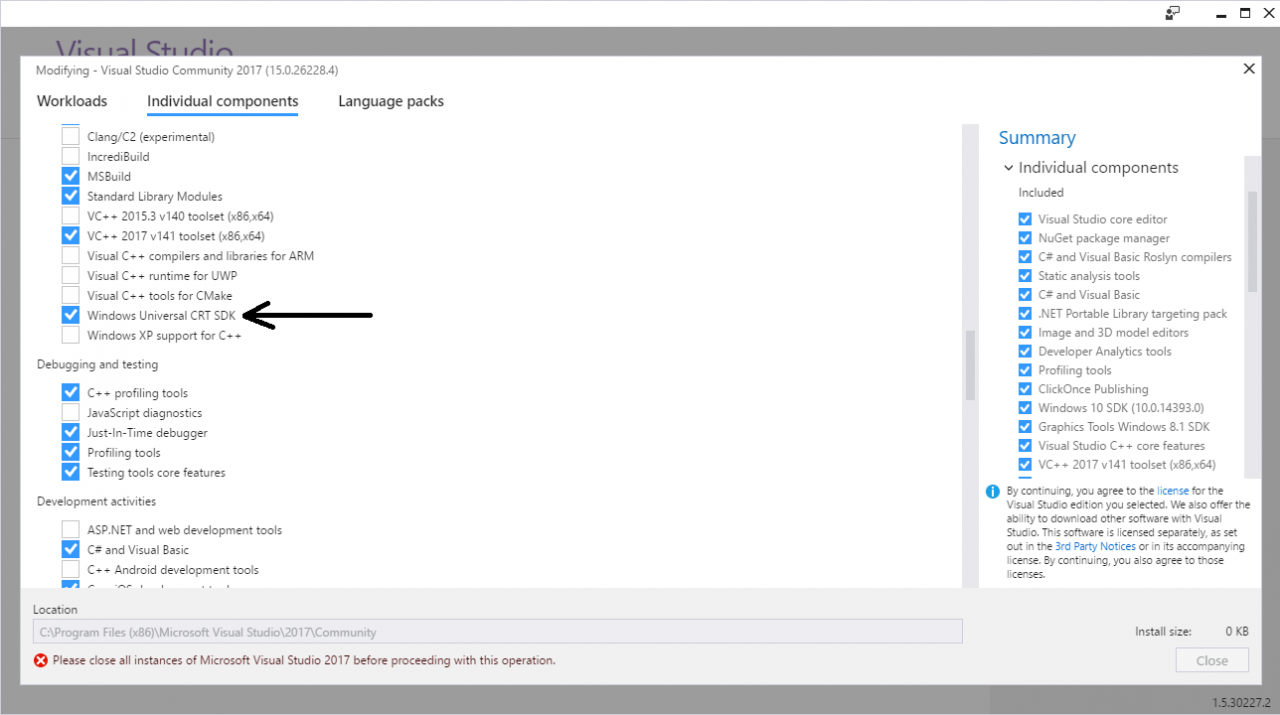
accepted I got the errors to go away by installing the Windows Universal CRT SDK component, which adds support for legacy Windows SDKs. You can install this using the Visual Studio Installer:

If the problem still persists, you should change the Target SDK in the Visual Studio Project : check whether the Windows SDK version is 10.0.15063.0.
In : Project -> test properties -> General -> Windows SDK Version -> select 10.0.15053.0.
Then errno.h and other standard files will be found and it will compile.


accepted I got the errors to go away by installing the Windows Universal CRT SDK component, which adds support for legacy Windows SDKs. You can install this using the Visual Studio Installer:

If the problem still persists, you should change the Target SDK in the Visual Studio Project : check whether the Windows SDK version is 10.0.15063.0.
In : Project -> test properties -> General -> Windows SDK Version -> select 10.0.15053.0.
Then errno.h and other standard files will be found and it will compile.

==================================== SQL Server 2012 fails on reinstallation – ================Clean up the registry

Android Error: Found item attr/tabtextsize more than one time

cause

I’m at RES/values/atts.xml The tabtextsize attribute is defined in the file. There is no problem when using it, but in the process of compiling, I produced error: Found item attr / tabtextsize more than one time , which means error: Found item attr / tabtrimescribe defined more than once , at the beginning, I was puzzled, so I went to see the attributes defined in attr. Find the following as shown:

<resources>
    <declare-styleable name="View Name">
        <attr name="tabTextSize" format="float"/>
        <attr name="tabTextSelectedColor" format="color" />
        <attr name="tabTextUnselectedColor" format="color" />
     </declare-styleable>

    <declare-styleable name="View Name">
        <attr name="tabTextSize" format="float"/>
        <attr name="tabTextSelectedColor" format="color" />
        <attr name="tabTextUnselectedColor" format="color" />
    </declare-styleable>
</resources>

Since the custom view property name is the same, the error mentioned above occurred.

How to Fix

The solution is to extract the same attribute and define it. As shown below, <attr name="tabTextSize" format="float" />is extracted and then called in each view.

<resources>
    <attr name="tabTextSize" format="float"/>
    <declare-styleable name="View Name">
        <attr name="tabTextSize" />
        <attr name="tabTextSelectedColor" format="color" />
        <attr name="tabTextUnselectedColor" format="color" />
    </declare-styleable>

    <declare-styleable name="View Name">
        <attr name="tabTextSize"/>
        <attr name="tabTextSelectedColor" format="color" />
        <attr name="tabTextUnselectedColor" format="color" />
    </declare-styleable>
</resources>

How to Fix Common Arcpy Error

1. Error: arcgisscripting.ExecuteError : ERROR 000539: Invalid field one_1

analysis:

This problem occurs if the field referenced in the python expression does not exist or is misspelled.

solve:

Change the name of the field in the expression to the correct name.


2. Catch exception

try :
     arcpy.Union_analysis (inFeatures, outFeatures, "ALL")
 except arcpy.ExecuteError:
     arcpy.GetMessages()


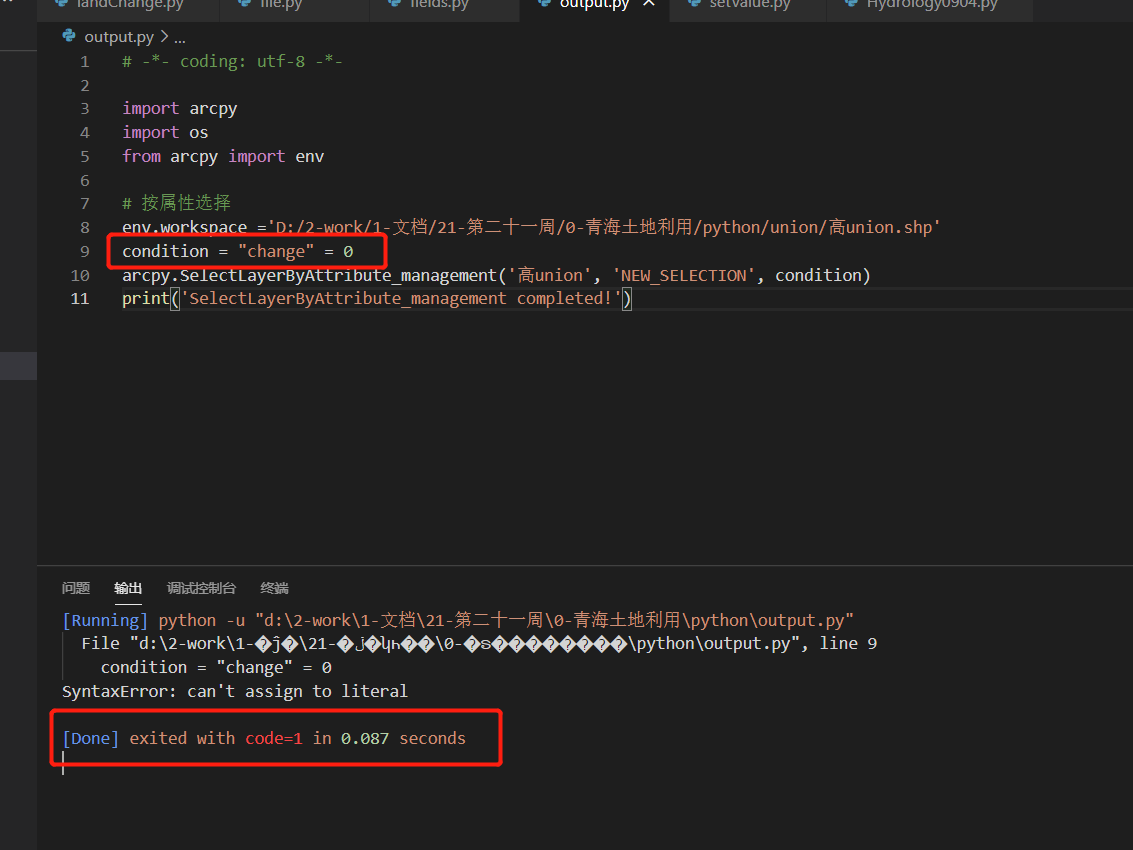
3. Syntax error: cannot assign to literal

solve:

Change to condition = '"change" = 0'


4. Error: object: create object layer invalid data source

This is arcpy.mapping.Layer Interface error:

    Check whether the file corresponding to the address passed into the interface exists. (if it is in the file geographic database, the extension does not include. SHP).
      1. Note that in the process of spelling address, /and \, do not mix. Generally, \

    is used

supplement

1. Python gets the file names of all specified suffixes in the specified directory

os.path.splitext():Separate filename and extension
os.path.splitext(file)[0] gets the file name
os.path.splitext(file)[1] get file extension

2. Python template string

from string import Template

query='''
  hi,%{name}this is a ${test}
'''
t = Template(query)
query = t.substitute({'name': 'Newber', 'test':'Test'})

How to Fix Error when integrating spring cloud openfeign with spring cloud Alibaba

When learning how to integrate spring cloud with Alibaba, we encountered an openfeign call error

Caused by: java.lang.IllegalStateException: No Feign Client for loadBalancing defined. Did you forget to include spring-cloud-starter-loadbalancer?
	at org.springframework.cloud.openfeign.FeignClientFactoryBean.loadBalance(FeignClientFactoryBean.java:309) ~[spring-cloud-openfeign-core-3.0.0.jar:3.0.0]
	at org.springframework.cloud.openfeign.FeignClientFactoryBean.getTarget(FeignClientFactoryBean.java:335) ~[spring-cloud-openfeign-core-3.0.0.jar:3.0.0]
	at org.springframework.cloud.openfeign.FeignClientFactoryBean.getObject(FeignClientFactoryBean.java:315) ~[spring-cloud-openfeign-core-3.0.0.jar:3.0.0]
	at org.springframework.beans.factory.support.FactoryBeanRegistrySupport.doGetObjectFromFactoryBean(FactoryBeanRegistrySupport.java:169) ~[spring-beans-5.3.3.jar:5.3.3]
	... 47 common frames omitted

Baidu found that openfeign 3.0.0 built in spring cloud 2020.0.0 conflicts with Nacos framework of spring cloud Alibaba.

Here are two solutions

Methond 1

First add the loadbalancer dependency in pom.xml

<dependency>
    <groupId>org.springframework.cloud</groupId>
    <artifactId>spring-cloud-loadbalancer</artifactId>
</dependency>

Because nacos dependencies containing ribbon dependencies will cause loadbalancer to be invalid, you need to exclude the ribbon dependencies from nacos dependencies.

<dependency>
	<groupId>com.alibaba.cloud</groupId>
	<artifactId>spring-cloud-starter-alibaba-nacos-discovery</artifactId>
	<exclusions>
		<exclusion>
			<artifactId>spring-cloud-starter-netflix-ribbon</artifactId>
			<groupId>org.springframework.cloud</groupId>
		</exclusion>
	</exclusions>
</dependency>

Method 2

 <!-- spring cloud 2020.0.0built-in openfeign3.0.0 and spring cloud alibaba framework nacos, seata conflict temporary solution - >
        <dependency>
            <groupId>org.springframework.cloud</groupId>
            <artifactId>spring-cloud-starter-openfeign</artifactId>
            <version>2.2.6.RELEASE</version>
            <exclusions>
                <exclusion>
                    <groupId>org.springframework.cloud</groupId>
                    <artifactId>spring-cloud-starter</artifactId>
                </exclusion>
                <exclusion>
                    <groupId>org.springframework.cloud</groupId>
                    <artifactId>spring-cloud-openfeign-core</artifactId>
                </exclusion>
                <exclusion>
                    <groupId>org.springframework.cloud</groupId>
                    <artifactId>spring-cloud-commons</artifactId>
                </exclusion>
            </exclusions>
        </dependency>
        <dependency>
            <groupId>org.springframework.cloud</groupId>
            <artifactId>spring-cloud-starter</artifactId>
            <version>2.2.6.RELEASE</version>
        </dependency>
        <dependency>
            <groupId>org.springframework.cloud</groupId>
            <artifactId>spring-cloud-openfeign-core</artifactId>
            <version>2.2.6.RELEASE</version>
        </dependency>
        <dependency>
            <groupId>org.springframework.cloud</groupId>
            <artifactId>spring-cloud-commons</artifactId>
            <version>2.2.6.RELEASE</version>
        </dependency>

The method println(boolean) in the type PrintStream is not applicable for the arguments (void) Error

Problem

An error occurred when I tried the following code.

public class PrimeFactorization {
	
	public static void primefactory(int m) {
		for (int i = 2; i < m; i++) {
			if (m % i == 0) {
				System.out.print(i+"*");
				m = m / i;
				i = 1;
				continue;
			}
			else if (i == (m-1)) {
				System.out.print(m);
			}
			else {
				continue;
			}
		}
	}
	
	public static void main(String[] args) {
		int k;
		System.out.println("Please enter the number to be decomposed into prime factors:");
		
		Scanner scanner = new Scanner(System.in);
		k = scanner.nextInt();
		
		System.out.print(k+" The result of decomposing the prime factors is"+primefactory(k));
		scanner.close();
	}
}

The error is line 27: the method println (Boolean) in the type printstream is not applicable for the arguments (void)

Solution

The return type of the primefactory() function in the program is “void”, which means that it is defined as having no return value. So instantiate the object PF in line 9 of the figure below, and call the primefactory() function through PF to make the program run smoothly.


	public static void main(String[] args) {
		int k;
		System.out.println("Please enter the number to be decomposed into prime factors.");
		
		Scanner scanner = new Scanner(System.in);
		k = scanner.nextInt();
		
		PrimeFactorization pf = new PrimeFactorization();
		System.out.print(k+" The result of decomposing the prime factors is");
		pf.primefactory(k);
		scanner.close();
	}
}

[How to Fix]Unable to find the requested Boost libraries

CMake Error at /usr/local/share/cmake-3.14/Modules/FindBoost.cmake:2147 (message):
Unable to find the requested Boost libraries.
Boost version: 0.0.0
Boost include path: /usr/include
Detected version of Boost is too old.  Requested version was 1.58 (or
newer).
Call Stack (most recent call first):
CMakeLists.txt:33 (find_package)
Solution:
Just make a link
sudo ln -s /usr/local/include/boost /usr/include/boost

[How to Fix]Type error: must use keyword argument for key function

The reason may be the version problem of Python 2 and 3
chestnut 1: call sorted() and pass in reversed()_ CMP can achieve reverse order sorting

def reversed_cmp(x, y):
    if x > y:
        return 1
    if x < y:
        return -1
    return 0

L1 = [16, 5, 120, 9, 66]
print(sorted(L1, reversed_cmp))

terms of settlement:

L1 = [16, 5, 120, 9, 66]
print(sorted(L1, reverse=True))

The results were as follows

[120, 66, 16, 9, 5]

Maybe it’s too simple. Python doesn’t bother to use custom functions…
in continuous update...

Chestnut 2: using sorted() higher-order function to realize the algorithm of ignoring case sorting

def cmp_ignore_case(s1, s2):
    if s1[0].lower() > s2[0].lower():
        return -1
    if s1[0].lower() < s2[0].lower():
        return 1
    return 0

print(sorted(['haha', 'about', 'TIM', 'Credit'], cmp_ignore_case))

terms of settlement:

def com_flag(s):
    return s.lower()
# key represents the key function, the default is None, reverse represents whether to reverse the order, the default is False
# The following functions are arranged in reverse order
print(sorted(['haha', 'about', 'TIM', 'Credit'], key=com_flag, reverse=True))

The results were as follows

['Zoo', 'Credit', 'bob', 'about']

How to Fix KeyError: ‘plotly_domain’

1. Error description

E:\PycharmProjects\cdk\venv\Scripts\python.exe E:/PycharmProjects/cdk/venv/plotly/b.py
Traceback (most recent call last):
  File "E:/PycharmProjects/cdk/venv/plotly/b.py", line 14, in <module>
    py.iplot(data,filename='Histogram');
  File "E:\PycharmProjects\cdk\venv\lib\site-packages\plotly\plotly\plotly.py", line 170, in iplot
    return tools.embed(url, **embed_options)
  File "E:\PycharmProjects\cdk\venv\lib\site-packages\plotly\tools.py", line 404, in embed
    != session.get_session_config()['plotly_domain']):
KeyError: 'plotly_domain'

Process finished with exit code 1

2. Cause of error

import plotly;
import plotly.plotly as py;
import plotly.graph_objs as go;

plotly.tools.set_credentials_file(username='xxx',api_key='787889Pa0GMIkz1R3Z1BHy');

C = go.Bar(
    x = [1,2,3,4,5,6,7,8],
    y = [7889,5623,9856,1254,4878,5656,3562,7445]
)

data = [C];

py.iplot(data,filename='Histogram');

3. Solutions

When drawing graphics, you need to call the plot () method instead of the iPlot () method

import plotly;
import plotly.plotly as py;
import plotly.graph_objs as go;

plotly.tools.set_credentials_file(username='xxx',api_key='56895656GMIkz1R3Z1BHy');

C = go.Bar(
    x = [1,2,3,4,5,6,7,8],
    y = [7889,5623,9856,1254,4878,5656,3562,7445]
)

data = [C];

py.plot(data,filename='Histogram');

