Category Archives: Error

TypeError: db.collection is not a function

1. Error description

F:\nodejs>node insertData.js
(node:10028) DeprecationWarning: current URL string parser is deprecated, and wi
ll be removed in a future version. To use the new parser, pass option { useNewUr
lParser: true } to MongoClient.connect.
���ӳɹ���
F:\nodejs\node_modules\[email protected]@mongodb\lib\operations\mongo_client_ops.js
:439
      throw err;
      ^

TypeError: db.collection is not a function
    at writeData (F:\nodejs\insertData.js:5:22)
    at F:\nodejs\insertData.js:19:2
    at result (F:\nodejs\node_modules\[email protected]@mongodb\lib\utils.js:414:17
)
    at executeCallback (F:\nodejs\node_modules\[email protected]@mongodb\lib\utils.
js:406:9)
    at err (F:\nodejs\node_modules\[email protected]@mongodb\lib\operations\mongo_c
lient_ops.js:285:5)
    at connectCallback (F:\nodejs\node_modules\[email protected]@mongodb\lib\operat
ions\mongo_client_ops.js:240:5)
    at process.nextTick (F:\nodejs\node_modules\[email protected]@mongodb\lib\opera
tions\mongo_client_ops.js:436:7)
    at process._tickCallback (internal/process/next_tick.js:61:11)

F:\nodejs>node insertData.js
(node:4900) DeprecationWarning: current URL string parser is deprecated, and wil
l be removed in a future version. To use the new parser, pass option { useNewUrl
Parser: true } to MongoClient.connect.
���ӳɹ���
F:\nodejs\node_modules\[email protected]@mongodb\lib\operations\mongo_client_ops.js
:439
      throw err;
      ^

TypeError: collection.insert is not a function
    at writeData (F:\nodejs\insertData.js:7:13)
    at F:\nodejs\insertData.js:19:2
    at result (F:\nodejs\node_modules\[email protected]@mongodb\lib\utils.js:414:17
)
    at executeCallback (F:\nodejs\node_modules\[email protected]@mongodb\lib\utils.
js:406:9)
    at err (F:\nodejs\node_modules\[email protected]@mongodb\lib\operations\mongo_c
lient_ops.js:285:5)
    at connectCallback (F:\nodejs\node_modules\[email protected]@mongodb\lib\operat
ions\mongo_client_ops.js:240:5)
    at process.nextTick (F:\nodejs\node_modules\[email protected]@mongodb\lib\opera
tions\mongo_client_ops.js:436:7)
    at process._tickCallback (internal/process/next_tick.js:61:11)

F:\nodejs>node insertData.js
(node:9572) DeprecationWarning: current URL string parser is deprecated, and wil
l be removed in a future version. To use the new parser, pass option { useNewUrl
Parser: true } to MongoClient.connect.
���ӳɹ���
F:\nodejs\node_modules\[email protected]@mongodb\lib\operations\mongo_client_ops.js
:439
      throw err;
      ^

TypeError: collection.insertOne is not a function
    at writeData (F:\nodejs\insertData.js:7:13)
    at F:\nodejs\insertData.js:19:2
    at result (F:\nodejs\node_modules\[email protected]@mongodb\lib\utils.js:414:17
)
    at executeCallback (F:\nodejs\node_modules\[email protected]@mongodb\lib\utils.
js:406:9)
    at err (F:\nodejs\node_modules\[email protected]@mongodb\lib\operations\mongo_c
lient_ops.js:285:5)
    at connectCallback (F:\nodejs\node_modules\[email protected]@mongodb\lib\operat
ions\mongo_client_ops.js:240:5)
    at process.nextTick (F:\nodejs\node_modules\[email protected]@mongodb\lib\opera
tions\mongo_client_ops.js:436:7)
    at process._tickCallback (internal/process/next_tick.js:61:11)

F:\nodejs>node insertData.js
(node:10664) DeprecationWarning: current URL string parser is deprecated, and wi
ll be removed in a future version. To use the new parser, pass option { useNewUr
lParser: true } to MongoClient.connect.
���ӳɹ���
����MongoError: doc parameter must be an object
^C
F:\nodejs>node insertData.js
(node:10308) DeprecationWarning: current URL string parser is deprecated, and wi
ll be removed in a future version. To use the new parser, pass option { useNewUr
lParser: true } to MongoClient.connect.
���ӳɹ���
CommandResult {
  result: { n: 1, ok: 1 },
  connection:
   Connection {
     _events:
      { error: [Function],
        close: [Function],
        timeout: [Function],
        parseError: [Function] },
     _eventsCount: 4,
     _maxListeners: undefined,
     options:
      { host: 'localhost',
        port: 27017,
        size: 5,
        minSize: 0,
        connectionTimeout: 30000,
        socketTimeout: 360000,
        keepAlive: true,
        keepAliveInitialDelay: 300000,
        noDelay: true,
        ssl: false,
        checkServerIdentity: true,
        ca: null,
        crl: null,
        cert: null,
        key: null,
        passPhrase: null,
        rejectUnauthorized: false,
        promoteLongs: true,
        promoteValues: true,
        promoteBuffers: false,
        reconnect: true,
        reconnectInterval: 1000,
        reconnectTries: 30,
        domainsEnabled: false,
        disconnectHandler: [Store],
        cursorFactory: [Function],
        emitError: true,
        monitorCommands: false,
        socketOptions: {},
        promiseLibrary: [Function: Promise],
        clientInfo: [Object],
        read_preference_tags: null,
        readPreference: [ReadPreference],
        dbName: 'student',
        servers: [Array],
        server_options: [Object],
        db_options: [Object],
        rs_options: [Object],
        mongos_options: [Object],
        socketTimeoutMS: 360000,
        connectTimeoutMS: 30000,
        bson: BSON {} },
     id: 0,
     logger: Logger { className: 'Connection' },
     bson: BSON {},
     tag: undefined,
     messageHandler: [Function],
     maxBsonMessageSize: 67108864,
     port: 27017,
     host: 'localhost',
     family: undefined,
     keepAlive: true,
     keepAliveInitialDelay: 300000,
     noDelay: true,
     connectionTimeout: 30000,
     socketTimeout: 360000,
     destroyed: false,
     domainSocket: false,
     singleBufferSerializtion: true,
     serializationFunction: 'toBinUnified',
     ca: null,
     crl: null,
     cert: null,
     key: null,
     passphrase: null,
     ciphers: null,
     ecdhCurve: null,
     ssl: false,
     rejectUnauthorized: false,
     checkServerIdentity: true,
     responseOptions:
      { promoteLongs: true,
        promoteValues: true,
        promoteBuffers: false },
     flushing: false,
     queue: [],
     connection:
      Socket {
        connecting: false,
        _hadError: false,
        _handle: [TCP],
        _parent: null,
        _host: 'localhost',
        _readableState: [ReadableState],
        readable: true,
        _events: [Object],
        _eventsCount: 5,
        _maxListeners: undefined,
        _writableState: [WritableState],
        writable: true,
        allowHalfOpen: false,
        _sockname: null,
        _pendingData: null,
        _pendingEncoding: '',
        server: null,
        _server: null,
        timeout: 360000,
        [Symbol(asyncId)]: 15,
        [Symbol(lastWriteQueueSize)]: 0,
        [Symbol(timeout)]: [Timeout],
        [Symbol(kBytesRead)]: 0,
        [Symbol(kBytesWritten)]: 0 },
     writeStream: null,
     hashedName: '29bafad3b32b11dc7ce934204952515ea5984b3c',
     workItems: [],
     buffer: null,
     sizeOfMessage: 0,
     bytesRead: 0,
     stubBuffer: null },
  message:
   Response {
     parsed: true,
     raw:
      <Buffer 3c 00 00 00 f0 02 00 00 02 00 00 00 01 00 00 00 08 00 00 00 00 00
00 00 00 00 00 00 00 00 00 00 01 00 00 00 18 00 00 00 10 6e 00 01 00 00 00 01 6f
 6b ... >,
     data:
      <Buffer 08 00 00 00 00 00 00 00 00 00 00 00 00 00 00 00 01 00 00 00 18 00
00 00 10 6e 00 01 00 00 00 01 6f 6b 00 00 00 00 00 00 00 f0 3f 00>,
     bson: BSON {},
     opts:
      { promoteLongs: true,
        promoteValues: true,
        promoteBuffers: false },
     length: 60,
     requestId: 752,
     responseTo: 2,
     opCode: 1,
     fromCompressed: undefined,
     responseFlags: 8,
     cursorId: Long { _bsontype: 'Long', low_: 0, high_: 0 },
     startingFrom: 0,
     numberReturned: 1,
     documents: [ [Object] ],
     cursorNotFound: false,
     queryFailure: false,
     shardConfigStale: false,
     awaitCapable: true,
     promoteLongs: true,
     promoteValues: true,
     promoteBuffers: false,
     index: 44,
     hashedName: '29bafad3b32b11dc7ce934204952515ea5984b3c' },
  ops:
   [ { name: 'zhangsan', age: '30', _id: 5b70f4bea602b02844490a15 } ],
  insertedCount: 1,
  insertedId: 5b70f4bea602b02844490a15 }

F:\nodejs>

2. Cause of error

In use Node.js When you operate mongodb database and want to insert data records into it, you write a JavaScript file and call the collection function. However, the old version of the method and the new version of the method are not this, but db() instead.

3. Solutions

var MongoClient = require('mongodb').MongoClient;
var DB_URL = 'mongodb://localhost:27017/student';

var writeData = function(db,callback){
	var dbo = db.db('t_sales');
	var data = {'name':'zhangsan','age':'30'};
	dbo.collection('t_sales').insertOne(data,function(error,result){
		if(error){
			console.log('error:'+error);
			return;
		};

		callback(result);
	});
}

MongoClient.connect(DB_URL,function(error,db){
	console.log('connect success!');
	writeData(db,function(result){
		console.log(result);
		db.close();
	});
});
TypeError: ‘WebElement’ object is not iterable error

problem

TypeError: ‘WebElement’ object is not iterable error

solve

At first, I thought it was an element problem. Later, I looked at the method carefully because
find should be used_ elements_by_XPath
instead of find_element_by_xpath

for citys in driver.find_elements_by_xpath('/html/body/div[6]/dl'):

instead of

for citys in driver.find_element_by_xpath('/html/body/div[6]/dl'):

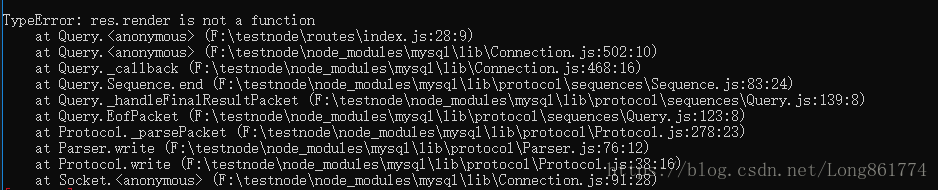
TypeError: res.render is not a function

node + mysql:

When writing the demo today, I found that the code reported an error typeerror: res.render Is not a function, but I tested myself when it is not suitable for MySQL to query data res.render The () method is available, but when MySQL data is not available res.render() will not go wrong. Direct code:

Problem code

var express = require('express');
var router = express.Router();
const mysqlCon = require('../modules/mysql');

router.get('/', function(req, res, next) {
  mysqlCon.query("SELECT empno,ename,job FROM emp WHERE empno > 1008",function(err,res){
    if(err){
      return res.redirect('/');
    }
    console.log('======================res==========================');
    var UserInfo = res;
    // UserInfo = JSON.parse(JSON.stringify(UserInfo))
    res.render('index', {
			title: 'Home Page',
			UserInfo
		})
  })
});

report errors

Solution:

var express = require('express');
var router = express.Router();
const mysqlCon = require('../modules/mysql');

router.get('/', function(req, res, next) {
  mysqlCon.query("SELECT empno,ename,job FROM emp WHERE empno > 1008",function(err,result){
    if(err){
      return res.redirect('/');
    }
    console.log('======================res==========================');
    var UserInfo = result;
    // UserInfo = JSON.parse(JSON.stringify(UserInfo))
    res.render('index', {
			title: 'Home Page',
			UserInfo
		})
  })
});

The return value of MySQL query, res, can be changed to other definitions. Because the previous code style habitually defines the return value as res, which conflicts with the corresponding res in the node project res.render is not a function。 It’s not a big pit, mainly because the code habit has not been transformed…

C++ BUG: [Error] invalid array assignment

C++BUG: [Error] invalid array assignment

1. Introduction2. The difference between the return value of memcpy() function prototype function header file and strcpy

example

1. Introduction

When using array to assign value to array, the above bug will appear. The general chestnut is as follows:

while(!student.eof()){
        SS[j].name=stud.name;//Error
        SS[j].ID=stud.ID;
        SS[j].score=stud.score;
        j++;
    }

The purpose is to store the data in the structure array object SS [J], but this assignment will report an error.

2. memcpy()

Function prototype

void *memcpy(void*dest, const void *src, size_t n);

function

The data of consecutive n bytes with SRC pointing address as the starting address is copied into the space with destination pointing address as the starting address.

Header file

The use of # include & lt; string. H & gt;;

Both # include & lt; CString & gt; and # include & lt; string. H & gt; can be used in C + +

Return value

Function returns a pointer to dest.

The difference from strcpy

1. Compared with strcpy, memcpy does not end when it encounters’ \ 0 ‘, but will copy n bytes. Therefore, we need to pay special attention to memory overflow.
2. Memcpy is used to copy memory. You can use it to copy objects of any data type, and you can specify the length of the data to be copied. Note that source and destination are not necessarily arrays, and any read-write space can be used;
however, strcpy can only copy strings, and it ends copying when it encounters’ \ 0 ‘.

example

For 2D arrays

int main(void)
{
    int src[][3]={{1,2,3},{4,5,6},{7,8,9},{1,2,3},{4,5,6},{7,8,9}};  
    int des[6][3]={0};//Be careful, the number of lines is fixed
    memcpy(des,src,sizeof(src)); //beware of memory overflow
    return 1;
}

/usr/bin/ld: skipping incompatible Error [How to Fix]

Today’s problem: /usr/bin/LD: skipping incompatible

QT reported an error when connecting a and so files

Analysis: the compiler’s error message is clear: compatibility issues

Analysis method:

File XXX. A “or” file ” xxx.so Take a look at whether the library version is 32-bit or 64 bit, or arm version or… And so on.

View so file information: 64 bit

user@ubuntu :~/Documents/CloudBox/VersionControlServer/code/bin$ file liblht_ coreframeworkD.so .1.0.0

liblht_ coreframeworkD.so .1.0.0: ELF

64-bit LSB shared object, x86-64, version 1 (SYSV), dynamically linked, BuildID[sha1]=0x395ec03d717504939d7e6c93f6f1132ea7830ad2, not stripped


View the system information: 64 bit is not displayed, basically 32-bit

user@ubuntu :~/Documents/CloudBox/VersionControlServer/code/bin$ uname -a Linux ubuntu 3.2.0-29-generic-pae # 46-Ubuntu SMP Fri Jul 27 17:25:43 UTC 2012  i686 i686 i386 GNU/Linux

Check the GUI system information: it’s really 32-bit.


Solutions.
1) recompile the 32-bit so file
2) switch to 64-bit linux

[ubuntu14.04]Tensorflow: Could not find any downloads that satisfy the requirement

Issue:
$ pip install   tensorflow
Downloading/unpacking tensorflow
Could not find any downloads that satisfy the requirement tensorflow
Cleaning up…
No distributions at all found for tensorflow
Storing debug log for failure in /home/tommy/.pip/pip.log
Analysis:
pip version is too low, need to upgrade
$ pip –version
pip 1.5.4 from /usr/lib/python2.7/dist-packages (python 2.7)
Solution:
sudo pip install pip -U $ sudo pip install   tensorflow
sudo: unable to resolve host tommy
DEPRECATION: Python 2.7 will reach the end of its life on January 1st, 2020. Please upgrade your Python as Python 2.7 won’t be maintained after that date. A future version of pip will drop support for Python 2.7.
The directory ‘/home/tommy/.cache/pip/http’ or its parent directory is not owned by the current user and the cache has been disabled. Please check the permissions and owner of that directory. If executing pip with sudo, you may want sudo’s -H flag.
The directory ‘/home/tommy/.cache/pip’ or its parent directory is not owned by the current user and caching wheels has been disabled. check the permissions and owner of that directory. If executing pip with sudo, you may want sudo’s -H flag.
Collecting tensorflow
/usr/local/lib/python2.7/dist-packages/pip/_vendor/urllib3/util/ssl_.py:354: SNIMissingWarning: An HTTPS request has been made, but the SNI (Server Name Indication) extension to TLS is not available on this platform. This may cause the server to present an incorrect TLS certificate, which can cause validation failures. You can upgrade to a newer version of Python to solve this. For more information, see https://urllib3.readthedocs.io/en/latest/advanced-usage.html#ssl-warnings
SNIMissingWarning
/usr/local/lib/python2.7/dist-packages/pip/_vendor/urllib3/util/ssl_.py:150: InsecurePlatformWarning: A true SSLContext object is not available. This prevents urllib3 from configuring SSL appropriately and may cause certain SSL connections to fail. You can upgrade to a newer version of Python to solve this. For more information, see https://urllib3.readthedocs.io/en/latest/advanced-usage.html#ssl-warnings
InsecurePlatformWarning
/usr/local/lib/python2.7/dist-packages/pip/_vendor/urllib3/util/ssl_.py:150: InsecurePlatformWarning: A true SSLContext object is not available. This prevents urllib3 from configuring SSL appropriately and may cause certain SSL connections to fail. You can upgrade to a newer version of Python to solve this. For more information, see https://urllib3.readthedocs.io/en/latest/advanced-usage.html#ssl-warnings
InsecurePlatformWarning
Downloading https://files.pythonhosted.org/packages/d2/ea/ab2c8c0e81bd051cc1180b104c75a865ab0fc66c89be992c4b20bbf6d624/tensorflow-1.13.1-cp27-cp27mu-manylinux1_x86_64.whl (92.5MB)
100% |████████████████████████████████| 92.5MB 170kB/s
Collecting numpy>=1.13.3 (from tensorflow)
Downloading https://files.pythonhosted.org/packages/c4/33/8ec8dcdb4ede5d453047bbdbd01916dbaccdb63e98bba60989718f5f0876/numpy-1.16.2-cp27-cp27mu-manylinux1_x86_64.whl (17.0MB)
100% |████████████████████████████████| 17.0MB 987kB/s
Collecting grpcio>=1.8.6 (from tensorflow)
Downloading https://files.pythonhosted.org/packages/b8/be/3bb6d8241b5ed1f8437169df53e7dd6ca986174e022585de15087a848c99/grpcio-1.19.0-cp27-cp27mu-manylinux1_x86_64.whl (10.7MB)
100% |████████████████████████████████| 10.7MB 1.4MB/s
Collecting keras-applications>=1.0.6 (from tensorflow)
Downloading https://files.pythonhosted.org/packages/90/85/64c82949765cfb246bbdaf5aca2d55f400f792655927a017710a78445def/Keras_Applications-1.0.7-py2.py3-none-any.whl (51kB)
100% |████████████████████████████████| 61kB 6.5MB/s
Collecting six>=1.10.0 (from tensorflow)

error: (-215:Assertion failed) size.width>0 && size.height>0 in function ‘cv::imshow‘

import cv2 as cv

import numpy as np

#Read images

img=cv.imread(r'E:\Downloaded\pexels\The sea21471.jpeg',1)

#Get the image's aspect information

sp=img.shape

length=sp[1]

heighth=sp[0]

print('width:{},height:{}'.format(length,height)) of the loaded image

#Display window and picture

cv.namedWindow('original image')

cv.imshow('original image',img)

#convert to grayscale image

img2=cv.cvtColor(img,cv.COLOR_BGR2GRAY)

cv.namedWindow('after conversion')

cv.imshow('after conversion',img2)

#image binarization

cv.threshold(img,280,500,0,img)

cv.namedWindow('image binarization')

cv.imshow('image binarization',img2)

# Set the window wait time, 0 means always display

cv.waitKey(0)

#Manual memory release

cv.destroyAllWindows()

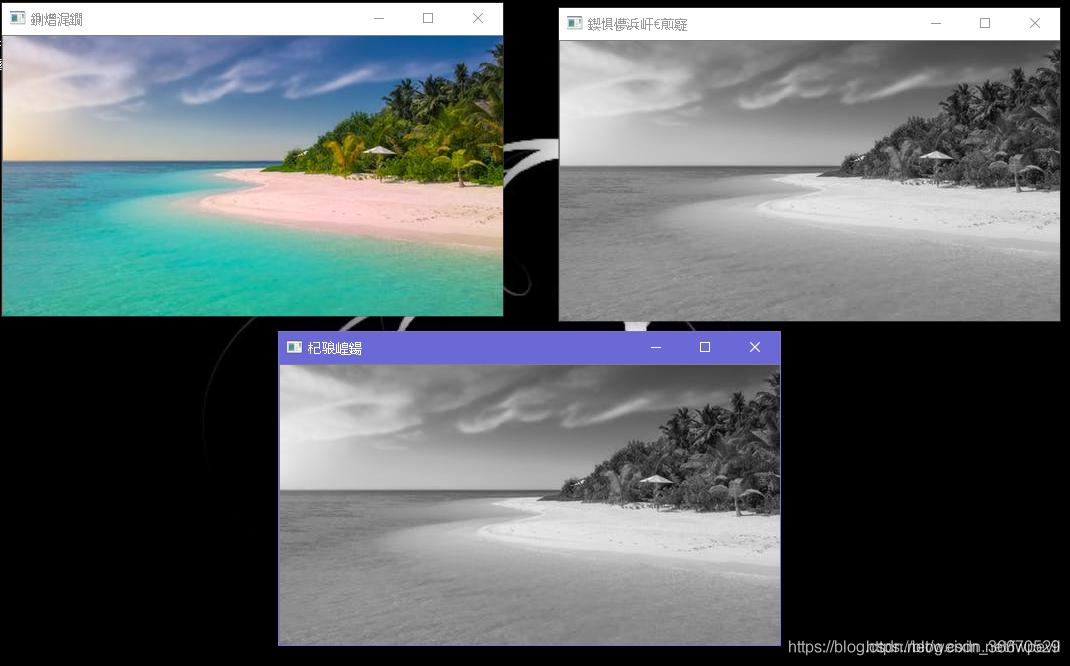
After Baidu saw the answer to a similar question, it was because the path was wrong, that is, the picture could not be found, so it reported an error. After modifying the path, the picture was successfully displayed, and the effect was as follows:

Undertake MATLAB, Python and C + + programming, machine learning, computer vision theory implementation and guidance, undergraduate and master can, salted fish trading,

target is multiclass but average=’binary’. please choose another average setting.

When the sklearn model is referenced and the model is evaluated after fit, the error occurs. The code is as follows:

from sklearn.tree import DecisionTreeClassifier
from sklearn.metrics import f1_score

regressor = DecisionTreeClassifier(random_state=42)
regressor.fit(X_train,y_train)
y_pred = regressor.predict(X_test)

print(f1_score(y_pred,y_test))

After running, it appears:

target is multiclass but average='binary'. please choose another average setting.

In fact, there is no problem with the code. The problem lies in the data type, y here_ The values in test are not binary of 0 and 1, but [123, 23142243 ]Therefore, in essence, it is impossible to carry out hair care_ Score calculation, you will find that if F1_ Change score to accuracy_ Score, the return result is 0
so to predict y of this kind of value type, other evaluation indicators, such as R 2, are needed. The code is as follows:

from sklearn.tree import DecisionTreeClassifier
from sklearn.metrics import r2_score
regressor = DecisionTreeClassifier(random_state=42)
regressor.fit(X_train,y_train)

# TODO: output predicted scores on the test set
y_pred = regressor.predict(X_test)

print(r2_score(y_pred,y_test))

result:

0.12800402751210926

Error: array bound is not an integer constant before ‘]’ token

Error: array bound is not an integer constant before ‘]’ token

#include<iostream>
#include<cstdio>
using namespace std;
const int N=1010;//(Just because this place forgot to write const !!!!)
int a[N][N],s[N][N];
int main()
{···}

==Just because I forgot to write const!!!! ==And then they report mistakes everywhere, “s’ /” a ‘was not declared in this scope?
children, do you also think it’s very emmm

Win10 ImportError: cannot import name NUMPY_MKL

Questions like title

When I install numpy, I use:

pip install numpy

When installing SciPy, you use:

pip install scipy-0.19.1-cp27-cp27m-win32.whl

Causes the installation source to be inconsistent, therefore appears the above question.

Solution:

http://www.lfd.uci.edu/~gohlke/pythonlibs/

Download numpy-1.13.1 + mkl-cp27-cp27m-win32.whl from the above website

Reuse:

pip install numpy-1.13.1+mkl-cp27-cp27m-win32.whl

Install numpy

The problem can be solved.