Category Archives: Error

Dyf Spring boot startup error: NoSuchBeanDefinitionException

When starting springboot, autowired automatically injects an error,

2017-05-26 15:23:05.761  WARN 46372 --- [           main] ationConfigEmbeddedWebApplicationContext : Exception encountered during context initialization - cancelling refresh attempt: org.springframework.beans.factory.UnsatisfiedDependencyException: Error creating bean with name 'mongoTest': Unsatisfied dependency expressed through field 'mongoDaoTest'; nested exception is org.springframework.beans.factory.NoSuchBeanDefinitionException: No qualifying bean of type 'mongo.MongoDaoTest' available: expected at least 1 bean which qualifies as autowire candidate. Dependency annotations: {@org.springframework.beans.factory.annotation.Autowired(required=true)}
2017-05-26 15:23:05.764  INFO 46372 --- [           main] o.apache.catalina.core.StandardService   : Stopping service Tomcat
2017-05-26 15:23:05.789  INFO 46372 --- [           main] utoConfigurationReportLoggingInitializer : 

Error starting ApplicationContext. To display the auto-configuration report re-run your application with 'debug' enabled.
2017-05-26 15:23:05.891 ERROR 46372 --- [           main] o.s.b.d.LoggingFailureAnalysisReporter   : 

***************************
APPLICATION FAILED TO START
***************************

Description:

Field mongoDaoTest in mongo.MongoTest required a bean of type 'mongo.MongoDaoTest' that could not be found.


Action:

Consider defining a bean of type 'mongo.MongoDaoTest' in your configuration.


Will prompt injection failure, you can try to replace @EnableAutoConfiguration annotation with @SpringBootApplication;

@SpringBootApplication annotation effect is equivalent to @Configuration, @EnableAutoConfiguration and @ComponentScan these three annotations are used together, so do not add @EnableAutoConfiguration to the Controller 
Crop the cropper image .toBlob() error: $(“#image”).cropper(‘getCroppedCanvas’).toBlob( function (blob){})

Problem Description:

  When cropping images using cropper.js, call the toBlob() method to report an error

$("#image").cropper('getCroppedCanvas').toBlob( function (blob){})

  Error message:

Uncaught TypeError: $(…).cropper(…).toBlob is not a function


Solution:

    /* Use binary method to process dataUrl */ 
    function processData(dataUrl) {
         var binaryString = window.atob(dataUrl.split(',')[1 ]);
         var arrayBuffer = new ArrayBuffer(binaryString.length);
         var intArray = new Uint8Array(arrayBuffer);
         for ( var i = 0, j = binaryString.length; i <j; i++ ) {
            intArray[i] = binaryString.charCodeAt(i);
        }

        var data = [intArray],
            blob;

        try {
            blob = new Blob(data);
        } catch (e) {
            window.BlobBuilder = window.BlobBuilder || 
                window.WebKitBlobBuilder || 
                window.MozBlobBuilder ||
                window.MSBlobBuilder;
            if (e.name ==='TypeError' && window.BlobBuilder) {
                 var builder = new BlobBuilder();
                builder.append(arrayBuffer);
                blob = builder.getBlob(imgType); // imgType is the upload file type, that is, file.type 
            } else {
                console.log( 'The version is too low to support uploading pictures' );
            }
        }
        return blob;
    }

Finally call the code:

    $('#cutBtn').click( function () {
         var data = $('#image').cropper('getCroppedCanvas' , {
                width: 300, // length and width after cropping 
                height: 300
            }),
            blob = processData(data.toDataURL());

        var formData = new FormData();
        formData.append( 'uploadImg' , blob);
        $.ajax({
            url: '/path/to/upload' ,
            method: "POST" ,
            data: formData,
            processData: false ,
            contentType: false ,
            success: function () {
                console.log( 'Upload success' );
            },
            error: function () {
                console.log( 'Upload error' );
            }
        });
    });

cropper.js usage documentation 

https://github.com/fengyuanchen/cropperjs/blob/master/README.md

Git under Windows reports an error: warning: LF will be replaced by CRLF in ××××.××


Git under Windows reports an error:

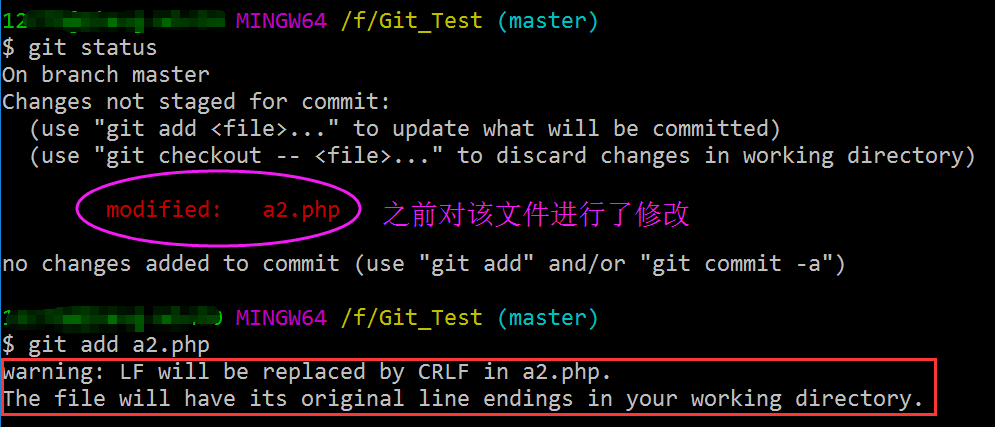
warning: LF will be replaced by CRLF in ××××.××(file name)
The file will have its original line ending in your working directory.

translation:
LF will be replaced by CRLF in the xxx.xx file.
In the working directory, this file will keep its original newline character. (Line ending: end of line, newline)

 annotation:

          LF: Line feed wrap

          CRLF: Carriage Return Line Feed Carriage Return Line Feed


1. Under different operating systems, the methods of handling end-of-line characters are different :

  Windows: CRLF (representing two characters with carriage return and line feed at the end of the sentence, that is, “\r\n” line feed under windows)

       Under unix: LF (represents the end of a sentence, only use line breaks)

       Mac: CR (represents only carriage return)

2. Handling “line ending” under Git

  core.autocrlf is the variable responsible for processing line ending in git. You can set 3 values: true, false, and inout.

(1) Set to true [config –global core.autocrlf  true ]

          When set to true, it means that whenever you add a file to the git repository, git will treat it as a text file.

   It will turn crlf into LF.

(2) Set to false [config –global core.autocrlf  false ]

     When set to false, line endings will not be converted. The text file remains as it is.

(3) When set to input, when adding a file git warehouse, git programs crlf to lf. When someone checks the code, it is still the lf way. Therefore, do not use this setting under the window operating system.


In summary, the reasons for the above warning are:

  The line break in windows is CRLF, and the line break in Linux is LF (using the Git command line Git Bash, which is actually equivalent to the linux environment), so this error message will appear when you execute the git add xxx.xx operation!

Solution: (Note: The warehouse will be deleted! The warehouse will be deleted! The warehouse will be deleted!)

  <1>Delete .git 【rm -rf .git

  <2>Disable automatic conversion, and set it soon: git config –global core.autocrlf  false

         Re-initialize and perform the add operation:

  <3>【git init

  <4> 【git add xxx.xx

Regarding Pyhton regular error: sre_constants.error: nothing to repeat at position

Wrong regular expression

1. \b followed by the quantity

Wrongly written \d to \b, embarrassing!

1
>>> pattern = re.compile(r'123\b*hello')

Output:

Traceback (most recent call last):
  File "<input>", line 1, in <module>
  File "E:\Anacoda3\Lib\re.py", line 233, in compile
    return _compile(pattern, flags)
  File "E:\Anacoda3\Lib\re.py", line 301, in _compile
    p = sre_compile.compile(pattern, flags)
  File "E:\Anacoda3\Lib\sre_compile.py", line 562, in compile
    p = sre_parse.parse(p, flags)
  File "E:\Anacoda3\Lib\sre_parse.py", line 856, in parse
    p = _parse_sub(source, pattern, flags & SRE_FLAG_VERBOSE, False)
  File "E:\Anacoda3\Lib\sre_parse.py", line 415, in _parse_sub
    itemsappend(_parse(source, state, verbose))
  File "E:\Anacoda3\Lib\sre_parse.py", line 615, in _parse
    source.tell() - here + len(this))
sre_constants.error: nothing to repeat at position 2

Reason for error: Since \b is a word boundary, * means that it appears any number of times, that is, a word can only have one boundary, and it cannot appear any number of times, so this error will be reported

mybatis-plus calls its own selectById method and reports an error: org.apache.ibatis.binding.BindingException:

The version number of mybatis-plus is 2.0.1, there is no error when calling its own insert(T), but an error is reported when executing update, and an error is also reported when calling selectById and deleteById. That is, errors are reported when the primary key is required to be identified.

The statement is as follows: (interface and implementation are implemented by MP itself)

        User selectById = userMapper1.selectById("ceshi" );
        userMapper1.deleteById( "ceshi");


The error message is as follows:

org.apache.ibatis.binding.BindingException: Invalid bound statement (not found): cn.xm.jwxt.ceshi.mapper.UserMapper.deleteById
    at org.apache.ibatis.binding.MapperMethod$SqlCommand. <init>(MapperMethod.java:230 )
    at org.apache.ibatis.binding.MapperMethod. <init>(MapperMethod.java:48 )
    at org.apache.ibatis.binding.MapperProxy.cachedMapperMethod(MapperProxy.java: 65 )
    at org.apache.ibatis.binding.MapperProxy.invoke(MapperProxy.java: 58 )
    at com.sun.proxy.$Proxy18.deleteById(Unknown Source)
    at cn.xm.jwxt.ceshi.MpTest.test1(MpTest.java: 30 )
    at sun.reflect.NativeMethodAccessorImpl.invoke0(Native Method)
    at sun.reflect.NativeMethodAccessorImpl.invoke(NativeMethodAccessorImpl.java: 57 )
    at sun.reflect.DelegatingMethodAccessorImpl.invoke(DelegatingMethodAccessorImpl.java: 43 )
    at java.lang.reflect.Method.invoke(Method.java: 606 )
    at org.junit.runners.model.FrameworkMethod$ 1.runReflectiveCall(FrameworkMethod.java:44 )
    at org.junit.internal.runners.model.ReflectiveCallable.run(ReflectiveCallable.java: 15 )
    at org.junit.runners.model.FrameworkMethod.invokeExplosively(FrameworkMethod.java: 41 )
    at org.junit.internal.runners.statements.InvokeMethod.evaluate(InvokeMethod.java: 20 )
    at org.springframework.test.context.junit4.statements.RunBeforeTestMethodCallbacks.evaluate(RunBeforeTestMethodCallbacks.java: 75 )
    at org.springframework.test.context.junit4.statements.RunAfterTestMethodCallbacks.evaluate(RunAfterTestMethodCallbacks.java: 86 )
    at org.springframework.test.context.junit4.statements.SpringRepeat.evaluate(SpringRepeat.java: 84 )
    at org.junit.runners.ParentRunner.runLeaf(ParentRunner.java: 263 )
    at org.springframework.test.context.junit4.SpringJUnit4ClassRunner.runChild(SpringJUnit4ClassRunner.java: 254 )
    at org.springframework.test.context.junit4.SpringJUnit4ClassRunner.runChild(SpringJUnit4ClassRunner.java: 89 )
    at org.junit.runners.ParentRunner$ 3.run(ParentRunner.java:231 )
    at org.junit.runners.ParentRunner$ 1.schedule(ParentRunner.java:60 )
    at org.junit.runners.ParentRunner.runChildren(ParentRunner.java: 229 )
    at org.junit.runners.ParentRunner.access$ 000(ParentRunner.java:50 )
    at org.junit.runners.ParentRunner$ 2.evaluate(ParentRunner.java:222 )
    at org.springframework.test.context.junit4.statements.RunBeforeTestClassCallbacks.evaluate(RunBeforeTestClassCallbacks.java: 61 )
    at org.springframework.test.context.junit4.statements.RunAfterTestClassCallbacks.evaluate(RunAfterTestClassCallbacks.java: 70 )
    at org.junit.runners.ParentRunner.run(ParentRunner.java: 292 )
    at org.springframework.test.context.junit4.SpringJUnit4ClassRunner.run(SpringJUnit4ClassRunner.java: 193 )
    at org.eclipse.jdt.internal.junit4.runner.JUnit4TestReference.run(JUnit4TestReference.java: 86 )
    at org.eclipse.jdt.internal.junit.runner.TestExecution.run(TestExecution.java: 38 )
    at org.eclipse.jdt.internal.junit.runner.RemoteTestRunner.runTests(RemoteTestRunner.java: 459 )
    at org.eclipse.jdt.internal.junit.runner.RemoteTestRunner.runTests(RemoteTestRunner.java: 675 )
    at org.eclipse.jdt.internal.junit.runner.RemoteTestRunner.run(RemoteTestRunner.java: 382 )
    at org.eclipse.jdt.internal.junit.runner.RemoteTestRunner.main(RemoteTestRunner.java: 192)


Reason: If it is a handwritten interface by yourself, you can find out the reason if you didn’t write SQL or the XML namespace of SQL was wrong, but this was implemented by MP itself, and the interface was not used.

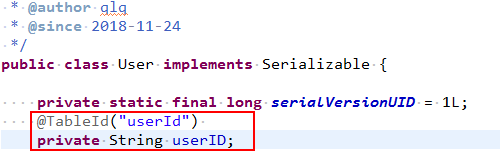
After checking, in the entity class, if the @TableId(“database field name”) annotation is not added to the primary key field, this error occurs when calling the own method involving id. It is estimated that mybatis-plus cannot recognize the primary key field.


 Solution: Declare the name of the primary key column of the database.


Therefore, it is recommended that if you use Mybatis-Plus, it is best to annotate the table name (@TableName) and the table primary key (@TableId) in detail in the entity class to avoid such errors that are difficult to find the cause.
Another: It is said that the new version of mybatis-plus has solved this problem

How to Solve Jquery 1.9 $.browser Error

When calling the jquery plug-in, a $.browser error occurred. It turned out that jQuery has removed attributes such as $.browser and $.browser.version since version 1.9.

Replaced by $.support.

Solution: add the following js

(function(jQuery){   
  
if (jQuery.browser) return ;   
  
jQuery.browser = {};   
jQuery.browser.mozilla = false ;   
jQuery.browser.webkit = false ;   
jQuery.browser.opera = false ;   
jQuery.browser.msie = false ;   
  
var nAgt = navigator.userAgent;   
jQuery.browser.name = navigator.appName;   
jQuery.browser.fullVersion = '' + parseFloat(navigator.appVersion);   
jQuery.browser.majorVersion = parseInt(navigator.appVersion, 10 );   
 var nameOffset,verOffset,ix;   
  
// In Opera, the true version is after "Opera" or after "Version"    
if ((verOffset=nAgt.indexOf( " Opera " ))!=- 1 ) {   
jQuery.browser.opera = true ;   
jQuery.browser.name = " Opera " ;   
jQuery.browser.fullVersion = nAgt.substring(verOffset+ 6 );   
 if ((verOffset=nAgt.indexOf( " Version " ))!=- 1 )   
jQuery.browser.fullVersion = nAgt.substring(verOffset+ 8 );   
}   
// In MSIE, the true version is after "MSIE" in userAgent    
else  if ((verOffset=nAgt.indexOf( " MSIE " ))!=- 1 ) {   
jQuery.browser.msie = true ;   
jQuery.browser.name = " Microsoft Internet Explorer " ;   
jQuery.browser.fullVersion = nAgt.substring(verOffset+ 5 );   
}   
// In Chrome, the true version is after "Chrome"    
else  if ((verOffset=nAgt.indexOf( " Chrome " ))!=- 1 ) {   
jQuery.browser.webkit = true ;   
jQuery.browser.name = " Chrome " ;   
jQuery.browser.fullVersion = nAgt.substring(verOffset+ 7 );   
}   
// In Safari, the true version is after "Safari" or after "Version"    
else  if ((verOffset=nAgt.indexOf( " Safari " ))!=- 1 ) {   
jQuery.browser.webkit = true ;   
jQuery.browser.name = " Safari " ;   
jQuery.browser.fullVersion = nAgt.substring(verOffset+ 7 );   
 if ((verOffset=nAgt.indexOf( " Version " ))!=- 1 )   
jQuery.browser.fullVersion = nAgt.substring(verOffset+ 8 );   
}   
// In Firefox, the true version is after "Firefox"    
else  if ((verOffset=nAgt.indexOf( " Firefox " ))!=- 1 ) {   
jQuery.browser.mozilla = true ;   
jQuery.browser.name = " Firefox " ;   
jQuery.browser.fullVersion = nAgt.substring(verOffset+ 8 );   
}   
// In most other browsers, "name/version" is at the end of userAgent    
else  if ((nameOffset=nAgt.lastIndexOf( '  ' )+ 1 ) <    
(verOffset =nAgt.lastIndexOf( ' / ' )))   
{   
jQuery.browser.name = nAgt.substring(nameOffset,verOffset);   
jQuery.browser.fullVersion = nAgt.substring(verOffset + 1 );   
 if (jQuery.browser.name.toLowerCase()== jQuery.browser.name.toUpperCase()) {   
jQuery.browser.name = navigator.appName;   
}   
}   
// trim the fullVersion string at semicolon/space if present    
if ((ix=jQuery.browser.fullVersion.indexOf( " ; " ))!=- 1 )   
jQuery.browser.fullVersion =jQuery.browser.fullVersion.substring( 0 ,ix);   
 if ((ix=jQuery.browser.fullVersion.indexOf( "  " ))!=- 1 )   
jQuery.browser.fullVersion =jQuery.browser.fullVersion.substring( 0 ,ix);   
  
jQuery.browser.majorVersion = parseInt( '' +jQuery.browser.fullVersion, 10 );   
 if (isNaN(jQuery.browser.majorVersion)) {   
jQuery.browser.fullVersion = '' + parseFloat(navigator.appVersion);   
jQuery.browser.majorVersion = parseInt(navigator.appVersion, 10 );   
}   
jQuery.browser.version = jQuery.browser.majorVersion;   
})(jQuery);   

When installing zookeeper, you can view the process start, but the status display error: Error contacting service. It is probably not running

When installing zookeeper-3.3.2, it started normally and no error was reported, but when checking the status with zkServer.sh status, an error occurred, as follows:

JMX enabled by default
Using config: /hadoop/zookeeper/bin/../conf/zoo.cfg
Error contacting service. It is probably not running.

jps looks at the process, but finds that the process has started

7313 QuorumPeerMain


There are three solutions for searching information online:

1, open zkServer.sh to find status)

STAT=`echo stat | nc localhost $(grep clientPort “$ZOOCFG” | sed -e’s/.*=//’) 2> /dev/null| grep Mode`Add
-q between nc and localhost 1 (It is the number 1 instead of the letter l)
If it already exists, remove the
note: Because the zookeeper I use is version 3.4.5, there is no line at all in my zkServer.sh script file, so it does not take effect

2. Call sh zkServer.sh status to encounter this problem. Baidu and Google found that someone modified a parameter of nc in the sh script to solve the problem, but the call of nc was not found in the sh file of 3.4.5. The log directory specified in the configuration file was not created and caused an error. Manually add the directory and restart, and the problem is solved.
Note: I think it’s not a log issue, so this method is not tried at all.

3. Create a data directory, that is, create a myid file in the directory specified by dataDir in your zoo.cfg configuration file, and specify the id, change the id to server.1=localhost:2888:3888 in your zoo.cfg file 1. Just write 1 in the myid header.
Note: When I installed the second time, the myid file was not created in the directory specified by dataDir, and the error was also reported. After creating the myid file in the directory specified by dataDir, no error was reported.

4 Because the firewall is not turned off. Turn off the firewall:

  #View firewall status

   service iptables status 

  #Turn off the firewall
   service iptables stop    #View the
  startup status of the firewall
chkconfig iptables –list #Turn
  off the firewall and start
   chkconfig iptables off

 Note: I did not turn off the firewall at the beginning, but when I turned off the firewall it did not solve the problem.

5 The mapping relationship between host and ip is not established.

  The command to establish the mapping relationship between hosts and ip is vim /etc/hosts. Add the mapping relationship between each host and ip address at the end of the file.

  Note: Only after the mapping relationship is established, can the machines on the same network segment use the host name for file transfer. problem solved!

Maven configuration error: JAVA_HOME not found in your environment

Recently, I was relatively empty and wanted to study spring mvc, so I compiled the development environment step by step according to the tutorial. After configuring maven, when running the command mvn -v, an error was reported. The error message is as follows:

Error: JAVA_HOME not found in your environment.
Please set the JAVA_HOME variable in your environment to match the
location of your Java installation.

I carefully checked the configuration of JAVA_HOME and found that there is no problem. Why does it prompt this error?

I searched the Internet,

Some say that JAVA_HOME should point to the root directory of jdk and cannot contain /bin;

Some say that there cannot be a semicolon after the JAVA_HOME path;

Some say that there should be no spaces in the path, such as “Program Files” such path.

I checked these items one by one, but it didn’t solve my problem.

In the end, I found the problem accidentally, and found that when I run cmd as an administrator, this error will not be reported.

SSH integration error: org.hibernate.hql.internal.ast.QuerySyntaxException: User is not mapped[……]

Very strange error, the information is as follows: 
org.hibernate.hql.internal.ast.QuerySyntaxException: User is not mapped [select count(*) from User u where u.userName=? and u.userPassword=?] 
Caused by: org .hibernate.hql.internal.ast.QuerySyntaxException: User is not mapped 
similar error message solution, I also studied for a long time before finally discovering the problem
There are two kinds of error conditions: 

1. The configuration file is not loaded into the hibernate entity list. 

2. The fields of the mapping file are inconsistent with the database fields, or the names are inconsistent, resulting 

in a special syntax for hql. Not sql. You set the hibernate dialect to the database you use.
The syntax of sql and hql are not the same thing. 
......QuerySyntaxException... means that the sql you want is not hql, and the syntax is wrong. .

1. See if you forget to add the hibernate mapping file to Hibernate.cfg.xml (when using Hibernate) or applicationContext.xml

2. Check whether the fields in the table correspond to the fields in the mapping file one-to-one

3. Check whether the field name uses keywords in the database

4. Is the HQL statement correct?

HQL: Hibernate query language Hibernate is equipped with a very powerful query language that looks a lot like SQL. But don’t be fooled by the similarities in grammatical structure, HQL is very consciously designed as a fully object-oriented query, it can understand concepts such as inheritance, polymorphism, and association.


So at this time you have to carefully check the hql statement you write, it must be an object query, especially [tableName] Do not write the table you want to query, but the object of the query

such as:

public long getTypeCount(Patent patent) {
String hqlString = “select count(*) from Patent as p where p.type ='”+patent.getType()+”‘”;
Query query = this.getSession().createQuery( hqlString);
long count =0;
count = ((Number)query.uniqueResult()).intValue();
return count;
}

Patent is an object

The database table name is patent if it is written as String hqlString = “select count(*) from p atent  as p where p.type ='”+patent.getType()+”‘”; 

There must be no results from the query, remember!

[Solved] yarn error ExitCodeException exitCode=127

I want to submit a task on yarn and report an error:

18/12/14 17:48:56 INFO mapreduce.Job: Job job_1544766080243_0018 failed with state FAILED due to: Application a18_000002 exited with  exitCode: 127
For more detailed output, check application tracking page:http://dev-hadoop6:8088/cluster/app/application_15447
Diagnostics: Exception from container-launch.
Container id: container_1544766080243_0018_02_000001
Exit code: 127
Stack trace: ExitCodeException exitCode=127:
        at org.apache.hadoop.util.Shell.runCommand(Shell.java:585)
        at org.apache.hadoop.util.Shell.run(Shell.java:482)
        at org.apache.hadoop.util.Shell$ShellCommandExecutor.execute(Shell.java:776)
        at org.apache.hadoop.yarn.server.nodemanager.DefaultContainerExecutor.launchContainer(DefaultContainerE
        at org.apache.hadoop.yarn.server.nodemanager.containermanager.launcher.ContainerLaunch.call(ContainerLa
        at org.apache.hadoop.yarn.server.nodemanager.containermanager.launcher.ContainerLaunch.call(ContainerLa
        at java.util.concurrent.FutureTask.run(FutureTask.java:266)
        at java.util.concurrent.ThreadPoolExecutor.runWorker(ThreadPoolExecutor.java:1149)
        at java.util.concurrent.ThreadPoolExecutor$Worker.run(ThreadPoolExecutor.java:624)
        at java.lang.Thread.run(Thread.java:748)


Container exited with a non-zero exit code 127
Failing this attempt. Failing the application.
18/12/14 17:48:56 INFO mapreduce.Job: Counters: 0
18/12/14 17:48:56 WARN mapreduce.HdfsMapReduce: Path /mapred-temp/job-user-analysis-statistic/01/top_in is not
java.io.IOException: Set input path failed !
        at com.tracker.offline.common.mapreduce.HdfsMapReduce.setInputPath(HdfsMapReduce.java:165)
        at com.tracker.offline.common.mapreduce.HdfsMapReduce.buildJob(HdfsMapReduce.java:122)
        at com.tracker.offline.common.mapreduce.HdfsMapReduce.waitForCompletion(HdfsMapReduce.java:65)
        at com.tracker.offline.business.job.user.JobAnalysisStatisticMR.main (JobAnalysisStatisticMR.java: 88 )
        at sun.reflect.NativeMethodAccessorImpl.invoke0(Native Method)
        at sun.reflect.NativeMethodAccessorImpl.invoke(NativeMethodAccessorImpl.java:62)
        at sun.reflect.DelegatingMethodAccessorImpl.invoke(DelegatingMethodAccessorImpl.java:43)
        at java.lang.reflect.Method.invoke(Method.java:498)
        at org.apache.hadoop.util.RunJar.run (RunJar.java: 221 )
        at org.apache.hadoop.util.RunJar.main (RunJar.java: 136 )
View error information: yarn logs- applicationId application_1544766080243_0018
18/12/14 17:59:57 INFO client.RMProxy: Connecting to ResourceManager at dev-hadoop6/10.100.3.176:8032


Container: container_1544766080243_0018_01_000001 on dev-hadoop5_43772
========================================================================
LogType:stderr
Log Upload Time: Friday December 14  17 : 48 : 56 + 0800  2018 
LogLength: 50
Log Contents:
/bin/bash: /bin/ java: No such file or directory
End of LogType:stderr

LogType:stdout
Log Upload Time: Friday December 14  17 : 48 : 56 + 0800  2018 
LogLength: 0
Log Contents:
End of LogType:stdout

This is not found in java, modify yarn-env.sh

export JAVA_HOME=/home/jdk8

Restart.

Yarn add package loading error: operation not permitted, unlink …

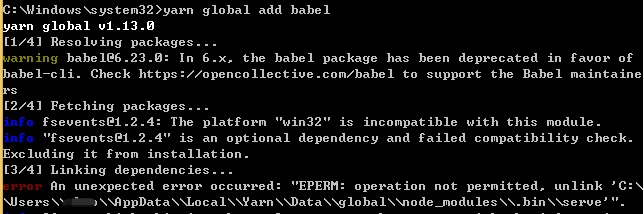
In yarn global add babelthe process of installing the package , the following error was reported:

error An unexpected error occurred: "EPERM: operation not permitted, unlink 'C:\\Users\\xxx\\AppData\\Local\\Yarn\\Data\\global\\node_modules\\.bin\\serve'".

solve

C:\\Users\\xxx\\AppData\\Local\\Yarn\\Data\\global\\node_modules\\.bin\\The content in the directory serveis occupied. After
thinking about it carefully, it is currently being used servein another project. After closing it, re-run it yarn global add babeland it will be fine.

The reason for this problem is that when the package is installed, the previous .binfile will be deleted and then regenerated. Because the file is occupied, the file cannot be deleted, so an error will be reported. You only need to close the corresponding occupied program.

When the package is installed, the previous .binfiles will be deleted and regenerated
. When the package is installed for the first time, babelthe creation time is as follows:

When the other package is installed for the second time, babelthe creation time is as follows: It

can be seen that the .binfolder is created when the package is installed for the second time. The following has babelbeen recreated.
In addition,
if you open the .binfolder while installing the package, you can see .binthat the folder will be deleted at the end of the package , and then regenerate

Flutter android studio runs gradle build error: Could not resolve all artifacts for configuration’:classpath’.

Flutter error report solution:

Find your flutter installation directory, for example mine is ~/Library/flutter

goto ~/Library/flutter/packages/flutter_tools/gradle

Modify flutter.gradle, add mavenCentral() under google() of repositories in buildscript, and then run it. As follows

buildscript {
    repositories {
        google()
        mavenCentral() // add this line
        jcenter()
    }
    dependencies {
        classpath 'com.android.tools.build:gradle:3.2.1'
    }
}

The error message is as follows:

* Error running Gradle:

ProcessException: Process "..\android\gradlew.bat" exited abnormally:

Starting a Gradle Daemon (subsequent builds will be faster)

FAILURE: Build failed with an exception.

* What went wrong:

A problem occurred configuring root project 'android'.

> Could not resolve all artifacts for configuration ':classpath'.

> Could not resolve com.google.auto.value:auto-value:1.5.2.

Required by:

project : > com.android.tools.build:gradle:3.2.1 > com.android.tools.build:bundletool:0.5.0

> Could not resolve com.google.auto.value:auto-value:1.5.2.

> Could not get resource 'https://jcenter.bintray.com/com/google/auto/value/auto-value/1.5.2/auto-value-1.5.2.pom'.

> Read timed out

> Could not resolve org.jdom:jdom2:2.0.6.

Required by:

project : > com.android.tools.build:gradle:3.2.1 > com.android.tools.build.jetifier:jetifier-processor:1.0.0-alpha10

> Skipped due to earlier error

> Could not resolve org.apache.commons:commons-compress:1.12.

Required by:

project : > com.android.tools.build:gradle:3.2.1 > com.android.tools.build:builder:3.2.1 > com.android.tools:sdklib:26.2.1

project : > com.android.tools.build:gradle:3.2.1 > com.android.tools.build:builder:3.2.1 > com.android.tools:sdklib:26.2.1 > com.android.tools:repository:26.2.1

> Skipped due to earlier error

> Could not resolve javax.inject:javax.inject:1.

Required by:

project : > com.android.tools.build:gradle:3.2.1 > com.android.tools.build:builder:3.2.1 > com.android.tools:sdk-common:26.2.1

> Skipped due to earlier error

> Could not resolve net.sf.kxml:kxml2:2.3.0.

Required by:

project : > com.android.tools.build:gradle:3.2.1 > com.android.tools.build:builder:3.2.1 > com.android.tools.build:manifest-merger:26.2.1

project : > com.android.tools.build:gradle:3.2.1 > com.android.tools.build:builder:3.2.1 > com.android.tools.ddms:ddmlib:26.2.1

project : > com.android.tools.build:gradle:3.2.1 > com.android.tools.build:builder:3.2.1 > com.android.tools:sdklib:26.2.1 > com.android.tools.layoutlib:layoutlib-api:26.2.1

> Skipped due to earlier error

> Could not resolve com.google.code.findbugs:jsr305:1.3.9.

Required by:

project : > com.android.tools.build:gradle:3.2.1 > com.android.tools.build:builder:3.2.1 > com.android.tools.build:apkzlib:3.2.1

project : > com.android.tools.build:gradle:3.2.1 > com.android.tools.analytics-library:shared:26.2.1 > com.google.guava:guava:23.0

> Skipped due to earlier error

> Could not resolve com.google.j2objc:j2objc-annotations:1.1.

Required by:

project : > com.android.tools.build:gradle:3.2.1 > com.android.tools.analytics-library:shared:26.2.1 > com.google.guava:guava:23.0

> Skipped due to earlier error

> Could not resolve org.codehaus.mojo:animal-sniffer-annotations:1.14.

Required by:

project : > com.android.tools.build:gradle:3.2.1 > com.android.tools.analytics-library:shared:26.2.1 > com.google.guava:guava:23.0

> Skipped due to earlier error

> Could not resolve commons-logging:commons-logging:1.2.

Required by:

project : > com.android.tools.build:gradle:3.2.1 > com.android.tools.analytics-library:crash:26.2.1 > org.apache.httpcomponents:httpclient:4.5.2

> Skipped due to earlier error

> Could not resolve commons-codec:commons-codec:1.9.

Required by:

project : > com.android.tools.build:gradle:3.2.1 > com.android.tools.analytics-library:crash:26.2.1 > org.apache.httpcomponents:httpclient:4.5.2

> Skipped due to earlier error

> Could not resolve org.jetbrains.kotlin:kotlin-stdlib-common:1.2.71.

Required by:

project : > com.android.tools.build:gradle:3.2.1 > org.jetbrains.kotlin:kotlin-stdlib-jdk8:1.2.71 > org.jetbrains.kotlin:kotlin-stdlib:1.2.71

> Skipped due to earlier error

> Could not resolve org.jetbrains:annotations:13.0.

Required by:

project : > com.android.tools.build:gradle:3.2.1 > org.jetbrains.kotlin:kotlin-stdlib-jdk8:1.2.71 > org.jetbrains.kotlin:kotlin-stdlib:1.2.71

project : > com.android.tools.build:gradle:3.2.1 > com.android.tools.build:builder:3.2.1 > com.android.tools:sdklib:26.2.1 > com.android.tools.layoutlib:layoutlib-api:26.2.1

> Skipped due to earlier error

> Could not resolve com.sun.activation:javax.activation:1.2.0.

Required by:

project : > com.android.tools.build:gradle:3.2.1 > com.android.tools.build:builder:3.2.1 > com.android.tools:sdklib:26.2.1 > com.android.tools:repository:26.2.1

> Skipped due to earlier error

> Could not resolve org.glassfish.jaxb:jaxb-runtime:2.2.11.

Required by:

project : > com.android.tools.build:gradle:3.2.1 > com.android.tools.build:builder:3.2.1 > com.android.tools:sdklib:26.2.1 > com.android.tools:repository:26.2.1

> Skipped due to earlier error

> Could not resolve com.google.jimfs:jimfs:1.1.

Required by:

project : > com.android.tools.build:gradle:3.2.1 > com.android.tools.build:builder:3.2.1 > com.android.tools:sdklib:26.2.1 > com.android.tools:repository:26.2.1

> Skipped due to earlier error

* Try:

Run with --stacktrace option to get the stack trace. Run with --info or --debug option to get more log output. Run with --scan to get full insights.

* Get more help at https://help.gradle.org

BUILD FAILED in 2m 12s

Command: C:\MyWorkCompany\Flutter\policies_manager\android\gradlew.bat app:properties

Finished with error: Please review your Gradle project setup in the android/ folder.