Category Archives: Error

Vagrant up Error: Warning: Authentication failure. Retrying…[How to Solve]

Vagrant under windows reports an error, always prompting Warning: Authentication failure. Retrying…, and there is no shared folder after running, depressed…

Find information online, visit forums, and finally have a solution, at least it works, post it and share it.

No nonsense, here is the error code and solution:

Local environment win7, vagrant version 1.8.5, virtualbox version 5.0.4

vagrant box add centos71 vagrant-centos-7.1.box

vagrant init centos71


Error code:

 1 f:\box>vagrant up
 2 ==> default: Attempting graceful shutdown of VM...
 3     default: Guest communication could not be established! This is
 4 se
 5     default: SSH is not running, the authentication information was
 6     default: or some other networking issue. Vagrant will force hal
 7     default: capable.
 8 ==> default: Forcing shutdown of VM...
 9 ==> default: Clearing any previously set forwarded ports...
10 ==> default: Fixed port collision for 22 => 2222. Now on port 2200.
11 ==> default: Clearing any previously set network interfaces...
12 ==> default: Preparing network interfaces based on configuration...
13     default: Adapter 1: nat
14 ==> default: Forwarding ports...
15     default: 22 (guest) => 2200 (host) (adapter 1)
16 ==> default: Booting VM...
17 ==> default: Waiting for machine to boot. This may take a few minut
18     default: SSH address: 127.0.0.1:2200
19     default: SSH username: vagrant
20     default: SSH auth method: private key
21     default: Warning: Authentication failure. Retrying...
22     default: Warning: Authentication failure. Retrying...
23     default: Warning: Authentication failure. Retrying...
24     default: Warning: Authentication failure. Retrying...
25     default: Warning: Authentication failure. Retrying...
26     default: Warning: Authentication failure. Retrying...
27     default: Warning: Authentication failure. Retrying...
28     default: Warning: Authentication failure. Retrying...
29 The guest machine entered an invalid state while waiting for it
30 to boot. Valid states are 'starting, running'. The machine is in th
31 'paused' state. Please verify everything is configured
32 properly and try again.
33 
34 If the provider you're using has a GUI that comes with it,
35 it is often helpful to open that and watch the machine, since the
36 GUI often has more helpful error messages than Vagrant can retrieve
37 For example, if you're using VirtualBox, run `vagrant up` while the
38 VirtualBox GUI is open.
39 
40 The primary issue for this error is that the provider you're using
41 is not properly configured. This is very rarely a Vagrant issue.


Solution:

 1 # -*- mode: ruby -*-
 2 # vi: set ft=ruby :
 3 
 4 # All Vagrant configuration is done below. The "2" in Vagrant.configure
 5 # configures the configuration version (we support older styles for
 6 # backwards compatibility). Please don't change it unless you know what
 7 # you're doing.
 8 
 9 Vagrant.configure("2") do |config|
10   # The most common configuration options are documented and commented below.
11   # For a complete reference, please see the online documentation at
12   # https://docs.vagrantup.com.
13 
14   # Every Vagrant development environment requires a box. You can search for
15   # boxes at https://atlas.hashicorp.com/search.
16   config.vm.box = "centos71"
17   
18   config.vm.boot_timeout = 360
19   config.ssh.username = "vagrant"
20   config.ssh.password = "vagrant"
21 
22   # Disable automatic box update checking. If you disable this, then
23   # boxes will only be checked for updates when the user runs
24   # `vagrant box outdated`. This is not recommended.
25   # config.vm.box_check_update = false
26 
27   # Create a forwarded port mapping which allows access to a specific port
28   # within the machine from a port on the host machine. In the example below,
29   # accessing "localhost:8080" will access port 80 on the guest machine.
30   # config.vm.network "forwarded_port", guest: 80, host: 8080
31 
32   # Create a private network, which allows host-only access to the machine
33   # using a specific IP.
34   # config.vm.network "private_network", ip: "192.168.33.10"
35 
36   # Create a public network, which generally matched to bridged network.
37   # Bridged networks make the machine appear as another physical device on
38   # your network.
39   # config.vm.network "public_network"
40 
41   # Share an additional folder to the guest VM. The first argument is
42   # the path on the host to the actual folder. The second argument is
43   # the path on the guest to mount the folder. And the optional third
44   # argument is a set of non-required options.
45   # config.vm.synced_folder "../data", "/vagrant_data"
46 
47   # Provider-specific configuration so you can fine-tune various
48   # backing providers for Vagrant. These expose provider-specific options.
49   # Example for VirtualBox:
50   #
51   # config.vm.provider "virtualbox" do |vb|
52   #   # Display the VirtualBox GUI when booting the machine
53   #   vb.gui = true
54   #
55   #   # Customize the amount of memory on the VM:
56   #   vb.memory = "1024"
57   # end
58   #
59   # View the documentation for the provider you are using for more
60   # information on available options.
61 
62   # Define a Vagrant Push strategy for pushing to Atlas. Other push strategies
63   # such as FTP and Heroku are also available. See the documentation at
64   # https://docs.vagrantup.com/v2/push/atlas.html for more information.
65   # config.push.define "atlas" do |push|
66   #   push.app = "YOUR_ATLAS_USERNAME/YOUR_APPLICATION_NAME"
67   # end
68 
69   # Enable provisioning with a shell script. Additional provisioners such as
70   # Puppet, Chef, Ansible, Salt, and Docker are also available. Please see the
71   # documentation for more information about their specific syntax and use.
72   # config.vm.provision "shell", inline: <<-SHELL
73   #   apt-get update
74   #   apt-get install -y apache2
75   # SHELL
76 end


Two lines of code are added to the Vagrantfile configuration file, using clear text username and password

config.ssh.username = “vagrant”
config.ssh.password = “vagrant”

save

vagrant reload

done!

Well done and Good Luck!
Fetch Error: Failed to execute ‘fetch’ on ‘Window’: Request with GET/HEAD method cannot have body

Error code: src/api/index.js

import Fetch from'../fetch/index' 
import jk from './ jk ' 
export default {
  verifycodeApi: params => Fetch(jk.verifycode, {method:'get' ,body: params})
}

In the get method here, the body is used to accept the parameters, so an error is reported.


solution:

In the packaged fetch.js

const Fetch = (url, option = ()) => {
   // Format the data of the get request (the get request of fetch needs to splice the parameters behind the url) 
  if (option.method ==='get') {
    if (option.data) {
      url = url + formatUrl(option.data)
    }
  }

  // Process non-get request headers and request bodies 
  if (option.method ==='post' || option.method ==='put' || option.method ==='delete' ) {
    option.headers[ 'Content-Type'] = option.headers['Content-Type'] ||'application/json' 
    option.body = qs.stringify(option.body)
     // option.body = JSON.stringify( option.body) 
  }

  delete option.data 
}

The key point is the code marked in orange. This is to create a data attribute for the get method. After the url is spliced, delete the data attribute with delete.


So, in src/api/index.js

// The api file stores the interface folder 
import Fetch from'../fetch/index' 
import jk from './ jk ' 
export default {
  manageloginApi: params => Fetch(jk.managelogin, {method:'post' , body: params}),
  verifycodeApi: params => Fetch(jk.verifycode, {method:'get' , data: params})
}

You can use the data attribute to store the parameters passed by get, avoiding the error of body passing parameters

[Solved] Error PAM in lightdm startup_ Kwallet (5). So does not exist

PAM unable to dlopen(pam_kwallet.so): /lib/security/pam_kwallet.so: cannot open shared object file: No such file or directory
PAM unable to dlopen(pam_kwallet5.so): /lib/security/pam_kwallet5.so: cannot open shared object file: No such file or directory
1.Edit the /etc/pam.d/lightdm and /etc/pam.d/lightdm-greeter configuration files
Comment out (delete) all of the following lines in each file with #
auth    optional        pam_kwallet.so
auth    optional        pam_kwallet5.so
session optional        pam_kwallet.so auto_start
session optional        pam_kwallet5.so auto_start
2. reboot both can be  systemctl restart lightdm


An error was reported when Maven package was running the packaged jar package: there is no main list attribute in xxx.jar, which can be solved by configuring Maven plugin

The command line runs the packaged jar package:

leung@wuyujin simple-webservice-server % java -jar target/sample-1.0-SNAPSHOT.jar 7896
target/sample-1.0-SNAPSHOT.jar There is no master list property in the

Error reason: there is no manifest file in the packaged jar package, which has two lines of configuration, about the full path of the startup class of jar package 0

Add Maven plugin

<plugin>
	<groupId>org.apache.maven.plugins</groupId>
	<artifactId>maven-jar-plugin</artifactId>
	<version>3.0.2</version>
	<configuration>
		 <archive>
		  <manifest>
			   <addClasspath>true</addClasspath>
			   <classpathPrefix>lib/</classpathPrefix>
			   <mainClass>com.coffee.bee.Main</mainClass>
		  </manifest>
		 </archive>
	</configuration>
</plugin>

Plugins
pluginManagement > plugins

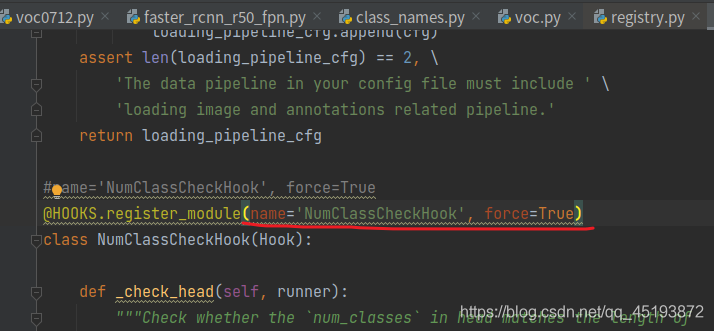
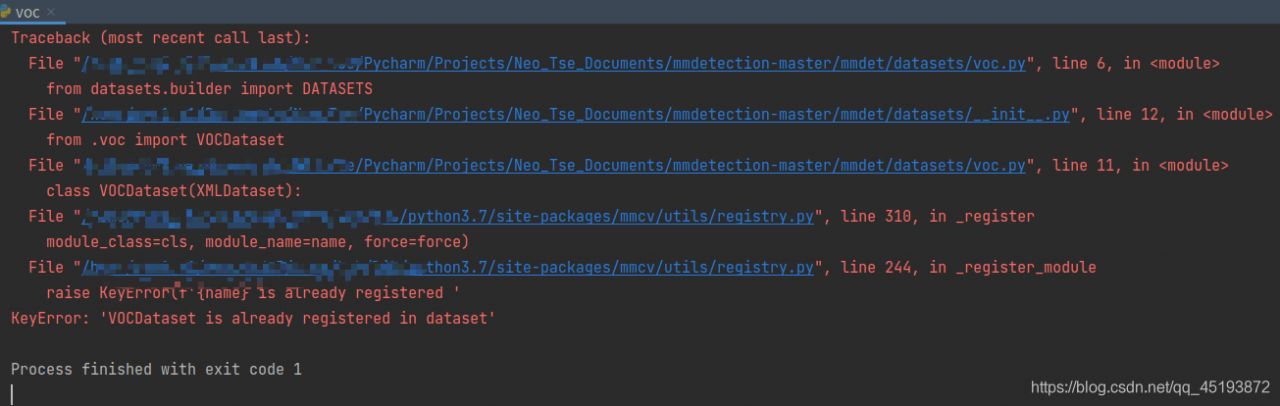
mmdetection Error when running voc.py: KeyError: ‘NumClassCheckHook is already registered in hook‘

This error is usually caused by the version of mmcv
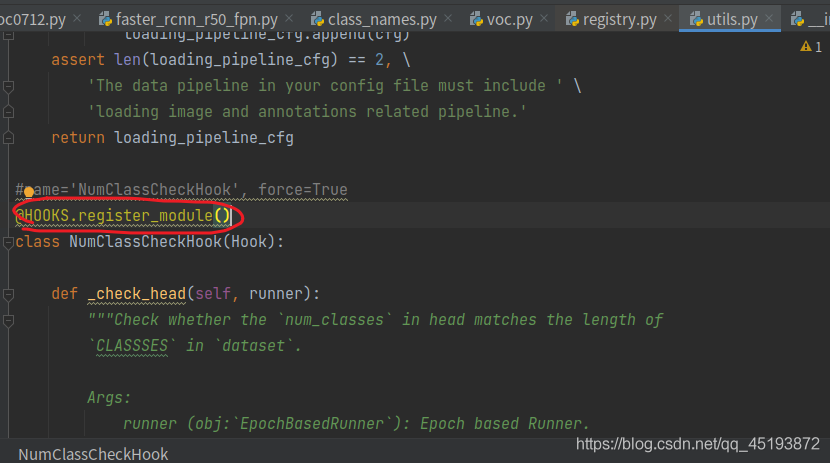
just click in one by one according to the following error prompt to find utils.py file:
change the code in the circle below:

add in brackets:

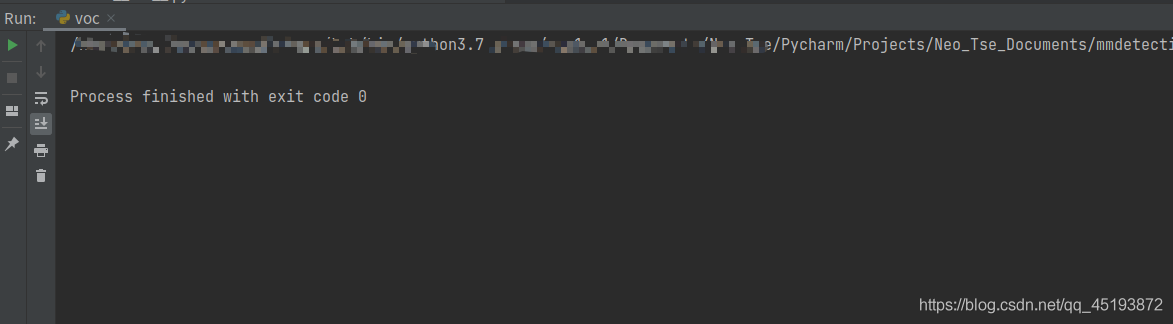
finally, it can run successfully.


Similar questions:
keyerror: ‘XXX is already registered in xxx’


Results: it runs perfectly

Pytorch error: `module ‘torch‘ has no attribute ‘__version___‘`

Today, I configured the python environment on windows. After installing python, I checked whether it was installed successfully. There was no error in inputting import torch. However, I found that print (torch. Version) could not query torch. After careful examination, I found that two underscores were missing, and there was no error in inputting print (torch. Version). It was a false alarm.

Refresh 404 after packaging Vue project, uncaught syntax error: unexpected token <

The login page can be accessed normally, and the menu can be accessed normally. Once the page is refreshed, it will be blank or not easy to make
at the same time, the console will report an error: unexpected token & lt;

This is because refreshing the page needs to re request the JS file, but the path has changed when the request is made, and the content of index.html is requested back

Solution
in Vue config – & gt; In index.js bulid,
configure assetspublicpath as the absolute path of your static resources. How to refresh this path will not change

build: {
    // Template for index.html
    index: path.resolve(__dirname, '../nqia-ias/index.html'),

    // Paths
    assetsRoot: path.resolve(__dirname, '../nqia-ias'),
    assetsSubDirectory: 'static',
    assetsPublicPath: '/s/nqia-ias/',
    ......
}

[Solved] Error in integrating redis with springboot: unable to connect to redis

org.springframework.data.redis.RedisConnectionFailureException: Unable to connect to Redis; nested exception is io.lettuce.core.RedisConnectionException: Unable to connect to 127.0.0.1:6379

	at org.springframework.data.redis.connection.lettuce.LettuceConnectionFactory$ExceptionTranslatingConnectionProvider.translateException(LettuceConnectionFactory.java:1621)
	at org.springframework.data.redis.connection.lettuce.LettuceConnectionFactory$ExceptionTranslatingConnectionProvider.getConnection(LettuceConnectionFactory.java:1529)
	at org.springframework.data.redis.connection.lettuce.LettuceConnectionFactory$SharedConnection.getNativeConnection(LettuceConnectionFactory.java:1315)
	at org.springframework.data.redis.connection.lettuce.LettuceConnectionFactory$SharedConnection.getConnection(LettuceConnectionFactory.java:1298)
	at org.springframework.data.redis.connection.lettuce.LettuceConnectionFactory.getSharedConnection(LettuceConnectionFactory.java:1039)
	at org.springframework.data.redis.connection.lettuce.LettuceConnectionFactory.getConnection(LettuceConnectionFactory.java:371)
	at org.springframework.data.redis.core.RedisConnectionUtils.fetchConnection(RedisConnectionUtils.java:193)
	at org.springframework.data.redis.core.RedisConnectionUtils.doGetConnection(RedisConnectionUtils.java:144)
	at org.springframework.data.redis.core.RedisConnectionUtils.getConnection(RedisConnectionUtils.java:105)
	at org.springframework.data.redis.core.RedisTemplate.execute(RedisTemplate.java:209)
	at org.springframework.data.redis.core.RedisTemplate.execute(RedisTemplate.java:189)
	at org.springframework.data.redis.core.AbstractOperations.execute(AbstractOperations.java:96)
	at org.springframework.data.redis.core.DefaultValueOperations.set(DefaultValueOperations.java:236)
	at com.gjw.RedisApplicationTests.contextLoads(RedisApplicationTests.java:24)
	at sun.reflect.NativeMethodAccessorImpl.invoke0(Native Method)
	at sun.reflect.NativeMethodAccessorImpl.invoke(NativeMethodAccessorImpl.java:62)
	at sun.reflect.DelegatingMethodAccessorImpl.invoke(DelegatingMethodAccessorImpl.java:43)
	at java.lang.reflect.Method.invoke(Method.java:498)
	at org.junit.platform.commons.util.ReflectionUtils.invokeMethod(ReflectionUtils.java:688)
	at org.junit.jupiter.engine.execution.MethodInvocation.proceed(MethodInvocation.java:60)
	at org.junit.jupiter.engine.execution.InvocationInterceptorChain$ValidatingInvocation.proceed(InvocationInterceptorChain.java:131)
	at org.junit.jupiter.engine.extension.TimeoutExtension.intercept(TimeoutExtension.java:149)
	at org.junit.jupiter.engine.extension.TimeoutExtension.interceptTestableMethod(TimeoutExtension.java:140)
	at org.junit.jupiter.engine.extension.TimeoutExtension.interceptTestMethod(TimeoutExtension.java:84)
	at org.junit.jupiter.engine.execution.ExecutableInvoker$ReflectiveInterceptorCall.lambda$ofVoidMethod$0(ExecutableInvoker.java:115)
	at org.junit.jupiter.engine.execution.ExecutableInvoker.lambda$invoke$0(ExecutableInvoker.java:105)
	at org.junit.jupiter.engine.execution.InvocationInterceptorChain$InterceptedInvocation.proceed(InvocationInterceptorChain.java:106)
	at org.junit.jupiter.engine.execution.InvocationInterceptorChain.proceed(InvocationInterceptorChain.java:64)
	at org.junit.jupiter.engine.execution.InvocationInterceptorChain.chainAndInvoke(InvocationInterceptorChain.java:45)
	at org.junit.jupiter.engine.execution.InvocationInterceptorChain.invoke(InvocationInterceptorChain.java:37)
	at org.junit.jupiter.engine.execution.ExecutableInvoker.invoke(ExecutableInvoker.java:104)
	at org.junit.jupiter.engine.execution.ExecutableInvoker.invoke(ExecutableInvoker.java:98)
	at org.junit.jupiter.engine.descriptor.TestMethodTestDescriptor.lambda$invokeTestMethod$6(TestMethodTestDescriptor.java:210)
	at org.junit.platform.engine.support.hierarchical.ThrowableCollector.execute(ThrowableCollector.java:73)
	at org.junit.jupiter.engine.descriptor.TestMethodTestDescriptor.invokeTestMethod(TestMethodTestDescriptor.java:206)
	at org.junit.jupiter.engine.descriptor.TestMethodTestDescriptor.execute(TestMethodTestDescriptor.java:131)
	at org.junit.jupiter.engine.descriptor.TestMethodTestDescriptor.execute(TestMethodTestDescriptor.java:65)
	at org.junit.platform.engine.support.hierarchical.NodeTestTask.lambda$executeRecursively$5(NodeTestTask.java:139)
	at org.junit.platform.engine.support.hierarchical.ThrowableCollector.execute(ThrowableCollector.java:73)
	at org.junit.platform.engine.support.hierarchical.NodeTestTask.lambda$executeRecursively$7(NodeTestTask.java:129)
	at org.junit.platform.engine.support.hierarchical.Node.around(Node.java:137)
	at org.junit.platform.engine.support.hierarchical.NodeTestTask.lambda$executeRecursively$8(NodeTestTask.java:127)
	at org.junit.platform.engine.support.hierarchical.ThrowableCollector.execute(ThrowableCollector.java:73)
	at org.junit.platform.engine.support.hierarchical.NodeTestTask.executeRecursively(NodeTestTask.java:126)
	at org.junit.platform.engine.support.hierarchical.NodeTestTask.execute(NodeTestTask.java:84)
	at java.util.ArrayList.forEach(ArrayList.java:1257)
	at org.junit.platform.engine.support.hierarchical.SameThreadHierarchicalTestExecutorService.invokeAll(SameThreadHierarchicalTestExecutorService.java:38)
	at org.junit.platform.engine.support.hierarchical.NodeTestTask.lambda$executeRecursively$5(NodeTestTask.java:143)
	at org.junit.platform.engine.support.hierarchical.ThrowableCollector.execute(ThrowableCollector.java:73)
	at org.junit.platform.engine.support.hierarchical.NodeTestTask.lambda$executeRecursively$7(NodeTestTask.java:129)
	at org.junit.platform.engine.support.hierarchical.Node.around(Node.java:137)
	at org.junit.platform.engine.support.hierarchical.NodeTestTask.lambda$executeRecursively$8(NodeTestTask.java:127)
	at org.junit.platform.engine.support.hierarchical.ThrowableCollector.execute(ThrowableCollector.java:73)
	at org.junit.platform.engine.support.hierarchical.NodeTestTask.executeRecursively(NodeTestTask.java:126)
	at org.junit.platform.engine.support.hierarchical.NodeTestTask.execute(NodeTestTask.java:84)
	at java.util.ArrayList.forEach(ArrayList.java:1257)
	at org.junit.platform.engine.support.hierarchical.SameThreadHierarchicalTestExecutorService.invokeAll(SameThreadHierarchicalTestExecutorService.java:38)
	at org.junit.platform.engine.support.hierarchical.NodeTestTask.lambda$executeRecursively$5(NodeTestTask.java:143)
	at org.junit.platform.engine.support.hierarchical.ThrowableCollector.execute(ThrowableCollector.java:73)
	at org.junit.platform.engine.support.hierarchical.NodeTestTask.lambda$executeRecursively$7(NodeTestTask.java:129)
	at org.junit.platform.engine.support.hierarchical.Node.around(Node.java:137)
	at org.junit.platform.engine.support.hierarchical.NodeTestTask.lambda$executeRecursively$8(NodeTestTask.java:127)
	at org.junit.platform.engine.support.hierarchical.ThrowableCollector.execute(ThrowableCollector.java:73)
	at org.junit.platform.engine.support.hierarchical.NodeTestTask.executeRecursively(NodeTestTask.java:126)
	at org.junit.platform.engine.support.hierarchical.NodeTestTask.execute(NodeTestTask.java:84)
	at org.junit.platform.engine.support.hierarchical.SameThreadHierarchicalTestExecutorService.submit(SameThreadHierarchicalTestExecutorService.java:32)
	at org.junit.platform.engine.support.hierarchical.HierarchicalTestExecutor.execute(HierarchicalTestExecutor.java:57)
	at org.junit.platform.engine.support.hierarchical.HierarchicalTestEngine.execute(HierarchicalTestEngine.java:51)
	at org.junit.platform.launcher.core.EngineExecutionOrchestrator.execute(EngineExecutionOrchestrator.java:108)
	at org.junit.platform.launcher.core.EngineExecutionOrchestrator.execute(EngineExecutionOrchestrator.java:88)
	at org.junit.platform.launcher.core.EngineExecutionOrchestrator.lambda$execute$0(EngineExecutionOrchestrator.java:54)
	at org.junit.platform.launcher.core.EngineExecutionOrchestrator.withInterceptedStreams(EngineExecutionOrchestrator.java:67)
	at org.junit.platform.launcher.core.EngineExecutionOrchestrator.execute(EngineExecutionOrchestrator.java:52)
	at org.junit.platform.launcher.core.DefaultLauncher.execute(DefaultLauncher.java:96)
	at org.junit.platform.launcher.core.DefaultLauncher.execute(DefaultLauncher.java:75)
	at com.intellij.junit5.JUnit5IdeaTestRunner.startRunnerWithArgs(JUnit5IdeaTestRunner.java:71)
	at com.intellij.rt.junit.IdeaTestRunner$Repeater.startRunnerWithArgs(IdeaTestRunner.java:33)
	at com.intellij.rt.junit.JUnitStarter.prepareStreamsAndStart(JUnitStarter.java:221)
	at com.intellij.rt.junit.JUnitStarter.main(JUnitStarter.java:54)
Caused by: io.lettuce.core.RedisConnectionException: Unable to connect to 127.0.0.1:6379
	at io.lettuce.core.RedisConnectionException.create(RedisConnectionException.java:78)
	at io.lettuce.core.RedisConnectionException.create(RedisConnectionException.java:56)
	at io.lettuce.core.AbstractRedisClient.getConnection(AbstractRedisClient.java:330)
	at io.lettuce.core.RedisClient.connect(RedisClient.java:216)
	at org.springframework.data.redis.connection.lettuce.StandaloneConnectionProvider.lambda$getConnection$1(StandaloneConnectionProvider.java:115)
	at java.util.Optional.orElseGet(Optional.java:267)
	at org.springframework.data.redis.connection.lettuce.StandaloneConnectionProvider.getConnection(StandaloneConnectionProvider.java:115)
	at org.springframework.data.redis.connection.lettuce.LettuceConnectionFactory$ExceptionTranslatingConnectionProvider.getConnection(LettuceConnectionFactory.java:1527)
	... 77 more
Caused by: io.lettuce.core.RedisCommandExecutionException: NOAUTH Authentication required.
	at io.lettuce.core.internal.ExceptionFactory.createExecutionException(ExceptionFactory.java:137)
	at io.lettuce.core.internal.ExceptionFactory.createExecutionException(ExceptionFactory.java:110)
	at io.lettuce.core.protocol.AsyncCommand.completeResult(AsyncCommand.java:120)
	at io.lettuce.core.protocol.AsyncCommand.complete(AsyncCommand.java:111)
	at io.lettuce.core.protocol.CommandHandler.complete(CommandHandler.java:746)
	at io.lettuce.core.protocol.CommandHandler.decode(CommandHandler.java:681)
	at io.lettuce.core.protocol.CommandHandler.channelRead(CommandHandler.java:598)
	at io.netty.channel.AbstractChannelHandlerContext.invokeChannelRead(AbstractChannelHandlerContext.java:379)
	at io.netty.channel.AbstractChannelHandlerContext.invokeChannelRead(AbstractChannelHandlerContext.java:365)
	at io.netty.channel.AbstractChannelHandlerContext.fireChannelRead(AbstractChannelHandlerContext.java:357)
	at io.netty.channel.DefaultChannelPipeline$HeadContext.channelRead(DefaultChannelPipeline.java:1410)
	at io.netty.channel.AbstractChannelHandlerContext.invokeChannelRead(AbstractChannelHandlerContext.java:379)
	at io.netty.channel.AbstractChannelHandlerContext.invokeChannelRead(AbstractChannelHandlerContext.java:365)
	at io.netty.channel.DefaultChannelPipeline.fireChannelRead(DefaultChannelPipeline.java:919)
	at io.netty.channel.nio.AbstractNioByteChannel$NioByteUnsafe.read(AbstractNioByteChannel.java:166)
	at io.netty.channel.nio.NioEventLoop.processSelectedKey(NioEventLoop.java:719)
	at io.netty.channel.nio.NioEventLoop.processSelectedKeysOptimized(NioEventLoop.java:655)
	at io.netty.channel.nio.NioEventLoop.processSelectedKeys(NioEventLoop.java:581)
	at io.netty.channel.nio.NioEventLoop.run(NioEventLoop.java:493)
	at io.netty.util.concurrent.SingleThreadEventExecutor$4.run(SingleThreadEventExecutor.java:989)
	at io.netty.util.internal.ThreadExecutorMap$2.run(ThreadExecutorMap.java:74)
	at io.netty.util.concurrent.FastThreadLocalRunnable.run(FastThreadLocalRunnable.java:30)
	at java.lang.Thread.run(Thread.java:748)


Process finished with exit code -1

The above is the complete error message

Baidu search all said to open the remote connection configuration, but my connection is local, so it is excluded
to check the redis configuration file (redis. Windows. Conf file) and find the following configuration

# Require clients to issue AUTH <PASSWORD> before processing any other
# commands.  This might be useful in environments in which you do not trust
# others with access to the host running redis-server.
#
# This should stay commented out for backward compatibility and because most
# people do not need auth (e.g. they run their own servers).
# 
# Warning: since Redis is pretty fast an outside user can try up to
# 150k passwords per second against a good box. This means that you should
# use a very strong password otherwise it will be very easy to break.
#
requirepass 123456

When I found the problem, I configured the password when I installed redis, but the previous springboot configuration file only had the configuration of host and port number.

Error configuration:

# redis
spring.redis.host=127.0.0.1
spring.redis.port=6379

Correct configuration

# redis
spring.redis.host=127.0.0.1
spring.redis.port=6379
spring.redis.password=123456

Problem solved!

Tensorflow Error: Could not create cudnn handle: CUDNN_STATUS_INTERNAL_ERROR

1. Confirm whether tensorflow corresponds to CUDA and cudnn. Check here. 2. Modify settings

os.environ['CUDA_VISIBLE_DEVICES']='0,1'
# tf 1.13
config = tf.ConfigProto()
config.gpu_options.allow_growth=True
sess = tf.Session(config=config)
sess.run(tf.global_variables_initializer())

# tf 2.0
# gpu = tf.config.experimental.list_physical_devices('GPU')
# tf.config.experimental.set_memory_growth(gpu[0], True)
# gpu = tf.config.experimental.list_physical_devices('GPU')
# tf.config.experimental.set_memory_growth(gpu[1], True)