Category Archives: Error

C Language error: two or more data types in declaration specifiers

Libmemcached encountered an error during compilation:

./config.h:632:15: error: two or more data types in declaration specifiers
 #define off_t long int
               ^
./config.h:632:20: error: two or more data types in declaration specifiers
 #define off_t long int
                    ^
./config.h:658:17: error: two or more data types in declaration specifiers
 #define ssize_t int

Since config. H is generated through the automake tool, I don’t know where to find the problem for a while
first write a try. C file:

#define off_t long int
#define ssize_it int
int main() {
	return 1;
}

Can be compiled
multiple attempts have found that it is related to the order of #define. If #define off_ T long int in #define < stdxx.h> Before, an error will be reported, otherwise no error will be reported
via G + + - E - P try. C > XX , you can see:

#define long int __off_t
#define __off_t off_t

If#define off_t long intis ahead of stdxx.h,then use long int to replace off_t:

#define long int __off_t
#define __off_t long int

A loop occurs, so an error will be reported
and if #define off_ T long int after stdxx. H
because you already have #typedef__ off_ t off_ T without execution

In addition, it is found that #include “A.H” can also be used as #include & lt; a.h>, Previously, it was thought that local. H files could only be imported with “” instead of & lt& gt;, Now it is found that with GCC - I. , the directory with – I and include can be used with & lt& gt; Import local H files.

In addition, G + + can get preprocessed output in – E – P X.C, that is, a. CC file. The extern "C" {...} requires that the precompiled output must be compiled by G + +.

[Solved] RuntimeError: CUDA error: CUBLAS_STATUS_ALLOC_FAILED when calling `cublasCreate(handle)`

Today, I encountered a speechless mistake and tossed it for a long time… I mentioned the feature network with Bert, but it didn’t work… I checked the size and found that it wasn’t, and later found that it wasn’t on CUDA

Specific error reporting

RuntimeError: Caught RuntimeError in replica 0 on device 0.
RuntimeError: CUDA error: CUBLAS_ STATUS_ ALLOC_ FAILED when calling `cublasCreate(handle)

resolvent:

ext_hashCodes.unsqueeze(1).repeat(1, B, 1)
#change to
ext_hashCodes.unsqueeze(1).repeat(1, B, 1).cuda()
#It's OK

[PX4 Bug] make px4_sitl gazebo Error: CMake Error: The following variables are used in this project

Article catalog

1. Preface 2. Bug 12.1 error reporting output 2.2 solutions 2.3 reference link

3. Bug 23.1 error output 3.2 solution

4. Bug 34.1 error reporting output 4.2 solution 4.3 reference link

1. Preface

When executing make Px4_ When sitl gazebo , an error is reported.

2. Bug 1

2.1 error output

CMake Error: The following variables are used in this project, but they are set to NOTFOUND.
Please set them or make sure they are set and tested correctly in the CMake files:
GSTREAMER_LIBRARIES (ADVANCED)
    linked by target "gazebo_uuv_plugin" in directory /home/zth/PX4-Autopilot/Tools/sitl_gazebo
    linked by target "gazebo_user_camera_plugin" in directory /home/zth/PX4-Autopilot/Tools/sitl_gazebo
    linked by target "gazebo_groundtruth_plugin" in directory /home/zth/PX4-Autopilot/Tools/sitl_gazebo
    linked by target "gazebo_sonar_plugin" in directory /home/zth/PX4-Autopilot/Tools/sitl_gazebo
    linked by target "gazebo_lidar_plugin" in directory /home/zth/PX4-Autopilot/Tools/sitl_gazebo
    linked by target "gazebo_camera_manager_plugin" in directory /home/zth/PX4-Autopilot/Tools/sitl_gazebo
    linked by target "gazebo_opticalflow_mockup_plugin" in directory /home/zth/PX4-Autopilot/Tools/sitl_gazebo
    linked by target "mav_msgs" in directory /home/zth/PX4-Autopilot/Tools/sitl_gazebo
    linked by target "nav_msgs" in directory /home/zth/PX4-Autopilot/Tools/sitl_gazebo
    linked by target "std_msgs" in directory /home/zth/PX4-Autopilot/Tools/sitl_gazebo
    linked by target "gazebo_opticalflow_plugin" in directory /home/zth/PX4-Autopilot/Tools/sitl_gazebo
    linked by target "gazebo_airspeed_plugin" in directory /home/zth/PX4-Autopilot/Tools/sitl_gazebo
    linked by target "gazebo_airship_dynamics_plugin" in directory /home/zth/PX4-Autopilot/Tools/sitl_gazebo
    linked by target "gazebo_controller_interface" in directory /home/zth/PX4-Autopilot/Tools/sitl_gazebo
    linked by target "sensor_msgs" in directory /home/zth/PX4-Autopilot/Tools/sitl_gazebo
    linked by target "gazebo_vision_plugin" in directory /home/zth/PX4-Autopilot/Tools/sitl_gazebo
    linked by target "gazebo_gimbal_controller_plugin" in directory /home/zth/PX4-Autopilot/Tools/sitl_gazebo
    linked by target "gazebo_imu_plugin" in directory /home/zth/PX4-Autopilot/Tools/sitl_gazebo
    linked by target "physics_msgs" in directory /home/zth/PX4-Autopilot/Tools/sitl_gazebo
    linked by target "gazebo_wind_plugin" in directory /home/zth/PX4-Autopilot/Tools/sitl_gazebo
    linked by target "gazebo_mavlink_interface" in directory /home/zth/PX4-Autopilot/Tools/sitl_gazebo
    linked by target "gazebo_motor_model" in directory /home/zth/PX4-Autopilot/Tools/sitl_gazebo
    linked by target "gazebo_catapult_plugin" in directory /home/zth/PX4-Autopilot/Tools/sitl_gazebo
    linked by target "gazebo_multirotor_base_plugin" in directory /home/zth/PX4-Autopilot/Tools/sitl_gazebo
    linked by target "gazebo_magnetometer_plugin" in directory /home/zth/PX4-Autopilot/Tools/sitl_gazebo
    linked by target "gazebo_usv_dynamics_plugin" in directory /home/zth/PX4-Autopilot/Tools/sitl_gazebo
    linked by target "gazebo_barometer_plugin" in directory /home/zth/PX4-Autopilot/Tools/sitl_gazebo
    linked by target "gazebo_parachute_plugin" in directory /home/zth/PX4-Autopilot/Tools/sitl_gazebo
    linked by target "gazebo_drop_plugin" in directory /home/zth/PX4-Autopilot/Tools/sitl_gazebo
    linked by target "gazebo_gst_camera_plugin" in directory /home/zth/PX4-Autopilot/Tools/sitl_gazebo
    linked by target "gazebo_irlock_plugin" in directory /home/zth/PX4-Autopilot/Tools/sitl_gazebo
    linked by target "gazebo_gps_plugin" in directory /home/zth/PX4-Autopilot/Tools/sitl_gazebo
    linked by target "gazebo_video_stream_widget" in directory /home/zth/PX4-Autopilot/Tools/sitl_gazebo
    linked by target "LiftDragPlugin" in directory /home/zth/PX4-Autopilot/Tools/sitl_gazebo

-- Configuring incomplete, errors occurred!
See also "/home/zth/PX4-Autopilot/build/px4_sitl_default/build_gazebo/CMakeFiles/CMakeOutput.log".
See also "/home/zth/PX4-Autopilot/build/px4_sitl_default/build_gazebo/CMakeFiles/CMakeError.log".
[217/819] Linking CXX static library s...lib/mixer/SimpleMixer/libSimpleMixer.a
FAILED: external/Stamp/sitl_gazebo/sitl_gazebo-configure 
cd /home/zth/PX4-Autopilot/build/px4_sitl_default/build_gazebo && /usr/bin/cmake -DCMAKE_INSTALL_PREFIX=/usr/local -DSEND_ODOMETRY_DATA=ON -DGENERATE_ROS_MODELS=ON -GNinja /home/zth/PX4-Autopilot/Tools/sitl_gazebo && /usr/bin/cmake -E touch /home/zth/PX4-Autopilot/build/px4_sitl_default/external/Stamp/sitl_gazebo/sitl_gazebo-configure
[227/819] Building CXX object src/lib/...MakeFiles/ecl_EKF.dir/EKFGSF_yaw.cpp.o
ninja: build stopped: subcommand failed.
Makefile:226: recipe for target 'px4_sitl' failed
make: *** [px4_sitl] Error 1

2.2 solutions

sudo apt install libgstreamer1.0-dev
sudo apt install gstreamer1.0-plugins-good
sudo apt install gstreamer1.0-plugins-bad
sudo apt install gstreamer1.0-plugins-ugly

2.3 reference links

[1] https://github.com/PX4/PX4-Autopilot/issues/13416

3. Bug 2

3.1 error output

VMware: vmw_ioctl_command error Invalid argument.

3.2 solutions

[1] Run gazebo under the virtual machine, about vmw_ ioctl_ Command error invalid argument error

4. Bug 3

4.1 error output

[Wrn] [Event.cc:61] Warning: Deleting a connection right after creation. Make sure to save the ConnectionPtr from a Connect call
[Err] [REST.cc:205] Error in REST request

libcurl: (51) SSL: no alternative certificate subject name matches target host name 'api.ignitionfuel.org'

4.2 Solution
Modify https://api.ignitionfuel.org in ~/.ignition/fuel/config.yaml to https://api.ignitionrobotics.org , it’s OK

[Solved] SyntaxError: Missing parentheses in call to ‘print‘. Did you mean print(e)?

After learning the fourth lesson of Mr. Gu Yue’s ROS, I started the keyboard control of the robot and reported this error in the launch file. The following is the error content:

process[mbot_teleop-1]: started with pid [4942]
  File "/home/zxf/catkin_ws/src/mbot_teleop/scripts/mbot_teleop.py", line 78
    print msg
          ^
SyntaxError: Missing parentheses in call to 'print'. Did you mean print(msg)?
[mbot_teleop-1] process has died [pid 4942, exit code 1, cmd /home/zxf/catkin_ws/src/mbot_teleop/scripts/mbot_teleop.py __name:=mbot_teleop __log:=/home/zxf/.ros/log/4e9341ca-0155-11ec-8ec5-cf95496c0738/mbot_teleop-1.log].
log file: /home/zxf/.ros/log/4e9341ca-0155-11ec-8ec5-cf95496c0738/mbot_teleop-1*.log

I searched the Internet and found that it was because of the version of python2. X was incompatible with the version of python3. X. The reason for the error lies in the print output syntax. A simple example is hello ROS

python2.x
print "hello ROS"     
Output: hello ROS
print 'hello ROS'
Output: hello ROS
print ('hello ROS')
Output: hello ROS
print ("hello ROS")
Output: hello ROS

The above four methods can be applied in Python 2. X, but not necessarily in Python 3. X

python3.x
print("hello ROS")
Output: hello ROS
print(hello ROS)
Output: hello ROS

I use Ubuntu 20.04, so it is the Python 3 version, which is different from that used by Gu Yue, so I need to modify ~/catkin_ws/src/mbot_teleop/scripts/mbot_ Teleop.py file

#!/usr/bin/env python
# -*- coding: utf-8 -*-

import rospy
from geometry_msgs.msg import Twist
import sys, select, termios, tty

msg = """
Control mbot!
---------------------------
Moving around:
   u    i    o
   j    k    l
   m    ,    .

q/z : increase/decrease max speeds by 10%
w/x : increase/decrease only linear speed by 10%
e/c : increase/decrease only angular speed by 10%
space key, k : force stop
anything else : stop smoothly

CTRL-C to quit
"""

moveBindings = {
        'i':(1,0),
        'o':(1,-1),
        'j':(0,1),
        'l':(0,-1),
        'u':(1,1),
        ',':(-1,0),
        '.':(-1,1),
        'm':(-1,-1),
           }

speedBindings={
        'q':(1.1,1.1),
        'z':(.9,.9),
        'w':(1.1,1),
        'x':(.9,1),
        'e':(1,1.1),
        'c':(1,.9),
          }

def getKey():
    tty.setraw(sys.stdin.fileno())
    rlist, _, _ = select.select([sys.stdin], [], [], 0.1)
    if rlist:
        key = sys.stdin.read(1)
    else:
        key = ''

    termios.tcsetattr(sys.stdin, termios.TCSADRAIN, settings)
    return key

speed = .2
turn = 1

def vels(speed,turn):
    return "currently:\tspeed %s\tturn %s " % (speed,turn)

if __name__=="__main__":
    settings = termios.tcgetattr(sys.stdin)
    
    rospy.init_node('mbot_teleop')
    pub = rospy.Publisher('/cmd_vel', Twist, queue_size=5)

    x = 0
    th = 0
    status = 0
    count = 0
    acc = 0.1
    target_speed = 0
    target_turn = 0
    control_speed = 0
    control_turn = 0
    try:
        print(msg)
        print(vels(speed,turn))
        while(1):
            key = getKey()
            if key in moveBindings.keys():
                x = moveBindings[key][0]
                th = moveBindings[key][1]
                count = 0
            elif key in speedBindings.keys():
                speed = speed * speedBindings[key][0] 
                turn = turn * speedBindings[key][1]   
                count = 0

                print(vels(speed,turn))
                if (status == 14):
                    print(msg)
                status = (status + 1) % 15
            elif key == ' ' or key == 'k' :
                x = 0
                th = 0
                control_speed = 0
                control_turn = 0
            else:
                count = count + 1
                if count > 4:
                    x = 0
                    th = 0
                if (key == '\x03'):
                    break

            target_speed = speed * x
            target_turn = turn * th

            if target_speed > control_speed:
                control_speed = min( target_speed, control_speed + 0.02 )
            elif target_speed < control_speed:
                control_speed = max( target_speed, control_speed - 0.02 )
            else:
                control_speed = target_speed

            if target_turn > control_turn:
                control_turn = min( target_turn, control_turn + 0.1 )
            elif target_turn < control_turn:
                control_turn = max( target_turn, control_turn - 0.1 )
            else:
                control_turn = target_turn

            twist = Twist()
            twist.linear.x = control_speed; 
            twist.linear.y = 0; 
            twist.linear.z = 0
            twist.angular.x = 0; 
            twist.angular.y = 0; 
            twist.angular.z = control_turn
            pub.publish(twist)

    except:
        print(e)

    finally:
        twist = Twist()
        twist.linear.x = 0; twist.linear.y = 0; twist.linear.z = 0
        twist.angular.x = 0; twist.angular.y = 0; twist.angular.z = 0
        pub.publish(twist)

    termios.tcsetattr(sys.stdin, termios.TCSADRAIN, settings)

It is probably to add () to the print output statement on lines 78, 79, 93, 95 and 141.
[Solved] ERROR_POLICY: attempt to perform an operation not allowed by the security policy `PDF‘ @ error/const

Error Message:
ERROR_POLICY: attempt to perform an operation not allowed by the security policy 'PDF' @ error/constitute.c/IsCoderAuthorized/421
Solution:
Modifysudo nano /etc/ImageMagick-6/policy.xml

.....
  <!-- not needed due to the need to use explicitly by mvg: -->
  <!-- <policy domain="delegate" rights="none" pattern="MVG" /> -->
  <!-- use curl -->
  <policy domain="delegate" rights="none" pattern="URL" />
  <policy domain="delegate" rights="none" pattern="HTTPS" />
  <policy domain="delegate" rights="none" pattern="HTTP" />
  <!-- in order to avoid to get image with password text -->
  <policy domain="path" rights="none" pattern="@*"/>
  <!-- disable ghostscript format types -->
  <!--<policy domain="coder" rights="none" pattern="PS" />
  <policy domain="coder" rights="none" pattern="PS2" />
  <policy domain="coder" rights="none" pattern="PS3" />
  <policy domain="coder" rights="none" pattern="EPS" />
  <policy domain="coder" rights="none" pattern="PDF" />
  <policy domain="coder" rights="none" pattern="XPS" />-->
  <policy domain="coder" rights="read|write" pattern="PDF" />
</policymap>

Comment coder, add the last line

C++ Opencv+BaiDu OCR“error“: “unsupported_grant_type“, “error_description“: “The authorization grant

1. Baidu general reference: authentication mechanism

https://ai.baidu.com/ai-doc/REFERENCE/Ck3dwjhhu

Introduction
this document is mainly for HTTP API callers. Baidu AIP open platform uses oauth2.0 authorization to call the open API. When calling the API, you must bring access in the URL_ Token parameter. The process of obtaining access token is as follows:

Get access token
request URL data format

To the authorized service address https://aip.baidubce.com/oauth/2.0/token Send the request (post is recommended), and take the following parameters in the URL:

grant_ Type: required parameter, fixed to client_ credentials;
client_ ID: required parameter, API key applied
client_ Secret: required parameter, the applied secret key;

https://aip.baidubce.com/oauth/2.0/token?grant_type=client_credentials&client_id=Va5yQRHlA4Fq5eR3LT0vuXV4&c

2. However, the result of my test is:

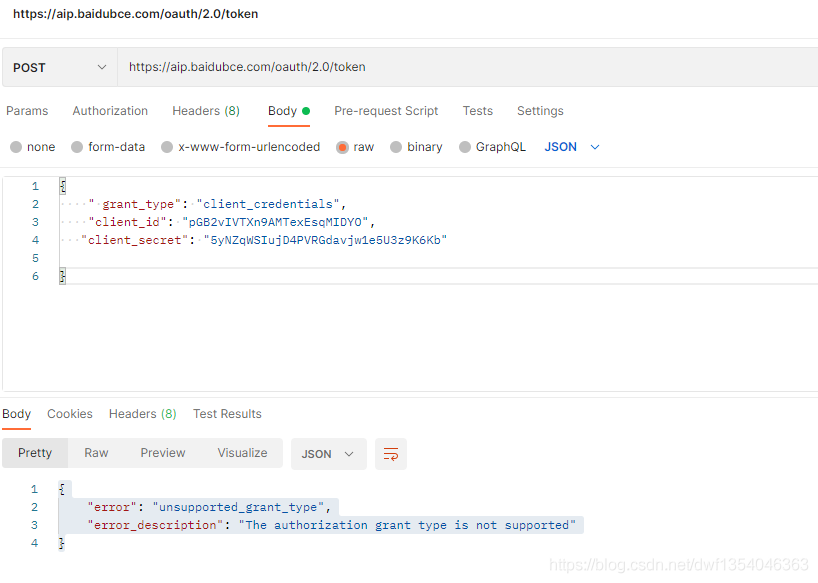
https://aip.baidubce.com/oauth/2.0/token

Postman test

{

    " grant_type": "client_credentials",

    "client_id": "pGB2vIVTXn9ATexEsqMIDYO",

   "client_secret": "5yNZqWSIuj4PVRGdavjw1e5U3z9K6Kb"

}

Get the token value and display the following results

{
    "error": "unsupported_grant_type",
    "error_description": "The authorization grant type is not supported"
}

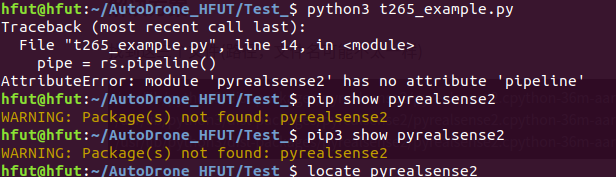
[Jeston Xavier NX Compile librealsense Error] AttributeError: module ‘pyrealsense2‘ has no attribute ‘pipeline‘

Attributeerror: module ‘pyrealsense 2’ has no attribute ‘pipeline’ error Jeston Xavier NX compiles librealsense

Cmake version problem description solution

Attributeerror: module ‘pyralesense2’ has no attribute ‘pipeline’ problem description solution

appendix

The problem of compiling realsense SDK using Jeston platform has attracted a lot of attention on GitHub issue, indicating that these problems are common
let’s start with an easy mistake,

Cmake version problem

Problem description

After compilation, (note that the PIP installation method is not suitable for Jeston platform, and pip only stores the precompiled packages of X86 platform)
an error is reported in import pyrealsense, and the module cannot be found

Solution

The apt package manager of Ubuntu cannot be upgraded to the latest version of cmake and needs to be recompiled. This is a big problem. You need to update cmake to 3.12 + before it can work normally. The steps are as follows:
first check your cmake Version (my version is normal)

if the version is too low, compile the new version of cmake yourself (it may be bad if it is too new).
note that the online tutorial will let you uninstall cmake in the current system, that is, execute the following instructions:

sudo apt-get autoremove cmake

Do not do this. This operation will uninstall all cmake compiled programs. For example, if you have installed the ROS system in your computer, you will be killed
cmake can directly overwrite the old version with the new version without uninstalling the old version

1.wget http://www.cmake.org/files/v3.13/cmake-3.13.0.tar.gz
2. tar xpvf cmake-3.13.0.tar.gz cmake-3.13.0/
3. cd cmake-3.13.0/
4. ./bootstrap --system-curl
5. make -j6
6. echo 'export PATH=/home/nvidia/cmake-3.13.0/bin/:$PATH' >> ~/. bashrc
7. source ~/.bashrc


AttributeError: module ‘pyrealsense2’ has no attribute ‘pipeline’

Problem description

Import pyrealsense2 does not report an error
but we generally only do this. It is considered that our compilation has been completed and the test has passed. In fact, there is no attributeerror when actually using the function of pyrealsense2: module ‘pyrealsense2’ has no attribute ‘pipeline’ error

Solution

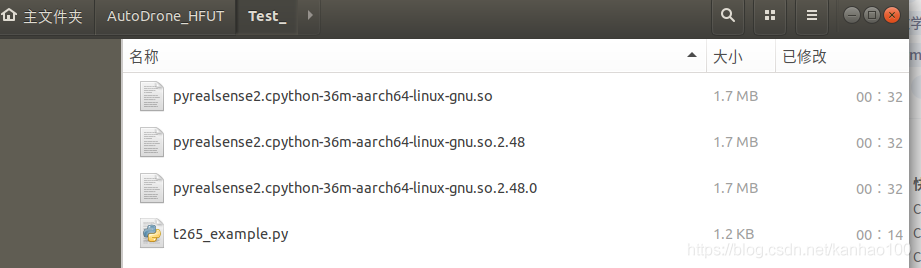
Find these three files (the path and file name may be different with your environment)

/usr/lib/python3/dist-packages/pyrealsense2/pyrealsense2.cpython-36m-aarch64-linux-gnu.so
/usr/lib/python3/dist-packages/pyrealsense2/pyrealsense2.cpython-36m-aarch64-linux-gnu.so.2.40
/usr/lib/python3/dist-packages/pyrealsense2/pyrealsense2.cpython-36m-aarch64-linux-gnu.so.2.40.0

Copy them to the location of your script
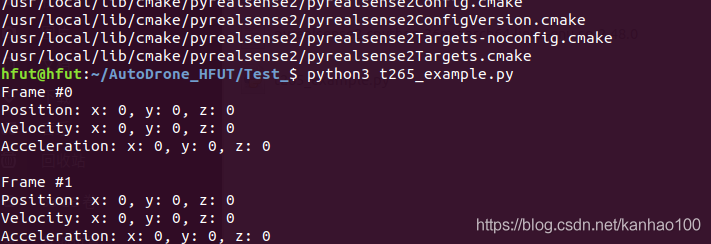
no error is reported

I know this method can not solve this problem gracefully
I remember solving this problem with raspberry pie 4B before, but I forgot.

Appendix

My cmake parameter

cmake ../ 
-DFORCE_RSUSB_BACKEND=ON 
-DBUILD_PYTHON_BINDINGS:bool=true 
-DPYTHON_EXECUTABLE=/usr/bin/python3.6 
-DCMAKE_BUILD_TYPE=release 
-DBUILD_EXAMPLES=true 
-DBUILD_GRAPHICAL_EXAMPLES=true 
-DBUILD_WITH_CUDA:bool=true

It should be noted that force_ RSUSB_ Backend, you’d better turn it on. There may be some problems. I forgot where I saw it
and import_ DEPTH_ CAM_ FW, update the firmware. It is recommended to close it, because the latest firmware file will be downloaded during cmake. We all know the current network situation. The probability is not moving. Don’t toss around here. Just update the firmware on the PC.

Complete parameter table: please refer to this table to determine the parameters to be filled in
https://dev.intelrealsense.com/docs/build-configuration

[Solved] RuntimeError: Error(s) in loading state_dict for FasterRCNN: Missing key(s) in state_dict:……

Problem description
RuntimeError: Error(s) in loading state_dict for FasterRCNN:Missing key(s) in state_dict: “backbone.body.conv1.weight”, “backbone.body.bn1.weight”, …

Solution:

# model.load_state_dict(torch.load("./model.pth"))
model.load_state_dict(torch.load("./model.pth"), False)

Source code analysis

load_state_dict(state_dict, strict=True)[SOURCE]
		Copies parameters and buffers from state_dict into this module and its descendants. If strict is True, then the keys of state_dict must exactly match the keys returned by this module’s state_dict() function.

		Parameters
			state_dict (dict) – a dict containing parameters and persistent buffers.

			strict (bool, optional) – whether to strictly enforce that the keys in state_dict match the keys returned by this module’s state_dict() function. Default: True

		Returns
			missing_keys is a list of str containing the missing keys

			unexpected_keys is a list of str containing the unexpected keys

		Return type
			NamedTuple with missing_keys and unexpected_keys fields

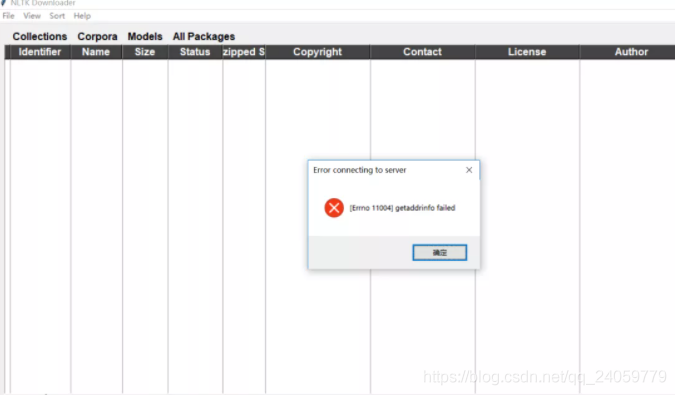
NLTK Error: [Error:11004] getaddrinfo failed [How to Solve]

When I run nltk’s word segmentation:

from nltk.tokenize import word_tokenize
text = "God is Great! I won a lottery."
print(word_tokenize(text))

The Punkt package is missing, so the following code is used to download it:

import nltk
nltk.download()

report errors  [ Error:11004] getaddrinfo failed

resolvent:

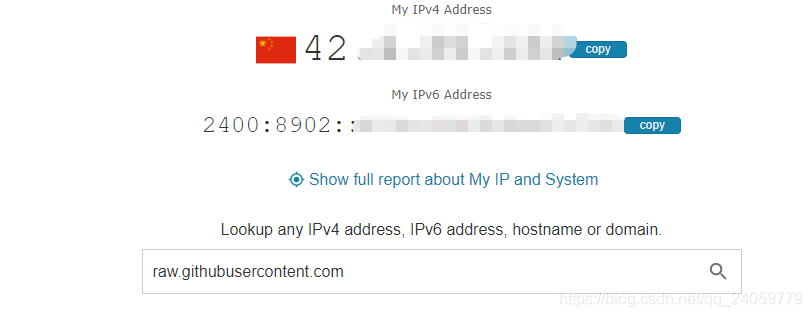
1. Open the website to query the IP address: https://www.ipaddress.com/ , and enter raw.githubusercontent.com

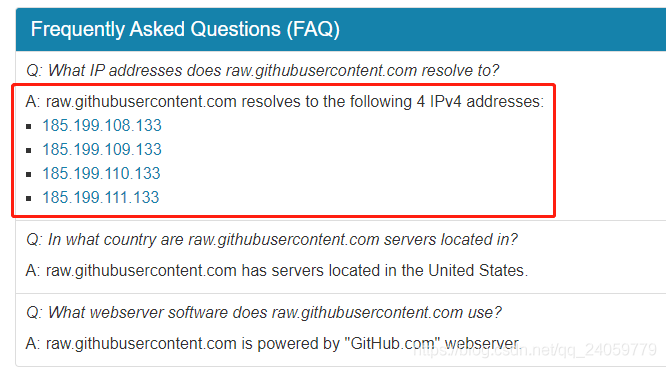
2. Copy the following four websites

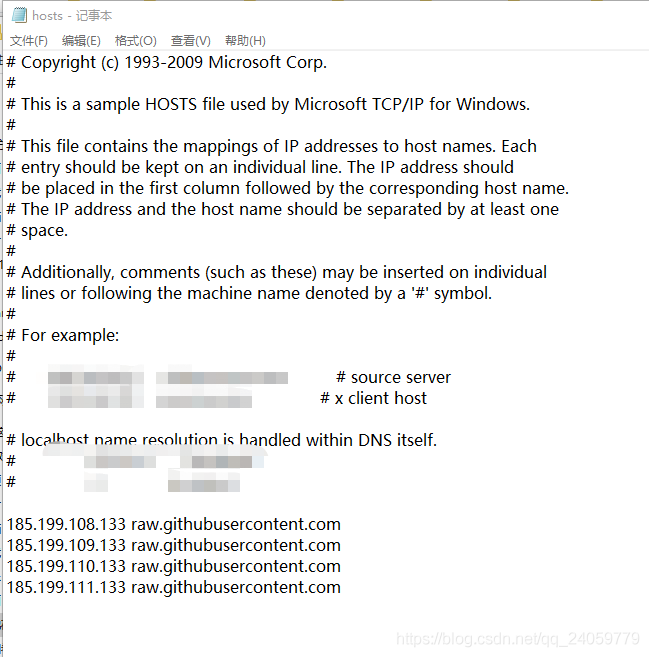
3. Open   C:\Windows\System32\drivers\etc\hosts   Paste the above URL to the back

RuntimeError: CUDNN_STATUS_EXECUTION_FAILED [How to Solve]

The error is as follows:

Traceback (most recent call last):
  File "main.py", line 23, in <module>
    t.train()
  File "c:\Paper Code\RCAN-master-Real\RCAN_TrainCode\code\trainer.py", line 51, in train
    sr = self.model(lr, idx_scale)
  File "C:\Anaconda3\envs\pytorch0.4.0\lib\site-packages\torch\nn\modules\module.py", line 491, in __call__
    result = self.forward(*input, **kwargs)
  File "c:\Paper Code\RCAN-master-Real\RCAN_TrainCode\code\model\__init__.py", line 54, in forward
    return self.model(x)
  File "C:\Anaconda3\envs\pytorch0.4.0\lib\site-packages\torch\nn\modules\module.py", line 491, in __call__
    result = self.forward(*input, **kwargs)
  File "c:\Paper Code\RCAN-master-Real\RCAN_TrainCode\code\model\rcan.py", line 107, in forward
    x = self.sub_mean(x)
  File "C:\Anaconda3\envs\pytorch0.4.0\lib\site-packages\torch\nn\modules\module.py", line 491, in __call__
    result = self.forward(*input, **kwargs)
  File "C:\Anaconda3\envs\pytorch0.4.0\lib\site-packages\torch\nn\modules\conv.py", line 301, in forward
    self.padding, self.dilation, self.groups)
RuntimeError: CUDNN_STATUS_EXECUTION_FAILED

Before code modification:

if __name__ == '__main__':
    torch.manual_seed(args.seed)
    checkpoint = utility.checkpoint(args)

    if checkpoint.ok:
        loader = data.Data(args)
        model = model.Model(args, checkpoint)
        loss = loss.Loss(args, checkpoint) if not args.test_only else None
        t = Trainer(args, loader, model, loss, checkpoint)
        while not t.terminate():
            t.train()
            t.test()

        checkpoint.done()

After code modification

if __name__ == '__main__':
    torch.backends.cudnn.enabled = False
    torch.manual_seed(args.seed)
    checkpoint = utility.checkpoint(args)

    if checkpoint.ok:
        loader = data.Data(args)
        model = model.Model(args, checkpoint)
        loss = loss.Loss(args, checkpoint) if not args.test_only else None
        t = Trainer(args, loader, model, loss, checkpoint)
        while not t.terminate():
            t.train()
            t.test()

        checkpoint.done()

Running ~ ~

Git push Submit to Remote Error: “remote: Support for password authentication was removed on August 13, 2021.“

Abnormal

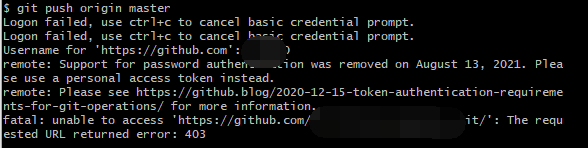
Error reporting for remote submission:

remote: Support for password authentication was removed on August 13, 2021. Please use a personal access token instead.
remote: Please see https://github.blog/2020-12-15-token-authentication-requirements-for-git-operations/ for more information.
fatal: unable to access 'https://github.com/xxx.git/': The requested URL returned error: 403

reason

From August 13, 2021, GitHub no longer supports submitting codes with passwords.


Solution:

Step 1: generate SSH key.

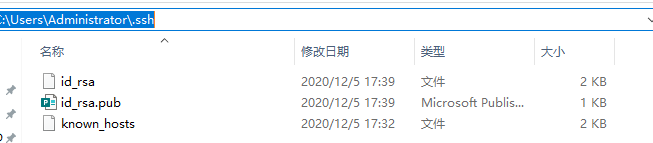
I use a Windows system. Usually, the SSH directory is C: \ users \ administrator \. SSH. If SSH is configured, there will be the following files, where id_ RSA is the private key, ID_ Rsa.pub is the public key.

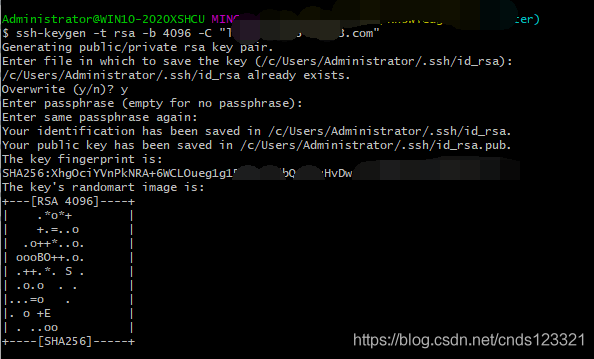
If SSH is not configured, execute the following command in Git bash to generate SSH key.

ssh-keygen -t rsa -b 4096 -C "Your GitHub Email"

For the options that appear, just default. The first option is the SSH save directory, which can be used by default; In the second option, if you are prompted that SSH already exists, enter y to overwrite and N to not overwrite; The third option is to enter the private key password. If you don’t want to log in with the private key, the private key password is blank. Press enter directly. Press enter twice because the password will be confirmed. After successful generation, you can see the generated key file in the directory.

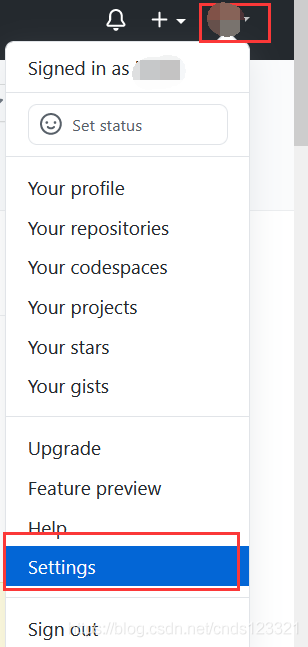
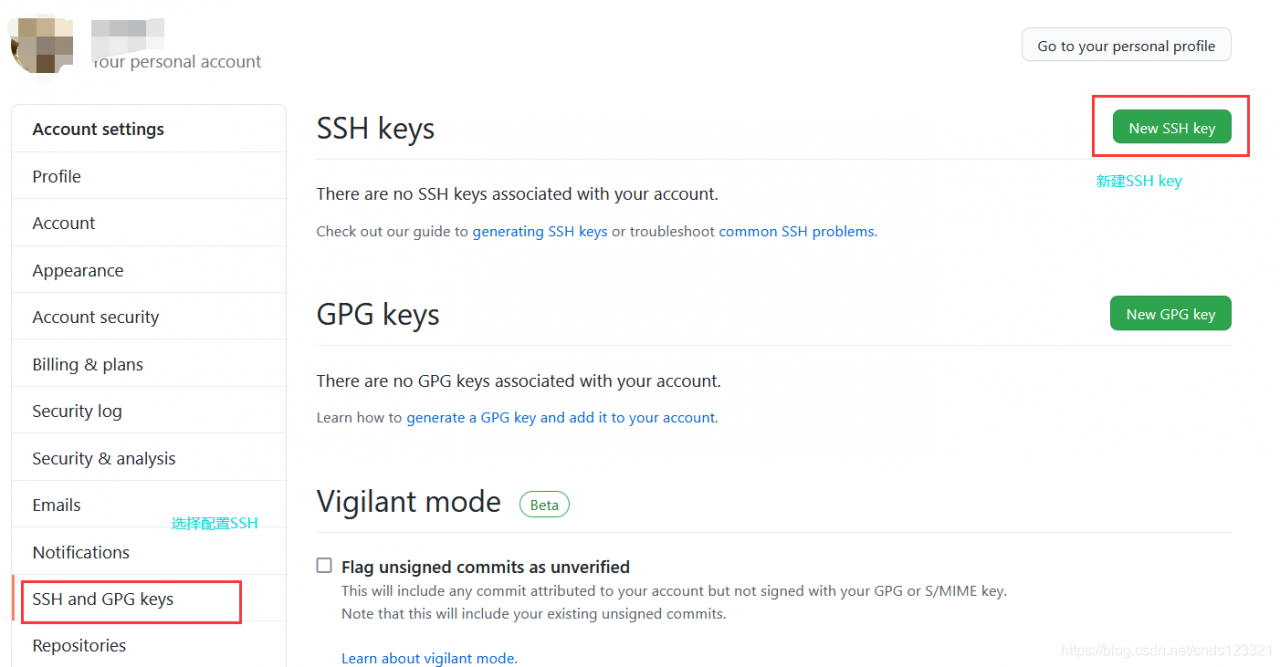
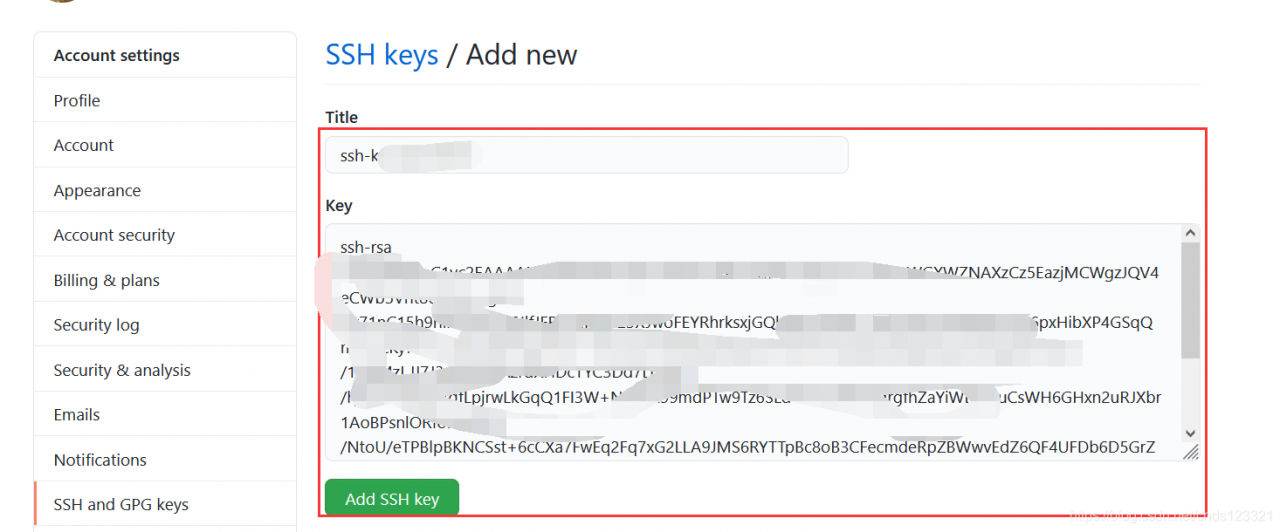
Step 2: configure to GitHub.

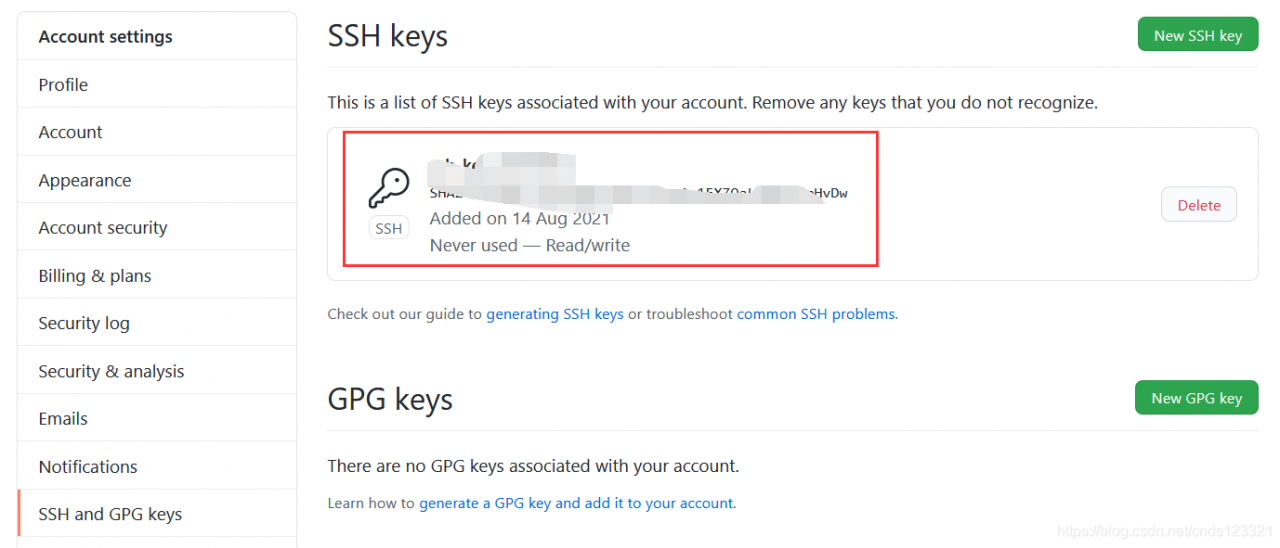
Will ID_ Copy the content in rsa.pub to the newly created SSH keys on GitHub.

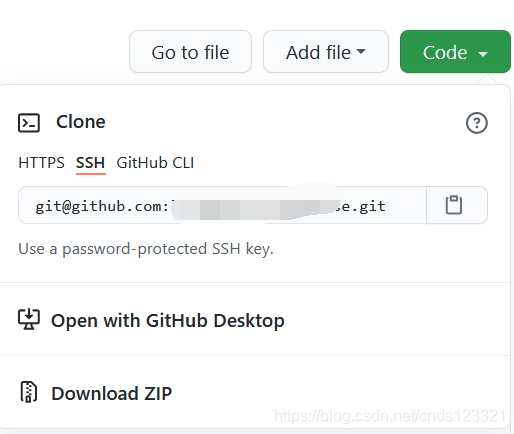
Now you can use SSH to clone code and copy SSH links

Git push submission is still unsuccessful

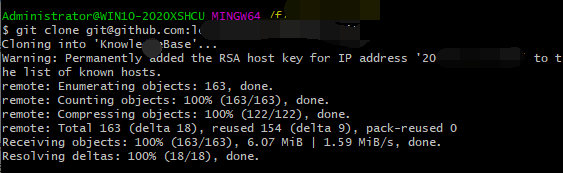
Therefore, it is very important to use SSH link to re clone the warehouse. You need to re clone a remote warehouse to the local.

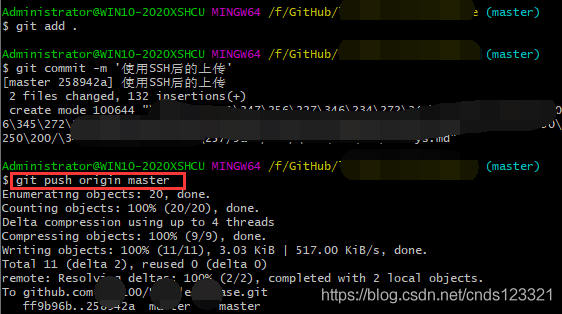
Just use remote commit again

Reference link: GitHub no longer supports password authentication solution: SSH password free and token login configuration