Author Archives: Robins

How to Fix NSS error 12190 in curl accessing to HTTPS

Environment.
CentOS 7
Question.
In use
curl https://192.168.1.8:6443/api/v1/nodes –cert /etc/kubernetes/pki/apiserver-kubelet-client. crt –key /etc/kubernetes/pki/apiserver-kubelet-client. key –cacert /etc/kubernetes/pki/ca. crt -v
Error NSS error -12190 (SSL_ERROR_PROTOCOL_VERSION_ALERT):
* Connection died, retrying a fresh connect
* Closing connection 0
* Issue another request to this URL: ‘https://192.168.1.8:6443/api/v2/nodes’
* About to connect() to 192.168.1.8 port 6443 (#1)
*   Trying 192.168.231.224…
* Connected to 192.168.1.8 (192.168.1.8) port 6443 (#1)
* TLS disabled due to previous handshake failure
*   CAfile: /etc/kubernetes/pki/ca. crt
CApath: none
* NSS error -12190 (SSL_ERROR_PROTOCOL_VERSION_ALERT)
* Peer reports incompatible or unsupported protocol version.
* Closing connection 1
How to Fix:
(1) yum update nss nss-util nspr(2)yum update curl
Updating only (1) doesn’t work, it should be that (2) this works (not verified).

Reference.
1、https://stackoverflow.com/questions/43975973/how-to-fix-error-failed-to-download-on-rbenv-install
2、https://stackoverflow.com/questions/30678583/centos-6-6-curl-returns-error-when-connecting-to-some-ssl-site

How to Fix TNS 12560 Error

alert.log error

Fatal NI connect error 12170.

VERSION INFORMATION:

TNS for Solaris: Version 11.2.0.1.0 – Production

Oracle Bequeath NT Protocol Adapter for Solaris: Version 11.2.0.1.0 – Production

TCP/IP NT Protocol Adapter for Solaris: Version 11.2.0.1.0 – Production

Time: 09-SEP-2011 10:19:05

Tracing not turned on.

Tns error struct:

ns main err code: 12535

TNS-12535: TNS:operation timed out

ns secondary err code: 12560

nt main err code: 505

TNS-00505: Operation timed out

nt secondary err code: 145

nt OS err code: 0

Client address: (ADDRESS=(PROTOCOL=tcp)(HOST=10.201.54.197)(PORT=65205))

Fri Sep 09 10:19:36 2011

This question can be found in metalink [ID 1286376.1]

‘Fatal NI connect error 12170′, ‘TNS-12535: TNS:operation timed out’ Reported in 11g Alert Log

Problems Description:

Suggested Actions:

– Search the corresponding text version of the listener log located on the database server for the corresponding client connection referenced by the Client address details referenced in the alert log message.

For the message incident below you would search the listener log for the ‘Client address’ string:

(ADDRESS=(PROTOCOL=tcp)(HOST=10.159.34.117)(PORT=1092))

The search of the listener log should find the most recent connection before the time reference displayed in the alert log message, e.g. ’22-JAN-2011 21:48:23′.

-Corresponding listener log entry:

22-JAN-2011 21:20:12 * (CONNECT_DATA=(SERVER=DEDICATED)(SERVICE_NAME=AMN11264.us.oracle.com)(CID=(PROGRAM=D:\app\mcassady\product\11.2.0\dbhome_1\bin\sqlplus.exe)(HOST=mcassady-lap)(USER=mca

ssady))) * (ADDRESS=(PROTOCOL=tcp)(HOST=10.159.34.117)(PORT=1092)) * establish * AMN11264.us.oracle.com * 0

– Alert log entry:

————

Fatal NI connect error 12170.

VERSION INFORMATION:

TNS for Solaris: Version 11.2.0.1.0 – Production

Oracle Bequeath NT Protocol Adapter for Solaris: Version 11.2.0.1.0 – Production

TCP/IP NT Protocol Adapter for Solaris: Version 11.2.0.1.0 – Production

Time: 22-JAN-2011 21:48:23

Tracing not turned on.

Tns error struct:

ns main err code: 12535

TNS-12535: TNS:operation timed out

ns secondary err code: 12560

nt main err code: 505

TNS-00505: Operation timed out

nt secondary err code: 145

nt OS err code: 0

Client address: (ADDRESS=(PROTOCOL=tcp)(HOST=10.159.34.117)(PORT=1092))

————

Problem Analytis:

Note the time of the client corresponding client connection(s) in the listener log.  Here you may find a particular client, set of clients or particular applications that are improperly disconnecting causing the timeout errors to be raised and recorder in the database alert log.

You may choose to revert from the new Automatic Diagnostic Repository (ADR) method to prevent the Oracle Net diagnostic details from being written to the alert log(s) by setting the following Oracle Net configuration parameters:

How to Fix:

To revert to Oracle Net Server tracing/logging, set following parameter in the server’s sqlnet. ora :

DIAG_ADR_ENABLED = OFF

Also, to back out the ADR diag for the Listener component, set following parameter in the server’s listener.ora:

DIAG_ADR_ENABLED_<listenername> = OFF

– Where the <listenername> would be replaced with the actual name of the configured listener(s) in the listener. ora configuration file.  For example, if the listener name is ‘LISTENER’, the parameter would read:

DIAG_ADR_ENABLED_LISTENER = OFF

-Reload or restart the TNS Listener for the parameter change to take effect.

How to Fix Spoolsv.exe Application Error

[quote]

[url]http://www.instant-registry-fixes.org/how-to-fix-spoolsvexe-application-error/[/url]

[/quote]

“Spoolsv.exe – Application Error”

“The instruction at “0x77fcc2c0” referenced memory at “0x00000000″.

“The memory could not be written.”

How to Fix[list]

[*]Open [b]Control Panel[/b], select Performance and Maintenance, select [b]Administrative Tools[/b] and then select the [b]Services [/b]option.

[*]In the Services management console, locate the [b]Print Spooler[/b] services, right-click on it and select [b]Stop[/b].

[*]Next, open the C[b]:\Windows\System32\Spool\Printers[/b] folder. (Here, we are assuming that your Windows is installed in the default C:\Windows folder)

[*]Delete all the [b]. SHD[/b] and [b]. SPL[/b] files from this folder.

[*]Next, open the TMP folder and delete all old and unused files from this folder.

[*]Finally, [b]restart [/b]the Spooler service from the Services management console.

[/list]

TypeScript error TS2345: Argument of type ‘String ‘is not assignable to parameter of type ‘string’

Today I encountered an error learning TypeScript polymorphism (i.e., inheritance)
Mistakes show

here indicates an error with super inheritance. String arguments cannot be assigned to string arguments. What the hell is this
To solve the error
See String, think of it, change to String try it? So he can
Modified polymorphic code

class Animal {
    name:String
    constructor(name:String) {
        this.name = name
    }
    eat() {}
}
class Dog extends Animal{
    constructor(name:String) {
        super(name)
    }
    eat() {
        return this.name + 'Eat Bean'
    }
}
class Cat extends Animal{
    constructor(name:String) {
        super(name)
    }
    eat() {
        return this.name + 'Eat?'
    }
}
let dog = new Dog('WW')
console.log(dog.eat())
let cat = new Cat('MM')
console.log(cat.eat())

Questions remain
In fact, the previous use of string inheritance is shown without error information, I don’t know why there is an error when using polymorphic inheritance, so I can only change it to string according to the prompt. If you know the reason, please give instruction

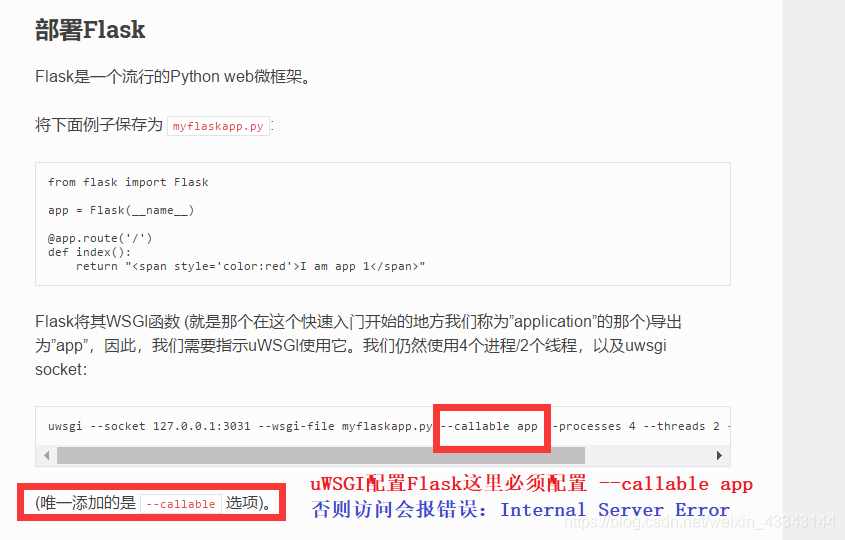
summary of configuration and deployment of uwsgi+nginx+flag in centos7 and why internal server error is prompted [official instructions]

Inspired by this article: https://www.cnblogs.com/zhangjpn/p/6876412.html?utm_source=itdadao& utm_medium=referral
Uwsgi official documentation configuration configuration 】 【 reference Flask: https://uwsgi-docs-zh.readthedocs.io/zh_CN/latest/WSGIquickstart.html

Customize a UWSGI.ini file and add the following

[uwsgi]
# socket=Extranet ip: port (sockets are used for nginx connections, sockets are not supported for normal http connections)
http=0.0.0.0:8099
chdir=/root/uniapp-Flask/
wsgi-file=/root/uniapp-Flask/test.py
# must be parameterized, otherwise it will report Internal Server Error
callable=app
processes=4
threads=2
master=True
pidfile=uwsgi.pid
daemonize=uswgi.log

stop: uwsgi — stop uwsgi. Pid [if it cannot be stopped, use the kill command]
restart: uwsgi — reload uwsgi. Pid
USES the HTTP protocol to check the operation of the website, it works normally, but the static file cannot be loaded

// Command Line Run
uwsgi --http 0.0.0.0:8099 --wsgi-file main.py --callable app --processes 4 --threads 2

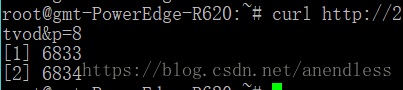
Curl returns empty reply from server. Due to the processing of special characters, curl cannot be accessed and the browser can access it.

Use the browser for normal access.
When using curl access, either appear
Return Empty Reply from Server or display

Through a number of experiments and Windows under the curl comparison, found that the access path has & AMP; Character, resulting in truncation.
When you add double quotes, you can access it normally
Both curl “http://x.x.x.x:8080/wserver?r=x& s=x& ./”

Socket error 10053

socket error- Software caused connection abort. Error code : 10053

Action.c(16): Error : socket0 – Software caused connection abort. Error code : 10053.

This error is caused by socket communication process, which is usually like this :
normal C/S communication process is:
Server Listen;

Client Connect;

Server Accept;

Client Send;

Server Recv;

Client Close;

Server Close

If the Client side does not actively close the connection and directly exits, the Server side thread will cause an error of 10053 (this error usually does not affect much), and if the Server first actively closes the connection in the communication process, the Client side will also cause an error of 10053
When the network is down, it usually means that the Client thinks the Server is down and yells 10053

Keil5 compiler error: runtime error R6002 – floating point support not loaded

Wanted to use JTAG emulator + Keil5 try online debugging and download the program using a USB serial port until (download), found an error, then compile time corresponding download file cannot be found. Axf (similar to unable to generate a HEX file downloaded to the board on the inside), then check along while information on the Internet, find below the compile error: the runtime error R6002 – floating point support not the loaded; Then began to look up information on the Internet and a variety of methods to solve.

Error 1051 (42s02): unknown table ‘…’

The reason Why I reported this error is that the storage engine used MyISAM before, but changed to InnoDB later
But I can’t delete the table because the storage engine mode used for the table before is still MyISAM, so I can’t delete it.
1 species,
Modify the storage engine of the table:
The second,
1. Delete the file of the corresponding table. Make sure the table is useless before deleting.
2. Find the location of the corresponding library in the system, such as: /var/lib/mysql/ library name

MySQL error code ‘1064’ troubleshooting process

Afternoon self-test code, stuck on this update for an hour and a half, greatly reduced the development productivity, send out the screening process, good soldiers will not fall into the same trap. First, type out the exception stack.

2016-03-28 17:23:38.420 main DEBUG [org.springframework.beans.factory.support.DefaultListableBeanFactory:463] - Finished creating instance of bean 'Sybase'
2016-03-28 17:23:38.420 main  INFO [org.springframework.jdbc.support.SQLErrorCodesFactory:126] - SQLErrorCodes loaded: [DB2, Derby, H2, HSQL, Informix, MS-SQL, MySQL, Oracle, PostgreSQL, Sybase]
2016-03-28 17:23:38.420 main DEBUG [org.springframework.jdbc.support.SQLErrorCodesFactory:199] - Looking up default SQLErrorCodes for DataSource [com.jd.im.data.dataresource.JdDataSourceDbcp@14021a9]
2016-03-28 17:23:38.423 main DEBUG [org.springframework.jdbc.support.SQLErrorCodesFactory:217] - Database product name cached for DataSource [com.jd.im.data.dataresource.JdDataSourceDbcp@14021a9]: name is 'MySQL'
2016-03-28 17:23:38.423 main DEBUG [org.springframework.jdbc.support.SQLErrorCodesFactory:175] - SQL error codes for 'MySQL' found
2016-03-28 17:23:38.423 main DEBUG [org.springframework.jdbc.support.SQLErrorCodeSQLExceptionTranslator:399] - Translating SQLException with SQL state '42000', error code '1064', message [  
--- The error occurred while applying a parameter map.  
--- Check the mall.org.updateById-InlineParameterMap.  
--- Check the statement (update failed).  
--- Cause: com.mysql.jdbc.exceptions.jdbc4.MySQLSyntaxErrorException: You have an error in your SQL syntax; check the manual that corresponds to your MySQL server version for the right syntax to use near 'WHERE id = 12' at line 1]; SQL was [] for task [SqlMapClient operation]
2016-03-28 17:23:38.424 main ERROR [com.jd.dd.mall.service.waiter.impl.OrgService‫Impl:97] - IM data access exception
com.jd.im.data.exception.IMDataAccessException: IM data access exception
	at com.jd.im.data.dataresource.IMSqlMapClientTemplateForMultDs.handleUserException(IMSqlMapClientTemplateForMultDs.java:280)
	at com.jd.im.data.dataresource.IMSqlMapClientTemplateForMultDs.update(IMSqlMapClientTemplateForMultDs.java:160)
	at com.jd.dd.mall.service.waiter.impl.OrgService‫Impl.updateById(OrgService‫Impl.java:106)
	at com.jd.dd.mall.service.waiter.impl.OrgService‫Impl.add(OrgService‫Impl.java:92)
	at com.jd.dd.mall.web.controller.waiter.OrgManageController.addOrg(OrgManageController.java:85)
	at sun.reflect.NativeMethodAccessorImpl.invoke0(Native Method)
	at sun.reflect.NativeMethodAccessorImpl.invoke(NativeMethodAccessorImpl.java:39)
	at sun.reflect.DelegatingMethodAccessorImpl.invoke(DelegatingMethodAccessorImpl.java:25)
	at java.lang.reflect.Method.invoke(Method.java:597)
	at org.springframework.web.method.support.InvocableHandlerMethod.invoke(InvocableHandlerMethod.java:219)
	at org.springframework.web.method.support.InvocableHandlerMethod.invokeForRequest(InvocableHandlerMethod.java:132)
	at org.springframework.web.servlet.mvc.method.annotation.ServletInvocableHandlerMethod.invokeAndHandle(ServletInvocableHandlerMethod.java:104)
	at org.springframework.web.servlet.mvc.method.annotation.RequestMappingHandlerAdapter.invokeHandleMethod(RequestMappingHandlerAdapter.java:746)
	at org.springframework.web.servlet.mvc.method.annotation.RequestMappingHandlerAdapter.handleInternal(RequestMappingHandlerAdapter.java:687)
	at org.springframework.web.servlet.mvc.method.AbstractHandlerMethodAdapter.handle(AbstractHandlerMethodAdapter.java:80)
	at org.springframework.web.servlet.DispatcherServlet.doDispatch(DispatcherServlet.java:925)
	at org.springframework.web.servlet.DispatcherServlet.doService(DispatcherServlet.java:856)
	at org.springframework.web.servlet.FrameworkServlet.processRequest(FrameworkServlet.java:915)
	at org.springframework.web.servlet.FrameworkServlet.doPost(FrameworkServlet.java:822)
	at javax.servlet.http.HttpServlet.service(HttpServlet.java:727)
	at org.springframework.web.servlet.FrameworkServlet.service(FrameworkServlet.java:796)
	at org.springframework.test.web.servlet.TestDispatcherServlet.service(TestDispatcherServlet.java:66)
	at javax.servlet.http.HttpServlet.service(HttpServlet.java:820)
	at org.springframework.mock.web.MockFilterChain$ServletFilterProxy.doFilter(MockFilterChain.java:168)
	at org.springframework.mock.web.MockFilterChain.doFilter(MockFilterChain.java:136)
	at org.springframework.test.web.servlet.MockMvc.perform(MockMvc.java:134)
	at com.jd.service.waiter.OrgControllerTest.add(OrgControllerTest.java:53)
	at sun.reflect.NativeMethodAccessorImpl.invoke0(Native Method)
	at sun.reflect.NativeMethodAccessorImpl.invoke(NativeMethodAccessorImpl.java:39)
	at sun.reflect.DelegatingMethodAccessorImpl.invoke(DelegatingMethodAccessorImpl.java:25)
	at java.lang.reflect.Method.invoke(Method.java:597)
	at org.junit.runners.model.FrameworkMethod$1.runReflectiveCall(FrameworkMethod.java:44)
	at org.junit.internal.runners.model.ReflectiveCallable.run(ReflectiveCallable.java:15)
	at org.junit.runners.model.FrameworkMethod.invokeExplosively(FrameworkMethod.java:41)
	at org.junit.internal.runners.statements.InvokeMethod.evaluate(InvokeMethod.java:20)
	at org.junit.internal.runners.statements.RunBefores.evaluate(RunBefores.java:28)
	at org.springframework.test.context.junit4.statements.RunBeforeTestMethodCallbacks.evaluate(RunBeforeTestMethodCallbacks.java:74)
	at org.springframework.test.context.junit4.statements.RunAfterTestMethodCallbacks.evaluate(RunAfterTestMethodCallbacks.java:83)
	at org.springframework.test.context.junit4.statements.SpringRepeat.evaluate(SpringRepeat.java:72)
	at org.springframework.test.context.junit4.SpringJUnit4ClassRunner.runChild(SpringJUnit4ClassRunner.java:231)
	at org.springframework.test.context.junit4.SpringJUnit4ClassRunner.runChild(SpringJUnit4ClassRunner.java:88)
	at org.junit.runners.ParentRunner$3.run(ParentRunner.java:193)
	at org.junit.runners.ParentRunner$1.schedule(ParentRunner.java:52)
	at org.junit.runners.ParentRunner.runChildren(ParentRunner.java:191)
	at org.junit.runners.ParentRunner.access$000(ParentRunner.java:42)
	at org.junit.runners.ParentRunner$2.evaluate(ParentRunner.java:184)
	at org.springframework.test.context.junit4.statements.RunBeforeTestClassCallbacks.evaluate(RunBeforeTestClassCallbacks.java:61)
	at org.springframework.test.context.junit4.statements.RunAfterTestClassCallbacks.evaluate(RunAfterTestClassCallbacks.java:71)
	at org.junit.runners.ParentRunner.run(ParentRunner.java:236)
	at org.springframework.test.context.junit4.SpringJUnit4ClassRunner.run(SpringJUnit4ClassRunner.java:174)
	at org.eclipse.jdt.internal.junit4.runner.JUnit4TestReference.run(JUnit4TestReference.java:50)
	at org.eclipse.jdt.internal.junit.runner.TestExecution.run(TestExecution.java:38)
	at org.eclipse.jdt.internal.junit.runner.RemoteTestRunner.runTests(RemoteTestRunner.java:459)
	at org.eclipse.jdt.internal.junit.runner.RemoteTestRunner.runTests(RemoteTestRunner.java:675)
	at org.eclipse.jdt.internal.junit.runner.RemoteTestRunner.run(RemoteTestRunner.java:382)
	at org.eclipse.jdt.internal.junit.runner.RemoteTestRunner.main(RemoteTestRunner.java:192)
Caused by: org.springframework.jdbc.BadSqlGrammarException: SqlMapClient operation; bad SQL grammar []; nested exception is com.ibatis.common.jdbc.exception.NestedSQLException:   
--- The error occurred while applying a parameter map.  
--- Check the mall.org.updateById-InlineParameterMap.  
--- Check the statement (update failed).  
--- Cause: com.mysql.jdbc.exceptions.jdbc4.MySQLSyntaxErrorException: You have an error in your SQL syntax; check the manual that corresponds to your MySQL server version for the right syntax to use near 'WHERE id = 12' at line 1
	at org.springframework.jdbc.support.SQLErrorCodeSQLExceptionTranslator.doTranslate(SQLErrorCodeSQLExceptionTranslator.java:233)
	at org.springframework.jdbc.support.AbstractFallbackSQLExceptionTranslator.translate(AbstractFallbackSQLExceptionTranslator.java:72)
	at org.springframework.orm.ibatis.SqlMapClientTemplate.execute(SqlMapClientTemplate.java:206)
	at org.springframework.orm.ibatis.SqlMapClientTemplate.update(SqlMapClientTemplate.java:381)
	at com.jd.im.data.dataresource.IMSqlMapClientTemplateForMultDs.update(IMSqlMapClientTemplateForMultDs.java:134)
	... 54 more
Caused by: com.ibatis.common.jdbc.exception.NestedSQLException:   
--- The error occurred while applying a parameter map.  
--- Check the mall.org.updateById-InlineParameterMap.  
--- Check the statement (update failed).  
--- Cause: com.mysql.jdbc.exceptions.jdbc4.MySQLSyntaxErrorException: You have an error in your SQL syntax; check the manual that corresponds to your MySQL server version for the right syntax to use near 'WHERE id = 12' at line 1
	at com.ibatis.sqlmap.engine.mapping.statement.MappedStatement.executeUpdate(MappedStatement.java:107)
	at com.ibatis.sqlmap.engine.impl.SqlMapExecutorDelegate.update(SqlMapExecutorDelegate.java:457)
	at com.ibatis.sqlmap.engine.impl.SqlMapSessionImpl.update(SqlMapSessionImpl.java:90)
	at org.springframework.orm.ibatis.SqlMapClientTemplate$9.doInSqlMapClient(SqlMapClientTemplate.java:383)
	at org.springframework.orm.ibatis.SqlMapClientTemplate$9.doInSqlMapClient(SqlMapClientTemplate.java:381)
	at org.springframework.orm.ibatis.SqlMapClientTemplate.execute(SqlMapClientTemplate.java:203)
	... 56 more

and my Ibatis SQL

<update id="updateById"  parameterClass="Org">
		UPDATE org
		SET	name = #name:VARCHAR#,
			<isNotNull property="tree_level">tree_level = #tree_level#, </isNotNull>
			<isNotNull property="yn">yn = #yn#, </isNotNull>
			<isNotNull property="route">route = #route:VARCHAR#, </isNotNull>
			`version` = `version` + 1,
			<isNotNull property="editor">editor = #editor:VARCHAR#  </isNotNull>
			
		WHERE id = #id#
	</update>

like this stack does not clearly indicate the cause of SQL problems, troubleshooting problems must be according to the error code to check. Baidu checked the 1064 error code. The column name of the table overlaps with the Mysql keyword. OK, I took this SQL close to the mysql client query interface and found that the name field changed to the color of the keyword. I thought I found the problem, so I put back quotes around the name. Run the unit test again and report an error of 1064.

There is no way out, only ibATIS executed SQL typing out, put into mysql client to see. OK, log4J plus log, the execution of IBATIS SQL typing out. Run the unit test again and the SQL doesn’t come out.
There is a feeling of frustration that should not be called indolent every day!
You have no choice but to look at SQL with your eyes. If the Editor field is null, then there are extra commas before the WHERE. Adjust the SQL.

	<update id="updateById"  parameterClass="Org">
		UPDATE org
		SET id = #id# ,
			<isNotNull property="name">`name` = #name:VARCHAR#, </isNotNull>
			<isNotNull property="tree_level">tree_level = #tree_level#, </isNotNull>
			<isNotNull property="yn">yn = #yn#, </isNotNull>
			<isNotNull property="route">route = #route:VARCHAR#, </isNotNull>
			<isNotNull property="editor">editor = #editor:VARCHAR# , </isNotNull>
			`version` = `version` + 1
		WHERE id = #id#
	</update>

Then run the unit test and the SQL executes successfully. Just log can not type out SQL, this time to type out. Where have you been when I need you?Mysql’s error code is not reliable at all! The SQL syntax is obviously wrong, but the code of 1064 is quoted.

Remove the back quotes from the Name and Version fields and the SQL will still execute normally. Fun!

Error: (2, ‘RegOpenKeyEx’, error resolution

Read the key values in the registry in Python as follows:

#coding:utf-8

import win32api, win32con
import os
key = win32api.RegOpenKeyEx(win32con.HKEY_CLASSES_ROOT, 'CLSID\\{01249E9F-88FF-45d5-82DB-A1BEE06E123C}\\Shell\Open\\Command', 0,  win32con.KEY_READ)
keyValue = win32api.RegQueryValue(key, '')


print keyValue

 
Then run it with the following error:

Traceback (most recent call last):
  File "D:\users\Desktop\yunpanAuto.py", line 8, in <module>
    key = win32api.RegOpenKeyEx(win32con.HKEY_CLASSES_ROOT, 'CLSID\\{01249E9F-88FF-45d5-82DB-A1BEE06E123C}\\Shell\Open\\Command', 0,  win32con.KEY_READ)
error: (2, 'RegOpenKeyEx', '\xcf\xb5\xcd\xb3\xd5\xd2\xb2\xbb\xb5\xbd\xd6\xb8\xb6\xa8\xb5\xc4\xce\xc4\xbc\xfe\xa1\xa3')

 
This depends on my own problem, because my Window system is 64-bit and Python is 32-bit, so I need to add another parameter:

key = win32api.RegOpenKeyEx(win32con.HKEY_CLASSES_ROOT, 'CLSID\\{01249E9F-88FF-45d5-82DB-A1BEE06E123C}\\Shell\Open\\Command', 0,  win32con.KEY_READ | win32con.KEY_WOW64_64KEY)

Just change the statement after the key above.