System search for PowerShell, right-click PowerShell to run as an administrator, and then enter the following command to execute,
set-ExecutionPolicy RemoteSigned
Then, select Y to complete the setup
System search for PowerShell, right-click PowerShell to run as an administrator, and then enter the following command to execute,
set-ExecutionPolicy RemoteSigned
Then, select Y to complete the setup
Two points timeout, there is no choice to build the tree first, may lead to too much recursion, so timeout, code:
#include<iostream>
#include<set>
#include<vector>
using namespace std;
set<int> se;
int a[10010];
int b[10010];
int n1,n2;
set<int> father;
vector<int> v;
bool f1=false,f2=false;
void func1(int l1,int r1,int l2,int r2,int aim,int t2){
    int t=l2;
    for(t;t<=r2&&b[t]!=a[l1];t++);
    if(aim<b[t]){
        if(b[t]==t2){f1=true;return;}
        father.insert(b[t]);
        func1(l1+1,t-l2+l1,l2,t-1,aim,t2);
    }
    else if(aim>b[t]){
        if(b[t]==t2){f1=true;return;}
        father.insert(b[t]);
        func1(l1+t-l2+1,r1,t+1,r2,aim,t2);
    }
    return;
}
void func2(int l1,int r1,int l2,int r2,int aim,int t1){
    int t=l2;
    for(t;t<=r2&&b[t]!=a[l1];t++);
    if(aim<b[t]){
        if(b[t]==t1){f2=true;return;}
        v.push_back(b[t]);
        func2(l1+1,t-l2+l1,l2,t-1,aim,t1);
    }
    else if(aim>b[t]){
        if(b[t]==t1){f2=true;return;}
        v.push_back(b[t]);
        func2(l1+t-l2+1,r1,t+1,r2,aim,t1);
    }
    return;
}
int main(){
    cin>>n1>>n2;
    for(int i=0;i<n2;i++){
        cin>>a[i];
        se.insert(a[i]);
    }
    auto it=se.begin();
    for(int i=0;i<n2;i++){
        b[i]=*it;
        it++;
    }
    for(int i=0;i<n1;i++){
        f1=false;f2=false;
        int t1,t2;
        cin>>t1>>t2;

        if(se.find(t1)==se.end()&&se.find(t2)==se.end()){
            cout<<"ERROR: "<<t1<<" and "<<t2<<" are not found."<<endl;
            continue;
        }
        else if(se.find(t1)==se.end()&&se.find(t2)!=se.end()){
            cout<<"ERROR: "<<t1<<" is not found."<<endl;
            continue;
        }
        else if(se.find(t1)!=se.end()&&se.find(t2)==se.end()){
            cout<<"ERROR: "<<t2<<" is not found."<<endl;
            continue;
        }
        if(t1==t2){
            cout<<t1<<" is an ancestor of "<<t1<<"."<<endl;
            continue;
        }
        father.clear();
        v.clear();
        father.insert(a[0]);
        v.push_back(a[0]);
        func1(0,n2-1,0,n2-1,t1,t2);
        if(f1){
            cout<<t2<<" is an ancestor of "<<t1<<"."<<endl;
            continue;
        }
        func2(0,n2-1,0,n2-1,t2,t1);
        if(f2){
            cout<<t1<<" is an ancestor of "<<t2<<"."<<endl;
            continue;
        }
        for(int i=v.size()-1;i>=0;i--){
            if(father.find(v[i])!=father.end()){
                cout<<"LCA of "<<t1<<" and "<<t2<<" is "<<v[i]<<"."<<endl;
                break;
            }
        }
    }
    return 0;
}
Install the Nvidia driver (same as before)
2. Install the CUDA10 version, do not select Compact, select Custom and then select All.
>
>
>
>
>
>
>
>
>
>
>
>
>
>
>
> Make sure you have CUDA installed and don’t continue without it.
②. Create a new project – select nvidia-cuda xx, select your name and define your path.
③. Remove the kernel.cu file and add your own CPP, CU, H files.
④. Configuration header file
Conventional – character set for double-byte character or not
c/c + + – general – additional include directories
E: \ opencv300 \ opencv \ build \ include \ opencv2
E: \ opencv300 \ opencv, build, include, opencv
E: \ opencv300, opencv, build, include the
D: \ tensorRTIntegrate \ TensorRT – master \ third_party \ cub
D: \ tensorRTIntegrate \ TensorRT – master \ include
C: \ Program Files \ NVIDIA GPU Computing Toolkit \ CUDA \ v10.0 \ include
D:\ TensorrtIntegrate \ Tensorrt-master \ Plugin
C/C ++ – Secure_No_Warnings
/ C ++ – Preprocessor – Warnings
D:\ TensorrtIntegrate \ Tensorrt-master \ Plugin
C/C ++ – Preprocessor – Warnings
C/C ++ – Precompiled header – Precompiled header – Do not use the precompiled header
CUDA C/C ++ -Common-Additional Include Directories
C: ProgramData\NVIDIA Corporation\CUDA Samples\ V10.0 \ Common \ Inc
DA C/C ++ -Device – Code Generation
te_75, SM_75 Note: Here the numbers are changed based on the graphics card power, the GPU2080/2080TI power is 75.
linker
– general – additional libraries directory E: \ opencv300 \ opencv, build, x64, vc12 \ lib
D: \ tensorRTIntegrate \ lean \ cuda10.0 \ lib
C: \ Program Files \ NVIDIA GPU Computing Toolkit \ CUDA \ v10.0 \ lib \ x64
D:\tensorRTIntegrate\lean\ tensorrt-6.0.1.5 \lib
Linker
dadevrt.lib
c>t.lib
cudart_>ic.lib
cudnn.libb7 cufft.lib
>ftw.lib
c>t.lib curand.lib
cusolver.lib
cusparse.lib
nppc.lib
nppial.lib
nppicc.lib
nppicom.lib
nppidei.lib
nppif.lib
nppig.lib
nppim.lib
nppist.lib
nppisu.lib
nppitc.lib
npps.lib
nvblas.lib
nvgraph.lib
nvml.lib
nvrtc.lib
OpenCL.lib
nvinfer.lib
nvinfer_plugin.lib
nvonnxparser.lib
nvparsers.lib
opencv_ts300.lib
Opencv_ts300d. lib
opencv_world300.lib
encv_world300d. lib
P> the DLL files of Tnesorrt and the DLL files of OpenCV in the project directory.
Tnesorrt DLL path: D: \ tensorRTIntegrate \ lean \ TensorRT – 6.0.1.5 \ lib DLL file:
nvinfer. DLL
nvinfer_plugin. DLL
nvonnxparser. DLL
nvparsers. DLL
nvserialize. DLL
OPENCV DLL path: E: \ opencv300 \ opencv, build, x64, vc12 \ bin DLL file:
opencv_ffmpeg300_64. DLL
opencv_world300. DLL
opencv_world300d. DLL
configured above, you can compile.
Do this after mv linux-amd64/tiller /usr/local/bin/tiller
order
lm init
Kubeadm init
– apiserver – advertise – address = 10.0.2.130
– image – repository registry.cn-hangzhou.aliyuncs.com/google_containers
– kubernetes – version v1.17.3
– service – cidr = 10.96.0.0/16
– pod – network – cidr = 10.244.0.0/16
consider cidr IP
The problem
OSError: [Errno 22] Invalid argument: ‘D:\ tssd-ota-tssd-ota \weights\test\ mar_02_10:34:12_2018.log’
Error cause:
>/\ | : “*?
The following code
file1 = open('D:\watermelon.csv','r')If you directly copy the path as shown below,
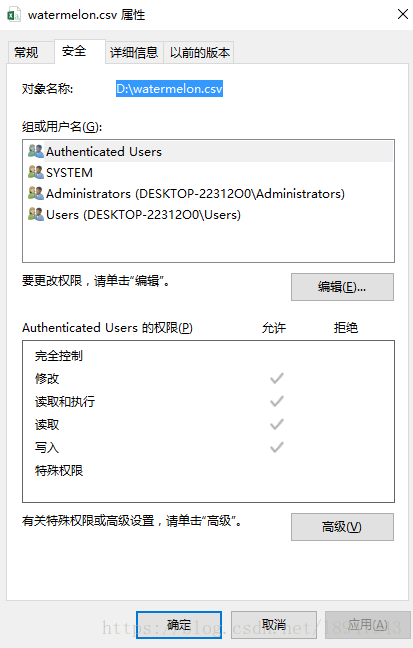
If there is an error, please manually type the path. Modify D–>; d:
file1 = open('d:\watermelon.csv','r')And then it worked out…

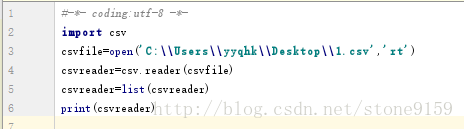
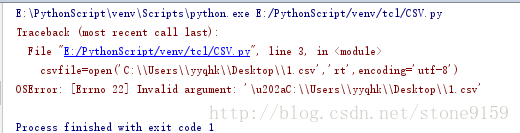
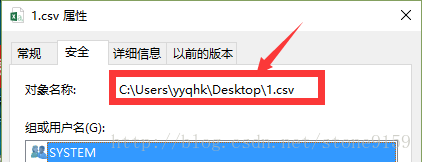
Reference: http://blog.csdn.net/qq_33733970/article/details/77519660
ERROR: [Errno 22] Invalid argument:
Method 1: Incorrect input format
f = open('F:\Python 3.6\test.txt','r')It should be modified to:
f = open('f:\\Python 3.6\\test.txt','r')Or:
f = open('f:/Python 3.6/test.txt','r')Change \ to /, or \\, because \t is a newline character in Python and is not recognized.
Method two :(I made a mistake here)
It is best to enter the path manually rather than copy and paste the changes directly.
Record the bugs you encounter. The method refers to the network
Problem description:
Problems encountered while reading and writing files
OSError: [Errno 22] Invalid argument: '\u202aC://Users//huawei//Desktop//a.txt'
Solution:
Enter the file path manually