Author Archives: Robins

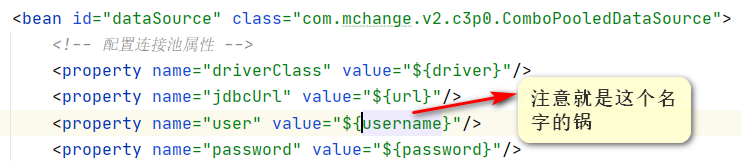
Idea access denied for user ‘xxx’ @ ‘localhost’ solution

Solutions to access denied for user ‘xxx’ @’localhost ‘problem

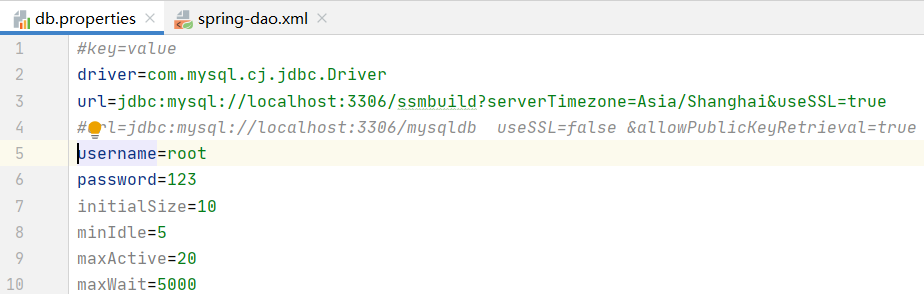
Key to error reporting

java.sql.SQLException : access denied for user ‘xxx’ @’localhost ‘(using password: Yes). Note that XXX here is not root, root is a permission problem

Solution

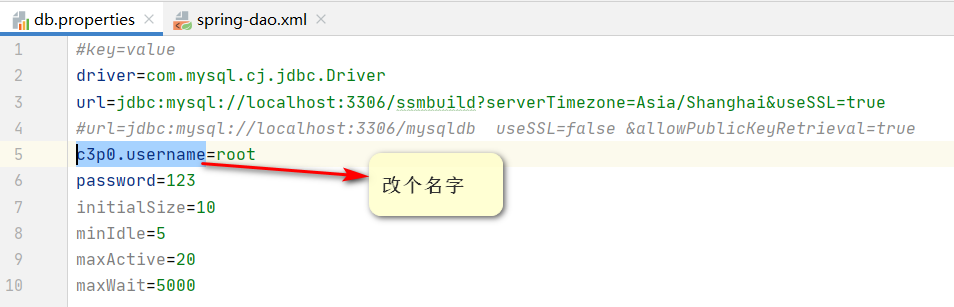
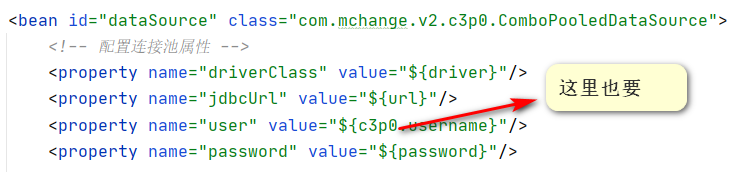
Change the user name for the configuration file

You can choose any name you like

And then 🆗 It’s over

Cause analysis

The framework did not get the correct user name of datasource, which is related to the configuration. When such a framework constructs an instance of abstractdriverbaseddatasource, the user name it gets is always the current machine name, that is, XXX. The underlying reason is not clear.

[resolution] str.contains() problem] valueerror: cannot index with vector containing Na/Nan values

Problem description;
when using dataframe, perform the following operations:

df[df.line.str.contains('G')]

The purpose is to find out all the lines in the line column of DF that contain the character ‘g’

---------------------------------------------------------------------------
ValueError                                Traceback (most recent call last)
<ipython-input-3-10f8503f73f2> in <module>()
---->  df.line.str.contains('G')

D:\Anaconda3\lib\site-packages\pandas\core\frame.py in __getitem__(self, key)
   2983 
   2984         # Do we have a (boolean) 1d indexer?
-> 2985         if com.is_bool_indexer(key):
   2986             return self._getitem_bool_array(key)
   2987 

D:\Anaconda3\lib\site-packages\pandas\core\common.py in is_bool_indexer(key)
    128             if not lib.is_bool_array(key):
    129                 if isna(key).any():
--> 130                     raise ValueError(na_msg)
    131                 return False
    132             return True

ValueError: cannot index with vector containing NA / NaN values

Obviously, it means that there are Na or Nan values in the line column, so Baidu has a lot of methods on the Internet to teach you how to delete the Na / Nan values in the line column.

However, deleting the row containing Na / Nan value in the line column still can’t solve the problem!! What shall I do?

Solution:
it’s very simple. In fact, it’s very likely that the element formats in the line column are not all STR formats, and there may be int formats, etc.
so you just need to unify the format of the line column into STR format!
The operation is as follows:

df['line'] = df['line'].apply(str) #Change the format of the line column to str

df[df.line.str.contains('G')] #Execute your corresponding statement

solve the problem!!

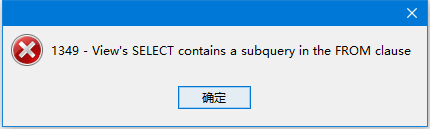
View’s select contains a subquery in the from clause bug

View’s select contains a subquery in the FROM clause Summary of bug additions
0x00 The original intention of the article
This bug has been encountered before, but I have not been thinking deeply about it, and today I encountered it again.
0x01 bug simple description: the view contains subqueries in the clause
0x02 Detailed description of the bug (a little too much to highlight the bolded parts).
https://bugs.mysql.com/bug.php?id=12755
How to locate this bug
Search for view contains subquery, find the following bug (a circle…)
ErrorCode 1379: View’s SELECT still can’t contain a subquery
—————————————————————————
[3 May 2012 8:42] Arjan Saly
Description: Already reported in 2006 for version 5.0, still not solved in 5.5: When creating a view, subqueries are still not allowed in the SELECT clause. What’s the point of creating a view when it cannot contain complex queries? In my opinion a serious RDMBS SHOULD be able to accept complex queries, hence incuding subqueries, to keep these kind of queries maintainable. Wondering though: Do the developers really under estimate the importance of these requests? Or has it actually been solved in 5.5, but did I stumble into a bug for this particular distribution? How to repeat: create view Test as select TestNumber From ( select 0 as TestNumber union all select 1 as TestNumber union all select 2 as TestNumber union all select 3 as TestNumber ) TestNumbers
[4 May 2012 17:47] Sveta Smirnova
Please do not submit the same bug more than once. An existing bug report already describes this very problem. Even if you feel that your issue is somewhat different, the resolution is likely to be the same. Because of this, we hope you add your comments to the original bug instead. Thank you for your interest in MySQL. Duplicate of bug #12755
[7 May 2012 7:18] Arjan Saly
Don’t reply patronising like this as I could NOT find the original bug report using both google and your own search engine. I did find another one, but that one was from an older version (as is the one you mention) and was not open anymore. Replies like this do not motivate me to report other bugs or feature request, given the fact that apparently your search engine does not work. Nor do I feel taken seriously as we are talking about a request that is open for 7 years already!—————————————————————————-
Bug #12755 Subquery in FROM clause of views
—————————————————————————-
[23 Aug 2005 14:12] Kay Doebl
Description: You write in your MySQL Reference Manual :: 21.2 CREATE VIEW Syntax “A view definition is subject to the following restrictions: The SELECT statement cannot contain a subquery in the FROM clause.” … Do you intend to abolish this restriction and when? We would have the advantage, not to change our code to extend our database support at MySQL. How to repeat: Mail to: [email protected]
[4 Aug 2009 17:50] Valeriy Kravchuk
Bug #16757 was marked as a duplicate of this one.
[4 Aug 2009 17:57] Josh Duff
This bug: http://bugs.mysql.com/bug.php?id=16757&error=nd has many people requesting a fix – it really is a pain in the ass to work around. People are still posting comments on that duplicate now (it must come up higher in Google results or something). Please fix this? Pretty please?
[14 Aug 2009 20:54] HaiXin Tie
This most basic database feature has been requested by numerous users for over 5 years. A view without support of inner queries in the FROM clause can only be used as a toy, not in real world applications. This should be an essential part of any standard SQL implementation, and MySQL, though most widely used today, is the only one I know that doesn’t support it.
[17 Aug 2009 21:32] Eric Bergen
I took out the safety check and tried a few different types of queries and it seems to work fine in 5.0.27 (old I know). I think the only thing preventing this from being enabled is the check in sql_view.cc to prevent views being created on temporary tables. It just needs a way to distinguish between a sub query in the from clause and a real temporary table: /* is this table temporary and is not view? */ if (tbl->table->s->tmp_table != NO_TMP_TABLE && !tbl->view && !tbl->schema_table) {
[17 Aug 2009 21:53] HaiXin Tie
Nice!
[30 Oct 2009 21:39] Joseph Borge
This is what I have in the original 5.0.51b source: /* is this table temporary and is not view? */ if (tbl->table->s->tmp_table != NO_TMP_TABLE && !tbl->view && !tbl->schema_table) { my_error(ER_VIEW_SELECT_TMPTABLE, MYF(0), tbl->alias); res= TRUE; goto err; } I can not see the difference between Eric’s code and original code. What changes need to be made before this would work?
[7 Jun 2010 20:53] Mark Kendall
Bump, we’re investigating and attempting to add support for MySQL to a large Linux application designed for DB2. The lack of OLAP functions (specifically RANK() and DENSE_RANK()) was close to making this work not feasible but this BUG makes it a show stopper unfortunately.
[26 Mar 2011 19:45] Brian Slezak
What’s the status on this bug?
[20 Dec 2011 12:27] Arnaud Adant
You can always define another view for the subquery.
[4 May 2012 17:48] Sveta Smirnova
Bug #65185 was marked as duplicate of this one.
[7 May 2012 7:07] Arjan Saly
How about solving this bug for once? How can we ever take MySQL serious when subqueries are not allowed inviews AND this still isn’t solved 7 years (!!) after the bug has been reported?
[7 May 2012 7:10] Arjan Saly
Added a duplicate bug report because this one does NOT show up when searching either using Google or the Search engine of this site!
[2 Jul 2012 10:43] Stefan Haag
I stumbled upon this issue (again) using 5.5.21. While I see different workarounds, they are only that – workarounds. Obviously this is something coming up again and again for years. Would it be possible to have a developer commentating on this with someting more than “duplicate”? No offense. As mentioned before, the severity of this shouldn’t be S4, but more S2.
[12 Nov 2013 15:55] John Viescas
See also http://bugs.mysql.com/bug.php?id=70870. I’m happy to loudly add my voice to the clamour to have this fixed!
[9 Mar 2015 19:02] Roy Lyseng
Fixed in 5.7.7
[27 Mar 2015 2:59] Paul Dubois
Noted in 5.7.7, 5.8.0 changelogs. Previously, view definitions were not permitted to contain derived tables (subqueries) in the FROM clause. This restriction has now been lifted.
—————————————————————————-
0x03 Affecting version 5.0.7 – 5.7.6
0x04 Version changelog
Find a method:
https://dev.mysql.com/doc/
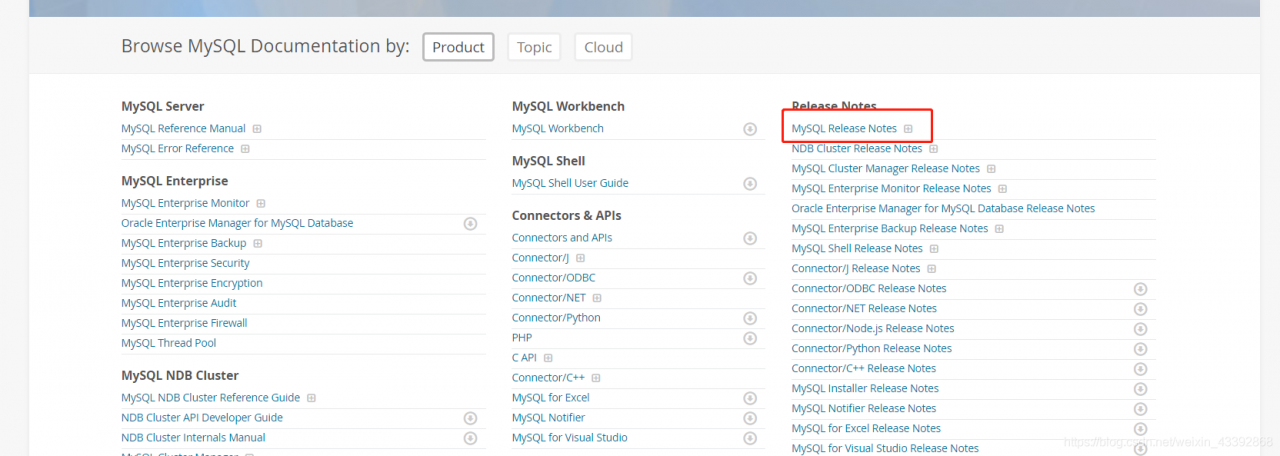
https://dev.mysql.com/doc/relnotes/mysql/5.7/en/news-5-7-7.html#mysqld-5-7-7-bug
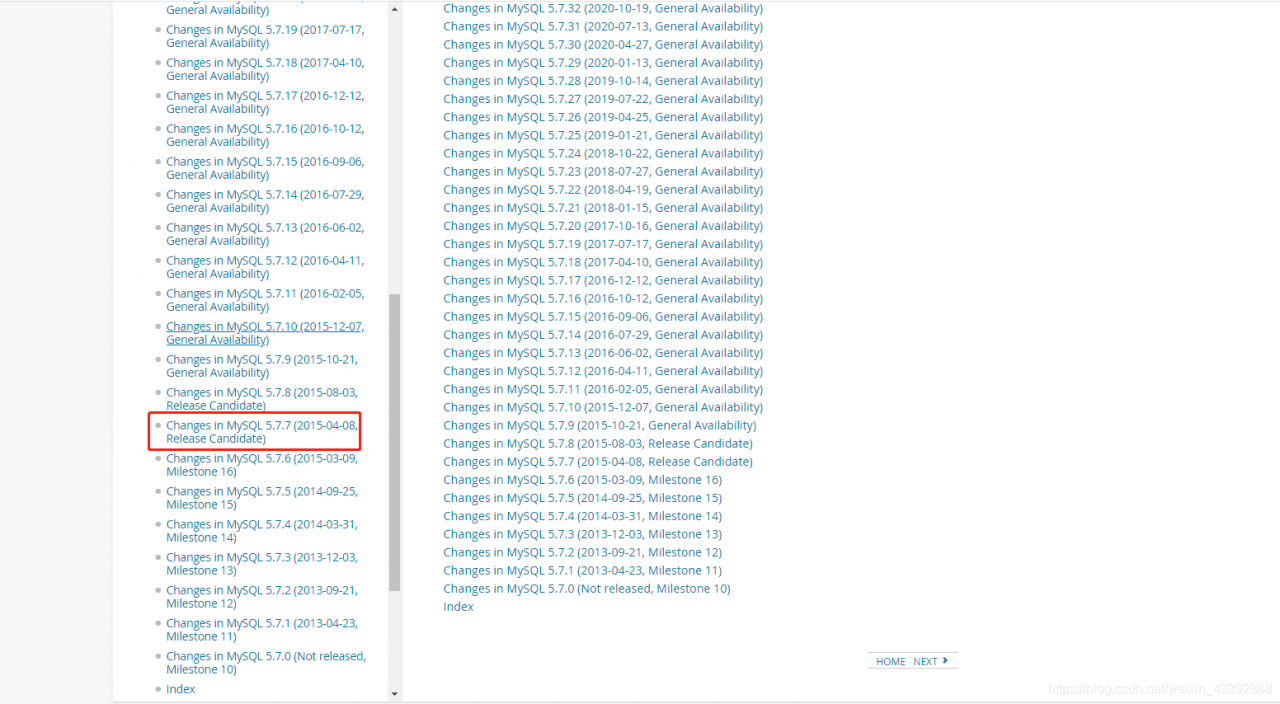
Previously, view definitions were not permitted to contain derived tables (subqueries) in the FROM clause. This restriction has now been lifted.
Previously, derived tables (subqueries) or views in the FROM clause could not be merged into the outer query if they contained subqueries in the SELECT list. Instead, they were processed using materialization. This restriction has now been lifted so that queries previously executed using materialization can be executed more quickly using merging. (Bug #12755, Bug #11745276, Bug #60417, Bug #11865600)
0x05 Solution
(1) Upgrade mysql version to 5.7.7 and above
(2) Change the subquery to a combination of multiple views
Autograd error in Python: runtimeerror: grad can be implicitly created only for scalar outputs


preface

Scalar is a tensor of order 0 (a number), which is 1 * 1;
vector is a tensor of order 1, which is 1 * n;
tensor can give the relationship between all coordinates, which is n * n.
So it is usually said that tensor (n * n) is reshaped into vector (1 * n). In fact, there is no big change in the reshaping process.

import torch
x=torch.ones(2,2,requires_grad=True)
print(x)
y=x+2
print(y)
#If a tensor is not created by the user, it has the grad_fn attribute. The grad_fn attribute holds a reference to the Function that created the tensor
print(y.grad_fn)
y.backward()
print(x.grad)

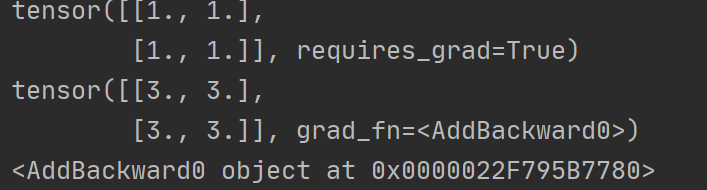
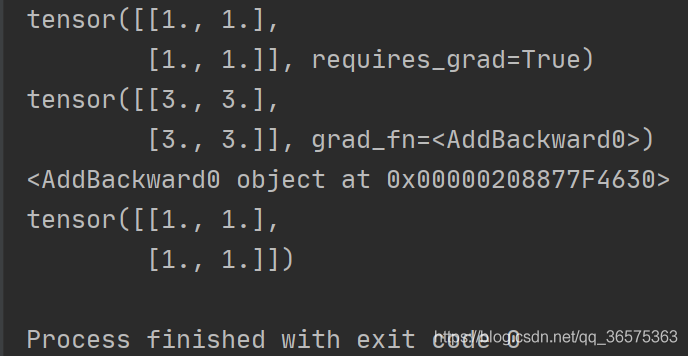
Running results

You can see that y is a tensor, which cannot use backward (), and needs to be converted to scalar,

Of course, tensor is also OK, that is, you need to change a code:

z.backward( torch.ones_ like(x))

Our return value is not a scalar, so we need to input a tensor of the same size as the parameter. Here we use ones_ The like function generates a tensor from X. In my opinion, because we want to obtain the derivative of X, the function y must be a value obtained, that is, a scalar. Then we start to find the partial derivatives of X and y, respectively.

After modification

import torch
x=torch.ones(2,2,requires_grad=True)
print(x)
y=x+2
print(y)
#If a tensor is not created by the user, it has the grad_fn attribute. The grad_fn attribute holds a reference to the Function that created the tensor
print(y.grad_fn)
y.backward(torch.ones_like(x))
print(x.grad)

Running results

numpy.AxisError: axis 1 is out of bounds for array of dimension 1

Original address

The error occurred during the execution of np.concatenate (, axis = 1) when

When I want to pile up two one-dimensional data, that is

# Pre
a = [1,2,3]
b = [4,5,6]
# New
[[1,2,3],
[4,5,6]]

use np.concatenate ((a,b),axis=1)

This is because both a and B are one-dimensional data with only one dimension, that is, axis = 0, and there is no axis = 1

I found two solutions

np.vstack ((A,B))

A and B can be stacked vertically

print(np.vstack((a,b)))	# Note that the parameter passed is '(a,b)'
# [[1 2 3] 
#  [4 5 6]]

The fly in the ointment is that this method can only pass two vectors to stack

np.newaxis + np.concatenate ()

Newaxis, as the name suggests, is a new axis. The usage is as follows

a = a[np.newaxis,:]	# Where ':' represents all dimensions (here 3), the shape of a becomes (1, 3), which is now two-dimensional
# [[1 2 3]]
b = b[np.newaxis,:]
# [[4 5 6]]

At this time, I can pile up two (1, 3) vectors into a matrix of (1 * 2, 3) = (2, 3). Note that axis = 0 should be used, that is, the first dimension

print(np.concatenate((a,b),axis=0))
# [[1 2 3] 
#  [4 5 6]]

relevant

Numpy: matrix merging

TypeError: unsupported format string passed to numpy.ndarray.__format__

a_ = np.array([12]).reshape(-1, 1)
a = model.predict(a_)
print("Predicting a 12-inch pizza.{:.2f}".format(a))

Error:
typeerror: unsupported format string passed to numpy.ndarray.format
Pass on to numpy.ndarray .__ format__ Unsupported format string for

solve

a_ = np.array([12]).reshape(-1, 1)
a = model.predict(a_)
print("Predicting a 12-inch pizza.{:.2f}".format(a[0][0]))

How to Solve apt get update problem: usr/lib/apt/methods/HTTPS could not be found_PUBKEY 7EA0A9C3F273FCD8

Error 1: The method driver /usr/lib/apt/methods/https could not be found.

Detecting detection –exec autodetection commands: apt-get install apt-transport-https

*

Error2: W: GPG error: https://download.docker.com/linux/ubuntu xenial InRelease: The following signatures could not be verified because the public key is not available: NO_PUBKEY 7EA0A9C3F273FCD8

Run as command, add 38053; decide:\ apt-key adv –recv-keys –keyserver keyserver.ubuntu.com 7EA0A9C3F273FCD8

*

ERROR information:

root@2bade87bd9dd :/# apt-get update

Hit:1 http :// mirrors.aliyun.com/ubuntu xenial InRelease

Get:2 http :// mirrors.aliyun.com/ubuntu Xenial-updates InRelease [109 kB]

Get:3 http :// mirrors.aliyun.com/ubuntu Xenial-backports InRelease [107 kB]:

Get:4 http :// mirrors.aliyun.com/ubuntu xenial-security InRelease [107 kB]

Get:5 http :// mirrors.aliyun.com/ubuntu Xenial-updates/main sources [406 kB]:

Get:6 http :// mirrors.aliyun.com/ubuntu Xenial-updates/restricted sources [2684 B]:

Get:7 http :// archive.canonical.com/ubuntu Xenial InRelease [11.5 kB]

Get:8 http :// mirrors.aliyun.com/ubuntu xenial-updates/multiverse Sources [8995 B]:

Hit:9 http :// archive.ubuntu.com/ubuntu Xenial InRelease

Get:10 http :// mirrors.aliyun.com/ubuntu xenial-updates/universe Sources [280 kB]

Get:11 http :// mirrors.aliyun.com/ubuntu xenial-updates/main amd64 Packages [1112 kB]

Get:12 http :// archive.canonical.com/ubuntu Xenial/partner sources [2408 B]:

Get:13 http :// mirrors.aliyun.com/ubuntu xenial-updates/restricted amd64 Packages [13.1 kB]

Get:14 http :// mirrors.aliyun.com/ubuntu xenial-updates/universe amd64 Packages [889 kB]

Get:15 http :// archive.canonical.com/ubuntu xenial/partner amd64 Packages [3248 B]

Get:16 http :// mirrors.aliyun.com/ubuntu xenial-updates/multiverse amd64 Packages [18.8 kB]

Get:17 http :// mirrors.aliyun.com/ubuntu xenial-backports/main Sources [5103 B]

Get:18 http :// mirrors.aliyun.com/ubuntu xenial-backports/universe Sources [7237 B]

Get:19 http :// mirrors.aliyun.com/ubuntu xenial-backports/main amd64 Packages [7965 B]

Get:20 http :// mirrors.aliyun.com/ubuntu xenial-backports/universe amd64 Packages [8532 B]

Get:21 http :// mirrors.aliyun.com/ubuntu xenial-security/main Sources [167 kB]

Get:22 http :// mirrors.aliyun.com/ubuntu xenial-security/multiverse Sources [2094 B]

Get:23 http :// mirrors.aliyun.com/ubuntu xenial-security/universe Sources [95.4 kB]

Get:24 http :// mirrors.aliyun.com/ubuntu xenial-security/main amd64 Packages [723 kB]

Get:25 http :// mirrors.aliyun.com/ubuntu xenial-security/universe amd64 Packages [491 kB]

Get:26 http :// mirrors.aliyun.com/ubuntu xenial-security/multiverse amd64 Packages [3747 B]

Fetched 4583 kB in 2s (2049 kB/s)

Reading package lists… Done

E: The method driver /usr/lib/apt/methods/https could not be found.

N: Is the package apt-transport-https installed?

Failed to fetch https://download.docker.com/linux/ubuntu/dists/xenial/InRelease *

E: Some index files failed to download. They have been ignored, or old ones used instead.

root@2bade87bd9dd :/#

Detecting detection –exec autodetection commands: apt-get install apt-transport-https

root@2bade87bd9dd :/# apt-get install apt-transport-https

Reading package lists… Done

Building dependency tree

Reading state information… Done

The following package was automatically installed and is no longer required:

* libllvm5.0

Use ‘apt autoremove’ to remove it.

The following new packages will be installed:

From apt-transport-https

0 upgraded, 1 newly installed, 0 to remove and 0 not upgraded.

Need to get 26.1 kB of archives.

After this operation, 215 kB of additional disk space will be used.

Get:1 http :// mirrors.aliyun.com/ubuntu xenial-updates/main amd64 apt-transport-https amd64 1.2.27 [26.1 kB]

Fetched 26.1 kB in 0s (446 kB/s)

debconf: delaying package configuration, since apt-utils is not installed

Selecting previously unselected package apt-transport-https.

(Reading database … 32433 files and directories currently installed.)

Preparing to unpack …/apt-transport-https_1.2.27_amd64.deb …

Unpacking apt-transport-https (1.2.27) …

Setting up apt-transport-https (1.2.27) …

root@2bade87bd9dd :/#

*

root@2bade87bd9dd :/# apt-get update Hit:1 http :// mirrors.aliyun.com/ubuntu Release Hit:2 http :// mirrors.aliyun.com/ubuntu Xenial-updates InRelease Hit:3 http :// mirrors.aliyun.com/ubuntu xenial-backports InRelease I’m sorry. Hit:4 http :// mirrors.aliyun.com/ubuntu Xenial-security InRelease Hit:5 http :// archive.canonical.com/ubuntu xenial Inrelease I’m sorry, I’m sorry. Get:6 https :// download.docker.com/linux/ubuntu xenial InRelease [66.2 kB] * * *
Ign:6 https :// download.docker.com/linux/ubuntu Genial InRelease Get:7 https :// download.docker.com/linux/ubuntu xenial/stable amd64 Packages [4467 B]
Hit:8 http://archive.ubuntu.com/ubuntu Xenial InRelease Done
W: GPG error: https://download.docker.com/linux/ubuntu xenial InRelease: The following signatures couldn’t be verified because the public key is not available: NO_PUBKEY 7EA0A9C3F273FCD8
W: The repository ‘ https://download.docker.com/linux/ubuntu xenial InRelease ‘is not signed.
N: Data from such a repository can’t be authenticated
N: See apt-secure(8) manpage for repository creation and user configuration details.
root@2bade87bd9dd :/#

to solve the detective:

According to the following commands, it adds 38053;:

apt-key adv –recv-keys –keyserver keyserver.ubuntu.com 7EA0A9C3F273FCD8

root@2bade87bd9dd :/# apt-key adv –recv-keys –keyserver keyserver.ubuntu.com 7EA0A9C3F273FCD8 Thumbnail: /tmp/tmp.1aB371lWPG/gpg.1.sh –recv-keys
–keyserver
keyserver.ubuntu.com
7EA0A9C3F273FCD8
gpg: requesting key F273FCD8 from hkp server keyserver.ubuntu.com
gpg: key 0EBFCD88: public key “Docker Release (CE deb) < [email protected] ” imported
gpg: Total number processed: 1
gpg:               imported: 1  (RSA: 1)
root@2bade87bd9dd :/# <
root@2bade87bd9dd :/# apt-get update
Hit:1 http :// mirrors.aliyun.com/ubuntu Release Hit:2 http :// mirrors.aliyun.com/ubuntu xenial-updates InRelease :: I’m sorry. Hit:3 http :// mirrors.aliyun.com/ubuntu Xenial-backports InRelease Hit:4 http :// mirrors.aliyun.com/ubuntu xenial-security InRelease
Hit:5 http :// archive.ubuntu.com/ubuntu Xenial Inrelease ≥ 1 ≥ 2 Hit:6 http :// archive.canonical.com/ubuntu Release Get:7 https :// download.docker.com/linux/ubuntu xenial InRelease [66.2 kB]
Fetched 66.2 kB in 1s (50.8 kB/s) &
Reading package lists… Done
root@2bade87bd9dd :/#

TensorFlow issue: Expected int32, got list containing Tensors of type ‘_Message’ instead.

1. Foreword

Looking up a lot of information, I found that the originator of this error report was tf.concat “Expected int32, got a list containing tendors of type”_ The reason and solution of “message ‘instead.”

2. Reasons

The specific analysis of errors caused by TensorFlow version is as follows:

In TensorFlow versions before 1.0, the parameter order of concat() is number first and tensors second. The example is as follows:

tf.concat(3,pooled_outputs_i)

For versions after TensorFlow 1.0, the parameter order of concat() is tensors first and numbers second. For example:

tf.concat(pooled_outputs_i,3)

3. Solutions

Smart as you, you should know how to debug when you see the two explanations in the reason. That is to say, adjust the order of concat parameters and everything will be OK

Call to undefined method Illuminate\Foundation\Application::bindShared()

According to the previous method, the composer creates a package called illuminate/HTML. It is found that it cannot be used during use, and an error will be thrown when the composer updates

[Symfony\Component\Debug\Exception\FatalErrorException]

Call to undefined method Illuminate\Foundation\Application::bindShared()

reason:

I found out online that it is not supported after 5.1, so I removed illuminate/html from config/app.php

In providers

'Illuminate\Html\HtmlServiceProvider'

In aliases

'Form'      => 'Illuminate\Html\FormFacade',

'HTML'      => 'Illuminate\Html\HtmlFacade

Reexecution

composer remove illuminate/html

composer update

After 5.1, it is replaced with the package of laravelcollective/HTML.

composer require laravelcollective/html

In/config/app.php Add the following sentence to the providers array of

Collective\Html\HtmlServiceProvider::class,

In/config/app.php Add the following two sentences to the aliases array of

'Form'=>Collective\Html\FormFacade::class,

'Html'=>Collective\Html\HtmlFacade::class,

springboot jsp: There was an unexpected error (type=Not Found, status=404). No message available

There was an unexpected error (type=Not Found, status=404). No message
available

Today, I encountered a very wordless bug. When I visited it, I found that this path did not find the file. The main reason is that springboot uses the template with HTML suffix by default instead of JSP. Therefore, after adding the dependency package and startup mode, I need to add these two sentences to the configuration file.

spring.mvc.view.prefix=/
spring.mvc.view.suffix=.jsp

When suffix suffix is added, the file can be found according to the path, but this error will occur

There was an unexpected error (type=Not Found, status=404). / #
ǰ׺��j��jsp/user- list.jsp

Then add the prefix and suffix together and you can access them.

But the most pit is coming!!!

Yesterday, I configured the integrated JSP mode, and it can be accessed normally. Today, I opened the computer access program, but it didn’t work. I’ve been looking at it. It should be the problem of path. Then I looked at the path of the controller, the name of the template, and the configuration file,

spring.mvc.view .prefix=/
spring.mvc.view .suffix=.jsp

After looking for it for a long time, I didn’t believe it. I first repeated the suffix, received it, didn’t copy it, and then restarted the scope of the project. The error report became a garbled error report. Then I changed the prefix and restarted the access. It was OK. I felt that the most pitiful thing was this. I found the bug for more than an hour, just because springboot couldn’t reload the configuration that had been written File?? It’s strange, but it’s always done. I’ll find out the reason later.

Introduction to Relational Databases in SQL

1. You First Database1.1 Introduction to Relational Databases (video)1.2 Attributes of Relational Databases1.3 Query Information_Schema with SELECT1. 4 Tables: At the Core of Every Database (video)1.5 CREATE Your First Few TABLEs1.6 ADD a COLUMN with ALTER TABLEs1.7 Update Your Database as the Structure Changes (video)1.8 RENAME and DROP COLUMNs in Affiliations1.9 Migrate Data with INSERT INTO SELECT DISTINCT1.10 Delete tables with DROP TABLE
2. Enforce Data Consistency with Attribute Constrains2.1 Better Data Quality with Constrains (video)2.2 Types of Database Constrains2.3 Conforming with Data Types2.4 Types CASTs2.5 Working with Data Types (video)2.6 Change Types with ALTER COLUMN2.7 Convert Types USING a Function2.8 The Not-Null and Unique Constrains (video)2.9 Disallow NULL values with SET NOT NULL2.10 What Happens If You Try to Enter NULLs?2.11 Make Your Columns UNIQUE with ADD CONSTRAINT
3. Unique Identify Records with Key Constraints3.1 Keys and Superkeys (video)3.2 Get to Know SELECT COUNT DISTINCT3.3 Identify Keys with SELECT COUNT DISTINCT3.4 Primary Keys (video)3.5 Identify the Primary Key3.6 ADD Key CONSTRAINTs to the Tables3.7 Surrogate Keys (video)3.8 ADD A SERIAL Surrogate Key3.9 CONCATenate Columns to A Surrogate Key3.10 Test Your Knowledge before Advancing
4. Glue Together Tables with Foreign Keys4.1 Model 1:N Relationships with Foreign Keys (video)4.2 REFERENCE A Table with A FOREIGN KEY4.3 Explore Foreign Key Constrains4.4 JOIN Tables Linked by A Foreign Key4.5 Model More Complex Relationships (video)4.6 Add Foreign Keys to the “Affiliations” Table4.7 Populate the “professor_id” Column4.8 Drop “firstname” and “lastname”4.9 Referential Integrity (video)4.10 Referential Integrity Violations4.11 Change the Referential Integrity Behavior of A Key4.12 Roundup (video)4.13Count Affiliations Per University4.14 Join All the Table Together

1. You First Database
1.1 Introduction to Relational Databases (video)
1.2 Attributes of Relational Databases
1.3 Query Information_Schema with SELECT
information_schema is a meta-database that holds information about your current database. information_schema has multiple tables you can query with the known SELECT * FROM syntax:
tables: information about all tables in your current databasecolumns: information about all columns in all of the tables in your current database…
In this exercise, you’ll only need information from the 'public' schema, which is specified as the column table_schema of the tables and columns tables. The 'public' schema holds information about user-defined tables and databases. The other types of table_schema hold system information – for this course, you’re only interested in user-defined stuff.
Instruction 1
Get information on all table names in the current database, while limiting your query to the 'public' table_schema.

-- Query the right table in information_schema
SELECT table_name 
FROM information_schema.tables
-- Specify the correct table_schema value
WHERE table_schema = 'public';

Instruction 2
Now have a look at the columns in university_professors by selecting all entries in information_schema.columns that correspond to that table.

-- Query the right table in information_schema to get columns
SELECT column_name, data_type 
FROM information_schema.columns 
WHERE table_name = 'university_professors' AND table_schema = 'public';

Instruction 3
Finally, print the first five rows of the university_professors table.

-- Query the first five rows of our table
SELECT * 
FROM university_professors 
LIMIT 5;

1. 4 Tables: At the Core of Every Database (video)
1.5 CREATE Your First Few TABLEs
You’ll now start implementing a better database model. For this, you’ll create tables for the professors and universities entity types. The other tables will be created for you.
The syntax for creating simple tables is as follows:

CREATE TABLE table_name (
 column_a data_type,
 column_b data_type,
 column_c data_type
);

Attention: Table and columns names, as well as data types, don’t need to be surrounded by quotation marks.
Instruction 1:
Create a table professors with two text columns: firstname and lastname.

-- Create a table for the professors entity type
CREATE TABLE professors (
 firstname text,
 lastname text
);

-- Print the contents of this table
SELECT * 
FROM professors;

Instruction 2:
Create a table universities with three text columns: university_shortname, university, and university_city.

-- Create a table for the universities entity type
CREATE TABLE universities (
 university_shortname text,
 university text,
 university_city text
);

-- Print the contents of this table
SELECT * 
FROM universities;

1.6 ADD a COLUMN with ALTER TABLEs
Oops! We forgot to add the university_shortname column to the professors table. You’ve probably already noticed:

An error occurs when trying to pipe a python program to CD- sys.excepthook is missing lost sys.stderr

The answer was found on stackoverflow at

NB: I have not attempted to reproduce the problem described below under Windows, or with versions of Python other than 2.7.3.
The most reliable way to elicit the problem in question is to pipe the output of the following test script through : (under bash):

try:
    for n in range(20):
        print n
except:
    pass

I.e.:

% python testscript.py | :
close failed in file object destructor:
sys.excepthook is missing
lost sys.stderr

My question is:

How can I modify the test script above to avoid the error message when the script is run as shown (under Unix/bash)?

(As the test script shows, the error cannot be trapped with a try-except.)
The example above is, admittedly, highly artificial, but I’m running into the same problem sometimes when the output of a script of mine is piped through some 3rd party software.
The error message is certainly harmless, but it is disconcerting to end-users, so I would like to silence it.
EDIT: The following script, which differs from the original one above only in that it redefines sys.excepthook, behaves exactly like the one given above.

import sys
STDERR = sys.stderr
def excepthook(*args):
    print >> STDERR, 'caught'
    print >> STDERR, args

sys.excepthook = excepthook

try:
    for n in range(20):
        print n
except:
    pass


How can I modify the test script above to avoid the error message when the script is run as shown (under Unix/bash)?

You will need to prevent the script from writing anything to standard output. That means removing any print statements and any use of sys.stdout.write, as well as any code that calls those.
The reason this is happening is that you’re piping a nonzero amount of output from your Python script to something which never reads from standard input. This is not unique to the : command; you can get the same result by piping to any command which doesn’t read standard input, such as

python testscript.py | cd .

Or for a simpler example, consider a script printer.py containing nothing more than

print 'abcde'

Then

python printer.py | python printer.py

will produce the same error.

When you pipe the output of one program into another, the output produced by the writing program gets backed up in a buffer, and waits for the reading program to request that data from the buffer. As long as the buffer is nonempty, any attempt to close the writing file object is supposed to fail with an error. This is the root cause of the messages you’re seeing.

The specific code that triggers the error is in the C language implementation of Python, which explains why you can’t catch it with a try/except block: it runs after the contents of your script has finished processing. Basically, while Python is shutting itself down, it attempts to close stdout, but that fails because there is still buffered output waiting to be read. So Python tries to report this error as it would normally, but  sys.excepthook  has already been removed as part of the finalization procedure, so that fails. Python then tries to print a message to  sys.stderr , but that has already been deallocated so again, it fails. The reason you see the messages on the screen is that the Python code does contain a contingency fprintf to write out some output to the file pointer directly, even if Python’s output object doesn’t exist.

I can provide details of the relevant parts of the C code if you’re interested.


Deeply impressed, very deep and in place.

I learned a few points, which are displayed as follows:

1. Pipeline command | flows data from standard output stdout to standard input stdin, so the command that does not read data from stdin cannot obtain data through pipeline command. Is it accurate

2. CD command is input through the command line of the terminal (device [keyboard] Read data, so Python <pythonScript.py>The CD will fail.

3. How to transfer values to commands such as CD?

It is quoted from Chapter 11 of Uncle Niao’s Linux private dishes: “in a string of commands, you need to provide information through other commands. You can use reverse single quotation marks”‘command ‘”or” $(command) ”